An AI agent session handoff file is the document that saves a builder from re-explaining everything every session. If you're running RAG pipelines or agent memory systems, you know the cost: lost context means wasted tokens, repeated setup, and outputs that drift from the original goal. The fix isn't another prompt trick. It's a structured file that records what the agent knew, what it decided, and what still needs doing. Tools like GigaRAG are built for agent memory, and a handoff file is the layer that tells that memory what matters. This guide gives you a copy-paste template with fields like session_id, goals, decisions, open_questions, and next_steps, plus a lifecycle workflow for creating, validating, updating, and archiving these files. It also tells you plainly what an AI agent session handoff file can't do, including context drift and stale information.
| At a glance | Details |
|---|---|
| What it is | Structured file preserving agent context between sessions |
| Key fields | session_id, goals, decisions, open_questions, next_steps |
| Lifecycle stages | Create, validate, update, archive |
| Main benefit | Reduces re-explanation and token waste |
| Common pitfalls | Context drift, stale info, over-documentation, security risks |
| Best for | RAG pipeline and agent memory builders |
In This Guide
- What Is an AI Agent Session Handoff File?
- Handoff File vs. Prompt-Only Context
- When to Use a Session Handoff File
- AI Agent Session Handoff File: A Step-by-Step Guide
- The Complete Handoff File Template
- How to Create an AI Agent Session Handoff File: Step-by-Step
- Integrating Handoff Files with RAG Pipelines and Agent Memory
- Handoff File Lifecycle: Create, Validate, Update, Archive
- Limitations and What Not to Expect
- Best Practices for Maintaining Handoff Files
- Final Thoughts on AI Agent Session Handoff Files
What Is an AI Agent Session Handoff File?
An AI agent session handoff file is a structured document that records what an agent learned, decided, and left unfinished during a work session, so the next session can pick up without re-explaining context.
It's a memory layer you control. Instead of relying on the agent's context window, which resets between sessions, you write down the state that matters: goals, decisions, open questions, next steps.
Why context loss is expensive for RAG pipelines
Every time an agent restarts cold, you burn tokens re-establishing ground truth. Worse, retrieval quality drops because the pipeline has no record of what was already tried. A handoff file gives the retriever something stable to anchor on.
How handoff files differ from system prompts
System prompts are static instructions. A handoff file is session state. The prompt says how to behave. The handoff file says what happened.
[!note] A handoff file is not a substitute for a full memory system; it is a lightweight, manual aid that works best when integrated into an existing RAG or agent workflow.
Handoff File vs. Prompt-Only Context
| Factor | Handoff File | Prompt-Only Context |
|---|---|---|
| Persistence | Survives across sessions as a file | Lost when session ends |
| Token efficiency | Reusable, can be summarized | Repeated each time, wastes tokens |
| Consistency | Structured fields enforce completeness | Ad-hoc, prone to omissions |
| Auditability | Versionable and reviewable | No record unless logged separately |
| Setup effort | Initial template creation required | Minimal, just write prompt |
When to Use a Session Handoff File
Not every session needs one. A single-shot prompt with no follow-up doesn't justify the overhead. You'll know it's time when the agent's next session depends on what happened in the last one.
Multi-session projects with evolving goals
When goals shift between sessions, the handoff file records what changed and why. Without it, the agent re-derives old assumptions and wastes tokens.
Long-running agent workflows with decision history
If the agent makes choices that affect later steps, log them. The file becomes the decision trail, so the next session doesn't re-litigate settled questions.
Collaborative agent teams sharing context
Multiple agents working the same problem need a shared state. The handoff file is the common reference point, not each agent's private memory.
[!tip] For RAG builders: store handoff files in a version-controlled repository and include a checksum or timestamp to detect stale information before loading into the agent.
AI Agent Session Handoff File: A Step-by-Step Guide
- Define a consistent file format (e.g., Markdown or JSON) with required fields: session_id, goals, decisions, open_questions, next_steps.
- At the end of each session, populate the file with key outcomes, decisions made, and unresolved questions.
- Validate the file for completeness and accuracy before closing the session.
- At the start of the next session, load the handoff file into the agent's context.
- Update the file during the session as new decisions are made or questions arise.
- Archive old handoff files periodically to avoid clutter and maintain relevance.
The Complete Handoff File Template
Here's the template. Copy it, strip the annotations, and adapt the field names to your stack. The structure matters more than the exact wording.
session_id: "proj-042-2025-11-14"
timestamp: "2025-11-14T09:30:00Z"
agent_role: "research-assistant"
goals:
  - "Identify 3 candidate vector DBs for the migration"
  - "Compare latency under 50ms p95"
constraints:
  - "No managed services over $500/month"
  - "Must support hybrid search"
active_context:
  - "Current stack uses pgvector 0.7"
  - "Team has 2 engineers, no dedicated infra"
decisions:
  - decision: "Exclude Weaviate Cloud"
    reason: "Pricing exceeds constraint at projected scale"
    made_by: "agent"
    session_ref: "proj-042-2025-11-12"
open_questions:
  - "Does Qdrant support filtered hybrid search in v1.12?"
  - "What's the cold-start latency for Milvus on a single node?"
next_steps:
  - "Run benchmark script against Qdrant and Milvus"
  - "Draft cost projection for 10M vectors"
Core fields: session_id, timestamp, agent_role
The session_id links this file to a specific run. Use a project prefix plus a date, not a random UUID. You'll thank yourself when you're grepping a directory of fifty handoff files. The timestamp tells you how stale the file is at a glance. The agent_role matters when multiple agents share a project: a planner's handoff reads differently from a retriever's.
Context fields: goals, constraints, active_context
Goals are what the agent was trying to do. Constraints are what it couldn't do. Keep them separate. Active_context holds the facts the agent needs loaded at the start of the next session: stack versions, team size, prior assumptions. This is the field that saves the most tokens, because it replaces a long re-briefing prompt.
Decision log: what was decided and why
Each decision gets a reason and a session_ref. The reason is the part that survives. Six weeks later, nobody remembers why Weaviate was excluded. The decision log does. The session_ref lets you trace a decision back to the session where it was made, which matters when you need to audit a bad call.
Open questions and next steps
Open questions are unresolved. Next steps are resolved actions waiting to happen. Don't merge them. An open question becomes a next step once someone answers it. If the next session starts with the open questions list, the agent knows exactly what it doesn't know. That's cheaper than discovering the gap mid-task.
How to Create an AI Agent Session Handoff File: Step-by-Step
The template above gives you the shape. Here's the process for filling it without turning documentation into a second job.
Step 1: Capture session goals and constraints
Start the session by writing down what you're trying to do and what you can't do. Two minutes at the start saves twenty at the next handoff. Don't wait until the end, because by then you'll have forgotten the constraint that shaped every decision.
Step 2: Log decisions as they happen
Write the decision the moment you make it. Not after. A decision logged an hour later loses the reason, and the reason is the only part that matters later. One line per decision is enough: what you chose, why, and which session it happened in.
Step 3: Record open questions and blockers
Keep a running list of what's unresolved. When you hit something you can't answer, add it immediately. Blockers go here too, with a note on what's waiting on them. This list becomes the starting prompt for the next session.
Step 4: Validate the file before ending the session
Read the file once before you close out. Check that every decision has a reason, every open question is still open, and every next step is something you'd actually do. If a field is empty, either fill it or delete it. An empty field is noise.
Integrating Handoff Files with RAG Pipelines and Agent Memory
Handoff files are not just documents. They're structured context that belongs in your retrieval stack.
Storing handoff files as retrievable documents
Store each handoff file as a separate document in your vector store. The session_id becomes the document ID. That way, when a new session starts, your agent can pull the previous session's file by ID before doing any semantic search. It's cheap and deterministic.
Using handoff metadata for semantic search
Attach metadata to each file: session_id, timestamp, agent_role, and status. Your retrieval query can then filter by recency or role before ranking by similarity. A handoff file from yesterday should outrank one from three months ago, and metadata filters make that happen without touching your embedding model.
Chunking strategies for handoff content
Don't chunk handoff files by fixed token count. Chunk by field. Each field (goals, decisions, open_questions) is already a coherent unit. Splitting a decision log mid-entry destroys the reason-and-decision pair that makes it useful. Keep fields intact, and let your retriever rank whole fields instead of fragments.
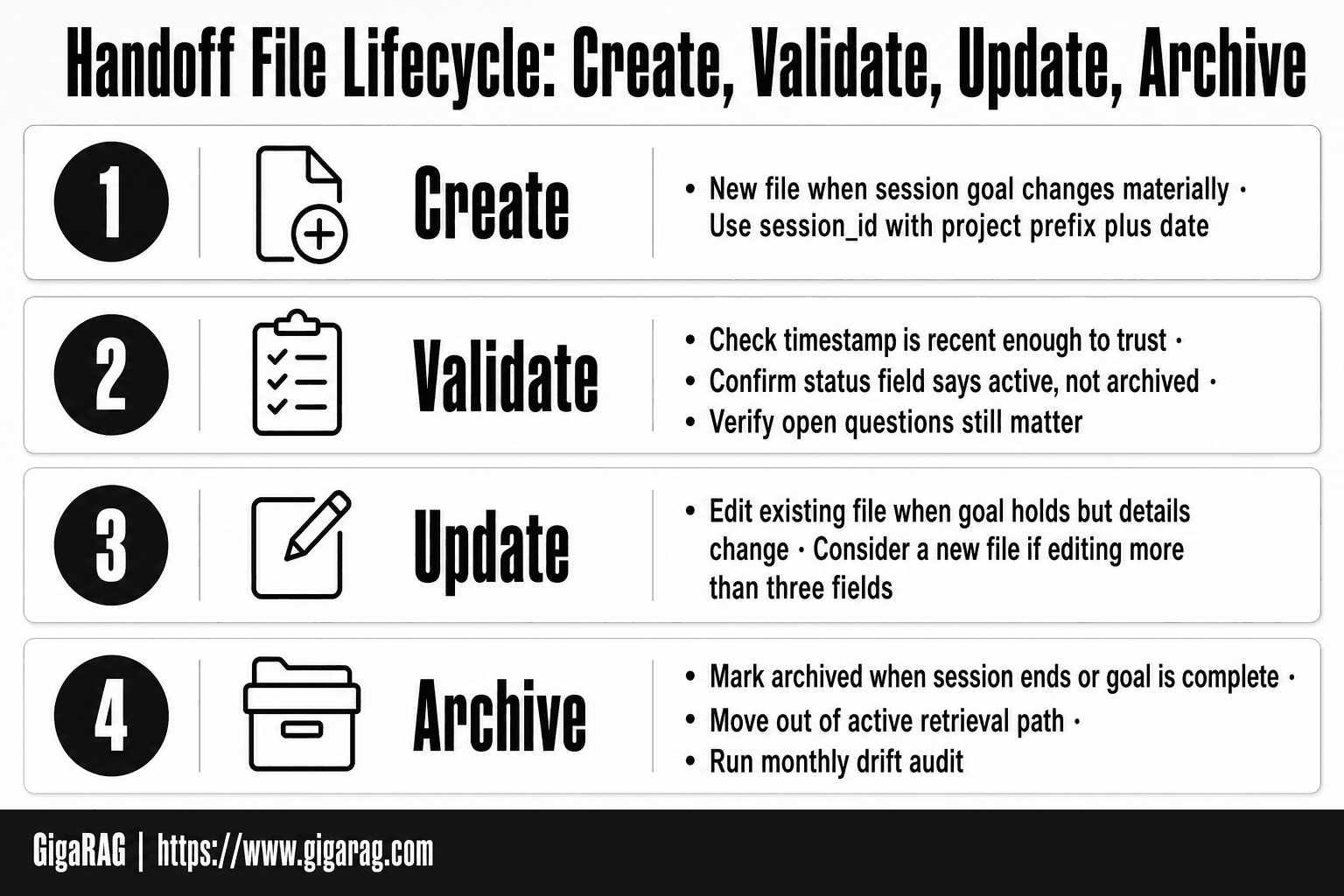
Handoff File Lifecycle: Create, Validate, Update, Archive
A handoff file is only useful if it reflects the current state of the work. Stale files are worse than no files: they give the agent false confidence.
When to create a new handoff file vs. update an existing one
Create a new file when the session's goal changes materially. A new feature, a different agent role, a shift in constraints. Update the existing file when the goal holds but decisions, open questions, or next steps changed. If you're editing more than three fields, consider a new file. The session_id should change with the goal, not with every edit.
Validation checks before reuse
Before an agent loads a handoff file, check three things. Is the timestamp recent enough to trust? Does the status field say "active" rather than "archived"? Do the open questions still matter, or have they been answered elsewhere? A quick validation pass costs seconds and prevents the agent from acting on dead context.
Archiving and drift audits
Archive a file when its session ends or its goal is complete. Mark it "archived" and move it out of the active retrieval path. Run a drift audit monthly: open each active file and ask whether its decisions still hold. If not, update or archive it. Drift is silent. Audits are the only counter.
Limitations and What Not to Expect
A handoff file captures a moment. It does not guarantee the agent will use it correctly, and it cannot fix a broken retrieval pipeline.
Context drift: when handoff files go stale
Every decision in the file was true at write time. Requirements shift, constraints change, and the file doesn't know. The agent will trust what it reads. If the file is two weeks old, that trust is misplaced. Drift audits catch this, but only if you run them.
Over-documentation: when the file becomes noise
More fields don't mean more context. They mean more tokens and more chances for the agent to latch onto irrelevant detail. A file with forty fields is harder to validate and slower to retrieve. Keep it to what the next session actually needs.
Security risks of storing sensitive session data
Handoff files often contain API keys, user data, or internal decisions. Stored in plaintext, they're a leak waiting to happen. Encrypt at rest, restrict access, and strip secrets before archiving. The file is only as safe as where you put it.
Best Practices for Maintaining Handoff Files
A handoff file earns its keep by staying lean. The moment it bloats, the agent starts pulling stale or irrelevant context and your token budget pays for it.
Keep files concise and structured
Stick to the fields from the template. If a field doesn't change what the next session does, cut it. Structure beats prose: a decision log with one line per entry retrieves better than three paragraphs of narrative.
Use consistent field names across sessions
session_id in one file and id in another breaks retrieval. Pick names once, use them everywhere. Your vector store's metadata filters depend on it.
Review and prune regularly
Set a trigger: every five sessions or every two weeks, whichever comes first. Delete resolved questions, archive old decisions, and strip anything the agent no longer needs. A handoff file is a working document, not a diary.
Final Thoughts on AI Agent Session Handoff Files
The handoff file works because it's boring. Session ID, goals, decisions, open questions. No cleverness required.
Start with the template. Fill it in at the end of one session. Use it at the start of the next. That's the whole workflow.
If you're running a RAG pipeline or agent memory layer, GigaRAG is built for exactly this: storing handoff files as retrievable context so your agents pick up where they left off.
Your next action: copy the template, fill it out after your current session, and see what breaks. Fix that. That's how you create an AI agent session handoff file that actually works.
Frequently Asked Questions
What should an AI agent session handoff file contain?
At minimum, it should include a unique session_id, the session's goals, key decisions made, open questions, and next steps. Additional fields like constraints, references, and timestamps can improve clarity.
How often should I update the handoff file?
Update it at the end of each session and whenever a significant decision or new question arises during a session. Regular updates prevent context drift.
Can I automate the creation of handoff files?
Yes, you can use scripts or agent hooks to extract key information from session logs and populate the template. However, manual review is recommended to ensure accuracy.
What are the risks of storing sensitive data in handoff files?
Handoff files may contain sensitive information; store them securely with access controls and avoid including credentials or personal data unless necessary.
How do I prevent context drift when using handoff files?
Validate the file at the start of each session, cross-check with recent logs, and update it promptly. Avoid over-documentation that can obscure key points.
Is a handoff file necessary if I use a persistent memory system?
It can still be useful as a human-readable summary and for debugging. Persistent memory systems may not capture all nuances, so a handoff file complements them.
About GigaRAG
GigaRAG is for agent memory and RAG pipeline builders. get this right. Whether you are working through How to Create an AI Agent Session Handoff File or something adjacent, we publish what we have actually tested, including where it falls short.