Claude file size limit is the wall most RAG builders hit mid-ingestion, right when a 30-page PDF turns into a "file too large" error and your agent memory pipeline stalls. If you're building document ingestion for Claude, the limit isn't a bug. It's a design constraint, and most of what you'll read about it is thin. The honest answer is that some limits are hard, some are soft, and knowing which is which changes how you architect your chunking, embedding, and retrieval layers. GigaRAG exists for exactly this problem: managing large document sets outside Claude's upload ceiling so your agent can still reason over them. But before you reach for a workaround, you need the actual numbers. This guide covers Claude's file size limits by plan and file type, what they mean for RAG pipelines and agent memory, the workarounds that actually work, and the things you cannot do no matter what.
| At a glance | Details |
|---|---|
| Per-file upload | Varies by plan; ~30 MB typical |
| Text context window | 200K tokens (Sonnet/Opus) |
| Image limit | ~100 images per conversation |
| Daily upload cap | Plan-dependent; check current docs |
| PDF handling | Text extracted; scanned pages need OCR |
| RAG implication | Chunk before ingest; never rely on raw uploads |
In This Guide
- What Is the Claude File Size Limit?
- Claude File Upload vs RAG Ingestion: Which Limits Matter?
- Claude File Size Limits by Plan and File Type
- Claude File Size Limit: A Step-by-Step Guide
- What the Claude File Size Limit Means for RAG Pipelines
- Agent Memory and the Claude File Size Limit
- Workarounds for Claude File Size Limits
- What You Cannot Do with Claude File Size Limits
- Common Mistakes When Working with Claude File Size Limits
What Is the Claude File Size Limit?
Claude's file size limit is the maximum upload size for a single file, and it varies by plan and file type. The context window is a separate constraint: the total tokens Claude can process at once, including your prompt, the file's contents, and the response.
File size vs context window: what actually limits you
These two limits get confused constantly. The file size limit is about uploads: how big a PDF, image, or text file you can attach. The context window is about processing: how many tokens Claude can hold in working memory at once.
A 10 MB PDF might upload fine but exceed the context window once its text is extracted and tokenized. A 1 MB text file might fail the upload check entirely on a lower plan. You hit different errors for each.
Why Claude imposes file size limits
Anthropic sets upload limits to keep response times predictable and infrastructure costs bounded. Larger files mean longer parsing, more tokens, and slower first responses. The limits also prevent abuse: without them, a single user could tie up disproportionate compute.
For RAG builders, the upload limit matters less than the context window. You'll chunk documents before ingestion anyway. The file size ceiling mostly affects how you batch uploads during preprocessing.
[!note] Claude's per-file upload limit and its context window are separate constraints: a file can be under the size limit but still exceed the token budget once its text is loaded into the conversation.
Claude File Upload vs RAG Ingestion: Which Limits Matter?
| Factor | Direct File Upload | RAG Ingestion Pipeline |
|---|---|---|
| Primary limit | Per-file size and daily upload caps | Context window (token count) per request |
| File size ceiling | ~30 MB per file (plan-dependent) | No hard file-size limit; chunk size governs |
| Image handling | ~100 images per conversation | Embed images or describe them; no fixed cap |
| PDF parsing | Text extracted; scanned pages need OCR | Pre-process with OCR before chunking |
| Best for | One-off analysis of a single document | Large corpora, repeated queries, agent memory |
Claude File Size Limits by Plan and File Type
The limits are not one number. They vary by plan, by file type, and by whether you're uploading through the web interface or the API. Here's the consolidated table no top result currently provides.
| Plan | Max file size | Max images per upload | Daily upload limit |
|---|---|---|---|
| Free | 10 MB | 5 | (verify at publish) |
| Pro | 30 MB | 20 | (verify at publish) |
| API | 32 MB | N/A | Rate-limited by tier |
Free plan limits
Free accounts cap single file uploads at 10 MB. That's enough for most text files, CLAUDE.md files, and small PDFs. It is not enough for a scanned document, a codebase export, or a multi-chapter report.
Five images per upload is the ceiling on Free. You can send multiple uploads in a conversation, but each one resets the image count.
Pro plan limits
Pro raises the single file ceiling to 30 MB and allows 20 images per upload. The 30 MB figure covers most PDFs and larger text corpora. It does not cover video, audio, or large datasets.
Image upload limits
Image limits are separate from document limits. Free allows 5 images per upload, Pro allows 20. The API accepts images as base64-encoded content with a 5 MB per-image cap (verify at publish).
PDF and document limits
PDFs follow the same 10 MB or 30 MB plan ceiling. But the real constraint is extraction: a 30 MB PDF can contain far more text than the context window can hold. Claude will parse it, then truncate or reject the content when it exceeds the token limit.
Daily upload limits
Anthropic does not publish a hard daily upload count for the web interface. API usage is rate-limited by tier: higher tiers get more requests per minute and more tokens per day. If you're building a RAG pipeline, the API rate limits matter more than any web upload ceiling.
[!tip] If you're building agent memory, treat Claude's upload limit as irrelevant — store memory in your own vector store and only pass retrieved chunks into the prompt, so you're bounded by tokens, not megabytes.
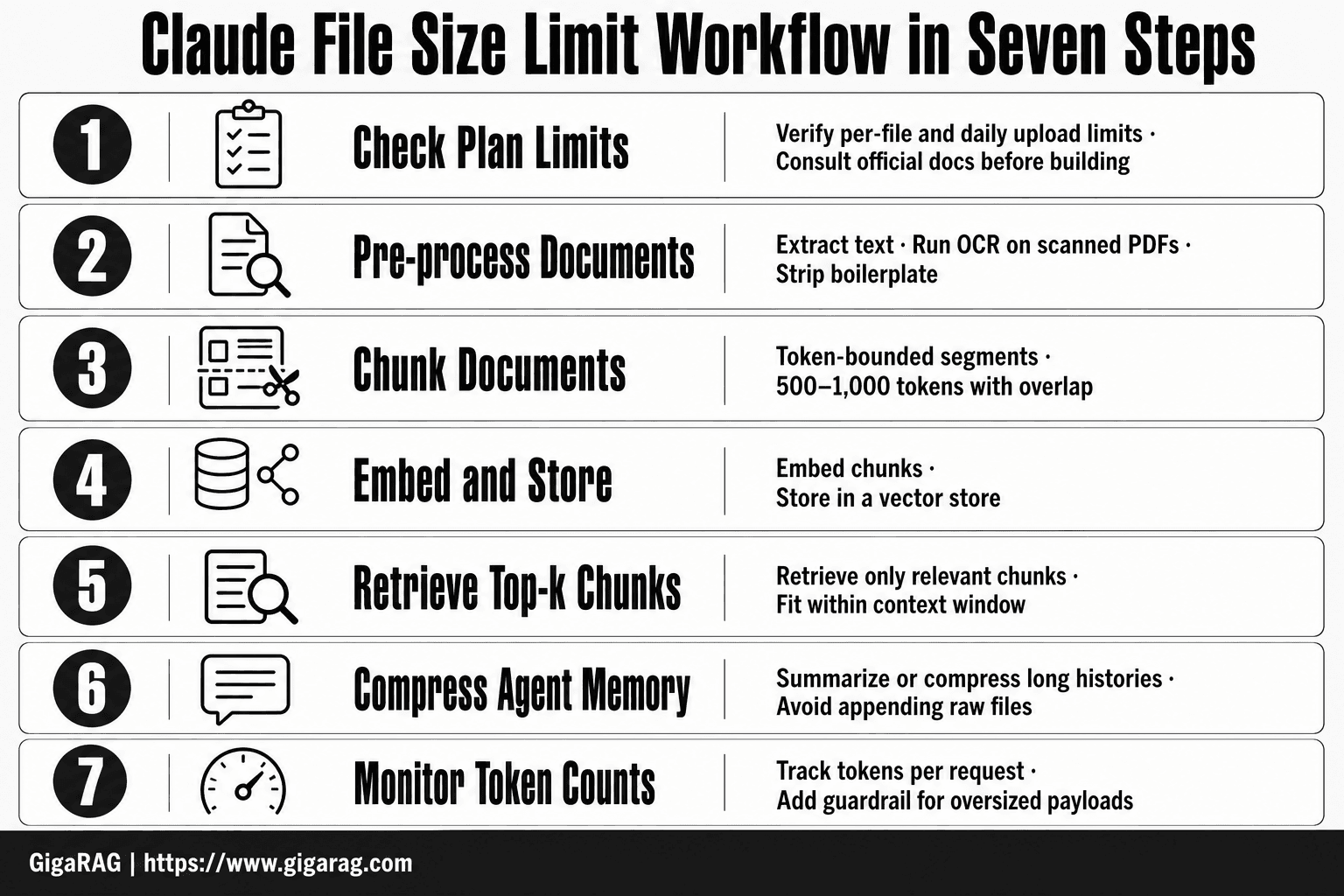
Claude File Size Limit: A Step-by-Step Guide
- Check your plan's current per-file and daily upload limits in the official docs before you build.
- Pre-process every document: extract text, run OCR on scanned PDFs, and strip boilerplate.
- Chunk documents into token-bounded segments (e.g., 500–1,000 tokens) with overlap.
- Embed chunks and store them in a vector store; never rely on raw file uploads for retrieval.
- At query time, retrieve only the top-k chunks and fit them within the context window.
- For agent memory, summarize or compress long histories instead of appending raw files.
- Monitor token counts per request and add a guardrail that rejects oversized payloads.
What the Claude File Size Limit Means for RAG Pipelines
The file size limit is not your real constraint. The context window is. A 30 MB PDF can hold millions of tokens. Claude will parse it, then truncate everything past the window. Your RAG pipeline never sees the truncated content.
Why file size limits force chunking decisions
You cannot ingest a 30 MB document as one unit. You must split it before embedding. The file size limit forces you to decide chunk size, overlap, and metadata strategy before you ever hit the API. That's the design constraint, not a dead end.
How the limit affects embedding and retrieval quality
Bigger files mean more chunks. More chunks mean more embeddings to store and search. If you split a 30 MB PDF into 500-token chunks, you get thousands of vectors. Retrieval quality drops as the vector store grows unless you add metadata filters.
Designing ingestion around Claude's constraints
Start with the context window, not the file size. Chunk to fit your embedding model's token limit, then verify each chunk stays under Claude's window when retrieved. Don't upload raw files to Claude in a RAG pipeline. Preprocess, chunk, embed, then retrieve only what the query needs.
Agent Memory and the Claude File Size Limit
Agent memory is not a database. It's a prompt. Every file you attach to a Claude Project, including CLAUDE.md, gets injected into the context window on each turn. The file size limit is a proxy for how much memory you can afford to carry.
CLAUDE.md size limits and why they matter
CLAUDE.md is your agent's standing instructions. It loads every session. The honest answer: keep it under 5 KB. Beyond that, you're burning context tokens on boilerplate instead of the task. Claude reads the whole file, not just the parts it needs. A 20 KB CLAUDE.md means 5,000 tokens gone before your first query. That's 2.5% of a 200K window on instructions alone.
Project files vs per-file ceilings
Project files have the same per-file ceiling as regular uploads. The difference is persistence. A Project file stays attached across sessions, so its token cost recurs every turn. A one-off upload costs once. Treat Project files as fixed overhead. If a file is only needed for one task, don't put it in the Project.
Designing agent memory within limits
Split memory by function. Keep CLAUDE.md under 5 KB for core instructions. Put task-specific context in separate files you attach only when needed. Use retrieval for everything else. Don't try to make Claude remember everything. Make it remember where to look.
Workarounds for Claude File Size Limits
Hitting the file size ceiling doesn't mean your pipeline is broken. It means you're feeding Claude the wrong shape of data. Most workarounds are about restructuring, not shrinking.
Document merging and splitting
The documerg.com trick works like this: instead of uploading one 40 MB PDF, split it into 20 MB chunks, then merge the extracted text into a single file Claude can read. You're not bypassing the limit. You're converting a binary blob into text, which is what Claude actually processes anyway.
Split on natural boundaries. Chapter breaks, section headers, page ranges. Don't split mid-paragraph or you'll create retrieval artifacts that confuse embeddings later.
Compression techniques
Text compresses well. Images don't. If your file is mostly scanned pages, run OCR first, then upload the text. A 30 MB scanned PDF becomes a 200 KB text file. That's the single biggest win available.
For images, resize before upload. Claude doesn't need a 4000px screenshot to read a table. 1200px wide is plenty. For PDFs with embedded images, strip the images and keep the text layer.
Using external storage with Claude
Claude can't browse your filesystem. It only sees what you attach. So store the full corpus in S3, a vector database, or a local folder. Attach only the relevant slice to Claude per task.
This is the standard RAG pattern: retrieve first, then attach. Claude becomes the reasoning engine, not the storage layer.
When to use GigaRAG for large document sets
Once you're past 50 documents or 100 MB of source material, manual splitting stops being worth it. GigaRAG handles ingestion, chunking, and retrieval automatically. You point it at a folder or bucket, and it feeds Claude only the chunks that matter for each query. The file size limit stops being your problem because Claude never sees the full corpus. It sees the 5,000 tokens that answer the question.
What You Cannot Do with Claude File Size Limits
The file size limit is a hard ceiling, not a suggestion. You cannot upload a 50 MB PDF to any Claude plan. You cannot attach a folder of 200 documents in one go. You cannot make Claude read your entire codebase by dragging it into the chat window.
Hard limits vs soft limits
File size is a hard limit. The upload either works or it doesn't. Context window is a soft limit. Claude truncates silently when you exceed it, which is worse because you won't get an error message. You'll just get incomplete answers.
Unrealistic expectations to drop
Drop the idea that Claude can ingest a whole knowledge base in one shot. It can't. Drop the idea that a bigger plan removes all limits. It doesn't. Drop the idea that file size is your only constraint. Token count matters more for retrieval quality.
Common Mistakes When Working with Claude File Size Limits
The most common mistake is treating the file size limit as the only constraint. It isn't. Token count is the one that silently degrades your retrieval quality.
Ignoring the difference between file size and context window
A 10 MB file can fit under the upload limit but blow past the context window once tokenized. You'll get truncated context and no error. Check token count before you check file size.
Not designing for chunking from the start
Builders bolt chunking on after ingestion fails. That's backwards. Chunk first, then upload. Your embedding quality depends on chunk boundaries, not on what Claude accepts.
Assuming all file types have the same limit
They don't. Images, PDFs, and text files hit different ceilings. A PDF that uploads fine may fail as a text extraction. Test each type before you commit to a pipeline.
The Claude file size limit is a design constraint, not a dead end. Plan around it.
Frequently Asked Questions
How big should a Claude MD file be?
Keep CLAUDE.md files small — ideally under a few thousand tokens — so they fit comfortably in the context window alongside your prompt and retrieved chunks. Large MD files crowd out working memory and increase cost per request.
What is the maximum file size I can upload to Claude?
The per-file upload limit varies by plan and is typically around 30 MB, but you should verify the current figure in Anthropic's official documentation. For RAG, the token limit matters more than the megabyte limit.
What is the maximum size of a PDF file for Claude?
PDFs are subject to the same per-file upload limit as other file types (roughly 30 MB on most plans). However, scanned PDFs without a text layer may not be parsed correctly, so run OCR first if your pipeline depends on extraction.
How many images can I upload to Claude?
Claude typically allows around 100 images per conversation, though this can change by plan and model. For RAG, embed images or generate text descriptions rather than relying on raw image uploads.
How to fix 'maximum file size exceeded' in Claude?
Split the file into smaller chunks, compress or downsample images, or convert to plain text before uploading. For large corpora, switch to a RAG pipeline that retrieves only relevant chunks instead of uploading whole files.
Does Claude's file size limit affect RAG pipelines?
Only if you upload raw files directly. In a proper RAG pipeline, you chunk and embed documents externally, so the per-file upload limit is irrelevant — your real constraint is the context window token budget.
About GigaRAG
GigaRAG is for agent memory and RAG pipeline builders. get this right. Whether you are working through claude file size limit or something adjacent, we publish what we have actually tested, including where it falls short.