Claude Project File Limit: The Honest Guide for RAG and Agent Memory Builders
You upload your 15th PDF to a Claude project and hit the wall: "project knowledge exceeds maximum." For a RAG builder, that error isn't a file count problem. It's a token problem wearing a file limit costume. The numbers matter, so here they are. Claude caps individual files at 30MB, allows 20 files per chat attachment, and runs a 200K token context window that everything you upload must fit inside. That last number is the one that actually bites. A single dense 30MB PDF can consume most of your window, while 20 small text files might barely dent it. Most guides stop at the upload caps and leave you guessing. This one does the token math, states what Claude Projects cannot do, and walks through the workarounds RAG builders actually need: chunking before upload, embedding pipelines for semantic retrieval, and offloading to an external vector store when project knowledge stops being enough. And if your agent memory outgrows Claude's limits entirely, GigaRAG is one external memory layer worth a look. Here's the honest breakdown.
| At a glance | Details |
|---|---|
| File count limit | Varies by plan; typically 20-50 files per project |
| File size cap | Usually 10-30 MB per file (verify at publish) |
| Token constraint | Total extracted text must fit context window |
| Context window | Claude 3 models: up to 200K tokens |
| Workaround | Chunking, embeddings, external vector stores |
| True unlimited uploads | Not possible within Claude Projects |
In This Guide
- What Is the Claude Project File Limit?
- Claude Projects vs External RAG Pipeline
- Token Math: Why File Count Is the Wrong Metric
- Claude Project File Limit: A Step-by-Step Guide
- What You Cannot Do with Claude Project Files
- Claude Project File Limit Workarounds for RAG Builders
- Why Can't I Attach a PDF to Claude?
- Claude Pro vs Max: Which Plan Fits Your Pipeline?
- Claude Projects Best Practices for Managing Many Documents
- What Happens When Claude Project Knowledge Exceeds Maximum?
- Is Claude Projects Free?
- What's the Difference Between Project Description and Instructions?
- Can I Use Claude Projects with an External Vector Database?
- The Bottom Line on the Claude Project File Limit
What Is the Claude Project File Limit?
Claude caps each uploaded file at 30MB, allows 20 files per chat, and limits project knowledge to what fits inside the 200K token context window. The file count is not the real constraint. Tokens are.
The 30MB per-file cap
Any single file you upload to a chat or a project cannot exceed 30MB. That's the hard ceiling. A 28MB PDF passes. A 31MB one fails. The cap applies to the raw file size, not the extracted text inside it.
The 20 files per chat limit
You can attach up to 20 files in a single chat message. That's per chat, not per project. Start a new chat and you get 20 more slots. But every file's extracted text still has to fit inside the context window alongside your prompt and Claude's response.
Project knowledge vs chat files: what counts where
Chat attachments live only in that conversation. Project knowledge is different: files you add to a project persist across chats and get pulled into context when relevant. The catch is that project knowledge also draws from the same 200K token budget. Add too many large documents and you'll hit the "project knowledge exceeds maximum" error before you hit any file count.
[!note] Claude's project file limits are subject to change and vary by subscription plan; always check the official documentation for the most current numbers.
Claude Projects vs External RAG Pipeline
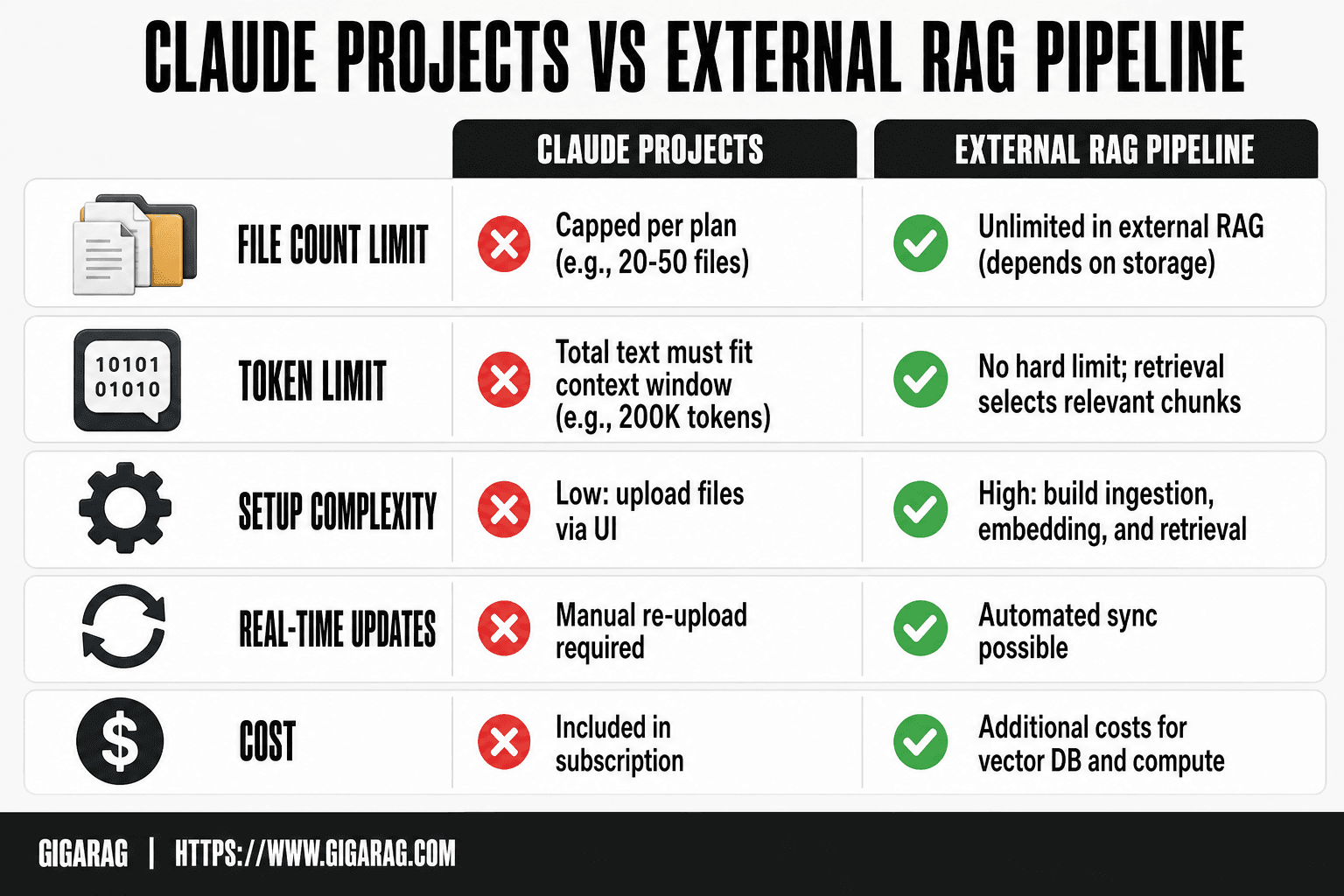
| Factor | Claude Projects | External RAG Pipeline |
|---|---|---|
| File count limit | Capped per plan (e.g., 20-50 files) | Unlimited (depends on storage) |
| Token limit | Total text must fit context window (e.g., 200K tokens) | No hard limit; retrieval selects relevant chunks |
| Setup complexity | Low: upload files via UI | High: build ingestion, embedding, and retrieval |
| Real-time updates | Manual re-upload required | Automated sync possible |
| Cost | Included in subscription | Additional costs for vector DB and compute |
Token Math: Why File Count Is the Wrong Metric
The 20-file chat limit sounds like the constraint. It isn't. The real ceiling is the 200K token context window, and a single file can eat most of it.
How tokens relate to file size
Tokens are chunks of text Claude reads, roughly three-quarters of a word in English. A 30MB file doesn't mean 30MB of tokens. What matters is the extracted text inside. A 30MB PDF full of scanned images might extract to almost nothing. A 30MB PDF of dense financial tables might extract to 300,000 tokens or more. File size tells you nothing useful. Extracted text length tells you everything.
Why a 30MB PDF can blow your context window
Here's the math that catches people off guard. A 200K token window holds roughly 150,000 English words. A dense 30MB PDF can easily contain 400,000 to 600,000 words once extracted. That's two to four times the entire context window. Upload one of those and Claude has to truncate, summarize, or refuse parts of it before you've even asked a question. You didn't hit a file limit. You hit a token wall.
Estimating token usage for different file types
A rough rule of thumb: one page of single-spaced text is about 500 tokens. A 10-page Word document lands near 5,000 tokens. A 100-page PDF might hit 50,000 tokens, a quarter of your window. Code files run denser, often 1.5 to 2 times the token count of prose for the same character length. Spreadsheets vary wildly depending on how many cells have data.
Before you upload anything to a project, extract the text and count it. If the total across all your files pushes past 150K tokens, you've left no room for your prompt, Claude's response, and any retrieval overhead. That's when the "project knowledge exceeds maximum" error shows up, and no amount of file-count juggling fixes it.
[!tip] For RAG builders, avoid uploading entire PDFs—extract only the text sections you need and chunk them semantically to maximize the use of your token budget.
Claude Project File Limit: A Step-by-Step Guide
- Estimate token count of your documents (e.g., 1 token ≈ 0.75 words) to see if they fit the context window.
- If over limit, split documents into smaller chunks (e.g., by headings or fixed token size) and upload only essential chunks.
- For large-scale RAG, preprocess documents externally: generate embeddings and store in a vector database like Pinecone or Weaviate.
- Use Claude's API to retrieve relevant chunks via similarity search and inject them into the prompt, bypassing project file limits.
- Implement a caching layer to avoid re-uploading frequently used documents.
- Regularly prune project knowledge to remove outdated files and stay within limits.
What You Cannot Do with Claude Project Files
Claude Projects is a context window with a file picker, not a knowledge base. Three limits matter more than the upload caps.
No true unlimited uploads
Anthropic markets generous upload limits, but the total extracted text across all project files still has to fit inside the 200K token window. Upload 50 small files and you're fine. Upload three dense PDFs and you're done. The limit isn't the file count. It's the tokens.
Project knowledge is not a searchable database
Claude reads your project files into context when it needs them. It doesn't index them, doesn't run semantic search, doesn't retrieve the most relevant chunk. It's closer to a pile of documents on a desk than a queryable store. For lookups across hundreds of documents, you need an actual vector database.
Chat files are not project knowledge
Files you attach in a chat stay in that chat. They don't get added to the project automatically. If you want a document available across sessions, you have to add it to project knowledge explicitly. Skip that step and Claude forgets the file the moment the conversation ends.
Claude Project File Limit Workarounds for RAG Builders
The workarounds fall into three buckets: shrink what you upload, index what you can't, or move storage out entirely. Each trades setup effort for headroom.
Chunking documents before upload
Split documents into sections of 500 to 2,000 tokens before adding them to project knowledge. A 30MB PDF becomes 40 small text files, each focused enough that Claude pulls only what's relevant. The tradeoff: you lose cross-chunk context unless you label chunks with source and position.
Using embeddings for semantic search
Generate embeddings for your documents, store them in a vector index, and retrieve the top matches before calling Claude. This gives you semantic search that project knowledge doesn't have. The catch: you're now running a pipeline, not just uploading files. You need an embedding model, a vector store, and retrieval code.
Offloading to an external vector store
For anything beyond a few dozen documents, keep the corpus in Pinecone, Weaviate, or a similar store. Claude only sees the retrieved chunks, so your 200K window goes much further. This is the standard RAG architecture. It's also more moving parts to maintain.
When to use Claude Projects vs a full RAG pipeline
Use Projects when your corpus fits in 200K tokens and you don't need semantic search. Build a RAG pipeline when you need retrieval across hundreds of documents, versioned updates, or agent memory that persists beyond a single project. The honest answer: most production RAG systems outgrow Projects within a month.
Why Can't I Attach a PDF to Claude?
Most PDF attachment failures come down to three things: the file is over 30MB, the file type isn't supported, or the PDF itself is unreadable. Check those first.
File size and type restrictions
Claude accepts PDFs up to 30MB per file. Anything larger gets rejected before upload. Supported types include PDF, DOCX, TXT, and a few others. If your file is a .pages or .odt export, convert it first. Password-protected PDFs also fail, since Claude can't decrypt them.
Corrupted or scanned PDFs
Scanned PDFs without a text layer are the quiet killer. Claude can't extract text from pure images, so the upload may succeed but return nothing useful. Run OCR first. Corrupted files fail outright. Re-export from the source if the upload errors repeatedly.
Chat attachment vs project knowledge upload
Chat attachments are temporary. They live in that conversation only. Project knowledge uploads persist across chats in that project and count toward your token budget. If you need the PDF available in every session, add it to project knowledge, not the chat.
Claude Pro vs Max: Which Plan Fits Your Pipeline?
Claude Pro and Max share the same 200K token context window. The difference is usage volume, not capability. Pro gives you roughly 5x more usage than the free tier. Max gives you roughly 5x more than Pro. For RAG builders, the question is whether that extra headroom solves your project knowledge problem.
Context window differences
None. Both plans cap at 200K tokens per conversation. If your extracted documents exceed that, no plan upgrade changes the math. You'll hit the same wall on Max that you hit on Pro.
Project knowledge capacity by plan
Anthropic doesn't publish separate project knowledge limits for Pro and Max. The file caps (30MB per file, 20 files per chat) apply across plans. What changes is how many conversations you can run before hitting usage limits. Max lets you process more documents across more sessions, but each session still operates under the same token ceiling.
When upgrading won't fix your limit problem
If your error is "project knowledge exceeds maximum," Max won't help. That error is about token volume in a single context, not monthly usage. Upgrading makes sense when you're running out of messages mid-project, not when a single document set is too large. For that, you need chunking, embeddings, or an external vector store.
Claude Projects Best Practices for Managing Many Documents
You can't upload unlimited files, so how you organize the ones you have matters. Three habits make a real difference.
Search project knowledge instead of file folders
Don't build a folder tree. Claude's project knowledge search is semantic, not directory-based. Name files clearly, then rely on search to pull what's relevant. A file called "refund-policy-2024.txt" beats one called "doc3-final.txt." The search works on content, but good names help you find things when you need to edit or remove them.
Keep custom instructions separate from tone and voice
Project instructions tell Claude how to behave. Tone and voice tell Claude how to sound. Keep them in separate sections or separate files. Mixing them means every style tweak risks changing behavior. When you update voice, you don't want to accidentally rewrite your retrieval rules.
Update projects when source documents change
Stale project knowledge is worse than no project knowledge. Claude will answer confidently from outdated files. Set a reminder to re-upload when your source docs change. If a policy updates quarterly, update the project quarterly. If you can't keep up, you're better off pointing Claude at a live source than trusting an old upload.
What Happens When Claude Project Knowledge Exceeds Maximum?
You get the error, and the fix is never "delete one more file." The error means the total extracted text across your project files has pushed past the token budget Claude can hold in context. You have three options: remove the largest files, chunk what remains into smaller pieces, or move the corpus to an external vector store and let Claude retrieve only what it needs. The first buys you time. The third actually scales.
Is Claude Projects Free?
No. Claude Projects requires a paid plan, either Pro or Max. The free tier doesn't include project knowledge at all. If you're testing whether Projects fits your workflow, you'll need at least a Pro subscription to try it. For RAG builders evaluating the platform, that's a real cost to factor in before you commit.
What's the Difference Between Project Description and Instructions?
The project description is metadata. It tells you, and anyone else looking at the project, what the project is for. Instructions are behavioral. They tell Claude how to respond, what rules to follow, and what constraints to respect. Confusing the two is a common mistake: people write retrieval rules in the description and wonder why Claude ignores them. Put behavior in instructions. Put context in the description.
Can I Use Claude Projects with an External Vector Database?
Yes, and for production RAG this is the standard pattern. You keep your corpus in Pinecone, Weaviate, or a similar store. Your retrieval code pulls the top chunks for a query, then passes those chunks to Claude inside the prompt. Claude never sees the full corpus, so the 200K window stops being the bottleneck. The tradeoff is the pipeline itself: you're now responsible for embedding quality, index freshness, and retrieval latency. Claude Projects gives you none of that. It also gives you none of the failure modes.
The Bottom Line on the Claude Project File Limit
The claude project file limit is a token limit first and a file limit second. If your corpus fits inside 200K tokens and you don't need semantic search, Projects works. If you're building a RAG pipeline or agent memory that has to scale, it doesn't. Chunking buys you headroom. Embeddings buy you retrieval. An external vector store buys you both, at the cost of running your own infrastructure. Know which problem you're solving before you pick the workaround.
Frequently Asked Questions
How many files can I upload to Claude Max?
Claude Max plan allows up to 50 files per project, but this may change. The total extracted text must also fit within the model's context window, so file count alone is not the only constraint.
Can I plan with Opus and execute with Sonnet in Claude Code?
Yes, you can use different models for different tasks in Claude Code. Opus is better for complex planning, while Sonnet is faster and cheaper for execution, but both share the same project file limits.
Why can't I attach a PDF to Claude?
PDFs may fail to attach if they exceed the file size limit (often 10-30 MB) or if the extracted text exceeds the token limit. Also, scanned PDFs without OCR may not be processed correctly.
How to use Claude AI projects?
Create a project, upload relevant files (within limits), and then chat with Claude using the project knowledge. You can also set custom instructions to guide responses based on your uploaded documents.
What happens when project knowledge exceeds maximum?
Claude will reject additional files or truncate content. You'll need to remove files or reduce their size to stay within the token and file count limits.
Is there a way to bypass Claude's file limits for RAG?
Yes, by using an external RAG pipeline: store documents in a vector database, generate embeddings, and retrieve relevant chunks to include in prompts via the API, avoiding project file uploads entirely.
About GigaRAG
GigaRAG helps GigaRAG is for agent memory and RAG pipeline builders. get this right. Whether you are working through claude project file limit or something adjacent, we publish what we have actually tested, including where it falls short.