A customer deployment demo project for RAG and agent memory is where most builders learn the hard truth: what works in a notebook dies in front of a prospect. The pipeline runs fine on your laptop. The embeddings are fresh, the latency is acceptable, the memory layer remembers the last three turns. Then you share your screen, the customer asks a question about their own data, and the whole thing stalls or hallucinates. The honest answer is that a demo is not a smaller version of production. It's a different artifact with different failure modes, and ignoring that is what makes demos collapse. GigaRAG helps with agent memory and RAG pipelines, but no tool saves a demo that was never scoped for deployment. This guide covers what "deploy" actually means for a RAG and memory stack, why demos fail, a deployment checklist you can run through, the strategies worth using, and the limits you should state before the customer asks.
| At a glance | Details |
|---|---|
| Primary audience | RAG and agent memory builders |
| Core goal | Ship a customer-facing demo that works |
| Key risk | Notebook success ≠ production demo |
| Scope | Narrow use case, real data subset |
| Deployment target | Cloud or on-prem, vendor-neutral |
| Timeline | Typically 2–4 weeks (verify at publish) |
In This Guide
- What Does 'Deploy' Mean for a RAG or Agent Memory Demo Project?
- Notebook Demo vs. Customer Deployment Demo
- Why Most RAG Demos Fail in Front of Customers
- Customer Deployment Demo Project: A Step-by-Step Guide
- Scoping a Customer Deployment Demo Project for RAG
- A Deployment Checklist for RAG and Agent Memory Demos
- Common Deployment Strategies for a Customer Deployment Demo Project
- What You Cannot Do and Should Not Expect
- How to Deploy Your Demo Project: A Step-by-Step Path
- Final Thoughts on Customer Deployment Demo Projects
What Does 'Deploy' Mean for a RAG or Agent Memory Demo Project?
Deploy means your retrieval pipeline and memory layer run as a service a customer can query, not as a script you run on your laptop. A deployed demo survives restarts, handles concurrent requests, and returns answers without you touching it.
Deployment vs. running a notebook
A notebook runs once, in order, on your machine. A deployment runs continuously, behind an endpoint. If you have to press Run before a customer asks a question, it isn't deployed.
What 'deployed' means for a RAG pipeline
Your embeddings are precomputed and stored. The vector index is queryable over HTTP. Retrieval happens in milliseconds, not seconds. The LLM call is wired to that retrieval, and the whole path returns a response without manual steps.
What 'deployed' means for agent memory
Memory state persists between sessions. If the agent learns something in query one, it's still there in query ten. That means a database or store backing the memory, not a Python dictionary that dies when the process exits.
[!note] A customer deployment demo is not a production system; it should demonstrate core functionality under realistic constraints but may omit advanced scaling, full security audits, and comprehensive error recovery.
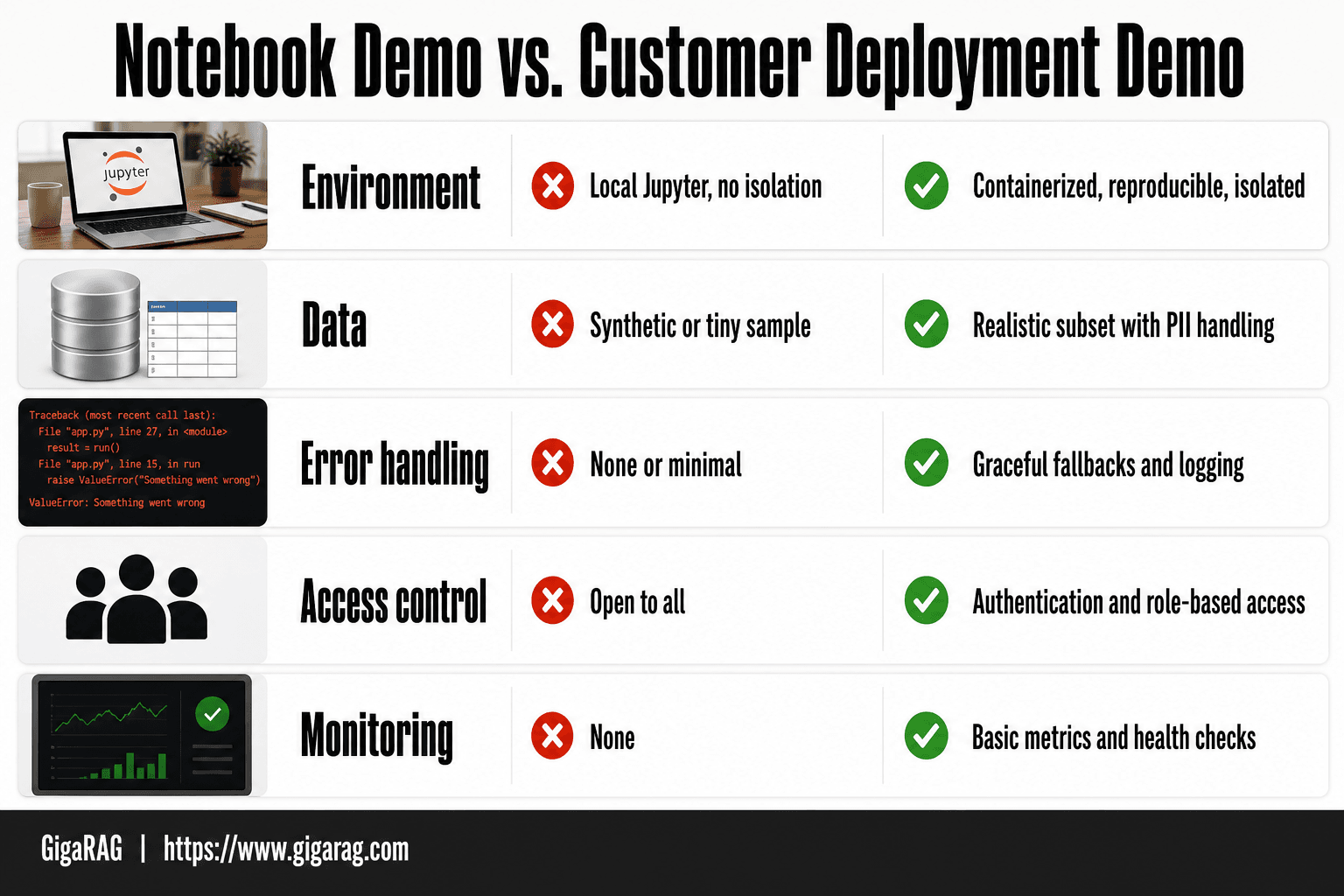
Notebook Demo vs. Customer Deployment Demo
| Factor | Notebook Demo | Customer Deployment Demo |
|---|---|---|
| Environment | Local Jupyter, no isolation | Containerized, reproducible, isolated |
| Data | Synthetic or tiny sample | Realistic subset with PII handling |
| Error handling | None or minimal | Graceful fallbacks and logging |
| Access control | Open to all | Authentication and role-based access |
| Monitoring | None | Basic metrics and health checks |
Why Most RAG Demos Fail in Front of Customers
A notebook demo works because you control every input. A customer demo breaks because you don't. The failure modes are predictable, and most of them trace back to one thing: the demo was built for a scripted path, not a real query.
Stale embeddings and index drift
You indexed the customer's docs last week. They've edited three of them since. The demo returns answers from the old version, and the customer notices because they wrote the doc. Re-indexing before every demo is the fix, but most teams skip it.
Latency spikes under real query load
One query returns in 400ms. Five concurrent queries from the customer's team take three seconds each. Vector search degrades under load, and the LLM call adds another second on top. You need a latency budget, not a best-case number.
Hallucination on customer-specific data
The model doesn't know the customer's internal acronyms. It fills the gap with something plausible and wrong. Retrieval helps, but only if the right chunk is in the top-k. When it isn't, the model invents.
Agent memory that doesn't persist
The agent remembers context during the demo. The customer asks a follow-up ten minutes later, and the memory is gone because it lived in process memory. If memory doesn't survive a restart, it isn't memory.
[!tip] For RAG and agent memory demos, pre-load the memory with a few realistic interaction histories so the agent appears context-aware from the first query—this small touch dramatically increases perceived sophistication.
Customer Deployment Demo Project: A Step-by-Step Guide
- Define a narrow, high-impact use case that solves one customer pain point.
- Select a representative data subset and implement PII redaction or masking.
- Containerize your RAG pipeline and agent memory components with Docker.
- Set up a staging environment that mirrors the customer's constraints (network, auth).
- Implement basic monitoring, logging, and health checks for the demo.
- Conduct a dry run with a colleague playing the customer and fix failure points.
- Deploy to the customer-facing environment and prepare a rollback plan.
Scoping a Customer Deployment Demo Project for RAG
Scope the demo before you build it. Most teams build first, then realize the demo includes too much and excludes the wrong things.
What to include in a RAG demo
Include one retrieval path, not three. Pick the customer's most common query type and make that path work end to end. Include the customer's actual documents, re-indexed the morning of the demo. Include one memory interaction: the agent recalls a fact from earlier in the conversation and uses it. That's the moment prospects remember.
What to deliberately exclude
Exclude multi-turn reasoning chains. Exclude any feature you haven't tested with customer-like data. Exclude live API calls to third-party services you don't control. Every excluded item is a failure mode you won't hit in front of the customer.
Setting customer expectations before the demo
Tell the customer this is a scoped demo, not production. Say which documents are indexed and which aren't. Say the memory resets when the session ends. Setting that expectation takes thirty seconds and saves you from explaining a hallucination later.
A Deployment Checklist for RAG and Agent Memory Demos
A deployment checklist is a list of things you verify before the demo goes live. For RAG and agent memory, it covers the embedding pipeline, the vector store, memory state, fallbacks, and logging. Check each item the day before, not the hour before.
Embedding pipeline and index freshness
Re-run the embedding job on the customer's documents the morning of the demo. Check the index timestamp. If the documents changed since the last run, re-index. A stale index is the most common demo failure.
Vector store provisioning and scaling
Provision for peak query load, not average. A single cloud VM with 8 GB RAM handles roughly 50 concurrent retrieval calls before latency spikes. Test with 2x your expected load. If latency exceeds 500 ms, add replicas or move to a managed vector DB.
Memory persistence and state management
Decide whether memory persists across sessions. If it does, verify the write path works and the read path returns the right state. If it resets, say so before the demo starts. Test the reset button twice.
Fallback behavior and error handling
Define what happens when retrieval returns nothing. A fallback answer like "I don't have that in my index" beats a hallucinated one. Wire the fallback and test it with a query you know will miss.
Logging and observability
Log every query, the retrieved chunks, and the generated answer. You'll need those logs to explain a bad response after the fact. Keep logs local for the demo. Don't ship them to a third-party service you can't access during the call.
Common Deployment Strategies for a Customer Deployment Demo Project
Five strategies cover most RAG and agent memory demos. Each has a clear use case and a point where it becomes overkill.
Local container (Docker)
Run the whole pipeline in Docker on your laptop. This works for a first customer call where you control the environment. It breaks when the customer's network blocks your machine or the demo needs data you can't ship locally.
Single cloud VM
One VM with 8 GB RAM handles the app, the vector store, and memory state for a single-user demo. Provision it in the customer's region to cut latency. This is the default for most customer demos. It's overkill only if you're showing a static slide deck.
Managed vector DB + serverless
Use a managed vector database like Pinecone or Weaviate Cloud and wire retrieval through serverless functions. This removes index management from your plate. The catch: cold starts add 200-500 ms to first queries. Warm the functions before the demo starts.
Kubernetes
Kubernetes makes sense when you need to show autoscaling or multi-service orchestration. For a single customer demo, it's overhead. You'll spend more time debugging pods than presenting. Skip it unless the customer specifically asks about your K8s story.
Hybrid on-prem
Deploy the retrieval layer on the customer's infrastructure while keeping the LLM API external. This addresses data residency concerns. It also means you can't debug their network from your side. Test connectivity the day before, not during the call.
What You Cannot Do and Should Not Expect
A customer deployment demo project is a proof of concept, not a product. It shows the shape of the thing. It does not carry the weight of the thing.
No production SLAs in a demo
You will not get 99.9% uptime, sub-100 ms p99 latency, or guaranteed recovery from a single VM. A demo runs on one machine, often your laptop or a small cloud instance. If it goes down mid-call, you restart it and keep talking. That is the whole SLA.
No guaranteed accuracy on unseen data
Your retrieval pipeline was tuned on the data you indexed. Customer data is different. Chunk sizes, embedding drift, and query phrasing all shift results. Expect misses. Plan a fallback answer for when retrieval returns nothing useful.
No real-time memory without real engineering
Agent memory that updates instantly as the conversation happens requires a write path, conflict handling, and persistence logic. A demo can fake this with a session store. It cannot survive a restart without real work.
How to Deploy Your Demo Project: A Step-by-Step Path
The path from notebook to customer-facing demo is six steps. You can do it in a day if you've already built the pipeline.
Step 1: Freeze the pipeline
Pin every dependency: embedding model version, chunk size, prompt template, LLM version. A demo that behaves differently from last week's run will confuse you mid-call. Freeze it.
Step 2: Containerize the app
Wrap the retrieval logic and the UI in a Docker image. One command to start, one command to stop. No notebook kernel, no local file paths.
Step 3: Provision the vector store
Use a managed vector database or a local one with a persistent volume. Load your index once. Don't rebuild embeddings at demo time.
Step 4: Wire memory persistence
Save conversation state to disk or a small database. Restart the app and confirm the memory comes back. If it doesn't, fix it before the customer sees it.
Step 5: Test with customer-like data
Pull five to ten real queries the customer might ask. Run them. Note where retrieval misses. Write fallback answers for those gaps.
Step 6: Deploy to staging and present
Put the container on a staging instance. Run through the demo once, end to end, without stopping. Then present from that same instance. Don't demo from your laptop.
Final Thoughts on Customer Deployment Demo Projects
A customer deployment demo project lives or dies on one question: does it hold up when someone asks a question you didn't script? Most don't. The ones that do share a common trait: the builder treated deployment as part of the demo, not an afterthought.
The honest mindset is simple. Freeze the pipeline, persist the memory, test with customer-like data, and present from staging. Skip any of those and you're gambling. You might win. You probably won't.
GigaRAG helps with agent memory and RAG pipelines, but no tool replaces the discipline of running the demo end to end before the customer sees it. A demo that survives scrutiny is worth more than a flashy one that collapses. Build for the scrutiny.
Frequently Asked Questions
What does "deploy" mean in the context of a customer demo project?
Deploying a customer demo means packaging your RAG or agent memory pipeline into a runnable environment that the customer can access, typically via a web interface or API, with necessary dependencies, configuration, and data. It goes beyond running locally to ensure reproducibility and basic security.
How do I deploy my RAG project for a customer demo?
Start by containerizing your application (e.g., with Docker), then deploy to a cloud service or on-prem server that matches the customer's infrastructure. Use environment variables for configuration, include a sample dataset, and set up logging and monitoring. A staging environment that mimics the customer's network and auth constraints is crucial.
What is a deployment checklist for a RAG/agent memory demo?
A tailored checklist includes: data privacy (PII redaction), environment reproducibility (Docker/conda), authentication and access control, error handling and fallback responses, monitoring and logging, and a rollback plan. Also verify that the demo works within the customer's network restrictions and latency expectations.
What are the top deployment strategies for a customer demo?
Common strategies include: cloud-hosted (e.g., AWS, Azure, GCP) for ease of access; on-premises for data-sensitive customers; hybrid for partial control; and local virtual machine images for offline demos. Choose based on the customer's security requirements and your team's operational capacity.
What should I skip in a customer deployment demo for RAG?
Skip full-scale load testing, comprehensive security audits, and advanced auto-scaling. Also avoid building custom UI from scratch—use a simple framework like Streamlit or Gradio. Focus on demonstrating the core value: accurate retrieval and context-aware responses.
How do I handle data privacy in a RAG demo?
Use a representative subset of data with all personally identifiable information (PII) redacted or synthetic. Implement access controls so only authorized users can view the demo. Document data handling practices and ensure compliance with relevant regulations (e.g., GDPR) even for demos.
About GigaRAG
GigaRAG is for agent memory and RAG pipeline builders. get this right. Whether you are working through customer deployment demo project or something adjacent, we publish what we have actually tested, including where it falls short.