The model ignores retrieved context and you can't figure out why. You built the RAG pipeline. The chunks are in the prompt. You can see them sitting there, right above the question. But the answer comes back as if the model never saw them. It's not a retrieval failure. The context is present. The model just isn't using it. If you're a RAG builder or agent memory developer, you've hit this wall. The good news: the failure is diagnosable, and most causes sit in your pipeline, not in the model's mysterious brain. The honest answer: some causes sit in the model, and no prompt tweak will fix them. This guide covers a severity-ranked diagnostic checklist that maps symptoms to root causes, the lost-in-the-middle problem and why context position matters, what agent memory architectures make worse, and which failures you should stop trying to fix. GigaRAG's agent memory design reduces context-ignoring failures by keeping retrieved context close to the decision point, but this guide is about diagnosis first.
| At a glance | Details |
|---|---|
| Core symptom | Model answers as if retrieved context is absent |
| Common root cause | Context buried mid-prompt (lost in the middle) |
| Fixable vs inherent | Some failures are model limitations, not bugs |
| Key diagnostic | Ablate context and compare outputs |
| Agent memory twist | Stale or conflicting memories get ignored |
| Honest ceiling | No fix guarantees full context utilization |
In This Guide
- What Does It Mean When the Model Ignores Retrieved Context?
- Prompt-Only Fixes vs Retrieval & Architecture Fixes
- Root Causes: Why the Model Ignores Retrieved Context
- The Model Ignores Retrieved Context: A Step-by-Step Guide
- The Lost in the Middle Problem and Why Position Matters
- A Severity-Ranked Diagnostic Checklist for the Model Ignores Retrieved Context
- Agent Memory Architectures: Why Context Ignoring Is Worse and Different
- What You Cannot Fix: Honest Limitations of Context Handling
- How to Test Whether Your Fix Actually Worked
- Common Mistakes When Debugging the Model Ignores Retrieved Context
- Final Thoughts: Building RAG Pipelines That Respect Retrieved Context
What Does It Mean When the Model Ignores Retrieved Context?
The model ignores retrieved context when the correct information sits in the prompt but the output shows no trace of it. You passed the right chunk. The model answered as if it never saw it.
Here's the precise failure: retrieval worked, injection worked, but utilization failed. The context is present in the input. The model's response doesn't reflect it. Not partially. Not with a wrong detail. It's as if the context was never there.
Symptoms of context ignoring
You'll see it in the output. The model gives a generic answer when the retrieved context contains a specific one. It repeats a claim the context directly contradicts. It asks for information you already provided in the prompt. It produces an answer that would be identical with or without the retrieved text.
The tell is consistency. Run the same query with and without the context. If the output doesn't change, the model isn't using it.
Context ignoring vs. poor retrieval
These are different failures with different fixes. Poor retrieval means the wrong chunks came back from your vector database. The context never had the answer, so the model couldn't use it. Context ignoring means the right chunks came back and the model still didn't use them.
Check retrieval first. If your top-k results don't contain the answer, you have a retrieval problem. If they do and the model ignores them, you have a utilization problem. Mixing these up wastes hours.
Context ignoring vs. hallucination
Hallucination is the model inventing facts. Context ignoring is the model ignoring facts you gave it. They overlap but aren't the same. A model can ignore retrieved context and still answer correctly from its training data. It can also ignore context and hallucinate. The difference matters for diagnosis.
If the model ignores context but answers correctly, you're wasting compute on retrieval. If it ignores context and hallucinates, you have a trust problem. Both need fixing, but the fixes differ.
[!note] Research on long-context models (e.g., Liu et al., 2023, 'Lost in the Middle') shows that performance often degrades when relevant information sits in the middle of a long prompt — this is a model behavior, not necessarily a pipeline bug.
Prompt-Only Fixes vs Retrieval & Architecture Fixes
| Factor | Prompt-Only Fixes | Retrieval & Architecture Fixes |
|---|---|---|
| Typical changes | Reorder context, add instructions, shorten prompt | Rerank chunks, chunk sizing, memory pruning, query rewriting |
| Effort to implement | Low — minutes to hours | Medium to high — pipeline changes |
| Addresses lost-in-the-middle | Partially — moves key context to edges | Yes — reduces volume and improves relevance |
| Addresses stale agent memory | No — model still sees conflicting facts | Yes — eviction and recency policies |
| Ceiling on improvement | Limited by model's context window behavior | Higher, but still bounded by model limits |
Root Causes: Why the Model Ignores Retrieved Context
When the model ignores retrieved context, the failure has already happened before you see the output. The question is where. Root causes cluster into three stages: before retrieval, after retrieval, and inside the model itself. Mapping your symptom to one of these stages tells you which fix to try first.
Pre-retrieval failures: bad chunks, bad embeddings, bad queries
The context can be useless before it ever reaches the prompt. Bad chunking splits a document so the answer spans two chunks and neither contains it. Bad embeddings map semantically similar text to distant vectors, so the right chunk never ranks high enough to get retrieved. Bad queries ask the retriever for something the user didn't actually mean.
The symptom looks like context ignoring but isn't. The model can't use context that was never retrieved. Check your chunk boundaries first. If the answer to a test question sits across a chunk split, that's a chunking failure, not a model failure.
Post-retrieval failures: prompt assembly, truncation, ordering
This is where context ignoring actually happens most often. The right chunk was retrieved. Then something in prompt assembly destroyed it.
Truncation is the obvious one. Your context window has a limit. If retrieved chunks get cut off mid-sentence, the model sees fragments. It can't use what it can't read. Check your token counts before blaming the model.
Ordering matters too. Context buried in the middle of a long prompt gets less attention than context at the start or end. We'll cover the lost in the middle problem in detail next, but the short version is: position is a first-order variable.
Prompt assembly bugs are sneakier. A message rendering bug can drop context entirely. A template that inserts the wrong variable can put retrieved text where the model treats it as instruction rather than information. The LinkedIn post that surfaced this issue identified exactly that: the context was in the prompt, but a rendering bug meant the model never actually received it.
Model-side failures: lost in the middle, attention limits, instruction conflict
Some failures live inside the model and no prompt fix will remove them. Attention is not uniform across the context window. Models attend most strongly to the beginning and end of a prompt. The middle gets less weight. Liu et al. 2023 demonstrated this systematically: performance drops measurably when the relevant context sits in the middle of a long input.
Instruction conflict is another model-side failure. If your system prompt says "be concise" and the retrieved context contains a detailed technical explanation, the model may prioritize the instruction over the context. It's not ignoring the context out of failure. It's following a competing instruction.
The honest answer is that some of these causes are fixable and some aren't. Truncation is fixable. Bad chunks are fixable. Attention limits are not. Knowing which is which saves you from debugging a model limitation as if it were a pipeline bug.
[!tip] For agent memory developers: before blaming the model, log the retrieved memory entries with timestamps and check for contradictions — models frequently ignore context that conflicts with their parametric knowledge or with other retrieved entries.
The Model Ignores Retrieved Context: A Step-by-Step Guide
- Reproduce the failure with a fixed query and log the exact prompt sent to the model.
- Ablate the retrieved context (remove it) and compare outputs — if answers are identical, the model is ignoring it.
- Check context position: move the key chunk to the start and end of the prompt and retest.
- Measure context volume: truncate to the most relevant chunks and see if utilization improves.
- For agent memory, inspect for stale or conflicting entries and test with a pruned memory state.
- Add an explicit instruction to cite or quote the context, then verify whether citations appear.
- If none of the above changes behavior, classify the failure as a model limitation and document it.
The Lost in the Middle Problem and Why Position Matters
Position is not a formatting detail. It changes what the model actually reads. Liu et al. 2023 measured this directly, and the results explain a lot of context-ignoring failures that look like retrieval bugs but aren't.
What Liu et al. 2023 actually showed
The paper tested models on tasks where the relevant context was placed at different positions in a long prompt. Performance was highest when the context sat at the very beginning or the very end. It dropped measurably when the same context sat in the middle.
The drop wasn't small. For multi-document question answering, models performed significantly worse when the answer-bearing document was in the middle of the input than when it was at the edges. The effect held across model sizes and architectures. Bigger context windows made it worse, not better, because the middle got longer.
How position affects context utilization
Attention is not uniform. Transformer models weight tokens at the start and end of a sequence more heavily than tokens in the middle. The mechanism is architectural: early tokens anchor the representation, and recent tokens are closest to the output prediction. Middle tokens get less gradient signal during training and less attention weight during inference.
In practice, this means a retrieved chunk placed third in a list of ten chunks gets less weight than the same chunk placed first or last. The model isn't refusing to use it. The model is attending to it less.
Practical implications for prompt assembly
Reorder your retrieved chunks. Put the most relevant context first, or last, or both. Never bury your best chunk in the middle of a long context block.
If you have multiple retrieved passages, rank them and place the top one at the start of the context section. If you have a single critical passage, consider placing it immediately before the question. Some builders duplicate the most relevant chunk at both the start and end of the prompt. That costs tokens but works.
The main catch is that position helps, but it doesn't eliminate the problem. Even at the edges, models still miss context sometimes. Position is a lever you can pull, not a fix that makes attention limits disappear.
A Severity-Ranked Diagnostic Checklist for the Model Ignores Retrieved Context
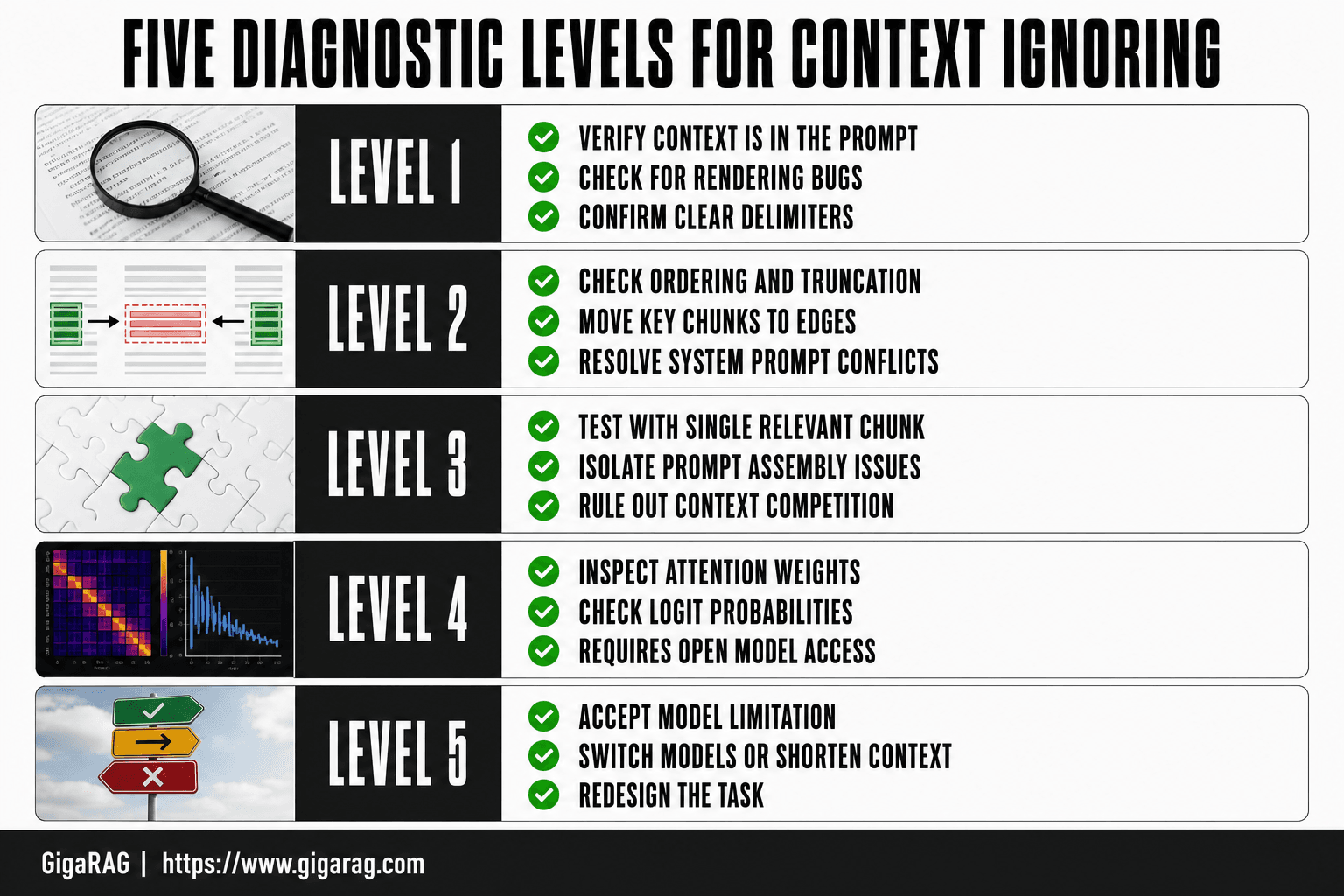
You've confirmed the context is in the prompt. You've read about lost in the middle. Now you need a process. This checklist goes from cheapest to most expensive, most likely to least likely. Don't skip levels. Each one rules out a class of failure before you spend time on the next.
Level 1: Verify context is actually in the prompt
Print the exact prompt string your model receives. Not the template. Not the variable names. The rendered string.
You're looking for three things. First, is the context present at all? A silent string formatting bug, an empty list, or a failed API call can produce a prompt that looks right in your code but contains no retrieved text. Second, is the context the text you think it is? Check for encoding issues, truncated chunks, or the wrong field being interpolated. Third, is the context separated from the question and instructions by clear delimiters? A model that can't tell where the context ends and the question begins will often ignore the context entirely.
This takes five minutes. It catches more failures than any other step.
Level 2: Check prompt ordering and truncation
Count your tokens. If the total prompt exceeds the model's context window, something got cut. Usually it's the middle. Check whether your retrieved context survived truncation or was silently dropped by your prompt assembly code.
Then look at where the context sits. If your most relevant chunk is in the middle of a long context block, move it to the start or the end. You read the previous section. Position matters.
Also check whether your system prompt is fighting the retrieved context. A system instruction like "answer only from your training data" or "be concise and don't quote sources" will override retrieved text every time. The model follows the instruction. It's not ignoring context. It's obeying you.
Level 3: Test with a single, highly relevant context
Strip the pipeline down. Feed the model one chunk that directly answers the question. Nothing else. No other retrieved passages, no long system prompt, no conversation history.
If the model uses the context now, your problem is in retrieval quality, prompt assembly, or context competition. You have too much context, or the wrong context, or context that's fighting itself.
If the model still ignores a single, obviously relevant chunk, the problem is model-side. Move to Level 4.
Level 4: Inspect model attention or logits if available
This only works if you have access to model internals. If you're using a closed API, skip to Level 5.
With open weights, you can check whether the model is attending to the context tokens at all. Low attention weight on the context span means the model isn't reading it. High attention weight but wrong output means the model read it and didn't use it. These are different failures with different fixes.
You can also run a logit check: does the model assign high probability to tokens from the retrieved context when generating its answer? If not, the context isn't influencing the output distribution.
Level 5: Accept model limitation and redesign
If you've verified the context is present, well-positioned, highly relevant, and the model still ignores it, you've hit an attention limit. No prompt tweak fixes this.
Your options are to switch models, shorten the context, or redesign the task so the model doesn't need to use retrieved context the way you expected. Sometimes the fix is to extract the answer from the context yourself and feed the model a much smaller, pre-processed input. The model can't ignore what it's given if what it's given is already the answer.
Agent Memory Architectures: Why Context Ignoring Is Worse and Different
Single-shot RAG has one retrieval, one prompt, one answer. Agent memory doesn't. Context accumulates across turns, gets compressed, and competes with system instructions. The failure modes overlap with single-shot RAG but compound. A fix that works for one retrieval won't transfer.
Accumulated context and attention dilution
Every turn adds to the context window. By turn ten, your retrieved chunks are buried under conversation history, tool outputs, and earlier reasoning. The model attends to what's recent and what's salient. Old retrieved context loses both.
The fix isn't more context. It's less. Trim aggressively between turns. Keep only what the agent still needs. If a retrieved chunk mattered three turns ago and hasn't been used since, drop it.
Memory compression and context loss
Agent frameworks compress memory to stay under token limits. Summarization, embedding-based recall, sliding windows. Each compression step loses information. A compressed memory says "user asked about pricing" but drops the specific numbers you retrieved. The model answers from the summary, not the source.
You can't fix this by improving the compressor. You fix it by deciding what must survive compression. Retrieved facts that the agent will need verbatim should be stored separately from narrative memory. Don't let a summarizer paraphrase your evidence.
System prompt vs. retrieved context conflicts
Agents carry long system prompts: role definitions, tool instructions, output formats. These instructions sit at the top of the context window, where attention is strongest. Retrieved context sits lower, where attention is weaker. When they conflict, the system prompt wins.
The honest answer is that you can't always fix this with prompt engineering. You can move retrieved context higher, shorten the system prompt, or restate the priority explicitly. But if the system prompt says "be concise" and the retrieved context is a long passage, the model will summarize or skip it. The instruction is closer and clearer than the evidence.
Agent memory makes context ignoring worse because the context is always changing. What was relevant at turn two may be noise at turn eight. The model can't tell the difference unless you tell it. That's the design work.
What You Cannot Fix: Honest Limitations of Context Handling
Some context-ignoring failures aren't bugs. They're properties of how transformer models work. You can reduce their frequency, but you can't eliminate them. Knowing which is which saves you weeks of debugging a problem with no fix.
Inherent attention limits
Attention is finite. A model with a 128k context window doesn't attend equally to all 128k tokens. It attends to what's recent, what's salient, and what matches the query. A retrieved chunk buried at position 40,000 competes with everything around it. You can move it, rerank it, or trim the context. You can't make the model attend to everything at once.
The lost in the middle effect is not a bug you patch. It's a measured property of transformer attention. Liu et al. 2023 showed performance drops when relevant information sits in the middle of long contexts. Reranking helps by moving relevant chunks to the edges. It doesn't remove the underlying bias.
When retrieval quality is not the problem
You can retrieve the perfect chunk, place it at the top of the prompt, and the model still ignores it. That's not a retrieval failure. It's a model limitation.
This happens most often when the retrieved context conflicts with the model's parametric knowledge. The model has seen the answer during training. Your retrieved context says something different. The model defaults to what it already "knows" because that's the stronger signal. No embedding model or reranker fixes this. You either accept it, or you switch to a model with different training data.
It also happens when the context is long and the answer requires synthesizing multiple facts. The model reads the chunk but can't hold all the pieces in working memory while generating. That's a capacity limit, not a prompt problem.
When to redesign the pipeline instead of debugging
Here's the line: if you've verified the context is in the prompt, ordered it well, tested with a single relevant chunk, and the model still ignores it, stop debugging. The architecture is the problem.
Redesign options: switch to a model with stronger instruction following, break the task into smaller steps so each step needs less context, or move the reasoning out of the LLM entirely. If the answer requires exact arithmetic or precise recall, do it in code and feed the result to the model. Don't ask the model to do what it can't reliably do.
The honest answer is that some pipelines shouldn't be RAG pipelines. If your task needs the model to use every retrieved fact verbatim, a database lookup with a template beats any prompt engineering.
How to Test Whether Your Fix Actually Worked
You changed the prompt ordering. You reranked the chunks. You trimmed the context. Now you need to know if any of it mattered. Guessing wastes more time than the fix itself.
Build a context utilization test set
Start with 20 to 30 questions where the answer exists only in the retrieved context, not in the model's parametric knowledge. Synthetic questions work fine: take a document, extract a fact, and write a question that can't be answered without that fact. If the model answers correctly, it used the context. If it answers with something plausible but wrong, it didn't.
Keep the set fixed. Run it after every change. That's the only way to compare fixes against each other instead of against your memory of how bad it was before.
Compare outputs with and without retrieved context
Run the same test set twice: once with retrieved context injected, once with an empty context slot. If the scores are identical, your fix did nothing. The model was never using the context in the first place.
This is the cheapest possible ablation. It takes minutes and tells you whether you're fixing a real problem or rearranging deck chairs. If the with-context score is higher, you have a baseline to improve against. If it's the same, go back to the diagnostic checklist.
Use an autorater or LLM-as-judge
Manual inspection doesn't scale. You can eyeball 30 outputs once, but you won't do it after every prompt tweak. An autorater does it consistently.
The setup: for each test question, include the ground-truth answer from the retrieved context. Ask a separate LLM call to judge whether the model's output contains that answer. Score 1 if it does, 0 if it doesn't. Average across the set. That's your context utilization score.
Keep in mind the autorater has its own biases. It can miss paraphrases or accept near-misses. Spot-check 10 outputs by hand before trusting the number. But once calibrated, it gives you a repeatable signal that manual review can't match.
Common Mistakes When Debugging the Model Ignores Retrieved Context
Most debugging time gets spent on the wrong layer. You'll swap embedding models, tune chunk sizes, and add rerankers while the actual problem sits one line above in your prompt assembly code. Here are the mistakes that waste the most effort.
Fixing retrieval when the problem is prompt assembly
The retrieved chunks are good. You can see them in the vector database results, ranked correctly, with the answer sitting in the top hit. But the model still ignores them. So you assume retrieval failed and start changing embeddings.
Don't. Check whether the context actually made it into the prompt string. A silent template bug, a missing variable interpolation, a wrong key name in your dict, any of these drops the context before the model ever sees it. Log the final prompt. Read it. If the context isn't there, no embedding change will help.
The same goes for ordering. If you inject context after the user question, or bury it under three turns of chat history, the model may deprioritize it. That's a prompt assembly problem, not a retrieval problem.
Testing with unrealistic context
You test your pipeline with clean, single-paragraph chunks that contain exactly one fact and a question that maps to it perfectly. Then production traffic arrives with messy, multi-topic documents and vague queries, and the model ignores everything.
That's not a model failure. That's a test set that flattered your pipeline. Build test cases from real documents with real noise: irrelevant sections, conflicting facts, long tangents. If your fix only works on synthetic clean cases, it doesn't work.
Ignoring token limits and truncation
You retrieved five chunks. You think the model saw five chunks. But your prompt template truncates at 4,000 tokens, and the fifth chunk, the one with the answer, got silently cut. The model didn't ignore the context. It never received it.
Check your token counts. Count the actual tokens in the assembled prompt, not the characters in your source strings. If truncation is happening, fix that before touching anything else. Truncation is the most boring root cause and the most commonly missed.
Final Thoughts: Building RAG Pipelines That Respect Retrieved Context
The diagnostic path is the same every time: confirm the context is in the prompt, check where it sits, test with one clean chunk, then accept what the model won't do. Most failures are boring. A truncation bug. A template that drops a variable. Context buried under chat history. You fix those and move on.
The honest limit is this: no prompt engineering, reranking, or chunking strategy will make a model attend to everything you give it. Attention is finite. Position matters. When the model ignores retrieved context despite correct injection and ordering, you're not debugging anymore. You're redesigning.
That's where architecture earns its keep. GigaRAG's agent memory design keeps retrieved context in a structured store that persists across turns, so the model isn't asked to hold everything in one prompt and hope. It's one option among several. But it's built for the failure mode this guide has been about.
Frequently Asked Questions
Why does the model ignore retrieved context even when it's in the prompt?
Models can ignore context for several reasons: the relevant chunk is buried mid-prompt (the 'lost in the middle' effect), the context is too long and dilutes attention, the retrieved content is irrelevant or contradictory, or the model's parametric knowledge overrides the context. Diagnosing which cause applies requires ablation and position tests.
What is the 'lost in the middle' problem in RAG?
It refers to the finding that language models tend to use information at the beginning and end of a long context more reliably than information in the middle. If your key retrieved chunk lands mid-prompt, the model may effectively ignore it. Reordering context so critical information appears at the edges can help.
Can prompt engineering fix context ignoring?
Partially. Instructions like 'base your answer only on the context below' or 'quote the relevant passage' can improve utilization, and reordering context helps with position effects. However, prompt-only fixes cannot overcome fundamental model limitations or fix stale/conflicting agent memory — those require retrieval and architecture changes.
How do I test whether my model is actually using retrieved context?
Run an ablation test: send the same query with and without the retrieved context. If the outputs are substantially the same, the model is not using the context. You can also add a citation requirement and check whether the model quotes or references the provided passages.
Why does my agent ignore its memory?
Agent memory is often ignored when entries are stale, contradictory, or irrelevant to the current query. Models may also prioritize their parametric knowledge over retrieved memories. Pruning outdated entries, resolving conflicts, and surfacing only recent or high-confidence memories can improve adherence.
Is context ignoring a bug in my pipeline or a model limitation?
It can be either. Pipeline issues include poor chunk ordering, excessive context length, or irrelevant retrieval. Model limitations include position bias and parametric knowledge override. The diagnostic steps in this guide help you distinguish between the two so you don't waste effort on fixes that cannot work.
About GigaRAG
GigaRAG is for agent memory and RAG pipeline builders. get this right. Whether you are working through the model ignores retrieved context or something adjacent, we publish what we have actually tested, including where it falls short.