Recall drops after you add metadata filters. If you build RAG pipelines or agent memory systems, you know the moment: retrieval was working, someone added a filter to clean up noisy results, and now your agent misses answers it used to find. Nobody changed the embeddings. Nobody touched the model. The filter did it.
Here's what most people get wrong. A metadata filter doesn't "focus" search the way you'd expect. It shrinks the candidate set before similarity search runs, and shrinking the candidate set always risks losing relevant documents. That's the whole mechanism. The filter that was supposed to improve precision quietly gutted recall.
The honest answer is that this is one of the most common and least-documented failure modes in retrieval systems. Most vector databases default to pre-filtering, and most tutorials don't tell you when that default is dangerous. GigaRAG was built to help agent memory and RAG builders avoid exactly this trap, but this guide is a troubleshooting framework, not a pitch. You'll get a step-by-step diagnostic checklist to isolate whether the drop comes from pre-filtering, cardinality, schema design, or the vector search itself.
| At a glance | Details |
|---|---|
| Core issue | Filters shrink candidate set, causing missed results |
| Common cause | Pre-filtering with restrictive or mis-typed metadata |
| Diagnosis focus | Isolate filter, schema, or vector search |
| Key trade-off | Precision vs recall; latency vs completeness |
| When to avoid | When filters create empty or tiny candidate sets |
| Agent impact | Iterative retrieval amplifies recall drops |
In This Guide
- Pre-Filter vs Post-Filter: Where Recall Actually Dies
- Pre-filtering vs Post-filtering for Metadata Filters
- The Cardinality Trap: Why Selective Filters Kill Recall
- Recall Drops After You Add Metadata Filters: A Step-by-Step Guide
- How to Diagnose a Recall Drop After You Add Metadata Filters
- Metadata Schema Design: The Root Cause Nobody Audits
- Agent Memory and Multi-Agent Retrieval: Why Recall Drops Hit Harder
- When Pre-Filtering Is the Wrong Choice
- Best Practices for Metadata Filters That Don't Destroy Recall
- Measuring Recall: The Metric Nobody Tracks Until It's Too Late
- Final Thoughts: Recall Drops After You Add Metadata Filters Are Fixable
Pre-Filter vs Post-Filter: Where Recall Actually Dies
Pre-filtering shrinks the candidate set before similarity search runs, so any relevant document that doesn't match the filter is gone before the vector comparison ever happens. Post-filtering runs similarity search first, then applies filters, so relevant documents survive the search and only get removed if they fail the filter.
What pre-filtering actually does to your candidate set
Pre-filtering applies your metadata conditions first. If you filter for user_id = 4821, the database builds a candidate set containing only documents owned by user 4821. Then it runs vector similarity search inside that set.
The problem is obvious once you see it. If the best semantic match for a query belongs to user 4822, it's not in the candidate set. It can't be retrieved, no matter how similar it is. The filter didn't rank it lower. It deleted it.
What post-filtering does differently
Post-filtering runs similarity search across the full index first. It finds the top-k nearest neighbors by vector distance, then applies your metadata conditions to that ranked list. Documents that fail the filter get removed, and the next-best matches move up.
This preserves recall in one important way: a relevant document that fails the filter still gets found by the search, then rejected by the filter. You can see it in your logs. With pre-filtering, that document never appears anywhere.
The trade-off is latency. Post-filtering has to search a larger space, and if your filter is very selective, you may need to retrieve far more than k candidates before you find k that pass.
Why most vector databases default to pre-filtering
Speed. Pre-filtering shrinks the search space before the expensive vector distance calculations run. A filter that removes 95% of documents means you only compute distances on the remaining 5%. That's a real performance win, and it's why most systems make pre-filtering the default.
The catch is that the default optimizes for latency, not recall. When your filters are broad, the loss is small. When they're selective, the loss is invisible until you measure it.
[!note] Metadata filtering cannot recover documents that lack the required metadata or have incorrect values; it only excludes them. Always verify that your metadata is complete and accurate before blaming the vector search.
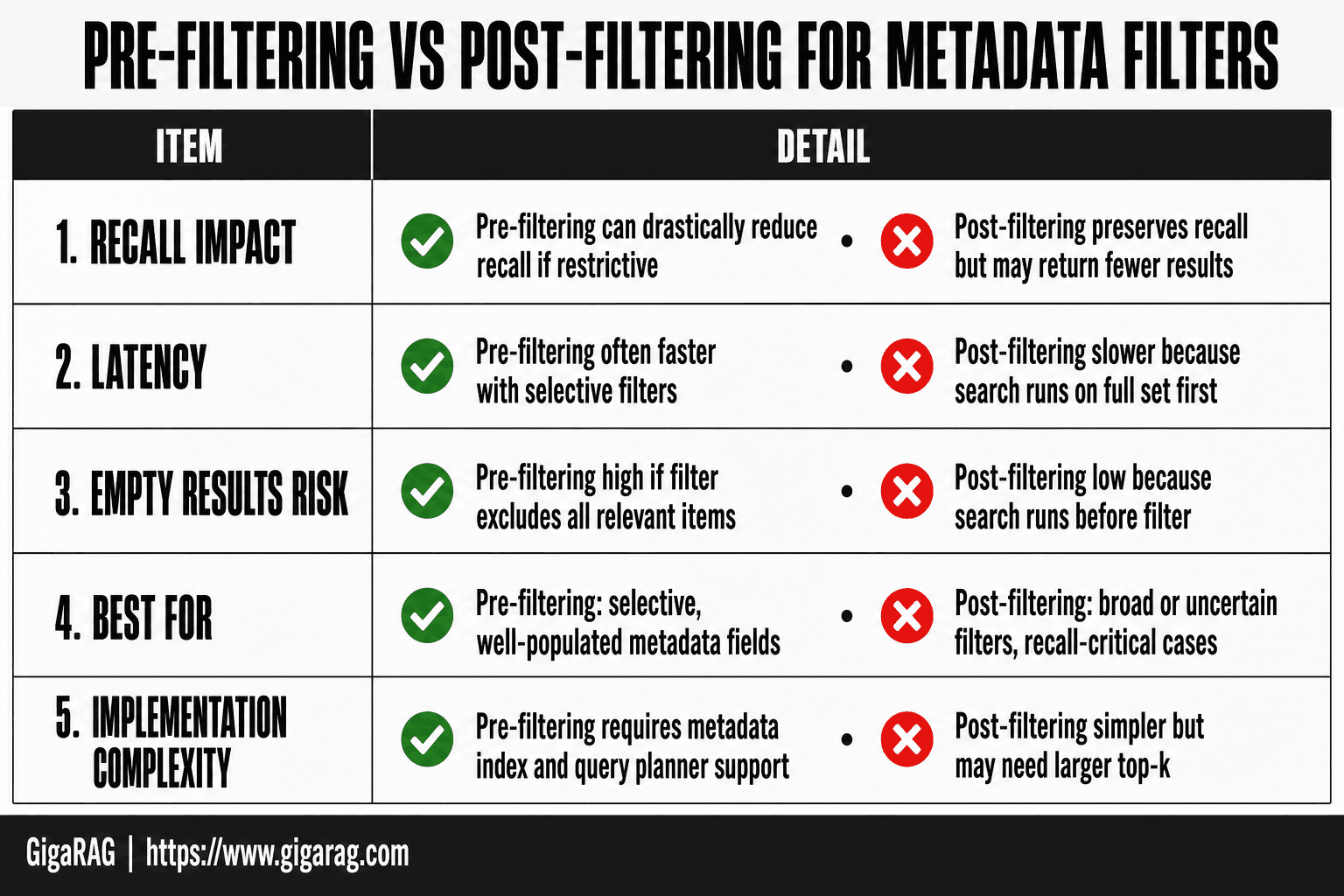
Pre-filtering vs Post-filtering for Metadata Filters
| Factor | Pre-filtering | Post-filtering |
|---|---|---|
| Recall impact | Can drastically reduce recall if filter is restrictive | Preserves recall but may return fewer results after filtering |
| Latency | Often faster if filter is selective (smaller search space) | Slower because vector search runs on full set first |
| Empty results risk | High if filter excludes all relevant items | Low because search runs before filter |
| Best for | Highly selective, well-populated metadata fields | Broad or uncertain filters, or when recall is critical |
| Implementation complexity | Requires metadata index and query planner support | Simpler, but may need larger top-k to compensate |
The Cardinality Trap: Why Selective Filters Kill Recall
What 'selectivity' means in practice
Selectivity measures how many documents match a filter. A filter that matches 90% of your corpus has low selectivity. A filter that matches 0.1% has high selectivity. The more selective the filter, the smaller the candidate set, and the more likely you are to lose relevant documents before similarity search runs.
High-cardinality filters: the silent recall killer
High-cardinality fields have many distinct values. A user_id field with 50,000 unique values is high-cardinality. Filtering by user_id = 4821 shrinks your candidate set to one user's documents. If the best answer lives under a different user, it's gone.
Timestamps are worse. Filtering by created_at > 2024-06-01 can cut your corpus by 80% or more, and you won't notice until a query that should match an older document returns nothing.
Low-cardinality filters: when filtering is safe
Low-cardinality fields have few distinct values. A document_type field with five values (invoice, contract, email, report, ticket) is low-cardinality. Filtering by document_type = contract keeps a broad candidate set, so similarity search still has room to find the right match.
The rule is simple: pre-filter on low-cardinality fields, post-filter on high-cardinality ones. If a filter removes more than half your corpus, test recall before you ship it.
[!tip] For agent memory systems, log the candidate set size at each retrieval step. A sudden drop in candidates after adding a filter is an early warning sign of recall loss that may only surface as poor answers several turns later.
Recall Drops After You Add Metadata Filters: A Step-by-Step Guide
- Reproduce the drop: run a query set with and without the filter, and compare recall@k.
- Check filter cardinality: count how many documents match the filter; if very low, recall will suffer.
- Inspect metadata schema: ensure fields are correctly typed and values are consistent (e.g., no case or format mismatches).
- Test pre-filtering vs post-filtering: switch strategies and measure recall and latency.
- Adjust top-k: increase the number of candidates retrieved before filtering to recover lost recall.
- Validate with agent workflows: simulate multi-turn retrieval to see if iterative context magnifies the drop.
- Iterate: refine filter logic or schema, and re-measure until recall meets requirements.
How to Diagnose a Recall Drop After You Add Metadata Filters
You added a filter. Recall dropped. You need to know which of five possible causes is the culprit before you touch anything. Here's the diagnostic flow, in order.
Step 1: Measure recall before and after the filter
You can't diagnose what you haven't measured. Take a labeled query set, at least 50 queries, and run it through the pipeline with the filter off. Record recall@10. Then run the same set with the filter on. If recall@10 drops by more than 5 points, you have a real problem. If it doesn't, the filter isn't the issue.
Don't skip this step. Most recall drops are invisible because nobody measured the baseline before adding the filter. If you don't have a labeled set, build one now. Even 50 hand-labeled queries will catch a 10-point drop.
Step 2: Isolate the specific filter causing the drop
If you added multiple filters at once, remove them one at a time. Run the same query set after removing each filter. The filter whose removal restores recall is your culprit.
This takes minutes and saves hours of speculation. If you only added one filter, skip to step 3.
Step 3: Check filter cardinality and selectivity
Count the distinct values in the field you're filtering on. Then measure what fraction of your corpus matches the filter. If the filter matches less than 10% of your corpus, you're in high-cardinality territory. That's the cardinality trap from the previous section.
The fix is usually to move that filter from pre-filter to post-filter. But confirm with step 4 before you commit.
Step 4: A/B test pre-filter vs post-filter
Run the same query set twice: once with the filter applied before similarity search, once with it applied after. Compare recall@10 and latency. If post-filtering restores recall without blowing your latency budget, switch to post-filtering for that filter.
If post-filtering is too slow, you need a hybrid approach. Pre-filter on a low-cardinality field, post-filter on the high-cardinality one.
Step 5: Inspect candidate set size
Log the candidate set size before and after filtering for a sample of queries. If the filter routinely shrinks the candidate set to under 100 documents, recall will suffer no matter how good your embeddings are.
The honest answer is that some filters are simply too selective to pre-filter on. If you see candidate sets under 50 documents, redesign the filter or accept the recall hit.
Metadata Schema Design: The Root Cause Nobody Audits
The filter you added in step 2 didn't come from nowhere. It came from a schema decision someone made months ago, probably without thinking about retrieval. That decision is now your recall problem.
Over-granular fields that force high-cardinality filters
A field like user_id or exact_timestamp looks harmless when you define it. You're just storing data. But the moment someone filters on it, you've created a high-cardinality filter by accident. Each value matches a tiny slice of the corpus. Pre-filtering on it shrinks the candidate set to near nothing.
The fix isn't to avoid granular fields. It's to know which fields are filterable and which are just stored. Mark them in the schema. If a field will ever be filtered, decide now whether it's pre-filter or post-filter material.
Missing defaults and empty filter matches
A metadata field with no default value is a trap. Documents that lack the field simply don't match the filter. If 30% of your corpus is missing a department field, filtering on department=engineering silently excludes those 30%. Recall drops and you don't know why.
Give every filterable field a default. Or make the filter optional. Or accept that missing values mean missing documents.
Schema evolution in agent memory systems
Agent memory systems add fields constantly. A new agent capability means a new metadata field. The problem: old documents don't have the new field. New filters exclude them. Nobody re-indexes. Nobody re-checks recall.
When you add a field, backfill it. Then measure recall on the old corpus before you let any filter touch it.
Agent Memory and Multi-Agent Retrieval: Why Recall Drops Hit Harder
A single-shot RAG pipeline retrieves once and answers. An agent retrieves, reasons, retrieves again, and repeats until it has enough context to act. That loop changes the math on recall entirely.
Why iterative retrieval amplifies recall loss
In a one-shot pipeline, a recall drop means one bad answer. In an agentic workflow, the first retrieval feeds the reasoning step, which decides what to retrieve next. If the first retrieval misses relevant documents, the agent reasons from incomplete context and asks the wrong follow-up question. The second retrieval is now searching for the wrong thing.
The drop compounds. A 10% recall loss on the first retrieval doesn't stay 10%. It cascades, because each iteration builds on the previous one. By the third or fourth retrieval, the agent is working from a context that drifted far from what the user actually asked.
Silent failures: when agents don't surface bad retrievals
A chat interface shows the user what it retrieved. An agent doesn't. It retrieves internally, reasons internally, and only surfaces the final action or answer. If the retrieval was bad, the user never sees it. The agent just produces a worse result and nobody knows why.
This is the dangerous part. You can't spot a recall drop by watching agent outputs, because the outputs look plausible. The agent fills gaps with its own reasoning. It compensates. The failure stays hidden inside the retrieval step where nobody is looking.
What agent memory builders should monitor
You need visibility into the retrieval step itself. Log the candidate set size for every retrieval call, not just the final answer. Track recall@k on a labeled evaluation set that exercises the same iterative patterns your agents use in production.
Watch for candidate sets that shrink suddenly after a filter is added. That's the same cardinality trap from earlier, but now it's happening inside a loop where the damage multiplies. If you can't see the candidate set, you can't see the recall drop. And if you can't see it, you can't fix it.
When Pre-Filtering Is the Wrong Choice
Pre-filtering isn't a default you should accept blindly. It's a trade-off, and there are cases where it's the wrong trade-off.
Empty candidate sets: when filters exclude everything
A filter with very high cardinality can match zero documents. Not few. Zero. The similarity search then runs against nothing and returns nothing, no matter how relevant the query is. This happens most often with timestamp filters, user ID filters, or compound filters that stack several selective conditions. The fix is to check the candidate set size before running the search, and fall back to a broader filter or no filter when it's empty.
Hybrid queries and filter interactions
Hybrid search combines vector similarity with keyword matching. Pre-filtering applies before both, so a filter that's safe for vector search can still break the keyword side. A document that matches the filter but uses different vocabulary than the query gets excluded from keyword results even though it's relevant. Post-filtering avoids this by letting both search modes run first.
What metadata filtering cannot fix
Metadata filtering cannot rescue a poorly embedded corpus. If your embeddings don't capture semantic similarity, no filter will make retrieval good. It also can't fix a badly designed retrieval pipeline: wrong chunk sizes, bad embedding models, or missing reranking steps all degrade recall regardless of how you filter. Filtering narrows the candidate set. It doesn't improve the quality of what's inside it.
Best Practices for Metadata Filters That Don't Destroy Recall
The rules are simple. Low-cardinality filters belong in pre-filtering. High-cardinality filters belong in post-filtering. Everything else is measurement.
Use low-cardinality filters for pre-filtering
A filter that matches thousands of documents is safe to apply before similarity search. Categories, document types, tenants, languages. These shrink the candidate set without cutting off relevant results. If a filter matches more than 10% of your corpus, pre-filtering won't hurt recall meaningfully.
Reserve high-cardinality filters for post-filtering
User IDs, timestamps, session IDs. These match a handful of documents, sometimes one. Apply them after similarity search runs. Post-filtering lets the vector search see the full candidate set first, then trims results to match the filter. You lose some precision in the top-k, but you keep recall intact.
Test recall impact before deploying any new filter
Don't ship a filter and hope. Run it against a labeled evaluation set first. Measure recall@k with and without the filter. If recall drops more than a few points, the filter is too selective for pre-filtering. Move it to post-filtering or loosen the condition.
Monitor candidate set size in production
The candidate set size after filtering is the single most useful signal. If it's routinely under 50 documents, your filters are too aggressive. If it's zero, you have an empty candidate set problem. Log this metric and alert on it. Agent memory systems need this more than most: a silent empty retrieval in an iterative loop compounds fast.
Measuring Recall: The Metric Nobody Tracks Until It's Too Late
Recall drops are invisible without measurement. You add a filter, the agent starts missing answers, and you don't notice until a user complains. By then the damage has compounded.
Recall@k and why it matters
Recall@k measures how many relevant documents appear in your top-k results. If 10 documents should match a query and only 4 show up in the top 10, your recall@10 is 0.4. Precision tells you how many retrieved results are relevant. Recall tells you how many relevant results you missed. When you add a metadata filter, precision often goes up while recall quietly collapses. You need both numbers to see the trade-off.
Building a labeled evaluation set
You need a set of queries where you know the correct answers. Start with 50 to 100 real queries from your logs. For each one, mark which documents should be retrieved. This is tedious but it's the only way to catch recall drops before users do. Rebuild the set when your corpus changes significantly.
Measuring recall without ground truth labels
Most teams don't have labels. The honest answer is you can't measure true recall without them. But you can approximate it. Run the same query with and without the filter. Compare the overlap in results. If the filtered set misses documents that the unfiltered set found, those are likely recall losses. Log candidate set size before and after filtering. A sharp drop is a warning sign. These proxies won't give you a clean recall@k number, but they'll surface problems early.
Final Thoughts: Recall Drops After You Add Metadata Filters Are Fixable
The fix starts with measurement. You can't diagnose what you can't see. Recall drops after you add metadata filters come from three places: pre-filtering shrinking the candidate set, high-cardinality filters excluding relevant documents, or schema design that forces bad filters. Each has a specific fix.
The honest answer is that filtering trades recall for precision. You decide how much loss is acceptable. Measure first, diagnose the cause, then choose pre-filter or post-filter deliberately.
GigaRAG (https://www.gigarag.com) was built for agent memory and RAG pipeline builders who want filtering without silent recall collapse. It won't fix a badly embedded corpus, but it handles the candidate set problem properly.
Frequently Asked Questions
Why does recall drop after adding metadata filters?
Metadata filters reduce the set of documents the vector search considers. If the filter is too restrictive or the metadata is incomplete, relevant documents are excluded before similarity search, leading to lower recall.
How can I diagnose whether the filter or the vector search is causing the recall drop?
Run the same queries with and without the filter and compare recall. If recall drops only when the filter is applied, the filter is the cause. Also check the number of matching documents; a very small candidate set indicates over-filtering.
When should I avoid pre-filtering?
Avoid pre-filtering when the filter is broad or when metadata is sparse or unreliable, as it can lead to empty or tiny candidate sets. In such cases, post-filtering or a hybrid approach preserves recall better.
Can metadata filters improve precision without hurting recall?
Yes, if the filter is well-designed and the metadata is accurate and complete. Using selective filters on fields with high cardinality and ensuring no relevant documents are excluded can improve precision with minimal recall loss.
How do metadata filters affect agent memory and multi-agent retrieval?
In agent memory, filters are applied at each retrieval step. A restrictive filter can cause the agent to miss critical context, and the effect compounds over multiple turns. Multi-agent systems may propagate these misses, leading to degraded performance.
What is the difference between pre-filtering and post-filtering in vector search?
Pre-filtering applies the metadata filter before the vector search, reducing the search space but risking recall loss if the filter is too narrow. Post-filtering runs the vector search first and then filters results, preserving recall but potentially increasing latency and requiring a larger top-k.
About GigaRAG
GigaRAG is for agent memory and RAG pipeline builders. get this right. Whether you are working through recall drops after you add metadata filters or something adjacent, we publish what we have actually tested, including where it falls short.