The terminal clears, the agent's memory is gone, and the RAG index you spent three days building is stale or missing entirely. You stare at a blank prompt and wonder what's actually recoverable. The honest answer is that it depends on what you persisted before the restart. Some state survives by default. Most doesn't. This guide walks through exactly what to check first, what to rebuild, and what's gone forever, with specific steps for agent memory and RAG pipeline recovery. GigaRAG is built for builders who want to avoid this exact scenario, but even with the right tooling, a restart is a moment of truth. By the end, you'll have a clear recovery sequence, a copy-pasteable checklist, and a plain statement of what you cannot resume.
| At a glance | Details |
|---|---|
| What survives | Code, configs, model weights, and persisted data |
| What's lost | In-memory state, unsaved caches, and live sessions |
| First action | Check logs and confirm what actually failed |
| Key habit | Persist state to disk or a database regularly |
| For RAG | Re-index only if the vector store is corrupted |
| For agents | Reload conversation history from a checkpoint |
In This Guide
- What Happens to an AI Project When It Restarts
- In-Memory State vs Persisted State: What Survives a Restart?
- Step 1: Assess What State You Still Have
- How To Resume An AI Project After A Restart: A Step-by-Step Guide
- Step 2: Restore Your RAG Pipeline State
- Step 3: Restore Agent Memory and Conversation State
- Step 4: Resume Model Training or Fine-Tuning
- What You Cannot Resume After a Restart
- Checklist: How to Resume an AI Project After a Restart
- How to Prevent Losing State in the Future
- Final Thoughts on Resuming AI Projects
What Happens to an AI Project When It Restarts
A restart doesn't just close your terminal. It cuts the thread between what your project held in memory and what it wrote to disk. What comes back depends entirely on what you saved before the process died.
What a restart actually clears
Anything that lived only in RAM is gone. That includes unsaved agent conversation state, in-flight embedding batches, and any index still sitting in memory waiting for a flush. If you never called a save or checkpoint function, the restart erased it. No recovery tool brings it back.
What survives a restart by default
Files on disk survive. Your vector database files, model checkpoints, and serialized memory stores all persist unless the restart corrupted them. The catch: they're only as current as your last write. A checkpoint from three hours ago means three hours of work is gone.
Why agent memory and RAG pipelines are uniquely vulnerable
Most software loses only unsaved edits on a restart. Agent memory and RAG pipelines lose context, and context is the product. An agent that forgets the last ten turns of a conversation isn't just missing data. It's missing the thread that made its next response coherent. A RAG index that's stale returns answers from documents you already updated. The restart itself is survivable. The staleness it leaves behind is the real problem.
[!note] A restart does not automatically lose your work if you have persisted state; the key is to distinguish between what was in memory (lost) and what was written to disk or a database (recoverable).
In-Memory State vs Persisted State: What Survives a Restart?
| Factor | In-Memory State | Persisted State |
|---|---|---|
| Survives restart? | No — cleared when the process ends | Yes — stored on disk or in a database |
| Examples | Agent conversation buffer, embedding cache in RAM | Vector index files, checkpointed model weights, logged conversations |
| Recovery effort | Must be rebuilt from scratch | Reload and resume from last checkpoint |
| Risk of data loss | High if not periodically saved | Low if backups and versioning are in place |
| Typical tools | Python variables, in-process caches | FAISS/Chroma persistence, SQLite, Redis, S3 |
Step 1: Assess What State You Still Have
Before you rebuild anything, figure out what actually survived. This takes ten minutes and saves you hours of trying to recover what's already gone. Work through the four checks below in order.
Check your vector database and index files
Look for the on-disk files first. Chroma stores data in a chroma.sqlite3 file plus an index/ directory. Qdrant uses a storage/ folder. FAISS writes .faiss and .pkl files. If those files exist and aren't corrupted, your index is recoverable. If they're missing, you're re-indexing from scratch. Check file timestamps to see how stale the index is.
Check your agent memory store and session logs
Agent memory lives in one of two places: a persistent store like Redis, Postgres, or a vector database, or an in-memory buffer that died with the process. Query your persistent store directly. If you used something like LangChain's ConversationBufferMemory without a persistence layer, that memory is gone. Session logs, if you wrote them, can help you rebuild context manually.
Check your model checkpoints and weights
Look for .pt, .ckpt, .safetensors, or .bin files in your training directory. The most recent checkpoint is your recovery point. Note the epoch and step number in the filename. That tells you exactly how much training you lost.
Check your data pipeline and intermediate outputs
Intermediate outputs like tokenized datasets, embedding caches, and preprocessed chunks often survive even when the final index doesn't. Check your data/processed/ or equivalent directory. Reusing these saves you the preprocessing step, which is often the slowest part of a RAG pipeline rebuild.
[!tip] For agent memory and RAG pipelines, schedule regular checkpoints of your vector index and conversation state to a durable store like S3 or a database, so a restart becomes a minor inconvenience rather than a major setback.
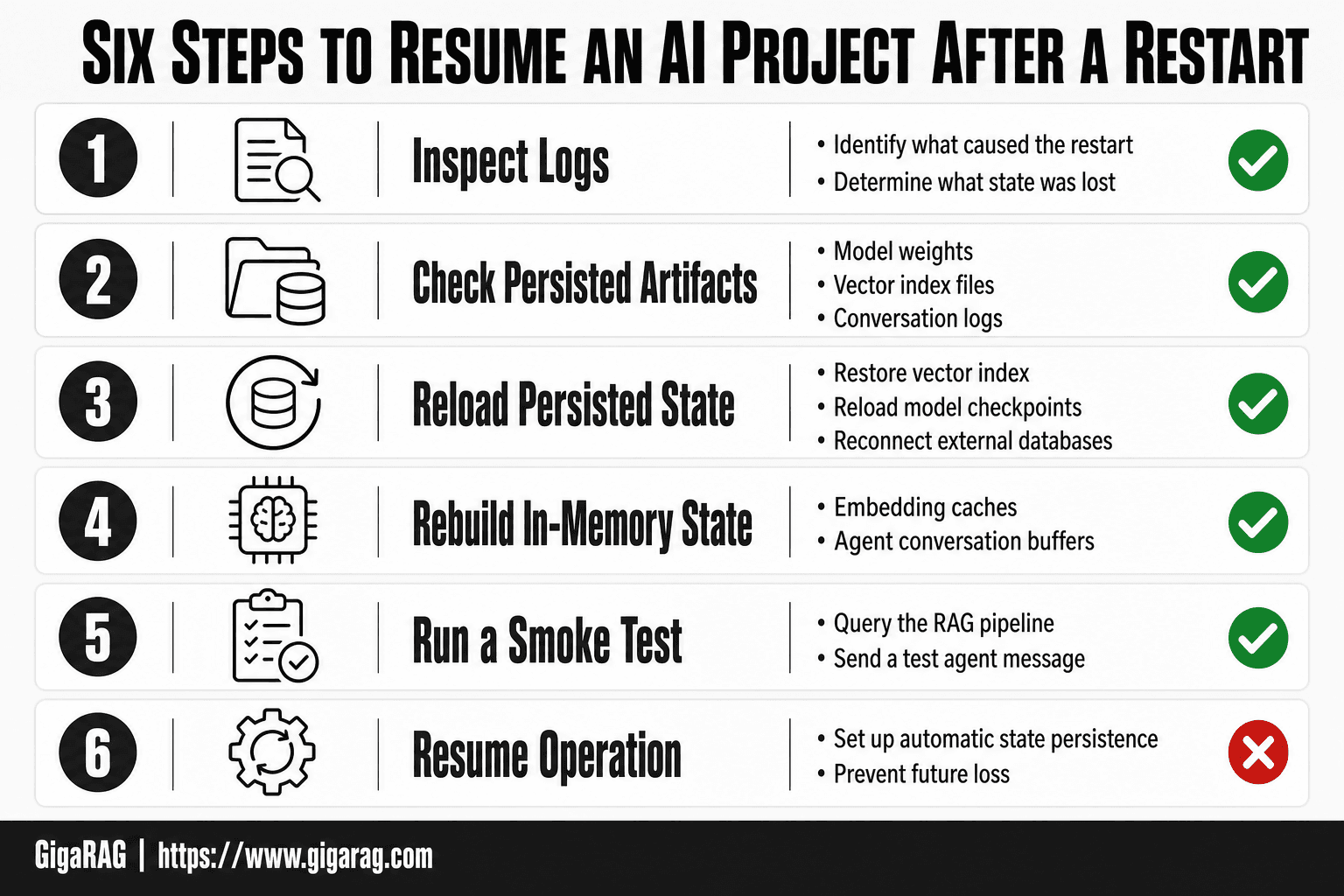
How To Resume An AI Project After A Restart: A Step-by-Step Guide
- Inspect logs and error messages to identify what caused the restart and what state was lost.
- Check which artifacts are already persisted (model weights, vector index files, conversation logs) and verify their integrity.
- Reload persisted artifacts: restore the vector index, reload model checkpoints, and reconnect to any external databases or APIs.
- Rebuild any in-memory state that was lost, such as embedding caches or agent conversation buffers, using the most recent saved data.
- Run a smoke test: query the RAG pipeline or send a test message to the agent to confirm it responds correctly.
- Resume normal operation and immediately set up automatic state persistence (e.g., periodic checkpointing) to prevent future loss.
Step 2: Restore Your RAG Pipeline State
You know what survived. Now rebuild what didn't. The order matters: index first, then embeddings, then validate.
Re-indexing your documents after a restart
If your vector database files are intact, load them and move on. If they're gone, re-index from your source documents. Start with the processed chunks from Step 1 if you have them. That skips parsing and chunking, which is often half the total indexing time. If you only have raw documents, re-run your full pipeline. Don't skip the chunking step to save time. Inconsistent chunk sizes will hurt retrieval quality later.
Recovering or regenerating embeddings
Embeddings are expensive to regenerate, so check your cache first. If you stored embeddings alongside chunks, reuse them. If not, you'll re-embed everything. Use the same model and the same parameters as before. Switching embedding models mid-project changes your vector space and breaks retrieval. If you can't remember which model you used, check your config file or requirements.txt.
Validating retrieval quality after recovery
Don't trust a rebuilt index until you test it. Run five to ten queries you know the answers to. Check that the right chunks come back in the top results. If retrieval quality dropped, the usual culprits are stale embeddings, changed chunk sizes, or a different embedding model. Fix those before you move on.
Step 3: Restore Agent Memory and Conversation State
Agent memory is not the same as your RAG index. The index holds documents. Memory holds what the agent learned during conversations. Restore them separately.
Recovering agent memory from persistent stores
If you wrote agent memory to a database or file, load it first. Check your memory store's read path before anything else. Most agent frameworks let you point to a store on startup. Do that. If the store is empty, your agent starts with no memory, even if the index is fine.
Rebuilding conversation context from logs
Logs are your fallback. If you logged each turn, you can replay the conversation into the agent's context window. Feed the last few turns back in as a system prompt or initial context. The agent won't have the same internal state, but it will have the facts from the conversation. That's often enough to continue.
What agent memory cannot be recovered
Anything held only in RAM is gone. That includes working memory, intermediate reasoning steps, and unsaved conversation turns. You can rebuild context from logs, but you cannot rebuild the agent's exact state at the moment of restart. Don't try. Reconstruct what matters and move forward.
Step 4: Resume Model Training or Fine-Tuning
If your model was mid-training when the restart hit, the first question is whether you saved checkpoints. If you did, you can resume. If you didn't, you start over. There's no middle ground.
Loading model checkpoints correctly
Load the checkpoint, not just the weights. A checkpoint includes the optimizer state, the epoch number, and the learning rate schedule. Weights alone get you the model, but not the training progress. Use the same framework version you trained with. A checkpoint saved under PyTorch 2.1 may not load cleanly under 2.3.
Adjusting learning rate after a restart
Don't resume at the same learning rate you were using. The optimizer state may be stale, and the loss landscape has shifted. Drop the learning rate by half and warm it back up over a few hundred steps. This avoids a spike in loss right after resuming.
Avoiding local minima when resuming training
A restart can leave your model stuck in a local minimum, especially if the checkpoint was saved right before a plateau. The fix is to perturb the weights slightly before resuming. Add small Gaussian noise to the last layer, then continue training. This nudges the model out of the basin without losing what it learned.
What You Cannot Resume After a Restart
Some state is gone the moment the process dies. No tool recovers it. The honest answer is that if you never wrote it to disk, it never existed in a form you can get back.
In-memory state that was never persisted
Anything held only in RAM is unrecoverable. That includes Python variables, in-memory caches, and any data structure you built during the session but never serialized. If your agent kept a running list of retrieved documents in a list, that list is gone. If your RAG pipeline held embeddings in a NumPy array without saving them, those embeddings are gone. The process that held them no longer exists.
Unsaved agent context and ephemeral conversation state
Agent conversation state that lives only in the context window is lost. If your agent was mid-task and you had not flushed its working memory to a persistent store, that context is unrecoverable. Logs can help you reconstruct what happened, but they are not the same as the live state. You can rebuild a summary from logs, but the exact token-level context is gone.
Why some things are gone forever
The reason is simple: RAM is volatile. When the process stops, the operating system reclaims that memory. There is no undo. The only fix is to persist state before you need it, not after. If you did not save it, you cannot resume it.
Checklist: How to Resume an AI Project After a Restart
The short answer: save state to disk before the restart, verify it loads after, and persist incrementally going forward. Everything else is recovery, not resumption.
Before the restart: what to save
- Serialize agent memory to a durable store (SQLite, Postgres, or a file).
- Export vector index and document metadata.
- Save model checkpoints with optimizer state, not just weights.
- Write pipeline intermediate outputs to disk, not RAM.
After the restart: what to check first
- Load the vector index and run a test query. Confirm results match pre-restart quality.
- Restore agent memory and verify the agent recalls prior context.
- Load model checkpoints and confirm loss continues from where it stopped.
- Check data pipeline outputs for corruption or partial writes.
Ongoing: what to persist going forward
- Checkpoint every N steps or every M minutes, whichever comes first.
- Use idempotent pipeline steps so re-runs don't duplicate work.
- Persist agent memory after every turn, not just at session end.
How to Prevent Losing State in the Future
The checklist gets you back to work. Prevention keeps you from needing it again.
Persist agent memory to durable storage
Don't keep agent memory in process RAM. Write it to SQLite, Postgres, or a file after every turn. A single write per turn costs milliseconds. Losing a day of context costs hours. If your agent runs in a container, mount a volume. Containers restart for reasons you won't predict: OOM kills, node drains, image updates.
Schedule regular checkpoints for models and indexes
Checkpoint every N steps or every M minutes, whichever comes first. Save optimizer state alongside weights, not just weights. For vector indexes, export the index and document metadata together. A checkpoint you can't reload is just a file. Test the restore path once before you rely on it.
Use idempotent pipeline steps
Make every pipeline step safe to re-run. If a step writes to a table, use upserts, not inserts. If it generates embeddings, check for existing ones before regenerating. Idempotency means a crash mid-pipeline doesn't corrupt state. You just re-run the step and it picks up where it left off.
Final Thoughts on Resuming AI Projects
Resuming an AI project after a restart comes down to one thing: what you saved before the crash. The steps are simple. Check what survived. Restore your RAG index. Rebuild agent memory from logs. Reload checkpoints if you have them.
What you didn't persist is gone. Accept that and move on.
The honest fix is prevention. GigaRAG handles agent memory and RAG pipeline persistence for you, so a restart doesn't mean starting over. If you're tired of rebuilding state by hand, it's worth a look.
Frequently Asked Questions
How do you get AI to rewrite your resume?
This question is about using AI to rewrite a human resume, not resuming an AI project. If you meant the latter, the process involves reloading persisted state and rebuilding in-memory components as described in this guide.
What is the final stage of the AI project cycle?
The final stage is typically deployment and monitoring, where the model or pipeline is put into production and its performance is tracked. Resuming after a restart is part of the monitoring and maintenance phase.
What is the role of data acquisition in the AI project cycle?
Data acquisition involves collecting and preparing the data needed to train or operate your AI system. After a restart, you may need to re-acquire or reload data if it was not persisted.
What is modelling in AI project cycle?
Modelling is the phase where you select, train, and tune machine learning models. After a restart, you can resume modelling by reloading saved model checkpoints and continuing training or inference.
Can I resume a RAG pipeline without re-indexing?
Yes, if your vector index was persisted to disk or a database and is not corrupted. You can reload the index and continue querying without rebuilding it from scratch.
How do I restore an agent's conversation state after a restart?
If you logged the conversation history to a file or database, you can reload it into the agent's memory buffer. Without logging, the conversation state is lost and must be rebuilt from user input.
What should I do first after an AI project restart?
First, check the logs to understand why the restart happened and what state was lost. Then verify which artifacts are persisted and reload them before rebuilding any in-memory state.
About GigaRAG
GigaRAG is for agent memory and RAG pipeline builders. get this right. Whether you are working through How to Resume an AI Project After a Restart or something adjacent, we publish what we have actually tested, including where it falls short.