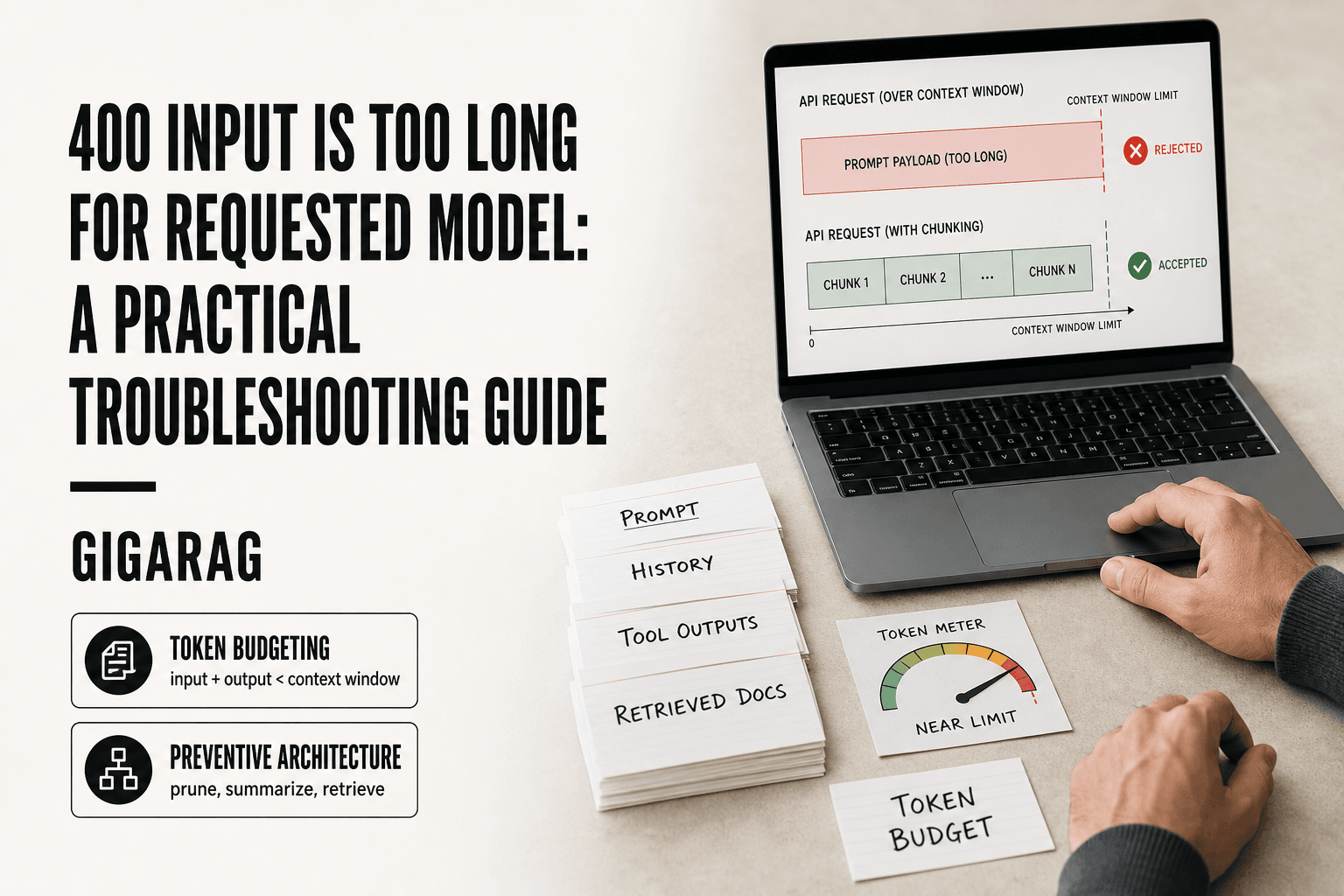
400 Input Is Too Long for Requested Model: A Practical Troubleshooting Guide
400 input is too long for requested model is the error that kills agent pipelines mid-run. You're an agent memory or RAG pipeline builder, your retrieval just returned a chunk set, the agent composed its prompt, and the API bounced it with a four-word message that tells you nothing about what actually broke. Most search results for this are fragmented bug threads: someone pasted an error, someone suggested retrying, nobody explained the mechanism. Here's the mechanism in one sentence: your input token count exceeded the model's context window, and no retry, no /compact, no model switch will fix that without changing what you send. For agent memory and RAG builders, GigaRAG provides context management that prevents this error at the architectural level rather than patching it after the fact. This guide covers the root causes across Claude, Bedrock, and Claude Code, the immediate fixes that actually work, token budgeting formulas, and the preventive architecture that keeps your pipeline from hitting this wall again.
| At a glance | Details |
|---|---|
| Error type | HTTP 400 — invalid request, not a server fault |
| Typical trigger | Input tokens exceed the model's context window |
| Common surfaces | Claude API, Bedrock, CLI tools, JS SDKs |
| Quick fix | Trim, chunk, or summarize the input before retrying |
| Durable fix | Token budgeting plus retrieval or memory architecture |
| Retry behavior | Retrying unchanged input will fail again |
In This Guide
- What Does '400 Input Is Too Long for Requested Model' Actually Mean?
- Quick Fix vs Architectural Fix for Context-Length Errors
- Root Causes: Why Your Input Exceeds the Model Limit
- 400 Input Is Too Long For Requested Model: A Step-by-Step Guide
- Immediate Fixes: What to Do Right Now
- Platform-Specific Fixes for Claude, Bedrock, and Claude Code
- Token Budgeting: How to Calculate What Fits
- Preventive Architecture: Context Management for Agent Pipelines
- What You Cannot Do: Honest Limitations
- Common Mistakes When Fixing 400 Input Is Too Long for Requested Model
What Does '400 Input Is Too Long for Requested Model' Actually Mean?
This error means the API received a request whose input token count exceeds the model's maximum context window. It's a client-side validation failure (HTTP 400), not a server problem. The fix is always the same: send fewer tokens.
The error fires before the model ever processes your request. The API checks your input size against the model's configured limit, finds it over, and rejects the call outright. Nothing was computed. No output was generated. The request died at the door.
HTTP 400 vs other error codes
HTTP 400 is the "bad request" family. It means the server understood your request but refused it because something about the request itself is invalid. In this case, that something is size.
Compare that to a 429, which means you're sending requests too fast. Or a 500, which means the server broke while handling a valid request. A 400 is different: your input is the problem, and the server is telling you to fix it before trying again.
That's why retrying the exact same request will always fail. The validation doesn't change between attempts.
Input tokens vs context window
A model's context window is the total number of tokens it can hold at once: input plus output. The input limit is how many tokens you can send in your prompt. The output limit is how many tokens the model can generate in response.
Here's the catch: both draw from the same pool. If a model has a 200,000-token context window and you send 190,000 input tokens, the model only has 10,000 tokens left for its entire response. Send 201,000 input tokens, and the API rejects you before the model runs.
The error message says "input is too long" because that's the specific limit you crossed. It doesn't mean your total context usage was over. It means the input portion alone exceeded what the model accepts.
Why the error message is so vague
The message tells you what happened, not why. It doesn't say how many tokens you sent, what the limit is, or which part of your input pushed you over. That's frustrating, but it's also deliberate.
Most API providers keep exact token counts out of error messages because the number depends on the model version, the region, and sometimes the specific endpoint you're hitting. A message that says "you sent 201,342 tokens against a 200,000 limit" would be wrong the moment a model version changes.
The practical consequence: you have to measure your own input. Count tokens before you send, not after the error tells you something went wrong.
[!note] A 400 status means the request itself was rejected as invalid — for this error the input exceeded what the requested model can accept. Retrying the identical payload will produce the same result; the input must change.
Quick Fix vs Architectural Fix for Context-Length Errors
| Factor | Quick Fix | Architectural Fix |
|---|---|---|
| Effort to implement | Minutes — trim or chunk the prompt | Days — redesign retrieval and memory flow |
| Recurrence risk | High — the same error returns on larger inputs | Low — inputs stay within budget by design |
| Handles growing data | No — breaks again as documents grow | Yes — retrieval scales with the corpus |
| Best for | One-off debugging and unblocking a run | Agent memory and RAG pipelines in production |
| Trade-off | May lose context the model needed | Adds retrieval latency and infrastructure |
Root Causes: Why Your Input Exceeds the Model Limit
The error always traces back to one thing: you sent more tokens than the model accepts. But how you got there varies. Some inputs are genuinely large. Others are bloated by accident. A few are victims of platform quirks or runaway agent loops. Knowing which category you're in determines the fix.
Large documents and conversation histories
The most obvious cause is the simplest one. You pasted a 50-page PDF into the prompt. You sent a full codebase. You let a conversation run for 40 turns without trimming anything.
Claude models accept large inputs, but not infinite ones. A 200,000-token context window sounds generous until you realize that a large document can consume much of it in one shot. Conversation histories compound the problem: every previous message, every tool result, every system prompt counts against the same budget. By turn 30, your history alone might be 80,000 tokens before you add anything new.
The honest answer is that these inputs are not bloated. They're just big. The fix is architectural: chunk, summarize, or retrieve instead of sending everything.
Accidental token bloat from tool outputs
This is the sneaky one. Your prompt is small. Your conversation history is manageable. But a tool call returned 50,000 tokens of raw JSON, and now that output sits in your context, silently consuming budget.
Agents that call APIs, read files, or query databases often pull back far more than they need. A search tool returns 200 results when you needed 5. A file reader grabs an entire 10,000-line log when you only wanted the last 50 lines. A web scraper returns every HTML tag instead of the extracted text.
The bloat compounds because tool outputs persist in context. Every subsequent message carries the weight of every previous tool result. By the time you hit the error, the culprit isn't your prompt. It's the accumulated garbage from tools that over-returned.
Platform-specific quirks (Bedrock regions, MCP servers)
Some 400 errors can involve factors beyond the application code. AWS Bedrock introduces additional variables such as region, model availability, and model version. The applicable context and output limits depend on the specific Claude model and version you're using, so verify the model configuration and current documentation before troubleshooting further.
MCP servers introduce another failure mode. An MCP server that returns excessive data, often because it lacks output limits or truncation logic, can push a request over the edge. The n8n community has reported exactly this: an MCP tool call returns a massive payload, and the next Claude API call fails with the 400 error.
The lesson: before you assume your input is the problem, check whether the platform or a connected tool is inflating it behind your back.
Agent loops that accumulate context
The worst case is the one that builds slowly. An agent runs a loop: call a tool, get a result, reason about it, call another tool. Each iteration appends to context. Nothing gets pruned.
After 20 iterations, the agent has accumulated 150,000 tokens of intermediate reasoning and tool outputs. The final request, which adds a simple question on top, crosses the limit. The error appears random because the final prompt was small. The problem was the 19 turns before it.
Agent frameworks sometimes prune automatically, but many don't. If your loop doesn't explicitly trim or summarize between iterations, it will eventually hit the wall. The fix is not a bigger model. It's a pruning strategy.
[!tip] For agent and RAG builders: log the token count of every outbound request alongside the model name, so you can see context growth trending toward the limit before it breaks a run in production.
400 Input Is Too Long For Requested Model: A Step-by-Step Guide
- Capture the full error response body, not just the status code, to confirm it is a context-length rejection.
- Estimate your input size in tokens and compare it against the target model's context window.
- Identify the largest contributors — retrieved documents, conversation history, or tool outputs.
- Apply an immediate fix: truncate, summarize, or chunk the oversized content before resending.
- Re-run the request with the reduced payload to confirm the error clears.
- Add a token-budget check in code so oversized inputs are caught before the API call.
- Introduce retrieval or memory summarization so context stays bounded as data grows.
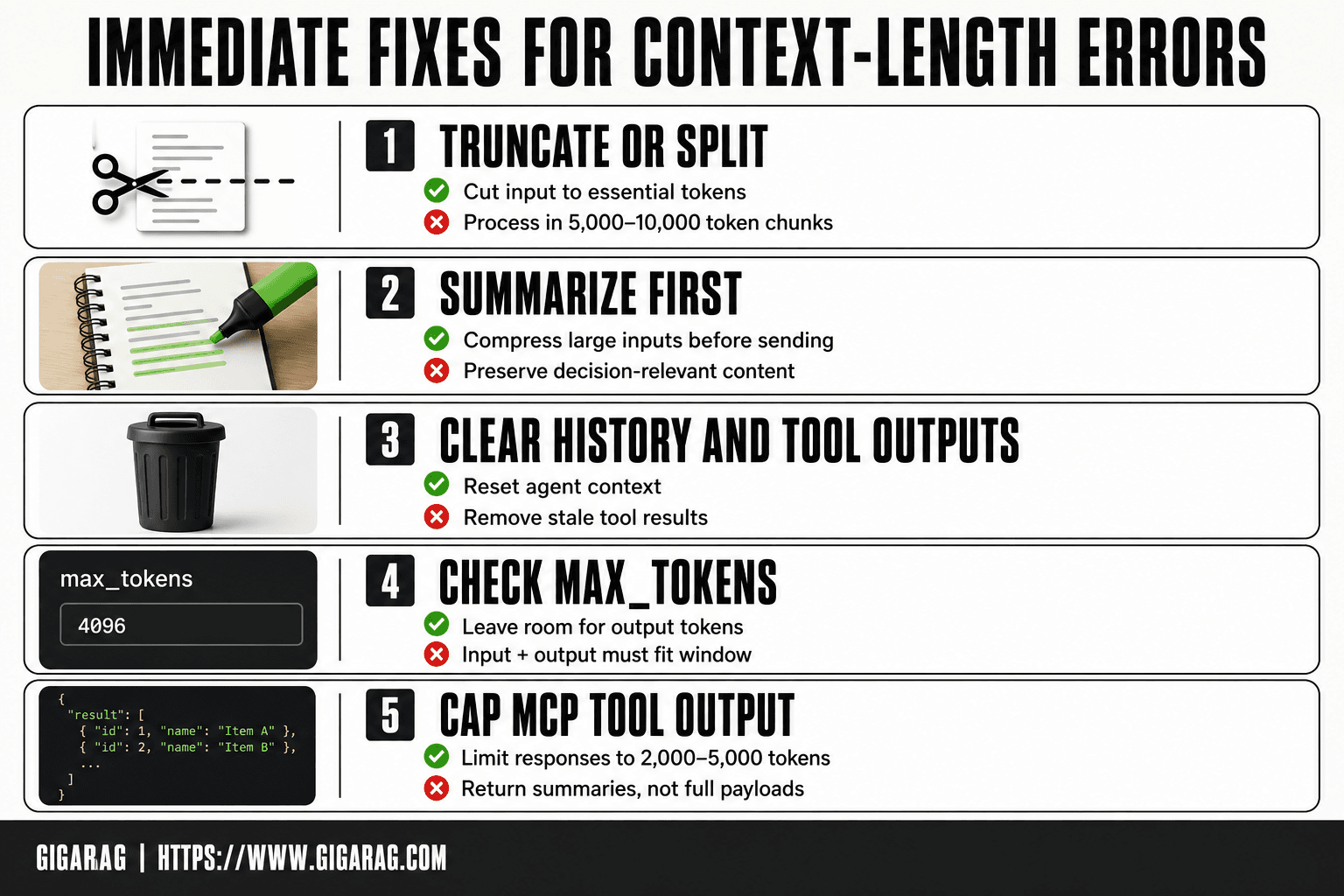
Immediate Fixes: What to Do Right Now
You've hit the error. Your pipeline is down. Here's what actually works, in order of effort.
Truncate or split the input
The fastest fix is the bluntest one: send less. Cut the input to the last N tokens that matter. If you're processing a document, split it into chunks of 5,000 to 10,000 tokens and process each separately. If you're mid-conversation, start a new session and paste only the essential context.
Truncation works because the error is purely about input size. The model never sees what you don't send. The tradeoff is obvious: you lose whatever you cut. So cut from the middle, not the end. The beginning holds instructions. The end holds the current task. The middle is usually filler.
Summarize before sending
When truncation would lose too much, summarize first. Take the large input, run it through a cheaper or faster model, and send the summary instead. A 50,000-token document can often be compressed to 2,000 tokens without losing the decision-relevant content.
This adds a step, but it's a step you control. You decide what the summary keeps. You decide how aggressive the compression is. And the summary itself becomes part of your pipeline, so the next request starts smaller.
Clear conversation history and tool outputs
If you're in an agent loop or a long conversation, the fix might be simpler than you think: clear the accumulated garbage. Start a fresh conversation. Reset the agent's context. Delete the tool outputs that are no longer needed.
Check what's actually in your context before you do anything else. Many agent frameworks let you inspect the current context size. If tool outputs are eating 60% of your budget, clearing them is free. No summarization needed. No chunking needed. Just remove what you don't need.
What does NOT work: retrying, /compact, hoping
Retrying without changing the input will always fail. The model's context window did not grow between your first request and your second. The error is deterministic. Same input, same result.
/compact in Claude Code does not reliably fix this. The command summarizes conversation history, but it doesn't always reduce the input enough, and it can drop critical context in the process. Users have reported hitting the 400 error even after running /compact. Treat it as a maybe, not a fix.
Hoping is not a strategy. The error will not resolve itself.
Platform-Specific Fixes for Claude, Bedrock, and Claude Code
The immediate fixes work everywhere. But each platform has its own failure modes that make the error more likely, or make the standard fixes less effective. Here's what to check on each.
Claude API: max_tokens and input size
When you hit the 400 error on the raw Claude API, check two numbers before anything else: your input token count and your max_tokens setting. The API validates both against the model's context window. If you set max_tokens to 4,096 and your input is already at 190,000 tokens on a 200,000-token model, the request fails even though each number is individually within limits.
The fix is arithmetic. Reduce max_tokens to leave room for your input, or reduce your input to leave room for output. Most people forget that output tokens count against the same window. A request that's 95% input and 5% output fits. A request that's 95% input and 10% output doesn't.
Switching models does not necessarily solve a context-length error. Context limits vary by model and version, so check the specific model's context window before switching. If the replacement model has an equal or smaller context limit, the same input may still fail.
AWS Bedrock: region and model version quirks
Bedrock introduces additional variables such as region, model availability, and model version that can affect how a request is handled. Check that the model you need is available in your chosen region and verify the specific model ID configured for your endpoint.
The applicable context and output limits depend on the specific Claude model and version exposed through Bedrock. Check the model documentation for the exact limits before sending large inputs.
Claude Code CLI: large file reads
Claude Code has a specific bug pattern when reading large files. The CLI loads file contents into context, and when a file exceeds a certain size, the read itself can push the request over the limit. The error appears as a 400, but the root cause is the file read, not your prompt.
The workaround is to read files in sections. Instead of letting the CLI pull an entire 50,000-token file into context, read the specific line ranges you need. If you need the whole file, process it outside Claude Code first: split it, summarize it, or extract the relevant sections. The CLI is a convenience layer, not a context manager.
MCP servers: limiting tool output
MCP servers are a common source of accidental token bloat. A tool that returns a database query result, a file listing, or an API response can dump thousands of tokens into context without you noticing. One tool call returning 30,000 tokens of JSON will blow a budget that was fine a minute earlier.
The fix is to cap tool output at the server level. Most MCP server implementations let you set a maximum response size. Set it to something sane: 2,000 to 5,000 tokens per tool call. If a tool genuinely needs to return more, have it return a summary plus a pointer to the full data, not the full data itself. Your agent doesn't need the entire table. It needs the first ten rows and a count.
Token Budgeting: How to Calculate What Fits
You can't fix this error by guessing. You fix it by knowing your numbers before you send the request. Token budgeting is the difference between a pipeline that runs and one that crashes at 2 a.m.
Tokens per word: a quick approximation
A token is roughly three-quarters of a word in English. A 1,000-word document is about 1,300 tokens. Code, JSON, and structured data run higher: a dense JSON payload can hit 1.5 to 2 tokens per word because of all the brackets, quotes, and field names.
The approximation is good enough for planning, not for precision. When you're near the limit, use a tokenizer. Anthropic's token counting tool gives you the exact number for your specific text. Don't trust the word-count heuristic within 10% of the window.
The formula: input + output should fit within the applicable limits
Total input tokens plus the requested maximum output should fit within the model's applicable context and output limits. Both sides of that equation matter.
If your input is 180,000 tokens and you request 30,000 output tokens on a model with a 200,000-token context limit, the combined budget is 210,000 tokens and may exceed the model's limit. Most people budget for input and forget output exists. Output tokens are not free. They also consume context capacity.
Claude model context window reference
| Model | Context window | Max output |
|---|---|---|
| Claude Haiku 4.5 | 200K tokens | 64K tokens |
| Claude Sonnet 5.5 | 1M tokens | 128K tokens |
| Claude Opus 5.5 | 1M tokens | 128K tokens |
Claude model limits vary by model and version. Context windows and maximum output limits are not uniform across Claude models, so always check the documentation for the specific model you're using before calculating your token budget.
Leaving headroom for agent loops
Agents don't send one request. They send dozens, and each turn adds tokens to the context: the previous response, the tool call, the tool output, the next prompt. A single turn that fits comfortably can become a failure three turns later.
Leave some headroom for agent loops. The amount of headroom you need depends on the model's context window and how much context your agent adds at each turn. For example, on a 200,000-token model, leaving 20% unused would mean starting with no more than 160,000 tokens of input. If your agent runs long loops, leave more.
The honest answer is that budgeting is not a one-time calculation. It's a constraint you check at every turn. When the running total approaches your ceiling, prune, summarize, or stop.
Preventive Architecture: Context Management for Agent Pipelines
Budgeting tells you when you're about to fail. Architecture stops you from getting close. The difference matters: one is a dashboard warning, the other is a design that never triggers it.
Context pruning and summarization layers
The simplest preventive pattern is to stop carrying everything forward. Context pruning drops old turns, stale tool outputs, and finished subtasks from the conversation before the next request. You keep what the agent needs for the current step and discard the rest.
Summarization layers do the same job with less loss. Instead of deleting old context outright, you compress it: every N turns, replace the full history with a summary that preserves decisions, constraints, and open questions. The summary is 5% of the original size. The agent loses verbatim detail but keeps the thread.
The main catch is that pruning and summarization are lossy. An agent that needs exact quotes, exact error messages, or exact file contents from ten turns ago will break if you've compressed them away. Use pruning for transient context and summarization for narrative context. Keep raw data in an external store.
External memory stores for agents
External memory is the architectural fix for context bloat. Instead of holding everything in the conversation window, the agent writes important information to a store outside the model: a vector database, a key-value store, or a document store. When it needs something, it retrieves just that piece.
This changes the failure mode. A conversation window fills up. An external store doesn't. The agent can run a hundred turns, write a thousand observations, and still send only the relevant slice to the model each turn.
The tradeoff is retrieval quality. If the agent can't find what it stored, the memory is useless. You need a retrieval mechanism that matches the agent's query patterns. That's where RAG comes in.
RAG pipelines: retrieve, don't send everything
Retrieval-augmented generation solves the input-too-long problem by inverting it. Instead of sending your entire document set, conversation history, or codebase to the model, you send a query. The pipeline retrieves the chunks most relevant to that query and sends only those.
A RAG pipeline with a 200,000-token context window can work with a corpus containing millions of tokens by retrieving only a relevant subset for each request.The corpus lives in a vector store. The model sees 2,000 to 5,000 tokens of retrieved context per request. The input never approaches the limit because the input is bounded by retrieval, not by corpus size.
The honest answer is that RAG shifts the problem rather than eliminating it. You now have to solve chunking, embedding, and retrieval relevance. A bad retriever returns irrelevant chunks, and the model produces bad answers from good-looking context. RAG can greatly reduce the risk of context-length errors, but it does not eliminate the problem automatically. Retrieval still needs to be bounded and managed.
How GigaRAG fits into this architecture
GigaRAG is an external context store built for agent memory and RAG pipelines. It holds your documents, conversation state, and tool outputs outside the model's context window. Your agent queries it for what it needs, and GigaRAG returns the relevant chunks instead of the full history.
In practice, this can allow an agent to continue operating across many turns without putting its entire accumulated history into the model's context window. Each turn sends a bounded input: the current task, the retrieved context, and the agent's working memory. The rest stays in GigaRAG.
The main catch is that GigaRAG doesn't fix retrieval quality for you. You still need to structure what you store and test what comes back. But if your pipeline is dying on input size, moving context out of the window and into an external store is the architectural fix that actually holds.
What You Cannot Do: Honest Limitations
The previous section covered what works. This one covers what doesn't. Knowing the boundaries saves you from wasting hours on fixes that can't succeed.
You cannot infinitely extend context windows
Context windows are defined by the specific model and version. They are fixed for a given model configuration, but different Claude models can have different context limits. Always check the current documentation for the model you're using.
You generally cannot increase a model's context window beyond the limit defined for that model. If you need more capacity, you can switch to a model with a larger supported context window, but the new limit is still finite.
What you can do is change what you send. That's the entire game: keep the input under the ceiling by pruning, summarizing, retrieving, or storing externally. The window stays fixed. Your input doesn't have to.
You cannot fix this with retries
Retrying the same request with the same input produces the same 400 error. Every time. The API validates your input token count before the model ever runs, so the failure is deterministic.
The error is not transient. It's not a server hiccup, not a rate limit, not a network blip. It's a client-side rejection: your request is too big, and it will be too big on the second attempt and the fiftieth.
The only retry that works is a retry with a different input. Truncate, summarize, split, or retrieve. Then send it again.
You cannot rely on /compact or similar tools
/compact in Claude Code compresses conversation history. It does not reliably fix the 400 input-too-long error. Users report hitting the error even after running /compact, because the compaction itself can produce output that still exceeds the limit, or because the underlying large file read is the problem, not the conversation history.
The same applies to any tool that promises to "compress" or "optimize" your context. These tools reduce token count, sometimes. They don't guarantee you'll land under the model's ceiling, and they don't address the architectural problem of unbounded context growth.
Treat /compact as a temporary bandage, not a fix. If your pipeline depends on compaction to survive, your pipeline is one large input away from breaking again.
Common Mistakes When Fixing 400 Input Is Too Long for Requested Model
Most failed fixes share the same root problem: they treat the symptom instead of the input. You'll save hours by knowing which moves waste time.
Blind truncation without prioritization
Chopping the first N tokens off your input is the fastest way to break your own pipeline. If you cut the system prompt, the model loses its instructions. If you cut the middle of a document, you lose context the answer depends on.
Truncate from the end of the least important content, not the beginning of everything. Conversation history is usually the safest thing to trim first. Tool outputs come second. System prompts and current task instructions should be the last thing you touch.
Switching models without checking limits
Moving from one Claude model to another does not automatically fix a context-length error. Whether it helps depends on the context limit of the specific models involved. Check their current limits before switching.
A model switch can help if the replacement model has a larger applicable context window. Otherwise, reduce the input size regardless of which model you use. Switching for its own sake is a coin flip that usually lands wrong.
Ignoring tool output bloat
Your input isn't just what you typed. It's everything the agent pulled in: file reads, MCP server responses, search results, database queries. A single tool call that returns 50,000 tokens of raw JSON can blow your budget instantly.
Check what your tools are actually returning before you blame the prompt. Cap tool output at the source, or filter it before it enters context.
Treating a design flaw as a bug
The 400 input-too-long error is not a malfunction. It's the API doing exactly what it was designed to do: reject requests that exceed a hard limit. Filing a bug report or waiting for a patch won't change the ceiling.
The fix is architectural. Prune, summarize, retrieve, or store externally. Until you change what you send, the 400 input is too long for requested model error will keep coming back, no matter how many times you retry.
Frequently Asked Questions
What does error code 400 mean in Claude?
A 400 response means the request was malformed or invalid and the server refused to process it. When the message references input length, the cause is that your prompt exceeds the requested model's context window. It is a client-side problem, so changing the request is required.
Why does Claude say my prompt is too long?
Every model has a maximum context window measured in tokens, covering both input and output. If your combined prompt, retrieved documents, and conversation history exceed that limit, the request is rejected. The fix is to reduce or restructure the input.
How do I get rid of 400 bad requests?
Read the error body to identify the specific cause, since 400 covers many validation failures. For input-length errors, trim, chunk, or summarize the payload before retrying. Adding a pre-flight token check prevents the same failure from recurring.
Does this error happen on Bedrock as well as the direct API?
Yes — the same context-window constraint applies regardless of whether you call the model through the direct API, Bedrock, or a CLI tool. The error wording may differ slightly between surfaces, but the underlying cause and fixes are the same.
What does the API error 400 Bad Request mean?
It is a general signal that the server could not process your request due to a client-side issue. Causes include malformed JSON, unsupported parameters, invalid flags, or oversized input. The response body usually names the specific problem.
Can I just increase the context window instead of changing my pipeline?
You can switch to a model with a larger window, but that only raises the ceiling — it does not remove it. Pipelines that append unbounded history or documents will eventually hit the new limit too. Bounded context design is the durable solution.
How do I prevent this error in a RAG pipeline?
Budget tokens explicitly: cap retrieved chunks, summarize conversation history, and validate total input size before each call. Retrieval should return only the most relevant passages rather than entire documents. This keeps every request within the model's limit by design.
About GigaRAG
GigaRAG is for agent memory and RAG pipeline builders. get this right. Whether you are working through 400 input is too long for requested model or something adjacent, we publish what we have actually tested, including where it falls short.


