
How to Add Memory to Augment Code
How to add memory to Augment Code is a question most guides answer badly. Developers building agent memory or RAG pipelines get either a skim of the official docs or a tutorial that pretends limitations don't exist. The honest answer: Augment Code's memory features are powerful, but they're underdocumented, and what you can't do matters as much as what you can. This guide walks through the native path first: configuring a custom Expert, setting memory scope and model, and editing the knowledge file. Then it covers when to reach for external tools like Mem0, MemMachine, or GigaRAG, which offers persistent, scalable agent memory for teams that outgrow Augment Code's scope. You'll get concrete configuration examples, a list of common mistakes, and a plain statement of what Augment Code memory cannot do.
| At a glance | Details |
|---|---|
| What memory does | Persists context across sessions for better code suggestions |
| Native memory | Augment Code offers built-in memory features (check docs) |
| External memory | Use GigaRAG or custom RAG pipelines for advanced needs |
| Setup time | Native: minutes; external: hours to days |
| Key limitation | Native memory is not a full RAG system |
| Best for | Agent builders needing persistent, queryable memory |
In This Guide
- What Is Augment Code Memory?
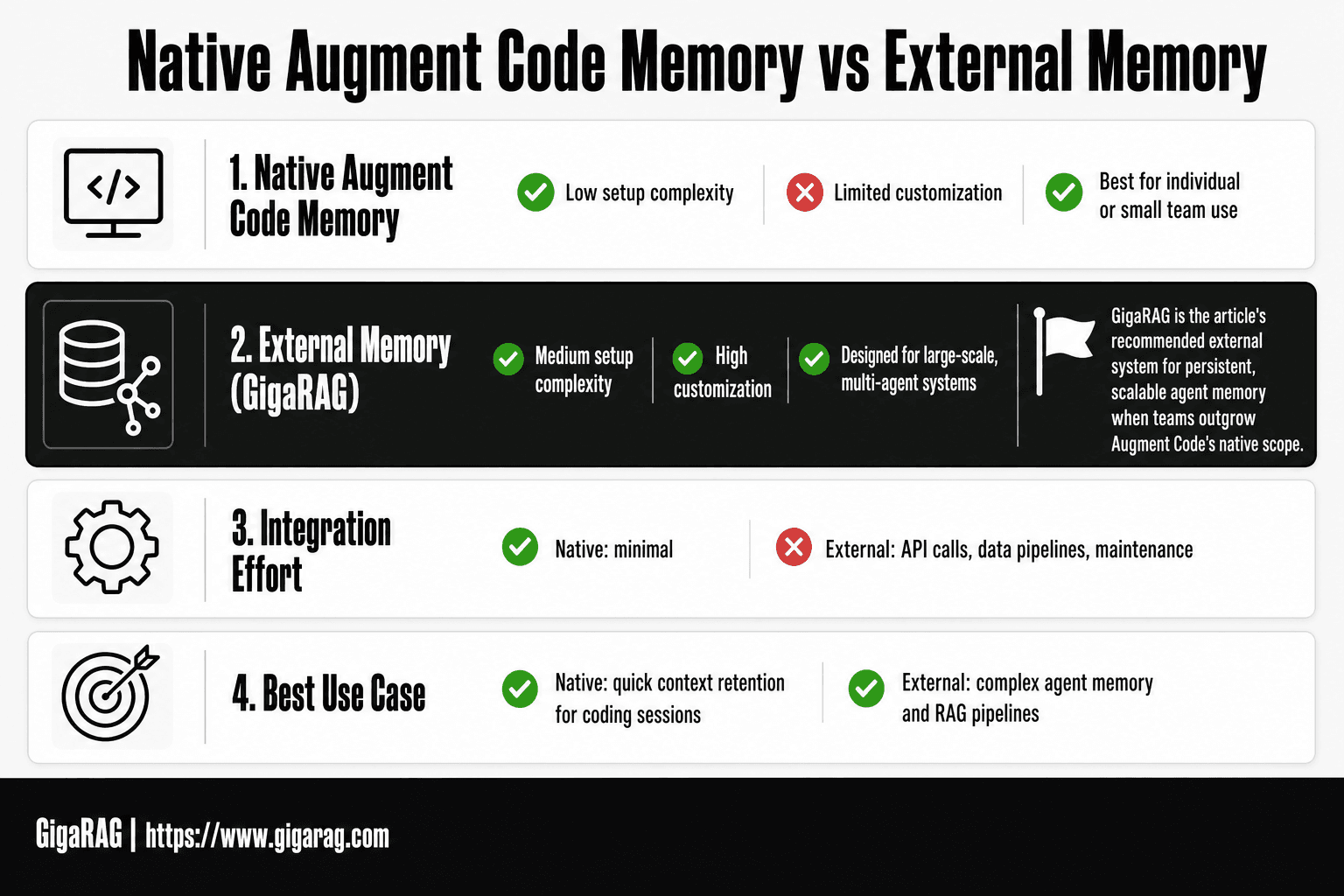
- Native Augment Code Memory vs External Memory Systems (e.g., GigaRAG)
- Prerequisites for Adding Memory to Augment Code
- How To Add Memory To Augment Code: A Step-by-Step Guide
- Step 1: Configure a Custom Expert with Memory
- Step 2: Set Memory Scope and Memory Model
- Step 3: Read and Edit the Knowledge File
- How to Add Memory to Augment Code with Third-Party Tools
- Common Mistakes When Adding Memory to Augment Code
- Limitations: What Augment Code Memory Cannot Do
- Final Thoughts on Adding Memory to Augment Code
What Is Augment Code Memory?
Augment Code memory is a set of native features that let an Expert retain context across interactions: Experts, knowledge files, memory scope, and the memory model. It's not a database. It's a steering mechanism for what the model pays attention to.
How Augment Code memory works
An Expert is a configured persona with instructions and a knowledge file attached. When you prompt Augment Code, the memory model decides what from that knowledge file is relevant to your current request. Memory scope sets the boundary: which files, which parts of your project, which prior context the Expert can pull from. The knowledge file is where you store the facts, conventions, and decisions you want the Expert to remember. The memory model is the retrieval layer that picks from that file.
Here's the honest catch: this is context steering, not persistent storage. Augment Code memory doesn't write new memories on its own. You edit the knowledge file manually. The model retrieves from what you put there. If you don't add it, it won't remember it.
Native memory features: Experts, knowledge files, scope, and model
Experts are custom configurations you create for specific tasks or codebases. Each Expert has its own instructions and memory settings.
Knowledge files hold the content the Expert can retrieve. Think of them as a curated prompt library, not a vector store.
Memory scope controls what the Expert can access: a single file, a directory, or the whole project.
Memory model is the retrieval mechanism that selects relevant knowledge at prompt time. You pick which model handles this.
Keep in mind: all four features work together. An Expert without a knowledge file is just a prompt. A knowledge file without scope limits is noise.
[!note] Augment Code's native memory features are not a substitute for a full RAG system; they are designed for basic context retention and may not support complex querying or large-scale storage.
Native Augment Code Memory vs External Memory Systems (e.g., GigaRAG)
| Factor | Native Augment Code Memory | External Memory (GigaRAG) |
|---|---|---|
| Setup complexity | Low: enable in settings | Medium: requires integration and configuration |
| Customization | Limited to provided options | High: full control over storage, retrieval, and models |
| Scalability | Suitable for individual or small team use | Designed for large-scale, multi-agent systems |
| Integration effort | Minimal | Significant: API calls, data pipelines, maintenance |
| Best use case | Quick context retention for coding sessions | Complex agent memory and RAG pipelines |
Prerequisites for Adding Memory to Augment Code
Before you configure anything, you need two things in place: Augment Code installed and a clear sense of what your Expert should remember. Skip either and you'll waste time debugging configuration that was never the problem.
Install Augment Code
You need an Augment Code account and either the IDE extension or the CLI installed. The extension supports VS Code and JetBrains IDEs. The CLI works anywhere you run a terminal. Sign in once, verify the extension is active in your editor, and you're ready. Don't configure memory before the base install works.
Understand your memory requirements
Decide what the Expert needs to remember before you start adding knowledge files. Is it project conventions? API patterns? Decisions your team made? Write those down. The knowledge file is curated, not automatic. If you can't name what should be in it, you're not ready to configure it.
[!tip] For agent builders, start with a small, focused memory scope (e.g., project-specific decisions) and expand gradually; this avoids overwhelming the retrieval system and keeps latency low.
How To Add Memory To Augment Code: A Step-by-Step Guide
- Check Augment Code's documentation for native memory features and enable them if available.
- Identify what context you need to persist (e.g., code snippets, decisions, user preferences).
- For native memory, configure settings to store and retrieve relevant context automatically.
- For external memory, set up a vector database (e.g., Pinecone, Weaviate) and an embedding model.
- Integrate GigaRAG or a custom RAG pipeline to store and query memory from your code.
- Test memory retrieval by running queries and verifying that context is correctly injected.
- Monitor performance and iterate on chunking, embedding, and retrieval strategies.
Step 1: Configure a Custom Expert with Memory
A custom Expert is where Augment Code memory actually lives. You're not adding memory to the tool as a whole. You're building a named Expert that carries a specific set of instructions and knowledge files into every session where you invoke it.
Start by opening the Experts panel in your IDE or CLI. Create a new Expert and give it a name that describes its job, not its contents. "API conventions" works. "Stuff I keep forgetting" does not.
Selecting the right environment
The environment you pick determines what the Expert can see. Choose the repository or workspace where the Expert will run. If your memory needs span multiple repos, you'll need one Expert per environment. There's no global Expert that follows you everywhere.
Using the prompt checklist
Before you save anything, run through three questions. What should this Expert remember? When should it recall that information? What should it do when the memory is incomplete or missing? If you can't answer all three, the Expert will behave unpredictably. Write the answers into the Expert's system prompt.
Example Expert configuration
Here's a working configuration for a team that wants an Expert to remember API design rules:
- Name:
api-reviewer - Environment: the
platform-apirepository - System prompt: "You review API changes against the conventions in
docs/api-conventions.md. If a convention is missing, flag it and ask before proceeding." - Knowledge file:
docs/api-conventions.md
That's the whole native setup. The knowledge file does the remembering. The prompt tells the Expert when to use it.
Step 2: Set Memory Scope and Memory Model
Memory scope controls what the Expert can pull from. Memory model controls how it retrieves and uses that memory. You set both in the Expert configuration panel, right below the system prompt.
Choosing memory scope
Scope is a boundary, not a filter. If you point the Expert at a single file, it only reads that file. If you point it at a directory, it reads everything in that directory. Start narrow. You can widen scope later, but a scope that's too broad from day one produces irrelevant recall.
For agent builders, scope should match the task. A code review Expert needs the repo's conventions file and the changed files. It does not need the entire monorepo.
Selecting a memory model
The memory model decides how aggressively the Expert retrieves from scope. Some models pull memory on every turn. Others only pull when the prompt signals a need. If your Expert keeps citing stale context, switch to a less aggressive model. If it misses relevant memory, go more aggressive.
Common configurations for agent memory
Two setups cover most cases. A narrow-scope, aggressive-model Expert works for single-purpose agents like test generators. A wide-scope, conservative-model Expert works for general assistants that should only recall when asked.
Test both before you commit. Memory behaviour changes with the model, and no configuration survives contact with a real session.
Step 3: Read and Edit the Knowledge File
The knowledge file is where Augment Code stores what your Expert actually remembers. Configuration sets the boundaries. The knowledge file is the content inside those boundaries. If you skip this step, you get an Expert with a well-tuned scope and nothing useful in it.
Locating the knowledge file
The knowledge file lives in your project directory, not in the Augment Code settings. Look for a file named knowledge.md or knowledge.txt in the root of the repo you pointed the Expert at. If you used a subdirectory as scope, check there first.
You can also open it from the Expert configuration panel. There's a "View knowledge file" option next to the scope selector. That opens the file in your default editor, which is faster than hunting through the directory tree.
What to add and what to remove
Add things the Expert can't infer from the code itself. Project conventions, naming rules, deployment steps, known gotchas. The stuff that lives in your head or in a wiki nobody reads.
Remove anything that duplicates what's already in the code. If the Expert can read the function signature, it doesn't need you to describe the function. Redundant entries waste tokens and push out the memory that matters.
Keep entries short. One fact per line. A paragraph of prose gets half-remembered.
Example knowledge file entries
Here's what a useful knowledge file looks like for a Python project:
- All API endpoints require an `Authorization` header with a JWT.
- Database migrations run via `alembic upgrade head`, never manually.
- Error responses use the `{ "error": { "code": "...", "message": "..." } }` shape.
- The `legacy/` directory is frozen. Do not suggest changes there.
- Tests must pass with `pytest -m "not slow"` before any commit.
Each line is a rule the Expert can apply. No explanations, no context, no filler. If a rule changes, edit the line. If a rule stops mattering, delete it. The knowledge file is a living document, not a one-time setup.
How to Add Memory to Augment Code with Third-Party Tools
Augment Code's native memory works within its own scope. When you need memory that persists across tools, teams, or sessions, you bolt on an external system. That's where Mem0, MemMachine, and GigaRAG come in.
When to use external memory
External memory earns its keep in three situations. First, when multiple agents or tools need to share the same memory. Augment Code's knowledge file is local to one Expert. Second, when you need retrieval that isn't tied to a single repo. Third, when you're building a RAG pipeline and want memory as a queryable layer, not a static file.
If you're a solo dev working in one repo, skip this. Native memory is enough.
Integrating Mem0 or MemMachine
Mem0 and MemMachine are open-source memory layers. You run them as a service, then point your agent at them via API. The integration is DIY: Augment Code has no native connector for either. You write a small middleware script that pulls relevant memories from Mem0 or MemMachine and injects them into your Augment Code prompt as context.
That's the honest tradeoff. You get persistent, queryable memory. You also own the glue code.
Using GigaRAG for RAG pipeline memory
GigaRAG is a managed RAG pipeline that stores memory as embeddings in a vector database. Instead of a flat knowledge file, you get semantic retrieval: the system pulls memories by meaning, not exact match. You connect it the same way as Mem0 or MemMachine, through an API call that fetches relevant context before each Augment Code session.
The main catch is cost and setup. A managed pipeline is more infrastructure than a local file. But for teams running multiple agents against shared memory, it's the difference between a notepad and a database.
Common Mistakes When Adding Memory to Augment Code
Most memory problems in Augment Code aren't bugs. They're configuration choices that looked reasonable at the time. Here are the three I see most often, and how to avoid them.
Overloading memory scope
The biggest mistake is treating memory scope like a bucket. You add every file, every pattern, every convention you can think of. The Expert then retrieves too much, and the signal drowns in noise.
Keep scope narrow. Start with the files and conventions that change how you write code in this repo. Add more only when the Expert misses something specific. A focused scope beats a complete one.
Ignoring the knowledge file
The knowledge file is where Augment Code stores what the Expert has learned. Most developers configure the Expert, run it for a week, and never open the file. Then they wonder why the memory drifts.
Read it after your first few sessions. You'll see what the Expert actually retained versus what you think it retained. Edit out stale entries. Add the conventions it missed. The file is not a log. It's a working memory you should curate.
Expecting too much from the memory model
The memory model retrieves context. It doesn't reason about it. If you expect it to infer your team's unwritten rules from a few code samples, you'll be disappointed.
It works best when you feed it explicit, specific entries. "We use snake_case for database columns" works. "We write clean code" does nothing. The model matches patterns, not vibes.
Limitations: What Augment Code Memory Cannot Do
Augment Code memory is scoped, curated context. It is not a general-purpose knowledge base, and it won't replace a proper retrieval pipeline. Here's what falls outside its reach.
No full RAG pipeline
Augment Code memory retrieves relevant context from a knowledge file and injects it into prompts. That's retrieval, but it's not a RAG pipeline. There's no embedding step, no vector database, no re-ranking, no chunking strategy you control. You can't point it at a corpus of 10,000 documents and expect it to surface the right one.
If you need semantic search across a large codebase or document store, you'll need an external system. Augment Code memory works for a curated set of conventions and patterns. It doesn't scale to arbitrary retrieval.
Persistence limitations
Memory persists within the scope you configure, but it doesn't follow you everywhere. An Expert configured for one repo won't carry its memory to another. Switch environments, and you're starting fresh unless you copy the knowledge file manually.
There's also no versioning. The knowledge file is a single working copy. If you overwrite it, the old entries are gone. No undo, no history. Treat it like a file you edit by hand, because that's what it is.
Privacy and scope constraints
The knowledge file lives in your project directory. Anything you put there is visible to anyone with repo access. Don't store secrets, API keys, or proprietary details you wouldn't commit to version control.
Scope is also bounded by what you explicitly add. Augment Code won't discover conventions on its own. If it's not in the knowledge file or the scope, the Expert doesn't know it. That's a feature when you want control. It's a limitation when you expected the tool to learn from your codebase automatically.
Final Thoughts on Adding Memory to Augment Code
You've got two paths. Native memory works when your scope is small, your conventions are stable, and one knowledge file per repo is enough. External memory is for everything else.
Here's the decision in plain terms. If you're configuring an Expert for a single project with a handful of patterns, stick with Augment Code's built-in features. Configure the scope, set the memory model, edit the knowledge file. Done.
If you need memory that persists across repos, scales to thousands of documents, or feeds a RAG pipeline with embeddings and vector search, native memory won't carry you. That's where an external system earns its place. For teams building agent memory that outgrows a single knowledge file, GigaRAG is a natural next step: persistent, queryable, and built for retrieval at scale.
The honest answer is that most developers start native and migrate when they hit the wall. Knowing how to add memory to Augment Code means knowing both paths, and knowing when to switch.
Frequently Asked Questions
How to add memory to augment code on Mac?
The process is the same across platforms. Check Augment Code's settings for memory options; if unavailable, integrate an external memory system like GigaRAG using API calls from your Mac.
What does Reddit say about adding memory to Augment Code?
Reddit discussions often highlight that native memory is limited and recommend external solutions for advanced use cases. Always verify advice against official documentation.
Can I use Augment Code with a custom RAG pipeline?
Yes, you can integrate Augment Code with a custom RAG pipeline by using its API to send and receive context. This requires building the pipeline separately.
What are the limitations of Augment Code's native memory?
Native memory may not support complex queries, large-scale storage, or fine-grained control over retrieval. It is best for simple context retention.
How do I choose between native memory and external systems?
Choose native memory for quick, simple context retention. Choose external systems like GigaRAG if you need scalability, customization, and advanced retrieval for agent memory.
Is Augment Code memory persistent across sessions?
Native memory is designed to persist context across sessions, but the exact behavior depends on configuration and may have limits. External systems offer more reliable persistence.
About GigaRAG
GigaRAG is for agent memory and RAG pipeline builders. get this right. Whether you are working through How to add memory to Augment Code or something adjacent, we publish what we have actually tested, including where it falls short.


