
How to Add Memory to Continue.dev
How to add memory to Continue.dev starts with admitting the obvious: your coding assistant forgets everything the moment the session ends. That conversation about your vector database schema? Gone. The project conventions you spent twenty minutes teaching it? Reset to zero. For developers building RAG pipelines and agent memory systems, this isn't an inconvenience. It breaks the workflow. You need an assistant that remembers project context, coding standards, and retrieval patterns across sessions, not one that starts fresh every morning.
The good news is you have options. Continue.dev offers native memory through .continue/rules/ and context providers, and third-party MCP servers like MemNexus can add persistence on top. GigaRAG takes a different route entirely, building persistent agent memory directly into the RAG pipeline rather than bolting it onto a coding assistant. But before you choose, you need to know what each approach can actually do, and what it can't.
| At a glance | Details |
|---|---|
| Native memory | Rules files and context providers, no chat history |
| Rules location | .continue/rules/ in your project root |
| MCP support | Yes, via Model Context Protocol servers |
| Cross-session chat memory | Not built in natively |
| Best for RAG builders | MCP server plus rules files combined |
| Setup effort | Low for rules, moderate for MCP |
In This Guide
- What Is Continue.dev and How Does Memory Work?
- Native .continue/rules/ vs MCP Server Memory
- Prerequisites: What You Need Before Adding Memory
- How To Add Memory To Continue.dev: A Step-by-Step Guide
- Native Memory: Using .continue/rules/ for Persistent Instructions
- Context Providers: Extending Continue.dev's Memory with External Data
- Third-Party Memory: Setting Up MemNexus MCP Server with Continue.dev
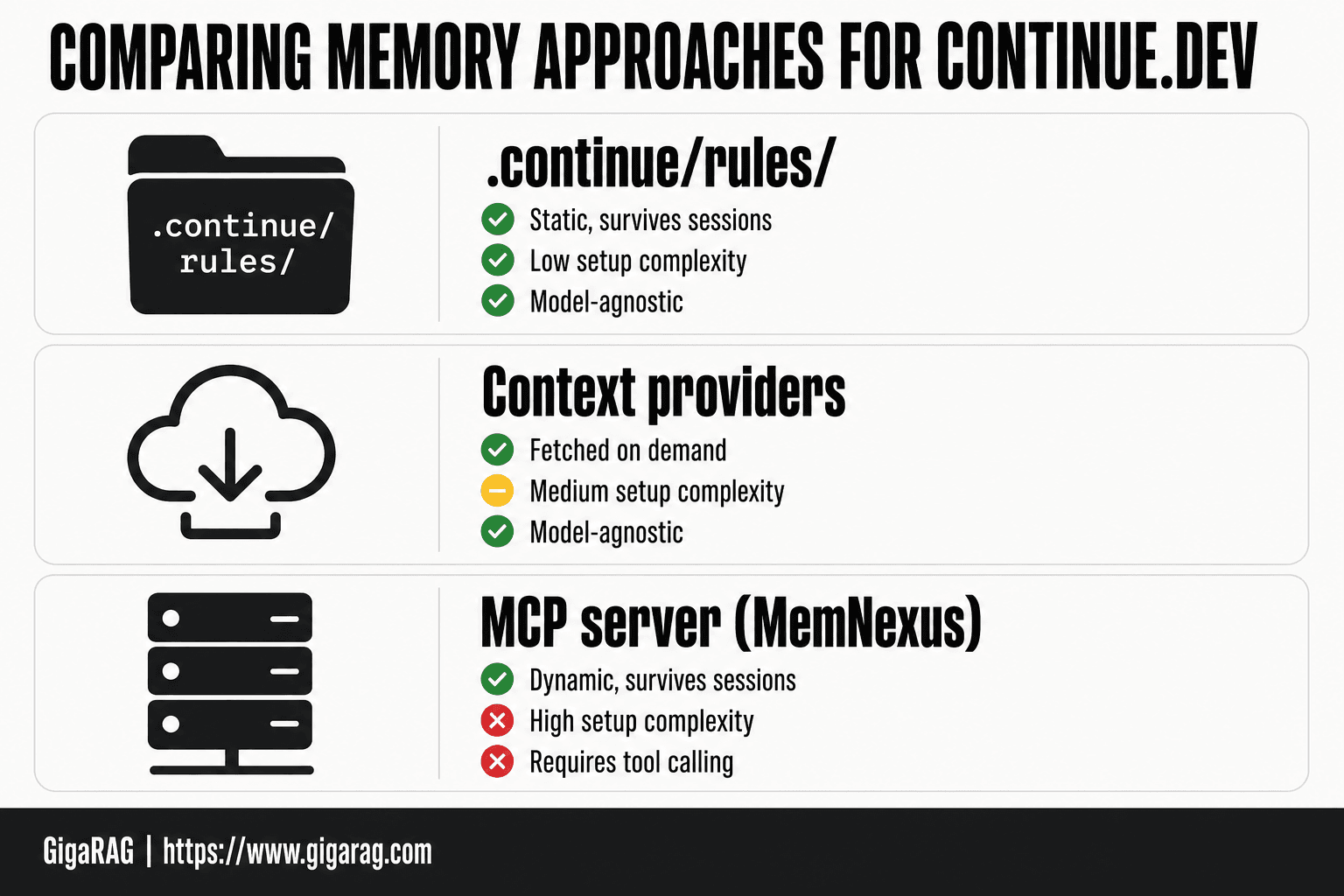
- Comparing Memory Approaches: Native Rules vs Context Providers vs MCP Servers
- How to Add Memory to Continue.dev for RAG Pipeline Builders
- Limitations and Troubleshooting: What Memory Cannot Fix
- Implementation Checklist: Your Complete Memory Setup Reference
- Final Thoughts: Choosing the Right Memory Strategy for Your Workflow
What Is Continue.dev and How Does Memory Work?
Continue.dev is an open-source AI coding assistant that runs as an extension inside VS Code, JetBrains IDEs, and Neovim. You point it at any model you want: OpenAI, Anthropic, local models through Ollama, or a custom endpoint. It handles autocomplete, chat, and code edits from your editor.
Continue.dev's session-based architecture
Here's what happens behind the scenes. Continue.dev builds a context window fresh each time you start a session. It pulls in your open files, your cursor position, any rules you've configured, and whatever context providers you've enabled. Then it sends that bundle to the model.
The session ends. The context window is gone.
Why memory resets every session
Continue.dev does not store conversation history by default. Nothing persists between sessions unless you explicitly configure it to. That's not a bug. It's the architecture: stateless by design, with persistence left to you.
The good news is you have three levers to pull. Native rules files persist instructions. Context providers inject external data. MCP servers like MemNexus add actual cross-session memory.
What "memory" means for RAG pipeline builders
If you build retrieval-augmented generation systems, you already know the distinction. Memory is not the same as retrieval. Retrieval fetches relevant chunks from a vector store at query time. Memory means the assistant remembers what happened before, your preferences, your project conventions, without you re-explaining them.
Continue.dev gives you retrieval through context providers. It gives you persistence through rules and MCP servers. It does not give you a built-in memory layer. You build that yourself.
[!note] Continue.dev does not natively persist chat history across sessions; any cross-session memory requires an external store such as an MCP server or a custom context provider. Rules files are loaded fresh each session and are not a substitute for conversation memory.
Native .continue/rules/ vs MCP Server Memory
| Factor | Native .continue/rules/ | MCP Server Memory |
|---|---|---|
| Persistence | Static files, always loaded | Dynamic, stored externally and queried |
| Setup complexity | Low, just markdown files | Moderate, requires server config and JSON |
| Cross-session chat history | Not supported | Possible if server stores it |
| Best use case | Project conventions and coding standards | Agent memory and RAG pipeline context |
| Maintenance | Manual edits | Server-managed, can auto-update |
Prerequisites: What You Need Before Adding Memory
Before you touch a rules file or wire up an MCP server, make sure Continue.dev actually runs. Most memory setup failures aren't memory problems. They're install problems.
Installing Continue.dev in VS Code, JetBrains, or Neovim
VS Code is the fastest path. Open the Extensions panel, search "Continue", install, and restart. JetBrains users grab the plugin from the marketplace inside the IDE. Neovim takes more work: you need the plugin installed through your package manager, plus a running Continue server.
Make sure you pick the right model before you go further. Local models through Ollama work fine for memory testing, but they're slower. A hosted model like Claude or GPT-4o will make iteration less painful.
Verifying your config.json is working
Open Continue's config file. In VS Code, hit Cmd+Shift+P and type "Continue: Open config.json". You should see a JSON file with a models array and a tabAutocompleteModel field.
Test it. Open a chat, type "hello", and send. If you get a response, your config is valid. If you get an error, the problem is your model endpoint or API key, not memory.
Understanding your current context provider setup
Context providers are already running, whether you know it or not. Continue.dev ships with defaults: files, code, and docs providers. Check the context array in your config.json to see what's active.
The honest answer is you don't need to change any of this yet. But you need to know it exists, because memory layers build on top of context providers. If your context setup is broken, your memory setup will be too.
[!tip] For RAG pipeline builders, keep your retrieval logic and embedding config in .continue/rules/ so every session starts with accurate pipeline context, then use an MCP server only for dynamic memory like past decisions or experiment results.
How To Add Memory To Continue.dev: A Step-by-Step Guide
- Create a .continue/rules/ directory in your project root
- Add markdown rule files describing project conventions and context
- Verify rules load by checking Continue.dev's context in a chat
- Install or build an MCP server that stores and retrieves memory
- Register the MCP server in your Continue.dev config.json
- Test cross-session recall by restarting Continue.dev and querying stored context
- Document what memory persists and what resets for your team
Native Memory: Using .continue/rules/ for Persistent Instructions
Continue.dev's .continue/rules/ directory is the only native way to persist instructions across sessions. It injects static text into every prompt, so your coding standards and project context survive a restart. It does not store conversation history.
Creating and configuring .continue/rules/ files
The rules directory lives inside your project's .continue folder. If you don't have one yet, create it at the root of your repo, right next to your config.json. Inside, add a rules subdirectory. Any file you drop in there gets loaded automatically.
Start with one file. Name it something obvious: coding-standards.md or project-context.md. The name doesn't matter to Continue.dev, but it matters to you when you come back in six months and need to edit it.
Write plain markdown. No special syntax, no frontmatter, no JSON. Whatever you type gets appended to the system prompt on every request. Here's a minimal example:
Always use TypeScript strict mode.
Never use `any` without a comment explaining why.
Prefer function declarations over arrow functions for exported utilities.
That's the whole setup. Save the file, restart Continue.dev, and the rules are live. No config.json changes needed.
What rules can persist: coding standards, project context, preferences
Rules are static text. That's both their strength and their ceiling. They persist anything you can write down once and reuse forever.
Coding standards are the obvious use case. Naming conventions, import order, error handling patterns, test requirements. Put them in rules and you never have to repeat them in chat.
Project context works too. Architecture decisions, file structure explanations, which modules are deprecated, where the tricky code lives. A RAG pipeline builder might store their embedding model choice, vector database schema, and chunking strategy so every session starts with that context loaded.
Preferences are the third category. Output format, language, tone, how verbose you want responses. These are personal, but they belong in rules if you want them applied consistently.
The good news is rules are cheap. You can have dozens of files and Continue.dev loads them all. The main catch is that they're static. You edit them by hand, and they don't update themselves.
What rules cannot do: no conversation history, no dynamic memory
Here's what rules won't do, stated plainly. They don't store conversation history. Close a session and every exchange is gone. Rules don't remember what you asked yesterday, what bug you were debugging, or what solution you settled on.
They also don't do dynamic memory. Rules can't learn from your interactions, can't update themselves based on what worked, can't pull in new context automatically. If you want Continue.dev to remember something, you have to write it into a rules file yourself.
That's the honest limitation. Rules are a notepad, not a memory. They persist what you explicitly write down, and nothing else. For RAG pipeline builders who need actual conversation recall or adaptive context, rules alone won't cut it. You'll need context providers or an MCP server for that.
Context Providers: Extending Continue.dev's Memory with External Data
Rules are a notepad. Context providers are a feed. They pull data from outside sources and inject it into the prompt at request time, so your context window carries more than what you typed by hand.
What context providers are and how they work
A context provider is a plugin that fetches data when Continue.dev builds a prompt. You type @ in the chat input and pick a provider. Continue.dev runs the provider, grabs the data, and stuffs it into the context window before the model sees your message.
The built-in providers cover files, folders, terminal output, and URLs. You can also write custom providers that query a database or hit an API. For RAG pipeline builders, that's the useful part: a custom provider can pull chunks from your vector store and inject them as context, no manual copy-paste needed.
Configuring file-based context providers
File-based providers work out of the box. Type @ in chat, select "Files", and pick the file you want. Continue.dev loads its contents into context. No config.json changes required.
For folders, select "Folders" and pick a directory. Continue.dev indexes it and lets you reference specific files inside. The main catch is size. A large folder can blow past your context window fast, so pick narrowly.
Using context providers for RAG pipeline data
Here's where context providers earn their keep. Write a custom provider that queries your vector database, returns the top-k chunks for a given query, and injects them as context. Your model gets retrieval results without leaving Continue.dev.
The honest limitation: context providers are pull-based. They fetch data when you ask. They don't persist anything between sessions, and they don't learn from what you retrieve. You're building the retrieval step yourself, which means writing and maintaining the provider code.
That's the tradeoff. Context providers give you a native hook for external data, but the memory part is still on you. For actual persistence across sessions, you need an MCP server.
Third-Party Memory: Setting Up MemNexus MCP Server with Continue.dev
Context providers fetch data when you ask. They don't remember anything. For actual persistence across sessions, you need a server that stores state outside Continue.dev's session lifecycle. MemNexus is one option.
What MemNexus is and why it solves the memory problem
MemNexus is an MCP server that stores conversation history and project context in a database, then exposes it back to Continue.dev through the Model Context Protocol. The key difference from rules and context providers: MemNexus writes data, not just reads it.
Here's what happens behind the scenes. When you chat with Continue.dev, MemNexus intercepts the conversation and saves it. On your next session, it loads that history and injects it into the prompt. You get continuity without manually copying anything.
The honest answer is that MemNexus solves one specific problem: session reset. It doesn't make your model smarter, and it doesn't learn preferences on its own. It just remembers what happened last time.
Step-by-step MCP server configuration in Continue.dev
Start by installing MemNexus. The server runs locally or on a remote host, and you'll need its MCP endpoint URL before touching Continue.dev.
Open your Continue.dev config.json. Add an mcpServers block if you don't have one:
{
  "mcpServers": {
    "memnexus": {
      "command": "npx",
      "args": ["-y", "memnexus-mcp-server"],
      "env": {
        "MEMNEXUS_DB_PATH": "~/.memnexus/memory.db"
      }
    }
  }
}
Save the file and restart Continue.dev. The MCP server should appear in your available tools.
Make sure you test the connection before relying on it. Type a message, then check whether MemNexus logged it. If the server doesn't start, check the command path and database directory permissions.
Verifying persistence across sessions
The test is simple. Start a session, tell Continue.dev a specific fact about your project, then close the session entirely. Open a new session and ask about that fact.
If MemNexus is working, the model references what you told it. If it doesn't, the server didn't save or didn't load. Check the MemNexus logs first, then verify the MCP server is actually running in Continue.dev's tool list.
Keep in mind that persistence depends on the database file surviving between sessions. If you're running MemNexus in a container or ephemeral environment, the memory dies with the container. Store the database on a persistent volume.
The main catch: MemNexus adds latency to every request. The server has to read and write on each turn, which slows things down. For most RAG pipeline work, the tradeoff is worth it. For quick one-off questions, it isn't.
Comparing Memory Approaches: Native Rules vs Context Providers vs MCP Servers
You've now seen three ways to give Continue.dev memory. They solve different problems, and picking the wrong one wastes setup time. Here's the honest breakdown.
Comparison table: persistence, complexity, cross-model support
| Approach | Persistence | Setup complexity | Cross-model support | Writes data? |
|---|---|---|---|---|
| .continue/rules/ | Static, survives sessions | Low | Full, model-agnostic | No |
| Context providers | Fetched on demand | Medium | Full, model-agnostic | No |
| MCP server (MemNexus) | Dynamic, survives sessions | High | Depends on MCP support | Yes |
Rules and context providers work with any model because they just inject text into the prompt. MCP servers require the model to support tool calling, which most modern models do but not all local ones.
When to use .continue/rules/ alone
Use rules alone when your memory needs are static. Coding standards, project conventions, preferred libraries, things that don't change between sessions. Rules cost nothing to maintain and never break.
The main catch: rules don't adapt. If your project changes, you edit the file manually. For a solo developer working on a stable codebase, rules are enough. Don't add complexity you don't need.
When to add context providers
Add context providers when you need fresh data, not remembered data. If your RAG pipeline pulls from files, URLs, or a database that changes frequently, context providers fetch the current state every time. That's not memory in the strict sense, but it keeps the model grounded in reality.
The tradeoff: context providers add latency per request, and you configure each source separately. Worth it when the alternative is stale information.
When to adopt an MCP server like MemNexus
Adopt an MCP server when you need conversation continuity across sessions. If you're building agent memory systems where the model must remember what you discussed yesterday, rules and context providers can't do it. MemNexus writes state, which is the only approach here that does.
The cost is real: setup complexity, ongoing latency, and a dependency on tool calling. For RAG pipeline builders who need persistent agent memory, it's the only option that actually works. For everyone else, start with rules and add context providers only when you hit a wall.
How to Add Memory to Continue.dev for RAG Pipeline Builders
RAG pipeline builders hit a specific wall with Continue.dev: the assistant resets every session, so retrieval context you tuned yesterday is gone today. The fix isn't one memory feature. It's a stack of three, used together.
Connecting Continue.dev memory to your RAG pipeline
Your RAG pipeline has two memory surfaces: the retrieval index and the prompt assembly layer. Continue.dev touches the second one. Rules inject static retrieval instructions into every prompt. Context providers fetch live data from your vector database or document store on demand. An MCP server like MemNexus writes conversation state that survives sessions.
In practice, wire them in order. Start with rules that tell the model how to use retrieved chunks: citation format, deduplication rules, when to discard low-relevance results. Then add a context provider that pulls your top-k chunks into the context window before generation. MemNexus goes last, once you need the model to remember which chunks worked last session.
Using memory to improve retrieval context
The honest answer: Continue.dev memory doesn't improve retrieval itself. It improves what the model does with retrieved context. Rules keep your chunk-handling instructions consistent. Context providers ensure the chunks are fresh. MemNexus lets the model recall which sources you trusted last week, so it can weight current results accordingly.
Don't expect Continue.dev to tune your embeddings or re-rank results. It won't. That's your pipeline's job. What it will do is stop the model from re-asking you which retrieval settings you prefer every session.
Agent memory patterns with Continue.dev
Agent memory in Continue.dev follows a simple pattern: static instructions in rules, dynamic data in context providers, conversational state in MemNexus. For a RAG agent that answers questions about your codebase, rules hold the retrieval policy, context providers hold the current chunks, and MemNexus holds the thread of what you've already tried.
The main catch: none of this is automatic. You configure each layer separately, and the model only uses what you explicitly inject. If a rule isn't loaded, it doesn't exist. If a context provider isn't configured, the chunks don't appear. Memory in Continue.dev is opt-in at every level.
Limitations and Troubleshooting: What Memory Cannot Fix
Memory in Continue.dev is a prompt-engineering layer, not a brain. It injects text into context. It doesn't learn, and it doesn't follow you across tools.
What memory cannot fix: cross-tool persistence, true long-term learning
Rules, context providers, and MemNexus all live inside Continue.dev. Open the same project in Cursor or a terminal-based agent, and none of that memory travels with you. There's no shared memory bus between coding assistants.
True long-term learning is also off the table. The model doesn't update its weights based on your sessions. It can't get better at your codebase over time. What you get is recall: the same instructions and context re-injected each session. That's useful, but it's not learning.
Common configuration errors and how to resolve them
The most frequent failure is a rules file that never loads. Check the path: it must be .continue/rules/ at your project root, not in a subfolder. Then check the file extension. Continue.dev reads .md and plain text files. A .txt file works; a .yaml file in the rules directory does nothing.
MCP server connections fail for two reasons: a wrong command in config.json, or the server not being installed globally. Run the server command manually in your terminal first. If it starts there, the problem is your config. If it doesn't, install it.
Performance considerations when adding memory
Every memory layer adds tokens to your context window. Rules are cheap, usually under 500 tokens. Context providers that pull large files or many chunks can eat thousands. MemNexus adds retrieval overhead on top.
The fix is simple: keep rules short, cap context provider output, and test with your smallest model first. If responses slow down or quality drops, cut the largest context source before touching anything else.
Implementation Checklist: Your Complete Memory Setup Reference
Work through this in order. Each step builds on the one before it.
Step-by-step checklist for native memory
- Create
.continue/rules/at your project root. - Add one
.mdfile per concern: coding standards, project context, preferences. - Keep each file under 500 tokens. Shorter loads faster and costs less.
- Restart Continue.dev and confirm the rules appear in your system prompt.
- Add a file-based context provider in
config.jsonif you need dynamic data pulled from your repo.
Step-by-step checklist for MCP server integration
- Install the MCP server globally with npm or your package manager.
- Run the server command manually in your terminal. If it starts, move on.
- Add the server to
config.jsonunder the MCP section with the exact command. - Restart Continue.dev and check the MCP connection status.
- Test with a simple query that should hit the server's memory store.
Verification steps
- Ask Continue.dev a question that only your rules file answers. If it responds correctly, native memory works.
- Close the session, reopen it, and ask again. Persistence confirmed.
- Check token usage after adding memory. If responses degrade, cut the largest context source first.
Final Thoughts: Choosing the Right Memory Strategy for Your Workflow
Start with the cheapest thing that solves your problem. For most people, that's .continue/rules/. It takes ten minutes, costs nothing, and persists project standards across sessions. If you need dynamic data pulled from your repo, add a file-based context provider. If you need actual conversation history and cross-session recall, that's when an MCP server like MemNexus earns its complexity.
The honest answer is that no native Continue.dev feature gives you true persistent agent memory. Rules are static. Context providers are read-only. MCP servers get closest, but they add a moving part you have to maintain.
For RAG pipeline builders who need memory that survives sessions, integrates with retrieval, and works across models, GigaRAG handles persistent agent memory without the MCP server overhead. It's the option when the native features run out. That's how to add memory to Continue.dev when the built-in tools stop being enough.
Frequently Asked Questions
Does Continue.dev have built-in memory?
Continue.dev has rules files and context providers, but no built-in persistent chat memory. Rules are static markdown loaded each session. For dynamic memory you need an external solution like an MCP server.
How do I add persistent memory to Continue.dev?
Use .continue/rules/ for static project context and register an MCP server for dynamic memory. The MCP server stores and retrieves information across sessions, while rules handle stable conventions.
What is the .continue/rules/ directory?
It is a folder in your project root where you place markdown files that Continue.dev loads as context. Each file can describe coding standards, architecture notes, or project-specific instructions.
Can Continue.dev remember past conversations?
Not natively. Continue.dev does not persist chat history between sessions by default. You would need a third-party MCP server or custom integration that stores conversation data externally.
What is the best memory solution for RAG pipeline builders using Continue.dev?
A combination of .continue/rules/ for static pipeline context and an MCP server for dynamic memory works best. Rules keep retrieval and embedding config consistent, while the MCP server tracks experiment results and decisions.
How do I configure an MCP server in Continue.dev?
Add the server details to your Continue.dev config.json under the MCP section. The exact schema depends on your Continue.dev version, so check the official docs for the current format.
About GigaRAG
GigaRAG is for agent memory and RAG pipeline builders. get this right. Whether you are working through How to add memory to Continue.dev or something adjacent, we publish what we have actually tested, including where it falls short.


