How to Add Memory to Factory Droid
How to add memory to Factory Droid starts with a hard truth for agent memory and RAG pipeline builders: your agents forget everything the moment a session ends. You run a workflow, your agent accumulates context, and then a restart wipes it clean. The top search results won't save you. One is a 583-word plugin README that jumps straight to installation without explaining what memory actually does. The rest are scattered forum threads. This guide fixes that. It walks you through the droid-sync-plugin, shows you exactly what persists and what doesn't, and gives you copy-pasteable configuration steps that work without prior plugin experience. The honest answer up front: Factory Droid memory is session-level persistence, not a vector store, and not a RAG backend. Teams needing production-grade agent memory often look beyond Factory Droid to platforms like GigaRAG. But if you need working persistence today, here's what works, what breaks, and what to avoid. By the end, you'll have a verified memory setup running across sessions.
| At a glance | Details |
|---|---|
| Native memory | None — Factory Droid is stateless by default |
| Workaround | External store via tools or plugins |
| Typical stores | Vector DB, SQLite, or file-based memory |
| Setup effort | Low to moderate, depends on store |
| Best for | Agent and RAG pipeline builders |
| Main limit | No built-in long-term vector memory |
In This Guide
- What Memory Means in Factory Droid
- Factory Droid Memory vs External Memory Store
- Prerequisites for Adding Memory to Factory Droid
- How To Add Memory To Factory Droid: A Step-by-Step Guide
- Step 1: Install the Droid Sync Plugin
- Step 2: Configure Factory Droid for Persistent Memory
- Step 3: Verify Memory Persistence Across Sessions
- What You Cannot Do with Factory Droid Memory
- Troubleshooting Common Factory Droid Memory Issues
- When to Move Beyond Factory Droid Memory
What Memory Means in Factory Droid
Memory in Factory Droid means session persistence: the ability to keep agent state and conversation context alive across separate runs instead of starting from zero every time.
Factory Droid doesn't ship with this. Out of the box, it's stateless. You run a session, the agent does its work, and when the process ends, everything it learned evaporates. That's the default, and it's the wall most builders hit within the first hour.
Why Factory Droid forgets by default
The core CLI keeps no state file. No buffer, no checkpoint, no hidden cache. Each invocation is a clean slate. The droid-sync-plugin exists precisely because this gap is real and annoying.
Session persistence vs. long-term memory
Session persistence means the next run picks up where the last one left off. Long-term memory means the agent can retrieve facts from weeks ago, semantically, across many sessions. Factory Droid can do the first with the plugin. It cannot do the second natively.
What memory enables for RAG pipeline builders
Persistent state lets your agent accumulate context: prior queries, retrieved chunks, user preferences. Without it, a RAG pipeline rebuilds context from scratch every run, which wastes tokens and produces inconsistent answers.
[!note] Factory Droid does not ship with native long-term vector memory or a built-in RAG store, so any persistent memory must be implemented through external tools, plugins, or a separate service.
Factory Droid Memory vs External Memory Store
| Factor | Factory Droid Native | External Memory Store |
|---|---|---|
| Persistence across sessions | No, context resets each run | Yes, stored outside the agent |
| Vector search support | Not built in | Yes, via vector database |
| Setup complexity | None, but no memory | Low to moderate, needs config |
| Control over retrieval | Not applicable | Full, you define queries and filters |
| Best use case | Stateless one-off tasks | Long-running agents and RAG pipelines |
Prerequisites for Adding Memory to Factory Droid
You need four things before you start: Node.js, npm, a working Factory Droid install, and optionally an API key if you're routing through CLIProxyAPI. Missing any of the first three means the plugin install fails or the config never loads.
Node.js and npm versions
The droid-sync-plugin installs globally via npm, so you need Node.js 18 or later. That's the floor for most current Factory CLI tooling. Check with node -v and npm -v. If npm isn't there, install Node.js from the official site and npm comes bundled.
Factory Droid base installation
Factory Droid itself must already run on your machine before you add memory. The plugin extends the base CLI; it doesn't replace it. Run factory --version to confirm the binary is on your PATH. If that command fails, fix the base install first.
Optional: Claude or ChatGPT Codex API access
You only need this if you're using CLIProxyAPI to route Factory Droid through Claude or ChatGPT Codex. The sync plugin itself doesn't require an API key. But if your setup calls an external model, you'll need a valid key in your environment before the first session runs.
[!tip] For agent memory and RAG pipeline builders, keep the memory interface narrow: expose only two operations, write and search, and version your stored records so you can migrate or rebuild the index without losing history.
How To Add Memory To Factory Droid: A Step-by-Step Guide
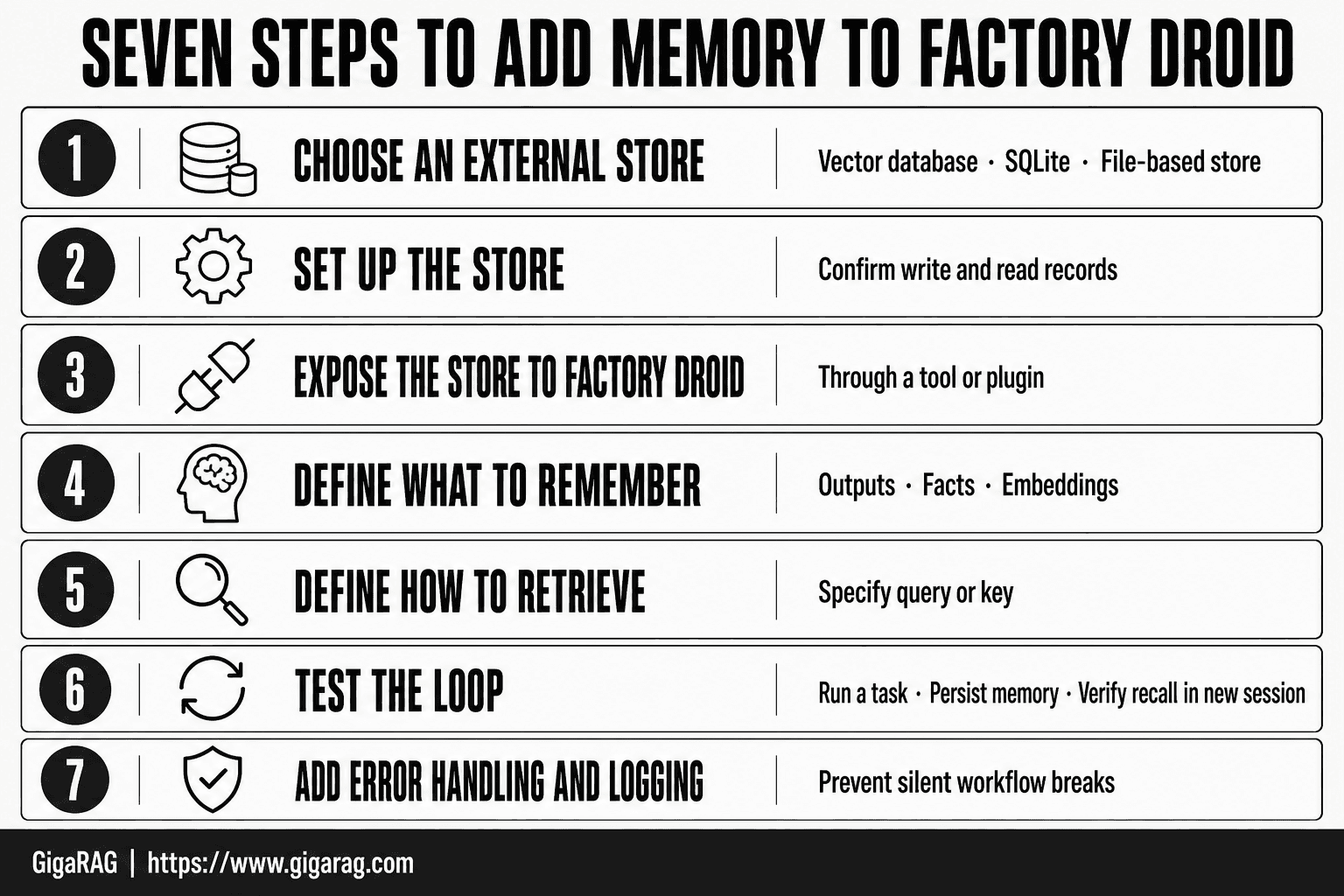
- Choose an external memory store such as a vector database, SQLite, or a simple file-based store.
- Set up the store and confirm you can write and read records from your environment.
- Expose the store to Factory Droid through a tool or plugin that performs write and read operations.
- Define what to remember: decide which outputs, facts, or embeddings to persist after each run.
- Define how to retrieve: specify the query or key Factory Droid should use to fetch relevant memory at the start of a run.
- Test the loop by running a task, persisting memory, then starting a new session and verifying recall.
- Add error handling and logging so failed writes or empty reads do not silently break the workflow.
Step 1: Install the Droid Sync Plugin
The plugin ships as a global npm package, so one command puts it on your PATH. You don't need to clone a repo or build anything. If you completed the prerequisites, this takes under a minute.
The install command
Run this from any terminal:
npm install -g droid-sync-plugin
The -g flag installs it globally, which matters. Factory Droid looks for the plugin on your system PATH, not inside a project folder. A local install won't register.
Expect npm to pull a handful of dependencies. On a clean machine, that's maybe 10 to 20 seconds. If you see peer dependency warnings, they're usually harmless for this plugin, but don't ignore an actual error.
Verifying the installation
Check that the plugin binary exists:
droid-sync --version
If that prints a version number, you're good. If it says "command not found," your npm global bin directory isn't on your PATH. Fix that before moving to configuration.
You can also run npm list -g droid-sync-plugin to confirm npm sees it. Both checks should pass before you touch the config file.
Step 2: Configure Factory Droid for Persistent Memory
The plugin is installed. It won't do anything until you point Factory Droid at it. Configuration is where most people stall, because the plugin README lists options without showing a working setup. Here's the full wiring.
Setting environment variables
Factory Droid reads its memory settings from environment variables first, then falls back to the config file. Set these in your shell profile so they survive restarts:
export DROID_MEMORY_BACKEND=sync
export DROID_SYNC_PLUGIN_PATH=$(which droid-sync)
export DROID_SYNC_ENDPOINT=http://localhost:8080
The first line tells Factory Droid to use the sync plugin as its memory backend. The second points to the plugin binary you installed in Step 1. The third is the OpenSync dashboard address, which defaults to localhost if you're running it locally.
If you're using CLIProxyAPI for Claude or ChatGPT Codex, add your API key here too:
export CLIPROXY_API_KEY=your_key_here
Don't hardcode keys in the config file. Environment variables keep them out of version control.
Editing the Factory Droid config file
Factory Droid looks for a config file at ~/.factory-droid/config.json. If it doesn't exist, create it. A minimal memory config looks like this:
{
  "memory": {
    "backend": "sync",
    "sync": {
      "pluginPath": "/usr/local/bin/droid-sync",
      "endpoint": "http://localhost:8080",
      "autoSync": true,
      "syncInterval": 30
    }
  }
}
autoSync matters. Without it, memory only writes when you manually trigger a sync. Set it to true and Factory Droid pushes state every 30 seconds. That's the difference between "memory works" and "memory works when I remember to save."
Connecting to OpenSync dashboard
The OpenSync dashboard is where you confirm the plugin is actually receiving data. Start it with:
droid-sync dashboard
Then open http://localhost:8080 in a browser. You should see a connection status showing Factory Droid as connected. If it says "waiting for client," your config isn't being read. Check the plugin path in your config file against which droid-sync.
The dashboard shows session state in real time. You'll use it in Step 3 to verify persistence actually works.
Step 3: Verify Memory Persistence Across Sessions
Configuration is done. Don't trust it. The only way to know memory works is to store a fact, kill the process, restart it, and check the fact is still there. Here's the test.
Running a test session
Start Factory Droid and give it something to remember:
factory-droid start
> Remember that the user's preferred model is claude-sonnet
Factory Droid should confirm the write. If it doesn't, your autoSync setting isn't working. Check the config from Step 2.
Now stop the process completely. Not a graceful exit, a full stop:
factory-droid stop
Checking the OpenSync dashboard
Open http://localhost:8080 and look at the session state. You should see the fact you just stored listed under recent writes. If the dashboard shows an empty state, the plugin never received the data. That means your DROID_SYNC_ENDPOINT is wrong or the dashboard isn't running.
Confirming state after restart
Start Factory Droid again:
factory-droid start
> What is the user's preferred model?
If memory persists, Factory Droid answers claude-sonnet. If it doesn't, you have a real problem. The most common cause is autoSync set to false, so the fact never left the session buffer. Fix the config, restart, and run the test again.
This test takes two minutes. Run it before you build anything on top of the memory layer.
What You Cannot Do with Factory Droid Memory
The test passed. Your fact survived a restart. Before you build on that, know exactly what you built. Factory Droid memory is session-level persistence. It is not a vector store, not long-term semantic memory, and not a RAG backend. Confusing those three things is how you waste a week.
No native long-term vector memory
Factory Droid does not embed your data. It does not build vector indexes. It does not do similarity search. What you stored in Step 3 is a key-value fact sitting in a sync buffer, not a semantic representation. Ask a paraphrased question and you'll get nothing back. The system matches what you wrote, not what you meant.
No built-in RAG retrieval
There is no retrieval step. No chunking, no embedding pipeline, no top-k lookup. If you want retrieval augmented generation, you bring your own vector store and wire it in yourself. Factory Droid will happily call your external endpoint, but it won't do the retrieval for you. The honest answer is that RAG is outside Factory Droid's scope.
What the sync plugin actually stores
The droid-sync-plugin persists session state: variables, directives, and recent conversation turns. It syncs those to the OpenSync dashboard so they survive a restart. That's it. It is a continuity layer, not a memory system. You get state retention across sessions. You do not get understanding across sessions. Keep that distinction clear and you'll pick the right tool for the job.
Troubleshooting Common Factory Droid Memory Issues
Most failures come down to four things: a plugin that never registered, a config file that isn't being read, a sync buffer that isn't flushing, or an API key that isn't valid. Work through them in that order.
Plugin not found after install
Run npm list -g --depth=0 and check that droid-sync-plugin appears. If it doesn't, your global install went to a different Node path than the one Factory Droid uses. Fix it by reinstalling with the same Node version you run Factory Droid under. Don't mix nvm-managed Node with system Node.
Config changes not taking effect
Factory Droid reads its config once at startup. If you edited the file while a session was running, nothing changes until you exit and relaunch. Also check that your environment variables are exported in the same shell that launches Factory Droid, not in a different terminal window.
Memory lost after restart
The sync plugin flushes to OpenSync on a timer, not on every write. If you killed the process immediately after storing a fact, the buffer may not have flushed. Wait a few seconds before exiting, or trigger a manual sync if the plugin exposes one.
API key errors with CLIProxyAPI
The key must be set as an environment variable before Factory Droid starts. Setting it inside a running session won't help. Check for trailing whitespace or quotes in your export line. A key that works in curl but fails in Factory Droid is usually a quoting problem.
When to Move Beyond Factory Droid Memory
Session persistence gets you far. It doesn't get you everywhere.
Signs you've outgrown session persistence
You'll know when the sync plugin stops being enough. Your agents start needing context from three sessions ago, not the last one. You're running multiple agents that need to share state, and the OpenSync buffer only holds what one session wrote. Your RAG pipeline needs semantic retrieval across thousands of documents, and a flat sync log can't do that.
The honest answer is that Factory Droid memory is a persistence layer, not a knowledge layer. It remembers what happened. It doesn't understand what happened.
What production-grade agent memory requires
Production memory means a vector store, embedding-based retrieval, and state that survives not just restarts but redeployments. It means multiple agents reading and writing the same memory without clobbering each other. Factory Droid doesn't ship any of that natively.
If you're building that, you're past what the sync plugin can do. Teams in that position typically move to a platform built for agent memory and RAG pipelines, like GigaRAG. But if you're still in single-agent, single-session territory, the plugin setup you just finished is enough. How to add memory to Factory Droid, in that case, is exactly what you've done here.
Frequently Asked Questions
Does Factory Droid have built-in memory?
- Factory Droid is stateless by default, meaning it does not retain context between runs. Any memory must be added externally through tools, plugins, or a connected store.
Can Factory Droid use a vector database for long-term memory?
Not natively. You can connect a vector database through a custom tool or plugin, but Factory Droid itself does not include a built-in vector store or retrieval layer.
How do I persist context across Factory Droid sessions?
Write the context you want to keep to an external store at the end of a run, then read it back at the start of the next run using a tool or plugin. The store can be a database, a file, or a vector index.
What are common failure modes when adding memory to Factory Droid?
Typical issues include writes that silently fail, retrieval queries that return nothing because of mismatched embeddings, and memory growing without limits. Add logging and validation around both write and read paths.
Is Factory Droid memory the same as RAG?
- Memory usually refers to persisting agent state or facts across sessions, while RAG retrieves relevant documents to ground a response. You can combine both, but they solve different problems.
Do I need a plugin to add memory to Factory Droid?
In most cases yes, or you need a tool that Factory Droid can call. Without an external interface, there is no way for the agent to read or write persistent state.
About GigaRAG
GigaRAG is for agent memory and RAG pipeline builders. get this right. Whether you are working through How to add memory to Factory Droid or something adjacent, we publish what we have actually tested, including where it falls short.


