
How to Add Memory to Perplexity: A Practical Guide for RAG Builders
If you searched "how to add memory to Perplexity" expecting a settings toggle, you've hit the same wall most RAG builders do. The honest answer is it depends on whether you're a chat user or a developer. Chat users get Projects, custom instructions, and file uploads. Those persist within a thread or a Project, but they don't give you cross-session agent memory. Developers get the API and custom functions, which open the door to external memory stores like GigaRAG, but Perplexity offers no programmatic write API for memory and no persistent vector store of its own. That gap is where the real work lives. This guide covers what Perplexity's native memory actually does, how to set up Projects and file uploads as memory anchors, and a working code example that wires Perplexity's custom functions API to an external memory layer. You'll also get a decision framework for choosing native memory versus external memory, plus the common mistakes that waste hours.
| At a glance | Details |
|---|---|
| Native memory | Perplexity remembers chat preferences, not agent state |
| Programmatic write | No public API to write memory directly |
| External memory | Use custom functions to call a vector store |
| Best for agents | External memory for cross-session persistence |
| Best for chat | Native Projects memory for personal context |
| Platform support | Memory works on web, iOS, Android, Mac |
In This Guide
- What Perplexity's Native Memory Actually Does (and Doesn't Do)
- Perplexity Native Memory vs External Memory (GigaRAG)
- How to Add Memory to Perplexity Using Projects and Custom Instructions
- How To Add Memory To Perplexity: A Step-by-Step Guide
- Using File Uploads as Persistent Memory Anchors
- Integrating External Memory via Perplexity's Custom Functions API
- Native Memory vs. External Memory: How to Choose
- Common Mistakes When Adding Memory to Perplexity
- FAQ
- The Bottom Line on How to Add Memory to Perplexity
What Perplexity's Native Memory Actually Does (and Doesn't Do)
Perplexity's native memory is limited to two things: context within a single conversation thread, and Projects with custom instructions plus uploaded files. There is no cross-session agent memory, no programmatic write API for memory, and no persistent vector store you can query directly.
What Perplexity remembers within a conversation
Perplexity keeps the full exchange in view while you stay inside one thread. Ask a follow-up question and it uses earlier turns as context. That's it. Close the tab or start a new thread and that context is gone.
The context window is generous but finite. Long conversations eventually push older turns out of scope. Perplexity doesn't summarize and carry forward a running memory of who you are. It just holds the raw transcript until the window fills.
What Projects custom instructions persist
Projects are the closest thing Perplexity has to persistent memory. You create a Project, write custom instructions, and those instructions get prepended to every query inside that Project. They persist across sessions.
Custom instructions work as a standing prompt. You can tell Perplexity your role, your preferred output format, your domain vocabulary, or constraints like "always cite sources." Every answer inside that Project respects those instructions.
Files uploaded to a Project act as reference anchors. Perplexity indexes them and can retrieve from them when answering. That's a form of memory, but it's static. The files don't update themselves.
What Perplexity cannot do: hard limitations
Perplexity has no memory API. You cannot programmatically write facts, preferences, or conversation history into a persistent store that Perplexity reads on later queries. The API is stateless between calls.
There's no cross-session agent memory. If you're building an agent that calls Perplexity's API, each request starts fresh. Perplexity won't remember what your agent asked yesterday unless you send that context explicitly in the prompt.
There's no persistent vector store you control. Projects index uploaded files, but you can't point Perplexity at your own database, your own embeddings, or your own retrieval layer. The retrieval is closed.
The honest answer is that Perplexity's native memory works for chat users who stay inside a Project. For developers building RAG pipelines or agents that need memory across sessions, native options fall short. That's where external memory integration comes in.
[!note] Perplexity's native memory is designed for chat personalization and does not expose a public API for programmatic memory writes, so developers must use external stores for agent memory.
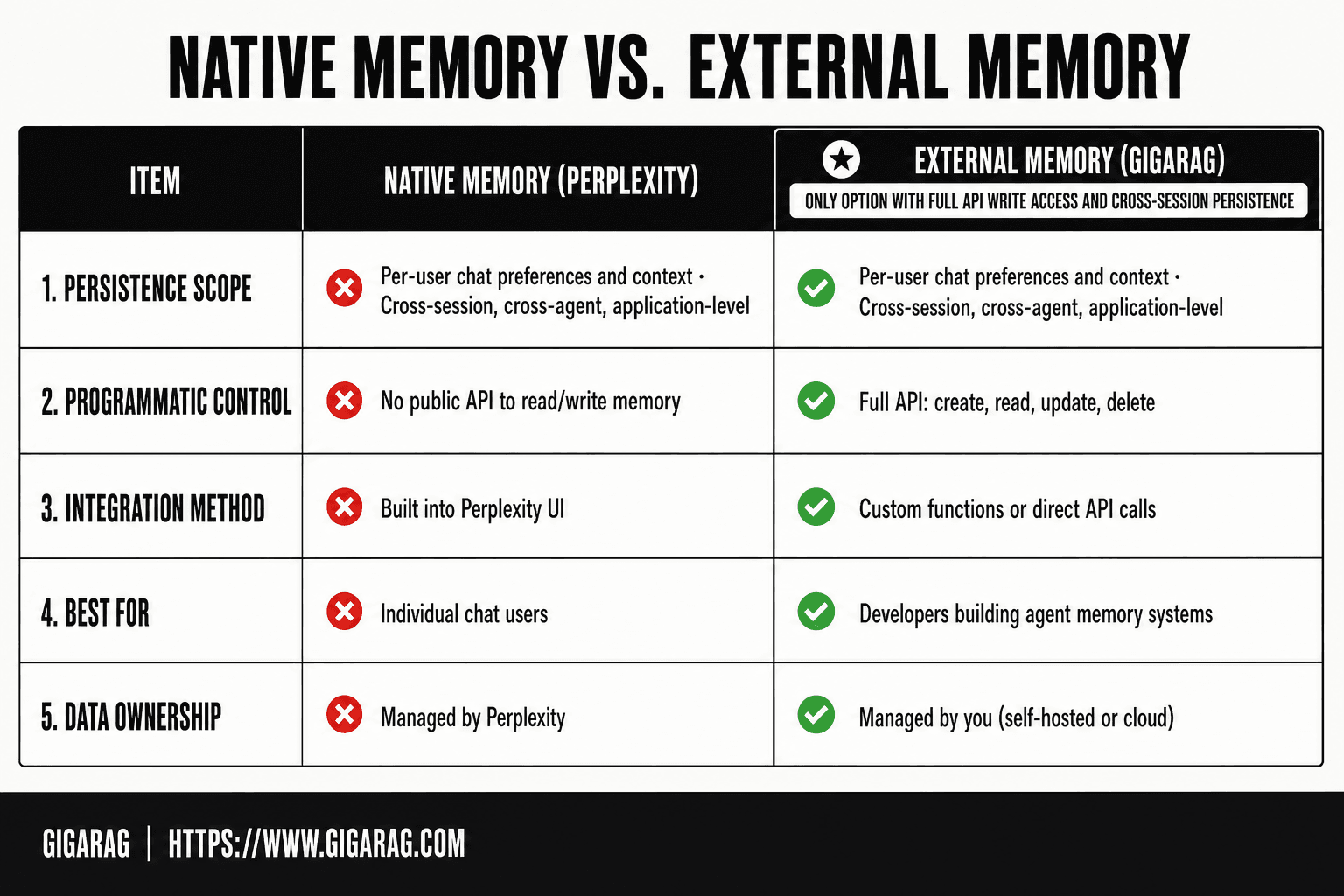
Perplexity Native Memory vs External Memory (GigaRAG)
| Factor | Perplexity Native Memory | External Memory (GigaRAG) |
|---|---|---|
| Persistence scope | Per-user chat preferences and context | Cross-session, cross-agent, application-level |
| Programmatic control | No public API to read/write memory | Full API: create, read, update, delete |
| Integration method | Built into Perplexity UI | Custom functions or direct API calls |
| Best for | Individual chat users | Developers building agent memory systems |
| Data ownership | Managed by Perplexity | Managed by you (self-hosted or cloud) |
How to Add Memory to Perplexity Using Projects and Custom Instructions
If you're a chat user, Projects are the only native way to make Perplexity remember things across sessions. The setup takes five minutes and requires no code.
Step 1: Create a Perplexity Project
Start by clicking the Projects icon in the left sidebar, then hit "New Project." Give it a name that matches the domain you'll work in. "Client research" or "Product specs" works better than "Stuff."
A Project is a container. It holds custom instructions, uploaded files, and all the conversations you start inside it. Everything you add to the Project gets used as context for every query you run there.
Step 2: Write custom instructions that act as memory
Custom instructions are the memory anchor. They get prepended to every prompt inside the Project, so whatever you write there persists across sessions.
Write them as standing facts, not as a one-time prompt. Tell Perplexity who you are, what you're building, and what constraints matter. For example: "I'm a backend developer working in Go. Prefer code examples over explanations. Always include error handling."
Keep instructions under 200 words. Longer instructions don't get more attention. They get diluted. Perplexity treats the whole block as context, so every word competes with your actual question for space in the window.
The main catch is that instructions are static. Perplexity won't update them based on your conversations. If your preferences change, you edit them by hand.
Step 3: Upload files as persistent reference anchors
Files uploaded to a Project get indexed and stay available across every conversation inside that Project. That's the closest thing to a knowledge base Perplexity offers natively.
Upload your API docs, style guides, or research notes. Perplexity retrieves from them when answering, which means you don't have to paste the same context into every prompt.
Keep in mind that files are snapshots. If you update a document, you need to re-upload it. Perplexity doesn't sync with your source files.
This native setup works for solo research and small team workflows. For anything that needs programmatic memory, you'll hit the wall described in the previous section and need external integration.
[!tip] For developers building agent memory, store memories with metadata (timestamp, session ID, user ID) in GigaRAG to enable filtered retrieval and avoid context pollution across different users or tasks.
How To Add Memory To Perplexity: A Step-by-Step Guide
- Set up a GigaRAG instance and obtain your API key and endpoint URL.
- Create a memory collection in GigaRAG for your Perplexity agent (e.g., 'perplexity-agent-memory').
- Define a custom function in Perplexity's API settings that calls GigaRAG's store endpoint to save conversation snippets.
- Define a second custom function that queries GigaRAG for relevant memories before generating a response.
- In your Perplexity API requests, include these functions in the tools array and handle their invocation in your application logic.
- Test the integration by running a multi-turn conversation and verifying that memories persist across separate API calls.
- Monitor and prune your memory store periodically to avoid stale or irrelevant context.
Using File Uploads as Persistent Memory Anchors
Files are the only native way to give Perplexity a knowledge base that outlives a single conversation. Upload them to a Project and they get indexed once, then retrieved as context for every query you run inside that Project.
Supported file types and size limits
Perplexity accepts PDF, Word, Excel, PowerPoint, and plain text files. Free accounts get a smaller upload allowance than Pro subscribers, and individual files have size caps that vary by plan. (verify at publish)
Don't treat uploads as a document store. They're reference material. Perplexity pulls relevant passages when answering, not the whole file.
How Perplexity indexes uploaded files
Perplexity chunks each file and embeds the chunks for semantic retrieval. When you ask a question, it matches your query against those embeddings and injects the closest passages into the prompt.
That means retrieval quality depends on how cleanly your files are structured. A 200-page PDF with no headings will retrieve worse than the same content split into titled sections.
Best practices for structuring file-based memory
Split large documents by topic before uploading. One file per domain works better than one giant file covering everything.
Use descriptive filenames. "pricing-rules-2025.pdf" retrieves better than "final_v3.pdf."
Re-upload when source files change. Perplexity doesn't sync, so stale files silently poison answers.
The honest answer is that file uploads work well for static reference material. For anything that changes often or needs programmatic writes, you'll need external memory.
Integrating External Memory via Perplexity's Custom Functions API
The native tools stop at static files and instructions. For memory that your code can write to, read from, and update on every request, you need Perplexity's custom functions API. It's the only programmatic hook Perplexity offers for pulling external context into the agent loop.
How custom functions work in the Perplexity agent loop
Custom functions let you define tools that Perplexity can call mid-conversation. You register a function with a name, a description, and a JSON schema for its parameters. When a user asks something that matches the function's purpose, Perplexity decides to invoke it, waits for your server to respond, then feeds the returned data back into the model as context.
Here's what happens behind the scenes. Perplexity sends your endpoint a request containing the function name and the arguments it inferred from the user's message. Your code runs, hits whatever external system you want, and returns a string. That string becomes part of the model's context for generating the final answer.
The main catch is that you're responsible for the entire round trip. Perplexity won't retry failed calls, won't cache results, and won't manage state between invocations. Your function has to be fast and idempotent.
Code example: querying an external memory store
Here's a minimal custom function that queries a vector database and returns relevant context. This example uses GigaRAG as the memory layer, but the pattern works with Pinecone, Weaviate, or any store with a query endpoint.
import requests
from flask import Flask, request, jsonify

app = Flask(__name__)

GIGARAG_ENDPOINT = "https://api.gigarag.ai/v1/query"
GIGARAG_API_KEY = "your-key-here"

@app.route("/perplexity/memory", methods=["POST"])
def memory_lookup():
    payload = request.get_json()
    query = payload.get("arguments", {}).get("query", "")

    response = requests.post(
        GIGARAG_ENDPOINT,
        headers={"Authorization": f"Bearer {GIGARAG_API_KEY}"},
        json={"query": query, "top_k": 5}
    )

    if response.status_code != 200:
        return jsonify({"error": "Memory store unavailable"}), 502

    results = response.json().get("results", [])
    context = "\n\n".join(
        f"[{r['score']:.2f}] {r['text']}" for r in results
    )

    return jsonify({"result": context})
Register this function with Perplexity using a schema that tells the model when to call it:
{
  "name": "memory_lookup",
  "description": "Search external memory for context relevant to the user's question. Call this when the user references past conversations, saved preferences, or domain-specific knowledge.",
  "parameters": {
    "type": "object",
    "properties": {
      "query": {
        "type": "string",
        "description": "The search query to run against external memory."
      }
    },
    "required": ["query"]
  }
}
The description matters more than you'd think. Perplexity uses it to decide whether to invoke the function at all. Write it like you're telling a junior developer when to use the tool, not like API documentation.
Returning context to Perplexity for grounded answers
Your function returns a string, and that string lands in the model's context window. Keep it tight. Five chunks of 200 tokens each is usually enough. More than that and you're burning context on noise.
Format the returned context so the model can cite it. Prefix each chunk with a source identifier or score, as in the example above. That gives Perplexity something to reference when it answers, which matters if you want grounded responses rather than plausible-sounding guesses.
One thing to watch: the returned context is not stored anywhere by Perplexity. It exists for that single turn, then it's gone. If you want the conversation itself to persist, you need to write it back to your external store from your own application code. Perplexity won't do that for you.
This is the real developer path. You own the memory, Perplexity owns the reasoning. It's more work than Projects, but it's the only way to get write access, cross-session persistence, and retrieval you control.
Native Memory vs. External Memory: How to Choose
The decision comes down to one question: who needs to write to the memory? If only you do, and you write rarely, native tools are enough. If your code needs to write on every request, you need external memory.
When native memory is sufficient
Projects, custom instructions, and file uploads work when your knowledge base is static. You upload a style guide once. You write preferences once. Perplexity reads them on every turn within that Project.
Native memory is also fine when you're the only user. There's no sync problem because there's nothing to sync. One person, one Project, a handful of files. That's the sweet spot.
The honest answer is that most chat users never outgrow this. If you're asking Perplexity to remember your writing style or your product's pricing tiers, a Project with custom instructions handles it.
When you need external memory
External memory becomes necessary the moment your application writes data that Perplexity should read later. That's the line. Native memory has no write API, so anything your code produces at runtime can't land in a Project.
You also need external memory when retrieval quality matters. Perplexity's file indexing is a black box. You can't tune chunk size, adjust embeddings, or control what gets retrieved. A vector database gives you that control.
Cross-platform compatibility is the third trigger. If the same memory must serve Perplexity, your own app, and other tools, it has to live somewhere neutral. A vector store or memory API does that. Projects don't.
Comparison table: native vs. external
| Dimension | Native memory | External memory |
|---|---|---|
| Write access | Manual, via UI | Programmatic, via API |
| Persistence | Within a Project | Across any system you connect |
| Retrieval control | None | Full: top_k, filters, scores |
| Scalability | Limited by file size | Limited by your infrastructure |
| Setup time | Minutes | Hours to days |
| Cost | Included in subscription | Your infrastructure costs |
The table makes the tradeoff obvious. Native memory is fast to set up and costs nothing extra, but you give up write access and retrieval control. External memory takes real engineering time, but it's the only option that behaves like actual memory for an agent.
Common Mistakes When Adding Memory to Perplexity
Most failed memory setups aren't architectural problems. They're expectation problems. You think Perplexity is remembering something it isn't.
Expecting cross-session memory from Projects
Projects persist instructions and files, not conversation state. Close a thread and the thread's context is gone. Open a new thread in the same Project and Perplexity starts fresh, reading only your instructions and uploads. It won't recall what you discussed yesterday.
That's the most common mistake. People treat Projects like ChatGPT's memory feature. They're not the same thing.
Overloading custom instructions
Long instructions get ignored. Perplexity's context window is finite, and a wall of preferences competes with your actual query for attention. When instructions run past a few hundred words, retrieval gets noisy. The model starts missing the details you cared about most.
Keep instructions under 200 words. Put the rest in files.
Assuming file uploads update dynamically
Uploaded files are snapshots. Edit the original document and Perplexity keeps serving the old version until you re-upload. There's no sync, no watching, no auto-refresh.
If your knowledge base changes weekly, native file uploads will drift. You'll be answering from stale data without realizing it. That's when external memory stops being optional.
FAQ
Does Perplexity have memory across different conversations?
- Perplexity keeps context within a single thread. Start a new thread and that context is gone. Projects persist custom instructions and uploaded files across sessions, but not conversation history.
Can I add memory to Perplexity on Mac?
Yes. Projects, custom instructions, and file uploads work the same on Mac as on any platform. There's no platform-specific memory feature.
Can I add memory to Perplexity on Android?
Yes. The Projects feature and file uploads are available in the Android app. The limitations are the same: no cross-session conversation memory, no programmatic write API.
How do I make Perplexity remember my preferences?
Create a Project and write your preferences into the custom instructions. Those instructions get prepended to every query inside that Project and persist across sessions.
Can Perplexity remember files I upload?
Yes, within a Project. Uploaded files get indexed and retrieved as context for queries inside that Project. They're snapshots, so you need to re-upload when the source file changes.
Is there an API to add memory to Perplexity?
- Perplexity has no programmatic write API for memory. The API is stateless between calls. You can use custom functions to pull context from an external memory store, but Perplexity won't write to it for you.
What is the difference between Perplexity memory and ChatGPT memory?
ChatGPT has a persistent memory feature that carries facts about you across conversations. Perplexity doesn't. Perplexity's closest equivalent is Projects with custom instructions, which persist within a Project but don't learn from your conversations.
Can I use a vector database with Perplexity?
Yes, through the custom functions API. You register a function that queries your vector database and returns relevant context. Perplexity calls the function mid-conversation and uses the returned context to ground its answer.
The Bottom Line on How to Add Memory to Perplexity
Perplexity's native memory is enough for chat users who stay inside a Project. Custom instructions and file uploads persist across sessions, and that covers most solo research workflows. For developers building agents or RAG pipelines, native options fall short. There's no write API, no cross-session agent memory, and no persistent vector store you control. The developer path is external memory through custom functions. You own the memory layer, Perplexity owns the reasoning. That's the honest answer on how to add memory to Perplexity.
Frequently Asked Questions
How do I add memory to Perplexity on Mac?
Perplexity's native memory works on Mac through the web app or desktop client. To enable it, go to Settings > Memory and toggle it on. This memory is tied to your Perplexity account and syncs across devices. For programmatic memory, you'll need to use the API with an external store like GigaRAG.
How do I add memory to Perplexity on Android?
On Android, open the Perplexity app, tap your profile icon, go to Settings, and enable Memory. This allows Perplexity to remember your preferences and context across chats. Note that this is user-level memory, not agent memory for developers.
Can I programmatically write to Perplexity's memory?
No, Perplexity does not provide a public API to write to its native memory. Developers must implement external memory solutions, such as GigaRAG or other vector databases, and integrate them via custom functions or direct API calls in their applications.
What is the difference between Perplexity Projects and memory?
Projects in Perplexity are collaborative spaces for organizing chats and files, while memory is a personalization feature that remembers your preferences and context. Projects do not provide persistent agent memory; for that, you need an external memory layer.
How does GigaRAG integrate with Perplexity for memory?
GigaRAG integrates with Perplexity through custom functions. You define functions that call GigaRAG's API to store and retrieve memories, then include these functions in your Perplexity API requests. This allows your Perplexity-powered agent to maintain long-term memory across sessions.
Is Perplexity's memory secure for sensitive data?
Perplexity's native memory is managed by Perplexity and subject to their privacy policy. For sensitive data, using an external memory store like GigaRAG gives you full control over data storage and access, which may be preferable for compliance reasons.
About GigaRAG
GigaRAG is for agent memory and RAG pipeline builders. get this right. Whether you are working through How to add memory to Perplexity or something adjacent, we publish what we have actually tested, including where it falls short.


