
How to Add Memory to ChatGPT: A Practical Guide for Developers and RAG Builders
How to add memory to ChatGPT starts with a problem most developers hit within weeks: the built-in memory fills up, and there's no obvious way to expand it. You get a notice that memory is full, you delete a few entries, and a week later it's full again. The top search results don't help much. They either complain about the limits or tell you to turn memory off entirely. Neither answers the real question.
The honest answer is that ChatGPT's built-in memory is a convenience feature, not a storage system. It has no API, no programmatic control, and no path to unlimited capacity. If you're building an agent or a RAG pipeline, you'll hit those walls fast. That's where external memory comes in, whether you roll your own vector database or use a tool like GigaRAG.
| At a glance | Details |
|---|---|
| Built-in memory | Toggle in Settings, no API access |
| Memory capacity | Limited, opaque, fills quickly |
| Custom instructions | Static, not dynamic memory |
| External RAG memory | Scalable, programmatic, API-driven |
| Best for developers | External RAG for control and scale |
| Key limitation | No programmatic control over built-in memory |
In This Guide
- What Is ChatGPT Memory and How Does It Work?
- Built-in ChatGPT Memory vs External RAG Memory
- How to Add Memory to ChatGPT Using Built-In Features
- How To Add Memory To ChatGPT: A Step-by-Step Guide
- ChatGPT Memory Limits: What You Cannot Do
- When Built-In Memory Isn't Enough: The Case for External Memory
- How to Add Memory to ChatGPT with RAG and Vector Databases
- GigaRAG for Agent Memory: A Practical Option
- Built-In Memory vs. RAG: How to Choose
- Common Mistakes When Adding Memory to ChatGPT
- Final Thoughts on Adding Memory to ChatGPT
What Is ChatGPT Memory and How Does It Work?
ChatGPT Memory is a built-in feature that lets ChatGPT remember facts about you across chats, so you don't have to repeat yourself every time you start a new conversation.
It's not a database. It's a small, persistent notepad that ChatGPT reads before it answers you. When you tell it something worth keeping, it saves that detail and uses it in future chats until you delete it or turn the feature off.
What ChatGPT Memory actually stores
Memory stores preferences, facts about you, and recurring context. Your name, your job, the programming language you prefer, the tone you like, the project you're working on. It also picks up smaller things: you're allergic to peanuts, you have a dog named Max, you prefer short answers.
It does not store entire conversations. It stores distilled snippets. A long chat about your startup might become one line: "User is building a SaaS tool for freelancers and prefers Python."
How ChatGPT decides what to remember
You can tell it directly: "Remember that I use TypeScript." That's the reliable path. ChatGPT also infers things from context, but that inference is probabilistic. It might save something you said in passing, or miss something you wanted kept. There's no way to force a save beyond saying it explicitly.
You can review saved memories in Settings > Personalization > Memory. Delete individual items or clear everything.
Where memory lives: account-level vs. chat-level
Memory is account-level. If you enable it, saved facts apply across all your chats, not just the one where you said them. That's the point, and also the risk. A fact saved in a work chat about a client will surface in a personal chat about dinner plans.
Chat-level context is different. That's the conversation history inside a single chat, which lives only in that thread and disappears when you start a new one. Memory is what survives between threads.
[!note] ChatGPT's built-in memory is only available in the ChatGPT interface and cannot be accessed or controlled via the API, so developers building agents must implement external memory solutions.
Built-in ChatGPT Memory vs External RAG Memory
| Factor | Built-in ChatGPT Memory | External RAG Memory |
|---|---|---|
| Control | Manual toggle, no API | Full programmatic control via API |
| Capacity | Limited and opaque | Scalable with vector databases |
| Persistence | Tied to ChatGPT account | Independent, portable across models |
| Use case | Personal chat continuity | Agent memory, multi-user apps |
| Setup effort | Low, just enable in settings | Moderate, requires RAG pipeline |
How to Add Memory to ChatGPT Using Built-In Features
You don't need a settings panel to add memory. You need to say things in a way ChatGPT will actually save. Here's the exact path.
Step 1: Use the 'Remember this' command
The most reliable method is explicit instruction. Type "Remember that I use TypeScript" or "Remember my dog's name is Max." ChatGPT saves that fact to memory immediately.
You can also phrase it as a request: "Please remember that I prefer short answers." The word "remember" is the trigger. Without it, ChatGPT might infer the detail or might not. With it, the save is near-certain.
Step 2: Let ChatGPT learn from conversation
ChatGPT also picks up details passively. Mention you're building a SaaS tool three times across different chats, and it may save "User is building a SaaS tool." Mention it once, and it probably won't.
This is probabilistic recall, not a guarantee. Don't rely on it for anything important. If a fact matters, use the explicit command from Step 1.
Step 3: Add custom instructions as manual memory
Custom instructions are a separate layer. They live in Settings > Personalization > Custom instructions and act as a standing prompt: "Always respond in Python when I ask for code" or "I'm a backend developer, not a frontend developer."
Unlike memory, custom instructions don't get inferred or edited by ChatGPT. You write them once, and they apply to every chat. They're the manual override when you need certainty.
Step 4: Review and edit saved memories
Go to Settings > Personalization > Memory. You'll see a list of saved facts. Delete individual items, or clear everything with one click.
Check this list regularly. ChatGPT saves things you didn't ask it to save, and those stray facts will surface in unrelated chats. Memory is account-level, so a work detail can leak into a personal conversation.
[!tip] For agent memory, start with a simple vector store like Chroma or Pinecone and focus on retrieval quality; you can always scale up later.
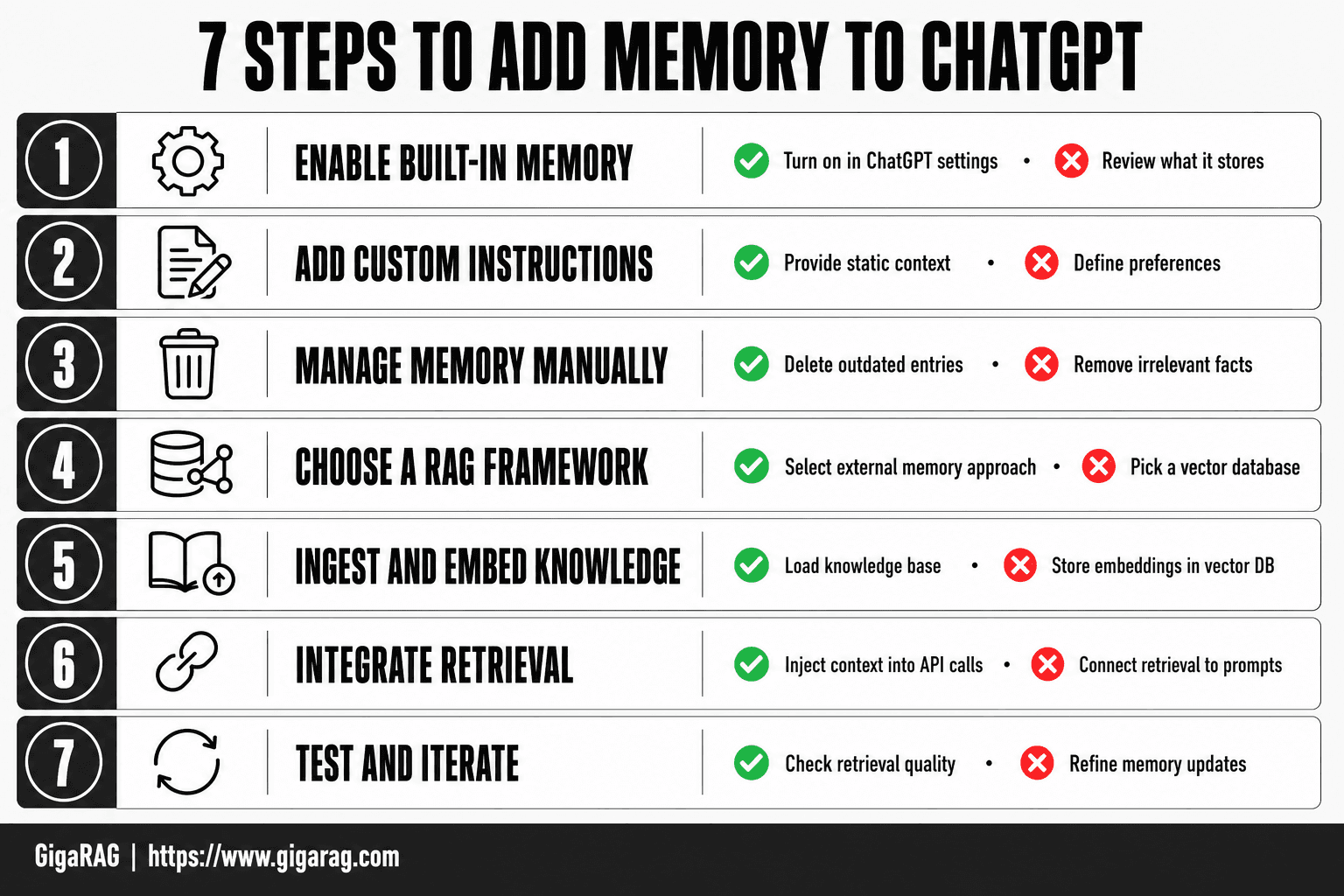
How To Add Memory To ChatGPT: A Step-by-Step Guide
- Enable built-in memory in ChatGPT settings and review what it stores.
- Use custom instructions to provide static context and preferences.
- Manually manage memory by deleting outdated or irrelevant entries.
- For external memory, choose a RAG framework and vector database.
- Ingest and embed your knowledge base into the vector store.
- Integrate retrieval into your ChatGPT API calls to inject relevant context.
- Test and iterate on retrieval quality and memory updates.
ChatGPT Memory Limits: What You Cannot Do
Built-in memory is useful, but it's not a database. It's not an API. And it's not something you can program against. If you're a developer, the limits hit fast.
No API access to ChatGPT Memory
There is no endpoint for ChatGPT Memory. You cannot read saved memories, write to them, or delete them programmatically. The memory feature lives entirely inside the ChatGPT web and mobile apps.
If you're building an agent or a RAG pipeline, this is the wall. You can't sync memory to your own database. You can't trigger a save from your backend. You can't even export the memory list as structured data. It's a black box with a UI on top.
Memory is not unlimited, and it fills up
ChatGPT Memory has a cap. When it's full, ChatGPT tells you, and new saves stop working until you delete something. The exact limit isn't published by OpenAI, but users report hitting it after a few hundred saved facts (verify at publish).
The honest answer is that built-in memory is designed for a single person's preferences and small details. It's not built for scale. If you're storing conversation history, user profiles, or domain knowledge, you'll hit the ceiling quickly.
No programmatic control or bulk management
You can delete memories one at a time in the settings panel. That's it. No bulk delete by category. No search. No export. No version history.
For a developer, this is the dealbreaker. You can't automate cleanup. You can't audit what's stored. You can't roll back a bad save. The memory list is a flat, opaque pile of text snippets.
Memory is not a knowledge base
ChatGPT Memory stores facts about you: your preferences, your projects, your dog's name. It does not store documents, codebases, or structured data. You cannot upload a PDF and expect ChatGPT to remember its contents across chats.
That's what RAG is for. Built-in memory is a notepad. A knowledge base is a library. Don't confuse the two.
When Built-In Memory Isn't Enough: The Case for External Memory
Built-in memory is a notepad. External memory is a database you control. The difference matters the moment you're building something that has to work reliably for more than one person.
Scale: beyond a single user's memory
ChatGPT Memory is tied to one account. One user. One pile of saved facts that fills up after a few hundred entries. That's fine for personal preferences. It's useless for an agent that serves a thousand users, each with their own conversation history, preferences, and context.
External memory lives in a vector database. You can store millions of chunks, query them in milliseconds, and shard them across users, tenants, or projects. Scale stops being a ceiling and becomes a configuration setting.
Control: programmatic access and management
With built-in memory, you get a settings panel. With external memory, you get an API. You can write to it, read from it, delete from it, and audit it. You can trigger saves from your backend, expire old entries on a schedule, and version your memory like code.
That's the difference between a feature and a system. If you're building a RAG pipeline, you need the system. You need to know exactly what's stored, why it was retrieved, and when it should be dropped.
Reliability: deterministic memory vs. probabilistic recall
Built-in memory relies on the model deciding what to remember and when to recall it. That's probabilistic. Sometimes it works. Sometimes it doesn't. You can't debug it because you can't see the decision.
External memory is deterministic. You write the retrieval logic. You choose the embedding model, the similarity threshold, the number of chunks returned. When something goes wrong, you can trace it: the chunk wasn't embedded, the query didn't match, the threshold was too high. You fix the pipeline, not the vibe.
The tradeoff is real. External memory requires engineering work. You're building and maintaining a retrieval system. But for developers who need memory that scales, that they can control, and that behaves predictably, there isn't a built-in alternative.
How to Add Memory to ChatGPT with RAG and Vector Databases
RAG gives ChatGPT-like agents memory you control. Instead of hoping the model remembers, you store knowledge as embeddings in a vector database, retrieve what's relevant at query time, and inject it into the prompt. Here's the full path.
Step 1: Choose a vector database
Start with Postgres and pgvector if you already run Postgres. It's one less service to manage. If you need scale beyond a few million vectors, look at dedicated options like Pinecone, Weaviate, or Qdrant. The honest answer: for most agent memory use cases, pgvector is enough.
Step 2: Embed and store your knowledge base
Chunk your documents into pieces of 200 to 500 tokens. Smaller chunks retrieve more precisely but lose context. Embed each chunk with a model like OpenAI's text-embedding-3-small or a local option like bge-small. Store the embedding, the original text, and any metadata (user ID, timestamp, source) in your vector database.
Step 3: Retrieve relevant context at query time
Embed the user's query with the same model you used for storage. Run a similarity search against your vector database. Return the top 3 to 5 chunks. Set a similarity threshold so irrelevant chunks don't leak into the prompt. Tune both numbers on real queries.
Step 4: Inject retrieved context into the prompt
Build your system prompt with the retrieved chunks included. A simple template works: "Use the following context to answer. If the context doesn't contain the answer, say so." Then append the chunks. Then append the user's question. That's the whole retrieval loop.
Step 5: Update memory as new information arrives
Memory that never changes is just a static index. Write new chunks when your agent learns something: a user preference, a project detail, a decision. Delete or expire old chunks that are no longer relevant. Run this as a background job, not inside the request path.
GigaRAG for Agent Memory: A Practical Option
If you've built the RAG pipeline from the previous section, you know the moving parts: embeddings, vector search, prompt injection, memory updates. GigaRAG bundles those parts into one system built for agent memory. It's not a magic fix. It's a shortcut past the plumbing.
What GigaRAG does for agent memory
GigaRAG stores conversation history and knowledge as embeddings, retrieves relevant context at query time, and injects it into your agent's prompt. The difference from a hand-rolled pipeline is that the chunking, embedding, storage, and retrieval are pre-wired. You configure the memory store, point your agent at it, and it handles the retrieval loop.
How GigaRAG fits into a RAG pipeline
It replaces the vector database and retrieval layer you'd otherwise build yourself. Your agent calls GigaRAG's API with the user's query. GigaRAG returns the top relevant chunks. You inject those into the prompt. The architecture stays the same as the five-step process above; GigaRAG just owns steps one through three.
When to choose GigaRAG over building from scratch
Choose it when you need agent memory working this week, not next quarter. Building retrieval, chunking, and update logic yourself takes real engineering time. GigaRAG is a practical option if you'd rather spend that time on your agent's logic. If you need full control over every retrieval detail, or you're already running Postgres with pgvector, building from scratch may serve you better.
Built-In Memory vs. RAG: How to Choose
The choice comes down to four things: scale, control, reliability, and effort. Built-in memory is zero effort but gives you almost no control. Custom instructions are slightly more work and give you a fixed prompt. RAG is real engineering but gives you deterministic retrieval at any scale. Here's how to decide.
Decision criteria: scale, control, reliability, effort
Scale is how much memory you need. Built-in memory holds a few hundred facts per account. Custom instructions hold about 1,500 words. RAG holds whatever fits in your vector database, which is effectively unlimited.
Control is whether you can read, edit, and delete memory programmatically. Built-in memory: no API, no bulk management. Custom instructions: you edit a text box. RAG: full programmatic control over what gets stored, retrieved, and injected.
Reliability is whether memory behaves the same way every time. Built-in memory is probabilistic. ChatGPT decides what to remember and when to recall it. RAG is deterministic. You control the retrieval query, the top-k results, and the prompt injection.
Effort is the real cost. Built-in memory takes zero setup. Custom instructions take minutes. RAG takes days to weeks of engineering, depending on your data pipeline.
Comparison table: built-in memory vs. custom instructions vs. RAG
| Built-in memory | Custom instructions | RAG | |
|---|---|---|---|
| Capacity | A few hundred facts | ~1,500 words | Unlimited (vector DB) |
| API access | No | No | Yes |
| Deterministic recall | No | Yes (fixed prompt) | Yes (controlled retrieval) |
| Setup effort | None | Minutes | Days to weeks |
| Update method | Automatic or manual | Manual text edit | Programmatic |
| Best for | Individual ChatGPT users | Stable preferences | Agents, apps, scale |
Recommendation by use case
If you're a single user who wants ChatGPT to remember your name, your project, and your preferences, built-in memory is enough. Turn it on, tell it what to remember, and move on.
If you need a stable system prompt that never changes, custom instructions are the right tool. They're deterministic, cheap, and easy to edit.
If you're building an agent that needs to retrieve from a knowledge base, serve multiple users, or update memory programmatically, you need RAG. Built-in memory won't scale, and custom instructions can't hold your data. The engineering cost is real, but it's the only option that gives you control and reliability at scale.
Common Mistakes When Adding Memory to ChatGPT
Most failed memory implementations aren't a tool problem. They're a design problem. Here are the four mistakes I see most often, and how to avoid them.
Treating built-in memory as a database
ChatGPT's built-in memory is a notepad, not a database. It stores a few hundred facts, retrieves them probabilistically, and gives you no query interface. If you try to store customer records, product catalogs, or conversation logs in it, you'll hit the capacity wall fast. Use built-in memory for preferences and small facts. Use a vector database for anything you need to query.
Overloading custom instructions
Custom instructions hold about 1,500 words. That sounds like a lot until you try to cram in a style guide, a list of 50 product names, and a full user profile. The model dilutes attention across everything you stuff in. Keep custom instructions to stable, high-value context: who you are, what you're building, how you want responses formatted. Everything else goes in RAG.
Poor chunking and retrieval in RAG
The most common RAG failure isn't the vector database. It's the chunking. If you split documents at arbitrary 500-token boundaries, you'll cut sentences in half and retrieve fragments that don't answer the question. Chunk by semantic unit: paragraph, section, or function. And test your retrieval before you trust it. A retrieval that returns the wrong context is worse than no retrieval at all.
Forgetting to update memory
Memory goes stale. Built-in memory accumulates outdated facts unless you review it. RAG pipelines drift as your knowledge base changes. Schedule memory updates: weekly for built-in, programmatic for RAG. Stale memory produces confident, wrong answers.
Final Thoughts on Adding Memory to ChatGPT
Built-in memory works for individuals who want ChatGPT to remember their name, their preferences, and a few recurring facts. It's simple, it's automatic, and it requires zero engineering. But it's a notepad, not a database. It fills up, it retrieves probabilistically, and you can't query it or control it programmatically.
Developers building agents or RAG pipelines need something else. External memory gives you scale, deterministic retrieval, and a real query interface. The tradeoff is effort: you're embedding documents, managing a vector database, and writing retrieval logic. That's real work, but it's work you control.
The decision comes down to one question: do you need memory that survives across sessions for a single user, or memory that scales across users, documents, and queries? If it's the first, built-in memory and custom instructions are enough. If it's the second, RAG is the answer. GigaRAG fits that second case: it's a practical option when you need agent memory without building the entire pipeline from scratch.
Start with the simplest thing that works. Add complexity when the limits force you to. That's how to add memory to ChatGPT without overbuilding.
Frequently Asked Questions
How to make ChatGPT remember more?
To make ChatGPT remember more, you can enable built-in memory in settings and manually add important facts. However, capacity is limited. For unlimited memory, use external RAG: store information in a vector database and retrieve relevant context in each API call.
How do I save memory?
You can save memory by enabling the memory feature in ChatGPT settings and providing information during conversations. ChatGPT will automatically store useful details. You can also manually add memories via the interface, but there is no API to save memory programmatically.
How to add memory to a virtual machine?
Adding memory to a virtual machine involves allocating more RAM in your hypervisor settings, which is unrelated to ChatGPT. For ChatGPT-like memory, you need to implement a RAG system that stores and retrieves information externally.
Can I access ChatGPT's memory via API?
No, ChatGPT's built-in memory is not accessible via the API. The API is stateless, so you must manage conversation history and external memory yourself using a database or RAG pipeline.
What are the limitations of ChatGPT's built-in memory?
Built-in memory is limited in capacity, opaque in how it decides what to store, and cannot be programmatically controlled. It also fills up quickly, and there is no way to export or back up memories.
How does RAG provide memory for ChatGPT?
RAG (Retrieval-Augmented Generation) provides memory by storing information in a vector database and retrieving relevant chunks to include in the prompt for each API call. This gives you scalable, controllable memory that persists across sessions.
Should I turn off ChatGPT memory?
If you are a developer building agents, built-in memory may not be sufficient and can introduce unpredictability. Turning it off and using external RAG gives you full control. For personal use, it depends on your privacy preferences.
About GigaRAG
GigaRAG is for agent memory and RAG pipeline builders. get this right. Whether you are working through How to add memory to ChatGPT or something adjacent, we publish what we have actually tested, including where it falls short.


