
How to Add Memory to Devin: A Practical Guide for RAG Pipeline Builders
How to add memory to Devin starts with an uncomfortable truth: out of the box, Devin doesn't remember much between sessions. It holds context inside a single run, then lets most of it go. The official docs describe managed sessions, playbooks, and knowledge management, but they don't tell you how to stitch those pieces into durable memory that survives a restart. The vendor blogs are worse: each one pitches a single solution and quietly ignores the other two.
That's the gap this guide closes. I compared the three main approaches RAG builders actually use: MCP-based persistent memory, MinIO AIStor buckets, and native plugins like Nowledge. Each has real tradeoffs. None is a drop-in fix for a RAG pipeline.
For teams running retrieval-augmented workflows, GigaRAG works alongside Devin as a complementary agent memory layer, not a replacement for any of the three approaches below. By the end, you'll know which memory approach fits your infrastructure, what Devin memory cannot do, and how to connect whichever one you choose to an external vector store.
| At a glance | Details |
|---|---|
| Default memory | Session-scoped; limited cross-session persistence |
| Main approaches | MCP servers, MinIO AIStor buckets, native plugins |
| Best for RAG | MCP-based memory wired to your vector store |
| Key constraint | No third-party lifecycle hooks or native RAG integration |
| Setup effort | Low for plugins; moderate for MCP and buckets |
| Who this is for | RAG pipeline builders needing queryable memory |
In This Guide
- What Devin Memory Actually Is (and What It Isn't)
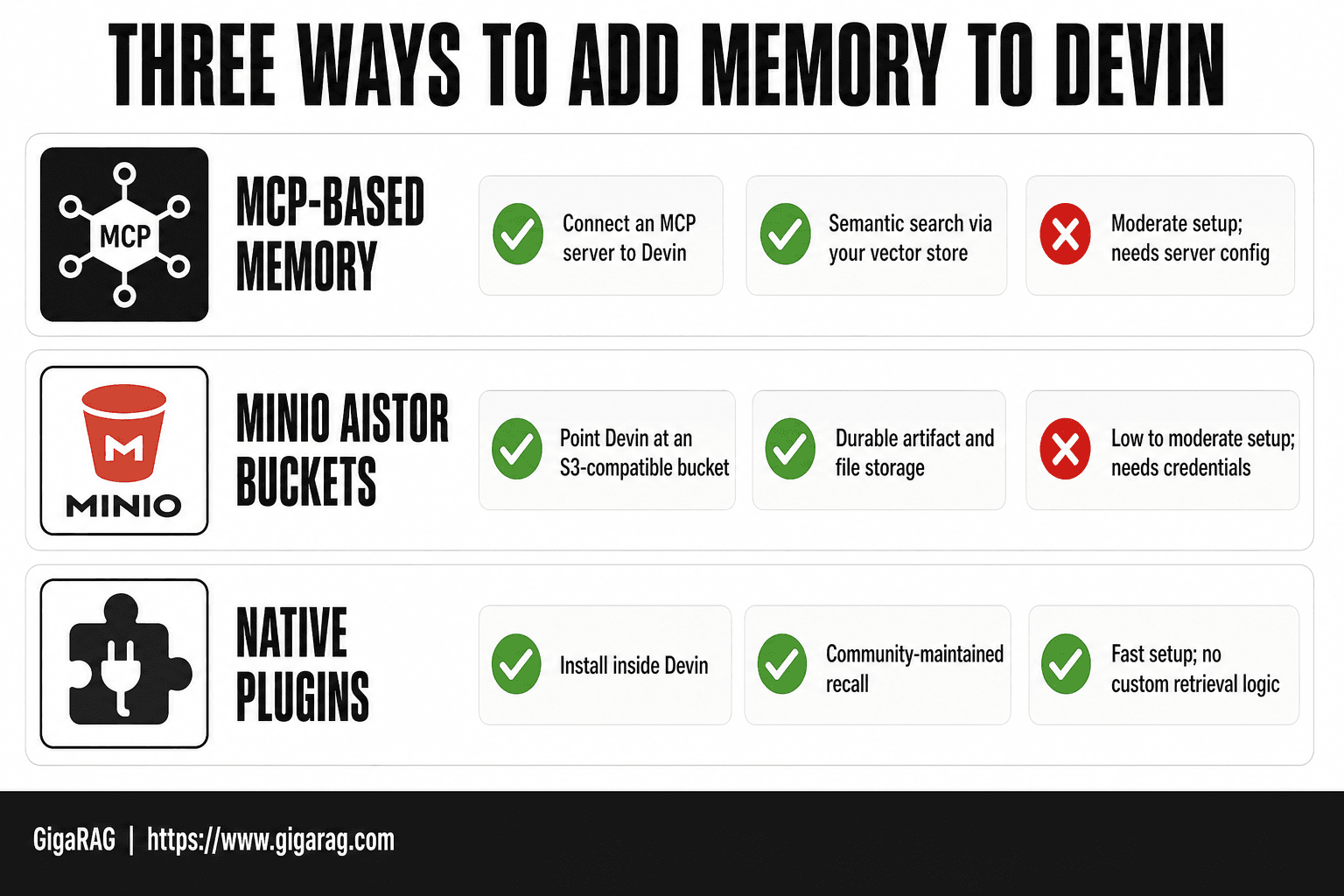
- MCP-Based Memory vs MinIO AIStor Buckets vs Native Plugins
- How to Add Memory to Devin: The Three Main Approaches
- How To Add Memory To Devin: A Step-by-Step Guide
- Approach 1: MCP-Based Persistent Memory for Devin
- Approach 2: Durable Memory with MinIO AIStor
- Approach 3: Native Memory Plugins for Devin
- Connecting Devin Memory to Your RAG Pipeline
- What You Cannot Do with Devin Memory
- How to Choose the Right Memory Approach for Your Use Case
- Best Practices for Adding Memory to Devin
- Final Thoughts on Adding Memory to Devin
What Devin Memory Actually Is (and What It Isn't)
Devin memory is managed session state, playbooks, and knowledge you explicitly store, not a continuously learning brain. It won't remember anything unless you tell it to.
What Devin remembers by default
Devin keeps context within a single managed session: files, commands run, decisions made. Playbooks persist across sessions when you save them. Knowledge you upload stays available until you remove it.
What Devin forgets between sessions
Everything else. Conversation history, intermediate reasoning, and uncommitted state disappear when the session ends. There's no implicit recall.
The three memory approaches at a glance
You can extend Devin's memory three ways: MCP-based persistent memory, MinIO AIStor buckets, or native plugins. Each trades off durability, setup effort, and RAG compatibility.
[!note] Devin does not expose third-party lifecycle hooks, so memory writes and reads are model-driven rather than event-driven. This means you cannot force a save or load at a specific point in a session.
MCP-Based Memory vs MinIO AIStor Buckets vs Native Plugins
| Factor | MCP-Based Memory | MinIO AIStor Buckets |
|---|---|---|
| Integration path | Connect an MCP server to Devin | Point Devin at an S3-compatible bucket |
| Best for | Queryable, RAG-ready memory | Durable artifact and file storage |
| Query capability | Semantic search via your vector store | Object listing and retrieval |
| Setup effort | Moderate; needs server config | Low to moderate; needs credentials |
| Main trade-off | Extra service to maintain | Not semantic by default |
How to Add Memory to Devin: The Three Main Approaches
You have three real options. Each one changes what Devin can recall, how long it lasts, and how much setup you'll do.
Approach 1: MCP-based persistent memory (Vectorize)
MCP, or Model Context Protocol, lets Devin talk to an external memory server. Vectorize runs one that stores embeddings and retrieves them on demand. You install it once, point Devin at it, and every session can query the same store. The catch: it's model-driven. Devin decides when to read or write, and you can't hook into its lifecycle.
Approach 2: MinIO AIStor Memory Bucket
MinIO mounts object storage as a memory bucket Devin can read and write directly. Files persist as objects, which means durability comes from your storage layer, not the model. Teams already running MinIO get this almost for free. Setup is heavier than MCP if you're starting from scratch.
Approach 3: Native memory plugins (Nowledge)
Nowledge is a community plugin that extends Devin's memory without external infrastructure. You install it inside Devin, and it manages recall locally. Fast to set up, but you're limited to what the plugin author built. No custom retrieval logic.
[!tip] For RAG pipeline builders, store memory as structured chunks with metadata (source, timestamp, project) rather than raw transcripts — this makes retrieval far more precise and lets GigaRAG complement Devin memory without duplicating it.
How To Add Memory To Devin: A Step-by-Step Guide
- Audit what Devin currently remembers across sessions and note the gaps.
- Choose an approach: MCP server, MinIO AIStor bucket, or a native plugin.
- Stand up the memory backend (MCP server or bucket) and secure credentials.
- Connect it to Devin using the supported configuration surface.
- Define what gets written to memory and when, using clear rules.
- Wire retrieval into your RAG pipeline so Devin can query stored context.
- Test cross-session recall and iterate on what is stored versus discarded.
Approach 1: MCP-Based Persistent Memory for Devin
MCP is a protocol that lets Devin talk to external tools through a standard interface. For memory, that means Devin can query a vector store instead of relying on whatever fits in its context window.
What is MCP and why it matters for Devin memory
MCP gives Devin a way to reach outside its own session. A memory server stores embeddings, and Devin retrieves them when it needs context. The memory lives in the server, not in the model.
Step-by-step installation
Install Vectorize, start the MCP server, then point Devin Desktop at the server endpoint. Devin picks it up as an available tool. No code changes on Devin's side.
Cloud vs self-hosted deployment
Vectorize offers a hosted option and a self-hosted one. Cloud is faster to start. Self-hosted keeps your embeddings on your own infrastructure.
The tradeoff: model-driven, not hook-driven
Devin decides when to read or write. You can't trigger memory operations from your own code. That's the main limit.
Approach 2: Durable Memory with MinIO AIStor
MinIO AIStor takes a different route. Instead of a vector store, it mounts an object storage bucket as a memory layer. Devin reads and writes files there, and those files persist after the session ends.
How MinIO AIStor Memory Buckets work
A Memory Bucket is an S3-compatible bucket that AIStor exposes as a mount point. Devin treats it like a local directory. Anything Devin writes there survives the session. The bucket stores raw files, not embeddings, so retrieval is file-based rather than semantic.
Mounting a memory bucket in Devin
Create the bucket in AIStor, then mount it in Devin's environment. Devin sees it as a folder. Point Devin's knowledge base at that folder, and it reads from the bucket on demand. Setup is a few commands, but you need AIStor running first.
When to choose MinIO over MCP
Choose MinIO if your team already runs object storage. The memory lives in infrastructure you control, and you can version it with standard S3 tooling. Choose MCP if you need semantic search. MinIO gives you durable files, not queryable vectors.
Approach 3: Native Memory Plugins for Devin
The third route skips external infrastructure entirely. A plugin runs inside Devin and extends its memory using community-built code. Nowledge is the example here.
How native memory plugins work
The plugin hooks into Devin's session and stores context locally. No vector database. No object storage. Memory lives in the plugin's own store, and Devin reads from it during the session.
Installing the Nowledge plugin
Install from the Nowledge community, then enable it in Devin. The plugin handles persistence on its own. Setup is minutes, not hours.
Pros and cons of plugin-based memory
The upside is simplicity. You don't run infrastructure. The downside is control: the plugin's storage format is whatever the community built, and you can't query it with external tooling. If you need RAG integration later, this approach won't get you there.
Connecting Devin Memory to Your RAG Pipeline
Devin's memory is not a retrieval system. It stores context for Devin to use during sessions. A RAG pipeline needs embeddings, a vector store, and a query layer. Those are separate pieces.
Why Devin memory alone isn't a RAG system
Devin memory holds text and session state. It doesn't embed that content, index it for semantic search, or expose a retrieval API. You can't point LangChain or LlamaIndex at Devin's memory store and run queries. The honest answer is that Devin memory is a source, not a system.
Exporting Devin memory to a vector store
Export what Devin remembers as plain text or JSON. Then chunk it, embed it, and load it into your vector store. This is manual work. There's no one-click export. You'll write a script that pulls memory out and pushes it into something like Pinecone, Weaviate, or pgvector.
Using GigaRAG as a complementary agent memory layer
GigaRAG fills the gap. It ingests Devin's exported memory, embeds it, and serves retrieval queries for your agents. Devin stays the builder. GigaRAG stays the memory layer that answers questions. That split works because neither tool tries to do the other's job.
What You Cannot Do with Devin Memory
Devin memory has hard limits. Knowing them before you build saves you a failed implementation.
No third-party lifecycle hooks
You can't trigger code when memory is written, read, or deleted. No webhooks, no event bus, no callbacks. If you need memory changes to fire a pipeline step, you'll poll or export on a schedule instead.
Model-driven limitations
Devin decides what to remember. You can't force it to store a specific fact. The model's judgment determines what persists, which means memory is inconsistent by design.
No native RAG or vector store integration
There's no built-in connector to Pinecone, Weaviate, or pgvector. Export is manual. Devin memory is not a queryable knowledge base.
Context window constraints
When memory exceeds the context window, older entries get truncated or dropped. Devin won't warn you. What it forgets is gone unless you exported it first.
How to Choose the Right Memory Approach for Your Use Case
The choice comes down to three questions: what infrastructure you already run, how much durability you need, and whether memory feeds a RAG pipeline.
Decision criteria: infrastructure, durability, RAG needs
If you run object storage today, MinIO is the path of least resistance. If you need model-driven recall without extra infrastructure, MCP fits. If you need queryable memory for retrieval, none of the three does that natively. You'll export to a vector store regardless.
When to choose MCP-based memory
Choose MCP when you want Devin to decide what's worth remembering and you don't want to manage storage yourself. Vectorize's cloud option works if you're a solo builder. Self-host if your memory contains anything sensitive.
When to choose MinIO AIStor
Choose MinIO when durability is non-negotiable and you already have object storage in your stack. Memory lives in buckets you control. Export is straightforward. The catch: it's storage, not intelligence. Devin still decides what gets written.
When to choose native plugins
Choose a plugin like Nowledge when you want community-maintained memory with minimal setup. It's the lightest option. It's also the least durable. Plugin memory dies with the plugin.
Best Practices for Adding Memory to Devin
Memory works when it's structured, scoped, and queryable. Unstructured memory is just noise Devin has to sort through.
Structuring knowledge for retrieval
Write memory entries as standalone facts, not running prose. Each entry should answer one question. If an entry needs context to make sense, it's two entries. Use consistent naming: "deployment-process" beats "how we ship things."
Playbooks vs memory: when to use each
Playbooks are procedures. Memory is state. Put "how to run the migration" in a playbook. Put "the migration ran on March 3 and hit these errors" in memory. Don't mix them. Playbooks stay stable. Memory changes.
Avoiding memory bloat
Every memory entry costs context window space. Delete entries that haven't been retrieved in 30 days. If an entry duplicates another, merge them. Devin won't prune for you.
Final Thoughts on Adding Memory to Devin
There's no single right way to add memory to Devin. It depends on your infrastructure and whether you need retrieval-augmented workflows.
MCP-based memory works if you want model-driven persistence without managing storage yourself. MinIO AIStor makes sense when you already run object storage and need durable, queryable buckets. Native plugins are the lightweight option for teams that want memory without extra infrastructure.
The honest answer is that none of these approaches gives Devin native RAG integration. If your pipeline needs semantic search over agent memory, you'll want a complementary layer. GigaRAG fills that gap: it handles agent memory and RAG integration alongside Devin, not instead of it.
Pick the approach that matches your stack. Test it on one session before wiring it into production.
Frequently Asked Questions
How to use Devin effectively?
Use Devin with clear, scoped tasks and give it access to durable memory so context survives across sessions. Keep instructions explicit and review what it stores, since memory behavior is model-driven.
What mental model should you use when working with Devin?
Think of Devin as a capable collaborator with a short default memory. You supply the long-term context through external memory systems, and Devin decides when to read or write based on the task.
How do I add skills to Devin?
Skills are added through Devin's supported configuration surfaces, such as plugins or connected services. The exact mechanism depends on your plan and setup, so check current documentation before building around it.
What are the best practices for Devin?
Keep tasks well-scoped, store memory as structured and queryable data, and test cross-session recall regularly. Avoid relying on Devin to remember everything automatically, and verify what persists.
Can Devin connect to an external vector store?
Yes, indirectly. You can connect Devin to an MCP server or similar service that fronts your vector store, then let Devin query it. There is no native RAG integration, so you build the bridge yourself.
Does Devin have built-in long-term memory?
Devin's default memory is limited and largely session-scoped. For durable, queryable memory you need an external approach such as MCP-based memory or object storage.
About GigaRAG
GigaRAG is for agent memory and RAG pipeline builders. get this right. Whether you are working through How to add memory to Devin or something adjacent, we publish what we have actually tested, including where it falls short.


