How to Add Memory to Gemini: A Practical Guide for Agent and RAG Builders
How to add memory to Gemini is the question every agent and RAG builder hits the moment their prototype works in one session and forgets everything in the next. You ask Gemini to recall a preference from yesterday, and it stares back blank. Most guides stop at Saved Info, the consumer toggle buried in settings. That's fine for remembering your favorite color. It's not a memory layer. For developers building agents or retrieval pipelines, the honest answer is that Gemini's native memory won't carry context across sessions, won't let you query past interactions, and won't plug into your code. GigaRAG fills that gap by giving Gemini a persistent, queryable memory store you control. This guide covers what native memory actually does, how to use Saved Info, why Gemini forgets conversations, the limitations you'll hit, and a concrete GigaRAG integration path for real agent memory.
| At a glance | Details |
|---|---|
| Native memory | Consumer Saved Info only |
| Cross-session | Not automatic; requires explicit settings |
| Queryable store | Not available natively |
| Builder solution | External memory layer + retrieval |
| GigaRAG role | Persistent, queryable agent memory |
| Key limitation | No built-in long-term memory API |
In This Guide
- What Gemini's Native Memory Actually Does
- Gemini Native Memory vs External Memory Layer
- How to Add Memory to Gemini Using Saved Info
- How To Add Memory To Gemini: A Step-by-Step Guide
- Managing and Deleting Gemini Memory
- Why Gemini Doesn't Remember Past Conversations
- What Gemini Memory Won't Do (Honest Limitations)
- Adding Persistent Memory to Gemini with GigaRAG
- Gemini Memory vs. ChatGPT Memory: What Builders Should Know
- Troubleshooting Gemini Memory Issues
- Final Thoughts: Building Real Memory for Gemini Agents
What Gemini's Native Memory Actually Does
Gemini's native memory stores facts and preferences you explicitly save, not your conversation history. You add entries manually or let Gemini save them during chats. It then uses those entries to personalize responses across sessions.
Saved Info: what it stores and where to find it
Saved Info holds facts about you: your job, your preferences, your projects. You'll find it at gemini.google.com/saved-info. You can add entries by hand or tell Gemini to remember something during a chat. It's a flat list, not a database.
Chat history vs. memory: the critical distinction
Chat history is a log of past conversations. Memory is what Gemini actively uses to shape new responses. They are not the same thing. You can have chat history on while Saved Info stays empty, and Gemini will still treat each session as fresh.
How Gemini uses memory for personalization
When you ask a question, Gemini checks Saved Info and weaves relevant entries into its answer. Ask for a meal plan and it'll skip foods you've flagged. Ask for code review and it'll reference your stack. The catch: it only uses what you've explicitly stored. Nothing gets inferred automatically.
[!note] Gemini's native memory (Saved Info) is designed for consumer personalization and does not provide a developer API for programmatic memory management or querying.
Gemini Native Memory vs External Memory Layer
| Factor | Gemini Native Memory | External Memory Layer (e.g., GigaRAG) |
|---|---|---|
| Scope | Consumer chat settings (Saved Info) | Developer-controlled, app-wide persistence |
| Cross-session context | Manual opt-in per user; not automatic | Automatic and configurable |
| Queryable store | No | Yes, via vector or hybrid search |
| Integration effort | None (user-managed) | Requires setup and API integration |
| Best for | Individual users wanting personalization | Agents and RAG pipelines needing long-term memory |
How to Add Memory to Gemini Using Saved Info
You add memory to Gemini by storing facts in Saved Info. It's manual, but it works. Here's the step-by-step.
Step 1: Open Saved Info settings
Go to gemini.google.com/saved-info. You'll see a flat list of everything Gemini remembers about you. Empty means no memory yet.
Step 2: Add preferences and facts manually
Click "Add" and type what you want Gemini to know. Keep entries specific: "I use Python 3.12 and prefer type hints" beats "I'm a developer." Add your stack, your naming conventions, your constraints. Gemini reads these before answering.
Step 3: Use a copy-paste prompt for personality and context
A Reddit thread with high upvotes shared a prompt that packs more context into Saved Info than manual entry. Paste this into a Gemini chat and ask it to save the output:
"Based on our conversation, create a Saved Info entry that captures my communication style, technical preferences, and recurring project details. Format it as a concise list."
Gemini generates a dense entry you can copy into Saved Info. It's faster than writing entries yourself.
Step 4: Verify memory is being used
Ask a question that should trigger a saved fact. If you saved "I prefer TypeScript over JavaScript," ask for a code example and check the language. No TypeScript means the entry isn't formatted right or wasn't saved. Fix and retest.
[!tip] For production agents, treat memory as a separate service: store embeddings in a vector database and retrieve top-k memories per query. This keeps your Gemini prompts lean and your memory scalable.
How To Add Memory To Gemini: A Step-by-Step Guide
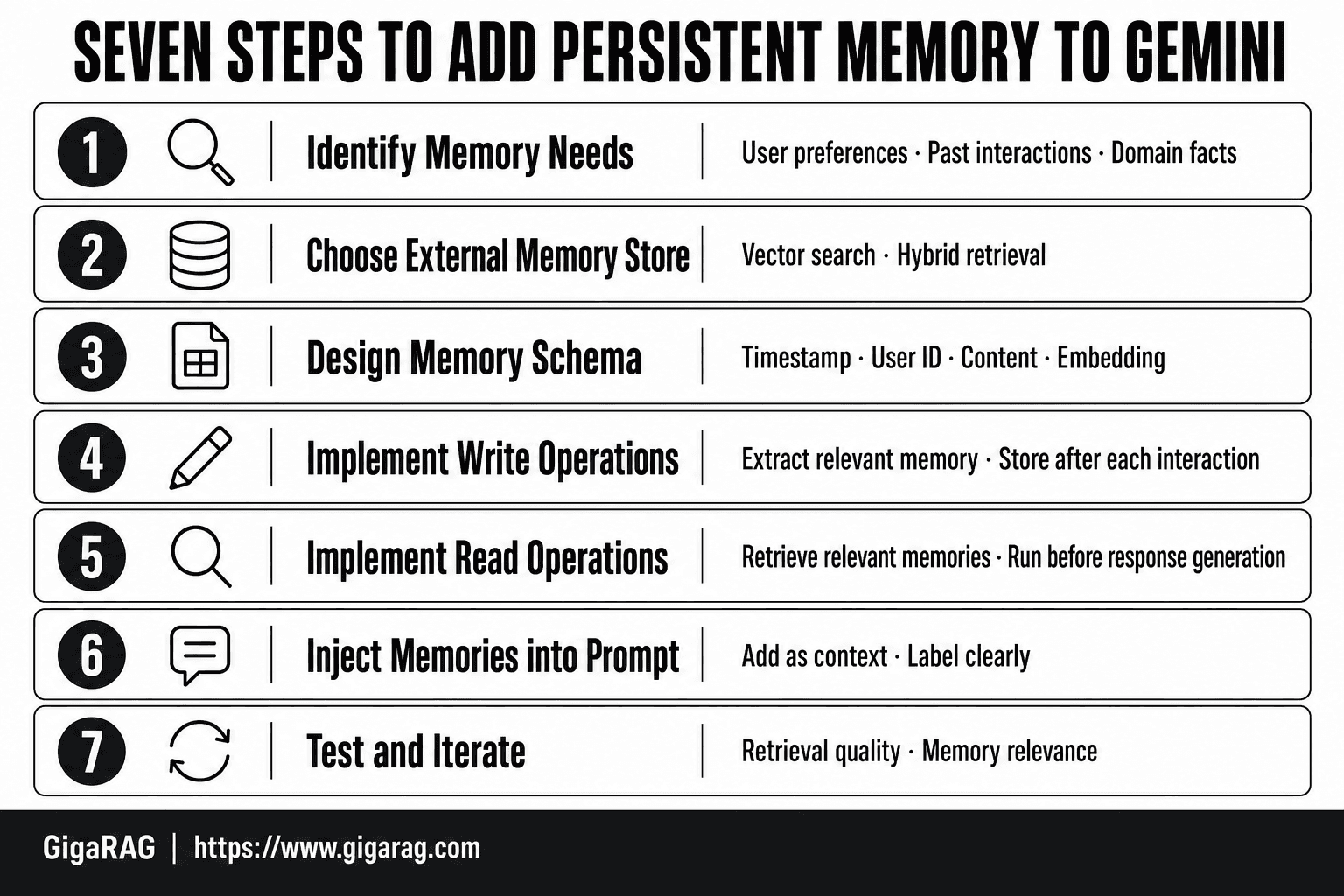
- Identify what your agent needs to remember (user preferences, past interactions, domain facts).
- Choose an external memory store that supports vector search or hybrid retrieval.
- Design a schema for memory entries (e.g., timestamp, user ID, content, embedding).
- Implement write operations: after each interaction, extract and store relevant memory.
- Implement read operations: before generating a response, retrieve relevant memories.
- Inject retrieved memories into the Gemini prompt as context.
- Test and iterate on retrieval quality and memory relevance.
Managing and Deleting Gemini Memory
You control what Gemini remembers. Delete bad entries, not just ignore them.
How to delete individual Saved Info entries
Open gemini.google.com/saved-info. Click the entry, then delete. It's gone from future responses immediately.
Clearing chat history vs. clearing memory
Chat history and Saved Info are separate. Clearing history removes conversations. Saved Info persists until you delete it manually.
Temporary chat mode for memory-free sessions
Turn on temporary chat for sessions that shouldn't touch memory. Nothing gets saved. Use it for sensitive work or testing prompts.
Why Gemini Doesn't Remember Past Conversations
Gemini doesn't remember past conversations because it has no persistent memory of chat content. Each session starts fresh. The only things that carry over are what you explicitly save to Saved Info.
Context window vs. persistent memory
A context window holds what's in the current conversation. It's large, but it's temporary. When the window fills or the session ends, that context is gone. Persistent memory would mean storing that context somewhere and retrieving it later. Gemini doesn't do that by default.
What happens when a session ends
The conversation stops existing as far as Gemini is concerned. Open a new chat and ask about something from yesterday's session. You'll get a blank response or a guess. There's no hidden archive it's consulting.
Why Saved Info is not the same as conversation memory
Saved Info stores facts you type in manually: your name, your job, your preferences. It doesn't store what you talked about. So Gemini might know you're a developer, but it won't remember the bug you discussed last Tuesday. That distinction trips up most users.
What Gemini Memory Won't Do (Honest Limitations)
Native Gemini memory is a preference store, not a memory layer. It holds facts you type in. It doesn't hold what happened. That gap matters if you're building agents or RAG pipelines.
No queryable memory store for agents
An agent can't ask Gemini "what did this user tell me last week?" and get an answer. Saved Info isn't indexed for retrieval. It's a flat list of preferences. No query interface exists.
No automatic cross-session context retention
Close a chat and the context is gone. Gemini won't pick up where you left off unless you manually re-enter the facts. There's no background process saving conversation state.
No semantic search over past interactions
You can't search your history by meaning. "Find when I mentioned the API timeout" returns nothing useful. Chat history is chronological, not semantic.
No memory API for programmatic access
There's no endpoint to write, read, or update memory from your code. Builders who need memory as a service have to bring their own layer. That's the honest answer.
Adding Persistent Memory to Gemini with GigaRAG
The previous section laid out the gaps. Here's how to fill them.
Why native memory falls short for agents
Agents need to query memory by meaning, not by manual entry. Native Gemini gives you neither. An agent that can't retrieve past context is just a stateless function with a nice interface.
Architecture: Gemini + GigaRAG memory layer
GigaRAG sits between your agent and Gemini. It stores conversation context as embeddings, retrieves relevant chunks at query time, and injects them into the prompt. Gemini stays the brain. GigaRAG becomes the memory.
Step 1: Store conversation context in GigaRAG
After each turn, write the exchange to GigaRAG. Include the user message, the agent response, and any metadata: session ID, timestamp, user ID. Don't store raw text only. Store structured chunks so retrieval has something to work with.
Step 2: Retrieve relevant memory at query time
Before calling Gemini, query GigaRAG with the current user message. Get back the top-k relevant chunks. Five to ten chunks is a reasonable starting range. Fewer loses context. More bloats the prompt.
Step 3: Inject memory into Gemini prompts
Prepend the retrieved chunks to your system prompt. Label them clearly: "Relevant past context:" followed by the chunks. Gemini then responds with memory in view. The context window is the limit, so keep injected memory tight.
Gemini Memory vs. ChatGPT Memory: What Builders Should Know
ChatGPT memory persists by default. Gemini's doesn't. That's the headline difference.
Key differences in memory architecture
ChatGPT saves facts and preferences automatically as you chat, then applies them across sessions. Gemini requires manual entry into Saved Info. No auto-capture. No cross-session recall unless you explicitly stored it.
Which is better for agent workflows
Neither is. Both are consumer features. ChatGPT's memory is a black box you can't query programmatically. Gemini's is a static list. For agents, you need a real memory layer like GigaRAG on top of either model.
Troubleshooting Gemini Memory Issues
Most memory problems come down to one of three things: the entry isn't saved, it's saved but not applied, or the "low memory" error appears.
Memory not being applied to responses
Check that your Saved Info entry is specific enough. "I like short answers" works. "Be helpful" doesn't. If Gemini ignores an entry, delete it and re-add it with clearer wording.
Saved Info not saving
This usually means you hit the character limit. Gemini caps Saved Info at 50,000 characters total. Trim old entries, then retry.
Low memory errors and what they mean
"Low memory" isn't about Saved Info. It means the current chat hit the context window limit. Start a new chat or delete earlier turns.
Final Thoughts: Building Real Memory for Gemini Agents
Native memory is a starting point, not a solution. Saved Info handles preferences. It doesn't handle conversation history, semantic search, or cross-session context for agents.
If you're building a RAG pipeline or agent workflow, you need a queryable memory layer. GigaRAG gives you that: store conversation context, retrieve relevant memory at query time, inject it into Gemini prompts. That's how to add memory to Gemini that actually persists.
Start with Saved Info. Then layer GigaRAG on top when your agent needs to remember more than preferences.
Frequently Asked Questions
How do I enable memory in Gemini?
In the Gemini app, go to Settings and enable 'Saved Info' to let Gemini remember details across chats. This is a consumer feature and does not apply to API or agent use.
Why doesn't Gemini remember my past conversations?
By default, Gemini does not retain context between separate chat sessions. Unless you explicitly enable Saved Info or provide context in each prompt, each session starts fresh.
Does Gemini have memory like ChatGPT?
Gemini offers a similar consumer memory feature called Saved Info, but it is less mature and lacks the developer-facing memory API that some other platforms provide.
How can I give Gemini a memory boost?
For consumer use, enable Saved Info and regularly review it. For developers, implement an external memory layer using a vector database and retrieve relevant memories to include in prompts.
Can I export or import Gemini memory?
Currently, Gemini does not provide a native export or import function for Saved Info. You would need to manually copy information or use external tools.
How do I see what Gemini remembers about me?
You can view and manage your Saved Info in the Gemini app settings. There you can see, edit, or delete individual memory entries.
Is there a way to make Gemini remember across chats automatically?
Only through the Saved Info feature, which requires user opt-in. For automatic cross-session memory in agents, you need to build an external memory system.
About GigaRAG
GigaRAG is for agent memory and RAG pipeline builders. get this right. Whether you are working through How to add memory to Gemini or something adjacent, we publish what we have actually tested, including where it falls short.


