How to Add Memory to Goose: A Practical Guide for Agent Memory and RAG Pipeline Builders
How to add memory to Goose is the question most RAG builders hit after the agent handles its first real task and forgets everything on restart. You don't need another "what is an AI agent" explainer. You need the storage paths, the config keys, and the honest list of what breaks. This guide covers the two memory mechanisms Goose actually ships: the .goosehints file and the Memory Extension. You'll get the setup steps for each, where the data lands on disk, how trigger words gate reads and writes, and a plain account of the limitations around cost and long memory that the official docs skip. For advanced agent memory and RAG pipeline needs beyond what Goose handles natively, GigaRAG offers a more robust route, but the focus here stays on making Goose's built-in memory work. By the end, you'll know exactly what to configure and what not to expect.
| At a glance | Details |
|---|---|
| What it is | Persistent memory for the Goose AI agent |
| Main use case | Carry context across sessions and tasks |
| Storage | Local files by default; configurable |
| RAG fit | Works alongside vector DB retrieval |
| Setup effort | Low to moderate, config-driven |
| Watch out for | Token cost and retrieval latency |
In This Guide
- What Is Goose and What Is a Goose Agent?
- Goose Memory vs External Vector Database
- How to Install Goose Before Adding Memory
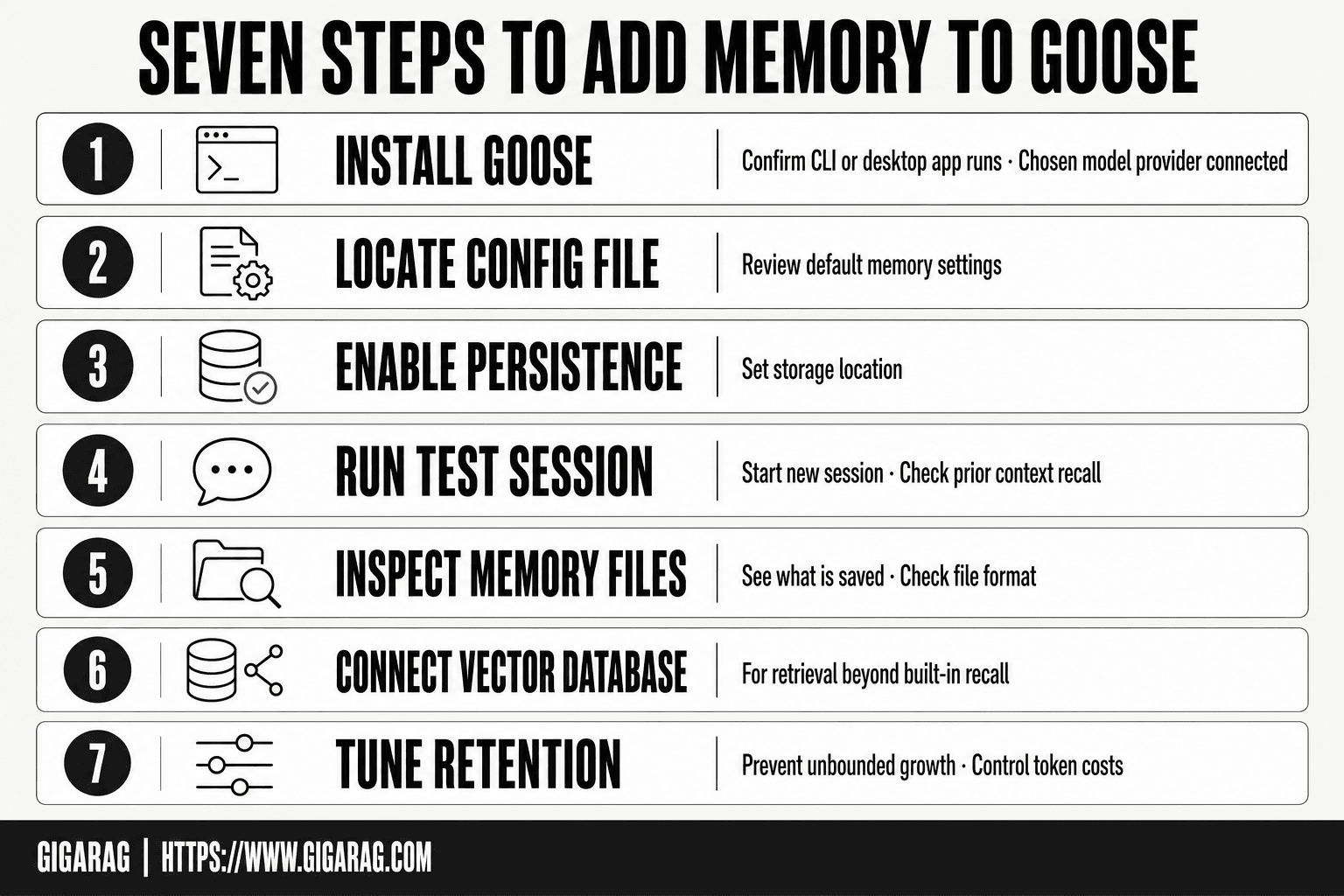
- How To Add Memory To Goose: A Step-by-Step Guide
- How to Add Memory to Goose: The Two Main Mechanisms
- Configuring the Memory Extension in Goose
- Storage Locations: Where Goose Memory Lives
- Trigger Words and When to Use Goose Memory
- Example Usage: Adding Memory to Goose Step by Step
- Goose Memory for RAG Pipeline Builders
- Limitations and What Not to Expect from Goose Memory
- Alternatives to Goose Memory for Advanced Agent Memory
- FAQ
- How to Add Memory to Goose: Final Notes
What Is Goose and What Is a Goose Agent?
Goose is an open-source AI agent that runs locally and executes tasks through MCP servers. A Goose agent is a configured instance of Goose with specific tools, extensions, and memory attached.
What is Goose?
Goose is an open-source AI agent built by Block. You run it on your own machine, and it connects to tools through MCP servers. It can read files, run commands, and automate workflows.
What is a Goose agent?
A Goose agent is a configured instance of Goose. You pick which extensions and MCP servers it loads. The agent then uses those tools to complete tasks you give it.
Is this related to the Game of Goose?
No. The Game of Goose is a board game. Goose the AI agent shares only the name.
[!note] Goose memory and a vector database solve different problems: Goose memory keeps agent context across sessions, while a vector database retrieves from a document corpus. Many RAG pipelines use both rather than choosing one.
Goose Memory vs External Vector Database
| Factor | Goose Memory | External Vector DB |
|---|---|---|
| Setup | Built into the agent; minimal config | Requires separate service and indexing |
| Storage | Local files by default; can be pointed elsewhere | Managed or self-hosted store |
| Retrieval | Agent-managed recall of prior context | Explicit similarity search you control |
| Best for | Session continuity and agent state | Large corpora and shared knowledge bases |
| Trade-off | Simpler, but less control over ranking | More control, but more moving parts |
How to Install Goose Before Adding Memory
You need Goose running before you can add memory. The install takes a few minutes.
Prerequisites
You'll need a machine running macOS or Linux. Windows support exists but is less mature. You also need an API key from a model provider, since Goose calls a large language model to do its work. Node.js 18 or newer is required for the MCP server setup.
Installation steps
Install Goose through Homebrew on macOS:
brew install goose
On Linux, download the binary from the Goose releases page on GitHub. Move it to a directory in your PATH, then run goose from a terminal.
The first launch walks you through picking a model provider and entering your API key. After that, Goose creates its config directory. That's where the memory files will live once you add them.
[!tip] For RAG builders: keep Goose memory for short-lived agent state and put your document corpus in the vector database. Mixing the two in one store makes retrieval harder to debug and can quietly raise token costs.
How To Add Memory To Goose: A Step-by-Step Guide
- Install Goose and confirm the CLI or desktop app runs with your chosen model provider.
- Locate the Goose configuration file and review the default memory-related settings.
- Enable memory persistence and set the storage location you want Goose to use.
- Run a short test session, then start a new one and check whether prior context is recalled.
- Inspect the stored memory files to understand what is being saved and in what format.
- Connect your vector database if your RAG pipeline needs retrieval beyond Goose's built-in recall.
- Tune retention and pruning so memory does not grow unbounded and inflate token costs.
How to Add Memory to Goose: The Two Main Mechanisms
Goose gives you two ways to add memory: a .goosehints file and the Memory Extension. They solve different problems. One is static. The other is dynamic.
What is .goosehints?
.goosehints is a plain text file you drop into a project directory. Goose reads it at startup and treats the contents as standing instructions. You'd put coding conventions, project structure notes, or API quirks there. It's memory you write by hand, once, and it stays fixed until you edit the file.
What is the Memory Extension?
The Memory Extension is an MCP server that lets Goose read from and write to a persistent memory store during a session. You trigger it with specific words, and Goose saves or retrieves information on its own. It's memory that grows as you work.
Key differences between .goosehints and Memory Extension
.goosehints is manual and static. You control every word. The Memory Extension is automatic and dynamic. Goose decides what to store based on your trigger words. Use .goosehints for rules that never change. Use the Memory Extension for facts you want Goose to accumulate over time.
Configuring the Memory Extension in Goose
The Memory Extension runs as an MCP server. You add it to Goose's config file, set trigger words, and restart. It's not a plugin you install from a marketplace. It's a server entry you declare.
Step 1: Locate the configuration file
Goose stores its config in ~/.config/goose/config.yaml on Linux and macOS. On Windows, it's %APPDATA%\goose\config.yaml. If the file doesn't exist, create it. You'll need a text editor and a terminal.
Step 2: Add the Memory MCP server
Open the config file and add a mcp_servers block. The Memory Extension needs a command and args pointing to the server binary. A minimal entry looks like this:
mcp_servers:
  memory:
    command: npx
    args: ["-y", "@goose/memory-server"]
The exact package name and args vary by version. Check the Goose docs for your release before copying this. Don't guess.
Step 3: Set trigger words
Trigger words control when Goose reads or writes memory. You set them in the same config block under a triggers key. Common defaults are "remember", "recall", and "forget". You can add your own. Pick words you won't type by accident, or Goose will save noise.
Step 4: Verify the configuration
Restart Goose and run a test. Type a trigger word followed by a fact, like "remember the API key is in .env.local". Then start a new session and type "recall the API key". If Goose returns the fact, the server is working. If it doesn't, check the server logs. The most common failure is a missing Node.js runtime, since the server runs through npx.
Storage Locations: Where Goose Memory Lives
Goose memory lives in plain files on your machine. No cloud sync. No database. The Memory Extension writes to a local directory, and .goosehints sits in your project root.
Default storage location
The Memory Extension stores data under ~/.config/goose/memory/ on Linux and macOS. On Windows, check %APPDATA%\goose\memory\. The .goosehints file lives in your project root as .goosehints.
How to inspect memory files
Open the memory directory and read the files directly. They're plain text or JSON, depending on the version. You don't need a special tool. If a file is empty, the server hasn't written anything yet.
Managing memory size
Long memory grows fast. Delete old files manually or clear the directory to reset. There's no built-in pruning.
Trigger Words and When to Use Goose Memory
Trigger words are the on-switch. Goose doesn't read or write memory on every turn. It waits for a specific word or phrase in your prompt, then acts.
What are trigger words?
They're strings you configure in the Memory Extension settings. When Goose sees one, it triggers a memory operation: read, write, or update. Without a trigger word, memory stays untouched.
Examples of trigger words
Common ones: "remember", "save this", "recall", "what do you know about". You set your own. Keep them short and unlikely to appear in normal conversation.
When to use memory vs. when not to
Use memory for facts you'll need again: project paths, API keys, user preferences. Don't use it for one-off questions. Every write costs tokens and grows the file.
Example Usage: Adding Memory to Goose Step by Step
Here's a concrete walkthrough. You've installed Goose and configured the Memory Extension. Now you want to store a fact and pull it back later.
Example scenario
You're building a RAG pipeline that indexes internal docs. Your repo lives at /home/dev/project-alpha. You keep forgetting the path. You want Goose to remember it.
Writing to memory
Start a new Goose session. Type:
remember the project-alpha repo is at /home/dev/project-alpha
Goose sees the trigger word "remember", writes the fact to its memory file, and confirms. The write happens immediately. No restart needed.
Retrieving from memory
Open a fresh session later. Type:
what do you know about project-alpha?
Goose reads the memory file, finds the path, and returns it. You didn't re-explain anything. That's the whole loop: trigger word in, fact stored, trigger word out, fact returned.
Goose Memory for RAG Pipeline Builders
Goose's memory is a flat file, not a vector store. That changes how you'd use it in a RAG pipeline.
Memory persistence in RAG pipelines
Goose writes memory as plain text to disk. It persists across sessions, which means your pipeline can treat it as a stable, human-readable knowledge source. You can read the file directly, parse it, and feed chunks into your retriever. No API call needed.
Retrieval considerations
Goose retrieves by trigger word, not by semantic similarity. It won't rank passages or return top-k results. If your pipeline needs relevance scoring, you'll have to add that layer yourself. The memory file is small enough to load fully into context for most use cases.
Integrating Goose memory with vector databases
You can export Goose's memory file and embed it into any vector database. The honest catch: Goose doesn't do this for you. You'll write a small script to chunk the file, embed the chunks, and upsert them. Once embedded, your RAG pipeline treats Goose memory like any other corpus.
Limitations and What Not to Expect from Goose Memory
Goose memory is a flat file with trigger-word retrieval. It is not a database, not a vector store, and not a semantic search engine. Expect to inspect files manually.
Cost implications of long memory
Long memory costs tokens. Every retrieval pulls the full memory file into context, so a 50 KB memory file adds roughly 12,000 tokens to each call where a trigger word fires. That adds up fast on paid models. There's no built-in summarization or pruning. You manage size yourself.
Performance issues
Retrieval is keyword matching, not ranking. As memory grows, trigger words collide and irrelevant entries get pulled in. Latency stays low, but precision drops. You'll spend time curating trigger words and trimming stale entries.
What Goose memory is not designed for
It won't do multi-hop reasoning, won't rank passages, and won't deduplicate conflicting entries. It's a scratchpad, not a knowledge base. For anything beyond session-to-session continuity, you'll outgrow it quickly.
Alternatives to Goose Memory for Advanced Agent Memory
Goose memory works until it doesn't. The flat file and trigger-word design handle session continuity fine. When you need ranking, deduplication, or semantic retrieval, you've hit the ceiling.
When Goose memory is sufficient
Use it for preferences, project notes, and small context you want to persist across sessions. Under 20 KB, with disciplined trigger words, it's fine.
When to consider alternatives
Switch when memory grows past manual curation, when retrieval precision matters, or when you need vector search. A real memory layer costs more to set up but stops the token bleed.
GigaRAG for advanced agent memory
GigaRAG replaces the flat file with a managed RAG pipeline: vector storage, ranked retrieval, and deduplication built in. It's the step up when Goose memory stops scaling. For teams that need agent memory and RAG pipeline infrastructure beyond what Goose's flat file can handle, GigaRAG is the practical next step.
FAQ
What is a Goose agent?
A Goose agent is a configured instance of Goose with specific tools, extensions, and memory attached. You pick which MCP servers it loads, and it uses those tools to complete tasks.
How do I install Goose?
Install Goose through Homebrew on macOS with brew install goose. On Linux, download the binary from the Goose releases page on GitHub and move it to a directory in your PATH. The first launch walks you through model provider setup and API key entry.
How do you play Game of Goose?
The Game of Goose is a board game where players roll dice and move pieces along a spiral track. It has no connection to the Goose AI agent.
What is the difference between .goosehints and the Memory Extension?
.goosehints is a static file you write by hand. The Memory Extension is dynamic and grows as you work. Use .goosehints for rules that never change. Use the Memory Extension for facts you want Goose to accumulate.
Where is Goose memory stored?
The Memory Extension stores data under ~/.config/goose/memory/ on Linux and macOS. On Windows, check %APPDATA%\goose\memory\. The .goosehints file lives in your project root.
Can I use Goose memory with a RAG pipeline?
Yes. Goose memory persists as plain text on disk, so you can read the file directly, parse it, and feed chunks into your retriever. For semantic retrieval, you'll need to embed the memory file into a vector database yourself.
What are the limitations of Goose memory?
It's a flat file with trigger-word retrieval. No ranking, no deduplication, no semantic search. Long memory costs tokens on every retrieval, and there's no built-in pruning.
How do I manage long memory in Goose?
Delete old files manually or clear the memory directory to reset. There's no built-in pruning or summarization. Keep the file under 20 KB and curate trigger words to avoid collisions.
How to Add Memory to Goose: Final Notes
How to add memory to Goose comes down to two files: a .goosehints file for static rules and a Memory Extension config for dynamic recall. Neither is complicated to set up. Both hit the same ceiling: a flat file with keyword retrieval, no ranking, and token costs that grow with every write. For session continuity and small project notes, that's enough. For a RAG pipeline that needs semantic search, deduplication, or ranked retrieval, you'll outgrow it. GigaRAG handles those cases with a managed pipeline, but the honest answer is that most teams should start with Goose's built-in memory, watch where it breaks, and only then reach for something heavier.
Frequently Asked Questions
What is a Goose agent?
Goose is an open-source AI agent that runs locally and can execute tasks using tools, extensions, and a chosen language model. It is designed to be extensible, so developers can wire in their own tools and workflows. Memory support lets it carry context between sessions rather than starting fresh each time.
How do I install Goose?
Installation depends on your platform: there is a desktop app and a command-line interface. Follow the official Goose documentation for the current install command and prerequisites for your OS. After installing, configure your model provider before enabling memory.
Does Goose memory replace a vector database?
No. Goose memory is about persisting agent context, while a vector database is about similarity search over a document corpus. For a RAG pipeline you typically want both: Goose memory for state and the vector database for retrieval. Treating them as interchangeable usually leads to poor retrieval quality.
Where does Goose store its memory?
By default, memory is stored locally in files tied to your Goose configuration. The exact path depends on your setup and OS. You can inspect these files to see what is persisted and adjust the location if your workflow requires it.
Will adding memory increase my costs?
It can. Recalled context consumes tokens on each request, so larger memory means higher token usage and potentially slower responses. Prune or summarize stored memory regularly, and only recall what the current task actually needs.
Can I use Goose memory with my existing RAG pipeline?
Yes, and it is a common pattern. Let Goose memory handle session continuity and agent state, and let your vector database handle document retrieval. Keep the two stores separate so you can debug retrieval and memory issues independently.
What should I not expect from Goose memory?
Do not expect it to act as a full knowledge base, a semantic search engine, or a substitute for proper retrieval infrastructure. It also will not manage its own relevance perfectly, so unbounded memory can degrade output quality. Plan for pruning, and test recall behavior before relying on it in production.
About GigaRAG
GigaRAG helps GigaRAG is for agent memory and RAG pipeline builders. get this right. Whether you are working through How to add memory to Goose or something adjacent, we publish what we have actually tested, including where it falls short.