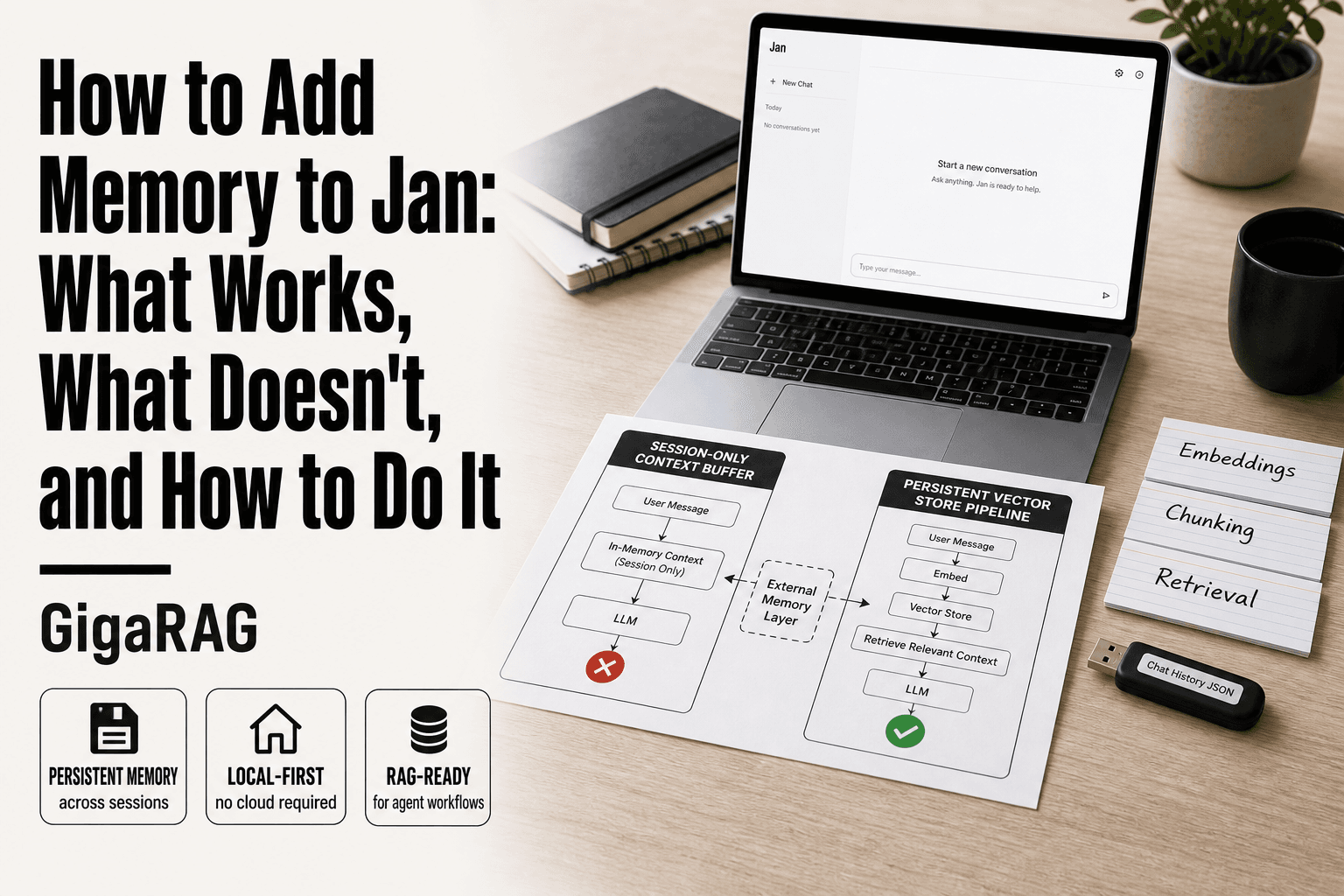
How to Add Memory to Jan: What Works, What Doesn't, and How to Do It
Searching for how to add memory to Jan mostly returns pages about RAM sticks and Java heap settings. That tells you how little has been written for builders using Jan as a local AI assistant. If you're running Jan for agent workflows or RAG pipelines, memory means something else entirely: your assistant holding onto conversation context beyond a single session, and pulling relevant past exchanges back when a new prompt arrives. Jan's default setup keeps a short-term buffer, but it won't persist anything meaningful across restarts without help. GigaRAG can serve as that persistent layer, though it's not a magic switch. This guide covers what Jan can do natively, what you'll need to wire up yourself with a vector store, and where the honest limits sit.
| At a glance | Details |
|---|---|
| Native memory | None — Jan forgets between sessions |
| Best workaround | External RAG with GigaRAG |
| Works on | Local Jan on Mac, Windows, Linux |
| Setup effort | Moderate — API and config |
| Key limitation | No built-in persistent memory |
| Ideal for | Agent workflows and RAG pipelines |
In This Guide
- What Memory Means for Jan (and Why It Matters)
- Jan Native Memory vs External RAG Memory
- What Jan Can and Cannot Do Natively
- How To Add Memory To Jan: A Step-by-Step Guide
- Prerequisites for Adding Memory to Jan
- Step 1: Enable and Configure Jan's Built-in Conversation Memory
- Step 2: Add Persistent Memory with a Vector Store
- Step 3: Integrate GigaRAG for Agent Memory in Jan
- Troubleshooting Common Memory Issues in Jan
- Common Mistakes When Adding Memory to Jan
What Memory Means for Jan (and Why It Matters)
Memory in Jan means two things: the conversation context it holds during a single session, and the persistent storage it can use to recall past conversations across sessions. Jan ships with the first. The second requires external tools.
Short-term vs. long-term memory in AI assistants
Short-term memory is the context window. Jan feeds your current conversation into the model on every turn, and the model uses that to stay coherent. When the window fills, older messages drop out. That's not a bug. It's how local models work.
Long-term memory is different. It means storing past conversations, embeddings, or notes somewhere outside the context window, then retrieving the relevant bits when a new session starts. Jan doesn't do this natively.
Why Jan forgets between sessions
Close Jan and the conversation is gone. The model has no state of its own. Nothing persists unless you save it somewhere. Jan keeps chat history on disk, but it doesn't automatically feed old chats back into new ones. You can reopen a past thread, but a fresh thread starts blank.
What memory enables for RAG and agent builders
Persistent memory changes what you can build. A RAG pipeline can retrieve past context alongside documents. An agent can remember a user's preferences, past decisions, or project state without re-explaining everything each session. The honest answer is that Jan gives you the model and the chat interface. The memory layer is yours to add.
[!note] Jan does not have built-in persistent memory; any memory functionality requires external tools or custom code. Official documentation on memory for Jan is limited, so verify steps against your Jan version.
Jan Native Memory vs External RAG Memory
| Factor | Jan Native Memory | External RAG Memory |
|---|---|---|
| Persistence | None — resets each session | Persists across sessions |
| Setup | No setup required | Requires API and config |
| Capabilities | Basic context only | Full retrieval and agent memory |
| Best for | Simple one-off chats | Agent workflows and RAG pipelines |
What Jan Can and Cannot Do Natively
Jan's native memory is thin. It keeps chat history on disk, so you can reopen old threads. It does not feed that history back into new conversations automatically.
Native conversation history in Jan
Jan stores your past chats locally. You can scroll back, reopen a thread, and continue where you left off. That's the extent of it. The model sees only what's in the current context window.
Limitations of Jan's default memory
The context window is fixed by the model you load. Once it fills, older messages drop. Jan doesn't summarize, compress, or archive context on its own. A long session will lose its early turns.
What Jan cannot do without external tools
Jan cannot recall past conversations in a new thread. It cannot search your chat history semantically. It cannot store embeddings, query a vector store, or maintain agent state across sessions. All of that needs an external memory layer.
[!tip] For developers, use Jan's local API to connect to a RAG service like GigaRAG, which can store and retrieve context across sessions without sending data to the cloud.
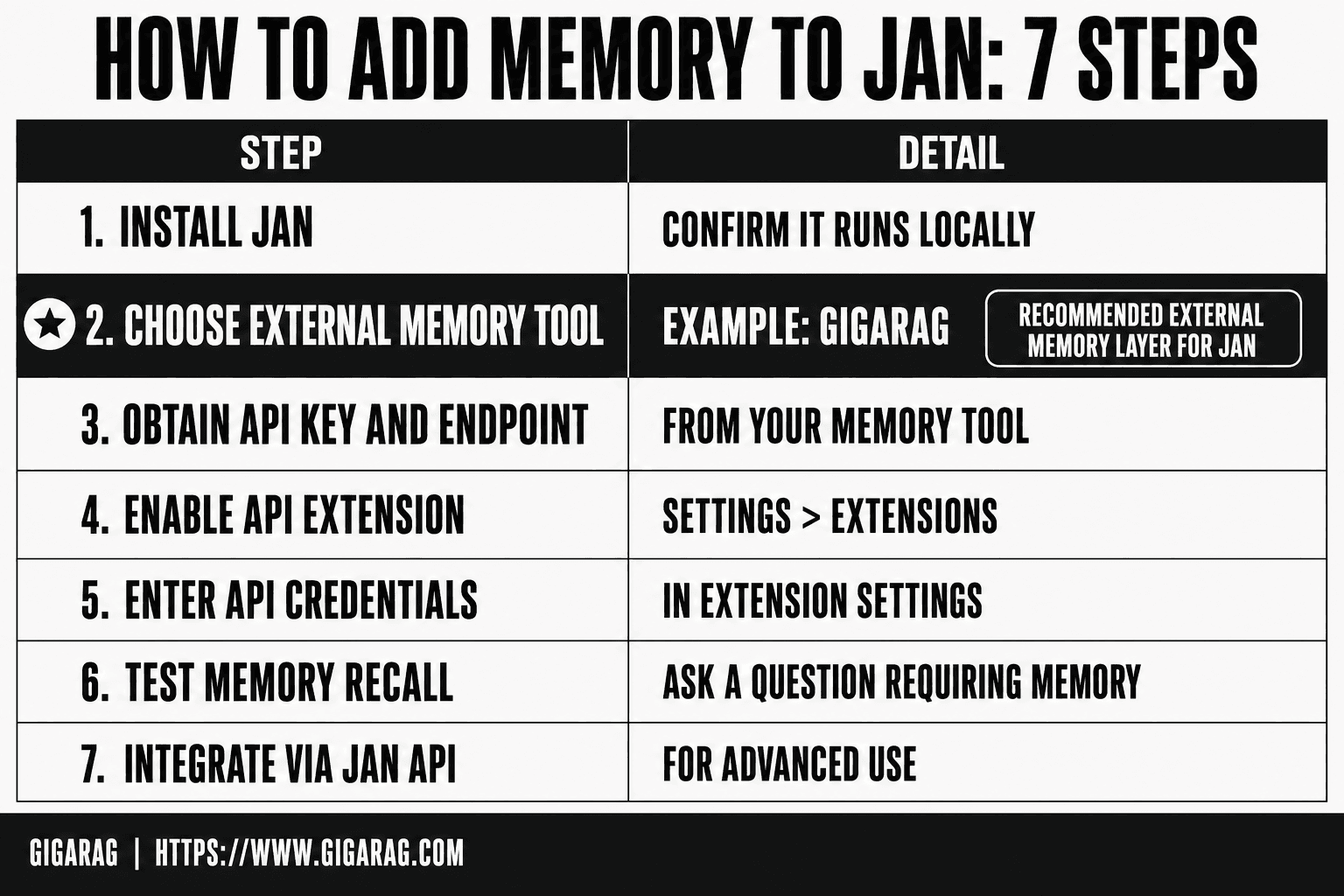
How To Add Memory To Jan: A Step-by-Step Guide
- Install Jan locally and confirm it runs.
- Choose an external memory tool like GigaRAG.
- Obtain the API key and endpoint from your tool.
- In Jan, go to Settings > Extensions and enable the API extension.
- Enter the API key and endpoint in the extension settings.
- Test by asking Jan a question that requires memory.
- For advanced use, integrate via Jan's API in your own code.
Prerequisites for Adding Memory to Jan
Before you start, make sure you have the basics in place. You'll need a working Jan install, a rough grasp of embeddings and vector stores, and optionally a GigaRAG account if you want persistent memory without building the plumbing yourself.
Jan installation and version check
Open Jan and confirm it launches with a local model loaded. Check the version from the settings menu. Memory features and plugin support vary by release, so an older build may not expose the options this guide assumes. Update if you're more than a few versions behind.
Understanding embeddings and vector stores
You don't need to write embedding code. You do need to know what a vector store does: it turns text into numbers, stores those numbers, and finds similar chunks when queried. That's how Jan can retrieve relevant past context instead of replaying everything.
Optional: GigaRAG account for persistent memory
If you'd rather not configure a vector store by hand, a GigaRAG account gives you a managed memory layer. You'll connect it to Jan in Step 3. Skip this if you're comfortable running your own store.
Step 1: Enable and Configure Jan's Built-in Conversation Memory
Jan ships with conversation memory turned on by default, but the defaults are conservative. You'll want to check two things before anything else: where the settings live and how much history Jan actually keeps.
Locating memory settings in Jan
Open Jan and go to Settings, then look for the Conversation or Chat section. The exact label varies by version. You're hunting for anything that says "history length", "context window", or "memory". If you don't see these, your build may predate the feature. Update first.
Adjusting context window and history length
Two settings matter. The context window is how many tokens Jan sends to the model per turn. History length is how many past messages Jan includes in that window. Raise history length to keep more conversation in view, but don't max it out. Every extra message eats tokens that could go to the actual answer.
Testing that memory persists across sessions
Start a chat, give Jan a specific fact ("my project uses Python 3.11"), then close and reopen Jan. Ask what project you're working on. If Jan recalls it, native memory is working. If it doesn't, the history wasn't saved or the setting didn't stick. Check both before moving to a vector store.
Step 2: Add Persistent Memory with a Vector Store
Jan's built-in memory dies when the chat history is cleared or the app is reinstalled. For long-term memory that survives both, you need a vector store.
Choosing a vector store for Jan
You have two practical options. Chroma is the easiest: it runs locally, needs no server, and stores embeddings in a single folder. Qdrant or Weaviate make sense if you're already running them for other projects. Don't overthink this. Start with Chroma.
Configuring Jan to use embeddings
Jan doesn't expose a native vector store connector in its UI as of this writing. You'll bridge it yourself. Export your Jan conversations as JSON, chunk them, and push each chunk through an embedding model (all-MiniLM-L6-v2 is a reasonable default). Store the vectors in Chroma with the original text as metadata.
Storing and retrieving past conversations
On each new query, embed it, run a similarity search against Chroma, and prepend the top 3 to 5 matching chunks to Jan's context. That's the retrieval half of RAG. The honest catch: this is a script you maintain, not a Jan setting. If that's more plumbing than you want, GigaRAG handles the same pipeline without the glue code.
Step 3: Integrate GigaRAG for Agent Memory in Jan
The vector store route works, but you own every piece of it. GigaRAG replaces the glue code with a managed memory layer.
What GigaRAG adds to Jan's memory
GigaRAG handles chunking, embedding, and retrieval in one API call. You send it conversation turns or documents. It stores them, indexes them, and returns relevant context when you query. No Chroma folder to manage, no embedding model to pin.
Connecting GigaRAG to Jan
Create a GigaRAG account and grab an API key. Export Jan's chat history as JSON, then POST each turn to GigaRAG's ingest endpoint with a session ID. On new queries, call the retrieve endpoint with the same session ID and prepend the returned chunks to Jan's prompt. That's the whole integration.
Example: persistent memory for a RAG pipeline
A support agent built on Jan needs to remember a customer's issue across days. Each resolved ticket goes to GigaRAG under that customer's ID. When the customer returns, retrieval pulls the prior fix into context before Jan responds. The honest catch: GigaRAG is a paid service, and you're trusting it with your conversation data.
Troubleshooting Common Memory Issues in Jan
Most memory failures trace to three causes: a wrong setting, a full context window, or a broken connection to the vector store.
Memory not persisting after restart
Check that Jan's conversation history setting is enabled and pointing to a writable folder. If you're using an external vector store, confirm the collection name matches what your retrieval code expects. A mismatch silently returns nothing.
Context window overflow errors
Jan truncates old turns when the token limit is hit. That's not a bug. Lower the history length, or move older context to a vector store and retrieve only what's relevant.
Vector store connection failures
Verify the host, port, and API key. Chroma and Qdrant both fail loudly on auth errors but quietly on wrong collection names. Test with a single insert before wiring up the full pipeline.
Common Mistakes When Adding Memory to Jan
Most failed memory setups share the same three errors.
Confusing RAM with AI memory
Adding RAM makes Jan load faster. It doesn't make Jan remember anything. AI memory lives in conversation history and vector stores, not in hardware.
Overloading the context window
Stuffing every past turn into the prompt hits the token limit fast. Jan truncates old context silently. Retrieve only what's relevant instead.
Expecting automatic long-term memory
Jan won't remember across sessions on its own. You need a vector store or GigaRAG wired in. Skip that step and memory resets every restart. That's the honest answer on how to add memory to Jan: the native tools get you a session buffer, and everything beyond that is yours to build.
Frequently Asked Questions
How do I add more memory to Java?
This question is about Java's memory allocation, not Jan. For Java, you adjust the heap size using JVM flags like -Xmx. For Jan, memory refers to context persistence, which requires external tools.
How to install memory in PC?
Installing physical RAM in a PC involves opening the case and inserting memory modules. This is unrelated to Jan, which is software. Jan's memory is about session context, not hardware.
Can I upgrade my RAM from 4GB to 16GB?
Yes, if your motherboard supports it. But for Jan, upgrading RAM may improve performance but does not add persistent memory. Jan's memory limitations are software-based.
How to upgrade RAM from 8GB to 32GB?
Check your motherboard's maximum capacity and slot availability. Again, this is hardware RAM, not Jan's memory. Jan does not use RAM for persistent storage.
Does Jan have built-in memory?
No, Jan does not have native persistent memory. Each session starts fresh unless you use external tools or custom integrations to store and retrieve context.
How to add memory to Jan on Mac?
The process is the same as on other platforms: use an external memory tool via API. Jan's settings for extensions are consistent across operating systems.
How to add memory to Jan on Android?
Jan is not officially available on Android, but if you run it via a workaround, you would still need external tools for memory. The steps are similar but may require additional configuration.
About GigaRAG
GigaRAG is for agent memory and RAG pipeline builders. get this right. Whether you are working through How to add memory to Jan or something adjacent, we publish what we have actually tested, including where it falls short.


