How to Add Memory to Kiro: A Practical Guide for RAG and Agent Memory Builders
How to add memory to Kiro is a question every RAG builder and agent memory architect hits eventually. You've probably seen the docs, maybe an AWS blog post, and you're still not sure which approach fits your stack. Kiro gives you four routes: native /knowledge add commands, MCP extensions like AWS Bedrock AgentCore, third-party tools like Total Recall and kiro-memory, and DIY bash hooks. Each has different persistence guarantees, different isolation behavior, and different failure modes. None of the top results compare them side by side. This guide does. You'll learn how Kiro memory works under the hood, step-by-step setup for each method, a decision framework for choosing the right one, and the limitations nobody else states plainly.
| At a glance | Details |
|---|---|
| Primary method | Native /knowledge add command |
| Alternative methods | MCP servers, third-party tools, bash hooks |
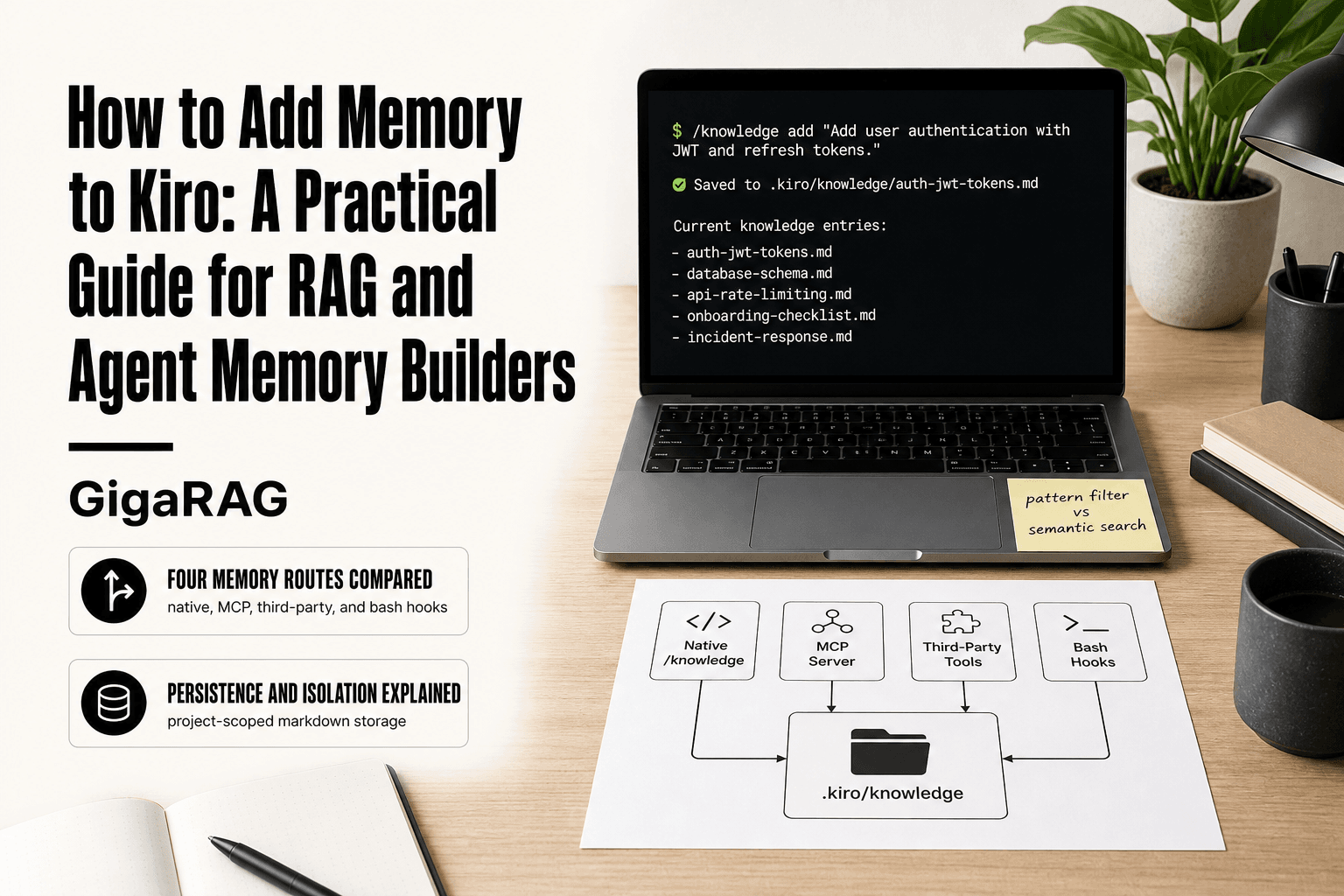
| Storage format | Markdown files in .kiro/knowledge |
| Retrieval | Keyword and semantic search |
| Persistence | Across sessions, tied to project |
| Best for | RAG pipelines and agent memory |
In This Guide
- How Kiro Memory Works Under the Hood
- Native /knowledge vs MCP vs Third-Party vs Bash Hooks
- Prerequisites for Adding Memory to Kiro
- How To Add Memory To Kiro: A Step-by-Step Guide
- Method 1: Native Knowledge Commands (/knowledge add)
- Method 2: MCP Extensions for Enterprise Memory
- Method 3: Third-Party Tools and DIY Approaches
- How to Add Memory to Kiro: Choosing the Right Approach
- What You Cannot Do with Kiro Memory
- Troubleshooting Common Kiro Memory Issues
- Best Practices for Kiro Memory in RAG Pipelines
- Final Thoughts on Adding Memory to Kiro
How Kiro Memory Works Under the Hood
Kiro stores knowledge as plain text entries, indexed by pattern, and retrieves them on demand during an agent session. You add a knowledge entry, Kiro persists it to a local file, and the agent pulls matching entries when it needs context.
Storage format and persistence guarantees
Kiro keeps knowledge in a local file tied to your configuration. Entries persist across sessions, so anything you add with /knowledge add stays available until you remove it. The honest catch: persistence is only as reliable as the file itself. Wipe your config or move machines without copying the file, and the memory goes with it.
Indexing and retrieval mechanics
Retrieval works by pattern matching, not semantic search. When the agent runs, Kiro checks your stored entries against the current context and surfaces matches. Exact phrasing matters. If you store "deploy command is make ship" and the agent asks "how do I deploy?", it may or may not pull the entry depending on how the pattern filter is configured.
Agent-specific isolation explained
Kiro isolates knowledge per agent. Entries added for one agent don't leak into another unless you explicitly share the config file. This is useful for RAG builders running multiple agents with different contexts. The tradeoff: there's no built-in shared memory pool across agents. You manage isolation by managing files.
[!note] Kiro's native memory is stored as markdown files in the .kiro/knowledge directory within your project, making it version-controllable but limited to text-based knowledge.
Native /knowledge vs MCP vs Third-Party vs Bash Hooks
| Factor | Native /knowledge | MCP / Third-Party / Bash Hooks |
|---|---|---|
| Setup complexity | Low: built-in command | Varies: MCP config, tool install, or script |
| Control over storage | Limited: fixed format and location | High: custom storage, indexing, retrieval |
| Integration with RAG | Basic: manual add and search | Advanced: can connect to external vector DBs |
| Persistence guarantees | Project-scoped, session-persistent | Depends on implementation; may need external storage |
| Best use case | Quick, simple memory for small projects | Complex, scalable memory for production RAG |
Prerequisites for Adding Memory to Kiro
Before you start, you need three things: a working Kiro CLI, access to your configuration file, and a basic grasp of slash commands. That's it. No database, no vector store, no extra services.
Kiro CLI version and setup
Install the latest Kiro CLI from the official docs. Version matters: older builds handle /knowledge commands differently, so update before you test anything.
Configuration file access
Kiro stores memory in a local config file. Find it, back it up, and know where it lives. If you can't locate the file, you can't verify persistence.
Platform-specific notes (Mac, AWS)
Mac users should check file permissions on the config directory. AWS users need IAM roles configured before connecting MCP servers.
[!tip] For RAG pipeline builders, combine native /knowledge for quick notes with an MCP server connected to a vector database for scalable semantic retrieval.
How To Add Memory To Kiro: A Step-by-Step Guide
- Choose your memory approach based on project complexity and integration needs.
- For native memory, use the /knowledge add command to store information.
- For MCP, configure an MCP server that provides memory capabilities.
- For third-party tools, install and integrate a memory tool like GigaRAG.
- For bash hooks, write scripts that trigger memory operations on events.
- Test memory retrieval by querying stored information in a new session.
- Document your memory setup for team use and future maintenance.
Method 1: Native Knowledge Commands (/knowledge add)
The native approach is the baseline. You store information with /knowledge add, retrieve it with /knowledge show, and control what gets stored with pattern filtering. No external services, no MCP servers, no third-party tools.
Step 1: Using /knowledge add
Type /knowledge add followed by the information you want Kiro to remember. Kiro stores it in the local config file. The command works inside an agent session, so the knowledge is tied to that agent's context.
Step 2: Retrieving with /knowledge show
Run /knowledge show to see what Kiro has stored. This is your verification step. If the information doesn't appear here, it wasn't saved.
Step 3: Configuring pattern filtering
Pattern filtering controls what Kiro captures automatically. You set patterns in the config file to include or exclude specific content types. This keeps your memory clean and relevant to the agent's actual work.
Method 2: MCP Extensions for Enterprise Memory
MCP extensions are the enterprise path. You run an MCP server that exposes memory tools, then connect Kiro to it. The AWS Bedrock AgentCore example shows the pattern: an MCP server holds the memory, and Kiro calls it as a client.
The main catch is complexity. You're running a separate server, managing credentials, and debugging connection issues. This is worth it when you need memory shared across multiple agents or when your memory has to live outside Kiro's local config.
Step 1: Setting up the MCP server
Start with a server that exposes memory operations. AWS Bedrock AgentCore provides the scaffolding. You define the tools (store, retrieve, list), then deploy the server where Kiro can reach it.
Step 2: Connecting Kiro to the MCP server
Point Kiro at the MCP server's endpoint. Kiro then treats the server's tools as available commands. Memory operations route through the server instead of local storage.
Step 3: Testing and cleaning up
Test with a store-then-retrieve cycle. Verify the data persists. When done, tear down the server to avoid orphaned resources and unexpected charges.
Method 3: Third-Party Tools and DIY Approaches
If you don't want to run an MCP server, third-party tools and shell scripts fill the gap. They're lighter than MCP but less integrated than native commands.
Total Recall for cross-session memory
Total Recall is an open-source tool that captures your terminal sessions and makes them searchable later. You run it alongside Kiro, and it records what you typed and what the agent returned. Retrieval happens outside Kiro, so you search the recall file rather than asking Kiro to remember.
DIY bash hooks and session files
The cheapest approach is a bash hook that appends every Kiro session to a file. A few lines in your shell config handle it. You get a plain-text log you can grep, but no indexing or filtering. It's a memory file, not a memory system.
Tradeoffs of third-party and DIY approaches
The honest answer is these are stopgaps. Total Recall adds a dependency and stores everything, including noise. Bash hooks give you raw text with no structure. Both break when Kiro changes its output format.
How to Add Memory to Kiro: Choosing the Right Approach
The right approach depends on what you're building. A single-agent RAG pipeline with one user needs less than a multi-agent system where memory must cross sessions and survive restarts.
Decision framework for RAG builders
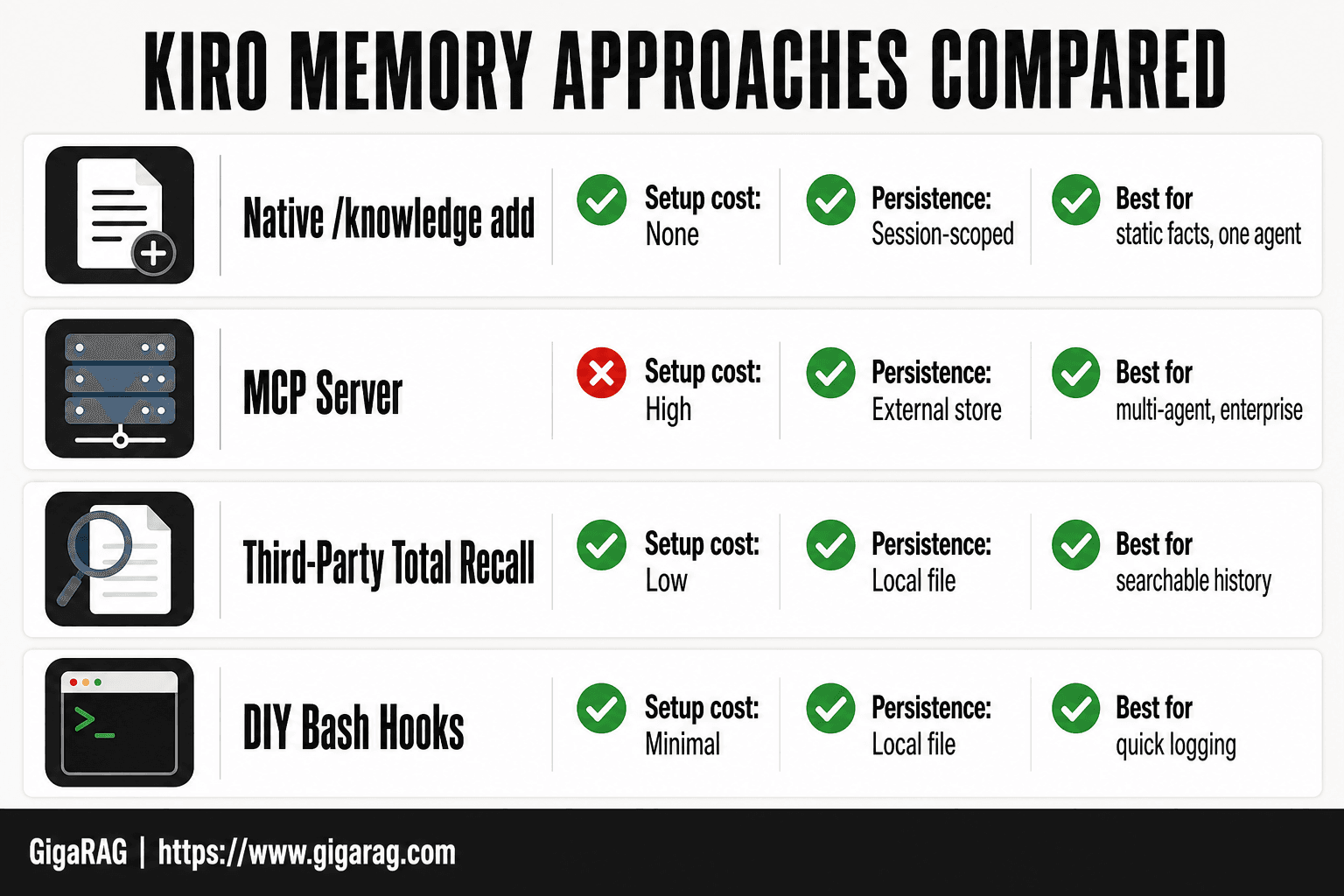
Start with native /knowledge add if your memory is static: project conventions, API schemas, domain rules. It's the only approach with zero extra dependencies. Move to MCP when memory must be shared across agents or integrated with external systems like AWS Bedrock AgentCore. Third-party tools fit when you need searchable session history but can't run a server. DIY bash hooks are for throwaway experiments, not production.
Comparison table: native vs MCP vs third-party vs DIY
| Approach | Setup cost | Persistence | Sharing | Best when |
|---|---|---|---|---|
Native /knowledge add | None | Session-scoped | No | Static facts, one agent |
| MCP server | High | External store | Yes | Multi-agent, enterprise |
| Third-party (Total Recall) | Low | Local file | No | Searchable history |
| DIY bash hooks | Minimal | Local file | No | Quick logging |
When to combine approaches
You can run native commands for stable knowledge and an MCP server for dynamic memory. Don't combine third-party tools with MCP unless you need redundant logging. Each layer adds failure modes.
What You Cannot Do with Kiro Memory
Kiro's memory is not a database you can edit at will. The honest answer is that control is limited in three specific ways.
No manual editing in Kiro Web
You can't open Kiro Web and change a stored memory entry. What gets added through /knowledge add stays as-is until you overwrite it with a new command. There's no edit button, no revision history, no way to correct a typo without re-adding the whole entry.
No cross-product memory sharing
Memory added in Kiro CLI doesn't appear in Kiro Web. Memory in Kiro Web doesn't transfer to Kiro Crew. Each product keeps its own store. If you need shared memory across products, you'll need an MCP server or a third-party tool that sits outside Kiro entirely.
Third-party tools may break with updates
Total Recall and kiro-memory hook into Kiro's internals. When Kiro changes its storage format or command structure, those tools can stop working without warning. You're relying on the tool's maintainer to keep up. For production RAG pipelines, that's a real risk.
Troubleshooting Common Kiro Memory Issues
Most failures come down to one of four things: persistence, command recognition, MCP connectivity, or platform quirks. Start with the simplest check.
Memory not persisting between sessions
Check your configuration file first. If pattern_filter is set too aggressively, Kiro drops entries before they're stored. Run /knowledge show to confirm what actually saved. If nothing appears, your config path may be wrong. Kiro writes to a specific location per product, and CLI and Web don't share it.
Slash commands not recognized
This usually means the Kiro CLI version is outdated. Slash commands changed across releases. Update the CLI, then restart your terminal session. If commands still don't register, check that you're in a directory Kiro recognizes as a project root.
MCP connection failures
Test the MCP server independently before blaming Kiro. If the server runs but Kiro can't reach it, check the connection string and port. Firewall rules on Mac and AWS security groups block MCP traffic more often than configuration errors do.
Best Practices for Kiro Memory in RAG Pipelines
The practices below assume you've already picked an approach from the decision framework. They're about not wasting what you store.
Structuring knowledge for retrieval
Store discrete facts, not paragraphs. A single /knowledge add entry should answer one question. If you need two sentences to capture it, split it into two entries. Retrieval works better when each chunk maps to a single concept. Name things consistently. If you call a service "auth-api" in one entry and "authentication service" in another, retrieval gets noisy.
Agent-specific isolation best practices
Use agent-specific isolation when agents serve different users or different tasks. Don't share a memory pool between a customer-facing agent and an internal ops agent. The overlap creates wrong answers. One agent, one knowledge scope. If two agents genuinely need the same facts, duplicate the entries rather than sharing the pool.
Memory hygiene and maintenance
Review stored knowledge on a schedule. Stale entries are worse than missing ones because they're retrieved with confidence. Delete anything that references a version, a price, or a status that changed. If you can't automate the review, set a calendar reminder. Memory rots quietly.
Final Thoughts on Adding Memory to Kiro
Start with native /knowledge add until it breaks. It's the fastest path and covers most single-agent use cases. Move to MCP when you need enterprise-grade persistence or cross-session guarantees. Reach for third-party tools only when a specific gap justifies the maintenance cost.
The honest answer is that Kiro's memory works well within its scope. It stores discrete facts, retrieves them during sessions, and isolates agents cleanly. What it doesn't do is give you a full agent memory platform with RAG pipeline tooling built in. If you're building something bigger than Kiro's native capabilities, GigaRAG is designed for exactly that: agent memory and RAG pipelines that need more than slash commands and session files. But don't add it until you've outgrown what's already here. How to add memory to Kiro is a solved problem at small scale. The question is what you do when the scale stops being small.
Frequently Asked Questions
How do I add memory to Kiro?
You can add memory to Kiro using the native /knowledge add command, by configuring an MCP server, integrating third-party tools, or setting up bash hooks. The best method depends on your project's complexity and your need for integration with external systems.
What is Kiro's memory architecture?
Kiro's memory architecture stores knowledge as markdown files in the .kiro/knowledge directory. It indexes these files for keyword and semantic search, and persists memory across sessions within the same project.
Can I use Kiro with AWS services?
Yes, Kiro can be integrated with AWS services through MCP servers or custom tools. This allows you to leverage AWS storage, databases, or AI services for enhanced memory capabilities.
How does Kiro CLI memory work?
Kiro CLI memory works similarly to the IDE version, using the /knowledge command to add and retrieve information. It persists across CLI sessions and can be extended with MCP or third-party tools.
What are the limitations of Kiro's native memory?
Native memory in Kiro is limited to text-based markdown files, lacks advanced indexing like vector search, and is scoped to a single project. For complex RAG pipelines, you may need external tools.
How do I integrate Kiro with a RAG pipeline?
To integrate Kiro with a RAG pipeline, use an MCP server or third-party tool that connects to your vector database. This allows Kiro to retrieve and store information in your RAG system.
Is there a Kiro memory bank?
Kiro does not have a built-in 'memory bank' feature, but the .kiro/knowledge directory acts as a local knowledge base. For a more robust memory bank, consider third-party solutions.
About GigaRAG
GigaRAG helps GigaRAG is for agent memory and RAG pipeline builders. get this right. Whether you are working through How to add memory to Kiro or something adjacent, we publish what we have actually tested, including where it falls short.


