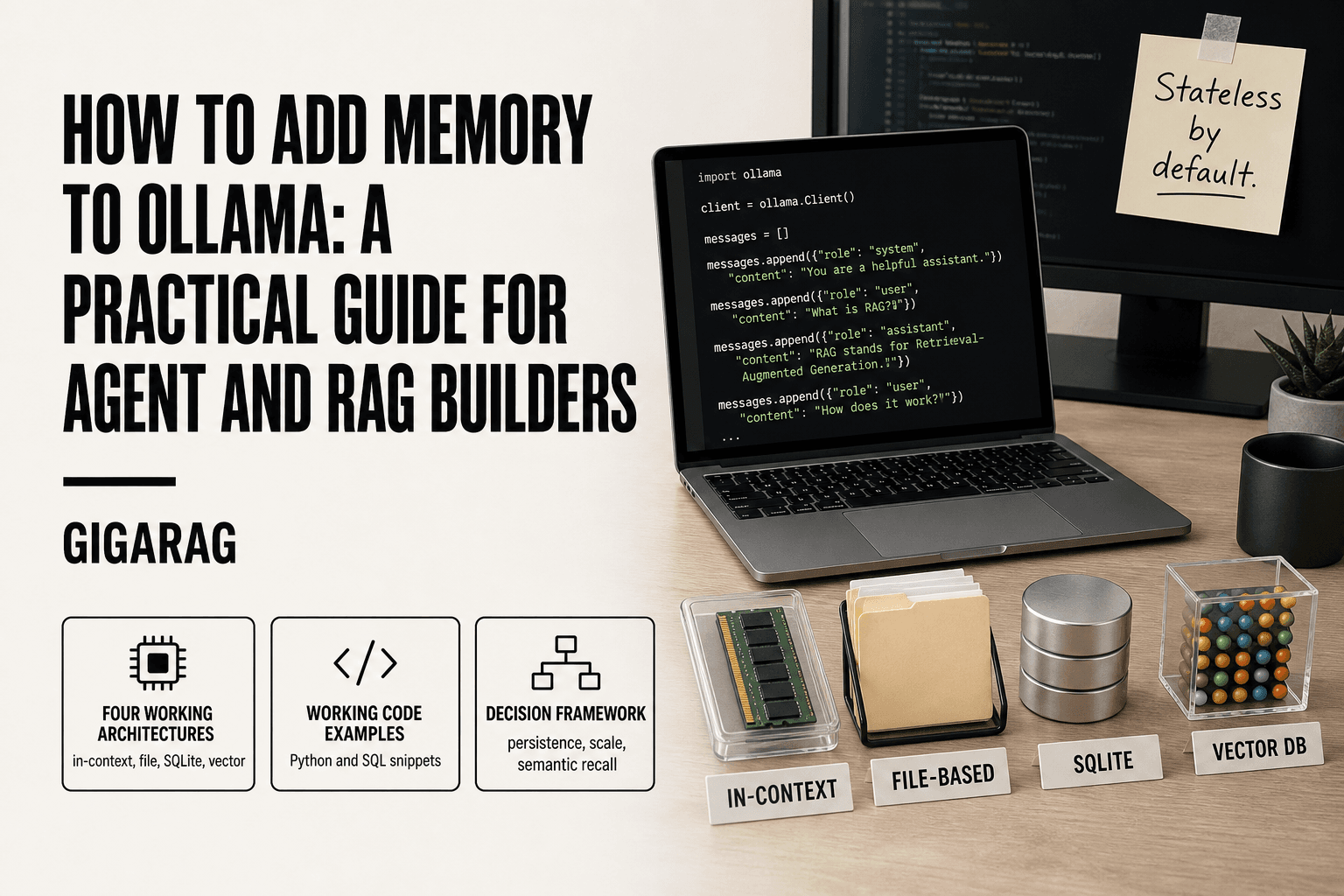
How to Add Memory to Ollama: A Practical Guide for Agent and RAG Builders
How to add memory to Ollama starts with a problem most agent builders hit within the first week: your model forgets everything the moment the process ends. You ask it to remember a user's name, a project constraint, a decision from two turns ago, and none of it survives a restart. Ollama is excellent at generating responses and completely indifferent to keeping them. That's not a bug, it's the default. The good news is you don't need a PhD in vector search to fix it. You need a clear map of the four memory architectures that actually work: in-context buffers, file-based persistence, SQLite for structured recall, and vector databases for semantic memory. Each has real trade-offs, and none is a drop-in solution. This guide covers all four with code you can adapt, plus a decision framework for choosing the right one. If you need managed, scalable agent memory without building the plumbing yourself, GigaRAG is one option worth checking. Here's what you'll get: honest limitations, working examples, and a path from zero memory to persistent, queryable recall.
| At a glance | Details |
|---|---|
| Core issue | Ollama has no built-in cross-session memory |
| Memory types | Short-term (context) vs long-term (persistent) |
| Implementation options | In-context, file, SQLite, vector DB |
| Best for agents | Vector DB for semantic recall across sessions |
| Best for simple apps | File or SQLite for exact history |
| Key trade-off | Simplicity vs recall quality vs cost |
In This Guide
- What Memory Means for Ollama (and What It Doesn't)
- In-Context Memory vs Vector Database Memory for Ollama
- The Four Memory Architectures for Ollama
- How To Add Memory To Ollama: A Step-by-Step Guide
- Approach 1: In-Context Memory with a Conversation Buffer
- Approach 2: File-Based Memory for Simple Persistence
- Approach 3: SQLite for Structured, Queryable Memory
- Approach 4: Vector Databases for Semantic Memory
- Choosing the Right Memory Approach for Your Use Case
- What to Expect (and Not Expect) from Ollama Memory
- Final Thoughts: Building Memory That Scales
What Memory Means for Ollama (and What It Doesn't)
Ollama runs models. It doesn't remember anything. Every request you send is stateless: the model sees only the prompt you give it, nothing from the last call. If you want memory, you build it yourself.
Short-term vs long-term memory
Short-term memory is the conversation buffer. You keep the last N turns in your application and pass them back with each prompt. It lives in RAM, dies when the process stops, and is limited by the context window.
Long-term memory is persistent. It survives restarts and usually lives in a file, a database, or a vector store. It's what lets an agent recall a user's name next week or pull a fact from three sessions ago.
The honest answer: most projects need both. Short-term for the current conversation, long-term for everything else.
What Ollama does out of the box
Nothing. Ollama serves models over an API. It handles loading, inference, and streaming. It does not store conversation history, user preferences, or facts between requests. The /api/chat endpoint accepts a messages array, but you supply it every time.
What Ollama cannot do without external tools
Ollama won't remember across sessions. It won't search past conversations. It won't build a knowledge base from your documents. All of that requires code you write or a framework you adopt: a file, SQLite, a vector database, or a managed memory layer. There is no built-in toggle for memory.
[!note] Ollama itself does not provide memory management; you must implement it externally using your own storage and retrieval logic.
In-Context Memory vs Vector Database Memory for Ollama
| Factor | In-Context Memory | Vector Database Memory |
|---|---|---|
| Persistence | Session only; lost when process ends | Persists across sessions on disk |
| Recall type | Exact recent context | Semantic similarity search |
| Setup complexity | Low: just append to prompt | Medium: embed, store, query |
| Scalability | Limited by context window | Scales to many documents |
| Best for | Short chats, one-off tasks | Agents, RAG, long-term recall |
The Four Memory Architectures for Ollama
Ollama memory comes down to four patterns: in-context buffers for short-term recall, files for simple persistence, SQLite for structured queries, and vector databases for semantic search. Each trades complexity for capability. Start with the simplest one that meets your needs.
In-context memory (conversation buffer)
You keep a list of past messages in your app and send it with every request. The model "remembers" because the history is right there in the prompt. It's the fastest to build and the first thing to break when conversations get long.
File-based memory (JSON, markdown, logs)
Write memory to disk. A JSON file holds user facts. A markdown file holds notes. It survives restarts and costs nothing to set up. The catch: you search it by reading the whole thing, which stops working past a few hundred entries.
Structured database memory (SQLite, Redis)
Store memory as rows you can query. Filter by user, by date, by topic. SQLite is the default choice: zero setup, one file, real SQL. Redis adds speed for high-throughput agents but needs a server.
Semantic memory (vector databases + embeddings)
Convert text to vectors, store them, and search by meaning rather than exact match. This is what powers RAG pipelines. It's the most capable approach and the most work to run. You need an embedding model, a vector store, and a retrieval step before every prompt.
[!tip] For agent and RAG builders: start with a simple file-based memory for prototyping, then migrate to a vector database like Chroma when you need semantic search across many memories. This staged approach avoids over-engineering early on.
How To Add Memory To Ollama: A Step-by-Step Guide
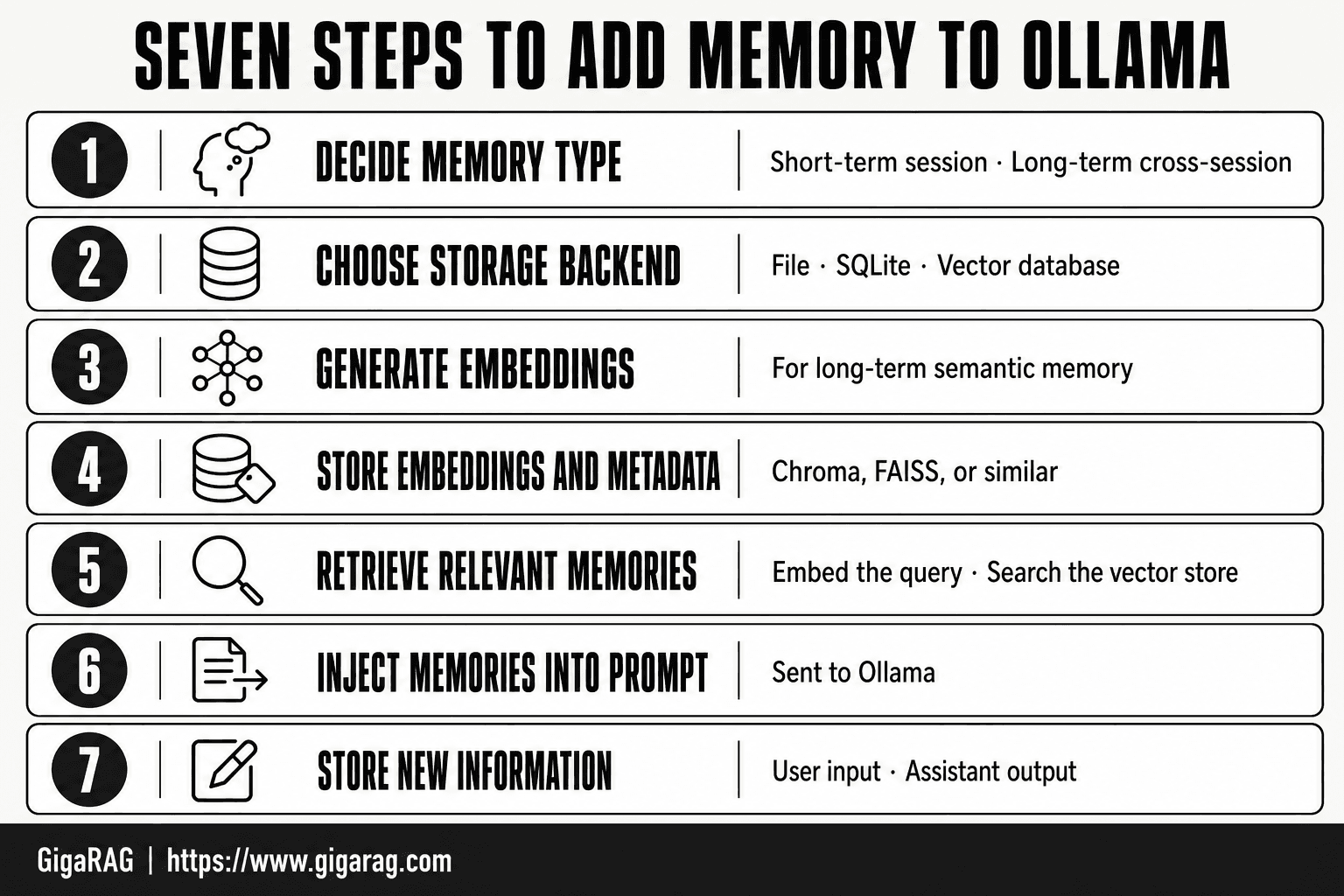
- Decide whether you need short-term (session) or long-term (cross-session) memory.
- Choose a storage backend: file, SQLite, or vector database based on recall needs.
- For long-term semantic memory, generate embeddings for your text using an embedding model.
- Store embeddings and metadata in your chosen vector database (e.g., Chroma, FAISS).
- On each new query, retrieve relevant memories by embedding the query and searching the vector store.
- Inject retrieved memories into the prompt sent to Ollama.
- After the response, store new information (user input, assistant output) as memories for future use.
Approach 1: In-Context Memory with a Conversation Buffer
The conversation buffer is the simplest memory you can add to Ollama. You keep a running list of messages in your application and send the whole list back with every prompt. The model doesn't actually remember anything. It just sees the history in the prompt and responds as if it does.
How the conversation buffer works
You maintain a list of message objects, each with a role ("user" or "assistant") and content. Before each call to Ollama, you join that list with the new user message and send everything together. The model reads the full transcript and generates the next reply. You append that reply to the list. Repeat.
Here's why this works: Ollama's API accepts a messages array, not just a single prompt. The model treats that array as the conversation so far. Your job is only to keep the array intact between requests.
Minimal Python implementation
import ollama

messages = []

def chat(user_input):
    messages.append({"role": "user", "content": user_input})
    response = ollama.chat(model="llama3.2", messages=messages)
    reply = response["message"]["content"]
    messages.append({"role": "assistant", "content": reply})
    return reply

while True:
    user_input = input("You: ")
    if user_input.lower() == "exit":
        break
    print(f"Assistant: {chat(user_input)}")
That's the whole thing. No database, no embeddings, no external tools. The memory lives in a Python list and dies when the process exits.
Limitations: context window and token costs
The main catch is the context window. Every model has a hard limit on how many tokens it can process in one request. For llama3.2, that's 128k tokens. Once your conversation history plus the new prompt exceeds that, the API returns an error or truncates the oldest messages.
Token costs are the second problem. You pay for every token in the prompt, including the history you've already paid for in previous turns. A 50-turn conversation means the 50th request carries 49 turns of redundant tokens. Locally that's just slower inference. On a hosted API, it's real money.
The honest answer: a conversation buffer is enough for short sessions and quick prototypes. It is not a memory system for anything that needs to persist or scale.
Approach 2: File-Based Memory for Simple Persistence
The conversation buffer dies when your process exits. File-based memory fixes that. You write the message history or memory entries to disk after each turn, then load them back when the app restarts. The model still doesn't remember anything on its own. You're just giving it a transcript that survives.
When file-based memory is enough
File-based memory fits single-user tools and small agents. A personal assistant that tracks your preferences, a local chatbot that resumes yesterday's session, a note-taking agent that appends findings. If you're the only user and the data is small, a JSON or markdown file is all you need. You don't need a database until you need to query across many records or handle concurrent writes.
JSON and markdown persistence patterns
The simplest pattern is a JSON file holding the message array:
import json, ollama

def load_messages(path="memory.json"):
    try:
        with open(path) as f:
            return json.load(f)
    except FileNotFoundError:
        return []

def save_messages(messages, path="memory.json"):
    with open(path, "w") as f:
        json.dump(messages, f, indent=2)

messages = load_messages()
# append user input, call ollama.chat, append reply
save_messages(messages)
Markdown works better for human-readable memory. Each entry is a dated section the agent can scan later. The trade-off: markdown is harder to parse programmatically than JSON.
Trade-offs: simplicity vs searchability
The main catch is search. A flat file has no query language. To find one fact from six months of logs, you read the whole file or write your own filtering. That's fine at a few hundred entries. It breaks down when you need structured lookups or semantic recall. For that, you move to SQLite or a vector database.
Approach 3: SQLite for Structured, Queryable Memory
File-based memory works until you need to ask questions of your data. SQLite is the next step up: a real database in a single file, no server to run, and SQL for filtering, sorting, and joining records. You get persistence plus queryability without adding infrastructure.
Schema design for conversation memory
A minimal schema separates messages from metadata. One table holds the conversation turns, another holds extracted facts or entities you want to recall later.
CREATE TABLE messages (
    id INTEGER PRIMARY KEY AUTOINCREMENT,
    session_id TEXT NOT NULL,
    role TEXT NOT NULL,
    content TEXT NOT NULL,
    created_at TIMESTAMP DEFAULT CURRENT_TIMESTAMP
);

CREATE TABLE facts (
    id INTEGER PRIMARY KEY AUTOINCREMENT,
    key TEXT UNIQUE NOT NULL,
    value TEXT NOT NULL,
    source_message_id INTEGER,
    updated_at TIMESTAMP DEFAULT CURRENT_TIMESTAMP
);
The session_id column lets you run multiple conversations in one database. The facts table stores things the agent learns: user preferences, names, project details. That's the long-term memory layer.
Storing and retrieving memory with SQL
Python's sqlite3 module is built in. No dependencies.
import sqlite3, ollama

conn = sqlite3.connect("memory.db")
conn.execute("""CREATE TABLE IF NOT EXISTS messages
    (id INTEGER PRIMARY KEY, session_id TEXT, role TEXT, content TEXT)""")

def store(session_id, role, content):
    conn.execute("INSERT INTO messages (session_id, role, content) VALUES (?, ?, ?)",
                 (session_id, role, content))
    conn.commit()

def load_recent(session_id, limit=20):
    rows = conn.execute(
        "SELECT role, content FROM messages WHERE session_id = ? ORDER BY id DESC LIMIT ?",
        (session_id, limit)).fetchall()
    return [{"role": r[0], "content": r[1]} for r in reversed(rows)]
Retrieval is where SQLite beats a flat file. You can pull the last 20 turns for context, search for every message mentioning a specific topic, or look up a stored fact by key. Exact-match queries are instant.
When SQLite is the right choice
SQLite fits when your memory is structured and your lookups are exact. Conversation history, user preferences, entity records, task logs. If you need to filter by date, session, or role, SQL does it in one line.
It's not the right choice for semantic recall. SQL can't find "messages about travel" unless the word "travel" appears in the text. For meaning-based search, you need embeddings and a vector database. SQLite also struggles with high write concurrency, though for a single agent or small app that's rarely a problem.
The honest answer: if your memory is a list of records you query by field, use SQLite. If it's a pile of prose you search by meaning, skip to Approach 4.
Approach 4: Vector Databases for Semantic Memory
SQLite finds exact matches. It can't find "messages about travel" unless the word "travel" appears. Vector databases close that gap. You store embeddings (numeric representations of meaning), then search by similarity instead of keyword. That's semantic memory.
How embeddings enable semantic recall
An embedding model converts text into a vector: a list of numbers where similar meanings sit close together in space. "I'm flying to Paris" and "booking a trip to France" produce nearby vectors even though they share no words. You store those vectors, then query with a new embedding and retrieve the nearest neighbours. Ollama serves embedding models locally via ollama.embeddings, so the whole pipeline can run on one machine.
Minimal ChromaDB + Ollama example
ChromaDB is the simplest starting point. It runs in-process, stores vectors on disk, and has a Python API that reads like a list.
import chromadb, ollama

client = chromadb.PersistentClient(path="./memory")
collection = client.get_or_create_collection("agent_memory")

def remember(text, metadata=None):
    embedding = ollama.embeddings(model="nomic-embed-text", prompt=text)["embedding"]
    collection.add(
        embeddings=[embedding],
        documents=[text],
        metadatas=[metadata or {}],
        ids=[str(hash(text))]
    )

def recall(query, n=5):
    embedding = ollama.embeddings(model="nomic-embed-text", prompt=query)["embedding"]
    return collection.query(query_embeddings=[embedding], n_results=n)["documents"][0]
That's the whole pattern: embed on write, embed on read, return the closest matches. Feed the results into your prompt as context and the model gets memory it never saw in training.
Scaling considerations for agent memory
ChromaDB handles thousands of vectors comfortably. Past that, you'll hit limits. Collections grow linearly in memory during queries, and there's no built-in sharding. For millions of vectors, switch to a dedicated vector store: Pinecone, Weaviate, Qdrant, or pgvector inside Postgres. Each adds operational overhead. The main catch with any vector approach: embedding quality sets the ceiling on recall. A weak embedding model returns noise no matter how good the database is. Test retrieval quality before you scale infrastructure.
Choosing the Right Memory Approach for Your Use Case
You've seen four architectures. The right one depends on three things: how long memory must survive, how much data you'll store, and whether recall needs to be exact or semantic.
Decision criteria: persistence, scale, semantic recall
Persistence is the first filter. If memory only needs to last one session, a conversation buffer in Python is enough. If it must survive restarts, you need disk: JSON, SQLite, or a vector store.
Scale is the second. A JSON file handles hundreds of entries before reads get slow. SQLite handles hundreds of thousands. A vector database handles millions, but only if you can afford the embedding step on every write.
Semantic recall is the third. If you need "find everything about travel" without knowing the exact words, only a vector database works. If you need "find the message where the user gave their phone number," SQLite is faster and simpler.
Use case → recommended approach
A single-session chatbot with no persistence needs: in-context buffer. Nothing else.
A personal assistant that remembers preferences across days: SQLite. Store facts as rows, query by key, done.
A RAG pipeline that retrieves relevant documents by meaning: vector database. Embeddings are the whole point.
An agent that mixes both (facts plus semantic search): SQLite for structured facts, ChromaDB for semantic recall. Run them side by side.
Common mistakes when adding memory to Ollama
The most common mistake is storing everything in the prompt. Context windows fill fast, and token costs climb with every turn. Trim aggressively.
The second is picking a vector database when SQLite would do. Embeddings add latency and complexity. If exact match works, use exact match.
The third is skipping retrieval testing. You won't know if memory works until you query it with real questions. Test recall before you build more on top.
What to Expect (and Not Expect) from Ollama Memory
The honest answer is that Ollama gives you nothing for free here. Every memory approach in this guide is something you build and maintain yourself. That's not a flaw in Ollama. It's a design choice: Ollama is an inference engine, not a state manager.
Context window limits are hard constraints
Every model has a fixed context window. Llama 3.1 handles 128k tokens. Phi-3 handles 4k. When your conversation history plus prompt exceeds that limit, the model either truncates the oldest tokens or refuses the request. You cannot expand the window with code. You can only manage what goes inside it.
No native cross-session memory
Stop the Ollama process, restart it, and your conversation is gone. There's no hidden cache, no automatic persistence, no session restore. If you want memory that survives a restart, you must write it to disk yourself: a JSON file, SQLite, or a vector store. Ollama won't do it for you.
Semantic memory requires an embedding pipeline
Ollama can generate embeddings, but it won't store them or search them. You need a vector database, an embedding model, and code that writes and queries both. That's three moving parts before semantic recall works at all. None of them are plug-and-play.
Final Thoughts: Building Memory That Scales
Adding memory to Ollama is a spectrum, not a single decision. Start with a conversation buffer. Move to files when you need persistence across restarts. Reach for SQLite when memory becomes structured and queryable. Add a vector database only when semantic recall actually matters for your agent or RAG pipeline.
The honest answer is that most projects never need all four. Pick the simplest approach that solves your current problem, then scale when it breaks.
For teams that need managed, scalable agent memory without building the pipeline themselves, GigaRAG handles the storage, embeddings, and retrieval. It's one option among several, but it removes the three moving parts you'd otherwise maintain yourself. That's the core of how to add memory to Ollama: know what you need, then build or buy exactly that.
Frequently Asked Questions
Does Ollama have built-in memory?
No, Ollama does not have built-in memory across sessions. It processes each request independently, so you must add memory externally using files, databases, or vector stores.
How do I add long-term memory to Ollama?
Implement an external memory layer: store past interactions in a database or vector store, then retrieve relevant pieces and include them in the prompt for each new request. This gives Ollama context from previous sessions.
What is the best vector database for Ollama memory?
Popular choices include Chroma, FAISS, and Qdrant. Chroma is often recommended for its simplicity and Python integration, while FAISS is efficient for local use. The best choice depends on your scale and deployment needs.
Can Ollama remember conversations?
Ollama can remember a conversation within a single session if you include the chat history in the prompt. For cross-session memory, you need to store and retrieve that history externally.
How do I use embeddings with Ollama for memory?
Use an embedding model (e.g., via Ollama's embedding endpoint or a separate library) to convert text into vectors. Store these vectors in a vector database, then query them with the embedding of the current user input to retrieve relevant memories.
What are the limitations of adding memory to Ollama?
Limitations include context window size (you can only inject so much retrieved text), retrieval accuracy (semantic search may miss relevant items), and added latency from embedding and database queries. Memory also requires careful design to avoid storing irrelevant or sensitive data.
About GigaRAG
GigaRAG is for agent memory and RAG pipeline builders. get this right. Whether you are working through How to add memory to Ollama or something adjacent, we publish what we have actually tested, including where it falls short.


