
How to Add Memory to Trae for Agent Memory and RAG Pipelines
How to add memory to Trae matters most to developers who've spent twenty minutes re-briefing their coding assistant on project context it should already know. You explain the stack, the conventions, the file structure. Trae nods along. Then the session ends and all of it evaporates. Trae's native Memory feature, tucked under Settings → Rules & Skills → Memory, fixes part of this with auto-capture and manual instruction. But for agent memory and RAG pipeline builders, it has real gaps: no semantic search, no cross-project persistence, no built-in querying. GigaRAG offers a purpose-built path for production-grade persistent, queryable memory, but you don't need to jump there first. This guide covers how to enable native Trae Memory step by step, how to wire up MCP memory servers like PromptX, OpenViking, and MemoryLake, what Trae still cannot do, and how to build a working RAG pipeline around it.
| At a glance | Details |
|---|---|
| Native memory | Session-scoped, not cross-project persistent |
| MCP memory | External server, persistent and queryable |
| Setup effort | Native: none; MCP: config + server |
| Best for | Agent memory and RAG pipelines |
| Key limitation | No built-in semantic search over memory |
| Path to production | MCP server + vector store |
In This Guide
- What Is Trae Memory and Why It Matters for Agent Builders
- Native Trae Memory vs MCP-Based Memory Servers
- How to Enable Native Trae Memory (Settings → Rules & Skills → Memory)
- How To Add Memory To Trae: A Step-by-Step Guide
- How to Add Memory to Trae with MCP Servers
- Native Trae Memory vs MCP Memory Servers: An Honest Comparison
- What Trae Memory Cannot Do (Honest Limitations)
- Troubleshooting Common Trae Memory Issues
- How to Add Memory to Trae for RAG Pipelines: A Practical Workflow
- Final Thoughts on Adding Memory to Trae
What Is Trae Memory and Why It Matters for Agent Builders
Trae Memory is a native feature that stores context you want the assistant to remember across sessions, created either automatically or by direct instruction.
It lives in Settings under Rules & Skills. You turn it on once, then Trae starts keeping entries.
How Trae Memory works at a high level
Trae stores memory entries as plain text rules. When a new session starts, it loads those entries into context before you type anything. That's the whole mechanism. No vector store, no embeddings, no query layer.
Auto-capture vs manual instruction
Auto-capture grabs details Trae notices during a conversation. Manual instruction means you tell Trae directly: "Remember that I use pnpm, not npm." Both land in the same memory list.
Why agent builders need more than session memory
Session memory dies when the chat closes. Agent workflows need context that survives, and that you can query. Native Trae Memory persists, but it doesn't search. You get back what you stored, nothing more.
[!note] Trae's native memory does not provide persistent cross-project memory, built-in RAG querying, or semantic search over memory entries; these require an external MCP memory server.
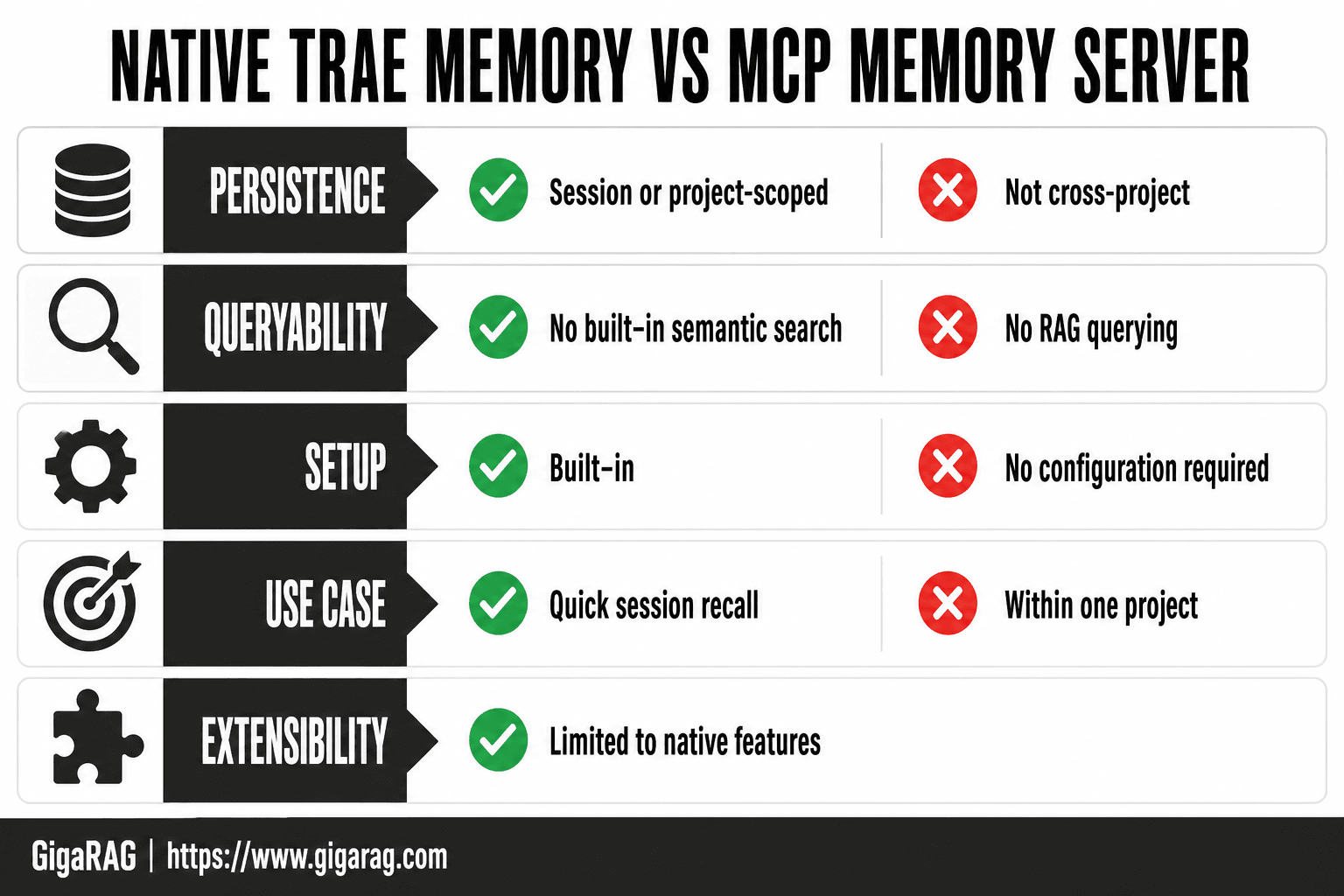
Native Trae Memory vs MCP-Based Memory Servers
| Factor | Native Trae Memory | MCP Memory Server |
|---|---|---|
| Persistence | Session or project-scoped; not cross-project | Persistent across sessions and projects |
| Queryability | No built-in semantic search or RAG querying | Supports semantic search via vector store |
| Setup | Built-in, no configuration required | Requires MCP server config and dependencies |
| Use case | Quick session recall within one project | Production agent memory and RAG pipelines |
| Extensibility | Limited to Trae's native features | Customizable with external databases and APIs |
How to Enable Native Trae Memory (Settings → Rules & Skills → Memory)
The path is short: Settings → Rules & Skills → Memory.
Step 1: Open Settings and navigate to Rules & Skills
Open Trae, click the gear icon in the bottom left, then find Rules & Skills in the left sidebar. Memory sits inside that panel. Don't look under Extensions or Integrations. It's not there.
Step 2: Enable the Memory feature
Toggle Memory on. Trae confirms it's active with a small indicator. From that point, memory entries load into context at the start of every new session. You don't need to restart Trae.
Step 3: Create memory via auto-capture or direct instruction
Auto-capture works in the background. Trae notices details during a conversation and writes them as entries. Direct instruction is faster and more predictable. Type "Remember that I use pnpm, not npm" and Trae stores it immediately. You'll see the entry appear in the Memory panel.
Step 4: Update and delete memory entries
Open the Memory panel to see every stored entry. Click an entry to edit it. Delete it with the trash icon. Changes apply to the next session, not the current one. Keep in mind: Trae doesn't deduplicate entries. If you tell it the same thing twice, you get two entries.
[!tip] For agent memory and RAG pipelines, pair an MCP memory server with a vector database (e.g., Chroma, Weaviate) to enable semantic search over stored context, and version your memory schema to avoid breaking changes.
How To Add Memory To Trae: A Step-by-Step Guide
- Choose an MCP memory server (e.g., OpenViking, MemoryLake, PromptX) and install its dependencies.
- Locate Trae's MCP configuration file (typically in the user settings directory).
- Add the memory server entry to the MCP configuration with the correct command and arguments.
- Restart Trae to load the new MCP server.
- Verify the server is running by checking Trae's MCP status or logs.
- Test memory persistence by storing and retrieving a sample entry across sessions.
How to Add Memory to Trae with MCP Servers
Native Trae Memory is session-scoped. For persistent, queryable memory, you need an MCP server. MCP (Model Context Protocol) lets Trae talk to external tools that store and retrieve context across sessions.
What is an MCP memory server?
An MCP memory server is a small program that runs alongside Trae and handles memory storage outside Trae's own panel. Trae sends it context to save, and the server returns relevant entries when a new session starts. You configure it once in Trae's MCP settings, then it runs every time you open the editor.
Setting up PromptX MCP for natural chat memory
PromptX MCP captures memory from natural conversation. Install it, add it to Trae's MCP configuration, and it watches your chats for details worth keeping. When you mention a stack choice or a naming convention, PromptX stores it. Next session, it injects those entries back into context automatically.
Configuring OpenViking for memory extraction and context loading
OpenViking takes a more structured approach. It extracts memory from your codebase and conversation, then loads relevant context at session start. Configure it by pointing it at your project directory and setting extraction rules. It works best when you define what to capture explicitly, rather than relying on auto-detection.
Using MemoryLake for persistent, queryable memory
MemoryLake stores memory in a queryable store, not a flat list. You can ask Trae to search MemoryLake for specific context mid-session. That's the key difference: native Trae Memory is a list you scroll through. MemoryLake is a store you query. For RAG pipelines, that queryability matters.
Keep in mind: MCP servers add setup overhead and a failure point. If the server crashes, memory doesn't load. Test each one before relying on it in production.
Native Trae Memory vs MCP Memory Servers: An Honest Comparison
Native Trae Memory is a list. MCP memory servers are stores. That's the core difference, and it drives every other tradeoff.
Persistence and cross-project support
Native memory lives inside Trae's session. Close the editor, lose the context. It doesn't follow you across projects. MCP servers like MemoryLake persist memory in an external store, so entries survive restarts and can be shared across projects if you point multiple Trae instances at the same server.
Queryability and semantic search
Native memory has no search. You scroll through entries manually. MCP servers let you query memory mid-session, and some support semantic search over stored context. For agent workflows where you need to retrieve relevant memory on demand, native falls short.
Setup complexity and maintenance
Native memory takes one toggle in Settings. MCP servers require installation, configuration, and ongoing maintenance. If the server crashes, memory doesn't load. That's a real failure point.
Which to choose for agent memory vs RAG pipelines
For simple session recall, native works. For agent memory that must persist and be queryable, use an MCP server. For RAG pipelines, you need the queryable store. Native Trae Memory won't get you there.
What Trae Memory Cannot Do (Honest Limitations)
Trae Memory handles session recall. It doesn't handle agent memory at scale. Before you build a workflow on it, know the gaps.
No semantic search over memory entries
Native memory is a flat list. You scroll, you don't search. If you've stored 40 entries about a codebase, finding the one about auth logic means reading through all of them. There's no vector index, no similarity matching, no query interface.
No cross-project persistence
Memory lives in the session. Close Trae, start a new project, and the context is gone. You re-brief every time. For agent builders working across repos, that's a hard stop.
No built-in RAG querying
Trae won't retrieve relevant memory chunks on demand. It can't take a query, rank stored entries by relevance, and inject the top matches into context. That retrieval step is the core of any RAG pipeline, and it's missing.
No automatic memory extraction from codebases
Trae doesn't scan your repo and build memory from it. You create entries manually or via chat instruction. For large codebases, that's slow and incomplete.
If you need queryable, persistent, cross-project memory, native Trae Memory isn't the tool. You'll need an MCP server or a purpose-built store like GigaRAG.
Troubleshooting Common Trae Memory Issues
Memory fails in predictable ways. Here's what breaks and how to fix it.
Memory not persisting across sessions
Check that Memory is enabled in Settings → Rules & Skills. If it's on but entries vanish, you're likely hitting the session boundary. Native memory doesn't cross projects. Export entries manually before closing Trae, or switch to an MCP server that stores to disk.
MCP server connection failures
Most connection failures are config errors. Verify the server URL, check that the MCP process is running, and confirm Trae's MCP settings point to the right port. Restart Trae after changing MCP config. Logs will show the handshake failure.
Memory entries not loading into context
Trae loads memory at session start. Entries created mid-session may not inject until you restart. If entries still don't load, check for size limits. Oversized entries get truncated or skipped.
Conflicts between native and MCP memory
Running both creates duplicate context. Pick one per project. Native for quick session recall, MCP for persistence. Don't mix them.
How to Add Memory to Trae for RAG Pipelines: A Practical Workflow
Native Trae Memory won't get you a RAG pipeline. It stores session notes, not queryable vectors. You need a separate store and a way to move context in and out. Here's the workflow I use.
Step 1: Extract memory from Trae sessions
Export native memory entries manually, or run an MCP server that writes to disk as you work. OpenViking and MemoryLake both capture session context. The output is plain text or JSON. That's your raw material.
Step 2: Store memory in a queryable vector store
Push extracted entries into a vector database: Pinecone, Weaviate, or pgvector. Chunk by session or by topic. Embed with a model you control. This is where memory becomes searchable.
Step 3: Inject relevant context back into Trae via MCP
Write a small MCP server that queries your vector store and returns top-k results. Trae calls it when a session starts or when you invoke a command. Relevant context lands in the prompt without re-briefing.
Step 4: Test and iterate on retrieval quality
Run the same query across sessions. Check that retrieved chunks actually answer the question. Tune chunk size, embedding model, and top-k. Retrieval quality is the whole game.
GigaRAG handles steps 2 through 4 out of the box: persistent storage, semantic search, and MCP injection without the glue code. If you'd rather build than buy, the workflow above is the map.
Final Thoughts on Adding Memory to Trae
You have two paths. Native Trae Memory is quick and works for session recall. MCP servers give you more control but add setup and maintenance. Neither gives you persistent, queryable memory across projects.
The honest answer is that how to add memory to Trae depends on what you're building. For solo work and short projects, native Memory is enough. For agent workflows that need to retrieve context from past sessions, you'll hit the wall fast. No semantic search. No cross-project persistence. No built-in RAG querying.
If you need production-grade agent memory, GigaRAG is the next step. It stores memory as queryable vectors and injects relevant context back into Trae through MCP, without the glue code. Start with native Memory. Move to GigaRAG when re-briefing costs more than the setup.
Frequently Asked Questions
What is Trae memory and how does it work?
Trae memory is a built-in feature that retains context within a session or project to help the AI assistant recall previous interactions. It is not designed for persistent, cross-project memory or semantic querying.
Can I use Trae with external memory servers?
Yes, Trae supports MCP (Model Context Protocol) servers, allowing you to integrate third-party memory solutions like OpenViking, MemoryLake, or PromptX. This enables persistent, queryable memory beyond native capabilities.
How do I configure an MCP memory server in Trae?
You need to edit Trae's MCP configuration file to add the server command and arguments, then restart Trae. The exact steps depend on the server; refer to its documentation for specifics.
What are the limitations of Trae's native memory?
Native Trae memory lacks persistent cross-project memory, built-in RAG querying, and semantic search over memory entries. It is limited to session or project scope and does not support advanced retrieval.
Which MCP memory server is best for RAG pipelines?
The best choice depends on your needs: OpenViking offers flexibility, MemoryLake focuses on scalability, and PromptX emphasizes prompt management. Evaluate based on your vector store compatibility and query requirements.
How does MCP memory improve agent memory?
MCP memory servers provide persistent storage and semantic search, enabling agents to recall context across sessions and projects. This is essential for building production-grade RAG pipelines that require long-term memory.
About GigaRAG
GigaRAG is for agent memory and RAG pipeline builders. get this right. Whether you are working through How to add memory to Trae or something adjacent, we publish what we have actually tested, including where it falls short.


