Building a Knowledge Graph from Documents with an LLM: A Practical Guide for RAG and Agent Memory
Building a knowledge graph from documents with an LLM is the move when your RAG pipeline starts returning semantically similar but contextually shallow answers, and your agent keeps forgetting what it learned three turns ago. Vector search alone can't handle multi-hop questions like "which of our vendors also worked on the project that used this library." It has no structure. It has no relationships. It just has proximity. The honest answer is that a knowledge graph fixes this by storing entities and edges as first-class data, not as embedding geometry. But it is not free. You'll pay in schema design time, LLM token costs, and ongoing maintenance. GigaRAG exists precisely because agent memory needs this structure without the plumbing. This guide walks through the full pipeline: schema design, entity and relationship extraction, entity resolution, graph queries for retrieval, and a decision framework for when a KG is overkill.
| At a glance | Details |
|---|---|
| What it is | Extracting entities and relationships from text with an LLM into a queryable graph |
| Core pipeline | Chunk, extract, resolve, store, query, then feed retrieval or agent memory |
| Best for | Multi-hop questions and persistent agent memory across sessions |
| Main cost | LLM extraction calls scale with document volume and chunk count |
| Biggest risk | Entity resolution errors and schema drift over time |
| When to skip | Single-hop lookups where vector-only RAG already performs well |
In This Guide
- What Is a Knowledge Graph (and Why It Matters for RAG and Agent Memory)?
- Vector-Only RAG vs Knowledge Graph RAG
- The LLM's Role in Building a Knowledge Graph from Documents
- Building A Knowledge Graph From Documents With An Llm: A Step-by-Step Guide
- Step 1: Design Your Schema Before You Extract
- Step 2: Chunk Documents and Extract Entities with an LLM
- Step 3: Extract Relationships and Build Triples
- Step 4: Resolve Entities and Fuse Knowledge Across Documents
- Step 5: Query the Graph for RAG and Agent Memory
- Common Mistakes When Building a Knowledge Graph from Documents with an LLM
- When Not to Use a Knowledge Graph (Decision Framework)
- Final Thoughts
What Is a Knowledge Graph (and Why It Matters for RAG and Agent Memory)?
A knowledge graph stores facts as a network of entities (nodes) connected by typed relationships (edges), where each fact is a subject-predicate-object triple. For RAG pipelines and agent memory, it adds structure that vector search alone can't provide.
Nodes, Edges, and Triples: The Core Building Blocks
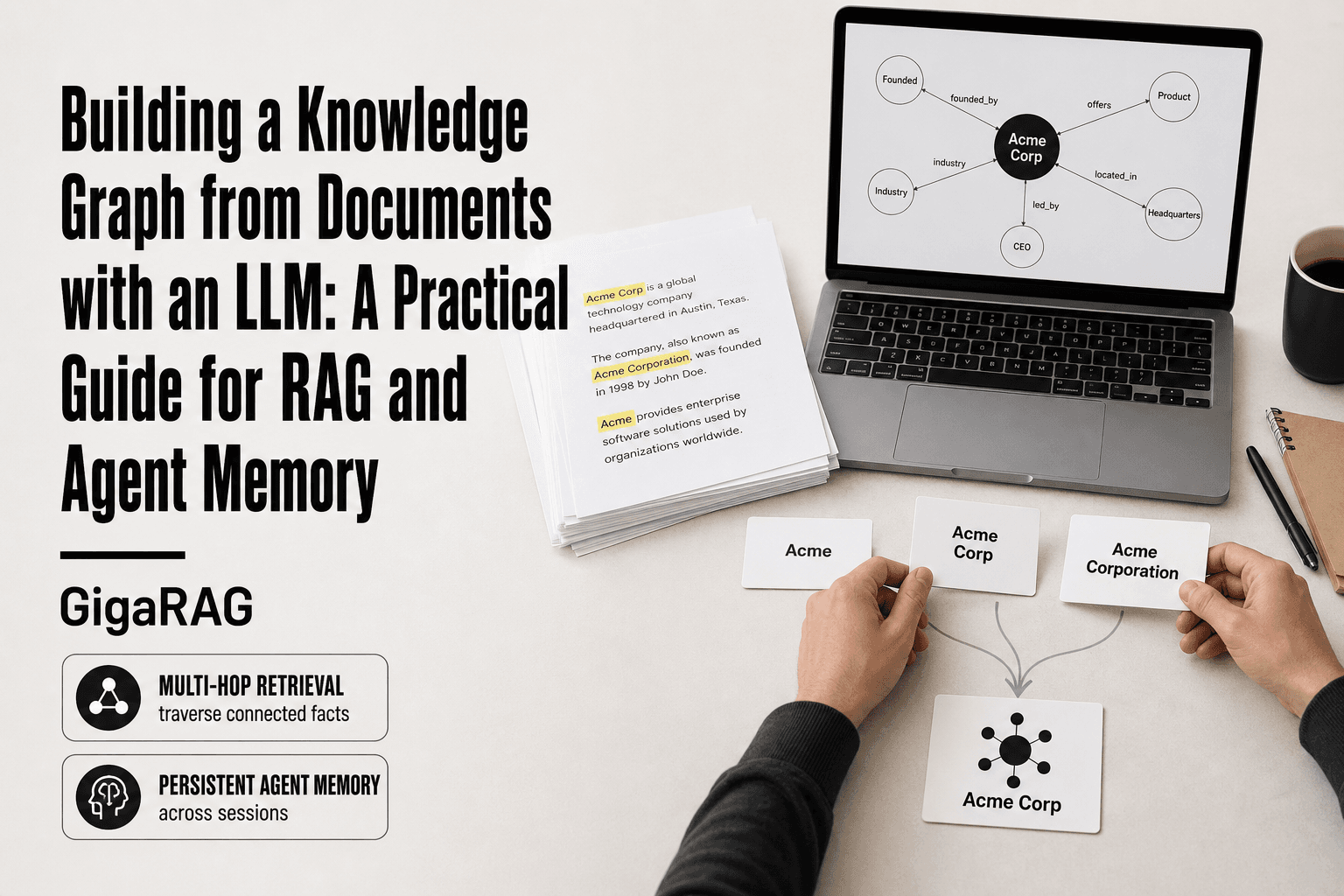
A node is a thing: a person, a product, a document, a concept. An edge is a typed relationship between two things: "works_at", "causes", "depends_on". A triple combines them: (Alice, works_at, Acme Corp). That's the whole model. Everything else is scale and schema.
The graph doesn't care how you store it. Neo4j, a property graph in Postgres, or a pile of triples in a text file all work. What matters is that relationships are first-class citizens, not something you infer at query time.
Why Vector Search Alone Fails on Multi-Hop Questions
Vector search finds passages that are semantically similar to your query. That's it. Ask "Who manages the person who wrote the incident report about the billing outage?" and vector search returns chunks about billing outages, incident reports, and maybe some managers. It can't traverse from report to author to manager.
A knowledge graph can. You start at the report node, follow the "authored_by" edge, then follow the "managed_by" edge. Two hops, exact answer. Vector search has no mechanism for that traversal.
Knowledge Graphs as Persistent Agent Memory
Agents forget. Every session starts blank unless you build memory. A knowledge graph gives you a place to write facts that survive across sessions: what the user said, what the agent learned, what changed.
The honest catch: building and maintaining that graph takes real work. Extraction, resolution, schema design. The next sections cover exactly that.
[!note] LLM-based extraction is probabilistic, so the same document can yield different entities and relationships across runs; pin your model version and prompt, and store extraction metadata so you can reproduce or re-run a graph build.
Vector-Only RAG vs Knowledge Graph RAG
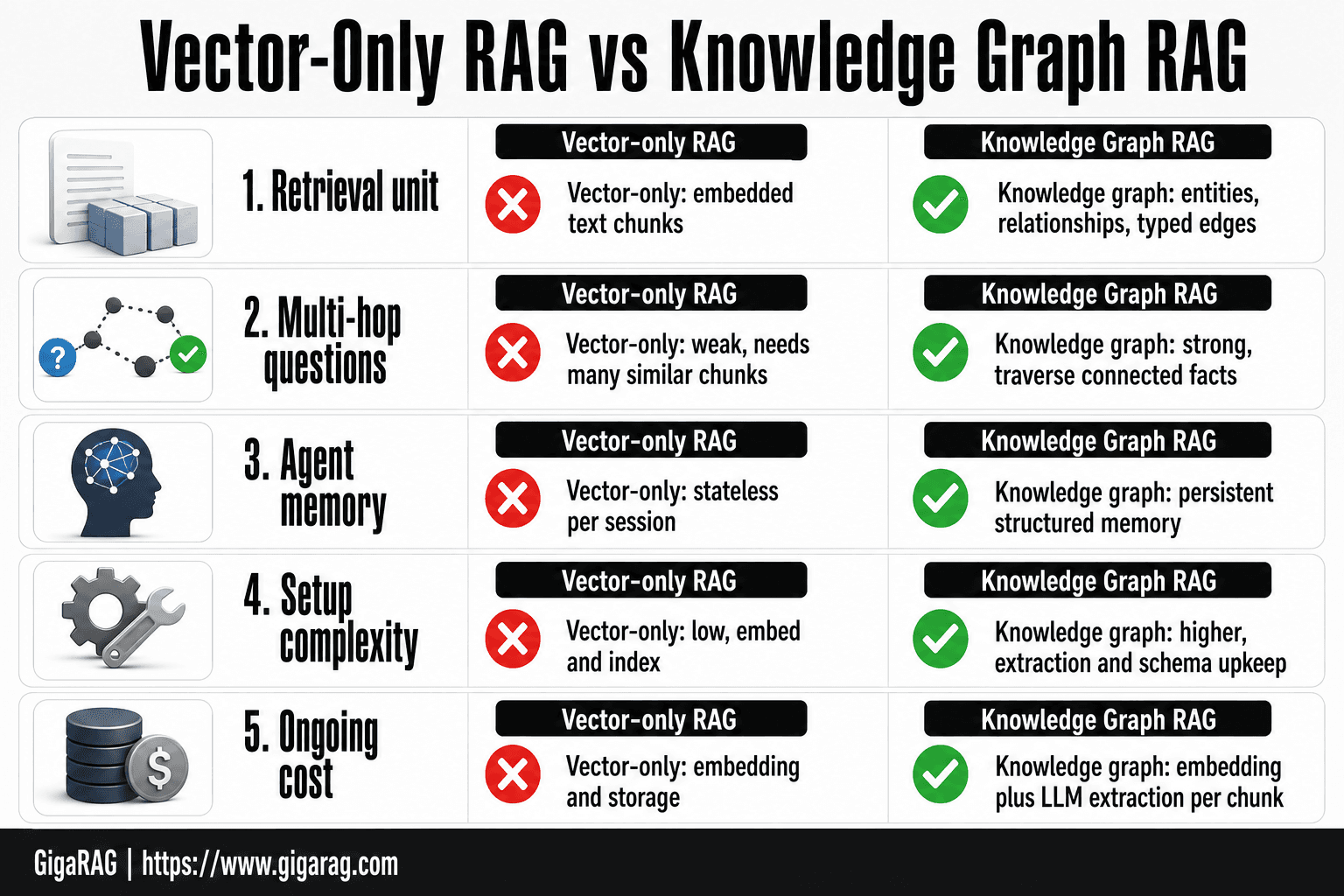
| Factor | Vector-Only RAG | Knowledge Graph RAG |
|---|---|---|
| Retrieval unit | Embedded text chunks | Entities, relationships, and typed edges |
| Multi-hop questions | Weak; needs many similar chunks | Strong; traverse connected facts |
| Agent memory | Stateless per session unless stored separately | Persistent structured memory across sessions |
| Setup complexity | Low; embed and index | Higher; extraction, resolution, schema upkeep |
| Ongoing cost | Embedding and storage | Embedding plus LLM extraction calls per chunk |
The LLM's Role in Building a Knowledge Graph from Documents
The LLM is the extraction engine. It reads unstructured text and outputs structured triples. That's the core job. Everything else in the pipeline, chunking, resolution, storage, querying, is plumbing around that one capability.
Entity Extraction: From Unstructured Text to Structured Nodes
You feed the LLM a chunk of text and a schema. It returns entities that match your entity types. A paragraph about a company acquisition becomes nodes for the acquirer, the target, the CEO, the date. The LLM handles the messy part: synonyms, pronouns, implicit references. "The firm" becomes "Acme Corp" because the model tracks context across sentences.
The prompt matters more than the model. You specify entity types, give examples, and demand JSON output. Without that structure, the LLM returns prose and you're back to parsing.
Relationship Extraction: Inferring Edges Between Entities
Once entities exist, the LLM infers how they connect. It reads "Alice joined Acme in March" and outputs (Alice, joined, Acme). It reads "Acme acquired Beta for $40M" and outputs (Acme, acquired, Beta). The relationship types come from your schema, not the model's imagination.
This is where the LLM earns its keep. Rule-based systems need a pattern for every phrasing. The LLM generalizes across phrasings without you writing a single regex.
What the LLM Cannot Do Reliably (Yet)
Entity resolution across documents is the big failure point. The LLM will happily create three nodes for "Acme Corp", "Acme", and "Acme Corporation" and never notice they're the same entity. You need a separate resolution step, embeddings or string matching, to merge them.
The LLM also hallucinates relationships that aren't in the text. It fills gaps with plausible-sounding facts. You must validate extracted triples against source text, or your graph quietly accumulates fiction.
Schema drift is the slow killer. The LLM invents new relationship types when your schema is too rigid or too vague. Six months in, your graph has 47 relationship types and no one knows what half of them mean.
[!tip] For agent memory, store each extracted fact with its source chunk ID and a timestamp, then let the agent write new nodes and edges as it learns — this turns the graph into durable, auditable memory rather than a one-off index. GigaRAG is purpose-built for this agent-memory layer if you would rather not maintain the graph store yourself.
Building A Knowledge Graph From Documents With An Llm: A Step-by-Step Guide
- Chunk your documents with overlap, preserving section headings and document metadata for provenance.
- Define a small schema of entity types and relationship types before extraction to limit drift.
- Prompt the LLM to return structured JSON of entities and relationships per chunk, with a strict output format.
- Normalize and resolve entities by merging aliases, casing variants, and near-duplicates into canonical nodes.
- Load nodes and edges into a graph store, keeping a link back to the source chunk for each fact.
- Query the graph for multi-hop retrieval and inject the subgraph into your RAG context or agent memory.
- Evaluate retrieval quality against a vector-only baseline and iterate on schema and prompts.
Step 1: Design Your Schema Before You Extract
Schema design is the difference between a graph you can query and a pile of nodes nobody understands. You do this before writing a single extraction prompt. The schema is your contract with the LLM: it tells the model what to look for and what to ignore.
Choosing Entity Types and Relationship Types
Start with the questions your system needs to answer. If you're building RAG for legal documents, you need entities like Person, Organization, Contract, Clause, and Date. If you're building agent memory, you need User, Preference, Task, Tool, and Session. Don't start with what's in the documents. Start with what you'll query.
Keep the list short. Five to eight entity types is plenty for most pipelines. Every type you add increases extraction errors and makes the graph harder to maintain.
Relationship types follow the same rule. Define ten to fifteen predicates that connect your entities. "works_at", "signed", "mentions", "prefers", "depends_on". Each relationship needs a clear direction and a clear meaning. If you can't explain a relationship type in one sentence, cut it.
The LLM will invent types you didn't define. That's schema drift, and it starts here. A tight schema with explicit instructions to ignore anything outside it is your first defense.
Schema Example for a RAG Pipeline
Here's a concrete schema for a RAG pipeline over company filings:
Entity types:
- Company: a legal entity named in a document
- Person: an individual named in a document
- Product: a product or service offered by a company
- Date: a specific point in time
- Metric: a measurable quantity (revenue, headcount, market share)
Relationship types:
- (Company, acquired, Company)
- (Person, works_at, Company)
- (Company, offers, Product)
- (Company, reported, Metric)
- (Metric, measured_on, Date)
This schema answers questions like "Which companies did Acme acquire in 2023?" and "Who works at Beta?" It ignores sentiment, opinions, and anything else the documents contain but your queries don't need.
Schema Example for Agent Memory
Agent memory needs a different shape. You're tracking what the user said, what the agent did, and what worked.
Entity types:
- User: the person interacting with the agent
- Preference: a stated like, dislike, or constraint
- Task: a goal the user asked the agent to accomplish
- Tool: a function or API the agent can call
- Session: a single interaction window
Relationship types:
- (User, stated, Preference)
- (User, requested, Task)
- (Task, used, Tool)
- (Task, completed_in, Session)
- (Tool, failed_in, Session)
This lets the agent answer "What did this user ask for last week?" and "Which tools failed on this task before?" That's persistent memory, not just a conversation log.
Keep the schema in a file. Version it. When you change it, you re-extract or you accept that old nodes don't match new types. There's no shortcut here.
Step 2: Chunk Documents and Extract Entities with an LLM
Chunking is the first place pipelines go wrong. Feed the LLM too little context and it misses entities that span paragraphs. Feed it too much and you burn tokens on text that doesn't matter, plus the model starts dropping entities from the middle of long inputs.
Chunking Strategy: How Much Context Does the LLM Need?
The honest answer is it depends on your documents and your schema. For most RAG pipelines, 1,000 to 2,000 tokens per chunk works. That's roughly 750 to 1,500 words. Enough for a full section of a legal filing or a complete product description. Not so much that the model loses focus.
Don't split on arbitrary character counts. Split on structure: paragraphs, sections, or headings. If your documents have clear section markers, use them. A chunk that starts mid-sentence and ends mid-thought produces garbage entities.
Overlap matters more than most people admit. A 10% overlap between chunks catches entities that straddle boundaries. If a person is introduced at the end of one chunk and their role is described at the start of the next, no overlap means you get the person but not the role. Ten percent overlap costs a little extra in tokens and saves you from silent data loss.
Here's a simple chunker in Python:
def chunk_text(text, chunk_size=1500, overlap=150):
    words = text.split()
    chunks = []
    start = 0
    while start < len(words):
        end = min(start + chunk_size, len(words))
        chunks.append(" ".join(words[start:end]))
        start = end - overlap
    return chunks
This is naive. It splits on words, not structure. For real documents, use a library that respects headings and paragraphs. But the logic is the same: fixed size, fixed overlap, no sentence left behind.
Prompt Template for Entity Extraction
The prompt is where your schema becomes instructions. Be explicit about what to extract and what to ignore. Vagueness here produces schema drift downstream.
Here's a prompt template that works:
You are extracting entities from a document chunk for a knowledge graph.

Entity types to extract:
- Company: a legal entity named in the text
- Person: an individual named in the text
- Product: a product or service offered by a company
- Date: a specific point in time
- Metric: a measurable quantity

Rules:
1. Extract only entities that match these types.
2. Ignore anything else, including sentiment, opinions, and events.
3. For each entity, return the name and the entity type.
4. If the same entity appears multiple times, return it once.
5. Return the output as a JSON array.

Text:
{chunk}
The rules section is the load-bearing part. Rule 2 prevents the LLM from extracting "lawsuit" as an entity when your schema has no LegalCase type. Rule 4 stops duplicate nodes before they start.
Keep the prompt short. Every extra instruction is a chance for the model to misinterpret something. Test it on ten chunks before you run it on ten thousand.
Parsing LLM Output into Structured Data
The LLM returns text. You need structured data. Ask for JSON and parse it defensively, because the model will occasionally return malformed output no matter how good your prompt is.
import json
from typing import List, Dict

def parse_entities(llm_output: str) -> List[Dict[str, str]]:
    try:
        entities = json.loads(llm_output)
        return entities
    except json.JSONDecodeError:
        # Fallback: try to extract the JSON array from the text
        start = llm_output.find("[")
        end = llm_output.rfind("]")
        if start != -1 and end != -1:
            try:
                return json.loads(llm_output[start:end+1])
            except json.JSONDecodeError:
                return []
        return []
The fallback matters. LLMs wrap JSON in markdown code fences, add trailing commas, or include explanatory text before the array. The find("[") and rfind("]") approach catches most of these cases. When it fails, return an empty list and log the chunk for manual review. Silent failures are worse than loud ones.
Validate every entity against your schema before adding it to the graph. If the LLM returns an entity type you didn't define, drop it or map it to the closest valid type. Don't let the model expand your schema for you.
At this point you have a list of entities per chunk. The next step is extracting the relationships between them, which is where the graph actually takes shape.
Step 3: Extract Relationships and Build Triples
Entities alone don't give you a graph. You get a bag of nodes. The relationships between them are what make multi-hop queries possible, and extracting those relationships is where the LLM earns its keep.
Prompt Template for Relationship Extraction
The relationship prompt takes the entities you already extracted and asks the LLM to connect them. You're not asking for open-ended interpretation. You're asking for specific predicate types from your schema.
You are extracting relationships between entities for a knowledge graph.

Entity list:
{entities}

Relationship types to extract:
- WORKS_FOR: a Person works for a Company
- OFFERS: a Company offers a Product
- COMPETES_WITH: a Company competes with another Company
- ACQUIRED: a Company acquired another Company
- HAS_METRIC: an entity has a measurable quantity

Rules:
1. Extract only relationships that match these types.
2. For each relationship, return subject, predicate, and object.
3. The subject and object must be entities from the list above.
4. If two entities have no relationship in the text, do not invent one.
5. Return the output as a JSON array.

Text:
{chunk}
Rule 4 is the one that matters most. LLMs hallucinate relationships when they feel pressure to produce output. If you don't explicitly say "no relationship is a valid answer," the model will connect entities that have nothing to do with each other in the source text.
Constructing Triples: Subject, Predicate, Object
A triple is the atomic unit of a knowledge graph. Subject and object are nodes. Predicate is the edge. That's it.
The subject and object must already exist as entities from Step 2. If the LLM returns a triple where the subject or object isn't in your entity list, you have two options: drop the triple, or go back and check whether the entity extraction missed something. Don't silently add new entities during relationship extraction. That's how schema drift starts.
Predicates come from your schema, not from the LLM's imagination. If you defined five relationship types, the LLM returns one of those five or nothing. When the model wants to express a relationship that doesn't fit your schema, it should skip it. You'll lose some information. That's the tradeoff for a queryable, consistent graph.
Here's what a parsed triple looks like:
{
  "subject": "Acme Corp",
  "predicate": "ACQUIRED",
  "object": "Beta Software"
}
Three strings. That's the entire data structure. Everything else is graph database plumbing.
Code Example: Building the Graph in Python
You don't need a graph database to start. A simple adjacency list in Python gets you to a working prototype, and you can swap in Neo4j or another graph store later.
from collections import defaultdict

class KnowledgeGraph:
    def __init__(self):
        self.nodes = set()
        self.edges = defaultdict(list)

    def add_entity(self, entity_id, entity_type, properties=None):
        self.nodes.add(entity_id)
        # Store entity metadata separately in a real implementation

    def add_triple(self, subject, predicate, object_):
        self.edges[(subject, object_)].append(predicate)

    def get_neighbors(self, entity_id):
        neighbors = []
        for (s, o), predicates in self.edges.items():
            if s == entity_id:
                neighbors.append((o, predicates))
            elif o == entity_id:
                neighbors.append((s, predicates))
        return neighbors

    def query_hop(self, entity_id, predicate):
        results = []
        for (s, o), predicates in self.edges.items():
            if s == entity_id and predicate in predicates:
                results.append(o)
        return results
This is deliberately minimal. No persistence, no indexing, no query language. But it's enough to test whether your extraction pipeline produces useful triples before you invest in infrastructure.
The query_hop method is the primitive that makes multi-hop retrieval work. Ask for one hop from "Acme Corp" with the predicate "ACQUIRED", get back "Beta Software". Then ask for one hop from "Beta Software" with the predicate "OFFERS", get back their product line. Two hops, one answer, no vector similarity involved.
In practice, you'll run relationship extraction on every chunk, deduplicate triples that appear multiple times, and load the result into a real graph database. But the logic stays the same: entities become nodes, predicates become edges, and the graph becomes queryable.
Step 4: Resolve Entities and Fuse Knowledge Across Documents
You've extracted entities and relationships from individual chunks. Now you hit the hard part: the same real-world thing shows up under different names, and different documents disagree about the facts.
Entity Resolution: Merging Duplicate Nodes
"Acme Corp", "Acme Corporation", and "Acme" are three nodes that should be one. The LLM can help here, but don't trust it blindly. Give it a pair of entities and ask: are these the same thing?
The prompt matters less than the threshold. Set a confidence score. If the LLM says 0.9 or higher, merge automatically. Between 0.7 and 0.9, flag for human review. Below 0.7, keep them separate. You'll still get errors, but you'll catch the worst ones.
A cheaper first pass: normalize strings before calling the LLM. Lowercase, strip punctuation, expand common abbreviations. That catches "Acme Corp" vs "ACME CORP" without spending a token.
Handling Conflicting Facts Across Documents
Two documents say different things about the same entity. One says Acme has 500 employees. Another says 1,200. You can't keep both as facts in the same graph without breaking queries.
The honest answer is that you need a policy. Options: keep the most recent fact, keep the fact from the most authoritative source, or store both with provenance and let the query layer decide. For most RAG pipelines, keeping the most recent fact with a source property is the pragmatic choice. You lose nuance, but your graph stays queryable.
When Fusion Fails: Common Error Patterns
The main catch is that LLMs over-merge. Two people with the same name become one node. Two companies with similar names get fused. This is worse than under-merging, because it creates false connections that poison every downstream query.
The second failure mode is silent conflict resolution. The LLM picks one fact and drops the other without telling you. You never know the disagreement existed. Store provenance on every fused fact, or you'll build a graph that looks clean and lies to you.
Step 5: Query the Graph for RAG and Agent Memory
The graph is built. Now you query it. The payoff is retrieval that answers questions vector search can't touch, and memory that survives a session.
Graph Queries for Multi-Hop Retrieval
A multi-hop question is "Who leads the company that acquired Acme in 2023?" Vector search returns chunks mentioning acquisitions. It can't follow the edge from Acme to the acquirer to that company's CEO.
A graph query can. In Cypher, it's three lines:
MATCH (a:Company {name: "Acme"})-[r:ACQUIRED_BY]->(b:Company)
MATCH (b)-[:LED_BY]->(p:Person)
RETURN p.name
That's the whole point. You're traversing relationships, not matching text similarity. The graph gives you the answer as a path, and the path is the evidence.
Using the Graph as Persistent Agent Memory
Agents forget because their context window resets. A graph doesn't. When an agent learns a fact about a user, a project, or a decision, you write it as a node or edge. Next session, the agent queries the graph before responding.
The pattern is simple: before generating a response, run a graph query for entities mentioned in the conversation. Pull their connected nodes and edges. Inject that subgraph into the prompt as structured context. The agent now has memory that doesn't depend on the last N messages.
Keep the memory schema narrow. User, project, preference, decision. If you let the agent write arbitrary nodes, you get schema drift and a graph that's useless within a week.
Combining Graph Traversal with Vector Search
The honest answer is that neither approach alone is enough. Graph traversal nails structured, multi-hop questions but misses fuzzy semantic matches. Vector search finds "what's similar to this" but can't follow a relationship.
Run both. Vector search retrieves the top chunks. Graph traversal pulls the subgraph around entities in the query. Merge the results before the LLM sees them. The graph gives structure and provenance. The vectors give coverage.
The main catch is latency. Two retrieval paths mean two round trips. For most RAG pipelines, the added 100 to 300 milliseconds is worth the jump in answer quality. For real-time chat, it might not be. Test it on your workload before committing.
Common Mistakes When Building a Knowledge Graph from Documents with an LLM
Most failures aren't the LLM's fault. They come from treating extraction as a one-shot job and skipping the boring parts: resolution, schema discipline, and cost tracking.
Entity Resolution Errors and Duplicate Nodes
The same entity appears as five nodes. "Acme Corp", "Acme Corporation", "ACME", "Acme Inc.", and "the company" all point to one real-world thing. The LLM extracts them faithfully. It doesn't merge them.
You get duplicate nodes because resolution is a separate step, and most pipelines skip it. The fix is a canonicalization pass: after extraction, ask the LLM to map each entity to an existing node or flag it as new. That pass costs extra tokens and adds latency. Skip it, and your graph fills with near-duplicates that break traversal. A query for Acme's CEO returns nothing because the edge is attached to "Acme Corp" while you searched "Acme Inc."
Schema Drift: When Your Graph Becomes Unmanageable
Schema drift happens when the LLM invents entity types and relationship types you never defined. You specified Person, Company, and Project. By week two, the graph has "Stakeholder", "Vendor", "Competitor", and "Former Employee" as node types, plus a dozen relationship types like "MENTIONED_IN" and "PARTNERED_WITH" that you never asked for.
The graph still works. It just gets harder to query. Cypher queries assume a schema. When the schema drifts, your queries miss nodes and edges. The fix is enforcement: validate every extracted triple against your schema before writing it. Reject or remap anything that doesn't fit. That validation step is unglamorous and most tutorials skip it. It's the difference between a graph that lasts a month and one that lasts a year.
Cost and Latency: The Hidden Price of LLM Calls
Every extraction call costs tokens. Every resolution pass costs more. A 1,000-document corpus at 2,000 tokens per chunk means roughly 2 million tokens just for entity extraction. Relationship extraction doubles that. Resolution adds another pass. At current API prices, that's real money, and it recurs every time you re-ingest a document.
Latency compounds too. A pipeline with extraction, relationship inference, and resolution runs three LLM calls per chunk. For a 1,000-document build, that's hours, not minutes. For incremental updates, it's a delay on every new document.
The honest answer is that you can't avoid these costs. You can reduce them by batching chunks, using cheaper models for extraction, and caching results. But the overhead is structural. If your budget or latency window can't absorb it, a knowledge graph is the wrong tool.
When Not to Use a Knowledge Graph (Decision Framework)
A knowledge graph is a structural investment. It pays off when your queries need relationships, not just similarity. It doesn't pay off when you're building a simple search over a small corpus.
Signs a Knowledge Graph Is Overkill
You have fewer than 100 documents. Vector search handles that fine. Your queries are single-hop: "What is X?" not "Who worked with X on Y before 2020?" Your documents don't share entities across files. Your team has no one who can maintain a schema. Your latency budget is under 500ms. Any one of these means a graph adds cost without adding retrieval quality.
Signs You Need a Knowledge Graph
Your queries are multi-hop. Users ask "Which suppliers did Acme use before their 2021 merger?" Your agents need persistent memory across sessions. Your documents reference the same entities in different forms. You need explainable retrieval: showing the path from question to answer, not just a similarity score.
A Simple Decision Checklist
Start with vector-only RAG. Move to a graph only if you hit two or more of these:
- Multi-hop questions appear regularly in your logs.
- Agents lose context between sessions and you've confirmed it's a memory problem, not a prompt problem.
- Entity resolution errors are causing wrong answers, and you've already tried deduplication at the chunk level.
- You have a maintainer who will own the schema.
If you can't check two boxes, don't build the graph. The maintenance cost is real and it compounds.
Final Thoughts
Building a knowledge graph from documents with an LLM is not a magic upgrade. It's a structural investment that pays off only when your queries demand relationships, not just similarity. The honest tradeoff is this: you trade vector search's simplicity for a system that answers multi-hop questions and gives agents persistent memory, but you take on schema maintenance, entity resolution errors, and real token costs.
The pipeline is straightforward once you commit: design the schema first, extract entities and relationships with prompts you can audit, resolve duplicates before they poison your graph, and query with traversal plus vector search. Each step has failure modes. Entity resolution will miss aliases. Schema drift will happen if no one owns the ontology. Costs will surprise you if you don't batch LLM calls.
If you're building agent memory or a RAG pipeline where multi-hop retrieval matters, the graph is worth it. If you're running a small corpus with single-hop queries, it isn't. For teams that want the graph's benefits without hand-rolling the extraction, resolution, and fusion layers, GigaRAG handles agent memory and RAG pipeline construction as a purpose-built solution. But even then, the decision framework still applies: know your queries before you build.
Frequently Asked Questions
How do I build a knowledge graph from documents with an LLM?
Chunk the documents, prompt an LLM to extract entities and relationships as structured JSON, resolve duplicates into canonical nodes, and load the result into a graph store. Then query that graph to supply multi-hop context to your RAG pipeline or agent memory. The quality of the graph depends mostly on your schema and entity resolution, not just the model.
What is an LLM knowledge graph builder?
An LLM knowledge graph builder is a tool or pipeline that uses a language model to read unstructured text and output entities and relationships in a graph format. It typically handles chunking, extraction, and sometimes entity resolution and graph storage. You can build one yourself with an LLM API and a graph database, or use an existing framework.
What is the LLM Graph Transformer?
The LLM Graph Transformer is an approach, popularized in open-source graph tooling, that converts documents into graph documents by prompting an LLM to identify nodes and relationships. It is one implementation pattern among several, and the same idea can be reproduced with any LLM that returns structured output.
Can I build a knowledge graph from documents with an LLM for free?
You can build a small graph for free using open-source libraries and a local or free-tier LLM, but extraction cost grows with document volume and chunk count. For anything beyond a demo, budget for LLM calls, graph storage, and the engineering time to maintain entity resolution. Free tiers are best for prototyping the pipeline before scaling.
When should I not use a knowledge graph for RAG?
Skip the graph when your questions are single-hop lookups that vector search already answers well, when your corpus changes constantly and schema upkeep would be a burden, or when you cannot absorb the extra extraction cost. A knowledge graph adds value mainly for multi-hop reasoning and persistent agent memory.
What are common failure modes of LLM-based knowledge graph construction?
The most common are entity resolution errors where the same real-world thing becomes multiple nodes, schema drift where extraction types change over time, and cost blowups from re-extracting large corpora. Hallucinated relationships and missing edges also degrade graph quality. Evaluating against a vector-only baseline helps you catch these early.
How does a knowledge graph improve agent memory?
A graph gives an agent structured, persistent memory it can read and write across sessions, instead of relying on a flat conversation history or stateless vector lookups. The agent can traverse relationships to recall connected facts and update the graph as new information arrives. This makes memory more auditable and easier to query than embeddings alone.
About GigaRAG
GigaRAG is for agent memory and RAG pipeline builders. get this right. Whether you are working through building a knowledge graph from documents with an llm or something adjacent, we publish what we have actually tested, including where it falls short.


