Building Agentic RAG with LangGraph: A Practical Guide for RAG Pipeline Builders
Building agentic RAG with LangGraph is a skill most RAG pipeline builders pick up from tutorials that stop exactly where production starts. You get a single-turn demo: ask a question, retrieve documents, generate an answer. Done. But your users don't ask one question and leave. They ask follow-ups, change direction, and expect the agent to remember what happened three turns ago. Most guides skip that part entirely.
This guide treats agent memory and persistent state as the backbone, not an afterthought. You'll see how to wire LangGraph checkpointers so your agent actually remembers across turns, and you'll get the honest truth about where that memory breaks. GigaRAG can help with agent memory and RAG pipeline integration if you want a managed layer, but the code here stands on its own. You'll walk through setup, indexing, the retriever tool, graph assembly, memory, evaluation, and the limitations nobody else mentions.
| At a glance | Details |
|---|---|
| Core Stack | LangGraph state graph plus retriever tools |
| Key Differentiator | Persistent memory via checkpointers |
| Memory Backends | In-memory for dev, Postgres for production |
| Critical Failure Mode | Retrieval loops and stale context |
| Evaluation Approach | Trajectory-level plus answer-level metrics |
| Production Readiness | Requires guardrails, cost caps, and monitoring |
In This Guide
- What Is Agentic RAG and How Is It Different from Traditional RAG?
- Agentic RAG vs Standard RAG: What Changes in LangGraph
- Prerequisites and Setup for Building Agentic RAG with LangGraph
- Building Agentic Rag With Langgraph: A Step-by-Step Guide
- Preprocess and Index Documents for Retrieval
- Create a Retriever Tool Your Agent Can Call
- Define Agent State with Persistent Memory
- Assemble the Graph: Nodes, Edges, and Conditional Routing
- Run the Agent and Inspect Its Decisions
- Evaluate and Test Your Agentic RAG Pipeline
- What You Cannot Do or Should Not Expect
- Production Considerations for Agentic RAG Pipelines
- Final Thoughts on Building Agentic RAG with LangGraph
What Is Agentic RAG and How Is It Different from Traditional RAG?
Agentic RAG gives an LLM control over the retrieval loop: the agent decides what to search for, when to search, and whether retrieved documents are good enough to answer with. Traditional RAG retrieves once and generates once. Agentic RAG loops, re-queries, and routes based on what it finds.
Traditional RAG: retrieve once, generate once
Traditional RAG follows a fixed pipeline. You embed a user query, pull the top-k chunks from a vector store, stuff them into the prompt, and generate an answer. The retrieval step happens exactly once. If the chunks are irrelevant, the answer is bad. There's no second chance.
The system has no agency. It can't say "these documents don't answer the question" and try again. It can't decide the query needs rewriting. It can't route to a different data source. It retrieves, it generates, it stops.
Agentic RAG: the agent decides what to retrieve and when
Agentic RAG replaces the fixed pipeline with a decision loop. The LLM acts as an agent that can call retrieval tools, inspect results, and choose its next move.
Here's what happens behind the scenes. The agent receives a question. It decides whether to retrieve at all, or answer from what it already knows. If it retrieves, it grades the documents. Relevant? Generate an answer. Irrelevant? Rewrite the query and search again, or try a different tool like web search.
The key difference is iteration. Traditional RAG makes one retrieval attempt. Agentic RAG can make three, five, or ten until it finds what it needs or gives up. That flexibility is the point.
When agentic RAG is worth the added complexity
The honest answer is: not always. If your queries are simple and your documents are clean, traditional RAG works fine. You don't need an agent to look up a product spec.
Agentic RAG earns its complexity when queries are ambiguous, multi-hop, or require comparing information across sources. It also helps when your knowledge base is messy and retrieval quality varies. The tradeoff is more latency, more API calls, and more failure modes. You'll see those failure modes in detail later.
[!note] LangGraph checkpointers persist state per thread, but they do not automatically summarize or prune old messages — you must implement context management yourself to avoid unbounded growth and stale context.
Agentic RAG vs Standard RAG: What Changes in LangGraph
| Factor | Standard RAG | Agentic RAG with LangGraph |
|---|---|---|
| Retrieval Control | Single fixed retrieval step | Agent decides when and what to retrieve |
| State Management | Stateless per query | Persistent state via checkpointers |
| Multi-Turn Memory | None by default | Thread-scoped memory across turns |
| Failure Handling | Retry or fallback chain | Agent can re-query or escalate |
| Complexity | Lower, easier to debug | Higher, needs trajectory evaluation |
Prerequisites and Setup for Building Agentic RAG with LangGraph
You need three things installed: LangGraph, LangChain, and a vector store. You'll also need API keys for your LLM provider and an embedding model. Here's the exact starting point.
Install LangGraph, LangChain, and a vector store
Run this in a fresh virtual environment:
pip install langgraph langchain langchain-openai chromadb
Pin your versions. LangGraph moves fast and breaking changes land in minor releases. Check the current stable version at publish time and pin it in a requirements.txt. ChromaDB gives you a local vector store with zero setup, which is enough for development. Swap it for Pinecone, Weaviate, or pgvector when you move to production.
Set up environment variables and API keys
Store keys in a .env file, not in code. You'll need OPENAI_API_KEY for the LLM and embeddings. If you use Anthropic or Cohere, add those keys instead. Load them with python-dotenv:
pip install python-dotenv
Then load_dotenv() at the top of your script. Never commit .env to version control.
Optional: LangSmith for tracing
LangSmith is LangChain's tracing tool. It's not required, but you'll want it the first time your agent makes a wrong routing decision and you can't see why. Set LANGCHAIN_TRACING_V2=true and LANGCHAIN_API_KEY in your .env. The free tier covers development.
[!tip] For RAG pipeline builders, start with an in-memory checkpointer during development, then switch to a Postgres-backed checkpointer for production — but design your state schema so the transition requires no code changes, only a config swap.
Building Agentic Rag With Langgraph: A Step-by-Step Guide
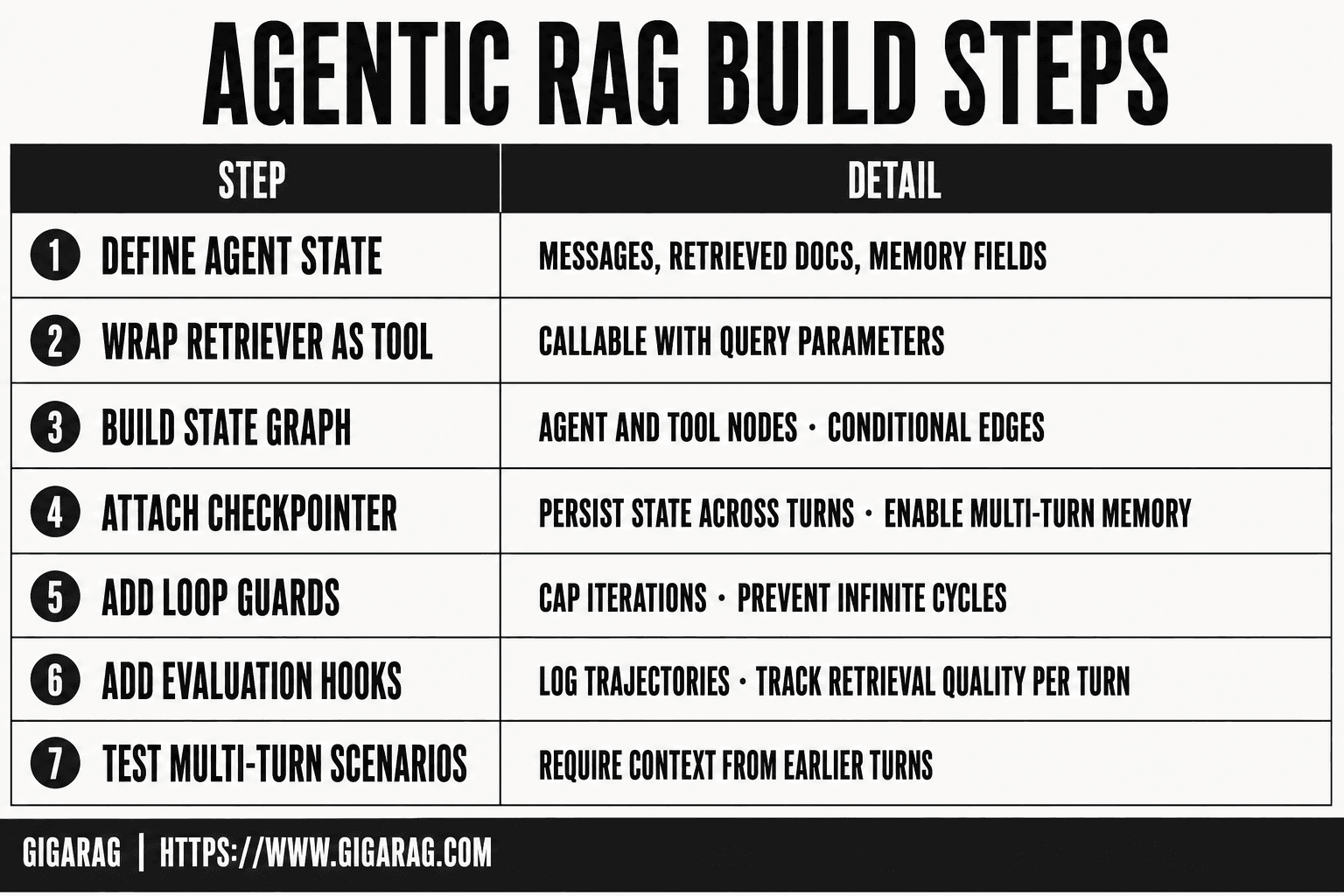
- Define the agent state schema with messages, retrieved documents, and memory fields.
- Wrap your retriever as a tool the agent can call with query parameters.
- Build the LangGraph state graph with agent and tool nodes plus conditional edges.
- Attach a checkpointer to persist state across turns and enable multi-turn memory.
- Implement retrieval loop guards to cap iterations and prevent infinite cycles.
- Add evaluation hooks that log trajectories and retrieval quality per turn.
- Test with multi-turn scenarios that require context from earlier turns.
Preprocess and Index Documents for Retrieval
Your retriever is only as good as the index behind it. Before the agent can decide what to fetch, you need documents loaded, split into chunks, embedded, and stored somewhere searchable. Skip this step and every downstream routing decision operates on garbage.
Load and split documents
LangChain's document loaders handle the common formats: PDFs, HTML, Markdown, CSVs, JSON. Pick the loader that matches your source. For a directory of Markdown files:
from langchain_community.document_loaders import DirectoryLoader

loader = DirectoryLoader("./docs", glob="**/*.md")
documents = loader.load()
Raw documents are too big to embed usefully. A 10-page PDF becomes one giant vector that matches everything and nothing. Split them. The default RecursiveCharacterTextSplitter with a chunk size around 1000 tokens and 200 tokens of overlap works for most prose. Tune it to your content. Code-heavy docs need smaller chunks. Legal docs need larger ones with more overlap.
from langchain_text_splitters import RecursiveCharacterTextSplitter

splitter = RecursiveCharacterTextSplitter(
    chunk_size=1000,
    chunk_overlap=200
)
chunks = splitter.split_documents(documents)
Overlap matters more than most people admit. Without it, a sentence that straddles a chunk boundary gets cut in half and becomes unretrievable.
Generate embeddings and store in a vector database
Embed each chunk with your embedding model, then store the vectors in ChromaDB:
from langchain_openai import OpenAIEmbeddings
from langchain_chroma import Chroma

embeddings = OpenAIEmbeddings()
vectorstore = Chroma.from_documents(
    documents=chunks,
    embedding=embeddings,
    persist_directory="./chroma_db"
)
ChromaDB persists to disk, so you don't re-embed on every run. For production, swap in Pinecone or pgvector. The embedding model you choose sets the ceiling on retrieval quality. text-embedding-3-small is cheap and fine for most cases. text-embedding-3-large costs more but catches semantic nuance the small model misses.
Verify your index with a test query
Don't trust that indexing worked. Query it:
results = vectorstore.similarity_search(
    "How do I configure the retriever?",
    k=3
)
for doc in results:
    print(doc.metadata.get("source"))
    print(doc.page_content[:200])
Read the returned chunks. If they don't answer the question, fix your chunk size or embedding model before you build the agent on top. A broken index produces an agent that confidently retrieves irrelevant text and then generates a wrong answer with total conviction.
Create a Retriever Tool Your Agent Can Call
The retriever alone does nothing for an agent. It's a function sitting in your codebase. To let the agent decide when to invoke it, wrap it as a tool with a name, a description, and a schema the model can read.
Wrap the retriever with a tool interface
LangChain gives you create_retriever_tool for exactly this. It takes your vectorstore's retriever, a name, and a description. The description matters more than the name. The agent reads it to decide whether this tool fits the current question.
from langchain.tools.retriever import create_retriever_tool

retriever = vectorstore.as_retriever()
retriever_tool = create_retriever_tool(
    retriever,
    "retrieve_docs",
    "Search the knowledge base for information relevant to the user's question."
)
Define the tool's input and output schema
The input is a query string. The output is a list of document chunks with their metadata. You don't write this schema by hand; create_retriever_tool generates it from the retriever. But you should know what the agent sees: raw text plus source metadata, no ranking scores unless you add them.
Test the tool in isolation
Call the tool directly before wiring it into the graph:
result = retriever_tool.invoke("How do I configure the retriever?")
print(result)
If the returned chunks don't answer the question, fix the index first. A tool that returns irrelevant text teaches the agent to distrust it, and the agent will route around it or answer wrong.
Define Agent State with Persistent Memory
Most LangGraph tutorials treat state as a variable that lives for one run and dies. That's fine for a demo. It's useless for a real agent that needs to remember what you asked three turns ago. This section makes state persistent.
What goes into agent state: messages, retrieved docs, routing decisions
Agent state is a dictionary that flows through every node in your graph. Each node reads it, updates it, and passes it along. What you put in it determines what your agent can remember.
The core fields are:
messages: the full conversation history, including user turns, assistant responses, and tool calls.retrieved_docs: the chunks pulled from your vector store in the current turn.routing_decision: which path the agent took, useful for debugging and evaluation.
You can add more. Some builders store a needs_rewrite flag or a confidence_score. The rule is simple: if a later node needs to know something, it goes in state. If not, leave it out. Extra state bloats every checkpoint and slows persistence.
Using LangGraph checkpointers for persistence
A checkpointer saves the state after every node runs. When the graph pauses for user input, the checkpointer writes state to storage. When the user responds, the graph resumes from that saved state instead of starting fresh.
LangGraph ships with MemorySaver for development. It stores checkpoints in RAM:
from langgraph.checkpoint.memory import MemorySaver

checkpointer = MemorySaver()
graph = workflow.compile(checkpointer=checkpointer)
For anything that survives a restart, swap in SqliteSaver or PostgresSaver. The API is the same; only the storage backend changes. You pass a thread_id when you invoke the graph, and LangGraph uses it to load the right conversation:
config = {"configurable": {"thread_id": "user-42"}}
graph.invoke({"messages": [("user", "What's the retriever config?")]}, config)
Same thread_id next turn, same conversation. Different thread_id, fresh state.
Multi-turn memory: what the agent remembers and what it forgets
The agent remembers whatever you put in state and persist via the checkpointer. Messages accumulate. Retrieved docs from previous turns stay unless you clear them. Routing decisions stay too.
What it forgets is anything you don't store. If you overwrite retrieved_docs on each turn instead of appending, the agent loses earlier retrieval context. If you trim messages to the last N turns, older context is gone. That's not a bug; it's a design choice. Context windows have limits, and you'll hit them.
The main catch: checkpointers persist state, but they don't summarize it. A 40-turn conversation stays 40 turns of raw messages unless you build a summarization node. That's your job, not the checkpointer's.
Assemble the Graph: Nodes, Edges, and Conditional Routing
The graph is where agentic RAG stops being a pipeline and starts being a decision loop. Each node does one job. Edges carry state between nodes. Conditional edges let the agent pick a path based on what's in state. You wire four nodes: generate-or-respond, grade documents, rewrite query, and generate answer.
Generate a query or respond directly
This node decides whether the user's message needs retrieval at all. If the message is a follow-up like "thanks" or "can you explain that again," the agent skips retrieval and responds from context. If the message is a question that needs documents, the node writes a search query to state and routes to retrieval.
Here's the logic in practice:
def generate_or_respond(state):
    messages = state["messages"]
    last_message = messages[-1]
    if is_conversational(last_message):
        return {"routing_decision": "respond"}
    return {"routing_decision": "retrieve", "search_query": last_message.content}
The conditional edge checks routing_decision. "respond" goes straight to answer generation. "retrieve" goes to the retriever tool, then to document grading.
Grade retrieved documents for relevance
Retrieval returns chunks. Some are relevant. Some aren't. This node grades each chunk against the query and filters out the noise.
You can grade with an LLM call per document, or use a simpler heuristic like cosine similarity threshold. The LLM approach costs more but catches semantic mismatches that similarity scores miss. The heuristic is faster and free.
In practice, most builders start with the LLM grader:
def grade_documents(state):
    query = state["search_query"]
    docs = state["retrieved_docs"]
    graded = []
    for doc in docs:
        score = llm.invoke(f"Is this relevant to '{query}'? Doc: {doc.page_content}")
        if "yes" in score.lower():
            graded.append(doc)
    return {"retrieved_docs": graded}
If zero documents pass, the conditional edge routes to query rewriting. If at least one passes, it routes to answer generation.
Rewrite the question when retrieval fails
Retrieval fails for two reasons: the query was too vague, or the index doesn't have the answer. This node only fixes the first. It rewrites the query to be more specific, then routes back to retrieval for another attempt.
The rewrite prompt asks the LLM to expand acronyms, add context, or rephrase ambiguous terms. A query like "what's the config" becomes "what is the retriever configuration in the LangGraph agentic RAG setup."
Keep a rewrite_count in state. After two rewrites, route to answer generation with whatever you have, or return a "no relevant documents found" response. Without a cap, the agent loops forever on queries the index can't answer.
Generate the final answer
This node takes the graded documents and the conversation history, and produces the response. The prompt includes the retrieved chunks as context and instructs the model to answer only from those chunks. If the chunks don't contain the answer, the model says so.
That instruction matters. Without it, the model fills gaps with its own knowledge, and you lose the traceability that makes RAG worth building. The answer may be worse, but it's honest about its sources.
The node writes the response to messages and returns the final state. The graph ends. The checkpointer saves everything for the next turn.
Run the Agent and Inspect Its Decisions
You've wired the graph. Now run it and watch what the agent actually does. Don't trust the output alone. Trust the trace.
Execute a multi-turn conversation
Start with a question that needs retrieval, then follow up with something conversational. The first turn should route through retrieval, grading, and answer generation. The second turn should skip retrieval entirely.
config = {"configurable": {"thread_id": "user-42"}}
graph.invoke({"messages": [{"role": "user", "content": "How do I configure the retriever?"}]}, config)
graph.invoke({"messages": [{"role": "user", "content": "Can you explain that again?"}]}, config)
The same thread_id is what makes the second turn work. Change it, and the agent starts fresh with no memory.
Trace node transitions with LangSmith
LangSmith shows every node the agent visited, in order, with the state at each step. You'll see whether retrieval happened, which documents got graded out, and whether a rewrite was triggered.
That trace is where routing mistakes show up. If the agent retrieves on a follow-up that should have gone straight to answer generation, the trace tells you the routing_decision was wrong.
Debug common routing mistakes
The most common failure: the agent retrieves when it should respond. That happens when is_conversational misses a message like "what do you mean by that." Fix the check, not the graph.
The second: the agent rewrites the query twice and still returns nothing. That's usually an index gap, not a routing bug. Check what's actually in your vector store before touching the rewrite logic.
Evaluate and Test Your Agentic RAG Pipeline
You ran the agent and watched the trace. Now measure whether it's actually good. A trace tells you what happened. Evaluation tells you whether what happened was right.
Metrics that matter: retrieval precision, answer faithfulness, routing accuracy
Three numbers cover most of what breaks in agentic RAG.
Retrieval precision is the share of retrieved documents that are actually relevant. If the agent pulls five docs and three are noise, precision is 0.4. Low precision means the grader is weak or the index is thin.
Answer faithfulness measures whether the generated answer is supported by the retrieved context. An answer can be fluent and wrong. Faithfulness catches that.
Routing accuracy is the share of turns where the agent made the right call: retrieve, rewrite, or respond directly. This is the metric unique to agentic RAG. Traditional RAG has no routing to evaluate.
Building a small evaluation set
You don't need a thousand examples. You need 30 to 50 that cover your failure modes.
Start with 10 questions that need retrieval. Add 10 conversational follow-ups that should skip retrieval. Add 10 questions where retrieval will likely fail, so you can watch the rewrite path. Then 10 edge cases: ambiguous queries, multi-hop questions, questions about content not in your index.
Label each one with the expected routing decision and the expected answer. That's your ground truth. It takes an afternoon. It pays for itself the first time a change breaks routing.
Using LangSmith evaluators
LangSmith has built-in evaluators for answer relevance and faithfulness. Wire them to your dataset and run them after every graph change.
The honest catch: automated evaluators miss things. They score fluency well and nuance poorly. Spot-check 10 traces by hand each week. You'll catch routing mistakes the evaluator doesn't know to look for.
Run the eval set before you change the graph, then after. If routing accuracy drops, the change broke something. Revert it.
What You Cannot Do or Should Not Expect
Agentic RAG with LangGraph is not a fix for bad retrieval. It's a control layer on top of it. If your index is thin or your embeddings are weak, the agent will route, rewrite, and grade its way to a confident wrong answer. The agent adds decisions. It doesn't add knowledge.
When retrieval fails silently
The grader can miss irrelevant documents. It scores similarity, not truth. A document that shares vocabulary with the query but contradicts it can pass grading. The agent then generates an answer from bad context, and nothing in the pipeline flags it. You'll see fluent, wrong output. Faithfulness evaluation catches this after the fact. The running agent won't.
Incorrect routing decisions and how they compound
One wrong routing call changes the whole turn. The agent decides to respond directly when it should retrieve, and it answers from the model's weights instead of your documents. Or it retrieves when the user just said "thanks," wasting a search and adding latency. These errors compound across turns because the bad decision becomes part of the conversation state. The next turn inherits it.
Memory limits and context window constraints
Persistent memory is not infinite memory. The checkpointer stores state, but the context window still has a hard limit. Long conversations push early messages out. The agent forgets what it said ten turns ago unless you build summarization or trimming. That's extra graph logic, and it's on you. LangGraph gives you the state. It doesn't manage the window for you.
Production scaling challenges
A single agent with a single retriever works in a notebook. Production means concurrent users, each with their own thread state. Checkpointers need storage that scales. Retrieval latency adds up when the agent calls the tool multiple times per turn. Cost per query climbs with every rewrite and re-grade. You'll need caching, rate limiting, and monitoring that the tutorial doesn't cover. None of this is impossible. None of it is free.
Production Considerations for Agentic RAG Pipelines
The notebook works. Production is a different job. You're now running concurrent threads, each with its own checkpointer state, and every turn can trigger multiple retrieval calls. Latency and cost stop being abstractions.
Deployment options for LangGraph agents
LangGraph Server is the managed path. It exposes your graph as an API, handles thread persistence, and supports streaming. Self-hosting means running the server yourself with Postgres or Redis as the checkpointer backend. The honest tradeoff: managed is faster to stand up, self-hosted gives you control over data residency and cost. Pick based on where your documents live.
Scaling retrieval and state management
State is the bottleneck. Every conversation thread writes to the checkpointer on each node transition. With hundreds of users, that's hundreds of writes per minute. Use Postgres, not SQLite, for anything beyond a demo. Cache retrieval results by query hash so repeated or near-duplicate questions don't re-hit the vector store. Rate-limit the retriever tool so one bad agent loop can't burn your embedding budget.
Monitoring and observability
You can't debug what you can't see. Trace every node transition, every routing decision, every graded document. LangSmith does this out of the box. Watch three numbers: retrieval latency per call, routing accuracy against a labeled set, and cost per turn. When routing accuracy dips, your agent is making bad decisions silently. That's the failure mode from the previous section showing up in production.
Final Thoughts on Building Agentic RAG with LangGraph
The pattern is simple once you've built it once: retrieve, grade, decide, answer. The hard part isn't the graph. It's the state.
Persistent agent memory is what separates a demo from a tool. Without a checkpointer, every turn starts from zero. Your agent forgets the question it just asked, the documents it just rejected, the route it just took. With a checkpointer, those decisions survive. That's the whole difference, and it's the part most tutorials skip.
The honest limits matter too. Retrieval fails silently. Routing compounds errors. Context windows fill up. You now know where each of those breaks happen and what to watch for in production. That's more than most guides give you.
If you're building agentic RAG with LangGraph and want agent memory handled without wiring the checkpointer, retriever tool, and evaluation loop yourself, GigaRAG integrates those pieces into a RAG pipeline that persists state across turns. It's not a replacement for understanding the graph. It's a shortcut past the boilerplate.
Frequently Asked Questions
Can I use LangGraph to implement Agentic RAG?
Yes. LangGraph is designed for stateful, multi-step agent workflows, which makes it a natural fit for agentic RAG. You define nodes for the agent and retrieval tools, connect them with conditional edges, and attach a checkpointer to persist state across turns.
How to build an agentic RAG system?
Start by defining your agent state schema, then wrap your retriever as a callable tool. Build a state graph where the agent decides when to retrieve, add loop guards to prevent infinite retrieval cycles, and attach a checkpointer for persistent memory. Finally, add evaluation hooks to monitor trajectory quality.
Can Agentic AI use RAG?
Yes, and this combination is often called agentic RAG. The agent uses RAG as one of its tools, deciding when retrieval is needed and how to use the results. This gives you more flexibility than a fixed retrieval pipeline but also introduces more failure modes to manage.
How is agentic RAG different from RAG?
Standard RAG follows a fixed retrieve-then-generate pattern with no memory between queries. Agentic RAG uses an agent to decide when and what to retrieve, maintains state across turns via checkpointers, and can re-query or escalate when initial retrieval is insufficient.
What are the main limitations of agentic RAG in production?
Common limitations include retrieval loops that inflate cost and latency, stale context from unbounded memory growth, and difficulty evaluating multi-step trajectories. You also need guardrails to prevent the agent from calling tools excessively or ignoring retrieved evidence.
How do I evaluate an agentic RAG pipeline?
Evaluate at two levels: trajectory-level metrics that check whether the agent took reasonable steps, and answer-level metrics that check final response quality. Log retrieval calls, tool usage, and turn count per query so you can diagnose where failures originate.
Do I need a checkpointer for agentic RAG in LangGraph?
You need a checkpointer if you want multi-turn memory or the ability to resume interrupted workflows. Without one, each invocation starts fresh and the agent cannot reference earlier turns. For production, use a persistent backend like Postgres rather than in-memory storage.
About GigaRAG
GigaRAG is for agent memory and RAG pipeline builders. get this right. Whether you are working through building agentic rag with langgraph or something adjacent, we publish what we have actually tested, including where it falls short.


