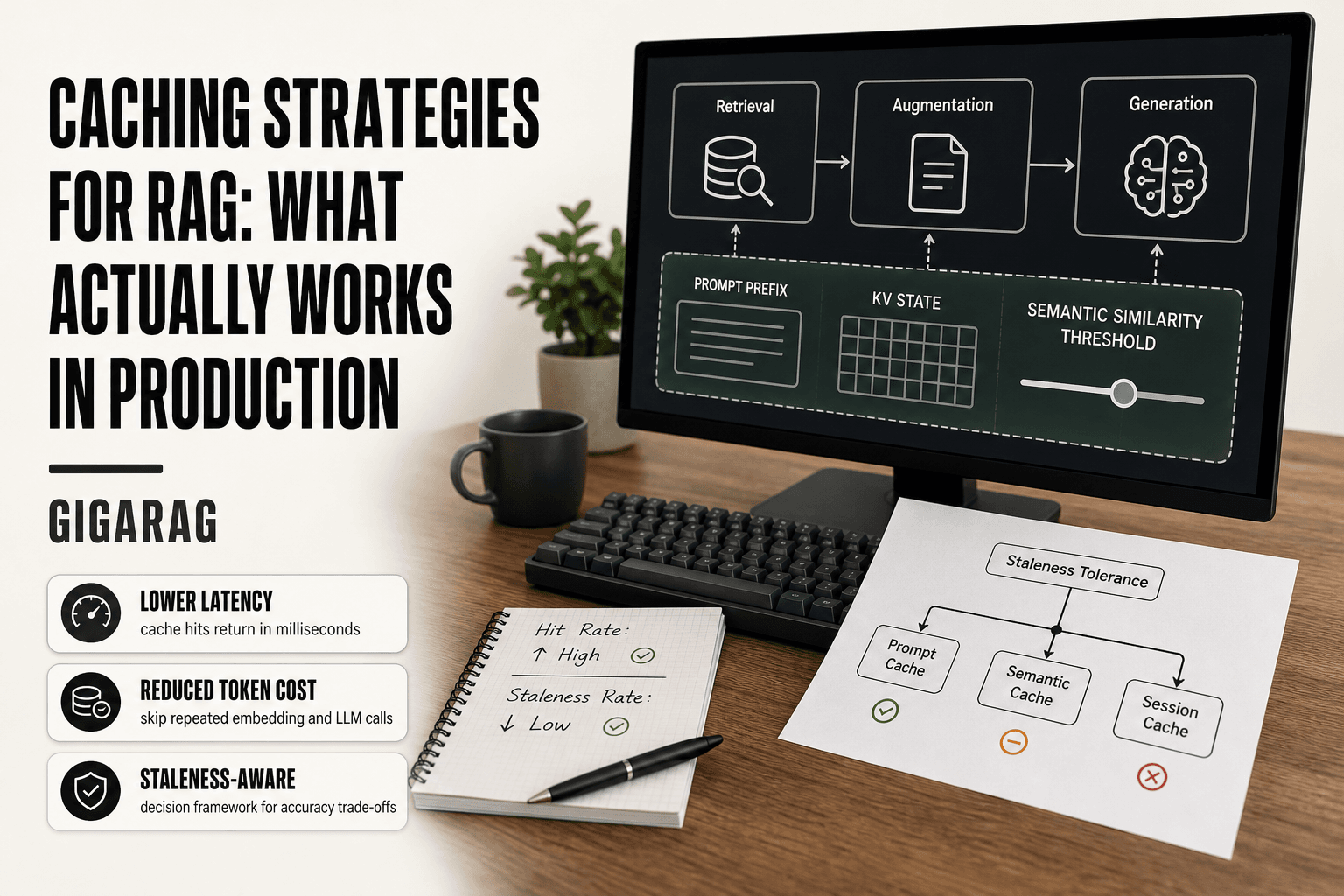
Caching Strategies for RAG: What Actually Works in Production
Caching strategies for RAG are sold to pipeline builders as a free lunch: lower latency, lower token cost, same answers. The honest answer is messier. A cache hit that returns last week's answer to a question about this morning's data isn't a performance win, it's a silent accuracy failure. And most articles about RAG caching won't tell you that. They list techniques, they skip the staleness problem, and almost none of them touch agent memory, where caches persist across turns and a bad hit compounds through an entire conversation.
This guide is for the people running RAG in production: pipeline builders and agent memory engineers who need to know which cache fits which workload, how to implement it, and when it will backfire. GigaRAG, a platform built for agent memory, handles several of these caching concerns natively, but this article assumes you're building or patching your own stack.
Here's what you'll get: prompt, KV, and semantic caching compared on real trade-offs, a decision framework for latency versus accuracy, and a plain statement of what caching cannot fix.
| At a glance | Details |
|---|---|
| What it is | Storing computed RAG outputs for reuse |
| Main trade-off | Lower latency vs. stale answers |
| Best for | Repeated queries and stable documents |
| Worst for | Fast-changing data and personalized answers |
| Key metric | Cache hit rate and answer freshness |
| Biggest risk | Silent staleness after data updates |
In This Guide
- What Is Caching in RAG?
- Exact-Match Caching vs. Semantic Caching for RAG
- The Two Main Strategies of Caching
- Caching Strategies For Rag: A Step-by-Step Guide
- The Three Types of Cache in RAG Systems
- Prompt Caching: The Highest ROI Optimization
- KV Cache: Reusing Attention States for Retrieved Chunks
- Semantic Caching: Matching Similar Queries to Stored Answers
- Caching for Agent Memory: What Changes
- Cache Invalidation and Staleness: What Breaks and How to Detect It
- A Decision Framework for Choosing Caching Strategies
- What Caching Cannot Do: Honest Limitations
- Retrieval Strategies in RAG and How Caching Interacts
- Final Thoughts on Caching Strategies for RAG
What Is Caching in RAG?
Caching in RAG means storing the results of expensive work so you don't pay for it twice. The expensive work is usually an LLM call: tokens in, tokens out, billed per thousand. But it can also be an embedding computation, a vector search, or a rerank pass. The cache holds a copy of the output, keyed by something you can check cheaply. Next time the same or similar input arrives, you skip the expensive step and return the stored result.
The trade is simple. You spend memory and engineering time to save latency and money. A cache hit returns in milliseconds instead of seconds, and costs nothing at inference time. A cache miss costs you the lookup plus the original work. The question is whether your hit rate justifies the overhead.
Why RAG pipelines are expensive without caching
A single RAG query touches multiple paid services. You embed the query, search the vector database, retrieve chunks, build a prompt, and call the LLM. Each step adds latency. The LLM call dominates cost: a 2,000-token prompt with a 500-token response might cost a few cents on a frontier model. Run that a thousand times a day and you're paying real money for questions that repeat.
Repeated questions are common. Users ask the same thing in different words. Agents re-send the same system prompt and context on every turn. Without caching, every one of those repeats pays full price.
Where caching fits in the RAG stack
You can cache at almost any layer. The query embedding, the retrieved chunks, the final answer, the KV states inside the model. Each layer has different hit rates, different staleness risks, and different implementation costs. The next sections break down which layers are worth caching and which aren't.
[!note] Caching reduces latency and cost only when queries repeat; for unique or highly personalized queries, hit rates stay low and the cache adds overhead without benefit.
Exact-Match Caching vs. Semantic Caching for RAG
| Factor | Exact-Match Caching | Semantic Caching |
|---|---|---|
| How it matches | Identical query string or hash | Similar meaning via embeddings |
| Hit rate | Lower; misses paraphrases | Higher; catches reworded queries |
| Accuracy risk | Low; same input, same output | Higher; similar query may need different context |
| Implementation cost | Low; simple key-value store | Higher; needs embedding model and threshold tuning |
| Best fit | FAQ bots, fixed prompts, repeated jobs | High-volume chat with varied phrasing |
The Two Main Strategies of Caching
The two main strategies are cache-aside (lazy loading) and write-through. Cache-aside fills the cache only when a request misses. Write-through updates the cache every time the underlying data changes.
Cache-aside (lazy loading) in RAG
Cache-aside is the default for most RAG pipelines. You check the cache first. On a hit, return the stored answer. On a miss, run the full pipeline, store the result, then return it. The cache stays empty until real traffic warms it up.
In practice, a query embedding cache works this way. You embed the user's question, hash it, and look up the hash. If the hash exists, you skip the embedding call. If not, you compute the embedding, store it, and move on. Same pattern for final answers: check the answer cache by query similarity, miss, generate, store.
The catch is the first request always pays full price. Cold starts hurt. And if your data changes, the cache doesn't know. You need a TTL or explicit invalidation to flush stale entries.
Write-through and read-through in RAG
Write-through updates the cache at write time, not read time. When new documents enter your vector database, you also update the cache entries that depend on them. The cache never goes stale because every write refreshes it.
Read-through is the sibling pattern. The cache sits in front of the data source. On a miss, the cache itself fetches from the source, stores the result, and returns it. Your application code never talks to the source directly.
In RAG, write-through makes sense for embedding caches tied to a document store. When a chunk changes, you re-embed it and overwrite the cached embedding. Read-through works for answer caches where the cache layer handles the LLM call on a miss.
When to use each pattern
Use cache-aside when reads dominate writes and staleness is tolerable for minutes or hours. Most single-turn Q&A fits here.
Use write-through when your data changes frequently and stale answers are unacceptable. Multi-turn agents with live context need this. The cost is write latency: every update pays the cache write penalty.
Read-through suits pipelines where you want one code path for cache logic. The trade is complexity. The cache layer now owns the fallback, which makes debugging harder when something breaks.
[!tip] For agent memory engineers: cache the retrieval result keyed by a hash of the memory state plus the query, not the query alone — agent context changes between turns, so a query-only key will serve stale memories.
Caching Strategies For Rag: A Step-by-Step Guide
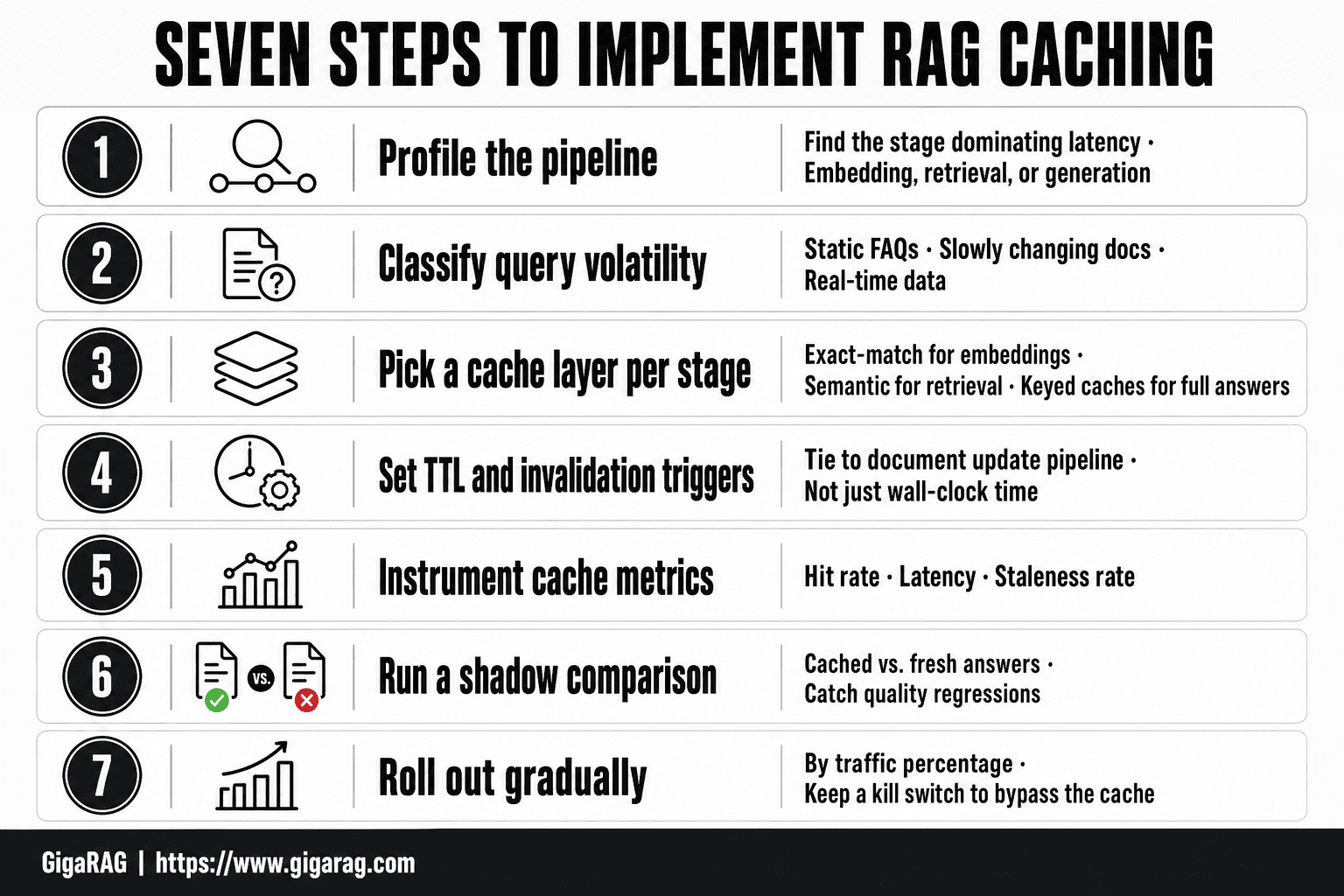
- Profile your pipeline to find which stage dominates latency: embedding, retrieval, or generation.
- Classify queries by volatility: static FAQs, slowly changing docs, or real-time data.
- Pick a cache layer per stage: exact-match for embeddings, semantic for retrieval, and keyed caches for full answers.
- Set a TTL and invalidation trigger tied to your document update pipeline, not just wall-clock time.
- Instrument hit rate, latency, and staleness rate before and after launch.
- Run a shadow comparison of cached vs. fresh answers on a sample to catch quality regressions.
- Roll out gradually by traffic percentage and keep a kill switch to bypass the cache.
The Three Types of Cache in RAG Systems
The generic L1/L2/L3 hierarchy doesn't map cleanly onto RAG. Instead, RAG systems use three cache types that live at different layers of the stack: prompt cache, KV cache, and semantic cache. Each stores something different and saves a different kind of work.
Prompt cache: reusing prefixes and system messages
Prompt cache stores the computed state of a prompt prefix. When you send the same system message and instructions repeatedly, the model doesn't reprocess them. It reuses the cached attention state from the first call.
This lives at the LLM provider layer. Anthropic and OpenAI both offer it. You pay a small premium for cache writes, then get discounted tokens on cache reads. The savings scale with prefix length: a 10,000-token system prompt cached across 100 requests saves real money.
KV cache: avoiding recomputation of attention states
KV cache stores the key-value pairs from attention layers during generation. Every token you generate produces a key and value vector. Without a cache, each new token recomputes attention over the entire sequence. With a KV cache, you only compute attention for the new token.
This is automatic in most inference engines. You don't manage it directly. But for RAG, the interesting case is reusing KV states for retrieved chunks. If the same chunk appears in multiple queries, you can reuse its KV state instead of recomputing it. That's what CacheClip and Cache-Craft do, and it's not a drop-in solution.
Semantic cache: matching similar queries to stored answers
Semantic cache stores answers keyed by embedding similarity, not exact match. You embed the incoming query, compare it to stored query embeddings, and return the cached answer if similarity exceeds a threshold.
This lives at the application layer. You control the threshold, the embedding model, and the eviction policy. A threshold of 0.95 returns only near-identical queries. A threshold of 0.85 returns more hits but risks wrong answers. The trade is yours to make.
How L1/L2/L3 maps to RAG cache layers
The mapping is loose, not exact. Prompt cache is closest to L1: fastest, smallest, closest to the compute. KV cache is L2: larger, slower to fill, still tied to the model. Semantic cache is L3: application-level, largest capacity, highest latency but biggest potential savings.
The honest answer is that RAG doesn't need all three. Most teams start with semantic cache because it's the easiest to implement and gives the biggest cost reduction per engineering hour. Prompt cache is nearly free if your provider supports it. KV cache reuse for retrieved chunks is research-grade work that most production teams should skip.
Prompt Caching: The Highest ROI Optimization
Prompt caching is the one optimization you should implement before anything else. It requires no application-layer code, no threshold tuning, no eviction policy. You enable it, structure your prompts correctly, and the savings show up on your next invoice.
How prompt caching reduces token costs
Here's what happens behind the scenes. When you send a prompt, the model computes attention over every token in the prefix before generating the first output token. That's the prefill phase. For a 10,000-token system message, prefill is expensive. Without caching, you pay for that prefill on every single request.
With prompt caching, the provider stores the computed attention state for your prefix. The next request with the same prefix skips prefill entirely. You pay a cache write fee on the first request, then a discounted read rate on every hit after that. Anthropic charges 1.25x for cache writes and 0.1x for cache reads. OpenAI's pricing is similar in structure. The savings compound with prefix length and request volume.
Designing prompts for cache hits
Cache hits depend on prefix stability. The cache matches from the start of the prompt forward. If anything in the prefix changes, the entire cache misses.
Put static content first. System instructions, tool definitions, few-shot examples, document context that doesn't change between requests. Put dynamic content last: the user's query, timestamps, session-specific variables.
Don't interleave static and dynamic content. A system message that includes the current date at the top breaks the cache for every request. Move the date to the end, or better, exclude it from the cached prefix entirely.
Keep the prefix byte-identical. A trailing space, a changed word, a reordered list all invalidate the cache. Treat your system prompt like a config file: version it, test changes in staging, and don't let application code mutate it at runtime.
Limitations: what prompt caching cannot do
Prompt caching only saves prefill compute. It does nothing for generation tokens, which are often the majority of cost on long outputs. It also doesn't help if your prompts vary widely per request. A RAG system that injects different retrieved chunks into the prompt on every call gets fewer hits unless the chunks themselves are stable.
Cache TTLs apply. Providers evict cached prefixes after a period of inactivity, typically minutes to hours. If your traffic is bursty with long gaps, you'll pay cache write fees repeatedly without enough reads to justify them.
The main catch: prompt caching is provider-specific. Anthropic and OpenAI support it. Open-source models served through vLLM or similar engines have their own prefix caching, but the behavior and pricing differ. You can't write one implementation and expect it to work everywhere.
KV Cache: Reusing Attention States for Retrieved Chunks
KV caching is the least understood and most overhyped optimization in RAG. It's not a config flag. It's not something you enable in your vector database. It's a research-level technique that requires modifying the inference engine itself, and for most teams it isn't worth the effort.
What KV cache stores and why it matters
During inference, the model computes key and value vectors for every token it processes. These vectors are the attention state. Without caching, the model recomputes them from scratch on every forward pass. That's wasteful when tokens repeat across requests.
The KV cache stores those computed vectors so the model can skip recomputation. For a single long document, that saves real compute. For RAG, the idea is to cache the KV state for retrieved chunks, then reuse that state when the same chunk appears in a later request.
Chunk-level KV reuse (CacheClip, Cache-Craft)
CacheClip and Cache-Craft are two research approaches to chunk-level KV reuse. Both work on the same premise: retrieved chunks are often shared across queries, so their attention states can be cached and stitched together.
CacheClip focuses on identifying which chunks are worth caching based on retrieval frequency. It stores the KV state for frequently retrieved chunks and reuses them when those chunks appear again. Cache-Craft takes a different angle: it compresses the KV state for retrieved chunks to reduce memory overhead, then reconstructs the state when needed.
The honest answer is that both are academic prototypes. They show promising latency reductions in benchmarks, but neither is a production-ready library you can drop into your stack. The engineering effort to integrate them is substantial, and the gains depend heavily on your retrieval patterns.
When KV caching is worth the engineering effort
It depends on three things: how often your retrieved chunks repeat, how long your context windows are, and whether you control the inference engine.
If you're running a high-volume RAG system where the same documents are retrieved for thousands of queries, chunk-level KV reuse could cut prefill costs meaningfully. If you're serving open-source models through vLLM or a custom inference server, you have the access needed to implement it.
If you're calling a hosted API like Anthropic or OpenAI, you can't touch the KV cache directly. Prompt caching is your only lever there. For most teams, that's the right place to stop.
Semantic Caching: Matching Similar Queries to Stored Answers
Semantic caching is the third layer, and the one most likely to go wrong. The idea is simple: store answers keyed by the meaning of a query, not its exact text. When a new query arrives, you check if it's similar enough to something you've already answered. If it is, you return the stored answer and skip retrieval and generation entirely.
The savings can be substantial. A cache hit skips embedding, vector search, reranking, and LLM inference. That's the entire pipeline, not just one stage. But the cost is accuracy risk, and that risk scales with how aggressively you set your similarity threshold.
How semantic similarity thresholds work
You embed the incoming query, then compare it against embeddings of previously cached queries using cosine similarity. If the similarity score exceeds a threshold, you return the cached answer.
The threshold is the whole game. Set it at 0.95 and you'll get few hits but high confidence. Set it at 0.80 and you'll get more hits but more wrong answers. There's no universal right number. It depends on your embedding model, your query distribution, and how much accuracy loss you can tolerate.
In practice, most teams start around 0.90 and tune from there. You'll need to monitor what gets returned as a hit and spot-check it against what a fresh pipeline run would have produced.
Query-embedding caches vs. rerank-score caches
Query-embedding caches compare the raw query embedding against stored query embeddings. They're fast and cheap, but they miss nuance. Two queries can have similar embeddings and different intents.
Rerank-score caches add a second check. Instead of trusting the embedding similarity alone, they run a reranker over the candidate cached answers and the new query. If the rerank score is high enough, the answer is reused. This catches cases where embedding similarity is misleading.
The trade-off is latency. A rerank-score cache still runs a reranker, so you lose some of the speed you gained. But you gain accuracy. For high-stakes answers, the rerank check is worth it.
Accuracy risks: when semantic caching returns wrong answers
The failure mode is silent. A query passes the threshold, gets a cached answer, and the answer is wrong for that specific query. The user has no way to know.
This happens most often with ambiguous queries. "How do I reset it?" could mean a password, a router, or a database connection. If the cached answer is for the wrong "it," you've served a confident wrong answer.
The fix is to cache only answers you're confident generalize, and to log every cache hit with its similarity score. When you see hits near the threshold returning bad answers, raise the threshold or switch to a rerank-score cache.
Caching for Agent Memory: What Changes
Agent memory changes the caching problem. In single-turn RAG, each query is independent. You cache an answer, and the next query either matches it or doesn't. In a multi-turn agent, every turn depends on the turns before it. The cache has to hold state, not just answers.
That's the core shift. A single-turn cache stores query-answer pairs. An agent memory cache stores conversation history, retrieved context, tool outputs, and intermediate reasoning. The cache isn't an optimization layer anymore. It's part of how the agent works.
Session persistence and context reuse
Agents run across many turns. Each turn rebuilds context from scratch unless you persist it. Without caching, turn five re-embeds the system prompt, re-retrieves the same documents, and re-sends the full conversation history to the LLM. That's wasteful in the obvious way: you pay for tokens you already paid for.
Session persistence means storing the conversation state between turns. The system prompt, the retrieved chunks, the tool outputs, and the running summary all live in a cache keyed by session ID. When the next turn arrives, you load the session instead of rebuilding it.
The savings compound. A ten-turn conversation that re-retrieves on every turn does ten vector searches. With session persistence, it does one search per new query, and reuses everything else. The LLM still processes the full context on each turn, but the retrieval and embedding costs drop sharply.
Multi-turn conversation caching patterns
There are three patterns that show up in practice.
The first is full-context caching. You store the entire conversation history and reuse it verbatim. This works when the conversation is short and the context window is large. It breaks when the conversation grows past what the model can hold, or when earlier turns become irrelevant.
The second is summary caching. You cache a running summary of the conversation, updated after each turn. The LLM sees the summary plus the last few turns, not the full history. This keeps context small, but the summary is lossy. Details from early turns get compressed away.
The third is selective retrieval caching. You cache the retrieved chunks per turn, and on each new turn you retrieve only what's new. This is the most efficient pattern, but it requires a retrieval system that can distinguish between what's already in context and what's missing.
Why agent memory caching is harder than single-turn RAG caching
Single-turn caching has one failure mode: a wrong answer from a bad match. Agent memory caching has that plus state corruption. If the cached session state is wrong, every subsequent turn inherits the error.
The invalidation problem is also harder. In single-turn RAG, you invalidate a cache entry when the underlying documents change. In agent memory, you invalidate when the conversation context shifts. A user changes their goal mid-conversation. A tool returns different results than last time. The cached context is now stale, and the agent doesn't know it.
The honest answer is that agent memory caching is still an unsolved problem for most teams. The patterns exist, but the tooling is immature. You'll end up building session state management yourself, and you'll need to instrument it carefully to catch when cached context drifts from what a fresh rebuild would produce.
Cache Invalidation and Staleness: What Breaks and How to Detect It
Caching breaks when the cached data stops matching the source data. That's the whole problem. In RAG, the source data is your documents, your embeddings, and your retrieval logic. When any of those change, the cache goes stale. The answer you serve is now wrong, and you won't know it unless you're watching.
Common staleness failure modes in RAG caches
The first failure mode is stale embeddings. You cached a query embedding and its answer. Then you re-embed your document corpus with a new embedding model. The cached query embedding no longer matches the new vector space. The similarity score is meaningless. You serve an answer that was correct under the old model and wrong under the new one.
The second is outdated answers. Your documents changed. A policy page updated. A price changed. A product shipped. The cache still holds the old answer. The user asks a question that matches the cached query, and they get the old information. This is the classic cache invalidation problem, and it's worse in RAG because the cache key is a semantic match, not an exact URL.
The third is drift in retrieved chunks. Your chunking strategy changed. You split documents differently. The chunks that were retrieved and cached no longer correspond to how the corpus is organized. The cached answer references chunks that don't exist anymore, or that now contain different text.
TTL, versioning, and invalidation strategies
TTL is the blunt instrument. Set a time-to-live on every cache entry. When it expires, the next query misses the cache and does a fresh retrieval. TTL works when your data changes on a predictable schedule. It fails when data changes unpredictably. A TTL of one hour means up to one hour of stale answers after a critical update.
Versioning is sharper. Tag every cache entry with the version of the embedding model, the chunking config, and the document corpus. When any of those bump, invalidate everything with the old version. This catches the stale embeddings and drift failure modes cleanly. It doesn't catch content changes within a version.
For content changes, you need event-driven invalidation. When a document updates, find every cache entry that retrieved from that document and invalidate it. This requires tracking which chunks came from which documents, which most RAG systems don't do by default. The honest answer is that most teams skip this and rely on TTL plus versioning, accepting some staleness window.
Monitoring cache health: hit rates, miss rates, and drift
Hit rate tells you how often the cache saves you work. Miss rate tells you how often it doesn't. Neither tells you if the cache is serving stale answers.
Drift detection is the hard one. Periodically run a sample of cached queries through a fresh retrieval and compare the results. If the fresh retrieval returns different chunks than the cached ones, you have drift. The percentage of drifted samples is your staleness rate. This is expensive, so you sample, not check everything.
The main catch is that drift detection only works if you're willing to pay for the fresh retrievals. That's the cost of knowing your cache is honest.
A Decision Framework for Choosing Caching Strategies
You've seen the failure modes. Now you need a way to pick a strategy without reading six more articles. The framework is simple: decide how much staleness you can tolerate, then pick the cache that matches.
Latency vs. accuracy: the core trade-off
Every caching decision is a bet on how often your data changes. Prompt caching is nearly free: the prefix is identical every time, so there's no staleness risk. Semantic caching is the opposite: you're reusing answers across similar queries, which means you're accepting that two different questions might get the same answer. The more you cache, the faster you get. The more you cache, the more likely you serve something wrong.
The honest answer is that most RAG systems can tolerate more staleness than their builders admit. A support bot answering "what's your refund policy" doesn't need the answer re-derived from source documents every time. A medical Q&A system does.
Use case to strategy mapping
Single-turn Q&A with stable documents: start with prompt caching. It's the highest ROI and carries zero accuracy risk. Add semantic caching only for high-frequency queries where you've measured the hit rate.
Multi-turn agents: cache the conversation context and retrieved chunks per session. This is session persistence, not global caching. The cache key includes the session ID, so staleness is bounded by the session length.
High-volume embeddings: cache embeddings at the document level, not the query level. Documents change less often than queries. When a document updates, invalidate its embedding and everything downstream.
A simple decision tree for choosing your first cache
Start with prompt caching. It's always safe. Then ask: do you have repeated queries that are semantically similar but not identical? If yes, add a semantic cache with a tight similarity threshold. If no, stop there.
Next: do you have multi-turn conversations where context repeats across turns? If yes, add session-level caching for retrieved chunks and conversation state. If no, you're done.
The main catch is that each layer adds invalidation surface. Prompt caching has none. Semantic caching needs TTL plus versioning. Session caching needs session-scoped eviction. Add layers only when you've measured the latency or cost win from the previous layer.
What Caching Cannot Do: Honest Limitations
Caching is a performance tool, not a correctness tool. It can't fix a pipeline that retrieves the wrong chunks or an embedding model that doesn't capture your domain. If your retrieval is bad, caching makes the bad answers faster.
Caching cannot fix bad retrieval
A cache stores what your pipeline already produced. If the retriever pulls irrelevant chunks, the cache stores irrelevant chunks. If the embedding model misses semantic relationships, the cache stores those misses. Caching amplifies whatever your retrieval does, good or bad.
The fix for bad retrieval is better chunking, better embeddings, or better reranking. None of those live in a cache layer. You can't cache your way out of a retrieval problem.
Caching cannot guarantee answer accuracy
A cache hit means you've seen something similar before. It doesn't mean the stored answer is correct. Semantic caches are especially risky: two queries that embed close together can still have different answers. "How do I reset my password" and "How do I change my password" might be the same. "What's the refund policy" and "What's the return policy" might not be.
The cache doesn't know the difference. It only knows the embeddings are close. You set the threshold. You own the risk.
When caching hurts more than helps
Caching hurts when your data changes faster than your invalidation strategy. A news Q&A system with a 24-hour TTL will serve yesterday's headlines as today's answers. A product catalog cache without versioning will recommend discontinued items.
It also hurts when the cache hit rate is low. If only 5% of queries hit, you're paying for cache storage and invalidation logic without the latency win. Measure before you add layers.
The honest answer: caching is worth it when retrieval is already good, data changes slowly, and you've measured the hit rate. Skip it otherwise.
Retrieval Strategies in RAG and How Caching Interacts
Retrieval strategies decide what chunks your RAG pipeline pulls before the LLM generates an answer. The three you'll actually encounter in production are dense, sparse, and hybrid. Each one interacts with caching differently, and knowing which you're running tells you which cache layers will actually pay off.
Dense, sparse, and hybrid retrieval
Dense retrieval embeds your query and your chunks into the same vector space, then finds nearest neighbors. It's good at semantic matches: "how do I cancel my account" and "terminate subscription" land close together even though they share no words. The catch is it can miss exact identifiers like product codes or error numbers.
Sparse retrieval works on term matching. Think BM25 or TF-IDF. It's fast, cheap, and excellent when the query contains a specific token that must appear in the answer. It fails on paraphrases and synonyms.
Hybrid retrieval runs both and merges the results, usually with a reranker on top. This is the default in most production RAG systems because it covers both failure modes. You pay for it in latency and infrastructure: two retrieval passes plus a rerank step before the LLM ever sees a token.
Where caching fits in each retrieval strategy
Dense retrieval is the most cache-friendly. Embedding a query is deterministic, so a query-embedding cache gives you instant reuse when the same or similar query arrives. You can also cache the retrieved chunk IDs per embedding, skipping the vector search entirely.
Sparse retrieval benefits least from semantic caching. Term matching is already fast, and the index is cheap to query. Caching here mostly means caching the final answer, not the retrieval step.
Hybrid retrieval is where caching gets interesting. The reranker is often the most expensive component after the LLM itself. A rerank-score cache stores the scores for query-chunk pairs, so repeated or similar queries skip the rerank pass. The main catch: rerank scores go stale when your chunk set changes, so you need versioning tied to your index.
The honest answer is that caching amplifies whatever retrieval strategy you've chosen. Dense retrieval gives you more cache surface area. Sparse gives you less. Hybrid gives you the most, but only if you're willing to manage invalidation across two retrieval paths and a reranker.
Final Thoughts on Caching Strategies for RAG
You don't need every cache. You need the right cache for your retrieval strategy and your latency budget. Start with prompt caching if you run a multi-turn agent. Add a semantic cache if your query volume repeats. Reach for KV cache reuse only when the engineering cost is justified by real token savings.
The decision framework comes down to one question: how much staleness can your users tolerate? Single-turn Q&A over static docs tolerates a lot. Agent memory over changing context tolerates almost none. Match your invalidation strategy to that tolerance, not to what's easiest to build.
Caching strategies for RAG work best when they're boring: stable prefixes, versioned embeddings, monitored hit rates. The moment a cache becomes clever, it becomes a source of silent wrong answers.
GigaRAG handles agent memory caching natively, so you don't rebuild session persistence and context reuse from scratch. That's the honest pitch. If you're not using it, the patterns in this guide still apply. Just budget for the invalidation work yourself.
Frequently Asked Questions
What are the two main strategies of caching?
The two broad strategies are exact-match caching, which returns a stored result for an identical request, and semantic caching, which returns a result for a request with similar meaning. Exact-match is simpler and safer; semantic caching improves hit rates but needs careful similarity thresholds to avoid wrong answers.
What are the three types of cache?
In RAG systems, the three practical cache types are embedding caches (reuse vectors for repeated text), retrieval caches (reuse fetched documents for a query), and generation caches (reuse the final answer). Each sits at a different pipeline stage and has different staleness risk.
What are the retrieval strategies in RAG?
Common retrieval strategies include dense vector search, sparse keyword search like BM25, and hybrid combinations of both. Reranking retrieved candidates with a cross-encoder is also common. Caching can sit in front of any of these to skip repeated retrieval work.
How do you handle cache invalidation in RAG?
Tie invalidation to your document update events rather than only time-based TTLs. When a source document changes, purge or version the cache entries derived from it. Versioning keys by document revision is a reliable way to avoid serving stale answers.
Can caching hurt RAG accuracy?
Yes. If source data changes and the cache is not invalidated, users receive outdated answers with no visible warning. Semantic caching adds another risk: a similar-sounding query may need different context, so a loose similarity threshold can return the wrong cached answer.
Does caching work for multi-turn agent memory?
It can, but the cache key must include the agent's memory or conversation state, not just the query. Otherwise the agent may reuse a memory from an earlier turn that no longer applies. Treat agent memory caching as a separate layer with its own invalidation rules.
What cache hit rate should you expect in RAG?
Hit rates vary widely by workload. High-volume FAQ-style traffic can see substantial reuse, while unique analytical queries may see very little. Measure your own query distribution before assuming caching will pay off, and track hit rate as a first-class metric.
About GigaRAG
GigaRAG is for agent memory and RAG pipeline builders. get this right. Whether you are working through caching strategies for rag or something adjacent, we publish what we have actually tested, including where it falls short.


