ChatGPT Branch in New Chat Not Working: What You Can and Can't Fix
You searched "chatgpt branch in new chat not working" because you tried to branch a conversation and it failed. You're not wrong about the search results. Most pages either praise the feature or collect complaints. Nobody tells you what to actually do.
Here's the honest answer: some branching failures are fixable in two minutes. Some are platform limitations you can't work around. And some are by design, because OpenAI shipped branching as a preview, not a full conversation management tool.
That last part matters more than it looks. If you're building agent memory or RAG pipelines, you already know the problem: conversation state is ephemeral, branches don't share context, and nothing persists unless you build it. GigaRAG exists for exactly that reason, and we'll get to it.
This guide covers the specific fixes for web, iOS, Android, and desktop, the limitations you can't fix, and a decision framework for when branching is the wrong tool entirely.
| At a glance | Details |
|---|---|
| What branching does | Creates a new chat from a chosen message |
| Common failure | Branch option missing or new chat empty |
| Platforms affected | Web, iOS, Android, desktop apps |
| Can you fix it? | Sometimes — depends on rollout and account |
| What you can't do | Force the feature if not enabled |
| Better alternative | Start fresh or use persistent memory tools |
In This Guide
- What ChatGPT's Branch Feature Actually Does
- Branching vs Starting a Fresh Chat: Which Should You Use?
- Why ChatGPT Branch in New Chat Not Working Happens
- Chatgpt Branch In New Chat Not Working: A Step-by-Step Guide
- Platform-Specific Fixes for Branching Problems
- What You Cannot Do with ChatGPT Branching
- Branch vs. New Chat: A Decision Framework
- What Branching Teaches You About Conversation State
What ChatGPT's Branch Feature Actually Does
Branching copies your conversation at a chosen point and continues it in a separate chat, leaving the original untouched. You get two parallel threads from one shared history.
How branching works on web
Hover over any assistant message. Click the three-dot menu, then "Branch in new chat." ChatGPT copies everything up to that point into a fresh conversation. You continue from there.
How branching works on mobile
Long-press an assistant message. The menu shows the branch option. Same mechanic, same result: a new chat with the old context baked in.
What happens to the original chat when you branch
Nothing. The original stays exactly where it was. You can keep going in it, branch again, or abandon it. Each branch is independent from the split point forward. No shared memory between them.
[!note] ChatGPT's branching feature has been rolled out gradually and may not be available on all accounts or platforms at the same time. If the option is missing entirely, it is likely a rollout issue rather than a bug you can fix.
Branching vs Starting a Fresh Chat: Which Should You Use?
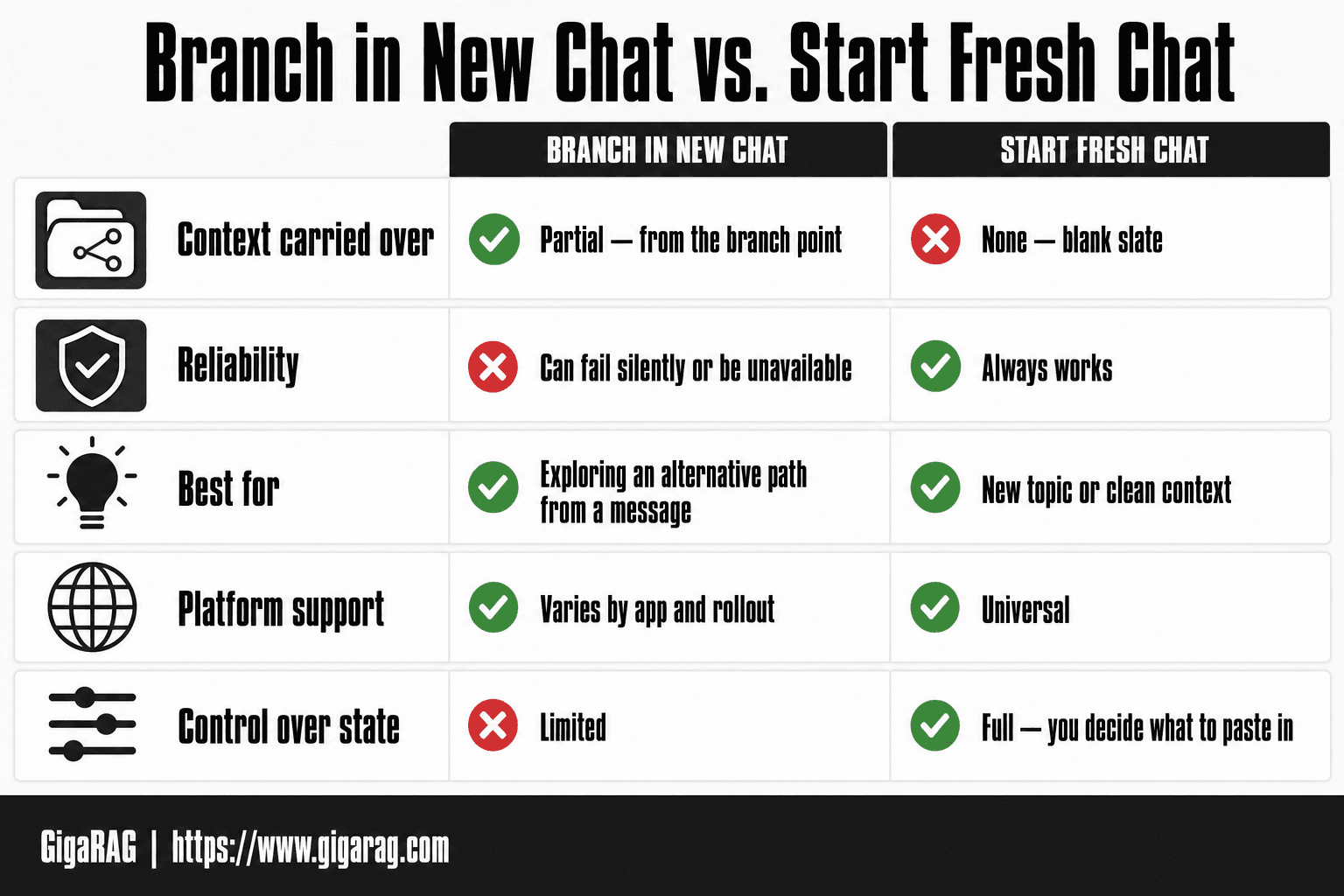
| Factor | Branch in New Chat | Start Fresh Chat |
|---|---|---|
| Context carried over | Partial — from the branch point | None — blank slate |
| Reliability | Can fail silently or be unavailable | Always works |
| Best for | Exploring an alternative path from a message | New topic or clean context |
| Platform support | Varies by app and rollout | Universal |
| Control over state | Limited | Full — you decide what to paste in |
Why ChatGPT Branch in New Chat Not Working Happens
The branch option fails for four main reasons, and only two of them are things you can fix yourself. The other two are on OpenAI's side.
Feature not rolled out to your account yet
OpenAI rolls features out in waves. Your account may simply not have the branch option enabled yet, even if someone else's does. This is the most common cause when the menu item is missing entirely. Check whether you see "Branch in new chat" in the three-dot menu on web or the long-press menu on mobile. If it's not there, you're waiting on a rollout. There's no toggle to force it. Free and paid accounts get features at different times, so a Plus subscription doesn't guarantee earlier access.
Outdated app or browser cache
An old app version or a stale browser cache can hide features that are actually available to your account. The fix is straightforward: update the app, or clear your browser cache and reload. On mobile, check your app store for an update. On web, a hard refresh (Ctrl+Shift+R on Windows, Cmd+Shift+R on Mac) forces the browser to pull the latest version of the interface. If the branch option appears after that, the problem was local.
Branching disabled in your interface
Some interfaces don't expose the branch option at all. The desktop app has lagged behind web and mobile on this feature. If you're on the desktop app and don't see branching, try the web version instead. Same account, same conversation, different interface. The feature may be there.
Server-side issues on OpenAI's end
ChatGPT has periodic outages and degraded performance. When the service is struggling, features can fail silently: the menu opens but the branch action does nothing, or the new chat never loads. Check OpenAI's status page before you spend time troubleshooting your own setup. If the status page shows degraded performance, wait it out. Your account and app are probably fine.
[!tip] For developers building agent memory or RAG pipelines, don't depend on ChatGPT's branching for state management — export the conversation or use a dedicated persistent memory layer so your context survives across sessions and platforms.
Chatgpt Branch In New Chat Not Working: A Step-by-Step Guide
- Confirm the branch option appears on the message you want to branch from — if it's missing, the feature may not be rolled out to your account.
- Update the ChatGPT app or refresh the web page to the latest version, then sign out and back in.
- Try the same action on a different platform (web vs iOS vs Android vs desktop) to isolate whether it's app-specific.
- Start a brand-new chat manually and paste the relevant context from the original conversation as a workaround.
- Check ChatGPT's status page and community forums for known outages or rollout notes.
- If branching still fails, report it via the in-app feedback option and note your platform and app version.
- For agent memory or RAG prototyping, switch to a persistent memory tool instead of relying on chat branching.
Platform-Specific Fixes for Branching Problems
The fix depends on where you're running ChatGPT. Each platform has its own failure modes.
Web browser fixes
Clear the cache first. A stale cache hides features your account already has. Hard refresh with Ctrl+Shift+R on Windows or Cmd+Shift+R on Mac. If the branch option still doesn't appear, try a different browser. Some extensions block menu items. Disable ad blockers and privacy extensions, then reload. Check that you're logged into the right account. A second account without the rollout will show no branch option.
iOS app fixes
Update the app from the App Store. An outdated build won't show features that are live on web. If updating doesn't work, delete and reinstall. That clears local state without touching your chat history, which lives on OpenAI's servers. Long-press a message to check for the branch option. If the menu opens but the action fails, force-quit the app and reopen.
Android app fixes
Clear the app cache in Settings > Apps > ChatGPT > Storage. Android caches interface data aggressively, and a corrupted cache breaks menu actions. Update through Google Play. If the branch option is missing after both, check whether your account has the feature by opening the web version on your phone. Same account, same conversation. If it works there, the Android app is the problem.
Desktop app fixes
The desktop app has the worst parity for branching. If the option is missing, don't troubleshoot it. Open the web version instead. Same account, same conversation, different interface. The feature is often there. If you must use the desktop app, check for updates in the app's settings menu. But honestly, the web version is the faster path.
What You Cannot Do with ChatGPT Branching
Some limits are bugs you can fix. Others are design decisions. Knowing which is which saves you an hour of troubleshooting something that was never going to work.
No renaming or organizing branches
Branches get auto-generated titles based on the message you branched from. You can't rename them. You can't tag them, color-code them, or group them into folders. If you branch five times from the same conversation, you get five chats with near-identical titles. The only way to tell them apart is to open each one and read the first exchange. For developers juggling multiple prototypes, that's a real cost.
No editing inputs after branching
Once you branch, the message you branched from is locked. You can't change the prompt, swap an image, or attach a different file. The branch inherits the exact input from the parent chat. If you realize the original prompt had a typo or a wrong parameter, you can't fix it in the branch. You start over or live with it.
No cross-branch memory or context sharing
Each branch is a separate conversation. What happens in one branch stays there. If you ask a question in branch A, branch B has no idea it happened. There's no shared state, no common scratchpad, no way to merge branches later. For agent memory work, this is the core limitation: branching gives you parallel timelines, not a shared memory.
Mobile access is inconsistent
The branch feature rolls out unevenly across platforms. You might have it on web but not on iOS. You might have it on Android but not on desktop. OpenAI doesn't publish a parity matrix, so you find out by trying. If branching matters to your workflow, test it on web first. That's where the feature is most stable.
Branch vs. New Chat: A Decision Framework
Branching isn't always the right tool. Sometimes it's the wrong one, and forcing it wastes time. Here's how to decide.
When branching is the right call
Branch when you want to explore variations of the same starting point. You have a working prompt, and you want to test three different follow-ups without retyping the setup. Branch when the context matters: the model's earlier answers shape what comes next, and you need that history intact. Branch when you're comparing outputs side by side. Each branch keeps the parent's context, so the comparison is fair.
When starting a new chat is better
Start fresh when the context is stale or irrelevant. If you're moving to a different problem entirely, carrying old context just adds noise. Start fresh when you need a clean slate for testing: no hidden assumptions from earlier turns. Start fresh when the conversation got long. Context windows fill up, and old messages crowd out new ones. A new chat gives you the full window back.
When you need persistent memory instead
Branching and new chats both reset state. Neither remembers anything across sessions. If you need a conversation to recall facts from last week, or share state across parallel threads, ChatGPT won't do it. That's where a persistent memory layer like GigaRAG comes in. It stores conversation state outside the chat, so branches and new chats can both pull from the same memory. For agent work, that's the difference between a demo and a system.
What Branching Teaches You About Conversation State
Branching is a UI feature, but underneath it's a lesson about state. Every branch is a fork in a conversation tree. The parent chat freezes. The new branch copies the context up to that point, then diverges. Nothing is shared after the split.
Branching as ephemeral state management
ChatGPT holds your conversation in memory only while the session lives. Branch it, and you get two sessions that don't talk to each other. Close the tab, and both are gone unless you reopen them from history. There's no persistence layer you control. For prototyping, that's fine. For building an agent that needs to remember what it learned yesterday, it's a dead end.
Why persistent memory matters for agents
An agent that forgets everything between runs isn't an agent. It's a script. Real agent memory means state that survives sessions, branches, and restarts. That's the gap GigaRAG fills: conversation state stored outside the chat, queryable by any branch or new thread. ChatGPT's branching shows you the problem. GigaRAG solves it. And that's the real fix for chatgpt branch in new chat not working when the problem isn't the button, it's the architecture.
Frequently Asked Questions
What happens when you branch in a new chat?
Branching creates a new conversation that starts from a specific message in the original chat, so you can explore a different direction without losing the original thread. The new chat inherits context up to that point, but the two conversations then evolve independently.
Why is my chat not loading?
A chat may fail to load due to a network issue, a server-side outage, or a corrupted local cache in the app. Try refreshing, clearing the app cache, or switching networks before assuming the branching feature itself is broken.
Can you branch chats in Grok?
Grok has its own conversation management features, but they are not identical to ChatGPT's branching. If you need branching specifically, check Grok's current documentation, as features change frequently.
Can ChatGPT work on multiple chats at once?
ChatGPT can maintain multiple separate conversations, and you can switch between them, but it does not merge context across chats automatically. Each chat is its own state unless you manually copy information between them.
How do I branch a chat in ChatGPT?
Hover over or long-press a message in the conversation and look for a branch or 'branch in new chat' option in the message menu. If it's not there, the feature may not be enabled for your account or platform yet.
What is separate mode in ChatGPT?
Separate mode generally refers to keeping a conversation isolated so it doesn't share context with other chats. It's useful when you want a clean slate without interference from previous threads.
Is branching in ChatGPT the same as threads?
No — threads usually refer to organized conversation groupings, while branching creates a new chat from a specific point in an existing one. They solve different problems: organization versus divergent exploration.
About GigaRAG
GigaRAG is for agent memory and RAG pipeline builders. get this right. Whether you are working through chatgpt branch in new chat not working or something adjacent, we publish what we have actually tested, including where it falls short.