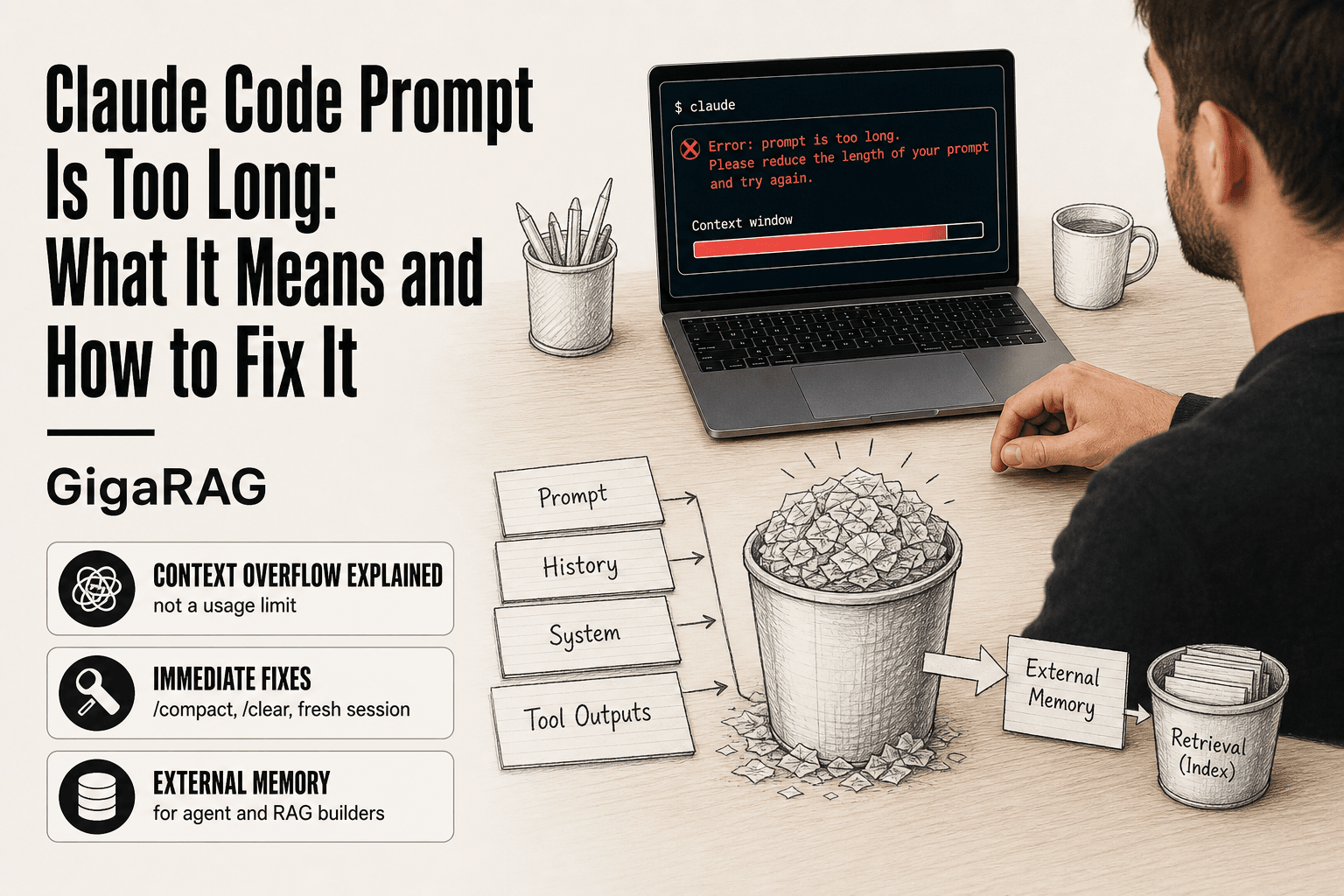
Claude Code Prompt Is Too Long: What It Means and How to Fix It
You paste a long prompt into Claude Code, hit enter, and it rejects you with "prompt is too long." You lose the context you built, maybe minutes or hours of work. Most search results for this error are just other developers complaining about the same thing. Few explain what's actually happening under the hood.
This guide won't magically expand the context window available to your current Claude Code model. But it will show you exactly why the error occurs, which immediate fixes actually work, and how to stop hitting it in the first place. For agent memory and RAG pipeline builders, external memory is one of the most reliable long-term fixes, and GigaRAG is one option for that.
| At a glance | Details |
|---|---|
| Error cause | Context window overflow, not a usage limit |
| Typical trigger | Long files, logs, or accumulated session history |
| Quick fix | Trim context, split tasks, or start a fresh session |
| Hard limit | You cannot expand Claude Code's context window |
| Prevention | External memory, retrieval, and context budgeting |
| Best for | Agent memory and RAG pipeline builders |
In This Guide
- What 'Claude Code Prompt Is Too Long' Actually Means
- Trimming Context vs External Memory: Which Fix Fits?
- How Long Can a Claude Code Prompt Be?
- Claude Code Prompt Is Too Long: A Step-by-Step Guide
- Immediate Fixes: /compact, /clear, and Session Reset
- Why Long Prompts Slow Down Claude Code
- Prevention Strategies for Agent Memory and RAG Pipeline Builders
- Common Mistakes When Claude Code Prompt Is Too Long
- What You Cannot Do: Honest Limits of Claude Code
- When to Use Alternatives to Claude Code
- Final Thoughts: Keeping Claude Code Prompts Short for Good
What 'Claude Code Prompt Is Too Long' Actually Means
"Prompt is too long" means your prompt plus the conversation history plus Claude's system instructions exceeded the model's context window, not that your prompt alone hit a usage limit. The error is a context overflow, and the fix is managing total context, not just trimming the one message you just typed.
The context window: what it is and why it fills up
The context window is the total amount of text Claude can hold in working memory at once. Every token counts against it: the system prompt that tells Claude how to behave, the conversation history, tool outputs, file contents you've shared, and the prompt you're typing right now. The applicable context window depends on the Claude model and version used by Claude Code. That limit can sound large, but it fills fast. A single code file can be a few thousand tokens. A conversation that's been running for an hour with tool calls, file reads, and edits can consume a substantial part of the available context before you paste anything new.
Prompt length vs. context length: the distinction that matters
Your prompt length is just the text you type or paste in one message. Context length is everything Claude can see: your prompt, all previous messages, tool results, and the system prompt. The error says "prompt is too long" but it's really reporting total context. You can hit this error with a short prompt if the conversation history is already near the limit. That's why the fix isn't always "write a shorter prompt." Sometimes the prompt was fine. The session was the problem.
Why Claude Code reports 'prompt is too long' instead of 'context is full'
The error message is imprecise. Claude Code checks whether the incoming message fits in the remaining context space. If it doesn't, the message is rejected. The check happens at the point of submission, so the error gets attributed to the prompt you just sent, even when the real cause is accumulated context from everything before it. It's not a bug. It's a poorly worded error for a real constraint.
[!note] The 'prompt is too long' error signals that your input exceeds the model's context window — it is a capacity limit, not a rate or usage limit, so retrying the same prompt will not help.
Trimming Context vs External Memory: Which Fix Fits?
| Factor | Trim & Split Prompts | External Memory / RAG |
|---|---|---|
| Setup effort | None — edit and resend | Requires indexing and retrieval layer |
| Best for | One-off long prompts | Recurring agent sessions |
| Context control | Manual and reactive | Automated and budgeted |
| Session continuity | Lost on restart | Persists across sessions |
| Ongoing cost | Your time per prompt | Storage plus retrieval calls |
How Long Can a Claude Code Prompt Be?
The short answer: the maximum prompt size depends on the context window of the Claude model being used and how much context is already present in the session. In practice, you'll hit the limit far sooner than the theoretical maximum because the available window is shared with everything else in the session.
Token limits by model: Sonnet, Opus, and Haiku
The applicable context window depends on the specific Claude model and version used by Claude Code. Different Claude models can have different context limits, so there is no single ceiling that applies to every model. Always check the current model documentation when calculating how much context a session can hold.
What 200K tokens actually means in practice
For example, if the applicable model has a 200K-token context window, that is roughly 150,000 words in English, or about 500 pages of prose. Sounds enormous. But code is token-hungry. A single 500-line file with comments and symbols can consume thousands of tokens. Ten files like that can use a substantial portion of the available context. The exact limit depends on the model and version you're using.
How much context is already used before you type a prompt
Here's the part most people miss. Before your prompt is even counted, Claude Code has already loaded the system prompt, your CLAUDE.md files, tool definitions, and the conversation history. A session that's been running for 30 minutes with file reads, edits, and tool calls can consume a substantial amount of context before you send anything new. So the honest answer to "how long can a prompt be" is: it depends on what's already in the session. A fresh session can accept much more new context than a busy one. A busy session might reject a relatively short prompt because little context capacity remains. The prompt itself may not be the underlying problem.
[!tip] For agent and RAG builders: treat the context window as a fixed budget and retrieve only the top relevant chunks per turn — keeping a persistent external memory store means you never need to paste the whole project history into a single prompt.
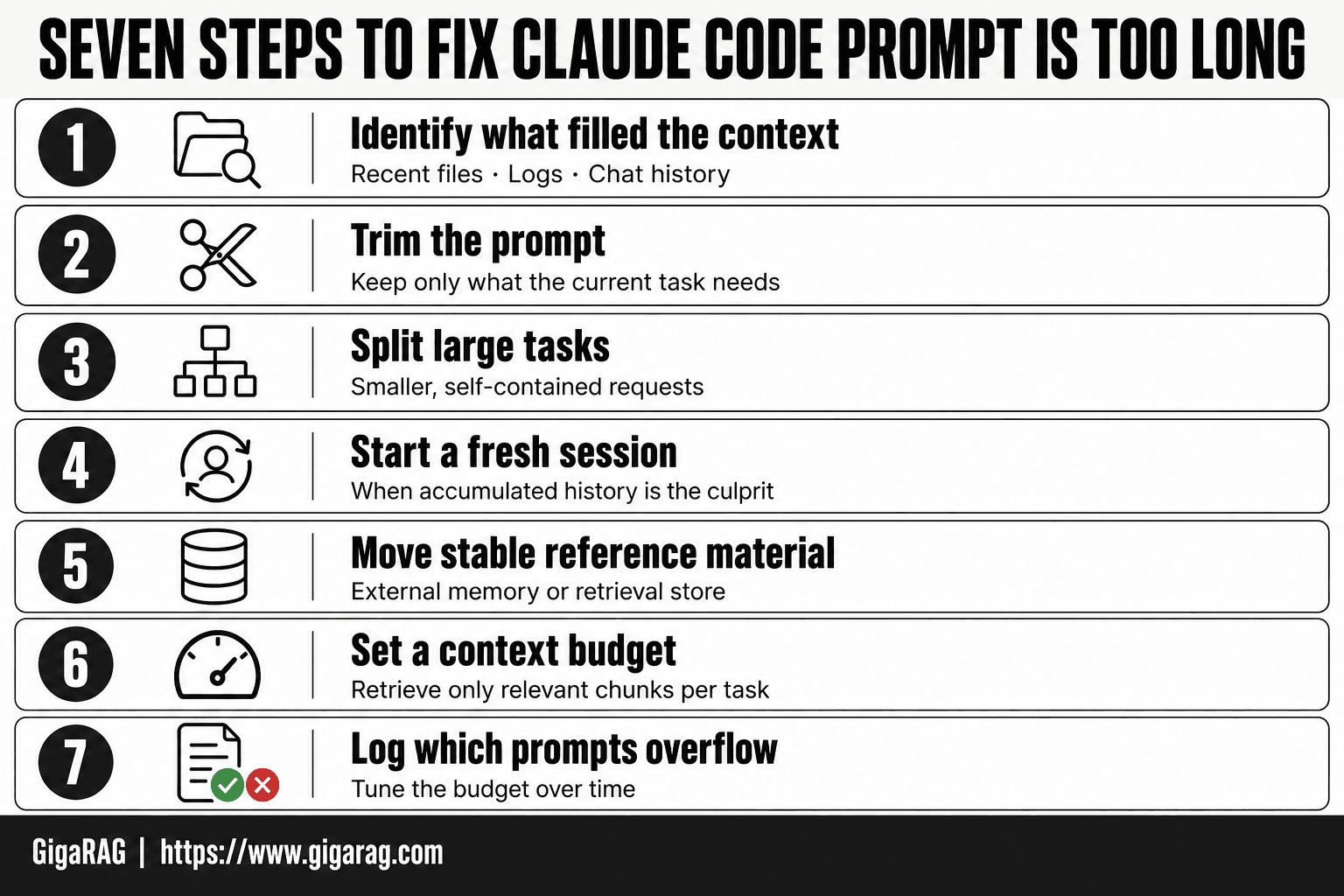
Claude Code Prompt Is Too Long: A Step-by-Step Guide
- Identify what filled the context: recent files, logs, or chat history.
- Trim the prompt to only what the current task needs.
- Split large tasks into smaller, self-contained requests.
- Start a fresh session when accumulated history is the culprit.
- Move stable reference material into an external memory or retrieval store.
- Set a context budget per task and retrieve only relevant chunks.
- Log which prompts overflow so you can tune the budget over time.
Immediate Fixes: /compact, /clear, and Session Reset
When the error hits, you don't need a lecture. You need the session working again. Here are the three fixes, in order of how much you lose.
Using /compact to reclaim context without losing the session
Type /compact and Claude Code summarizes the conversation history into a condensed form, freeing up tokens while keeping the session alive. It's the first thing to try because you keep your files, your working state, and the thread of what you were doing.
The catch: the summary is lossy. Fine-grained details, exact code snippets you pasted earlier, and subtle decisions can get flattened or dropped. If you're mid-debug on a specific error message, don't compact until you've copied that message somewhere safe. Use /compact when the conversation has drifted through exploration you no longer need verbatim.
When /clear is the right call — and what it costs
/clear wipes the entire conversation history. Everything. The session stays open, but Claude Code forgets every exchange you've had.
The right call is when the history is mostly noise: abandoned approaches, wrong turns, file reads that didn't pan out. You keep your working directory and any files on disk, so the actual code isn't lost. What you lose is the shared understanding you built with the model. If Claude Code had learned your project structure through the conversation, that's gone. You'll re-explain it.
Starting a fresh session: the nuclear option that sometimes works best
Sometimes the cleanest fix is closing the terminal and starting over. A new session starts with a near-empty conversation history, giving you much more available context for the new task. The tradeoff is obvious: you lose everything from the old session, including any conversation-specific context that was not stored elsewhere.
This works best when you've been exploring and now know exactly what you need to do. Write down the final approach in a few lines, start fresh, and paste those lines as your first prompt. You'll get more done in a clean session than in a bloated one.
Why Long Prompts Slow Down Claude Code
Long prompts don't just risk rejection. They slow everything down, even when they fit inside the window.
Token processing time: why more context means slower responses
Larger inputs generally require more processing before Claude Code can start generating a response. As the amount of context grows, response latency can increase, although the exact impact depends on the model and infrastructure. Keeping prompts lean can therefore improve responsiveness as well as reduce the risk of hitting the context limit.
Here's what happens behind the scenes. Larger inputs require the model to process more context before generating a response. The exact computational cost depends on the model architecture and inference system, so there isn't a single simple multiplier for how much slower a larger context will be. The important point is that unnecessary context can add processing overhead on each request.
The near-limit slowdown: why performance degrades before the hard cap
Large contexts can increase processing time and latency, especially when the model has to process substantially more input. The exact performance impact depends on the model, infrastructure, and how the context is processed.
In practice, keeping sessions reasonably small can help maintain responsiveness, although the exact latency difference will vary between models and environments.
The honest answer is that if you routinely work near the limit, you're paying a latency tax on every exchange. Keeping sessions lean isn't just about avoiding errors. It's about keeping Claude Code responsive enough to actually use.
Prevention Strategies for Agent Memory and RAG Pipeline Builders
If you build agent memory systems or RAG pipelines, you hit this error differently than most users. You're not pasting a one-off prompt. You're feeding Claude Code a steady stream of context, and the error is a symptom of architecture, not a single mistake.
Structuring prompts for concision without losing capability
Start by cutting what the model doesn't need. Don't paste a full file when the function signature and a three-line description will do. Don't restate the task in three different phrasings. One clear instruction beats three hedged ones.
The pattern that works: state the goal in one sentence, give the constraints as a bulleted list, and attach only the code that's directly relevant. If you need Claude Code to understand a broader codebase, point it at the files instead of pasting their contents. The model can read them itself, and that keeps your prompt lean.
Using CLAUDE.md for persistent instructions that don't bloat every prompt
CLAUDE.md is your project-level memory file. Anything you'd normally paste into every prompt, coding style, build commands, testing conventions, goes there instead. Claude Code reads it automatically at session start, so it's in context without you paying for it in every message.
Keep it under 200 lines. A bloated CLAUDE.md is just a slow system prompt. Review it monthly and cut anything that's no longer true.
Prompt caching: reduce repeated token costs
If you're calling the Anthropic API directly rather than using the Claude Code CLI, prompt caching cuts both cost and latency on repeated prefixes. You mark a stable prefix, system instructions, tool definitions, a shared context block, and Anthropic caches it. Subsequent calls with the same prefix skip reprocessing those tokens.
The catch: cached prefixes have a minimum length and a time-to-live. Short prefixes don't cache, and stale caches expire. Design your prompts so the stable part is long enough to matter and the variable part stays small.
Context pruning: what to keep, what to drop, and when
Prune aggressively. Conversation history older than the current task is usually dead weight. Tool outputs that were useful ten turns ago are not useful now. Summarize what matters and drop the rest.
A practical rule: keep the current task's inputs, the last three exchanges, and any decisions the model made that affect what comes next. Everything else goes. Run /compact before you hit 70% of the window, not after the error appears.
External memory for agent systems: keeping prompts short with GigaRAG
The most reliable long-term fix is to stop treating the context window as your memory. Store the knowledge outside it, and retrieve only what the current task needs.
That's what GigaRAG does. It indexes your codebase, docs, and past decisions in a vector store, then injects only the relevant chunks into each prompt. Your prompt stays short because the model pulls what it needs instead of you pushing everything at it. For agent systems that run long sessions or handle large codebases, this can help prevent the active context from reaching the model's applicable limit.
Common Mistakes When Claude Code Prompt Is Too Long
The error keeps coming back because the habits that cause it don't change. You hit the wall, you trim, you keep working, and twenty minutes later you hit it again. Here are the patterns that cause the recurrence.
Pasting entire codebases into a single prompt
The fastest way to fill a context window is to dump everything into it at once. You don't need the whole repo in the prompt. Claude Code can read files itself. Point it at the relevant paths and let it pull what it needs.
Ignoring conversation history growth until it's too late
Every exchange adds tokens. Tool outputs, file reads, error messages, all of it accumulates silently. By the time you notice, you're at 90% of the window and the next prompt fails. Run /compact at 70%, not after the error.
Expecting the context window to expand — it won't
No prompt trick or context-management technique increases the context limit of the specific model you're using. The applicable limit is defined by the model and system configuration. You control how much of that available context you consume.
What You Cannot Do: Honest Limits of Claude Code
You generally cannot increase the context window beyond the limit defined for the specific model and configuration you're using. No prompt-engineering trick can make a model accept more context than its applicable limit.
The hard context window limit: no workaround exists
The context limit is a model and system constraint, not a usage quota that can be bypassed by retrying the request. When the available context is exhausted, you need to reduce the amount of active context, start a fresh session, or use a model/configuration with a larger supported context window.
What you can do is spend the budget differently. That's the entire game. Every token you save on boilerplate, redundant instructions, or unnecessary file reads is a token available for the actual work.
What no tool, prompt, or hack can change
Agent memory systems like GigaRAG keep prompts short by storing context externally, but the applicable model context limit still applies to whatever you send in.
The honest answer is that Claude Code cannot handle arbitrarily long prompts, no matter how you structure them. If your task genuinely needs more active context than the current model and configuration support, you need to reduce the active context, use a model with a larger supported window, or use an architecture with external memory and retrieval.
When to Use Alternatives to Claude Code
Claude Code is the right tool when your task fits comfortably within the applicable context budget. Interactive coding, debugging, refactoring, and agent workflows can work well when the active context remains manageable. The tight feedback loop between you and the model is the product. If you're iterating on a feature, exploring a codebase, or running a multi-step agent task, Claude Code's session management can help manage context as the session grows.
Claude Code is right when: scenarios where it excels
You're working on a single codebase with a clear task. You need the model to see recent conversation history, file contents, and tool outputs together. You value speed of iteration over raw context capacity. You're willing to run /compact regularly and keep prompts focused.
Consider alternatives when: scenarios where the limits are fatal
Switch when your task genuinely needs more active context than the model you're using can support. That can mean working across multiple large codebases simultaneously, processing entire documentation sets in one pass, or running agents that accumulate long histories without pruning.
The alternatives: use the Anthropic API directly with your own context management, swap to a model with a larger window, or move to an agent architecture with external memory. GigaRAG and similar systems store context outside the prompt, so the model only sees what's relevant to the current step. That's not a workaround for the limit. It's a different design that never asks one prompt to hold everything.
Final Thoughts: Keeping Claude Code Prompts Short for Good
The error is a context window overflow. Not a bug, not a usage cap. Your prompt plus conversation history plus system prompts exceeded the model's hard limit, and Claude Code told you in the bluntest way it has.
Immediate fixes work. /compact, /clear, and fresh sessions get you unstuck in seconds. But they're band-aids. You'll hit the same wall again unless you change how prompts get built.
Prevention is the real fix. Concise prompt structure, CLAUDE.md for persistent instructions, prompt caching, and context pruning keep sessions under budget. For agent memory and RAG pipeline builders, external memory is the most reliable long-term answer. Store context outside the prompt, retrieve only what's relevant, and the "claude code prompt is too long" error stops being a recurring event. GigaRAG is one option for that architecture.
Frequently Asked Questions
How long can a Claude Code prompt be?
It depends on the model's context window, which is shared between your prompt, attached files, and the conversation history. There is no single fixed character count — what matters is total tokens in the window. Check the current model's documented context size, since it changes between versions.
How to bypass Claude message length limit?
You cannot bypass the context window of the model you're using. What you can do is reduce what you send: trim files, summarize history, split the task, or retrieve only relevant chunks from an external store. If you need more active context, you can use a model with a larger supported context window or an architecture that keeps information in external memory and retrieves it as needed.
Why does Claude take so long to code?
Longer inputs take longer to process, and large context windows increase latency before any output appears. If your prompt is near the limit, response times will feel slow even before the error appears. Keeping prompts lean usually improves both speed and reliability.
How to extend Claude Code?
You cannot extend the context window itself, but you can extend effective working memory by pairing Claude Code with an external memory or RAG layer. Store project knowledge outside the prompt and retrieve only what each task needs. This keeps every individual prompt within the limit.
Does starting a new session fix the error?
Often, yes — if the overflow came from accumulated conversation history rather than a single huge paste. A fresh session resets the history portion of the context window. If your single prompt alone is too long, you still need to trim or split it.
Is 'prompt is too long' the same as a rate limit?
- A rate limit is about how many requests you send over time; 'prompt is too long' is about the size of a single request. Waiting and retrying will not fix a context overflow — you have to reduce the input.
About GigaRAG
GigaRAG is for agent memory and RAG pipeline builders. get this right. Whether you are working through claude code prompt is too long or something adjacent, we publish what we have actually tested, including where it falls short.


