Claude upload limit explained for the RAG pipeline builder reading this: you've hit the wall, probably at the worst possible moment. A 40MB PDF bounces back. A 200K-token context overflows mid-ingestion. A batch of 150 files gets blocked at 100. You're mid-build, the deadline's close, and every existing guide repeats the same vague number without telling you what it means for your ingestion workflow.
This guide breaks down Claude's upload limits plan by plan, separates file size from context window (the distinction most guides miss), and gives you a decision framework for handling oversized documents in a RAG pipeline. When Claude's native limits constrain your ingestion, GigaRAG helps you manage agent memory and external storage so the pipeline keeps moving. You'll get the exact limits per plan, why they exist, what you cannot bypass, and three workarounds with real trade-offs.
| At a glance | Details |
|---|---|
| Plan-dependent limits | Upload caps vary by Claude plan |
| File size vs context | Two separate constraints to manage |
| Hard cap | No upload above plan limit |
| Workaround | Preprocess or chunk large files |
| RAG impact | Chunking may fragment context |
| Decision framework | Compress, chunk, or external storage |
In This Guide
- Claude Upload Limits by Plan: Free, Pro, Max, and API
- Claude Upload Limits: File Size vs Context Window
- Why Claude Has Upload Limits: The Technical Reality
- Claude Upload Limit Explained: A Step-by-Step Guide
- File Size vs Context Window: The Distinction Most Guides Miss
- What You Cannot Do: Honest Limits of Claude Uploads
- Strategy 1: Smart Compression for Oversized Files
- Strategy 2: External Storage and Reference Architecture
- Strategy 3: Intelligent Chunking and Context Management
- Claude Upload Limits and RAG Pipeline Design: A Decision Framework
Claude Upload Limits by Plan: Free, Pro, Max, and API
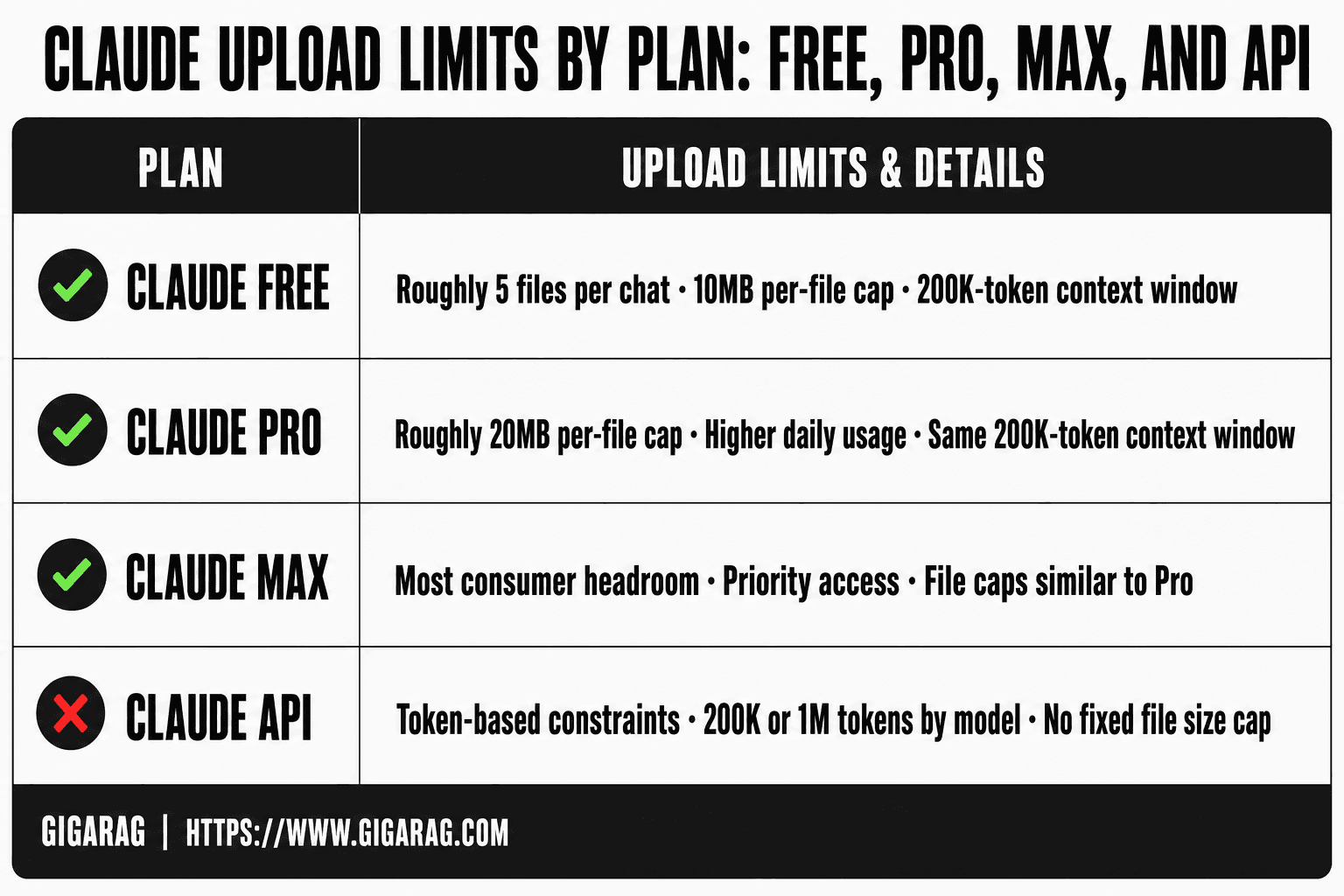
Claude's upload limits vary by plan: Free allows roughly 5 files per chat with a 10MB cap, Pro raises this to 20MB per file with higher daily usage, Max offers the largest consumer limits, and the API enforces its own token-based constraints rather than file size alone. The exact numbers shift as Anthropic updates models, so treat these as working figures, not fixed guarantees.
Claude Free upload limits
Free users get the tightest constraints. You can attach a handful of files per conversation, each capped around 10MB. The context window sits at 200K tokens for newer models, but your daily message quota on Free is low enough that large uploads burn through it fast. For testing a RAG idea, Free works. For building anything real, it won't.
Claude Pro upload limits
Pro lifts the per-file cap to roughly 20MB and gives you more messages per day. You still hit the same context window, so a 20MB PDF that expands to 300K tokens will overflow. Pro is the right tier for prototyping a pipeline before you commit to API costs.
Claude Max upload limits
Max is the consumer tier with the most headroom: higher usage limits and priority access. File size caps stay in the same range as Pro, but you can push more documents through in a day. It's a convenience tier, not an architectural fix.
Claude API upload limits
The API doesn't think in file sizes the same way. You send text or base64-encoded files, and the constraint is tokens: 200K for Claude 3.5 Sonnet, 1M for select models. A 30MB PDF may be fine if it tokenizes under the limit, or it may not. The API is where RAG builders actually work, and it's where chunking and external storage become design decisions rather than workarounds.
[!note] Claude's upload limits are plan-specific and subject to change; always verify the current limits in Anthropic's official documentation before finalizing your pipeline design.
Claude Upload Limits: File Size vs Context Window
| Factor | File Size Limit | Context Window Limit |
|---|---|---|
| What it restricts | Maximum size of a single uploaded file | Total tokens the model can process in one session |
| Typical unit | Megabytes (MB) or pages | Tokens (e.g., 200K for Claude 3) |
| Consequence of exceeding | Upload rejected outright | Content truncated or request fails |
| Mitigation | Compress, split, or convert format | Chunk, summarize, or use external retrieval |
| Impact on RAG | Requires preprocessing before ingestion | Affects coherence and retrieval strategy |
Why Claude Has Upload Limits: The Technical Reality
The limits aren't arbitrary. They're the visible edge of three hard constraints: what inference costs, how the context window is built, and what preprocessing does to every file before Claude ever sees it. Understanding these changes how you design around them.
Compute cost and inference economics
Every token Claude reads costs money. A 200K-token context isn't free memory; it's compute that scales with sequence length. Attention mechanisms grow quadratically in the worst case, so a 200K-token prompt is dramatically more expensive than a 20K-token one. Anthropic sets file caps to bound that cost per request. If you could upload a 500MB PDF, the token count would explode and so would the bill. The caps keep inference economically viable at scale.
Context window architecture
The context window is a fixed buffer, not a filing cabinet. Claude holds your entire conversation plus every uploaded file in that buffer simultaneously. A 20MB PDF can tokenize to 300K tokens or more, which overflows a 200K window before the model even starts reasoning. The file size cap is a rough proxy for the token budget. It's imperfect, which is why a small file with dense text can still blow the window.
Safety and preprocessing overhead
Before Claude reads a file, it gets extracted, parsed, and scanned. PDFs become text. Images get processed. Attachments get checked against safety filters. That preprocessing takes time and compute, and it happens per file, per upload. The 100-file cap and per-file size limits keep that pipeline from becoming a denial-of-service vector. It's not just about what Claude can hold. It's about what the ingestion layer can process without degrading service for everyone else.
[!tip] For RAG builders: preprocess documents into smaller, semantically coherent chunks before uploading to Claude, and use a vector database to retrieve only the most relevant chunks per query—this avoids hitting both file size and context window limits while maintaining answer quality.
Claude Upload Limit Explained: A Step-by-Step Guide
- Identify whether the bottleneck is file size or context window by checking your plan's limits.
- If file size is the issue, compress the document (e.g., reduce image resolution, convert to plain text).
- If context window is the issue, split the document into smaller chunks that fit within the token limit.
- For chunking, use overlapping windows or semantic segmentation to preserve context coherence.
- Consider storing large documents externally and retrieving relevant chunks via a vector database.
- Test retrieval quality after chunking to ensure no critical information is lost.
- Document your preprocessing steps for reproducibility and scaling.
File Size vs Context Window: The Distinction Most Guides Miss
Most guides treat these as the same thing. They're not. File size is a hard cap on what you can attach. Context window is a hard cap on what Claude can hold in memory at once. A file can pass one test and fail the other.
What the file size cap actually limits
The file size cap limits what you can upload. Nothing else. It's checked before Claude ever reads a byte. A 20MB PDF under the cap uploads fine. A 30MB PDF over the cap gets rejected outright. The cap doesn't care what's inside the file.
What the context window actually limits
The context window limits how many tokens Claude can process in a single request. Uploaded files get tokenized, and dense text expands fast. A 10MB PDF of financial tables can tokenize to 150K tokens or more. A 10MB PDF of images might tokenize to 20K. Same file size, wildly different token counts.
How the two interact in practice
You can upload a file that fits the size cap but overflows the context window. You can also have a corpus that fits the window but exceeds the per-file cap. The fix for each is different: compression for size, chunking for tokens. Knowing which limit you've hit tells you which workaround to use.
What You Cannot Do: Honest Limits of Claude Uploads
Some limits are soft. These aren't. You can't negotiate with the upload dialog, and no prompt engineering gets around a hard cap. Here's what actually blocks you.
Hard file size caps you cannot bypass
Every plan has a per-file ceiling. If your PDF is over it, Claude rejects the upload before reading a single token. No retry, no workaround inside the interface. You have to shrink the file first: compress it, split it, or extract the text. The cap applies per file, not per conversation, so uploading the same oversized document in pieces doesn't help unless each piece fits.
Context window limits you cannot stretch
The context window is fixed per model. You can't ask Claude to "hold more" or "remember beyond the limit." When a request overflows, Claude either truncates the oldest content or refuses the request. For RAG builders, this means you can't dump a 200K-token document into a 100K-token window and expect full retrieval. You must select what enters the window.
Chunking trade-offs: what you lose
Chunking solves the size problem but creates a new one: context fragmentation. When you split a document into 2,000-token pieces, each chunk loses its surrounding context. A sentence that depends on a definition from three pages earlier becomes ambiguous. Retrieval quality drops, and Claude may answer from a fragment rather than the full argument. You can mitigate this with overlap and metadata, but you can't eliminate it. The trade-off is real: smaller chunks fit the limits, larger chunks preserve meaning. You pick one.
Strategy 1: Smart Compression for Oversized Files
Compression is the first lever to pull when a file barely misses the cap. If your PDF is 35MB against a 30MB limit, you don't need a new architecture. You need a smaller file.
When compression makes sense
Compression helps most when the file is 10 to 30 percent over the limit and the content is text-heavy. A 35MB PDF full of scanned images compresses well. A 31MB PDF that's already optimized won't shrink much. Check the file type before you bother.
Compression methods that preserve text quality
For text, use PDF optimization tools that strip embedded fonts and downscale images without touching the text layer. ZIP works for plain text and CSV. For scanned documents, OCR first, then compress the extracted text. Don't compress images you need Claude to read: downscaling a diagram below legibility destroys retrieval quality.
What compression loses for RAG retrieval
Compression is lossy. Downscaled images lose detail Claude might need. Stripped metadata removes structure your chunker relied on. The honest trade-off: you save upload space but may degrade what the model can extract. Test retrieval quality on a compressed sample before you commit the whole corpus.
Strategy 2: External Storage and Reference Architecture
When a corpus is too large to compress into submission, stop uploading it. Keep the documents where they live and give Claude a map instead of the territory.
When external storage beats uploading
External storage wins when your corpus is hundreds of files or tens of gigabytes. No compression gets you under the cap. You need selective access, not bulk transfer.
Reference patterns: summaries, pointers, and selective retrieval
Store full documents in S3, a vector database, or a filesystem. Build a summary index: each document gets a short abstract plus metadata like title, date, and section headers. When a query arrives, retrieve only the relevant chunks and pass those to Claude. The model sees 2,000 tokens of context, not 2 million.
How this fits a RAG pipeline
This is the standard RAG architecture. Embeddings index your corpus. A retriever pulls the top-k chunks for each query. Claude generates from those chunks alone. The upload limit stops mattering because you never upload the corpus. You upload the answer's source material, one query at a time.
Strategy 3: Intelligent Chunking and Context Management
Chunking is where retrieval quality gets decided. Split too small and you lose meaning. Split too large and you blow past the context window. The fix is deliberate boundaries, not arbitrary character counts.
Chunking strategies that respect token limits
Chunk by semantic unit: paragraph, section, or code block. Aim for 200 to 500 tokens per chunk. That fits comfortably inside Claude's window with room for the query, instructions, and generated output. Use a tokenizer, not a character counter. Words and tokens don't map one-to-one.
Overlap and metadata for context preservation
Add 10 to 15 percent overlap between adjacent chunks. A sentence cut in half at a boundary survives because the next chunk repeats it. Attach metadata to every chunk: source document, section header, position. When retrieval pulls a chunk, Claude sees where it came from.
Common chunking mistakes in RAG pipelines
The worst mistake is fixed-size splitting that ignores structure. You get fragments that start mid-thought. Another is no overlap, which orphans context at every boundary. And skipping metadata means retrieved chunks float without provenance. Each one quietly degrades answer quality.
Claude Upload Limits and RAG Pipeline Design: A Decision Framework
You have a corpus. You have Claude's limits. The decision is which path gets each document into the pipeline without breaking retrieval quality.
Decision tree: upload, compress, chunk, or externalize
Start with two numbers: file size and estimated token count. If the file is under your plan's size cap and under roughly 80 percent of the context window, upload it directly. No preprocessing, no loss.
If the file exceeds the size cap but compresses well (text-heavy PDFs, logs, CSVs), compress first. You lose some formatting, not meaning.
If the file is under the size cap but over the token budget, chunk it. Semantic boundaries, 200 to 500 tokens per chunk, overlap at the edges.
If the corpus is large, changing often, or needs selective retrieval, externalize. Store documents in a vector database or object store. Reference them by summary or embedding match.
How GigaRAG fits the externalization path
GigaRAG handles the externalization case. It ingests documents, chunks them, embeds them, and serves only the relevant pieces to Claude at query time. That means Claude never sees the full corpus, so upload limits stop mattering for retrieval. The trade-off: you're running a second system, and its chunking quality becomes your retrieval quality.
Pipeline patterns that respect Claude's limits
The pattern that works: preprocess once, store once, retrieve selectively. Upload small, stable documents directly. Compress oversized text files before upload. Chunk anything that exceeds the token budget. Externalize anything that changes or needs search across a large corpus. The claude upload limit explained this way becomes a routing rule, not a wall.
Frequently Asked Questions
What to do if file size is too big to upload?
First, check if compression or format conversion (e.g., to plain text) reduces the size below the limit. If not, split the file into smaller parts or store it externally and retrieve relevant sections via a RAG pipeline.
What is the maximum file size I can upload to Claude?
The maximum file size depends on your Claude plan (e.g., Free, Pro, Team, Enterprise). Anthropic publishes these limits in its official documentation, and they may change over time. Always verify the current limit for your plan before uploading.
Does Claude have a context window limit separate from file size?
Yes. The context window is the total amount of text (in tokens) Claude can consider in a single conversation, while file size limits restrict individual uploads. Even if a file is under the size limit, its content may exceed the context window if the document is very long.
How does chunking affect RAG performance with Claude?
Chunking helps fit large documents within context limits but can fragment context, potentially losing coherence between chunks. Using overlapping chunks or semantic segmentation can mitigate this, but always test retrieval quality after chunking.
Can I bypass Claude's upload limits by using external storage?
Yes, you can store large documents externally (e.g., in a database or cloud storage) and retrieve only relevant chunks to feed into Claude's context. This approach is common in RAG pipelines and avoids direct upload limits.
What is the difference between file size limit and context window limit?
File size limit is the maximum size of a single file you can upload, while context window limit is the maximum number of tokens Claude can process in one session. Exceeding the file size limit results in upload rejection; exceeding the context window limit results in truncation or errors.
About GigaRAG
GigaRAG is for agent memory and RAG pipeline builders. get this right. Whether you are working through claude upload limit explained or something adjacent, we publish what we have actually tested, including where it falls short.