
Compaction Failed Unexpectedly: What It Means and How to Fix It
Compaction failed unexpectedly is the message every RAG builder dreads mid-session, right when your agent has finally assembled the context it needs and you're one prompt away from a working pipeline. The conversation history vanishes, the state is gone, and you're left staring at an error that tells you nothing about what broke. Most search results offer the same two band-aids: press esc twice, or restart and hope. Neither explains what compaction actually does under the hood, and neither helps when the failure isn't length-related.
The honest answer is that compaction is a fragile operation, and retrying it won't always work. What's missing from the top results is a systematic diagnosis: distinguishing length-related failures from backend state corruption, checking session state, and knowing when a session is unrecoverable. GigaRAG's context management approach sidesteps some of these failures by design, but first you need to understand what's happening.
| At a glance | Details |
|---|---|
| What it means | Compaction failed to summarize context |
| Common triggers | Token limits, media size, API errors |
| Immediate fix | Retry, then reduce context size |
| Risk | Loss of conversation context if unhandled |
| Who it affects | Agent memory and RAG pipeline builders |
| Prevention | Monitor context, chunk inputs, handle errors |
In This Guide
- What Does Compaction Actually Do?
- Length-Related vs Non-Length-Related Compaction Failures
- Common Causes of Compaction Failed Unexpectedly
- Compaction Failed Unexpectedly: A Step-by-Step Guide
- How to Diagnose a Compaction Failure
- Workarounds That Actually Work (and Ones That Don't)
- Preventing Compaction Failures in Agent Memory and RAG Pipelines
- What to Do When Compaction Failed Unexpectedly Keeps Happening
What Does Compaction Actually Do?
Compaction is the process of condensing conversation history to fit within a model's context window, replacing older messages with a compressed summary. When the conversation approaches the token limit, the system summarizes earlier turns and swaps them out, freeing space for new messages.
How compaction summarizes conversation history
Compaction doesn't delete history. It rewrites it. The system takes the oldest messages, runs them through a summarization pass, and stores the result as a single condensed block. That block replaces the original turns in the context. The model then continues with the summary standing in for the full record.
The trade-off is fidelity. A summary captures the gist but loses exact wording, code snippets, and fine-grained details. For most conversations that's acceptable. For debugging sessions or RAG pipeline work, it can be costly.
Why compaction is critical for agent memory and RAG pipelines
Agent memory and RAG pipelines live or die on context. An agent that loses track of what it already tried will repeat steps or contradict itself. A RAG pipeline that compacts retrieved passages too aggressively can drop the exact evidence it needs to answer correctly.
Compaction is what keeps these systems running past their context limit. Without it, the session simply stops. With it, the session continues but on a degraded memory.
What happens when compaction fails
The error "compaction failed unexpectedly" means the summarization pass didn't complete. The system tried to condense history, something went wrong, and the context was left in an inconsistent state. The session can't proceed because it's too close to the limit, and it can't compact because the compaction step itself failed.
That's the core problem: the system is stuck between needing more space and being unable to create it.
[!note] Compaction is the process of summarizing conversation history to fit within a model's context window; failures can occur due to both length and non-length issues.
Length-Related vs Non-Length-Related Compaction Failures
| Factor | Length-Related Failure | Non-Length-Related Failure |
|---|---|---|
| Primary cause | Context exceeds token limit | API errors, media size, bugs |
| Typical error message | Context length exceeded | Compaction failed unexpectedly |
| Retry behavior | Retry may work after reducing context | Retry may fail repeatedly |
| Fix approach | Truncate or summarize context | Check API status, media limits, logs |
| Prevention | Set token budgets and alerts | Robust error handling and validation |
Common Causes of Compaction Failed Unexpectedly
The error message itself is frustratingly generic. It doesn't tell you whether the conversation got too long, whether the backend glitched, or whether something else went wrong. Here's what actually causes it.
Length-related failures vs. non-length-related failures
The first split is simple: did the conversation hit the context limit, or didn't it? Length-related failures happen when the system tries to compact because it's running out of room, and the compaction pass itself chokes on the volume. Non-length-related failures happen when there's plenty of context left but the compaction step still fails. That points to state problems, not size problems.
Backend state corruption
The backend tracks session state: which messages are compacted, which are live, what the summary contains. If that state gets corrupted, compaction fails regardless of context length. A partial write, a crashed process, or a race condition can leave the state inconsistent. The system then can't figure out what to summarize or where to put the result.
Model switching and session state issues
Switching models mid-session can break compaction. Different models have different tokenizers, different context limits, and different summarization behavior. The session state built for one model doesn't always transfer cleanly to another. The compaction step may try to use assumptions from the old model and fail.
Attached media size limits
Attached files and images count against the context window too. A large attachment can push the session past the limit faster than expected, triggering compaction at an awkward moment. If the attachment itself can't be summarized or pruned cleanly, the compaction step fails.
[!tip] For agent memory and RAG pipelines, implement a fallback mechanism that saves raw context before compaction, so you can recover if compaction fails.
Compaction Failed Unexpectedly: A Step-by-Step Guide
- Check the error message for clues about length or media size.
- Retry the compaction once to rule out transient API issues.
- If retry fails, reduce context size by removing large attachments or truncating history.
- Verify that attached media does not exceed size limits.
- Inspect API logs for rate limits or service errors.
- If the failure persists, restart the session and reload essential context.
- Implement monitoring and token budgeting to prevent recurrence.
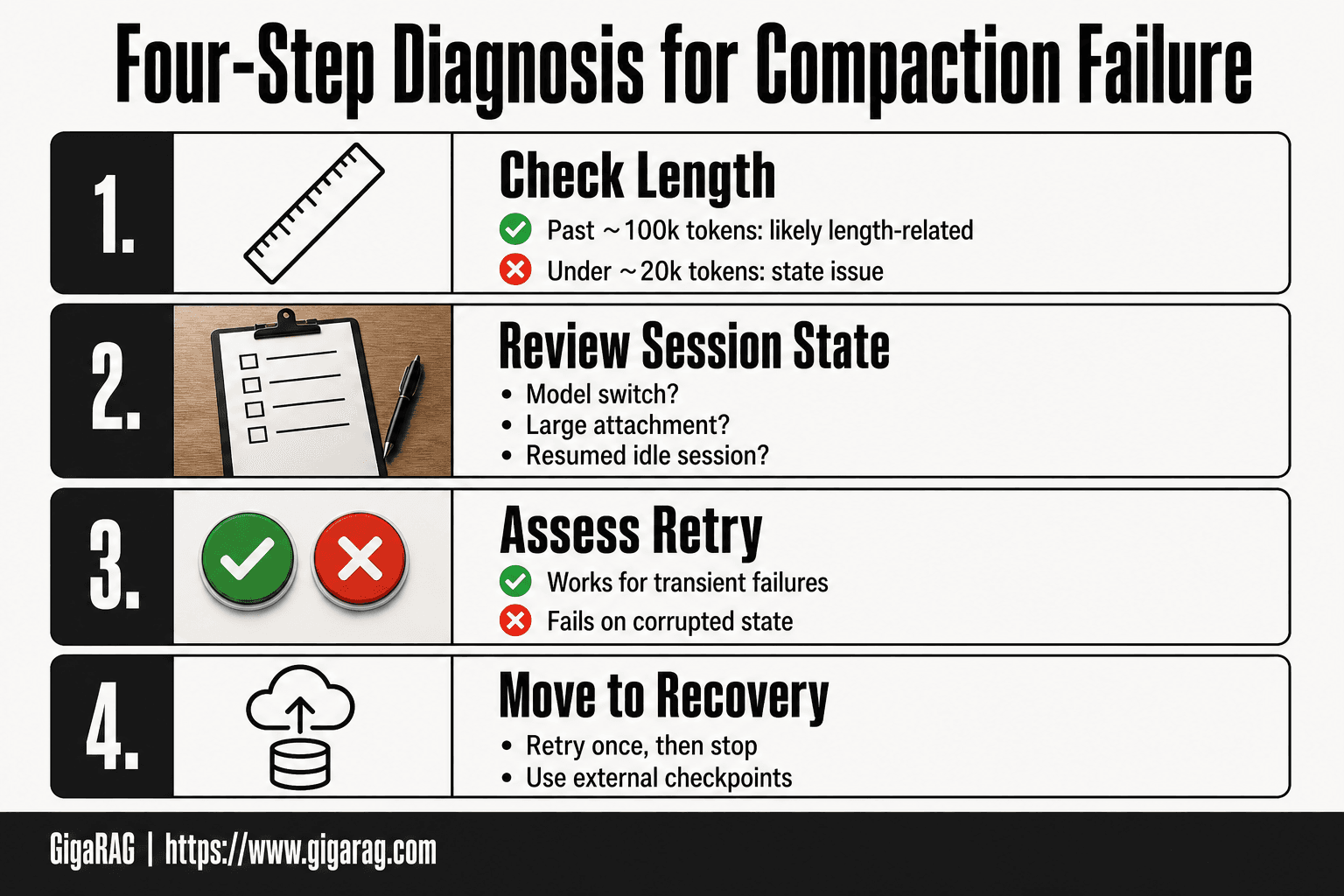
How to Diagnose a Compaction Failure
The error message won't tell you much. "Compaction failed unexpectedly" is the system's way of saying the summarization step crashed, without saying why. You'll need to work backwards from what you know about the session.
Step 1: Determine if the error is length-related
Check the conversation length first. If you're deep into a long session, past 100k tokens or so, the failure is probably length-related. The system tried to compact because it was running out of room, and the compaction pass itself couldn't handle the volume.
If the conversation is short, under 20k tokens, length isn't your problem. You're dealing with a state issue, not a size issue. That changes what you do next.
Step 2: Check session state and recent changes
Ask yourself what changed right before the failure. Did you switch models? Attach a large file? Resume a session that had been idle for hours? Each of these can corrupt the session state that compaction depends on.
If you switched models mid-session, that's your likely culprit. Different models track context differently, and the compaction step may be working with assumptions from the old model. If you attached a large file, the compaction pass may have tried to summarize it and failed.
Step 3: Assess whether retrying is likely to help
Retrying works when the failure was transient: a timeout, a race condition, a temporary backend hiccup. In those cases, pressing esc twice and retrying gives the system another shot at the same operation.
Retrying won't help when the state is actually corrupted. If the backend can't figure out which messages are compacted and which are live, running the same step again just hits the same wall. The honest answer is that you can't tell from the error message alone which case you're in. Retry once. If it fails again, stop retrying and move to recovery.
Workarounds That Actually Work (and Ones That Don't)
The workarounds floating around Reddit and GitHub aren't magic. They work under specific conditions, and they fail under others. Here's what actually happens when you try each one.
Press esc twice and retry
This is the most common suggestion, and it works when the failure was transient. Pressing esc twice backs you up a few messages, then retrying gives the system a fresh shot at the same compaction step. If a timeout or race condition caused the crash, this clears it.
It won't help when the state is corrupted. You'll just hit the same wall again.
Restart with claude -c
Closing the session and restarting with claude -c reloads the conversation from disk. This can clear in-memory state that got tangled. It's worth trying once, especially after a model switch.
The catch: if the corruption was written to disk, restarting loads the same broken state.
Exit and resume the conversation
Exiting entirely and resuming the conversation forces a fresh session state. This is the most reliable workaround for non-length-related failures. You lose nothing if the conversation was saved properly.
What not to expect from workarounds
None of these fix the underlying cause. If your session is genuinely corrupted, no workaround recovers it. Retrying more than twice is wasted effort.
Preventing Compaction Failures in Agent Memory and RAG Pipelines
The workarounds get you unstuck. Prevention keeps you from getting stuck in the first place. For agent memory and RAG pipeline builders, the cost of a compaction failure isn't just a lost session. It's lost context that took real work to build.
Context management best practices
Keep your context window under 70% capacity before compaction triggers. The more headroom the system has, the less aggressive the summarization needs to be. Aggressive compaction is where failures cluster.
Trim stale context yourself. Don't wait for the system to decide what's irrelevant. If you're building a RAG pipeline, prune retrieved chunks that didn't contribute to the last three turns. You know your domain better than the summarizer does.
Session hygiene and state management
Long sessions are the enemy. A session that runs for hours accumulates state that's harder to compact cleanly. Break work into sessions of 30 to 45 minutes. Save your context explicitly before switching models or tools.
Never switch models mid-session without a checkpoint. Model switching is a known trigger for compaction failures, and the state from one model doesn't always map cleanly onto another.
Architectural considerations for RAG pipelines
If you're building your own pipeline, don't rely on a single monolithic context. Store conversation state externally. Keep a rolling summary separate from the raw transcript. When compaction runs, it should operate on the summary, not the full history.
Design for compaction failure. Assume it will happen. Keep enough external state that a failed compaction costs you minutes, not hours. A checkpoint every 10 turns is cheap insurance.
How GigaRAG's approach can help
GigaRAG separates context storage from context assembly. Instead of one growing transcript, it maintains a structured memory store that gets queried on demand. When the context window fills, GigaRAG doesn't summarize everything at once. It swaps in the most relevant chunks and leaves the rest in storage.
The honest catch: GigaRAG won't prevent every compaction failure. If the underlying backend corrupts state, no architecture saves you. But it reduces how often you hit the wall, and it makes recovery faster when you do.
What to Do When Compaction Failed Unexpectedly Keeps Happening
Recurring failures mean the workarounds aren't addressing the root cause. Retrying the same session is likely futile. The error points to deeper state corruption, not a transient hiccup.
When to escalate or report a bug
If compaction fails three times in the same session, stop retrying. Capture the error message, your model version, and the session length. Report it through the official channel. A recurring failure with the same signature is a bug, not bad luck.
When to abandon a session
Abandon the session when the error reappears immediately after a restart. The state is corrupted beyond recovery. Continuing wastes time.
Recovering context from other sources
Pull your context from external stores: saved checkpoints, rolling summaries, or your RAG pipeline's memory store. If you kept state outside the session, you lose minutes, not hours. That's the whole point of designing for compaction failure. When compaction failed unexpectedly becomes a pattern, your external state is the only reliable recovery path.
Frequently Asked Questions
What does 'compaction failed unexpectedly' mean?
It means the system attempted to summarize the conversation to reduce token usage but encountered an error. This can happen due to context length limits, attached media exceeding size limits, or transient API issues.
Why does compaction fail unexpectedly in Claude?
Compaction in Claude can fail if the conversation history is too long, if attached files are too large, or if there are temporary service disruptions. The error message may not always specify the exact cause.
How do I fix compaction failed unexpectedly?
First, retry the operation. If it fails again, reduce the context size by removing large attachments or truncating the conversation. Check for API status updates and ensure your inputs are within limits.
Is compaction failure related to token limits?
Sometimes. If the context exceeds the model's token limit, compaction may fail. However, non-length issues like media size or API errors can also cause failures, so it's important to diagnose the specific error.
Can I prevent compaction failures in my RAG pipeline?
Yes. Implement token budgeting, monitor context size, validate media attachments, and add error handling with retries. Saving raw context before compaction can also help recover from failures.
What should I do if compaction fails and I lose context?
If you have a backup of the raw context, reload it. Otherwise, you may need to reconstruct the conversation from memory or logs. To avoid this, always persist context externally before compaction.
About GigaRAG
GigaRAG is for agent memory and RAG pipeline builders. get this right. Whether you are working through compaction failed unexpectedly or something adjacent, we publish what we have actually tested, including where it falls short.


