How to Configure Read and Write MCP Memory Access
Most MCP memory content aimed at technical builders falls into two camps: high-level conceptual overviews that never touch a tool definition, or personal build stories tied to one client and one storage backend. Neither gives you a configuration path you can reuse. This guide takes the other route. You'll work through concrete JSON tool definitions for read and write memory operations, permission scopes that actually restrict access, and integration patterns that map memory primitives to RAG pipeline stages. GigaRAG makes agent memory and RAG integration easier once you have the underlying MCP configuration in place. But the honest answer is that MCP memory access has real limits: no cross-session consistency guarantees, concurrency constraints, and security boundaries you need to understand before wiring memory into a retrieval system. By the end, you'll have a working read and write memory configuration you can deploy across MCP clients, plus a clear picture of what it won't handle for you.
| At a glance | Details |
|---|---|
| What it is | MCP tools for reading/writing agent memory |
| Core tools | memory_read and memory_write |
| Key config | JSON schema, scopes, server URL |
| Works with | Any MCP client and RAG pipeline |
| Main limitation | No cross-session consistency or concurrency |
| Security | Enforce at server and transport layers |
In This Guide
- What Is MCP Memory Access?
- Read-Only vs Read-Write MCP Memory Access
- Prerequisites for Configuring MCP Memory Access
- How To Configure Read And Write MCP Memory Access: A Step-by-Step Guide
- Step 1: Define the Read Memory Tool
- Step 2: Define the Write Memory Tool
- Step 3: Configure Permission Scopes for Read and Write Access
- Step 4: Connect MCP Memory to Your RAG Pipeline
- Current Limitations of MCP Memory Access
- What's Next After Configuring MCP Memory Access
What Is MCP Memory Access?
MCP memory access is the set of read and write tools an MCP server exposes so a client can store information outside its context window and retrieve it later. The memory lives in a storage backend, not in the model itself. The client calls a tool, the server handles persistence.
Read vs. write memory operations
A read operation retrieves stored data. It takes a query or an identifier, searches the backend, and returns matching entries. A write operation stores new data. It takes content plus optional metadata, validates it, and persists it to the backend.
The distinction matters because permissions are separate. You can grant a client read access without write access, or the reverse. Most agent setups want both, but a retrieval-only client shouldn't be able to modify memory.
How MCP memory differs from context window
The context window is what the model can see in a single request. It's limited, and it resets when the session ends. MCP memory is external storage. It persists across requests and sessions, assuming the backend supports it.
Here's the practical consequence: you don't stuff everything into the prompt. You write important facts to memory, then read only what's relevant when a new request arrives. The context window stays lean. The memory grows independently.
[!note] MCP memory access does not guarantee cross-session consistency or handle concurrent writes out of the box; you must implement conflict resolution and persistence at the server level.
Read-Only vs Read-Write MCP Memory Access
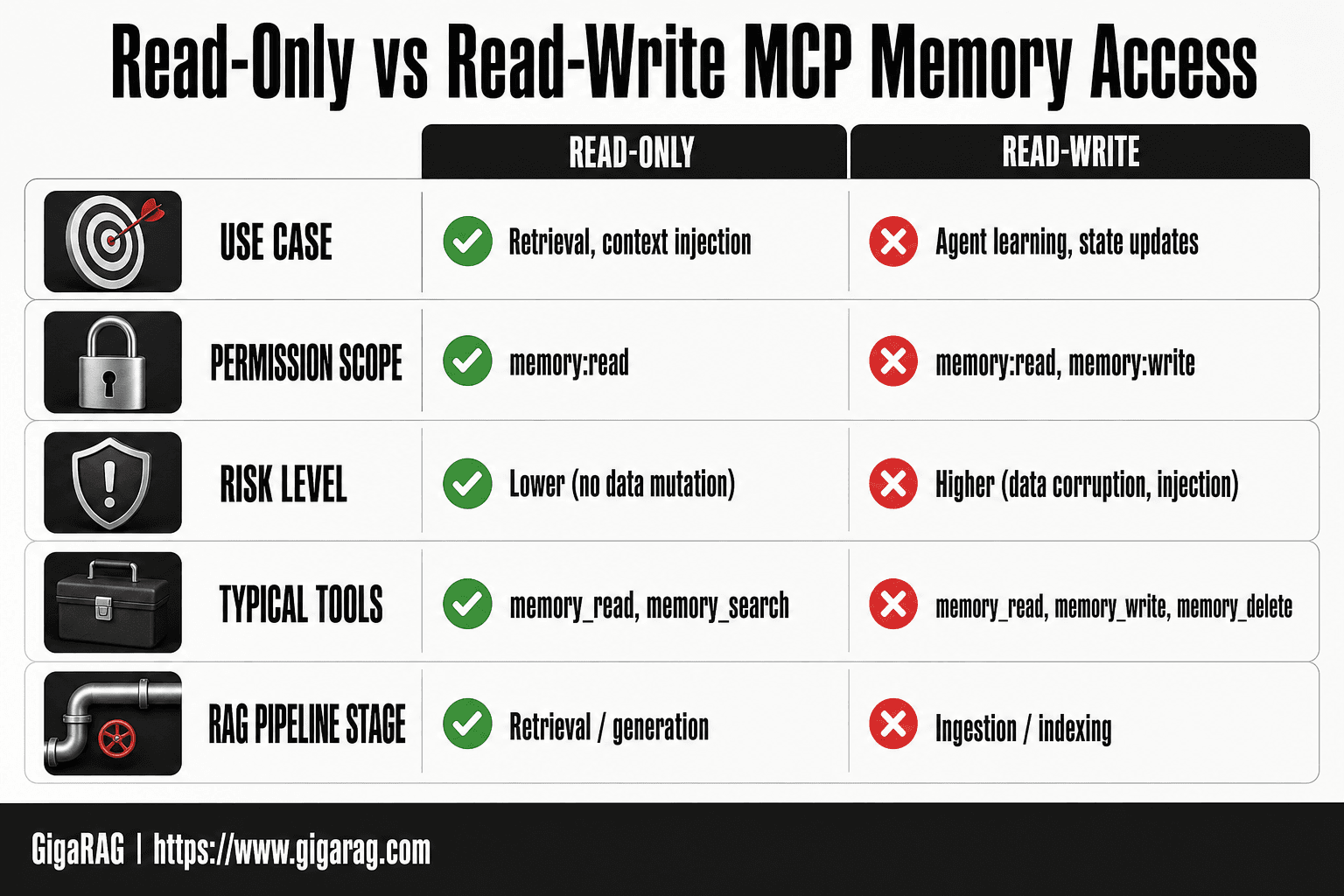
| Factor | Read-Only | Read-Write |
|---|---|---|
| Use case | Retrieval, context injection | Agent learning, state updates |
| Permission scope | memory:read | memory:read, memory:write |
| Risk level | Lower (no data mutation) | Higher (data corruption, injection) |
| Typical tools | memory_read, memory_search | memory_read, memory_write, memory_delete |
| RAG pipeline stage | Retrieval / generation | Ingestion / indexing |
Prerequisites for Configuring MCP Memory Access
You need three things before you start: an MCP client, a storage backend, and enough JSON to read a tool definition without flinching. None of these are optional.
MCP client requirements
Your client must support MCP tool calls. Claude Desktop and Claude Code both do. A custom client works if it implements the MCP protocol and can invoke tools by name. Check that your client lets you configure tool permissions, not just list tools.
Storage backend options
The memory server needs somewhere to persist data. SQLite works for local testing. PostgreSQL handles concurrent writes better. A vector store like pgvector or Qdrant makes sense if you plan semantic search later. Pick based on whether you need embeddings now or just key-value storage.
Basic JSON schema knowledge
Tool definitions are JSON. You don't need to write schemas from scratch, but you should recognize parameter types, required fields, and return formats. If a JSON object with nested properties looks like noise, spend an hour on the basics first. It'll save you debugging time later.
[!tip] For Mac users, store the MCP server config in ~/Library/Application Support/Claude/claude_desktop_config.json and use environment variables for secrets to avoid hardcoding credentials.
How To Configure Read And Write MCP Memory Access: A Step-by-Step Guide
- Define memory_read and memory_write tools with JSON schemas for input and output.
- Choose a memory server (e.g., SQLite, Redis, vector DB) and expose it via MCP.
- Set permission scopes: memory:read for retrieval, memory:write for updates.
- Register the MCP server in your client configuration (e.g., claude_desktop_config.json).
- Implement read/write handlers with validation, error handling, and logging.
- Test with a simple agent loop: write a fact, then read it back.
- Integrate into your RAG pipeline: write during ingestion, read during retrieval.
Step 1: Define the Read Memory Tool
The read tool is the retrieval half of your memory setup. It takes a query, searches stored memories, and returns matches. Without it, your agent can write all day and never recall a thing.
JSON tool definition for read
Here's a minimal read tool definition. It declares the tool name, a description the client uses to decide when to call it, and the input schema.
{
  "name": "read_memory",
  "description": "Search stored memories for entries relevant to the query. Returns the top matches with their content and timestamps.",
  "inputSchema": {
    "type": "object",
    "properties": {
      "query": {
        "type": "string",
        "description": "The search query. Use keywords or a short phrase that captures what you need to recall."
      },
      "limit": {
        "type": "integer",
        "description": "Maximum number of memories to return. Defaults to 5.",
        "default": 5
      }
    },
    "required": ["query"]
  }
}
The description matters more than you'd think. The client reads it to decide whether to call this tool or something else. Write it as an instruction, not a label.
Parameter schema and return format
Two parameters keep the read tool simple: query and limit. The query is a string. The limit caps how many results come back, which prevents flooding the context window with stale memories.
The return format should be a JSON object with a results array. Each result carries the memory content, an ID, and a timestamp. Here's the shape:
{
  "results": [
    {
      "id": "mem_01HX3K",
      "content": "User prefers PostgreSQL over SQLite for production workloads.",
      "created_at": "2025-01-15T14:22:00Z",
      "relevance": 0.87
    }
  ]
}
The relevance score is optional but useful. It tells the agent how confident the match is, so it can ignore weak results instead of treating every hit as fact.
Example read operation
Say your agent stored a memory about a user's database preference last week. Now the user asks which backend to use. The agent calls read_memory with the query "database preference production". The tool searches, finds the PostgreSQL memory, and returns it. The agent folds that into its answer.
Query patterns that work best: short keyword phrases, not full sentences. "database preference" beats "what database did the user say they preferred for production workloads". The shorter query gives the search backend less noise to match against.
Keep the read tool dumb. It retrieves. It doesn't decide what's relevant beyond the search itself. That judgment belongs to the agent.
Step 2: Define the Write Memory Tool
The write tool is the ingestion half. It takes a memory, validates it, and stores it. Without it, your agent has nothing to retrieve.
JSON tool definition for write
{
  "name": "write_memory",
  "description": "Store a new memory. Validates the content and returns the stored memory with its ID and timestamp.",
  "inputSchema": {
    "type": "object",
    "properties": {
      "content": {
        "type": "string",
        "description": "The memory to store. Keep it to one fact or preference per call."
      },
      "tags": {
        "type": "array",
        "items": { "type": "string" },
        "description": "Optional labels for filtering later."
      }
    },
    "required": ["content"]
  }
}
Parameter schema and validation
Two parameters: content and tags. Content is required and must be a string. Tags are optional, but they pay off later when you want to filter reads by category.
Validation rules: reject empty content, cap content at 2,000 characters, and strip leading or trailing whitespace. Don't store duplicates. If the same content already exists, return the existing memory ID instead of writing a new row.
Example write operation
The agent learns the user prefers PostgreSQL. It calls write_memory with content "User prefers PostgreSQL over SQLite for production workloads" and tags ["database", "preference"]. The tool stores it, returns the ID and timestamp. The read tool from Step 1 can now find it.
Supported formats: plain text strings work best. JSON objects are fine if you flatten them to a string first. Don't store binary blobs here. That's a job for object storage, not a memory tool.
Step 3: Configure Permission Scopes for Read and Write Access
Permission scopes decide which tools your MCP client can actually call. You defined read and write tools in Steps 1 and 2. Now you control who gets to use them.
Tool-level permission configuration
MCP clients use allow and deny lists per tool. In Claude Desktop, you'll see a prompt the first time a server requests access to a tool. You can approve it once, approve it always, or deny it. That choice gets stored in the client config.
For a custom client, you define scopes in the server registration. A scope names a tool and the operations allowed on it. The read tool might get read_memory:read. The write tool gets write_memory:write. Keep them separate. Don't bundle both under one scope unless you have a reason.
Security boundaries for memory access
The main risk is a write tool that accepts anything. An agent with unrestricted write access can pollute your memory store with bad data, and that bad data then shows up in every future read. It compounds.
So restrict writes. Allow writes only from trusted sessions or after explicit user confirmation. Reads are lower risk but still worth scoping. If your memory store holds user preferences or PII, don't expose the read tool to every agent in the system.
Example permission scope
{
  "scopes": [
    {
      "tool": "read_memory",
      "operations": ["read"],
      "allowed_sessions": ["user_agent"]
    },
    {
      "tool": "write_memory",
      "operations": ["write"],
      "allowed_sessions": ["user_agent"],
      "requires_confirmation": true
    }
  ]
}
This grants read access freely but forces a confirmation before any write. That's the pattern to start with. You can loosen it later once you trust the agent's behaviour.
Step 4: Connect MCP Memory to Your RAG Pipeline
MCP memory tools don't replace your RAG pipeline. They feed it. The write tool becomes an ingestion path. The read tool becomes a retrieval source. Here's how that maps.
Memory writes as ingestion events
When an agent calls write_memory, treat that call as an ingestion event. The memory server stores the record, then triggers an embedding step. The text gets vectorized and written to your vector store alongside the raw record.
You need a hook between the write tool and your embedding pipeline. Some memory servers handle this natively. Others require a queue or a webhook. Either way, the write is not complete until the vector exists. If the embedding fails, the memory exists but isn't retrievable by semantic search. That's a silent failure worth monitoring.
Memory reads as retrieval augmentation
The read tool returns stored memories. In a RAG flow, those memories become additional context passed to the generator alongside retrieved documents.
The pattern: query the vector store for relevant documents, query the memory store for relevant past interactions, merge both into the prompt. Memory adds what documents can't: user preferences, past decisions, corrections the agent already made.
Mapping MCP memory to RAG stages
Ingestion: write_memory stores the record and triggers embedding. Retrieval: read_memory pulls relevant memories by query or ID. Generation: merged memory and document context go to the model.
The honest catch: MCP memory is not a vector store. It's an interface. Your storage backend does the semantic work. MCP just standardizes how tools talk to it.
Current Limitations of MCP Memory Access
MCP standardizes the interface. It does not standardize the guarantees. The read and write tools you configured in the previous steps are only as reliable as the storage backend behind them. Here's what breaks first.
Cross-session consistency limits
MCP has no built-in session persistence. If your memory server restarts, in-memory state is gone. If your storage backend is a flat file, concurrent clients can overwrite each other's writes. The protocol does not promise that a memory written in session one will be readable in session two. That promise comes from your backend, not from MCP.
Concurrency and race conditions
Two agents writing to the same memory key at the same time will produce a last-write-wins result. There's no transaction layer in the MCP spec. If you need atomic updates or compare-and-swap semantics, you build that into the memory server yourself. Most reference implementations don't.
Security boundaries
MCP tool permissions are client-side. A misconfigured allow list grants read access to every memory in the store. The protocol does not enforce row-level access control. If your memory server exposes a read_memory tool with no filtering, any connected client can pull the entire store. Scope your tools narrowly at the server level, not just the client level.
What's Next After Configuring MCP Memory Access
Your read and write tools work. The next step is proving they hold up under real use.
Testing read/write operations
Write a known value, read it back, then restart the memory server and read again. If the value survives, your backend persists. If it doesn't, you found the limitation before your users did. Test concurrent writes from two clients to the same key. You'll see last-write-wins in action.
Scaling memory storage
Start with a flat file or SQLite for development. Move to PostgreSQL or a vector store when memory volume passes what a single file can handle. The MCP tool definitions don't change. Only the backend connection string does.
Advanced retrieval patterns
Once basic read/write works, add semantic search. Store embeddings alongside raw memory entries, then let the read tool accept a query vector instead of an exact key match. This is where MCP memory access starts feeding a RAG pipeline properly: writes become ingestion events, reads become retrieval calls. That's the full configuration path for read and write MCP memory access. The tools are simple. The guarantees are not. Build accordingly.
Frequently Asked Questions
How do I configure read and write MCP memory access?
Define memory_read and memory_write tools in your MCP server with JSON schemas, set permission scopes, and register the server in your MCP client. Then implement handlers that connect to your memory store (e.g., SQLite or Redis) and test with a simple agent loop.
What is the difference between read-only and read-write MCP memory access?
Read-only access allows agents to retrieve memory but not modify it, reducing risk. Read-write access enables agents to update memory, which is essential for learning and stateful behavior but requires careful permission scoping and validation.
Can MCP memory be used with any RAG pipeline?
Yes, MCP is vendor-neutral. You can integrate MCP memory tools into any RAG pipeline by mapping write operations to ingestion/indexing stages and read operations to retrieval/generation stages.
How do I secure MCP memory access?
Enforce authentication and authorization at the MCP server level, use transport encryption (e.g., TLS), and apply the principle of least privilege for scopes. Never expose memory_write without validation and audit logging.
What are the limitations of MCP memory?
MCP memory does not provide cross-session consistency, concurrency control, or built-in security boundaries. You must implement these at the server or application layer, and be aware that memory is only as persistent as the underlying store.
How do I configure MCP memory on Mac?
On Mac, edit the MCP client configuration file (e.g., ~/Library/Application Support/Claude/claude_desktop_config.json) to add your memory server. Use environment variables for secrets and ensure the server process has appropriate file permissions.
About GigaRAG
GigaRAG is for agent memory and RAG pipeline builders. get this right. Whether you are working through How to Configure Read and Write MCP Memory Access or something adjacent, we publish what we have actually tested, including where it falls short.


