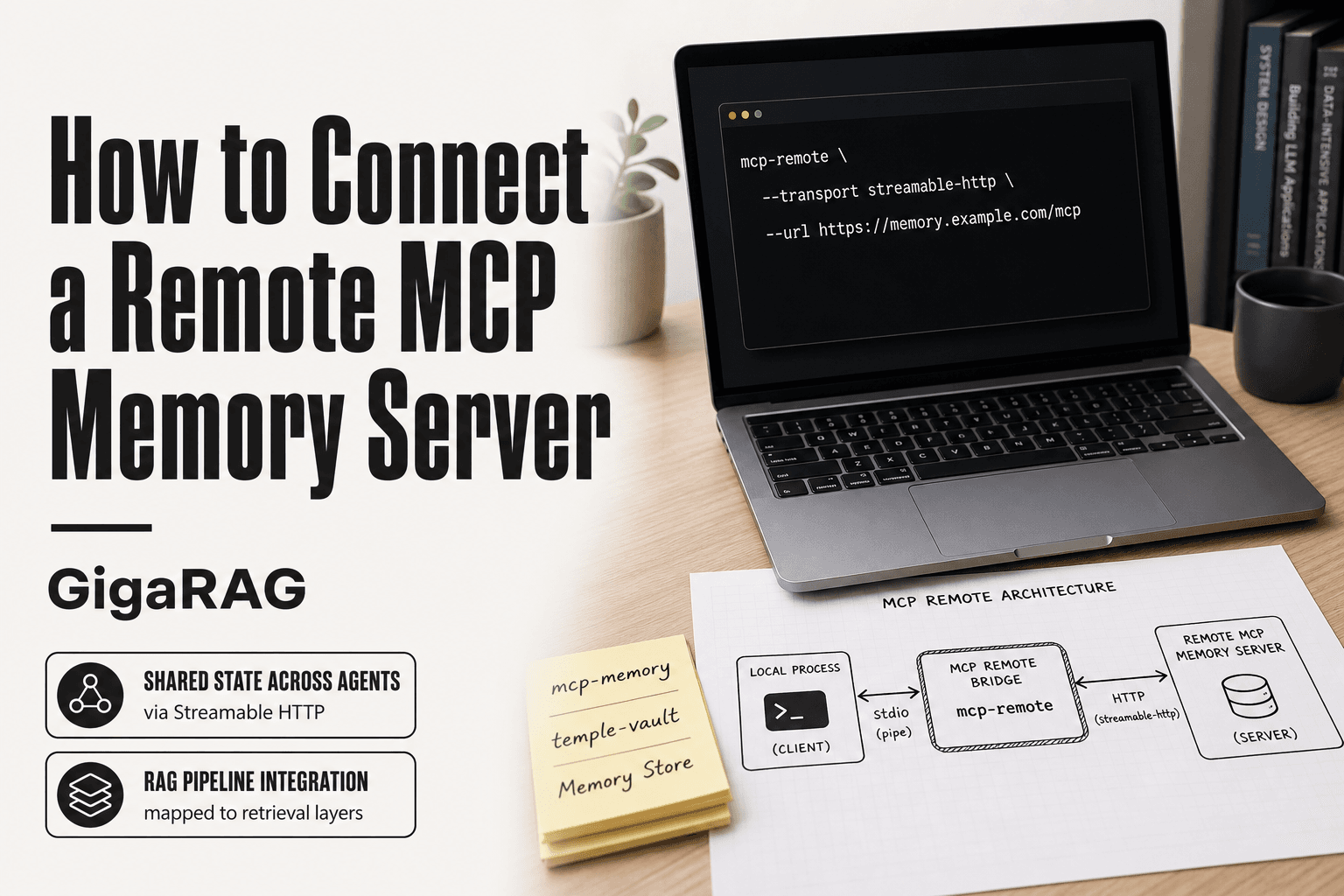
How to Connect a Remote MCP Memory Server
How to Connect a Remote MCP Memory Server trips up most agent memory and RAG pipeline builders because local MCP clients speak stdio, while remote memory servers speak HTTP. The bridge isn't obvious, and most guides skip the memory-specific angle entirely. This one won't. GigaRAG is built for agent memory and RAG pipelines, so we've tested these connections in production and know where they break.
The honest answer is that remote memory is a trade-off, not an upgrade. You get shared state across agents and retrieval endpoints, but you give up local speed and full data control. This guide covers the transport gap, compares three memory-specific MCP servers, walks through mcp-remote setup, secures the connection, and states plainly what remote memory servers cannot do.
| At a glance | Details |
|---|---|
| What it is | MCP server exposing agent memory over the network |
| Common transports | stdio (local) vs Streamable HTTP (remote) |
| Typical auth | Bearer tokens or OAuth 2.1 (verify per server) |
| Best for | Persistent memory across sessions and RAG pipelines |
| Main trade-off | Convenience vs latency, privacy, sync conflicts |
| Client support | Varies; check your client's remote transport support |
In This Guide
- What Changes When You Connect a Remote MCP Memory Server
- stdio vs Streamable HTTP for Remote MCP Memory Servers
- Prerequisites for Connecting a Remote MCP Memory Server
- How To Connect A Remote MCP Memory Server: A Step-by-Step Guide
- Choosing a Memory Server: mcp-memory, temple-vault, and Memory Store Compared
- stdio vs Streamable HTTP for Memory Workloads
- How to Connect a Remote MCP Memory Server with mcp-remote
- Client Configuration Examples for Agent Memory and RAG Pipelines
- Security Considerations for Remote Memory Servers
- What Remote Memory Servers Cannot Do
- Troubleshooting Common Remote MCP Memory Server Failures
- Production Checklist for Remote MCP Memory Servers
- Final Thoughts on Connecting Remote MCP Memory Servers
What Changes When You Connect a Remote MCP Memory Server
The shift is architectural. A local MCP client speaks stdio over a pipe to a process on the same machine. A remote memory server speaks HTTP over a network. Connecting the two means bridging that gap, and the bridge changes what your agent can remember and who else can reach it.
The stdio-to-HTTP transport gap
stdio assumes one client, one server process, same host. HTTP assumes many clients, one endpoint, anywhere. When you move memory to a remote server, you trade process isolation for network latency. You also gain shared state across agents.
Why memory servers are different from generic MCP servers
A generic MCP server returns tools or resources. A memory server returns state that must persist across sessions. That means write durability matters more than request throughput. A dropped tool call is annoying. A dropped memory write is data loss.
What remote memory enables for RAG pipelines
Remote memory gives your retrieval pipeline a shared, queryable store that outlives any single agent run. Multiple agents can write to the same memory, and your RAG retriever can read from it without spawning its own process. The cost is latency and a new failure surface.
[!note] Remote MCP memory servers cannot guarantee latency, keep data within your environment, or fully resolve sync conflicts between concurrent agents; persistence depends on the server's storage backend and your configuration.
stdio vs Streamable HTTP for Remote MCP Memory Servers
| Factor | stdio (local) | Streamable HTTP (remote) |
|---|---|---|
| Deployment | Runs on same host as client | Runs on remote host or cloud |
| Latency | Low, no network hop | Adds network round-trip; varies by region |
| Privacy | Data stays local | Data leaves your environment |
| Multi-agent access | Limited to local processes | Shared across clients and agents |
| Setup complexity | Simple, no auth needed | Requires auth, TLS, and endpoint config |
Prerequisites for Connecting a Remote MCP Memory Server
You need three things before you start. Missing any one of them means you'll hit a wall mid-guide.
Node.js or Python runtime
Most memory servers ship as Node.js packages you run with npx, or Python packages you run with pip. Node 18 or newer covers the npx path. Python 3.10 or newer covers the pip path. Check your version first.
MCP client (Claude Desktop, custom agent, or RAG pipeline)
You need a client that speaks MCP. Claude Desktop works out of the box. A custom agent needs the MCP SDK. A RAG pipeline needs an MCP client library wired into your retrieval code.
A deployed memory server endpoint
You need a URL that responds to Streamable HTTP. Localhost won't work for remote connections. Deploy the server first, then connect.
[!tip] For RAG pipelines, namespace memory by agent or session ID and set a TTL on ephemeral memories to avoid stale context polluting retrievals.
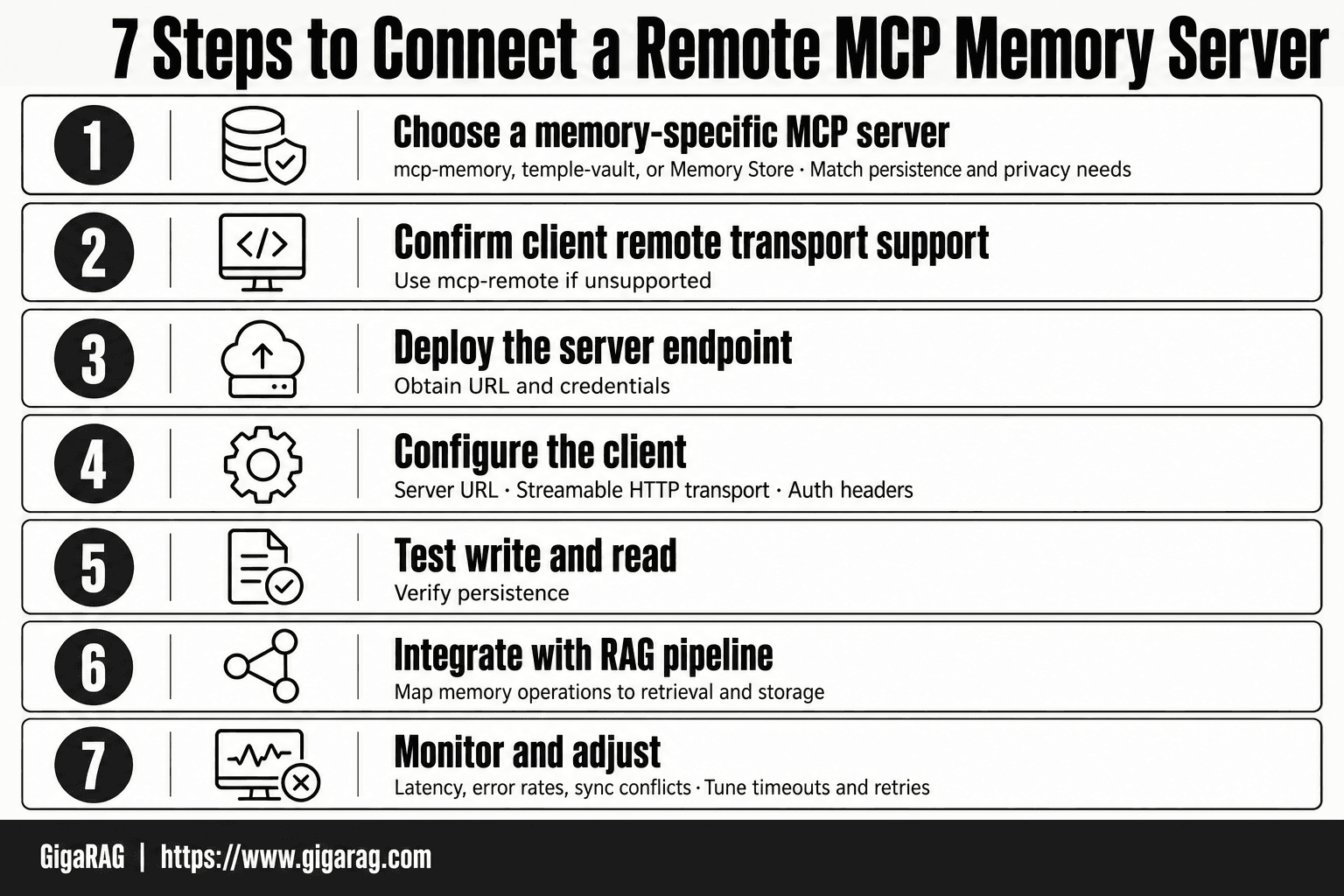
How To Connect A Remote MCP Memory Server: A Step-by-Step Guide
- Choose a memory-specific MCP server (e.g., mcp-memory, temple-vault, Memory Store) based on your persistence and privacy needs.
- Confirm your MCP client supports remote transports; if not, use a bridge like mcp-remote.
- Deploy or obtain the server endpoint URL and required credentials (API key or OAuth token).
- Configure the client with the server URL, transport type (Streamable HTTP), and auth headers.
- Test the connection with a simple memory write and read to verify persistence.
- Integrate the memory server into your RAG pipeline by mapping memory operations to your retrieval and storage layers.
- Monitor latency, error rates, and sync conflicts; adjust timeouts and retry logic as needed.
Choosing a Memory Server: mcp-memory, temple-vault, and Memory Store Compared
Three memory-specific MCP servers cover most agent memory and RAG use cases. They differ in deployment model, persistence guarantees, and security. Pick based on where your data lives and who needs access.
mcp-memory: self-hosted, file-based, simple
mcp-memory stores memory as local files on the machine running the server. You run it yourself, point it at a directory, and it reads and writes JSON or Markdown files. No database, no external service.
The main catch is durability. File-based storage means writes are only as reliable as the filesystem. A crash mid-write can corrupt a file. There's no built-in replication or backup. For a single agent on a single machine, that's fine. For production RAG pipelines, it's thin.
temple-vault: persistent memory with encryption
temple-vault adds encryption and a proper persistence layer. Memory is encrypted at rest, and the server manages storage rather than dumping raw files. It's still self-hosted, but built for multi-agent setups where memory must survive restarts.
The trade-off is complexity. You manage keys, storage backends, and the server itself. Encryption adds latency on every read and write. If you don't need encryption, you're paying that cost for nothing.
Memory Store: managed option with API access
Memory Store is a hosted service. You get an API endpoint, and the vendor runs the infrastructure. No server to patch, no storage to manage. It's the fastest path to a remote memory server.
The honest drawback is lock-in and cost. Your memory data sits on someone else's infrastructure. Pricing scales with usage, and you can't inspect the underlying storage. If compliance requires data on your own hardware, Memory Store is out.
When to self-host vs use a managed service
Self-host when data must stay in your infrastructure, or when you need full control over persistence and encryption. Use a managed service when you want to ship fast and don't want to run servers. It depends on your compliance requirements and how much operational work you'll tolerate.
stdio vs Streamable HTTP for Memory Workloads
The transport you pick changes how memory behaves under load. stdio is a local pipe between one client and one server process. Streamable HTTP is a network protocol that any number of clients can reach.
When stdio is sufficient (local dev, single agent)
stdio works when the client and memory server run on the same machine. You launch the server as a child process, and the client talks to it over standard input and output. No ports, no network config, no auth.
For local development or a single agent with a file-based memory server like mcp-memory, that's all you need. It's fast because there's no network hop. It's simple because there's nothing to secure.
The limit is hard: one client per server process. Two agents can't share the same stdio pipe.
When Streamable HTTP is required (remote, multi-agent, production)
Streamable HTTP is required the moment memory must be reachable from another machine. That covers remote agents, RAG pipelines running on separate infrastructure, and any multi-agent setup where memory is shared.
You get horizontal scaling: multiple clients can hit the same endpoint. You also get standard HTTP tooling for load balancing, monitoring, and auth. The cost is latency and operational overhead. You now run a network service, not just a process.
Latency and persistence implications for RAG retrieval
Every retrieval over HTTP adds a round trip. On a local network, that's 1-5 ms. Across regions, 50-200 ms. For RAG pipelines that retrieve memory on every query, that latency multiplies across each retrieval call.
Persistence doesn't change with transport. stdio and HTTP both depend on the server's storage layer. A file-based server over HTTP is still file-based. The transport only determines who can reach the memory, not how reliably it's stored.
How to Connect a Remote MCP Memory Server with mcp-remote
mcp-remote is a proxy that bridges stdio-speaking MCP clients to Streamable HTTP servers. You run it locally as a child process, point it at your remote memory server URL, and your client connects to mcp-remote as if it were a local stdio server.
Install mcp-remote via npx
You don't install mcp-remote globally. You run it through npx, which pulls the package on demand.
npx mcp-remote
That command alone won't do anything useful. You need to pass the remote server URL as an argument. But first, make sure Node.js 18 or later is on your machine, since mcp-remote depends on the built-in fetch API.
Point mcp-remote at your memory server URL
The URL is the Streamable HTTP endpoint of your deployed memory server. For a server running on port 3000 on your network, that looks like:
npx mcp-remote http://192.168.1.50:3000/mcp
If your memory server requires OAuth, mcp-remote handles the token exchange. It opens a browser window for the authorization flow, stores the token locally, and attaches it to subsequent requests. You'll re-authenticate when the token expires.
Configure the MCP client to use the proxy
Your client config points at mcp-remote, not at the remote server directly. In Claude Desktop's claude_desktop_config.json:
{
  "mcpServers": {
    "remote-memory": {
      "command": "npx",
      "args": ["mcp-remote", "http://192.168.1.50:3000/mcp"]
    }
  }
}
The client sees a stdio server. mcp-remote translates stdio messages to HTTP requests and back. Your agent or RAG pipeline doesn't know the memory lives on another machine.
One thing to check: mcp-remote forwards the MCP protocol as-is. If your memory server exposes tools with names that collide with other connected servers, the client will show both and you'll need to disambiguate in your agent logic.
Client Configuration Examples for Agent Memory and RAG Pipelines
The mcp-remote bridge works the same way across clients. What changes is where you put the config and how your code calls the memory tools. Here are three patterns you can adapt.
Claude Desktop configuration
Claude Desktop reads claude_desktop_config.json on startup. You already saw the basic shape in the previous section. For a memory server with OAuth, add the auth flag:
{
  "mcpServers": {
    "remote-memory": {
      "command": "npx",
      "args": ["mcp-remote", "--oauth", "https://memory.example.com/mcp"]
    }
  }
}
Restart Claude Desktop after editing the file. The memory tools appear in the tool list, and Claude can call them during conversations. Keep in mind that Claude Desktop caches the config, so a typo means the server silently doesn't load. Check the logs if tools don't show up.
Custom agent client (Python or Node.js)
If you're building your own agent, you don't need mcp-remote. You can speak Streamable HTTP directly using the MCP SDK.
In Python:
from mcp import ClientSession, StdioServerParameters
from mcp.client.stdio import stdio_client

params = StdioServerParameters(
    command="npx",
    args=["mcp-remote", "https://memory.example.com/mcp"]
)

async with stdio_client(params) as (read, write):
    async with ClientSession(read, write) as session:
        await session.initialize()
        result = await session.call_tool("memory_search", {"query": "user preferences"})
The pattern is identical in Node.js with @modelcontextprotocol/sdk. You spawn mcp-remote as a child process, then treat the session like any local MCP connection.
RAG pipeline integration pattern
For a RAG pipeline, memory retrieval becomes one step in your retrieval chain. Don't call the memory server for every query. Call it once at the start of a session to load user context, then merge that context into your vector store query.
# Load agent memory once per session
memory_context = await session.call_tool("memory_get", {"key": "user_profile"})

# Merge into RAG retrieval
augmented_query = f"{memory_context} {user_query}"
results = vector_store.search(augmented_query, top_k=5)
The memory server handles long-term facts. The vector store handles document retrieval. Mixing them in one query works, but keep the memory context short. Long memory dumps dilute the retrieval signal.
Security Considerations for Remote Memory Servers
A remote memory server holds your agent's long-term facts. That's a bigger deal than it sounds. If someone reads that memory, they read every preference, decision, and context your agent has accumulated.
OAuth authentication and token storage
Use OAuth 2.0 for any remote memory server exposed beyond localhost. The token proves your client is allowed to read and write memory. Store tokens in a secrets manager or environment variable, never in your client config file. A config file gets committed to git. A token in git is a token in the wild.
Encrypting memory data in transit and at rest
TLS is non-negotiable for the HTTP connection. Use HTTPS, not HTTP, even inside a private network. For data at rest, check what your memory server actually encrypts. mcp-memory stores plain JSON on disk by default. temple-vault encrypts at rest. If you self-host mcp-memory, you're responsible for disk encryption yourself.
Common security mistakes with remote memory
The most common mistake is exposing the memory endpoint without auth because it's "just internal." Internal networks get breached. The second is logging memory contents in plaintext. Memory often contains PII: user names, preferences, past decisions. Treat it like a database, not a cache.
What Remote Memory Servers Cannot Do
Remote memory servers solve a real problem: shared, persistent state across agents. They don't solve everything. Before you deploy one, know the four limits that will bite you in production.
Latency: remote memory is slower than local
Every read and write crosses a network. Local stdio memory returns in single-digit milliseconds. Remote HTTP adds 20 to 200 ms per round trip, more if the server is in another region. For RAG retrieval that fires dozens of memory reads per query, that compounds fast. You'll feel it in response time.
Privacy: data leaves your infrastructure
Remote means someone else's disk, or at least someone else's network. If you self-host, you keep control but add ops burden. If you use a managed service, your agent's memory sits on their servers. Read the data processing terms before you send PII through it.
Persistence: what 'persistent' actually guarantees
Persistent means the server writes to disk. It doesn't mean durable. A crash mid-write can lose the last few operations. Most memory servers don't replicate across nodes. One disk failure and the memory is gone unless you've set up backups yourself.
Sync conflicts in multi-agent systems
Two agents writing to the same memory key at the same time will overwrite each other. Most memory servers offer no conflict resolution. Last write wins. If your agents share memory, you need to design around this, because the server won't fix it for you.
Troubleshooting Common Remote MCP Memory Server Failures
Most connection failures come down to four things: the endpoint is wrong, the token is dead, the cache is lying to you, or the client and server speak different protocol versions. Start with the error message. It usually names the problem.
Connection refused or timeout errors
Check the URL first. A trailing slash, wrong port, or http instead of https will refuse the connection outright. Then check the server is actually running: curl the health endpoint from the same machine the client runs on. If curl works but the client doesn't, the problem is client config, not the server. Firewalls and security groups block more remote memory connections than anything else.
OAuth token expired or invalid
Tokens expire. Most MCP servers issue short-lived access tokens, often 15 to 60 minutes. If your client caches the token and reuses it, reads and writes fail with 401 errors after expiry. Check whether your client refreshes tokens automatically. Many don't. You'll need to handle refresh logic yourself.
Memory writes succeed but reads return stale data
The write landed, but the read hit a cache or a replica that hasn't caught up. If your memory server uses read replicas, replication lag means a write can succeed and a read milliseconds later returns old data. For RAG pipelines, this shows up as retrieved context missing the most recent memory. Reduce the cache TTL or read from the primary node.
Client compatibility issues
MCP is still young. A client built against protocol version 2024-11-05 may not work with a server on 2025-03-26. Check both sides' protocol versions. If they mismatch, upgrade the client or pin the server. Don't assume the latest is compatible.
Production Checklist for Remote MCP Memory Servers
Before you point an agent or RAG pipeline at a remote memory server, run through this list. Each item takes minutes to check and hours to fix if you skip it.
Endpoint verification
Confirm the URL works from the client's network, not just your laptop. Curl the health endpoint. Check the protocol version matches what your client expects. Test a write and a read with a throwaway key, then delete it.
Security hardening
Require OAuth on every route, including health checks if they leak version info. Store tokens in a secret manager, not in config files. Encrypt memory data in transit with TLS and at rest with your provider's encryption or your own keys. Rotate tokens before they expire.
Monitoring and logging
Log every write, read, and auth failure. Alert on latency spikes above your baseline, not just outages. For RAG pipelines, track retrieval freshness: how long between a write and its appearance in reads. That lag is your real memory staleness metric.
Backup and recovery
Memory servers hold state you can't regenerate. Schedule backups at the interval your data loss tolerance allows. Test restores. A backup you haven't restored is a hope, not a plan.
Final Thoughts on Connecting Remote MCP Memory Servers
The decision comes down to two things: transport and memory server. For local dev, stdio works fine. For production agent memory or RAG pipelines, Streamable HTTP through mcp-remote is the path. Pick a server that matches your persistence and privacy needs, then secure it before you ship.
What remote memory can't do: guarantee latency, keep data on your infrastructure, or eliminate sync conflicts. Plan for those gaps.
If you'd rather skip the assembly, GigaRAG is built for agent memory and RAG pipelines out of the box. Otherwise, start with one memory server, connect it, and test reads before you trust writes. That's how to connect a remote MCP memory server.
Frequently Asked Questions
What is a remote MCP memory server?
It is an MCP server that stores and retrieves agent memory over a network connection rather than locally. It lets multiple agents or sessions share persistent memory, typically via Streamable HTTP transport. This is distinct from local stdio servers that run on the same host.
How do I connect a remote MCP server to Claude?
Claude Desktop and similar clients may require a bridge like mcp-remote to connect to remote servers. You configure the server URL and auth in the client's MCP settings. Check your client's documentation for current remote transport support.
What is the difference between stdio and Streamable HTTP for MCP memory?
stdio runs the server as a local process with no network overhead, ideal for single-agent local use. Streamable HTTP connects to a remote endpoint, enabling shared memory across agents but adding latency and privacy considerations. Choose based on your deployment and collaboration needs.
Can I use npx mcp-remote to connect a remote memory server?
Yes, mcp-remote is a common bridge that allows clients without native remote support to connect to remote MCP servers. It proxies stdio to the remote endpoint. Verify compatibility with your specific memory server and client.
What are the limitations of remote MCP memory servers?
They cannot guarantee low latency, may expose data outside your environment, and can suffer from sync conflicts when multiple agents write concurrently. Persistence depends on the server's backend and your configuration. Always review the server's privacy and retention policies.
How do I integrate a remote MCP memory server with my RAG pipeline?
Map memory operations (store, retrieve, search) to your RAG components, often using the memory server as a vector or key-value store. Ensure your pipeline handles network failures and latency. Namespace memories to avoid cross-contamination between agents.
Which memory-specific MCP servers are available?
Options include mcp-memory, temple-vault, and Memory Store, among others. Each has different storage backends, APIs, and transport support. Evaluate them against your persistence, privacy, and integration requirements.
About GigaRAG
GigaRAG helps GigaRAG is for agent memory and RAG pipeline builders. get this right. Whether you are working through How to Connect a Remote MCP Memory Server or something adjacent, we publish what we have actually tested, including where it falls short.


