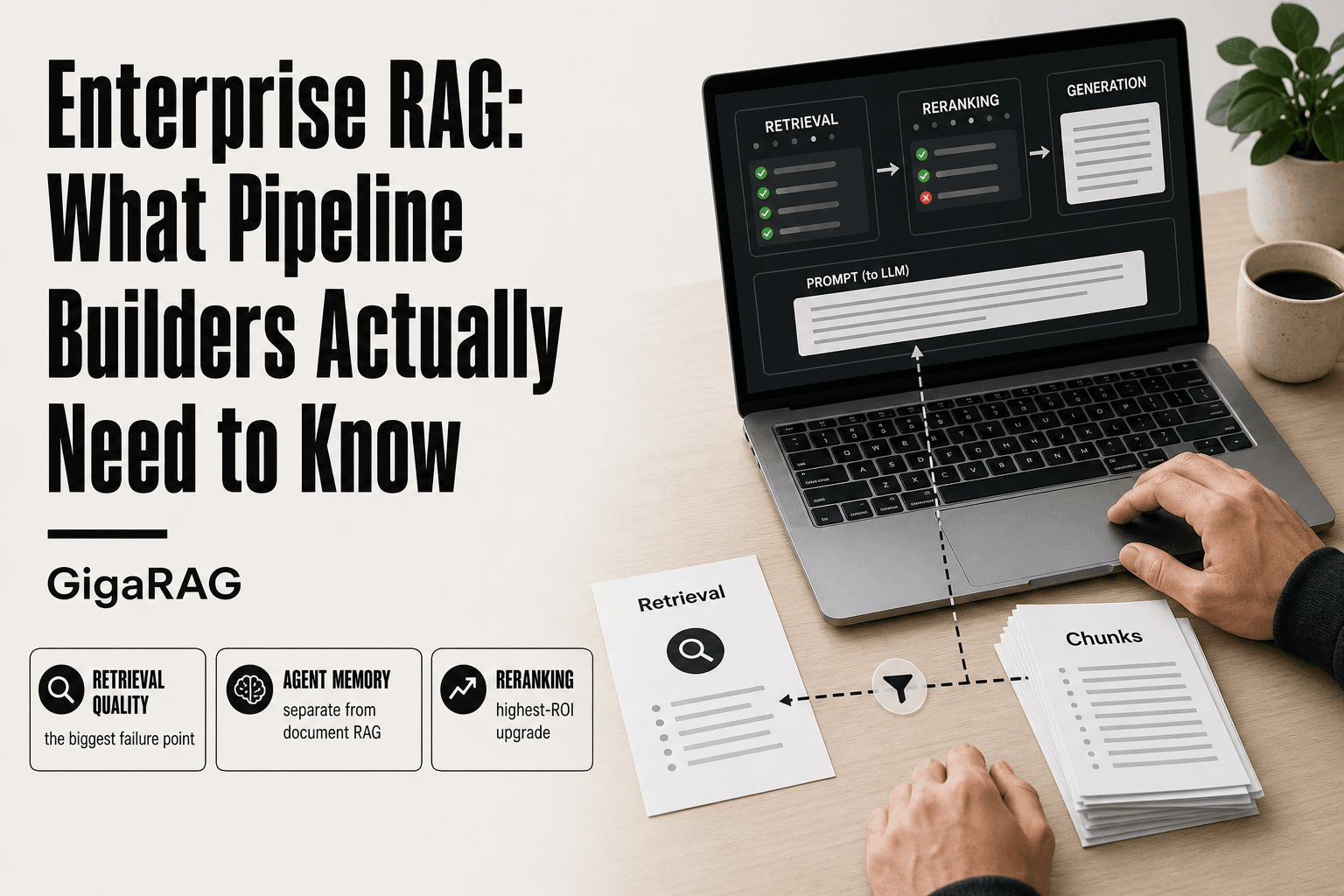
Enterprise RAG: What Pipeline Builders Actually Need to Know
Enterprise RAG looks easy in a demo. You wire a vector database to an LLM, ask a question, and get a grounded answer. Then you ship it to production and watch it miss retrievals, blow your latency budget, and hallucinate on stale data. If you build RAG pipelines or agent memory systems for a living, you already know the gap between the prototype and the thing that actually runs. Tools like GigaRAG exist to close that gap, but no tool fixes the fundamentals for you. The architecture has to be right first. This guide walks through the full enterprise RAG pipeline, the seven failure points that kill production deployments, and the agent memory integration that every top guide skips. You'll also get the plain truth on what RAG cannot do, so you don't build around false expectations.
| At a glance | Details |
|---|---|
| What it is | Retrieval-augmented generation for production pipelines |
| Core components | Ingestion, chunking, embeddings, retrieval, generation, evaluation |
| Biggest failure | Retrieval quality, not the LLM |
| Agent memory | Separate store from document RAG |
| Latency budget | Retrieval adds tens to hundreds of ms |
| Evaluation | Measure retrieval and generation separately |
In This Guide
- What Is Enterprise RAG?
- Document RAG vs Agent Memory: What's the Difference?
- The Enterprise RAG Pipeline: A Component-by-Component Breakdown
- Enterprise Rag: A Step-by-Step Guide
- 7 Failure Points in Enterprise RAG (and How to Plan for Them)
- RAG for Agent Memory: What the Top Guides Skip
- Advanced Enterprise RAG Techniques Worth Your Time
- What Enterprise RAG Cannot Do (and What Not to Expect)
- How to Build an Enterprise RAG Pipeline: A Practical Checklist
- Common Mistakes When Building Enterprise RAG
What Is Enterprise RAG?
Enterprise RAG is retrieval augmented generation running at production scale: your company's documents, indexed and searchable, feeding an LLM the context it needs to answer from your data instead of its training set. The retrieval step grounds the model. The generation step writes the answer. The enterprise part means it has to work every time, for every user, without leaking data.
RAG vs. fine-tuning: what actually changes
Fine-tuning bakes knowledge into the model's weights. RAG keeps knowledge outside the model, in a vector index. You update the index, the answers update. No retraining, no GPU bill for a new model. The tradeoff: RAG depends on retrieval quality. Miss the right chunk, and the answer is wrong no matter how good the LLM is.
What makes RAG "enterprise" vs. a weekend project
A weekend RAG demo works on one laptop with ten documents. Enterprise RAG means thousands of documents, dozens of users, access controls, audit logs, and latency budgets. Multi-tenancy matters: user A's query must never pull context from user B's files. Reliability matters more than cleverness.
Is ChatGPT a RAG? (and why the answer matters)
Not by default. ChatGPT answers from its training data unless you give it documents or it searches the web. When it does search, that's RAG-like behavior. The distinction matters because it tells you what RAG actually buys you: answers grounded in your data, not the model's memory.
[!note] Enterprise RAG does not eliminate hallucinations; it grounds generation in retrieved context, but the model can still produce incorrect or unsupported statements. Retrieval quality and evaluation are what determine whether the system is trustworthy in practice.
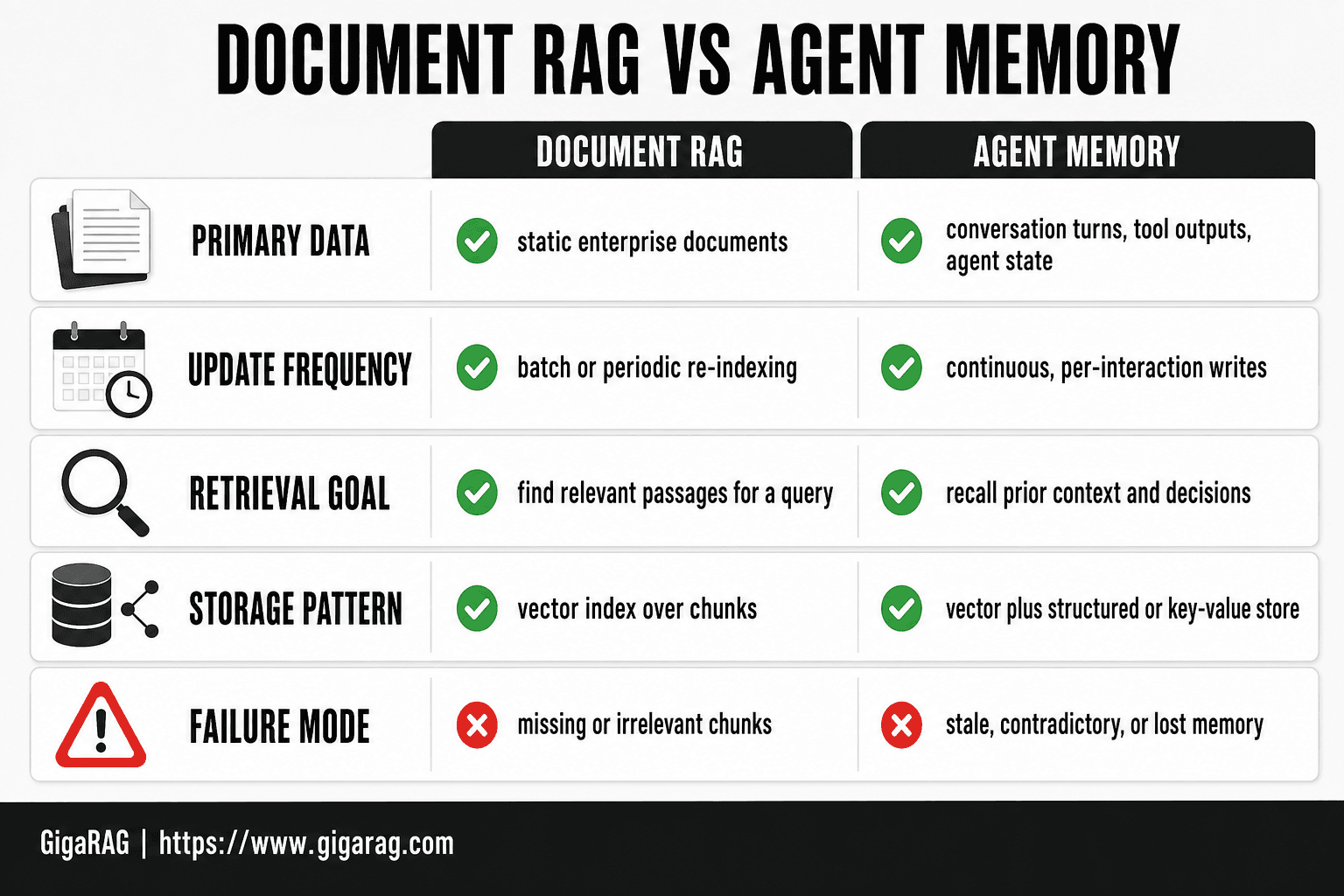
Document RAG vs Agent Memory: What's the Difference?
| Factor | Document RAG | Agent Memory |
|---|---|---|
| Primary data | Static enterprise documents | Conversation turns, tool outputs, agent state |
| Update frequency | Batch or periodic re-indexing | Continuous, per-interaction writes |
| Retrieval goal | Find relevant passages for a query | Recall prior context and decisions |
| Storage pattern | Vector index over chunks | Vector plus structured or key-value store |
| Failure mode | Missing or irrelevant chunks | Stale, contradictory, or lost memory |
The Enterprise RAG Pipeline: A Component-by-Component Breakdown
A production RAG pipeline has seven moving parts. Each one can fail independently. You can't debug what you can't name, so here's the full stack, in the order data flows through it.
Document ingestion and chunking strategy
Ingestion is where most pipelines quietly die. You pull documents from SharePoint, Confluence, S3, or a database, extract the text, clean it, and split it into chunks. The chunking decision is the first one that actually matters. Too large, and your chunks bury the answer in noise and blow past the LLM's context window. Too small, and you lose the surrounding context that makes a chunk answerable.
Chunk size depends on your documents. For dense technical manuals, 500 to 800 tokens per chunk with 10 to 15 percent overlap works. For Q&A pairs or FAQ content, smaller chunks of 100 to 200 tokens are better. Overlap matters because meaning doesn't respect chunk boundaries. A sentence split across two chunks is a sentence neither chunk can retrieve.
Don't chunk blindly. Respect document structure: headings, lists, and tables should stay intact where possible. A chunk that starts mid-list and ends mid-sentence is a retrieval miss waiting to happen.
Embedding and indexing: what actually matters
Embedding turns each chunk into a vector, a list of numbers that captures semantic meaning. The embedding model you pick sets the ceiling on retrieval quality. A weak embedding model means even perfect chunking and perfect indexing can't save you.
The index is your vector database: Pinecone, Weaviate, Qdrant, pgvector, or one of a dozen others. What actually matters at enterprise scale is not the database brand. It's whether the index supports metadata filtering, multi-tenancy, and fast approximate nearest neighbor search under load. You need to filter by user, by department, by document type, and by date. If your vector DB can't do that at query time, you'll leak data or return stale results.
Keep your embedding model and your index in sync. If you change embedding models, you must re-embed every chunk. That's a full reindex, not a config change.
Retrieval, reranking, and generation
Retrieval pulls the top-k chunks most similar to the query. Top-k is a real decision: too few chunks and you miss context, too many and you dilute the answer and burn tokens. Start with k between 5 and 10, then tune against evaluation data.
Reranking is the highest-ROI upgrade you can make. The initial retrieval is fast but coarse. A reranker, often a cross-encoder model, scores each retrieved chunk against the query with much higher precision. It reorders the list before anything reaches the LLM. This single step fixes a large share of retrieval misses.
Generation is the final step: the LLM receives the query plus the reranked chunks and writes the answer. The prompt matters here. Tell the model to answer only from the provided context, and to say when it can't. That instruction doesn't eliminate hallucination, but it reduces it measurably.
[!tip] For pipeline builders: treat chunking and retrieval as the highest-leverage decisions. A well-tuned retriever with a modest LLM will usually outperform a powerful LLM fed poor context, so invest your evaluation effort there first.
Enterprise Rag: A Step-by-Step Guide
- Define your retrieval evaluation set before writing pipeline code.
- Ingest and normalize source documents, preserving metadata and access controls.
- Choose a chunking strategy that matches your document structure and query patterns.
- Generate embeddings and build a vector index with metadata filtering.
- Add a reranking stage to improve precision on top-k results.
- Integrate an agent memory store separate from the document index.
- Instrument latency, retrieval quality, and answer faithfulness in production.
7 Failure Points in Enterprise RAG (and How to Plan for Them)
Every component in that pipeline can break. The failures below are the ones I've seen take down production systems, not hypotheticals. Plan for each before you ship.
Retrieval misses and irrelevant context
The retriever returns chunks that don't answer the question. Sometimes it's a semantic mismatch: the query says "churn rate" but the document says "customer attrition." Sometimes the right chunk exists but ranks below the top-k cutoff. The fix is layered. Start with hybrid search, combining dense vectors with BM25 keyword matching. Add reranking. Then test against a labeled evaluation set so you can measure recall, not guess at it.
Chunking that breaks meaning
A chunk that splits a procedure across two boundaries is a chunk that can't be retrieved as a unit. You covered chunk size in the pipeline section. The failure point here is subtler: chunks that are technically intact but semantically orphaned. A step that says "repeat the above process" is useless without the steps above it. Fix this by chunking on document structure, not token count alone. Keep headings with their content. Keep numbered lists together.
Latency and cost overruns
Retrieval plus reranking plus generation adds up. A query that takes 4 seconds in a demo takes 12 seconds under concurrent load, and your cost per query triples because you're stuffing 10 chunks into every prompt. Set a latency budget before you build. If your budget is 2 seconds, you can't afford a slow reranker on every query. Cache frequent queries. Cap top-k. Monitor tokens per query, not just response time.
Hallucination and ungrounded answers
The LLM writes an answer that isn't in the retrieved context. It sounds confident. It cites a chunk that doesn't say what the answer claims. The prompt instruction to "answer only from context" helps but doesn't solve it. Add a grounding check: after generation, verify that each factual claim in the answer maps to a span in the retrieved chunks. If it doesn't, flag the answer or refuse to return it. This is a guardrail, not a feature.
Stale or conflicting data
Two documents say different things. One was updated last week, the other is from 2022. The retriever returns both, and the LLM blends them into a confident wrong answer. The fix is metadata discipline: every chunk carries a source date, a document version, and a content type. Filter on recency at query time. For conflicting sources, instruct the model to surface the conflict rather than resolve it silently.
Security and multi-tenancy leaks
User A's query retrieves chunks from User B's tenant because the vector search didn't filter on tenant ID. This is the failure that gets you fired. Metadata filtering must be enforced at the index level, not in application code. If your vector DB can't do tenant-level filtering natively, pick a different vector DB. Test this explicitly: run queries as different tenants and verify zero cross-tenant results.
Evaluation blind spots
You can't fix what you don't measure. Most teams ship a RAG pipeline with no evaluation set, then wonder why users complain. Build a labeled set of at least 100 query-answer pairs before launch. Measure retrieval recall, answer faithfulness, and latency. Run it on every change. A pipeline without evaluation is a pipeline you're debugging in production, one angry ticket at a time.
RAG for Agent Memory: What the Top Guides Skip
Most RAG guides treat retrieval as a one-shot lookup: query in, context out, answer generated. Agents don't work that way. An agent runs for dozens or hundreds of turns, and what it retrieved five turns ago still matters. That's the gap. The top guides cover pipelines and failure points, but none of them tell you how to use RAG as the memory layer for an agent that keeps running.
Why agents need RAG as memory, not just as a search tool
An agent's context window is finite. You can't stuff every past turn into the prompt forever. RAG gives you a way to store what the agent has learned and retrieve only what's relevant to the current turn. The difference from search: the agent isn't just looking up documents. It's looking up its own history, decisions it made, facts it confirmed, and corrections it received. That history lives in your vector store alongside the source documents, and the retriever treats both the same way.
Context management across multi-turn sessions
The honest answer is that you need two layers. Working memory is the current conversation, the last few turns, kept in the prompt. Long-term memory is everything else, stored as embeddings and retrieved on demand. The mistake most builders make is treating every turn as a fresh retrieval. Don't. If the agent is mid-task and the context is sufficient, skip retrieval. Retrieve when the agent hits a gap: a new entity, a conflicting fact, a question it can't answer from what's already in the prompt. That keeps latency down and keeps the context focused.
Memory persistence: what to store, what to discard
Store decisions, not chatter. When the agent confirms a fact, resolves a conflict, or makes a choice that affects later turns, write that to memory as a short, self-contained chunk. Discard the filler: greetings, retries, dead ends. A chunk that says "the user prefers quarterly reports, not monthly" is worth keeping. A chunk that says "the user said thanks" is noise. The main catch: memory chunks need the same metadata discipline as source documents. Tag them with the session ID, the timestamp, and the agent that wrote them. Otherwise you'll retrieve stale memories from a different session and the agent will act on them as if they're current.
Advanced Enterprise RAG Techniques Worth Your Time
Most advanced RAG techniques sound impressive in blog posts and fall apart in production. Here's a filter: adopt what reduces failure points, skip what adds moving parts without a measurable gain.
Agentic RAG: when it helps, when it hurts
Agentic RAG lets the model decide what to retrieve, when to retrieve it, and whether the retrieved context is good enough. That's useful when queries are ambiguous or multi-step. The cost is latency and unpredictability. Every retrieval decision adds a model call, and every model call adds 200-500ms. For a single-turn lookup, agentic RAG is overhead. For a research task where the agent needs to follow a trail across documents, it's the difference between a dead end and an answer.
Graph RAG and hybrid search
Graph RAG stores relationships between entities, not just chunks. It helps when your questions span documents: "which customers use both product A and product B" needs a graph, not a similarity search. The catch is maintenance. Building and updating a knowledge graph is real work, and most enterprise teams don't have the budget for it. Hybrid search, combining keyword and vector retrieval, is cheaper and solves the same class of problem for most use cases. Start there.
Reranking: the highest-ROI upgrade
Reranking takes the top 50 or 100 retrieved chunks and scores them with a cross-encoder, keeping only the best 5 or 10. It's the single biggest quality improvement you can make to a RAG pipeline without changing your data. The cost is one extra model call per query, typically 50-100ms. For enterprise deployments where answer quality matters more than raw speed, reranking pays for itself. If you adopt one advanced technique, make it this one.
What Enterprise RAG Cannot Do (and What Not to Expect)
RAG is still relevant. It's the cheapest way to ground an LLM in your own data without retraining. But relevance isn't magic. Here's what it won't do for you.
RAG won't fix bad data
If your source documents are contradictory, outdated, or poorly written, RAG will retrieve that mess and the model will repeat it with confidence. The pipeline doesn't clean anything. It finds chunks and hands them to the LLM. Garbage in, garbage out applies here more than anywhere else in your stack. Before you touch a vector database, audit what's actually in your knowledge base.
RAG won't eliminate hallucination
Retrieval reduces hallucination. It doesn't remove it. The model can still ignore retrieved context, blend facts from multiple chunks incorrectly, or fill gaps with plausible-sounding invention. You need guardrails: require citations, check answer grounding against retrieved chunks, and set a confidence threshold below which the system says "I don't know." Expecting zero hallucination from RAG is how production incidents happen.
RAG won't replace fine-tuning everywhere
RAG is for knowledge that changes. Fine-tuning is for behavior, style, and domain fluency that stays stable. If you need the model to follow a specific output format every time, or write in a regulated voice, fine-tuning does that better. If you need today's pricing data or yesterday's incident report, RAG wins. Most enterprise systems need both, and pretending RAG alone solves everything is the fastest way to disappoint stakeholders.
How to Build an Enterprise RAG Pipeline: A Practical Checklist
You've seen the failure points. You know what RAG won't do. Here's the build sequence that avoids the worst of it.
Step 1: Audit your data before touching a vector DB
Inventory every source you plan to index. Mark which documents are authoritative, which are stale, and which conflict with each other. Delete or archive anything that shouldn't reach the model. If two documents disagree, decide now which one wins. The vector DB will happily retrieve both.
Step 2: Choose chunking and embedding strategy
Chunk size depends on your content. For dense technical docs, 256 to 512 tokens per chunk works. For FAQs or short answers, go smaller. Test your embedding model against real queries before committing. A model that scores well on benchmarks can still miss your domain's vocabulary.
Step 3: Build retrieval with evaluation from day one
Stand up a golden dataset of 50 to 100 real questions with known-good answers. Run retrieval against it before you wire up generation. Measure recall@k and precision. If retrieval can't find the right chunk, no amount of prompt engineering downstream will save you.
Step 4: Add reranking and guardrails
A cross-encoder reranker is the highest-ROI upgrade you'll make. It costs latency but fixes most retrieval misses. Add citation requirements and a grounding check before answers go out. Set a confidence floor below which the system refuses to answer.
Step 5: Monitor and iterate
Log every query, every retrieved chunk, and every answer. Watch for drift: new document types, shifting query patterns, rising hallucination rates. RAG is not a one-time build. It's a system you tune weekly.
Common Mistakes When Building Enterprise RAG
Most enterprise RAG failures aren't architecture problems. They're process problems. The pipeline was built once, shipped, and left to rot.
Skipping evaluation until the end
Builders wire up retrieval, connect the LLM, and only then ask "is this working?" By that point you can't tell whether a bad answer came from retrieval, chunking, or generation. The fix is the golden dataset from Step 3: 50 to 100 real questions with known-good answers, run against retrieval before generation exists. Measure recall@k on day one. If retrieval can't find the right chunk, nothing downstream matters.
Ignoring latency budgets
A reranker adds 50 to 200 milliseconds per query. A graph traversal adds more. Fine for a chatbot, fatal for an agent making five retrieval calls per turn. Set a latency budget before you add components. Measure p95, not average. If reranking pushes you over, reduce top-k before retrieval or cache frequent queries.
Treating RAG as a one-time build
Your documents change. Your users' questions change. Your embedding model gets replaced. A pipeline tuned in March will drift by June. Log queries, retrieved chunks, and answers. Watch for rising hallucination rates and falling recall. Schedule a weekly review. Enterprise RAG is a system you operate, not a project you finish.
Frequently Asked Questions
What are the 7 types of RAG?
Common taxonomies distinguish types such as naive RAG, advanced RAG, modular RAG, graph RAG, hybrid RAG, agentic RAG, and multi-hop RAG. The exact list varies by source, so treat these as architectural patterns rather than fixed categories. For pipeline builders, the useful distinction is whether retrieval is single-pass or iterative and whether memory is involved.
Is ChatGPT a RAG system?
ChatGPT is a general-purpose LLM application, not inherently a RAG system. When it uses browsing or file uploads to ground answers in external content, that is a form of retrieval-augmented generation. Enterprise RAG is a deliberate architecture you build and control, not a feature you toggle.
Is RAG still relevant?
Yes. RAG remains the standard approach for grounding LLM outputs in private or up-to-date enterprise data without retraining the model. As context windows grow, some tasks shift toward long-context prompting, but retrieval is still needed for scale, access control, and cost management. The two approaches are complementary.
Can you explain RAG for dummies?
RAG works like an open-book exam: instead of relying only on what the model memorized, you retrieve relevant passages from your documents and give them to the model as context. The model then answers using that context. In an enterprise, the hard parts are ingesting documents well, retrieving the right passages, and measuring whether the answers are actually correct.
What is the biggest failure point in enterprise RAG pipelines?
Retrieval quality is the most common failure point. If the retriever returns irrelevant or incomplete chunks, even a strong LLM will produce poor answers. Chunking strategy, embedding choice, metadata filtering, and reranking all affect retrieval quality more than the choice of generation model.
How does agent memory fit into enterprise RAG?
Agent memory is typically a separate store from the document index, holding conversation history, tool outputs, and agent state. It requires continuous writes and different retrieval logic than static document RAG. Integrating it means coordinating two retrieval paths and deciding what gets persisted, for how long, and with what access controls.
About GigaRAG
GigaRAG is for agent memory and RAG pipeline builders. get this right. Whether you are working through enterprise rag or something adjacent, we publish what we have actually tested, including where it falls short.


