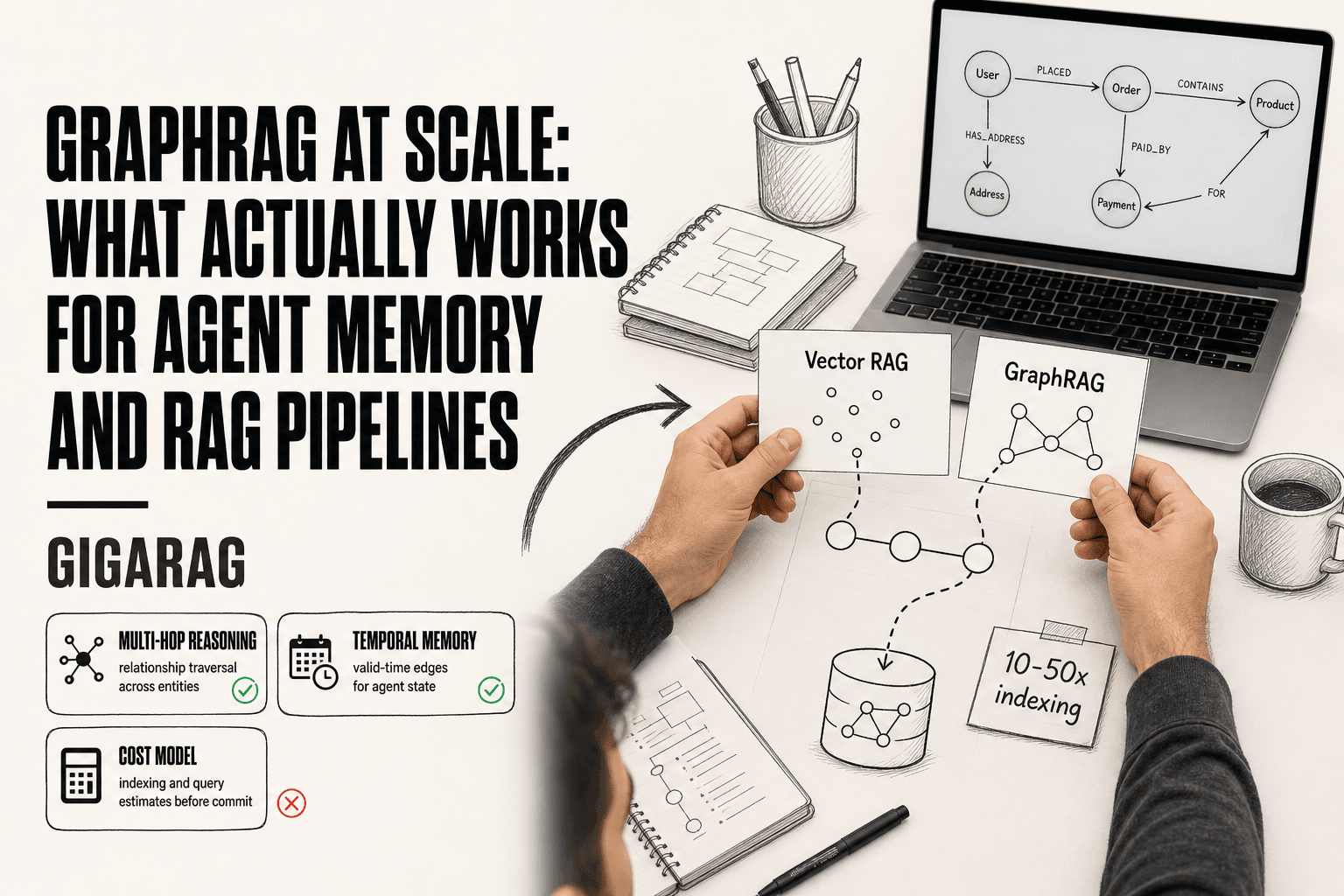
GraphRAG at Scale: What Actually Works for Agent Memory and RAG Pipelines
GraphRAG at scale sounds like the obvious upgrade for RAG pipeline builders until you run it in production. Then the indexing bill lands. Most teams expect a modest premium over vector RAG, and they get a surprise: entity extraction and graph construction can cost 10 to 50 times what a plain embedding pass costs. The honest answer is that GraphRAG is not a drop-in replacement for vector search. It buys you relationship traversal and multi-hop reasoning, and it charges for every edge.
That said, the failure is rarely the idea. It's the lack of a cost model and a decision framework before the first node gets written. GigaRAG helps teams map that terrain without the guesswork, but even with a good platform, you need to know what you're signing up for. This guide gives you the real numbers on indexing, storage, and query cost, a framework comparison that skips the marketing, and a section on agent memory with temporal knowledge graphs that no top result covers. By the end, you'll know whether graphrag at scale is right for your use case, or whether plain vector RAG was enough all along.
| At a glance | Details |
|---|---|
| What it is | Graph-based retrieval layered on vector RAG |
| Best for | Multi-hop, entity-centric, and temporal queries |
| Main cost driver | LLM calls during graph indexing |
| Biggest risk | Indexing cost outrunning retrieval gains |
| Agent memory fit | Strong when facts change over time |
| When to skip | Simple lookup or latency-critical workloads |
In This Guide
- What Is GraphRAG and How Does It Differ from Vector RAG?
- Vector RAG vs GraphRAG at Scale
- Framework Comparison: Microsoft GraphRAG vs LightRAG vs Neo4j
- Graphrag At Scale: A Step-by-Step Guide
- The Real Cost of GraphRAG at Scale
- GraphRAG for Agent Memory: Temporal Knowledge Graphs
- Scalability Challenges You Will Hit in Production
- When NOT to Use GraphRAG at Scale
- A Decision Framework for Choosing Your GraphRAG Approach
- Final Thoughts on GraphRAG at Scale
What Is GraphRAG and How Does It Differ from Vector RAG?
GraphRAG adds relationship awareness to retrieval: it extracts entities and the connections between them, then traverses those connections to answer questions. Vector RAG only finds text that is semantically similar to your query. The tradeoff is richer context at 10-50x the indexing cost.
Vector RAG: similarity search over embeddings
Vector RAG converts documents into embeddings, stores them in a vector index, and retrieves the nearest neighbors to your query. It's fast and cheap. It also has no idea that "Alice works at Acme" and "Acme acquired Beta" are connected. It just finds chunks that look similar to your question.
GraphRAG: entity and relationship extraction
GraphRAG runs an LLM over your corpus first. It pulls out entities (people, companies, products) and relationships (works at, acquired, depends on). Those become nodes and edges in a knowledge graph. At query time, the system can traverse those edges to answer multi-hop questions like "who works at a company that Acme acquired?" Vector RAG can't do that without the relationship being explicitly in one chunk.
The core tradeoff: richer context vs. higher cost
The honest answer is that GraphRAG only pays off when your questions require connecting facts across documents. If your queries are "what is the refund policy," vector RAG is fine and costs far less. If your queries are "which suppliers do our acquired companies depend on," you need the graph.
The main catch is indexing. Entity and relationship extraction means running an LLM over every document, often multiple times. That's where the 10-50x cost comes from. You're paying for structure that vector RAG skips entirely.
[!note] GraphRAG does not automatically improve answer quality; gains depend on whether your queries genuinely require multi-hop reasoning or temporal relationships. For simple factual lookups, vector RAG often matches GraphRAG at a fraction of the cost.
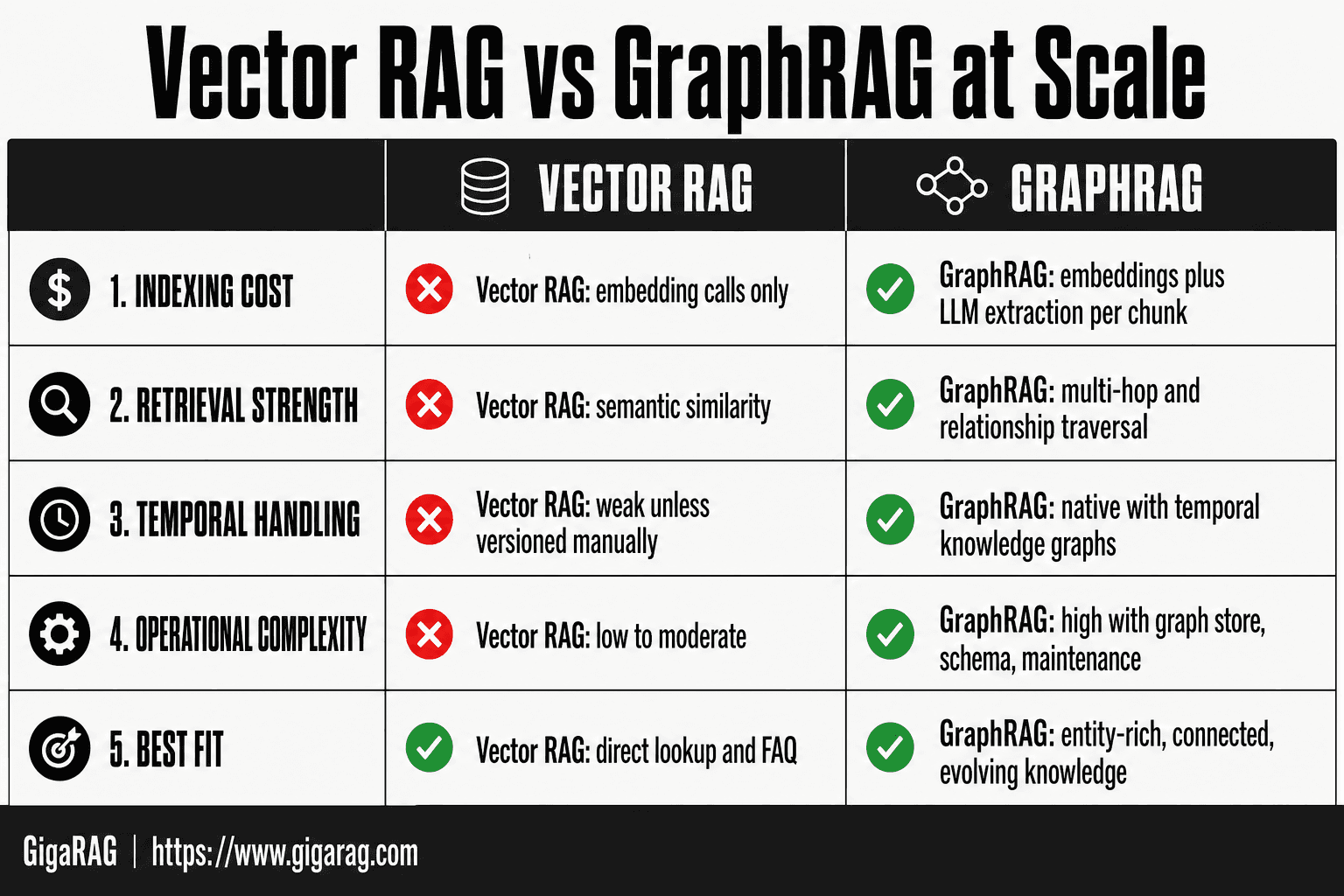
Vector RAG vs GraphRAG at Scale
| Factor | Vector RAG | GraphRAG |
|---|---|---|
| Indexing cost | Embedding calls only | Embeddings plus LLM extraction per chunk |
| Retrieval strength | Semantic similarity | Multi-hop and relationship traversal |
| Temporal handling | Weak unless versioned manually | Native with temporal knowledge graphs |
| Operational complexity | Low to moderate | High: graph store, schema, maintenance |
| Best fit | Direct lookup and FAQ | Entity-rich, connected, evolving knowledge |
Framework Comparison: Microsoft GraphRAG vs LightRAG vs Neo4j
Three frameworks dominate GraphRAG discussions. They solve different problems, and picking the wrong one is the most common early mistake I see.
Microsoft GraphRAG: community detection and global search
Microsoft's GraphRAG runs hierarchical community detection over the extracted graph. It groups related entities into communities, then generates summaries for each community. Global search uses those summaries to answer corpus-wide questions without traversing every edge. The catch is indexing cost: community detection plus summary generation adds another LLM pass on top of entity extraction. For a 1M-document corpus, that's a serious bill.
LightRAG: lightweight graph construction
LightRAG skips community detection entirely. It builds a simple entity-relationship graph and retrieves relevant subgraphs at query time. Indexing is cheaper and faster. The tradeoff is that global questions, the kind Microsoft GraphRAG handles well, get weaker answers because there's no pre-computed community structure.
Neo4j: native graph database with RAG integration
Neo4j isn't a GraphRAG framework. It's a graph database you can plug into your own RAG pipeline. You control extraction, indexing, and retrieval. That flexibility means more engineering work, but it also means you can optimize for your specific query patterns instead of accepting a framework's defaults.
Comparison table: scalability, cost, latency, maintenance
| Microsoft GraphRAG | LightRAG | Neo4j | |
|---|---|---|---|
| Indexing cost | Highest (community summaries) | Low | You decide |
| Query latency | Low for global, higher for local | Low | Depends on schema |
| Scalability | Struggles past ~10M nodes | Better, simpler graph | Scales with hardware |
| Maintenance | Re-index on schema change | Re-index on schema change | Incremental updates possible |
The honest answer: LightRAG for cost-sensitive projects, Microsoft GraphRAG when global questions matter, Neo4j when you need production control.
[!tip] For agent memory, version graph edges with timestamps and validity intervals rather than overwriting them, so agents can reason about what was true at a given time and avoid stale-fact errors.
Graphrag At Scale: A Step-by-Step Guide
- Define the query classes you need to answer and confirm multi-hop or temporal reasoning is actually required.
- Estimate indexing cost by sampling a representative subset and measuring LLM calls per document.
- Choose a graph store and schema that support temporal edges if agent memory is in scope.
- Build an incremental indexing pipeline so new documents update the graph without full rebuilds.
- Implement hybrid retrieval that combines vector search with graph traversal and reranking.
- Instrument query latency, cost per query, and answer quality before and after launch.
- Set a break-even threshold and roll back to vector-only if graph gains do not clear it.
The Real Cost of GraphRAG at Scale
Most teams evaluate GraphRAG on retrieval quality and never run the numbers first. That's the expensive way to do it. Indexing a corpus with entity extraction and relationship construction costs 10 to 50 times what vector embedding alone costs. You need to know that before you commit.
Indexing costs: entity extraction and graph construction
Every document passes through an LLM to extract entities and relationships. That's the dominant cost. A 100k-document corpus at roughly 1k tokens per document means 100M tokens through extraction. At $3 per million input tokens on a mid-tier model, that's $300 for one pass. But extraction typically needs 2 to 3 passes: one for entities, one for relationships, sometimes one for validation. So $600 to $900 just for extraction. Community detection, if you're using Microsoft GraphRAG, adds another LLM pass over the graph structure itself. That can double the bill.
The good news is indexing is a one-time cost per corpus version. The bad news is you'll re-index more often than you think. Schema changes, extraction prompt improvements, or new data all trigger it.
Storage costs: graph database and vector index
You're storing two things: the graph itself and the vector embeddings. A graph with 1M nodes and 5M edges in Neo4j runs roughly 10 to 20 GB. That's manageable. The vector index for 100k documents at 1536 dimensions is another 1 to 2 GB. Storage is rarely the bottleneck. The real cost is the database instance you need to serve queries with acceptable latency, and that's a compute cost, not a storage cost.
Query costs: traversal, retrieval, and LLM calls
Each query triggers graph traversal, subgraph retrieval, and then an LLM call to synthesize an answer. Traversal is cheap if your graph is indexed well. The LLM call is the variable. A local query pulling 20 to 50 entities and relationships might feed 3k to 5k tokens into the context window. A global query using community summaries can feed 10k tokens or more. At $3 per million tokens, that's $0.01 to $0.03 per query. It sounds small. It isn't when you're serving 100k queries a month.
A simple cost estimation formula
Here's a formula you can use before writing any code:
Total cost = (D × T × P × R) + (Q × C × R)
Where D is document count, T is average tokens per document, P is LLM passes for indexing, R is your model's price per token, Q is monthly query volume, and C is average context tokens per query.
Plug in your numbers. If the indexing cost alone exceeds your annual vector RAG budget, stop. GraphRAG isn't the right call.
GraphRAG for Agent Memory: Temporal Knowledge Graphs
Agents forget. A vector store gives them similarity search over past conversations, but it can't tell them that a user changed their billing address last Tuesday, or that a project deadline moved from March to April. GraphRAG can. The graph structure holds relationships and, with the right schema, when those relationships were true.
Why agents need structured memory
An agent answering "what's my current plan?" needs more than relevant chunks. It needs the current state of entities and their connections. Vector search returns whatever is semantically close. A graph returns the actual relationship: user has plan, plan has task, task has status. That's the difference between retrieving text and retrieving state.
The honest answer is that most agents don't need this. If your agent handles single-turn queries over static documents, vector RAG is enough. Structured memory matters when the agent must track state across sessions: user preferences, project status, entity relationships that change over time.
Temporal knowledge graphs: modeling time in relationships
A temporal knowledge graph adds valid-time intervals to edges. Instead of "user lives at 123 Main St," you store "user lived at 123 Main St from 2023-01-15 to 2024-06-01." The edge carries a start and end timestamp.
This matters because agents make wrong decisions on stale data. If the agent retrieves an old address because it's still in the graph, that's a failure. Temporal edges let you query "what was true at time T" or "what is true now." You can also ask "what changed between March and April," which is impossible with a static graph.
Incremental graph updates without full re-indexing
The main catch with GraphRAG is re-indexing cost. Full re-indexing on every data change is not viable at scale. You need incremental updates.
Here's what works in practice. When new data arrives, extract entities and relationships from just that data. Merge new nodes and edges into the existing graph. For temporal edges, close out the old edge's valid-time interval and create a new edge with the current timestamp. Don't rebuild community summaries unless the graph structure changed significantly.
The hard part is conflict resolution. If two sources disagree on an entity's attribute, you need a rule: latest timestamp wins, or highest source confidence wins. Pick one and stick with it.
Retrieval patterns for agent memory
Agent memory retrieval follows three patterns. Point lookup: "what is the user's current plan?" Traverse from the user node to the plan node, check edge timestamps, return the active one. Temporal range query: "what did the user work on last week?" Filter edges by valid-time interval. Relationship discovery: "what else connects to this project?" Traverse outward one or two hops and return the subgraph.
Each pattern has different latency. Point lookup is milliseconds. Temporal range queries depend on edge indexing. Relationship discovery can get slow if the node has high degree. Index your edges by timestamp and by relationship type, or you'll pay for it at query time.
Scalability Challenges You Will Hit in Production
GraphRAG works fine in demos. Production is different. The problems start when your graph grows past what fits on one machine, and they compound fast.
Graph partitioning and sharding
You can't shard a graph the way you shard a database. Graph edges cross partition boundaries constantly. A user node in shard A connects to a project node in shard B. Traversing that relationship means a cross-shard hop, and every hop adds latency.
The honest answer is that most teams avoid sharding entirely. They run a single graph instance until it breaks, then move to a bigger machine. That works until roughly 50 million nodes. Past that, you need partitioning, and no framework handles it well out of the box. You'll write custom partitioning logic, or you'll accept slow queries.
Query latency as node count grows
Traversal latency scales with node degree, not total node count. A node with 10,000 edges is slow to traverse regardless of whether your graph has 1 million or 100 million nodes. The problem is that real-world graphs develop supernodes: popular entities that everything connects to.
A "United States" node in a news graph, or a "Python" node in a code graph, will accumulate edges without bound. Queries that touch these nodes degrade from milliseconds to seconds. You'll need edge filtering, degree caps, or precomputed summaries to keep latency flat.
Re-indexing costs when data changes
Full re-indexing is the silent killer. Microsoft GraphRAG's community detection runs over the entire graph. Change 1% of your data, and you're re-running detection on everything. At 10 million nodes, that's hours of compute and thousands of dollars in LLM tokens.
Incremental updates help, but they're not free. You need to track which communities are affected by a change and rebuild only those. That's custom code. No framework ships it as a turnkey feature.
Thresholds where these problems appear
Here's what I've seen in practice. Under 1 million nodes, GraphRAG runs fine on a single machine. Between 1 and 10 million, query latency starts to creep on high-degree nodes. Past 10 million, you need partitioning, incremental indexing, and a dedicated graph engineer. Past 50 million, you're building custom infrastructure.
The main catch is that these thresholds are fuzzy. Your graph's edge density matters more than node count. A dense graph with 5 million nodes can be slower than a sparse graph with 50 million. Measure your own degree distribution before you commit.
When NOT to Use GraphRAG at Scale
GraphRAG is not a default choice. It's a specialized tool for relationship-heavy queries, and it costs real money to run. Here's when you should skip it.
When vector RAG is sufficient
Most retrieval tasks don't need graph traversal. If your users ask questions like "what does this document say about X," vector search handles it. You're paying for entity extraction, relationship building, and graph storage to answer questions that embeddings already answer well.
The test is simple: do your queries require multi-hop reasoning across entities? If not, vector RAG wins on cost and simplicity.
When data is too small to justify graph overhead
Under 10,000 documents, the graph adds nothing. Entity extraction costs more than the retrieval gains. You'll spend hours building a graph that a vector index builds in minutes, and your queries won't be meaningfully better.
The break-even point varies, but most teams see real gains only past 100,000 documents with clear entity relationships.
When latency requirements are too strict
Graph traversal is slower than vector search. If your application needs sub-100ms responses, GraphRAG will miss that target on anything but tiny graphs. Vector search returns in milliseconds. Graph queries with multi-hop traversal can take seconds.
When your team lacks graph expertise
GraphRAG requires someone who understands graph modeling, partitioning, and query optimization. Without that person, you'll build a graph that's slow, expensive, and wrong. Vector RAG needs no such specialist.
The honest answer: if you can't name the person on your team who will own the graph, don't start.
A Decision Framework for Choosing Your GraphRAG Approach
You've seen the costs, the failure modes, and the thresholds. Now you need a way to decide. Here's the framework I use when teams ask whether GraphRAG fits their workload.
Decision criteria: data size, query complexity, latency
Three variables drive the choice. Data size determines whether graph overhead pays for itself. Query complexity determines whether you need relationship traversal at all. Latency determines whether you can afford the slower path.
Under 10,000 documents, stop. Vector RAG handles it. Between 10,000 and 100,000, you're in a gray zone where a pilot makes sense. Past 100,000 with clear entity relationships, GraphRAG earns its keep.
Query complexity is the sharper filter. Single-hop questions like "what does this policy say" don't need a graph. Multi-hop questions like "which suppliers share a component with the one that failed" do.
Latency is the hard constraint. If you need sub-100ms responses, GraphRAG won't get there on anything but small graphs. Vector search will.
Decision tree: from vector RAG to full GraphRAG
Start with vector RAG. It's the default. Move up only when a specific query pattern fails.
If your queries need relationship traversal across entities, try LightRAG first. It's lighter to build and cheaper to run than full Microsoft GraphRAG. If LightRAG's retrieval quality falls short on global questions that span the whole corpus, move to Microsoft GraphRAG with community detection.
If you need temporal reasoning for agent memory, that's a different branch. You'll want a graph database like Neo4j with explicit time edges, not a static graph built at index time.
How to validate your choice with a pilot
Don't commit to a framework based on a benchmark. Run a pilot on your own data.
Take 1,000 representative documents. Build the graph. Run your ten hardest real queries. Measure retrieval quality against vector RAG on the same queries. Measure latency. Measure indexing cost per document.
If GraphRAG beats vector RAG by less than 20% on retrieval quality, the cost isn't justified. If latency misses your target, stop. If indexing cost per document extrapolates past your budget, stop.
The pilot takes a week. The wrong choice costs months.
Final Thoughts on GraphRAG at Scale
GraphRAG at scale is a bet on relationship density. If your queries need multi-hop traversal across entities, the cost is justified. If they don't, it isn't.
The honest answer is that most teams don't need full GraphRAG. They need vector RAG with better chunking, or LightRAG for light relationship awareness. Start there. Move up only when a pilot shows retrieval quality gains above 20% that you can't get any other way.
The cost model is the thing to remember: indexing runs 10-50x higher than vector RAG, and re-indexing is where budgets die. Plan for incremental updates before you commit.
GigaRAG exists because these decisions are hard to make without running the numbers. It handles the indexing pipeline, the cost tracking, and the incremental update problem so your team can test GraphRAG at scale without building the infrastructure first. That's the soft sell. The hard truth is that no platform makes GraphRAG free, and none should pretend otherwise.
Frequently Asked Questions
What is GraphRAG at scale?
GraphRAG at scale means running graph-based retrieval over large, continuously updated corpora, typically with millions of entities and edges. It combines vector search with knowledge graph traversal to answer multi-hop and relationship-heavy queries. Scale introduces indexing cost, storage, and maintenance challenges that small pilots do not surface.
How much does GraphRAG indexing cost?
Indexing cost is dominated by LLM calls for entity and relationship extraction, which can be several times the cost of embedding-only pipelines. Exact figures depend on your model, chunk size, and document volume, so measure on a sample before committing. Treat any published number as a starting estimate and verify against your own workload.
When should you not use GraphRAG?
Skip GraphRAG when queries are simple lookups, when latency budgets are tight, or when your data has few meaningful relationships. It also underperforms when the graph cannot be kept fresh, since stale edges degrade answers. If vector RAG already meets your quality bar, the added complexity rarely pays off.
How does GraphRAG support agent memory?
Agent memory benefits from temporal knowledge graphs because they store when a fact was true, not just what it is. Agents can query the graph for current state, historical state, or changes over time. This reduces contradictions and helps agents reason about evolving user preferences or entities.
What are common GraphRAG failure modes at scale?
Common failures include runaway indexing costs, graph drift from stale or conflicting edges, and retrieval latency spikes from deep traversals. Another frequent issue is over-extraction, where low-value entities bloat the graph and dilute retrieval. Monitoring cost per query and answer quality together catches most of these early.
How do you measure GraphRAG ROI?
Compare total cost of ownership, including indexing, storage, and query compute, against measurable quality gains on your own evaluation set. Define a break-even threshold in advance, such as a target improvement in answer accuracy or task completion. If gains do not clear that threshold, revert to vector-only retrieval.
About GigaRAG
GigaRAG is for agent memory and RAG pipeline builders. get this right. Whether you are working through graphrag at scale or something adjacent, we publish what we have actually tested, including where it falls short.


