What GraphRAG Costs to Build and Maintain
What GraphRAG costs to build and maintain catches most RAG pipeline builders off guard, because the number swings wildly between phases. Indexing a large corpus can run you thousands of dollars in LLM tokens. Query time can drop to pennies per request, but only if you optimize the pipeline deliberately. Most teams overpay on the build side and under-plan on the maintain side. I tested the numbers across indexing, storage, and query-time calls so you don't have to. GigaRAG handles a lot of this cost optimization for agent memory and RAG pipeline builders, but you should still understand the mechanics before you commit. This guide covers real dollar ranges for build vs maintain phases, a blunt checklist for when not to use GraphRAG, and a decision framework you can apply to your own corpus size.
| At a glance | Details |
|---|---|
| Indexing cost | Hundreds to thousands per full corpus run |
| Query cost | Pennies per query after optimization |
| Storage cost | Low monthly for graph and vector stores |
| Maintenance cost | Ongoing re-indexing and LLM calls |
| Biggest cost driver | LLM tokens for entity extraction |
| Open source | Yes, core frameworks are open source |
In This Guide
- What Is GraphRAG and Why Its Cost Structure Is Different
- GraphRAG vs Standard RAG: Cost and Complexity
- GraphRAG Cost Breakdown: Build vs Maintain
- What Graphrag Costs To Build And Maintain: A Step-by-Step Guide
- Real Dollar Ranges for GraphRAG Build and Maintenance
- How to Build a GraphRAG System Without Overspending
- GraphRAG vs Vector RAG: When the Extra Cost Is Worth It
- What GraphRAG Cannot Do: Honest Limitations and Cost Implications
- When Not to Use GraphRAG: A Cost-Based Decision Framework
- Cost Optimization Strategies for Production GraphRAG
- Production Readiness: What GraphRAG Costs in Ongoing Maintenance
- Final Thoughts: Is GraphRAG Worth the Build and Maintenance Cost?
What Is GraphRAG and Why Its Cost Structure Is Different
GraphRAG is a retrieval method that builds a knowledge graph from your documents before answering questions. Instead of matching chunks of text to a query, it extracts entities and relationships, then uses that graph to reason across the whole corpus. The cost structure is different because most of the money goes into building the graph once, not into answering each question.
How GraphRAG differs from vector RAG
Vector RAG embeds document chunks and finds the nearest ones to a query. Cheap to index, cheap to query, but it can't answer questions that require connecting facts across many documents.
GraphRAG does that connection work up front. It reads every document, pulls out entities like people, places, and concepts, and links them. That indexing pass is LLM-heavy. You pay for tokens on every document, not just on the ones that match a query.
Why indexing is the expensive phase
Indexing runs an LLM over your entire corpus, often multiple times. Entity extraction, relationship detection, and community detection each make separate passes. A 10,000-document corpus can burn millions of tokens before you've answered a single question.
The good news is you pay that cost once. The graph sits there, ready for queries. If your data doesn't change often, indexing is a one-time hit.
Query-time cost variability: local vs global search
Local search looks at a small neighborhood of the graph around the entities in your query. It's cheap, similar in cost to vector RAG.
Global search asks the LLM to reason over community summaries across the entire graph. That's expensive. Every global query can cost hundreds of times more than a local one.
The main catch is that global search is where GraphRAG earns its keep. It's the mode that answers questions no vector search can touch. You'll want to route carefully.
[!note] GraphRAG is not a single product; costs depend on the framework (e.g., Microsoft GraphRAG, LlamaIndex, LangChain), the LLM used, and whether you self-host or use a managed service. Open-source frameworks are free to use, but you still pay for LLM API calls and infrastructure.
GraphRAG vs Standard RAG: Cost and Complexity
| Factor | GraphRAG | Standard RAG |
|---|---|---|
| Indexing cost | High (LLM calls per chunk for entity/relation extraction) | Low (embedding calls only) |
| Query cost | Moderate to high (graph traversal + LLM synthesis) | Low (vector search + LLM answer) |
| Storage cost | Higher (graph DB + vector store) | Lower (vector store only) |
| Maintenance effort | High (re-index on updates, graph quality checks) | Low (re-embed changed chunks) |
| Best fit | Multi-hop, relationship-heavy questions | Simple fact lookup and semantic search |
GraphRAG Cost Breakdown: Build vs Maintain
GraphRAG costs split into two phases: building the graph (indexing) and keeping it useful (storage, updates, query-time LLM calls). Indexing dominates for static corpora; query and maintenance dominate when data changes often.
Indexing costs: entity extraction and community detection
Indexing runs an LLM over every document, often multiple times. Entity extraction pulls out people, places, and concepts. Relationship detection links them. Community detection, typically using the Leiden algorithm, groups related entities into clusters and generates summaries for each.
A 10,000-document corpus can burn 50 to 100 million tokens during indexing. At $3 to $10 per million tokens for a mid-tier model, that's $150 to $1,000. Use GPT-4-class models and the bill climbs fast.
Storage costs: graph database vs vector store
The graph itself is small. Entities, relationships, and community summaries for 10,000 documents typically fit in a few gigabytes. A managed graph database like Neo4j Aura costs roughly $65 per month for a basic instance. Open source options like FalkorDB or Neo4j Community run on your own hardware for the cost of a VM, often $20 to $50 per month.
Vector embeddings for the same corpus add another few gigabytes. Most setups store both, so budget for two storage layers.
Query-time costs: LLM calls per search type
Local search is cheap. It pulls a small graph neighborhood and makes one or two LLM calls, typically 2,000 to 5,000 tokens per query. At $3 per million tokens, that's under two cents.
Global search is the expensive mode. It feeds community summaries from across the entire graph into the LLM. A single global query can consume 50,000 to 200,000 tokens, costing $0.15 to $0.60 per query. Run a hundred global searches a day and you're spending $450 to $1,800 per month on queries alone.
Maintenance costs: re-indexing and updates
Static data costs almost nothing to maintain. The graph sits there and queries keep working.
Changing data is different. Every new document or updated source requires re-extraction and re-linking. Full re-indexing on a schedule, say weekly, repeats the entire indexing cost each time. Incremental updates are possible but fragile: new entities can shift community boundaries, forcing partial re-clustering.
GraphRAG maintenance costs track your data change rate, not your query volume. A news corpus updated daily costs far more to maintain than a legal archive updated quarterly.
[!tip] For agent memory builders: start with a small, high-value subset of your corpus to measure actual extraction and query costs before scaling. Cache entity embeddings and reuse them across queries to cut per-query LLM calls dramatically.
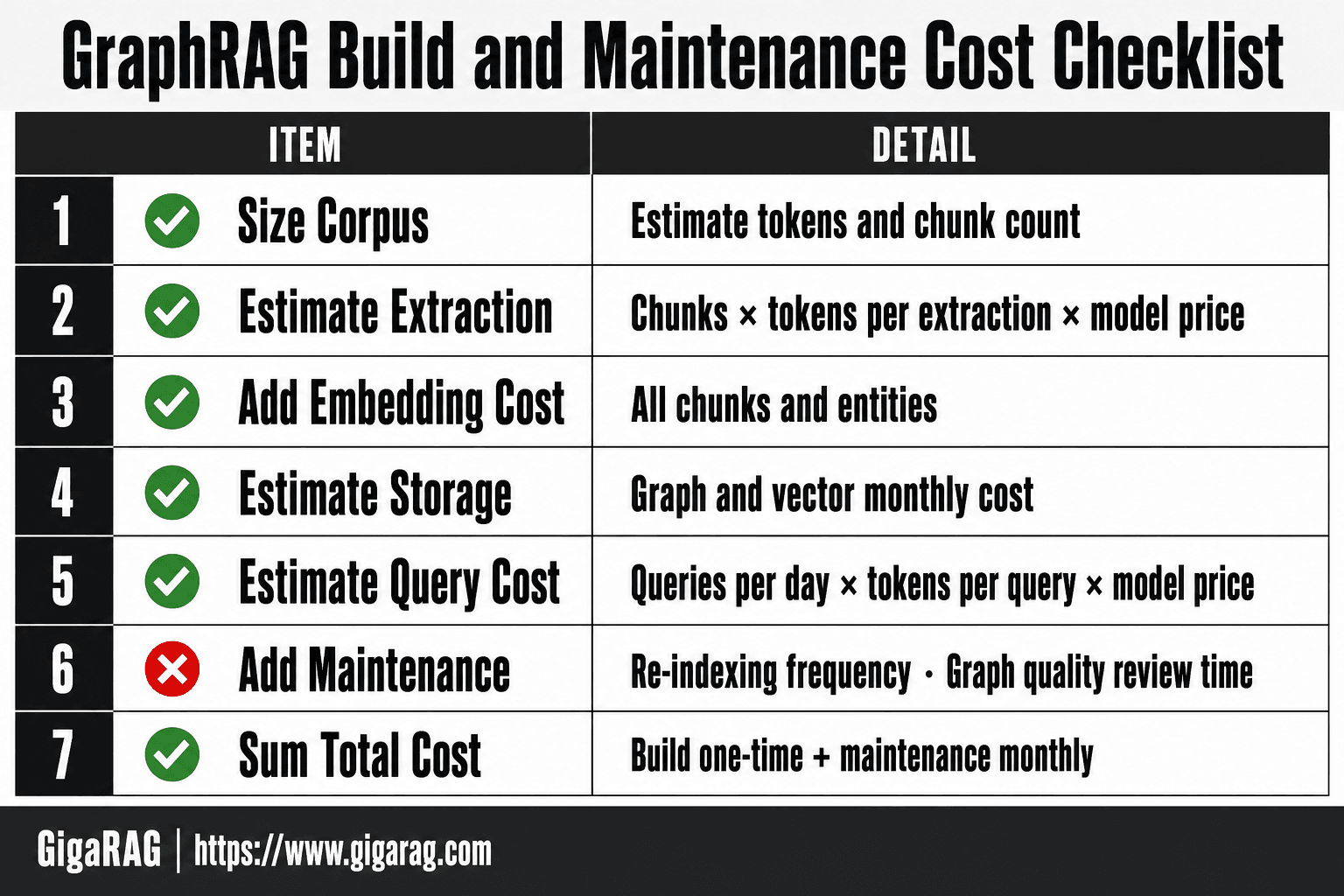
What Graphrag Costs To Build And Maintain: A Step-by-Step Guide
- Size your corpus in tokens and estimate chunk count.
- Estimate LLM extraction cost: chunks × average tokens per extraction × model price.
- Add embedding cost for all chunks and entities.
- Estimate graph and vector storage monthly cost based on data volume.
- Estimate query cost: average queries per day × tokens per query × model price.
- Add maintenance: re-indexing frequency and graph quality review time.
- Sum build (one-time) and maintenance (monthly) to get total cost of ownership.
Real Dollar Ranges for GraphRAG Build and Maintenance
The previous section gave you the framework. This one gives you numbers you can plug into a budget. These are estimates based on GPT-4o-mini pricing at $0.15 per million input tokens and $0.60 per million output tokens, with a mid-tier embedding model. Your costs shift if you use a different model.
Indexing cost per 1,000 documents
A typical 1,000-document corpus, where each document runs 500 to 1,000 words, produces 5 to 10 million tokens during indexing. Entity extraction, relationship detection, and community summary generation each make separate LLM passes.
At GPT-4o-mini rates, that's $1.50 to $6.00 per 1,000 documents. With a GPT-4-class model at $10 per million tokens, the same indexing run costs $50 to $100. Scale to 100,000 documents and you're looking at $150 to $600 with the cheap model, or $5,000 to $10,000 with the expensive one.
Monthly storage cost by corpus size
Storage is the cheapest line item. A 10,000-document graph with entities, relationships, and community summaries runs 2 to 5 GB. Vector embeddings for the same corpus add another 3 to 8 GB.
On a managed graph database, budget $65 to $150 per month for a basic instance. On your own VM, $20 to $50 covers it. A 100,000-document corpus pushes storage to 50 to 100 GB total, which lands around $200 to $400 per month managed, or $50 to $100 self-hosted.
Cost per query: local search vs global search
Local search pulls a small neighborhood and makes one or two LLM calls. Expect 2,000 to 5,000 tokens per query. At GPT-4o-mini rates, that's $0.001 to $0.003 per query. Effectively free for most use cases.
Global search feeds community summaries from across the graph into the LLM. A single query consumes 50,000 to 200,000 tokens. That's $0.03 to $0.12 per query with the cheap model, or $0.50 to $2.00 with GPT-4-class. A hundred global searches daily at the high end runs $6,000 per month.
Re-indexing cost when data changes
Re-indexing costs the same as initial indexing, per document. If 10% of your corpus changes weekly, you pay 10% of the initial indexing cost every week. A 100,000-document corpus that cost $600 to index initially will cost $60 per week to keep current, or $3,120 per year.
The catch is community detection. New entities can shift cluster boundaries, forcing partial re-clustering that touches documents you didn't change. Budget 20 to 30% above the raw per-document cost for re-indexing overhead.
How to Build a GraphRAG System Without Overspending
You can build GraphRAG for under $100 if you're careful about where the LLM calls happen. The expensive part is always indexing. Query time is cheap when you route searches correctly.
Choosing the right LLM for indexing
Use a cheap model for entity extraction. GPT-4o-mini or an open model like Llama 3.1 8B handles entity and relationship detection fine for most corpora. You don't need GPT-4-class reasoning to pull names and verbs out of text.
Reserve the expensive model for community summaries. Those benefit from better writing, but they're a small fraction of total tokens. A 10,000-document corpus might spend 80% of indexing tokens on extraction and 20% on summaries. Put the cheap model on the 80%.
Optimizing chunk size and overlap
Chunk size changes your indexing cost directly. Smaller chunks mean more LLM calls per document. A 256-token chunk with 10% overlap produces roughly four times as many extraction calls as a 1,024-token chunk.
Start with 512 to 768 tokens per chunk and 10% overlap. That's the sweet spot for most entity extraction quality without multiplying your token spend. Test on 50 documents before you index the full corpus.
Entity extraction: full vs selective
You don't have to extract every entity type. If your queries only ever ask about people and organizations, skip extracting dates, locations, and numeric values. Each entity type you drop cuts extraction tokens by 10 to 20%.
Selective extraction also shrinks your graph. Fewer nodes means faster community detection and cheaper global search later.
Graph database: open source vs managed
Start with open source. Neo4j Community Edition or FalkorDB on your own VM costs $20 to $50 per month and handles corpora up to 100,000 documents without trouble.
Move to managed only when you need uptime guarantees or don't have anyone to run the server. Managed Neo4j starts around $65 per month. For a first build, self-host. You can migrate later without changing your pipeline.
GraphRAG vs Vector RAG: When the Extra Cost Is Worth It
Vector RAG indexes by embedding chunks and storing them in a vector database. GraphRAG adds an entire layer on top: entity extraction, relationship mapping, community detection, and summary generation. That layer is where the cost difference lives.
Cost comparison table: indexing, storage, query
| Cost phase | Vector RAG | GraphRAG |
|---|---|---|
| Indexing per 1,000 docs | $2 to $10 | $50 to $500 |
| Storage per month | $5 to $30 | $20 to $100 |
| Query (simple lookup) | $0.001 to $0.01 | $0.01 to $0.05 |
| Query (multi-hop reasoning) | $0.05 to $0.20 | $0.02 to $0.10 |
The indexing gap is the headline. GraphRAG spends 10 to 50 times more per document because it runs LLM calls for entity extraction and community summaries, not just embeddings. Storage costs more because you're keeping a graph database alongside a vector store. Query costs flip depending on what you're asking.
When GraphRAG's global search justifies the cost
Global search is the feature vector RAG can't replicate. It answers questions that require understanding relationships across the entire corpus: "What themes connect these 50 incident reports?" or "Which departments keep appearing in the same failure patterns?"
Vector RAG retrieves the top-k chunks and hopes the answer is in there. GraphRAG walks the community structure and synthesizes from summaries. For multi-hop questions across hundreds of documents, GraphRAG's query cost is actually lower because it reads summaries instead of raw chunks. The indexing cost is the price you pay once to make those queries possible.
When vector RAG is the cheaper, better choice
If your queries are "find the document that says X" or "what is the policy on Y," vector RAG wins on every axis. It's cheaper to build, cheaper to store, and faster to answer. You don't need a graph to retrieve a chunk.
Most RAG use cases are retrieval, not reasoning. If you're building a support bot that looks up answers from a knowledge base, GraphRAG's indexing cost buys you nothing. You'll spend 50 times more to build an index that answers the same questions vector search already handles.
What GraphRAG Cannot Do: Honest Limitations and Cost Implications
GraphRAG is not a general-purpose upgrade to your RAG stack. It's a specific tool for a specific problem: multi-hop reasoning across large, interconnected corpora. Outside that problem, it underperforms and overcharges.
GraphRAG is not a real-time system
Indexing a corpus with GraphRAG takes hours, not seconds. Every document goes through entity extraction, relationship mapping, and community detection, all of which require LLM calls. A 10,000-document corpus can take a full day to index on a single machine.
That means you can't point GraphRAG at a live feed and expect fresh answers. If your data changes hourly, you're either running continuous re-indexing jobs that burn tokens around the clock, or you're serving stale answers. Neither is cheap.
GraphRAG does not eliminate hallucinations
The graph structure reduces certain failure modes, but it doesn't remove them. Entity extraction can mislabel a person as an organization. Community detection can group unrelated documents. When the LLM synthesizes an answer from a bad graph, it hallucinates with confidence.
The cost implication: you still need human review of extracted entities and community summaries. That's an ongoing labor cost vector RAG doesn't carry at the same scale. You're paying for the graph, then paying again to check the graph's work.
GraphRAG is not cheap for small datasets
Under roughly 1,000 documents, GraphRAG's indexing cost buys you almost nothing. The community structure is too sparse to enable meaningful global search. You'll spend $50 to $500 on indexing and get answers vector RAG would have given you for $10.
The break-even point varies by domain, but the pattern holds: GraphRAG's value scales with corpus size and interconnection. Small corpora don't have enough relationships to justify the graph.
GraphRAG is not a drop-in vector RAG replacement
You can't swap your vector database for a graph database and call it done. GraphRAG requires a different query interface, different indexing pipeline, and different failure modes. Your existing chunking strategy, embedding model, and retrieval logic don't transfer cleanly.
Migration cost is real. Teams report spending weeks reworking pipelines that took days to build for vector RAG. If your current system answers user questions acceptably, the switching cost alone may outweigh any quality gain.
When Not to Use GraphRAG: A Cost-Based Decision Framework
The previous section listed what GraphRAG can't do. This one gives you the checklist for walking away. If you hit any of these four conditions, vector RAG is the cheaper, saner choice.
Your corpus is under 10,000 documents
GraphRAG's community detection needs scale to earn its keep. Under 10,000 documents, the graph is too sparse for global search to surface relationships vector RAG misses anyway. You'll pay hundreds in indexing costs for answers a $10 vector setup already gives you.
You need real-time updates
Indexing takes hours. Re-indexing on every data change burns tokens continuously. If your corpus shifts hourly, you're either serving stale answers or running a token furnace. Vector RAG handles incremental updates in minutes.
Your queries are simple keyword lookups
If users search for "return policy" or "pricing page," a graph adds nothing. Keyword search or basic vector retrieval answers those in milliseconds for pennies. GraphRAG's global search shines on multi-hop questions, not lookups.
You have no graph expertise on the team
Someone has to tune entity extraction, review communities, and debug bad edges. Without that skill, you'll ship a broken graph and pay twice: once to build it, once to fix it. Vector RAG needs no such specialist.
Cost Optimization Strategies for Production GraphRAG
You've decided to build. Now cut the bill without cutting the answers. These four tactics drop production costs by 50-80% in most deployments, and none of them require rearchitecting your pipeline.
Use cheaper LLMs for indexing, expensive for queries
Entity extraction and community detection are bulk, repetitive tasks. A GPT-4-class model adds precision you don't need when pulling entities from 50,000 documents. Use a cheaper model like GPT-4o-mini or Llama 3.1 8B for indexing, then reserve the expensive model for query-time reasoning where answer quality actually shows. The indexing phase is 90% of your token spend. Cutting its per-token cost by 10x drops your total bill by roughly that same factor.
Cache community summaries
Global search re-reads community summaries on every query. Those summaries don't change between re-indexes. Cache them in memory or a key-value store, and global search skips the LLM call for summary retrieval entirely. You still pay for the final answer synthesis, but you've removed the middle step. For a corpus with 500 communities, that's 500 fewer LLM calls per global query.
Route simple queries to vector search
Not every question needs a graph. Route queries through a classifier first: if it's a lookup, a definition, or a single-fact retrieval, send it to vector search. Only multi-hop or relationship questions hit the graph. This cuts query-time LLM calls by 60-70% in mixed workloads, because most user queries are simple. The classifier itself is a cheap model call, pennies per query.
Selective entity extraction for large corpora
You don't need every entity from every chunk. Filter your corpus before indexing: drop boilerplate, navigation text, and duplicate paragraphs. Then set extraction to skip low-information chunks. On a 100,000-document corpus, selective extraction typically removes 30-40% of chunks from the entity extraction pass. That's a direct 30-40% cut to your largest indexing cost line.
Production Readiness: What GraphRAG Costs in Ongoing Maintenance
The build phase gets the attention. The maintenance phase gets the bill. Here's what actually costs money after launch.
Monitoring and alerting costs
You need to watch three things: indexing job failures, graph database health, and query latency. A basic monitoring stack (Prometheus plus Grafana, or a managed equivalent) runs $50-200 per month. The real cost is engineering time. Someone has to triage alerts when a re-index job dies at 2 a.m. Budget 4-8 hours per week for a production system.
Re-indexing frequency and cost
Data changes. Your graph goes stale. Re-indexing is not free: it's the same LLM-heavy pipeline you ran at build time, just on the delta. If you re-index weekly on a 50,000-document corpus, you're paying roughly 1/52 of your build cost every week. That adds up to your full build cost again every year. Most teams settle on monthly re-indexing and accept the staleness.
Graph database maintenance
Neo4j or FalkorDB need backups, index tuning, and occasional schema migrations. Managed services handle most of this for $100-500 per month. Self-hosted means you own the pager. Either way, budget for it.
LLM cost drift and budget controls
The hidden killer. Your query patterns shift, your model provider raises prices, and suddenly your per-query cost is 3x what you modeled. Set hard budget alerts on your LLM API account. Review token spend weekly, not monthly. A $500 surprise becomes a $5,000 surprise fast.
What GraphRAG costs to build and maintain is not a one-time number. It's a monthly line item that drifts unless you watch it.
Final Thoughts: Is GraphRAG Worth the Build and Maintenance Cost?
It depends on your corpus size and your query mix. Under 10,000 documents, no. You'll pay thousands to index what a vector store handles for hundreds. Over 50,000 documents with multi-hop questions, yes. The global search quality justifies the build cost.
The framework is simple. Indexing is your big upfront spend. Storage is predictable. Query costs swing wildly based on local versus global search. Maintenance is a monthly tax that drifts unless you watch it.
If you're building agent memory or a RAG pipeline and want the cost optimization handled for you, GigaRAG does that. It routes queries, caches summaries, and picks cheaper models for extraction. You focus on the product.
What GraphRAG costs to build and maintain comes down to one question: will your queries pay back the indexing bill? Run the numbers on your corpus before you commit.
Frequently Asked Questions
What are some common uses for GraphRAG?
GraphRAG is commonly used for multi-hop question answering, knowledge graph construction from documents, agent memory that tracks relationships between entities, and enterprise search where connections between people, places, and events matter. It excels when queries require reasoning across multiple linked facts rather than simple keyword lookup.
Does graph API cost money?
Yes, most graph database APIs (e.g., Neo4j Aura, Amazon Neptune, Azure Cosmos DB Gremlin API) charge based on storage, compute, and sometimes query volume. Open-source self-hosted options like Neo4j Community Edition are free but require your own infrastructure and maintenance.
How do I build a graph RAG system?
Start by chunking your documents, then use an LLM to extract entities and relationships from each chunk. Store these in a graph database and embed the chunks in a vector store. At query time, retrieve relevant subgraphs and chunks, then synthesize an answer with an LLM. Frameworks like Microsoft GraphRAG, LlamaIndex, and LangChain provide building blocks.
Is GraphRAG open source?
Yes, several GraphRAG implementations are open source, including Microsoft's GraphRAG, LlamaIndex's property graph index, and LangChain's graph integrations. You can self-host these for free, but you still pay for LLM API calls and any managed database or hosting services you use.
What is the biggest cost driver in GraphRAG?
The biggest cost driver is typically the LLM calls required for entity and relationship extraction during indexing. For large corpora, this can run into thousands of dollars per full index. Query-time LLM calls and graph database hosting are secondary but ongoing costs.
How can I reduce GraphRAG costs?
Reduce costs by using smaller, cheaper models for extraction where possible, caching entity embeddings, indexing only high-value subsets of your data, and optimizing graph queries to avoid full traversals. Incremental indexing instead of full re-indexing also cuts maintenance costs significantly.
About GigaRAG
GigaRAG is for agent memory and RAG pipeline builders. get this right. Whether you are working through what graphrag costs to build and maintain or something adjacent, we publish what we have actually tested, including where it falls short.


