GraphRAG in Python, End to End: A Practical Guide for Agent Memory and RAG Pipeline Builders
GraphRAG in Python, end to end, is a promise most tutorials break. If you're a Python developer building RAG pipelines or agent memory systems, you've hit the same wall: the Microsoft docs run 681 words and stop before anything breaks, the Neo4j posts assume you've already bought the database, and nobody tells you what fails in production. This guide doesn't do that. You'll see the full pipeline: extraction, graph construction, retrieval, and agent integration, with honest limitations named up front and a production checklist no top result provides. GigaRAG removes much of this boilerplate for agent memory teams, but you need to understand the layers before you hand them off. The mental model is three layers: extraction, indexing, querying. Each maps to real Python libraries you can choose between, not a single vendor's happy path.
| At a glance | Details |
|---|---|
| What it is | GraphRAG builds a knowledge graph from your docs, then retrieves over it |
| Core Python libs | Microsoft GraphRAG, neo4j-graphrag, NetworkX/Kuzu |
| Best for | Multi-hop questions and agent long-term memory |
| Skip when | Single-hop queries, tiny corpora, tight latency budgets |
| Main cost driver | LLM calls during entity and relationship extraction |
| Key trade-off | Higher build cost and latency vs. better multi-hop recall |
In This Guide
- What Is GraphRAG and Why It Matters for Agent Memory
- Microsoft GraphRAG vs Neo4j graphrag vs Lightweight NetworkX/Kuzu for Agent Memory
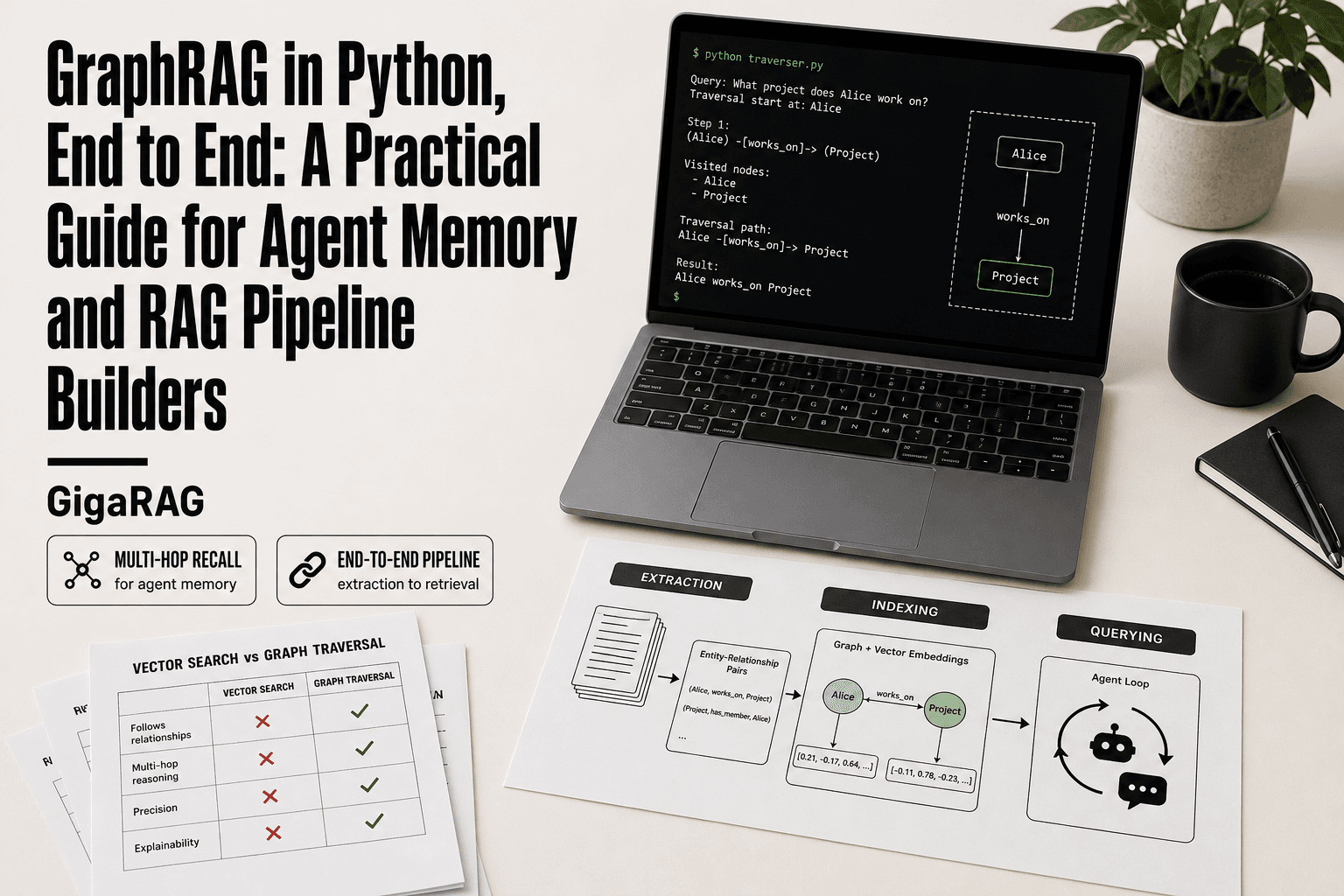
- The Three-Layer Mental Model: Extraction, Indexing, Querying
- Graphrag In Python, End To End: A Step-by-Step Guide
- GraphRAG Python Libraries Compared: Microsoft, Neo4j, and Lightweight Options
- Step 1: Install and Set Up Your GraphRAG Python Environment
- Step 2: Build a Knowledge Graph from Your Documents
- Step 3: Retrieve from Your Knowledge Graph
- Integrating GraphRAG with Agent Memory
- When NOT to Use GraphRAG
- Evaluating GraphRAG in Python: Metrics That Matter
- Production Checklist for GraphRAG in Python
- Final Thoughts: Is GraphRAG in Python Worth It for Your Pipeline?
What Is GraphRAG and Why It Matters for Agent Memory
GraphRAG is retrieval augmented generation that uses a knowledge graph instead of, or alongside, a vector index to ground LLM responses. It extracts entities and relationships from your documents, stores them as nodes and edges, then retrieves relevant subgraphs at query time.
Baseline RAG vs GraphRAG: the one-paragraph version
Baseline RAG chunks documents, embeds the chunks, and finds the nearest vectors to a query. It's fast and simple. But it can't answer questions that span multiple documents or require understanding how entities connect. GraphRAG builds a graph first: entities become nodes, relationships become edges. Queries traverse those edges. A question like "who worked with the author of this paper before 2019" is trivial for a graph and nearly impossible for vector search alone.
Why agents need graph memory, not just vector memory
Agents hold multi-turn conversations. They need to remember what a user said three turns ago, connect it to a fact from a document, and act on both. Vector memory stores fragments. Graph memory stores relationships. That's the difference between an agent that recalls a fact and one that reasons across facts.
The main catch is cost. Graph construction burns tokens, and traversal adds latency. For single-hop lookups, vector RAG is enough. For persistent entity memory across turns, graph structure earns its overhead.
[!note] GraphRAG's index-time cost comes mainly from LLM calls during entity and relationship extraction, so token usage scales with corpus size and chunk count rather than with query volume. Budget for that extraction pass before committing to a full-corpus run.
Microsoft GraphRAG vs Neo4j graphrag vs Lightweight NetworkX/Kuzu for Agent Memory
| Factor | Microsoft GraphRAG | Neo4j graphrag |
|---|---|---|
| Setup complexity | Heavy: config-driven indexing pipeline | Moderate: needs a Neo4j instance |
| Retrieval style | Global and local community search | Cypher plus vector index hybrid |
| Agent memory fit | Batch-oriented, less suited to per-turn writes | Good: persistent store with incremental updates |
| Operational cost | High LLM token use at index time | Database hosting plus LLM extraction |
| Best when | You want an opinionated end-to-end pipeline | You already run Neo4j or need Cypher control |
The Three-Layer Mental Model: Extraction, Indexing, Querying
Every GraphRAG system, whatever library you pick, has three layers. Keep them separate in your head and you'll know where things break.
Layer 1: Extraction (entities and relationships from text)
You feed raw text to an LLM and ask it to pull out entities and the relationships between them. The output is a list of nodes and edges. This is where token cost lives. Every document pass costs money, and extraction quality sets the ceiling for everything downstream. Microsoft GraphRAG does this automatically with its own prompts. Neo4j's package does too. Lightweight options make you write the prompts yourself, which is more work but gives you control over what counts as an entity.
Layer 2: Indexing (graph storage and vector indexes)
Extracted nodes and edges land in a graph store: Neo4j, Kuzu, or NetworkX in memory. You also embed node text and store those vectors separately. The graph handles structure. The vectors handle fuzzy matching. You need both. A graph alone can't find "the thing that sounds like this query." Vectors alone can't traverse relationships.
Layer 3: Querying (graph traversal + vector search + LLM synthesis)
At query time you do three things: find seed nodes with vector search, traverse the graph from those seeds to pull related entities, and hand the resulting subgraph to an LLM as context. The LLM writes the answer. The graph supplies the evidence.
[!tip] For agent memory specifically, keep two graphs: a small, fast-updating 'working memory' graph for the current session and a larger, slower 'long-term' graph built offline. This avoids re-running expensive extraction on every conversational turn while still giving the agent multi-hop recall.
Graphrag In Python, End To End: A Step-by-Step Guide
- Ingest and chunk your documents, preserving metadata and source IDs for later citation.
- Extract entities and relationships with an LLM, using a strict schema and few-shot examples.
- Resolve duplicates and normalize entity names before writing anything to the graph.
- Build the graph in your chosen store (Neo4j, Kuzu, or NetworkX) and attach embeddings to nodes and edges.
- Implement hybrid retrieval: seed with vector search, then expand via graph traversal for multi-hop context.
- Wire the retriever into your agent loop, writing new memories back as nodes and edges after each turn.
- Evaluate retrieval accuracy, latency, and token cost, then iterate on the extraction schema and traversal depth.
GraphRAG Python Libraries Compared: Microsoft, Neo4j, and Lightweight Options
You have three real choices in Python. Each trades setup effort against control.
Microsoft GraphRAG: strengths and weaknesses
Microsoft's graphrag package handles extraction, indexing, and querying out of the box. You point it at a folder of text, run an index command, and it builds communities with the Leiden algorithm. The good news is you get a working pipeline in under an hour. The main catch is opacity: prompts are baked in, the graph lives in Parquet files, and tuning means editing YAML settings you can't easily inspect. Token cost runs high because extraction and community summarization both hit the LLM repeatedly. For agent memory, the lack of incremental updates hurts. You re-index when documents change.
Neo4j graphrag package: strengths and weaknesses
Neo4j's graphrag package gives you a real graph database with Cypher queries and persistent storage. You control extraction prompts, so entity definitions match your domain. The catch is setup: you need a running Neo4j instance, either local Docker or Aura cloud. That's more moving parts than Microsoft's flat files. Query latency is low once the graph is built, and incremental updates work because the database supports merges. For agent memory, persistence matters. Your agent's entity memory survives restarts.
NetworkX / Kuzu: when lightweight is enough
NetworkX keeps everything in memory. No server, no config, just Python objects. It's fine for prototyping and small graphs under 10,000 nodes. Kuzu gives you an embedded graph database with Cypher support and no separate server process. Both make you write extraction prompts yourself. That's more upfront work but full control over what counts as an entity. For agent memory prototypes, Kuzu is the sweet spot: persistent, queryable, zero infrastructure.
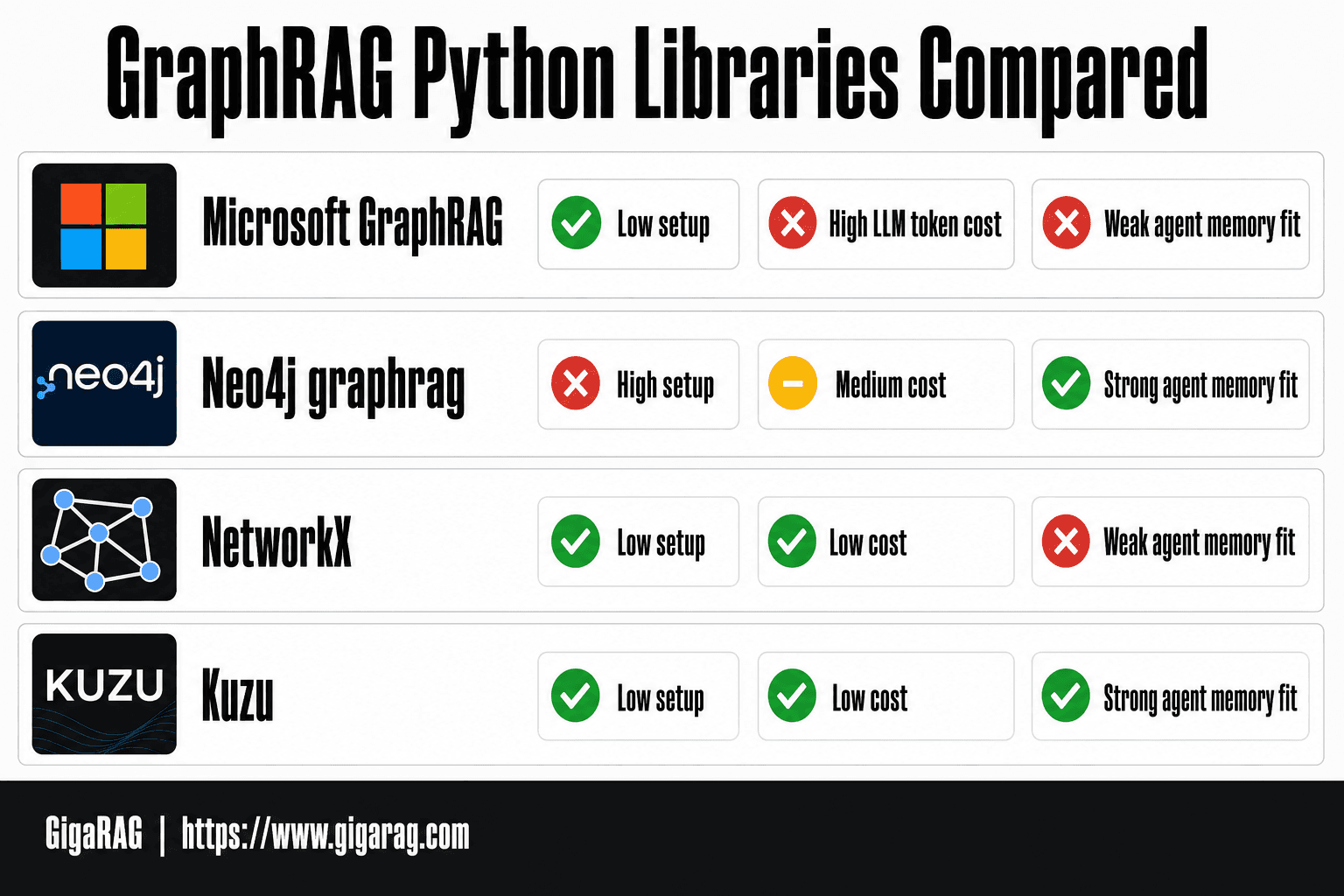
Comparison table: setup complexity, cost, scalability, agent memory fit
| Library | Setup | Cost | Scalability | Agent memory fit |
|---|---|---|---|---|
| Microsoft GraphRAG | Low | High (LLM tokens) | Medium | Weak (no incremental updates) |
| Neo4j graphrag | High | Medium | High | Strong (persistent, queryable) |
| NetworkX | Low | Low | Low (in-memory) | Weak (lost on restart) |
| Kuzu | Low | Low | Medium | Strong (embedded, persistent) |
Microsoft wins on speed to first result. Neo4j wins on production durability. Kuzu wins on agent memory without infrastructure. NetworkX is for sketching, not shipping.
Step 1: Install and Set Up Your GraphRAG Python Environment
You'll need Python 3.10 or newer. Both libraries assume you have pip and a virtual environment. Start there.
Installing Microsoft GraphRAG
pip install graphrag
That's the whole install. The package pulls in pandas, tiktoken, and networkx as dependencies. No database server required. The indexer writes Parquet files to disk, so you need write access to a working directory. If you're on Windows, use PowerShell or WSL; the CLI works in both but path handling differs.
Installing Neo4j graphrag package
pip install graphrag
Same package name, different source. Neo4j's graphrag package lives on PyPI under the same namespace, so check which one you're getting with pip show graphrag. You also need a running Neo4j instance. The quickest path is Docker:
docker run -d --name neo4j -p 7687:7687 -p 7474:7474 \
  -e NEO4J_AUTH=neo4j/password neo4j:5
Swap password for something real. The package connects over Bolt on port 7687.
Environment variables and workspace setup
Microsoft GraphRAG uses a .env file or shell variables for your LLM key:
export GRAPHRAG_API_KEY="your-openai-key"
export GRAPHRAG_LLM_MODEL="gpt-4o-mini"
Then run graphrag init to generate a settings.yaml in your working directory. That file controls prompts, chunk size, and community detection. Edit it before indexing.
Neo4j's package reads connection details from environment variables or constructor arguments:
export NEO4J_URI="bolt://localhost:7687"
export NEO4J_USERNAME="neo4j"
export NEO4J_PASSWORD="password"
Keep both sets of variables in a .env file and load them with python-dotenv. Don't commit that file.
Step 2: Build a Knowledge Graph from Your Documents
Extraction is where the LLM earns its keep. You feed chunks of text to a model and ask it to return entities and relationships as structured JSON. The prompt matters more than the library.
Entity and relationship extraction with LLMs
Microsoft GraphRAG ships a default prompt that extracts entities, their types, and relationships between them. You don't write it from scratch. You tune it. The default prompt asks for a name, type, and description per entity, plus a source and target for each relationship. That's the minimum viable graph.
Neo4j's package takes the same approach but returns Cypher-ready structures. NetworkX and Kuzu don't extract anything. They expect you to bring your own entities. That's the real fork: Microsoft and Neo4j bundle extraction, lightweight options don't.
Populating the graph: Neo4j vs NetworkX vs Kuzu
With Neo4j, you run graphrag build and the package writes nodes and edges directly to the database. NetworkX is in-memory only. You build a DiGraph, add nodes with add_node(), add edges with add_edge(), and lose everything when the process exits. Kuzu sits between: embedded, persistent, no server, but you write the schema first.
Common extraction pitfalls and how to avoid them
The main catch is entity duplication. The LLM extracts "Apple" in one chunk and "Apple Inc." in the next. You get two nodes for one entity. Fix it with a canonicalization pass: lowercase, strip punctuation, and merge near-duplicates before insertion. The second pitfall is over-extraction. A loose prompt returns every noun as an entity. Tighten the prompt to ask only for entities that participate in a relationship. That cuts the graph size by half in practice.
Step 3: Retrieve from Your Knowledge Graph
Retrieval is where GraphRAG earns its overhead. You have three paths: vector search, graph traversal, or both.
Vector retrieval vs graph traversal vs hybrid
Vector search finds chunks that are semantically similar to the query. It's fast and familiar. It also misses relationships. Ask "who worked with Alice before 2020" and a vector index returns chunks mentioning Alice, not the connected nodes that answer the question.
Graph traversal walks edges. You start at a node and follow relationships. It answers multi-hop questions vector search can't touch. The catch: traversal is slower and needs a query language.
Hybrid is the default in practice. Run vector search to find entry nodes, then traverse from there. You get recall from vectors and precision from edges.
Querying with Cypher (Neo4j) vs Python-native graph APIs
Neo4j uses Cypher. You write MATCH (p:Person)-[:WORKED_WITH]->(c) WHERE p.name = 'Alice' RETURN c. It's expressive but a second language to learn.
NetworkX and Kuzu use Python. You call G.neighbors(node) or G.successors(node). Less powerful, zero new syntax.
Passing graph context to the LLM
You don't send the graph to the model. You send text. Serialize the retrieved subgraph as a list of entities and relationships, then append it to the prompt. The LLM synthesizes an answer from that context. Keep the context under the model's token limit or truncate the least relevant edges first.
Integrating GraphRAG with Agent Memory
Agents forget. Vector memory stores chunks, but chunks don't track who did what to whom across turns. Graph memory does.
Persistent entity memory for multi-turn agents
Store entities as nodes and update them as the conversation evolves. When a user mentions "Alice" in turn one and "the project" in turn four, the agent resolves both to the same node. It retrieves the node's relationships before answering. That's persistent memory, not a fresh search each turn.
The catch: you need an update step. After each turn, extract new entities and relationships, then merge them into the graph. Skip this and your memory goes stale.
Graph-based state management vs vector-only memory
Vector-only memory retrieves similar text. It can't answer "what did Alice say about the deadline last week" unless that exact phrase is embedded nearby.
Graph memory stores the deadline as a property on the Project node, linked to Alice. Traversal finds it directly. The trade-off is write cost: every turn triggers extraction and graph updates, which adds latency and token spend.
Code sketch: agent loop with GraphRAG memory
def agent_turn(user_input, graph, vector_index):
    # 1. Retrieve relevant subgraph
    entities = extract_entities(user_input)
    subgraph = graph.traverse(entities, depth=2)

    # 2. Build context
    context = serialize(subgraph) + vector_search(user_input)

    # 3. Generate response
    response = llm.generate(user_input, context)

    # 4. Update memory
    new_triples = extract_triples(user_input, response)
    graph.merge(new_triples)

    return response
The merge step is where most implementations fail. Use node IDs, not names, or you'll create duplicate entities every turn.
When NOT to Use GraphRAG
GraphRAG is not a default. It's a tool for a specific failure mode: questions that require traversing relationships across documents. If your queries don't do that, you're paying for machinery you don't need.
Single-hop queries: vector RAG is enough
If your users ask "what is X" or "summarize this document," vector RAG answers faster and cheaper. GraphRAG adds extraction, entity resolution, and graph traversal before retrieval even starts. That's overhead with no payoff when the answer lives in one chunk.
The test: can a single document answer the question? If yes, skip the graph.
Small document sets: graph overhead isn't worth it
With under 50 documents, you can scan everything directly. Building a knowledge graph means running an LLM over every document to extract entities and relationships, then resolving duplicates, then storing the result. That's real compute for a problem you could solve with a grep.
GraphRAG earns its keep when documents number in the hundreds or thousands, and relationships span them.
Latency and cost: the hidden tax of graph construction
Graph construction is not free. Every document passes through an LLM for extraction, often multiple times. A 1,000-document corpus can cost hundreds of dollars in tokens before you answer a single query.
Latency compounds too. Extraction, indexing, and traversal add seconds to every request. If you need sub-second responses, GraphRAG will miss that budget. Vector search alone won't.
Evaluating GraphRAG in Python: Metrics That Matter
You can't improve what you don't measure. GraphRAG has more moving parts than vector RAG, so you need metrics at three levels: retrieval, cost, and answer quality.
Retrieval accuracy: precision and recall on graph queries
Build a test set of 50 to 100 questions with known answer entities. Run each query through your graph retrieval step, not the full LLM pipeline. Precision is the share of returned entities that are relevant. Recall is the share of relevant entities you found. GraphRAG should beat vector RAG on recall for multi-hop questions, but precision often drops because traversal pulls in neighbors. Track both.
Latency and token cost benchmarks
Time each stage separately: extraction, indexing, query traversal, LLM synthesis. Extraction dominates at build time. Traversal plus synthesis dominates at query time. Log token counts per query, because graph context windows grow fast. A three-hop traversal can easily triple your prompt size.
Answer quality: LLM-as-judge basics
Use a stronger model to score answers on faithfulness and completeness, 1 to 5. Run it on 20 queries before and after adding graph context. The delta tells you if the graph is earning its cost.
Production Checklist for GraphRAG in Python
Evaluation tells you if the graph earns its cost. Production tells you if it stays up. The checklist below covers the three places GraphRAG deployments break.
Scaling graph construction and retrieval
Extraction is embarrassingly parallel until it isn't. Shard documents by entity density, not file size. A 10-page legal contract produces more entities than 50 support tickets. Run extraction as a batch job with checkpointing, so a failed LLM call doesn't restart the whole corpus. For retrieval, index embeddings separately from graph structure. Vector search scales horizontally; graph traversal doesn't. Keep hot subgraphs in memory, cold ones on disk.
Cost control: token budgets and caching
GraphRAG burns tokens twice: once at extraction, once at query synthesis. Cache entity and relationship outputs keyed by document hash. Re-extraction only happens when the source changes. Set a hard token cap per query. If traversal pulls more context than the cap, truncate by edge weight, not by insertion order.
Latency optimization and error handling
Precompute community summaries at index time. Don't run Leiden at query time. For traversal, cap hop depth at three. Beyond that, latency compounds and precision drops. Wrap every LLM call in retry logic with exponential backoff. Graph databases fail differently than vector stores: a missing relationship returns empty, not approximate. Log empty traversals as first-class errors.
Final Thoughts: Is GraphRAG in Python Worth It for Your Pipeline?
It depends on your queries and your corpus. If you're answering single-hop questions over a few hundred documents, vector RAG wins on cost and latency. If your agents need persistent entity memory, multi-hop reasoning, or relationship-aware retrieval across a large corpus, GraphRAG in Python earns its overhead.
The three-layer model holds up: extraction, indexing, querying. Each layer has a cheap path and an expensive path. You choose based on what your queries actually need.
The honest answer is that most teams don't need GraphRAG. The ones that do are building agent memory or reasoning over connected, heterogeneous sources. For those teams, the boilerplate is real: entity extraction prompts, graph population, hybrid retrieval, evaluation. GigaRAG removes most of that for agent memory and RAG pipeline builders who'd rather not hand-roll the plumbing. If you're in that camp, it's worth a look. If you're not, start with vector RAG and revisit when your queries outgrow it.
Frequently Asked Questions
What is GraphRAG in Python, end to end?
It is the full pipeline of building a knowledge graph from your documents in Python and then retrieving over that graph to answer queries. End to end means ingestion, entity and relationship extraction, graph storage, hybrid retrieval, and agent integration. Each stage maps to a Python library you can choose independently.
Which Python library should I use for GraphRAG?
Microsoft GraphRAG is the most opinionated and gives you a full pipeline out of the box. Neo4j's graphrag package suits teams already running Neo4j or needing Cypher control. NetworkX or Kuzu are good lightweight, hackable options for prototypes and smaller agent memory systems.
When should I NOT use GraphRAG?
Skip it when your queries are mostly single-hop, your document set is small enough for plain vector search, or you have a tight latency budget. GraphRAG adds extraction cost and retrieval complexity that only pays off for multi-hop questions over larger, interconnected corpora.
How do I evaluate a GraphRAG pipeline?
Track retrieval accuracy on a labeled question set, end-to-end latency per query, and token cost for both indexing and answering. Compare these against a vector-only baseline so you can see whether the graph is actually earning its overhead.
Can GraphRAG be used for agent memory?
Yes, and it is one of the strongest use cases because agents need multi-hop recall across past interactions. The practical pattern is a fast-updating working-memory graph plus a larger long-term graph built offline. This keeps per-turn latency manageable while preserving deeper recall.
What are the main failure modes of GraphRAG in production?
Common failures include noisy or inconsistent entity extraction, duplicate entities that fragment the graph, and traversal that pulls in irrelevant context. Latency and token cost can also spike unexpectedly at index time. Most of these are mitigated by a strict extraction schema and entity resolution before writing to the graph.
Do I need Neo4j to build GraphRAG in Python?
- Neo4j is a popular choice, but you can build GraphRAG with embedded options like Kuzu or in-process libraries like NetworkX. The trade-off is that you take on more of the persistence, concurrency, and query-layer work yourself.
About GigaRAG
GigaRAG is for agent memory and RAG pipeline builders. get this right. Whether you are working through graphrag in python, end to end or something adjacent, we publish what we have actually tested, including where it falls short.