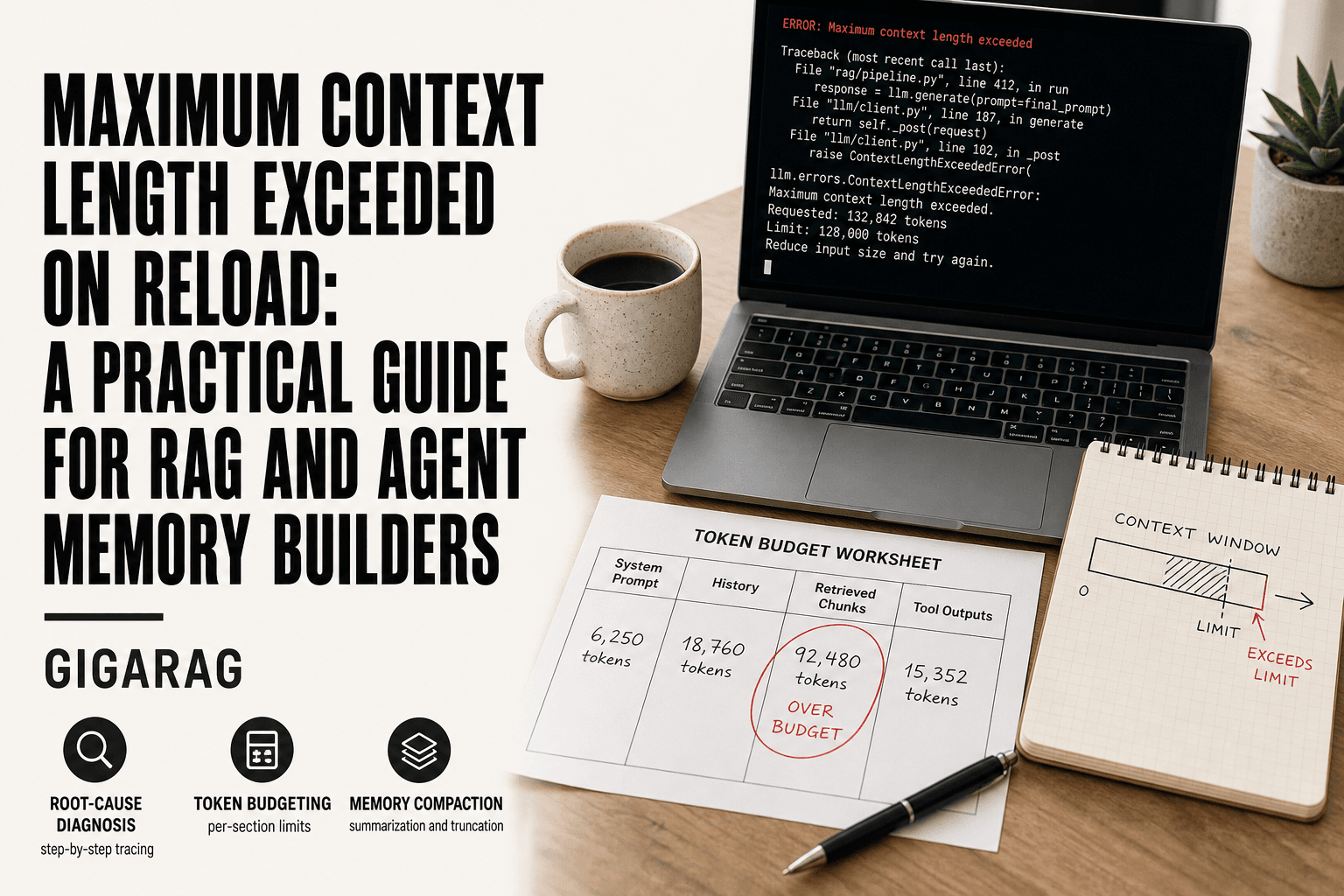
Maximum Context Length Exceeded on Reload: A Practical Guide for RAG and Agent Memory Builders
Maximum context length exceeded on reload. If you build RAG pipelines or agent memory systems, you've hit that wall mid-reload, staring at a stack trace that tells you nothing about why it broke or what to do next. The forums don't help much either. You'll find scattered GitHub issues and half-answers, but no one walks through the actual diagnosis. GigaRAG was built for exactly this problem, and the honest answer is that most fixes fail because developers skip the root cause and patch the symptom. This guide covers why the error happens, how to trace it to the specific context bloat in your pipeline or memory layer, and which fixes actually hold up. You'll also get the limitations stated plainly: what you cannot exceed, what workarounds won't achieve, and what to expect when you apply real context management.
| At a glance | Details |
|---|---|
| What it means | Your assembled prompt exceeds the model's token window |
| Common trigger | Reload re-injects full history plus retrieved chunks |
| Typical culprits | Unbounded memory, large chunks, verbose tool outputs |
| First diagnostic | Log token counts per prompt section |
| Core fix | Budget tokens and compact or summarize history |
| Hard limit | You cannot exceed the model's maximum context window |
In This Guide
- What Does 'Maximum Context Length Exceeded on Reload' Actually Mean?
- Truncation vs Summarization for Context Overflow
- Root Causes of Context Length Exceeded Errors in RAG and Agent Memory
- Maximum Context Length Exceeded On Reload: A Step-by-Step Guide
- How to Diagnose Maximum Context Length Exceeded on Reload
- Practical Fixes for Context Length Exceeded in RAG Pipelines
- Agent Memory and Context Management: What Actually Works
- What You Cannot Do: Honest Limitations of Context Length Fixes
- Common Mistakes When Handling Maximum Context Length Exceeded
- Final Thoughts on Managing Context Length in RAG and Agent Memory
What Does 'Maximum Context Length Exceeded on Reload' Actually Mean?
The error means your saved conversation or pipeline state contains more tokens than the model's context window allows when you try to restore it. The model can't load what won't fit.
Breaking down the error message
"Context length" is the total token count of everything the model sees: system prompt, retrieved chunks, conversation history, and your new input. "Exceeded" means that total crossed the model's hard limit. "On reload" means it happened when restoring a saved state, not during a fresh run.
Why 'reload' triggers the error
A fresh run starts empty. A reload restores everything at once: old messages, stored memory, retrieved documents. If that combined state grew past the limit while saved, the restore fails immediately.
Context length vs. token limit: what's the difference?
They're the same ceiling. "Context length" describes the space. "Token limit" is the number that defines it.
[!note] The 'maximum context length exceeded' error is a hard limit imposed by the model's architecture; no prompt engineering trick can make a model accept more tokens than its context window allows.
Truncation vs Summarization for Context Overflow
| Factor | Truncation | Summarization |
|---|---|---|
| Token savings | Predictable, immediate | Variable, depends on summary length |
| Information loss | High for dropped content | Lower, preserves gist |
| Latency and cost | Low, no extra calls | Higher, requires an LLM call |
| Implementation effort | Simple slicing or windowing | More complex, needs prompt design |
| Best for | Hard caps and quick mitigation | Long-running agent memory |
Root Causes of Context Length Exceeded Errors in RAG and Agent Memory
The error doesn't appear randomly. It's the result of specific, identifiable mechanics in how models process text and how pipelines accumulate state.
Hard token limits: what they are and why they exist
Every model has a fixed context window. GPT-4o has 128k tokens. Claude 3.5 Sonnet has 200k. These limits exist because the attention mechanism scales quadratically: doubling context quadruples compute. The model physically cannot attend to more tokens than its architecture allows. No prompt engineering changes that.
How RAG pipelines accumulate context
A RAG pipeline adds tokens at every stage. The system prompt takes space. Each retrieved chunk adds hundreds of tokens. Reranking metadata, few-shot examples, and formatting all stack up. A typical retrieval call pulling five 500-token chunks adds 2,500 tokens before your query even enters. On reload, the pipeline restores all of it at once.
Agent memory and conversation history growth
Agents compound the problem. Every turn appends to history. Memory stores summaries, but those summaries sit alongside raw messages unless you explicitly prune them. A 50-turn conversation with tool outputs can easily hit 30k tokens. Reload restores the full transcript, and the limit hits.
Model-specific context window differences
The same code fails on different models for different reasons. GPT-4o's 128k window handles what Claude 3.5 Sonnet's 200k handles easily, but Claude's tokenizer counts words differently. A pipeline tuned for one model breaks on another. Check your model's actual limit before assuming the error is your code.
[!tip] For agent memory systems, store a rolling summary plus the last N turns instead of the full transcript, and re-embed only the summary on reload to keep token usage bounded.
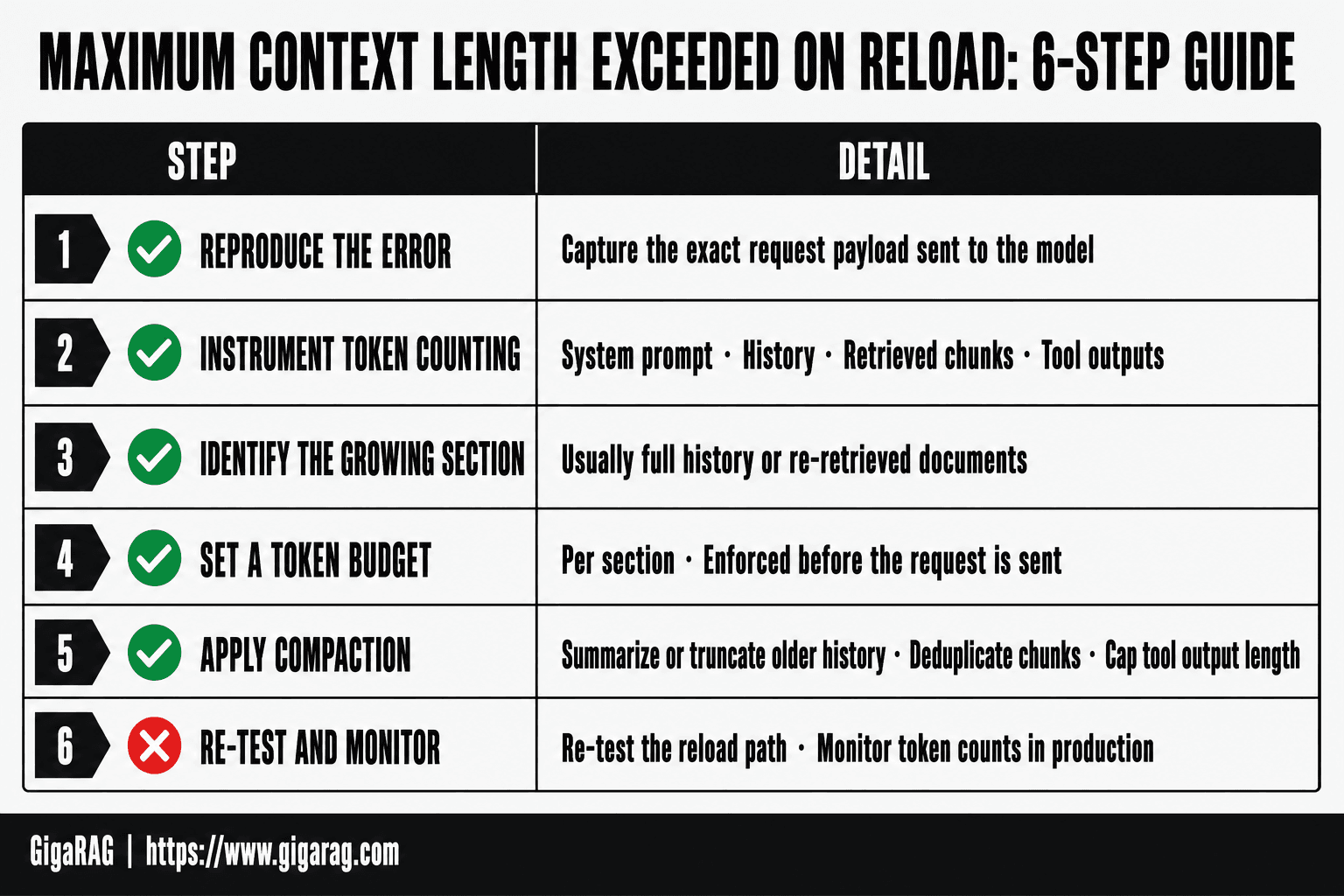
Maximum Context Length Exceeded On Reload: A Step-by-Step Guide
- Reproduce the error and capture the exact request payload sent to the model.
- Instrument token counting for each section: system prompt, history, retrieved chunks, tool outputs.
- Identify which section grows on reload (usually full history or re-retrieved documents).
- Set a token budget per section and enforce it before the request is sent.
- Apply compaction: summarize or truncate older history, deduplicate chunks, cap tool output length.
- Re-test the reload path and monitor token counts in production to catch regressions.
How to Diagnose Maximum Context Length Exceeded on Reload
You need a repeatable process, not guesswork. Here's one that works.
Step 1: Identify where the error occurs
Reproduce the error with a minimal case. Strip your pipeline down to the system prompt, one retrieved chunk, and one user query. If the error disappears, the problem is accumulation, not the base call. If it persists, your base prompt alone may be too large. Log the exact point of failure: retrieval, assembly, or model call. The stack trace tells you which.
Step 2: Measure your actual token usage
Don't estimate. Count. Most model SDKs expose a token counting method. OpenAI's tiktoken, Anthropic's count_tokens, and LangChain's get_num_tokens all work. Log token counts at each pipeline stage: system prompt, each retrieved chunk, history, and final assembly. You'll usually find one stage eating far more than you assumed.
Step 3: Check your model's context window
Confirm the actual limit for the model you're calling. GPT-4o is 128k. Claude 3.5 Sonnet is 200k. But some API deployments cap lower. Check your provider's settings. If you're at 90% of the window, even small additions trigger the error. Leave headroom: aim for 70% or less.
Step 4: Isolate the source of context bloat
Compare token counts across stages. The culprit is usually one of three things: oversized retrieved chunks, unbounded conversation history, or a bloated system prompt. Cut each in isolation and re-test. When the error clears, you've found it. Fix that stage before touching anything else.
Practical Fixes for Context Length Exceeded in RAG Pipelines
You've found the bloat. Now cut it. Three levers work, and each trades something away.
Chunking strategies to reduce context size
Smaller chunks mean fewer tokens per retrieval. Split documents into 256-512 token pieces with overlap of 10-15%. The overlap preserves meaning across boundaries. You'll retrieve more chunks but each costs less. The tradeoff: too-small chunks lose surrounding context and hurt answer quality.
Summarization and context compaction techniques
Compress retrieved chunks before assembly. A cheap model can summarize each chunk to one or two sentences, or you can extract only the sentences containing query terms. This cuts context by 50-80% but risks dropping details the answer needs. Test against your eval set before shipping.
Optimizing retrieval to minimize context
Retrieve fewer chunks. Tighten your similarity threshold, cap results at three to five, and use reranking to keep only the most relevant. If your vector store returns ten chunks by default, that's likely your problem. Cutting to three often fixes the error without any other change.
Code example: implementing context management in Python
def fit_context(chunks, max_tokens=6000):
    total = 0
    kept = []
    for chunk in chunks:
        tokens = count_tokens(chunk)
        if total + tokens > max_tokens:
            break
        kept.append(chunk)
        total += tokens
    return kept
This truncates to a hard budget. It won't summarize or rerank, but it stops the error. Combine it with the levers above for better results.
Agent Memory and Context Management: What Actually Works
Agent memory is where context bloat hides. Conversation history grows unbounded, and every turn gets replayed into the prompt. The fix is not a bigger window. It's a memory system that decides what to keep.
Memory management patterns for agents
Three patterns work in practice. Sliding window keeps only the last N turns, cheap but amnesiac. Summarization compresses older turns into a running digest, preserving gist at the cost of detail. Vector-backed memory stores past exchanges in a database and retrieves only what the current turn needs. Most production agents combine all three.
How GigaRAG addresses context management
GigaRAG treats agent memory as a retrieval problem. Past turns get embedded and stored, then pulled back by relevance rather than recency. That means a conversation from last week can inform today's answer without bloating the prompt. The tradeoff: retrieval misses matter more, and you need a vector store running.
Tradeoffs of different memory strategies
Sliding window is simple but loses anything older than the cutoff. Summarization keeps more history but flattens specifics. Vector retrieval preserves detail but adds latency and a new failure mode. There's no free lunch. Pick based on whether your agent needs recency, detail, or both.
What You Cannot Do: Honest Limitations of Context Length Fixes
No fix removes the ceiling. Every model has a hard token limit, and no chunking, summarization, or memory pattern changes that. You can only work under it.
Hard token limits are non-negotiable
The context window is fixed at inference time. GPT-4's 128k tokens, Claude's 200k, whatever your model ships with: that's the wall. You cannot extend it with code. You cannot buy your way past it mid-session. The only move is fitting under it.
Workarounds that don't actually work
Truncation just deletes information. Splitting a prompt into pieces and feeding them sequentially does not give the model the full context, it gives it fragments. Compressing tokens with a smaller embedding model loses fidelity. None of these solve the underlying problem.
What to expect from context management strategies
Good management buys headroom, not infinity. Chunking, summarization, and retrieval reduce what you send, but they trade away detail. Expect to lose nuance. Expect retrieval misses. The error goes away, but the model knows less than it did.
Common Mistakes When Handling Maximum Context Length Exceeded
Most failed fixes come from treating the error as one problem. It isn't. It's three, and they compound.
Ignoring tokenization differences
A character count is not a token count. "Hello" is one token. "Unicode" might be three. If you truncate by string length, you'll still blow past the limit because tokens don't map to characters. Count tokens, not letters.
Over-relying on truncation
Chopping the tail off your context feels safe. It isn't. You lose the most recent turns, which are usually the most relevant. The model then answers from stale context and you chase a new bug. Truncation is a stopgap, not a strategy.
Misunderstanding model-specific limits
The same code fails differently on GPT-4, Claude, and local models. A 4k window on one model is not a 4k window on another when tokenizers differ. Hard-code a limit and you'll hit the wall on a different model. Read the model card before you set the ceiling.
Final Thoughts on Managing Context Length in RAG and Agent Memory
The error isn't random. It's a signal that your pipeline is holding more than the model can carry.
You can't raise a hard token limit. You can change what enters the window. Chunking, summarization, and retrieval optimization each cut context before it reaches the model. The tradeoff is always the same: less context means less fidelity. Decide what your task actually needs.
Measure before you fix. Count tokens, check the model card, isolate the bloat. Guessing wastes a deploy cycle.
GigaRAG handles context compaction and memory management for RAG pipelines and agent memory out of the box. It won't make maximum context length exceeded on reload impossible, but it gives you the controls to keep it rare. Start with measurement. Then cut what doesn't earn its place.
Frequently Asked Questions
What does 'maximum context length exceeded on reload' mean?
It means the total tokens in your prompt (system instructions, conversation history, retrieved documents, and tool outputs) exceed the model's maximum context window when the session is reloaded. The reload often re-injects the full history or re-runs retrieval, pushing the count over the limit.
Why does it happen on reload specifically?
On reload, many RAG and agent frameworks reconstruct the prompt from stored state, which may include the entire conversation history and freshly retrieved chunks. If that reconstruction is not bounded, the token count can spike above the limit even if earlier turns were fine.
How do I fix 'maximum context length exceeded' in Python?
Use a tokenizer library compatible with your model to count tokens before sending the request. Then implement a budget: truncate or summarize history, limit retrieved chunks to top-k with a max token size, and cap tool output length. Log token counts per section to find the biggest contributor.
Can I increase the context length of my model?
Only if the model supports a larger context window and you have configured it correctly (some APIs require specifying a larger context variant). You cannot exceed the model's hard architectural limit. For open-weight models, you may fine-tune or use positional interpolation techniques, but results vary and are not guaranteed.
What is the difference between context length and max tokens?
Context length (or context window) is the total number of tokens the model can consider at once, including both input and output. Max tokens usually refers to the maximum number of tokens the model can generate in its response. The sum of input and output tokens must fit within the context window.
How do I prevent context overflow in a RAG pipeline?
Implement a token budget for each component: system prompt, conversation history, retrieved chunks, and tool outputs. Use chunking with overlap, deduplicate retrieved content, and summarize or truncate older history. Monitor token usage in production and set alerts for approaching limits.
What are the tradeoffs of summarizing conversation history?
Summarization reduces token usage while preserving the gist, but it adds latency and cost due to the extra LLM call, and it can lose important details. Truncation is cheaper and more predictable but discards information entirely. Choose based on your application's tolerance for information loss.
About GigaRAG
GigaRAG is for agent memory and RAG pipeline builders. get this right. Whether you are working through maximum context length exceeded on reload or something adjacent, we publish what we have actually tested, including where it falls short.


