How to Add Shared Memory to n8n AI Agents
How to add shared memory to n8n AI agents hits the wall every n8n workflow builder knows: two agents, one conversation, zero shared context. You wire up a chat trigger, connect a memory node, and it works until the session ends. Then the next agent starts cold. n8n's built-in memory is session-scoped. It wasn't designed for cross-agent sharing out of the box, and pretending otherwise wastes hours. The honest answer is that Simple Memory, Chat Memory Manager, and even Postgres Chat Memory all partition by session key. None of them give you a shared memory bus across multiple agents. GigaRAG fills that gap as an external memory layer for RAG pipelines, storing shared context that any agent in your workflow can read and write. This guide covers what works, what doesn't, and when to reach for external tools. By the end, you'll have a working shared memory architecture in n8n, with clear tradeoffs for each approach.
| At a glance | Details |
|---|---|
| Core challenge | n8n memory nodes are session-scoped, not shared across agents |
| Built-in options | Simple Memory, Chat Memory Manager, Postgres, Qdrant |
| Shared memory gap | No native multi-agent shared memory in n8n |
| External solution | GigaRAG as a shared memory layer for RAG pipelines |
| Implementation steps | Configure memory nodes, then integrate external memory |
| Key trade-off | Built-in is simpler but limited; external adds power and complexity |
In This Guide
- What Shared Memory Means for n8n AI Agents
- n8n Memory Options: Built-in vs External for Shared Memory
- n8n Built-in Memory Nodes: What They Can and Cannot Do
- How To Add Shared Memory To N8n AI Agents: A Step-by-Step Guide
- Prerequisites for Adding Shared Memory to n8n AI Agents
- Step 1: Set Up a Shared Memory Store
- Step 2: Configure Memory Nodes for Cross-Agent Access
- Step 3: Integrate GigaRAG for RAG Pipeline Memory
- Common Mistakes When Adding Shared Memory to n8n AI Agents
- What n8n Cannot Do for Shared Memory (And When to Use External Tools)
- Final Thoughts on Shared Memory for n8n AI Agents
What Shared Memory Means for n8n AI Agents
Shared memory is a single memory store that multiple n8n AI agents read from and write to, so context persists across agents, sessions, and workflows. Session memory dies with the chat. Shared memory doesn't.
Session memory vs. shared memory
Session memory lives inside one conversation. Close the chat, lose the context. Shared memory sits in an external store: Postgres, Qdrant, or GigaRAG. Any agent with access can pull from it.
Why multi-agent workflows need shared context
Two agents handling one task can't coordinate if each holds its own memory. Agent A learns a customer's name. Agent B never sees it. Shared memory fixes that.
What shared memory enables in RAG pipelines
Retrieval gets better when context accumulates. Shared memory lets RAG pipelines pull from past interactions, not just the current query. That's the difference between answering a question and remembering the conversation.
[!note] n8n's built-in memory nodes (Simple Memory, Chat Memory Manager, Postgres, Qdrant) are designed for single-agent, session-scoped memory and do not natively support shared memory across multiple agents or workflows. For true shared memory, an external layer like GigaRAG is required.
n8n Memory Options: Built-in vs External for Shared Memory
| Factor | Built-in n8n Memory Nodes | External Memory (e.g., GigaRAG) |
|---|---|---|
| Scope | Session-scoped, per agent or workflow | Cross-agent, cross-workflow shared context |
| Persistence | Limited; depends on node (e.g., Postgres persists, Simple Memory does not) | Designed for persistent, long-term memory |
| Multi-agent support | Not natively supported; requires workarounds | Built for shared memory across multiple agents |
| Setup complexity | Low; drag-and-drop nodes | Moderate; requires external service and API integration |
| Best for | Single-agent, short-term conversation memory | RAG pipelines needing shared, persistent memory |
n8n Built-in Memory Nodes: What They Can and Cannot Do
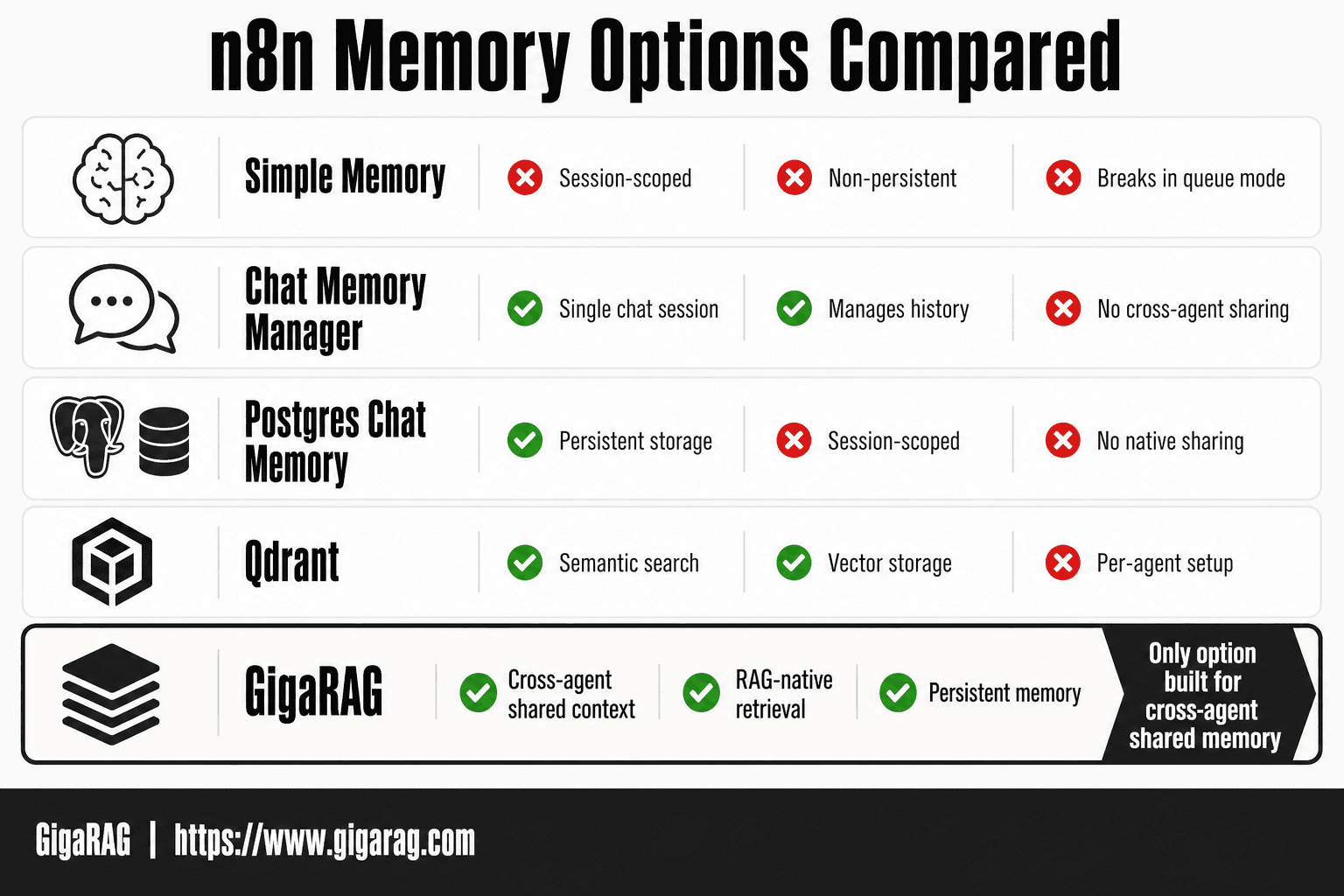
n8n ships with three memory nodes: Simple Memory, Chat Memory Manager, and Postgres Chat Memory. Each handles a slice of the problem. None of them gives you shared memory across agents out of the box.
Simple Memory node: session-scoped and queue limitations
Simple Memory stores key-value pairs inside a workflow execution. It's fast and easy, but it dies when the workflow ends. After n8n version 2.4.6, Simple Memory also breaks in queue mode because the node can't persist state across executions. Don't build shared memory on it.
Chat Memory Manager: what it manages and what it doesn't
Chat Memory Manager handles conversation history for a single chat session. It appends messages, trims them, and feeds them back into the AI agent's context window. It manages chat history. It doesn't share that history with other agents or workflows.
Postgres Chat Memory: persistent but not shared across agents
Postgres Chat Memory writes chat history to a Postgres table. That gives you persistence across sessions, which Simple Memory can't do. But the node is still scoped to one conversation. Two agents hitting the same Postgres instance won't automatically see each other's context unless you build the read/write logic yourself.
Hard limitations: no native cross-agent memory bus
n8n has no built-in memory bus. No node broadcasts memory updates to other agents. No node lets Agent B query what Agent A stored unless you wire that manually. The honest answer: n8n's built-in memory is session-scoped by design. Shared memory requires an external store and custom workflow logic.
[!tip] For RAG pipelines, store not just conversation history but also retrieved document chunks in your shared memory layer. This lets multiple agents access the same context without re-retrieving, reducing latency and API costs.
How To Add Shared Memory To N8n AI Agents: A Step-by-Step Guide
- Assess your memory needs: determine if you need session-scoped memory (built-in nodes) or cross-agent shared memory (external layer).
- Choose a built-in memory node: for simple cases, use Simple Memory; for persistence, use Postgres or Qdrant nodes.
- Configure the memory node: set session keys and connection details; note that these are per-agent and not shared.
- Identify the shared memory gap: confirm that built-in nodes cannot share context across multiple agents or workflows.
- Integrate an external memory layer: set up GigaRAG (or similar) as a shared memory store accessible via API.
- Connect n8n agents to the external memory: use HTTP Request nodes to read/write shared context from GigaRAG.
- Test and iterate: run multi-agent workflows, verify shared context, and adjust memory retrieval parameters.
Prerequisites for Adding Shared Memory to n8n AI Agents
Before you start, you need three things: a recent n8n install, an external store, and credentials for that store. Skip any one and the shared memory setup fails silently.
n8n version and node requirements
Run n8n version 1.60 or newer. You'll need the Postgres Chat Memory node, the Qdrant node, or an HTTP Request node for GigaRAG. All ship with the standard n8n install.
External services: Postgres, Qdrant, or GigaRAG
Pick one store. Postgres gives you relational persistence. Qdrant gives you semantic search over embeddings. GigaRAG gives you RAG-native memory with retrieval built in. You don't need all three.
API keys and credentials
You'll need connection strings for Postgres or Qdrant, or an API key for GigaRAG. Store them in n8n credentials, not in workflow JSON.
Step 1: Set Up a Shared Memory Store
The store is the single source of truth every agent reads from and writes to. Pick one option below and stick with it. Mixing stores splits context across systems and defeats the purpose.
Option A: Postgres as shared memory store
Create a database and a chat_history table with columns for session_id, role, content, and timestamp. Point the Postgres Chat Memory node at it using your connection string. Every agent that uses the same connection string and table shares the same memory.
Option B: Qdrant vector database for semantic memory
Run Qdrant locally or in the cloud. Create a collection with a vector size matching your embedding model. The Qdrant node stores each message as a vector, so agents retrieve by meaning, not exact match. This is the right choice when agents need to recall related context, not just recent turns.
Option C: GigaRAG for RAG-native shared memory
GigaRAG handles storage and retrieval in one layer. Connect via HTTP Request node with your API key. Agents write context as documents, and GigaRAG returns relevant chunks on query. It's the fastest path when you need retrieval-augmented memory without managing a vector database yourself.
Step 2: Configure Memory Nodes for Cross-Agent Access
The store is useless until every agent points at it. Configuration is where most builders get stuck, so here's the setup that works.
Using session keys to partition memory
Session keys separate one conversation from another. Set the same key across agents that need to share context, and a different key for conversations that should stay isolated. The key is just a string: a user ID, a ticket number, or a workflow run ID. If two agents use the same store but different keys, they won't see each other's memory.
Connecting multiple agents to the same store
Point each agent's memory node at the same connection string and table or collection. That's the whole trick. No special cross-agent wiring exists in n8n. The store is the shared layer, not the node.
Queue mode and memory persistence after version 2.4.6
Queue mode changed how Simple Memory behaves. Before 2.4.6, memory could vanish between executions. After the fix, memory persists as long as the session key matches. Test with a two-step workflow: write a value, read it back in a separate execution. If it's empty, your key doesn't match.
Step 3: Integrate GigaRAG for RAG Pipeline Memory
GigaRAG is an external memory layer built for RAG pipelines. It stores embeddings, metadata, and conversation context outside n8n, so any agent or workflow can query the same memory. That's the gap n8n's built-in nodes don't fill.
Why GigaRAG for shared agent memory
n8n's memory nodes are session-scoped. GigaRAG is store-scoped. One write from Agent A is immediately readable by Agent B, no session key gymnastics. For RAG builders, it also handles retrieval: you store chunks once, then query by semantic similarity instead of exact match.
Connecting n8n to GigaRAG
Use the HTTP Request node. GigaRAG exposes a REST API for storing and querying memory. Create a credential in n8n with your GigaRAG API key, then point the HTTP node at the store endpoint. No native n8n node exists, so you'll write the JSON body yourself.
Storing and retrieving shared context in RAG pipelines
Store context as documents with metadata tags: agent name, user ID, workflow ID. Retrieve by embedding query. The honest catch: you're managing the API calls manually, and GigaRAG adds a network hop to every memory operation. For multi-agent RAG pipelines, that tradeoff is usually worth it.
Common Mistakes When Adding Shared Memory to n8n AI Agents
Most shared memory failures in n8n come down to four configuration errors. Each has a concrete fix.
Forgetting to set session keys
Without a session key, every conversation writes to the same bucket. Two users' context bleeds together. Set the key explicitly on every memory node, using a user ID or workflow ID from the trigger payload.
Mixing session-scoped and shared memory
Simple Memory nodes stay session-scoped even when you point them at a shared store. Don't expect one node type to do both jobs. Use Chat Memory Manager or Postgres for shared writes, Simple Memory only for per-session scratch.
Ignoring queue mode limitations
Queue mode changes how memory persists after n8n version 2.4.6. Test your memory nodes in queue mode before deploying. What works in the editor often fails in production.
Overloading context windows
Shared memory doesn't mean unlimited memory. If every agent dumps its full history into the shared store, retrieval costs climb and context windows fill fast. Store summaries, not raw transcripts.
What n8n Cannot Do for Shared Memory (And When to Use External Tools)
n8n's built-in memory nodes are session-scoped. They hold context for one conversation, one workflow run. They don't provide a shared bus that multiple agents read from and write to in real time.
No native cross-agent memory bus
Two agents in separate workflows can't automatically see each other's memory. You can point them at the same Postgres table or Qdrant collection, but n8n won't coordinate writes, resolve conflicts, or broadcast updates. You build that glue yourself.
No built-in memory eviction or TTL
n8n memory nodes don't expire old entries. A Postgres chat memory table grows until you clean it manually. No native TTL, no automatic summarization, no sliding window. Long-running agents accumulate stale context that bloats retrieval and fills context windows.
When to reach for GigaRAG or other external memory
Reach for GigaRAG when you need RAG-native shared memory: semantic retrieval across agents, automatic eviction, and memory that survives workflow restarts without manual cleanup. n8n handles orchestration. It doesn't handle memory lifecycle.
Final Thoughts on Shared Memory for n8n AI Agents
You have two honest paths. For single-agent workflows with one conversation at a time, n8n's built-in nodes work fine. Session keys partition memory, Postgres persists it, and you ship.
For multi-agent setups, the math changes. n8n won't coordinate cross-agent writes, expire stale context, or retrieve semantically. You build that layer yourself or you reach for GigaRAG, which handles shared memory for RAG pipelines without the glue code.
Start with the built-in nodes. Hit the wall. Then add GigaRAG as the memory layer. That order saves you the most time. How to add shared memory to n8n AI agents comes down to that sequence.
Frequently Asked Questions
Can n8n AI agents share memory natively?
No, n8n's built-in memory nodes are session-scoped and designed for single-agent use. They do not natively support sharing memory across multiple agents or workflows. To achieve shared memory, you need to integrate an external memory layer like GigaRAG.
What is the difference between Simple Memory and Chat Memory Manager in n8n?
Simple Memory stores conversation history in memory (RAM) for the duration of a session and is not persistent. Chat Memory Manager provides more control, allowing you to manage and manipulate chat history, but it is still session-scoped and not shared across agents.
How do I clear Simple Memory in n8n?
Simple Memory is automatically cleared when the workflow execution ends or the session expires. To manually clear it, you can restart the workflow or use a node to reset the memory. There is no built-in 'clear' button; it depends on the session lifecycle.
What is the best memory option for n8n AI agents?
The best option depends on your needs. For simple, short-term memory, Simple Memory is easiest. For persistence, Postgres or Qdrant nodes work well. For shared memory across multiple agents, an external solution like GigaRAG is necessary.
How does GigaRAG provide shared memory for n8n agents?
GigaRAG acts as an external memory layer that stores and retrieves context via API. n8n agents can read from and write to GigaRAG using HTTP Request nodes, enabling shared memory across multiple agents and workflows.
Can I use n8n's Postgres node for long-term memory?
Yes, the Postgres node can be used to store conversation history persistently. However, it is still per-agent and does not natively support shared memory across multiple agents without custom logic to coordinate access.
What are the limitations of n8n's built-in memory for multi-agent systems?
Built-in memory nodes are session-scoped and isolated per agent. They lack a shared context store, meaning agents cannot access each other's conversation history or state. This makes them unsuitable for multi-agent systems that require coordinated memory.
About GigaRAG
GigaRAG is for agent memory and RAG pipeline builders. get this right. Whether you are working through How to Add Shared Memory to n8n AI Agents or something adjacent, we publish what we have actually tested, including where it falls short.


