How to Add Persistent Memory to Google ADK Agents
Persistent memory in Google ADK is the feature most RAG pipeline builders think they understand until they try to implement it. You'll read a tutorial that shows a session state example, copy the code, and then discover your agent forgets everything the moment the process restarts. That's not a bug in your code. It's the default behavior, and most top results won't tell you that plainly. GigaRAG users run into this same wall when wiring agent memory into retrieval workflows, so I tested the backends and the limitations directly.
Here's the honest answer: ADK gives you the tools for persistent memory, but it won't hold your hand. You need to pick a backend, configure it explicitly, and accept what still won't persist. This guide covers what persistent memory in ADK actually does, what it cannot do, how to implement it with memory_service.add_, and which backend fits your RAG pipeline.
| At a glance | Details |
|---|---|
| Core concept | ADK separates session state from long-term memory |
| Default backend | InMemoryMemoryService — not persistent |
| Persistent options | Database, Vertex AI Memory Bank, custom |
| Key limitation | AgentTool does not persist memory across sessions |
| RAG integration | Pair memory with a vector store for retrieval |
| Effort to add | Moderate — requires backend and wiring |
In This Guide
- What Persistent Memory Means in Google ADK
- Which ADK Memory Backend Should You Use?
- How ADK Sessions and State Work
- Persistent Memory Google ADK: A Step-by-Step Guide
- Memory Backends for Persistent Memory in Google ADK
- Step-by-Step: Implementing Persistent Memory with memory_service.add_
- What Persistent Memory in ADK Cannot Do
- Integrating Persistent Memory with RAG Pipelines
- Deployment and Scaling Considerations
- Common Mistakes When Adding Persistent Memory to Google ADK Agents
What Persistent Memory Means in Google ADK
Persistent memory in Google ADK is long-term storage that survives across sessions, but it is opt-in, not automatic. ADK gives you session state for short-term context and a separate memory service for anything that must outlive a single conversation.
Short-term memory: session and state
A session in ADK is a container for one conversation. It holds the messages, the state parameter, and any temporary context the agent needs while the user is still talking to it. When the session ends, that state goes away unless you explicitly save it somewhere else.
This is the default behaviour. Create an agent, run it, and the conversation lives in memory only as long as the session object exists. Restart the process and it's gone.
Long-term memory: what persists and what doesn't
Long-term memory is the part you wire up yourself. ADK provides a MemoryService interface, and you choose the backend: in-memory for testing, a database for production, or Vertex AI Memory Bank for managed storage. What persists is whatever you explicitly write through that service.
What doesn't persist: anything stored only in session state, anything held by AgentTool, and anything you assumed would be saved automatically. ADK won't remember a user's name from last week unless you wrote code to store and retrieve it.
[!note] ADK does not automatically persist memory across sessions — you must explicitly configure a persistent memory service and write/read logic. Also, wrapping an agent in AgentTool does not carry memory across sessions, so plan for that limitation.
Which ADK Memory Backend Should You Use?
| Factor | InMemoryMemoryService | Vertex AI Memory Bank |
|---|---|---|
| Persistence | None — lost on restart | Managed, cross-session persistence |
| Setup effort | Minimal, built in | Requires Google Cloud project and config |
| Best for | Local dev and quick tests | Production agents needing recall |
| Cost | Free (in-process) | Usage-based — check current pricing |
| RAG fit | Poor — no durable history | Good — pairs with Vertex AI Search/vector stores |
How ADK Sessions and State Work
A session is the unit ADK uses to track one conversation. It holds the messages, the state, and the runtime context. The session object is what you pass around when you create, resume, or inspect a conversation.
Session lifecycle in ADK
A session starts when you call create_session() and ends when you delete it or let the process die. Between those points, the session stores everything the agent needs to keep a conversation coherent: the user's messages, the agent's responses, and any state you attach.
The lifecycle matters because state is tied to the session, not to the agent. Two sessions with the same agent share nothing unless you explicitly copy data between them. That's the core mechanic behind why persistent memory requires a separate service.
State parameter in create_session()
The state parameter is a dictionary you pass when creating a session. It holds key-value pairs that the agent can read and write during the conversation. Think of it as scratch space for the current session.
Here's what happens behind the scenes: ADK stores the state alongside the session, so any tool or callback that has access to the session can read or update it. The state is not encrypted, not versioned, and not automatically synced to any external store.
Code example: storing and retrieving state
from google.adk.sessions import InMemorySessionService

session_service = InMemorySessionService()

# Create a session with initial state
session = session_service.create_session(
    app_name="my_agent",
    user_id="user_123",
    state={"preferred_language": "English"}
)

# Retrieve state later in the same session
language = session.state.get("preferred_language")
The state survives as long as the session object does. Kill the process and the state is gone. That's the honest boundary: state is short-term, and anything you need next week belongs in a memory backend, not in the state parameter.
[!tip] For RAG builders: keep your document vector store and your agent memory store logically separate. Mixing them makes it hard to tune retrieval relevance versus personalization, and harder to delete user data on request.
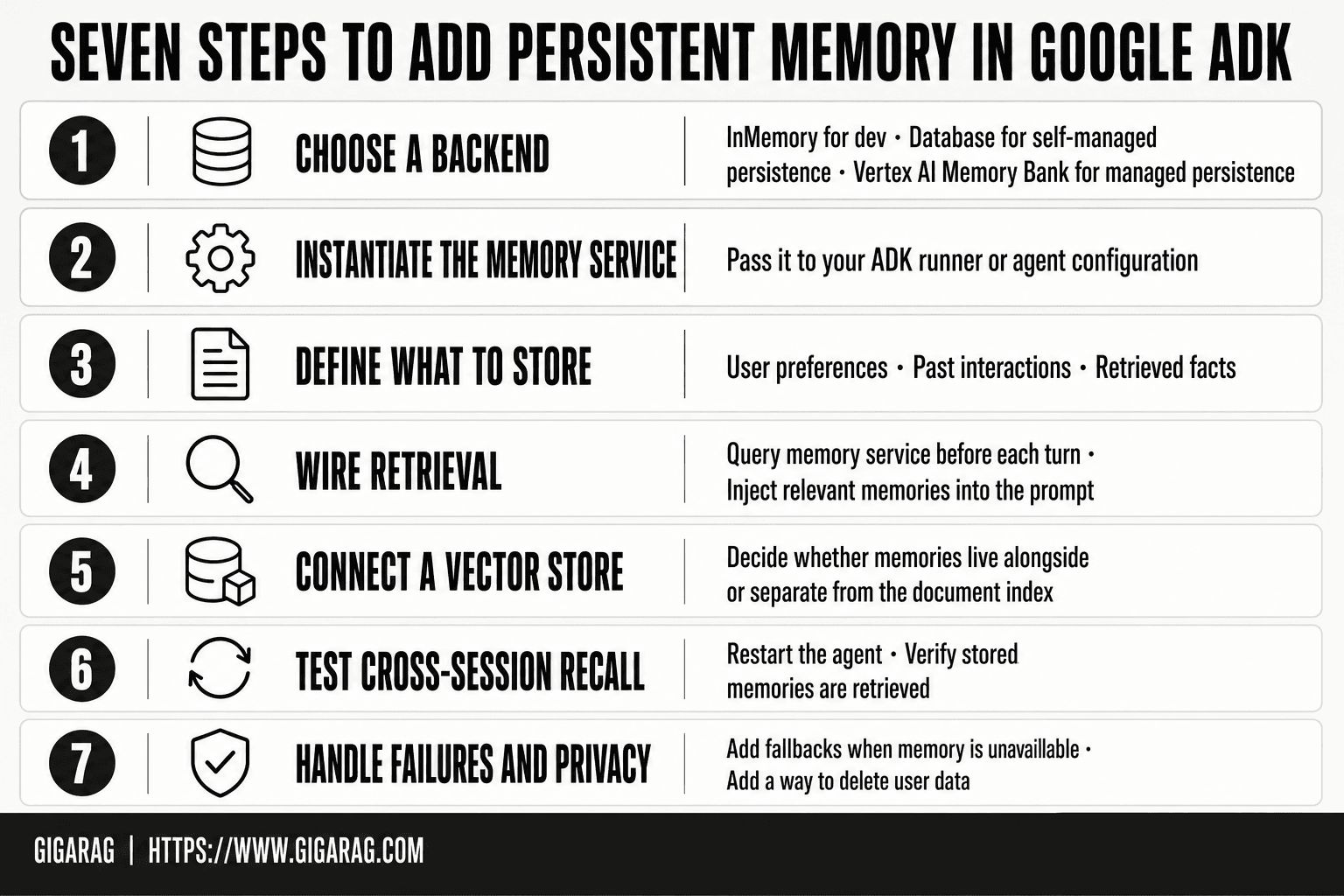
Persistent Memory Google ADK: A Step-by-Step Guide
- Choose a backend: InMemory for dev, a database for self-managed persistence, or Vertex AI Memory Bank for managed persistence.
- Instantiate the memory service and pass it to your ADK runner or agent configuration.
- Define what to store — user preferences, past interactions, or retrieved facts — and when to write it.
- Wire retrieval: query the memory service before each turn and inject relevant memories into the prompt.
- For RAG, connect a vector store and decide whether memories live alongside or separate from your document index.
- Test cross-session recall by restarting the agent and verifying stored memories are retrieved.
- Handle failures and privacy: add fallbacks when memory is unavailable and a way to delete user data.
Memory Backends for Persistent Memory in Google ADK
The backend you pick decides whether memory survives a restart. ADK ships with three built-in options and a path for custom ones. Each trades simplicity for durability in a different way.
InMemorySessionService: pros, cons, use cases
This is the default. It stores sessions in a Python dictionary inside the running process. Fast, zero setup, and gone the moment the process exits.
Pros: no configuration, no external dependencies, ideal for local testing and demos. Cons: no persistence across restarts, no sharing between processes, and memory grows until the process dies.
Use it for prototyping. Not for production.
DatabaseSessionService: pros, cons, use cases
DatabaseSessionService writes sessions to a SQL database through SQLAlchemy. That means your memory survives restarts and can be shared across multiple agent instances.
Pros: real persistence, works with Postgres, MySQL, or SQLite, and scales horizontally if your database does. Cons: you manage the database, handle migrations, and pay the latency of a round trip on every session read.
Best for production deployments where losing memory is not an option.
Vertex AI Memory Bank: pros, cons, use cases
Vertex AI Memory Bank is Google's managed memory store. It handles storage, retrieval, and scaling for you, and it integrates with the rest of Vertex AI.
Pros: managed infrastructure, built-in retrieval, no database to run. Cons: it's a Google Cloud service, so you're locked into that ecosystem and you pay per use. Pricing varies by region and usage volume (verify at publish).
Best for teams already on Google Cloud who want memory without operating a database.
Custom backends: when and why
You can implement the SessionService interface yourself. That's the escape hatch when none of the built-ins fit.
Do it when you need a specific store: Redis, DynamoDB, an internal vector database, or a compliance-mandated system. The cost is you own the code, the retries, and the failure modes.
The honest answer: most teams should start with DatabaseSessionService and only go custom when a real constraint forces it.
Step-by-Step: Implementing Persistent Memory with memory_service.add_
The previous section covered which backend to pick. This one covers wiring it up. You'll need a configured backend, a MemoryService instance, and a call to add_ at the right point in your agent's flow.
Prerequisites and setup
You need Python 3.9 or newer and the google-adk package installed. Install it with pip:
pip install google-adk
If you're using DatabaseSessionService, you'll also need SQLAlchemy and a running database. For Vertex AI Memory Bank, you need a Google Cloud project with the Vertex AI API enabled and credentials configured.
Make sure you can import the ADK modules before going further:
from google.adk.sessions import InMemorySessionService
from google.adk.memory import MemoryService
That import failing is usually a version mismatch. Check your installed version against the ADK release notes.
Configuring MemoryService
MemoryService sits on top of your session service. It's the layer that handles explicit memory operations like add_, search, and delete. You create it by passing in your session service instance.
session_service = InMemorySessionService()
memory_service = MemoryService(session_service=session_service)
Swap InMemorySessionService for DatabaseSessionService when you want persistence. The MemoryService API stays the same, which is the point: you can prototype locally and switch backends by changing one line.
Code example: memory_service.add_
Here's the core pattern. You call add_ with a memory payload and it stores the entry in the underlying session service.
memory_service.add_(
    session_id="user-123",
    memory={
        "type": "preference",
        "content": "User prefers concise answers with code examples",
        "metadata": {"source": "onboarding_flow"}
    }
)
The session_id ties the memory to a specific user or conversation. The memory dict is your payload. Keep it structured: a type field helps when you search later, and metadata holds anything you don't want in the main content.
You call this from inside your agent's tool or callback, not from the agent's main prompt. The agent decides when something is worth remembering, then invokes the memory service.
Testing persistence across sessions
The test is simple: add a memory in one session, start a new session, and check if it's still there.
# Session 1
memory_service.add_(session_id="user-123", memory={"type": "fact", "content": "Works at Acme Corp"})

# Session 2 (new process or new session)
results = memory_service.search(session_id="user-123", query="employer")
With InMemorySessionService, this fails if the process restarted between sessions. With DatabaseSessionService or Vertex AI Memory Bank, it works. That's the whole difference in one test.
Don't skip this test. It's the fastest way to confirm your backend is actually persisting and not just pretending to.
What Persistent Memory in ADK Cannot Do
The previous section showed you how to wire it up. Now the part most tutorials skip: what breaks.
AgentTool does not persist memory
AgentTool wraps an agent so another agent can call it. The wrapper passes state during the call, but it does not carry memory across calls. When the parent agent finishes, the child agent's memory does not follow. If you need a sub-agent that remembers between invocations, you have to give it its own session service and manage that session explicitly. AgentTool won't do it for you.
No automatic cross-session memory
ADK does not remember anything unless you tell it to. Session state resets when the session ends. Long-term memory only exists if you call memory_service.add_ and point it at a persistent backend. There's no background process watching your agent and deciding what to keep. The agent itself has to make that call, every time.
Backend-specific limitations
InMemorySessionService loses everything when the process stops. DatabaseSessionService persists, but you own the database: backups, migrations, connection pooling. Vertex AI Memory Bank handles scaling for you, but it's a managed service with its own latency and cost profile. Custom backends give you control and nothing else. You write the persistence logic, the failure handling, and the retrieval path. None of these are set-and-forget.
Integrating Persistent Memory with RAG Pipelines
You've seen what ADK memory cannot do. Now the part RAG builders actually care about: making memory feed retrieval.
Memory and vector stores: how they connect
Persistent memory and vector stores solve different problems. A vector store holds embeddings for similarity search. ADK memory holds session state and long-term facts. They connect when you store a pointer, not a copy. Save the fact in ADK memory, save the embedding in your vector store, and link them with an ID. When retrieval runs, it pulls the ID, then the fact.
Don't store raw embeddings in ADK memory. Session state is not built for high-dimensional vectors. Keep the vector store separate.
Retrieval strategies with persistent memory
Two patterns work in practice. First, memory as a filter: before querying the vector store, check what the user already told the agent. Use that to narrow the search space. Second, memory as a re-ranker: retrieve candidates, then score them against long-term facts about the user's preferences or project context.
The honest catch: ADK does not do either automatically. You write the retrieval logic and call memory_service inside it.
Practical example: memory-enhanced RAG
A support agent remembers the user's product tier in ADK memory. When the user asks a question, the agent retrieves docs, then filters out any doc that applies to a different tier. The memory call adds one lookup. The retrieval quality improves because the search space shrinks.
That's the whole integration: memory narrows retrieval. It doesn't replace the vector store.
Deployment and Scaling Considerations
Deployment changes what "persistent" means. Local testing hides latency and storage limits. Production exposes both.
Local testing with ADK Web UI
ADK Web UI runs your agent in a browser with a local session service. It's fine for verifying that memory survives a page refresh. It won't tell you how your backend behaves under load. Use it to check the wiring, not the scale.
Docker deployment for memory-enabled agents
Containerize the agent and the memory backend separately. Point the agent at the backend's hostname, not localhost. If you're using DatabaseSessionService, run Postgres or SQLite in its own container with a volume. Without a volume, every container restart wipes memory. That's the mistake that looks like a bug but is just missing persistence.
Scaling memory backends in production
InMemorySessionService dies with the process. Don't use it past a single instance. DatabaseSessionService scales vertically first: one database, more connections. Vertex AI Memory Bank handles horizontal scaling but adds latency per call. Measure that latency before you commit. The honest answer: most RAG pipelines don't need Memory Bank. A Postgres-backed session service handles thousands of sessions fine.
Common Mistakes When Adding Persistent Memory to Google ADK Agents
Most failures come from three assumptions. You assume the session is the memory. You assume the backend scales. You assume local behavior survives deployment.
Confusing session state with long-term memory
Session state is scratch paper. It holds what the agent needs for one conversation. Long-term memory is the filing cabinet. Developers write to session state and expect it to persist across sessions, then wonder why the agent forgot everything. If you want memory that outlives the session, you must write it to a memory service explicitly. Session state won't do it for you.
Choosing the wrong backend for scale
InMemorySessionService works in a demo. It dies with the process. If your agent runs in multiple containers, each one has its own memory. DatabaseSessionService fixes that but adds a database to manage. Vertex AI Memory Bank adds horizontal scaling and per-call latency. Pick the backend for the load you actually have, not the load you hope to have.
Ignoring deployment constraints
Local testing hides the problem. Docker without a volume wipes memory on restart. A backend pointed at localhost breaks the moment the container moves. Test the deployment path before you trust persistent memory in Google ADK.
Frequently Asked Questions
What is Google ADK's memory service?
Google ADK's memory service is the component that lets an agent store and retrieve information beyond a single session. ADK provides built-in implementations like InMemoryMemoryService for development and integrations such as Vertex AI Memory Bank for managed persistence. You choose and configure the service that fits your deployment.
Does Google ADK persist memory across sessions by default?
- The default in-memory service does not persist across sessions or restarts. To get persistent memory, you must configure a persistent backend such as a database or Vertex AI Memory Bank and implement the read/write logic in your agent.
What are the limitations of persistent memory in Google ADK?
ADK does not automatically remember across sessions, and wrapping an agent in AgentTool does not persist memory across sessions. You are responsible for choosing a backend, defining what to store, and handling retrieval, privacy, and failure cases. There is no single switch that makes all agents remember everything.
How does persistent memory integrate with RAG pipelines in ADK?
Persistent memory complements RAG by storing user-specific context and past interactions, while your vector store handles document retrieval. At runtime, you retrieve relevant memories and documents, then inject both into the prompt. Keeping the two stores separate makes each easier to tune and manage.
Is Vertex AI Memory Bank required for persistent memory in ADK?
- Vertex AI Memory Bank is one managed option, but you can also implement persistence with a database or a custom memory service. The right choice depends on your scale, cloud setup, and how much operational overhead you want to take on.
How much does Vertex AI Memory Bank cost?
Pricing for Vertex AI Memory Bank is usage-based and can change, so check the current Google Cloud pricing page for your region. For planning, treat it as a variable cost tied to storage and operations rather than a fixed fee.
Can I use persistent memory with multi-agent systems in ADK?
Yes, but you need to decide which agent or shared service owns the memory. A common pattern is a shared memory service that multiple agents read from and write to, with clear rules about what each agent may store. Without that, agents can overwrite or misread each other's context.
About GigaRAG
GigaRAG is for agent memory and RAG pipeline builders. get this right. Whether you are working through How to Add Persistent Memory to Google ADK Agents or something adjacent, we publish what we have actually tested, including where it falls short.


