
How to Add Persistent Memory to LangChain Agents: A Practical Guide for RAG Builders
How to add persistent memory to LangChain agents is a question most RAG builders hit after their first multi-turn demo: the agent works, then the session ends and it forgets everything. The tutorials don't help much either. One pushes PostgreSQL, another pushes Redis, a third sells you a vector store, and none of them tell you when persistence is actually worth the extra moving parts. The honest answer is that it's often not. Single-shot queries and stateless tools don't need memory, and adding it anyway just gives you stale context and higher latency. But for long-running pipelines, user-specific context, and agents that need to pick up where they left off, persistence is the difference between a toy and a tool. GigaRAG handles this natively for agent memory, but you don't need a vendor product to do it yourself. This guide covers a neutral, step-by-step implementation using LangChain's built-in checkpointers, with a real comparison of PostgreSQL, Redis, and vector store backends, plus the limitations nobody else mentions.
| At a glance | Details |
|---|---|
| Core idea | Persist agent state across sessions |
| Main backends | PostgreSQL, Redis, vector store |
| LangChain tools | Memory classes, checkpointers, stores |
| Best for | Multi-session, personalized agents |
| Avoid when | Stateless tasks, privacy-sensitive data |
| Key trade-off | Complexity vs. continuity |
In This Guide
- What Is Persistent Memory in LangChain Agents?
- PostgreSQL vs Redis vs Vector Store for Persistent Memory
- When Persistent Memory Is Worth the Complexity
- How To Add Persistent Memory To LangChain Agents: A Step-by-Step Guide
- Prerequisites for Adding Persistent Memory
- Step 1: Choose a Memory Backend
- Step 2: Implement Persistent Memory in LangChain
- Step 3: Handle Common Pitfalls and Limitations
- Best Practices for Persistent Memory in RAG Pipelines
- FAQ: How to Add Persistent Memory to LangChain Agents
- Final Thoughts on Persistent Memory for LangChain Agents
What Is Persistent Memory in LangChain Agents?
Persistent memory stores an agent's conversation state and context in an external backend, so it survives process restarts and new sessions. In-memory buffers vanish when the script ends. Persistent memory writes to a database or store that outlives the run.
In-memory vs. persistent memory
LangChain's default conversation buffers live in RAM. They're fast and simple, but they die with the process. Persistent memory serializes agent state to a backend like PostgreSQL, Redis, or a vector store. The agent reads from that backend on startup, so context carries over.
Why agents forget between sessions
An agent is just code plus state. When the process exits, anything held in memory is gone. Without a checkpoint or store, the next session starts blank. Persistence means writing state somewhere durable, then loading it back when the agent initializes. That's the whole mechanic. It doesn't make the agent smarter. It just stops it from starting over.
[!note] LangChain's memory tools are evolving; some classes like ConversationBufferMemory are being deprecated in favor of newer checkpointers and stores. Always check the latest LangChain documentation for the most current approach.
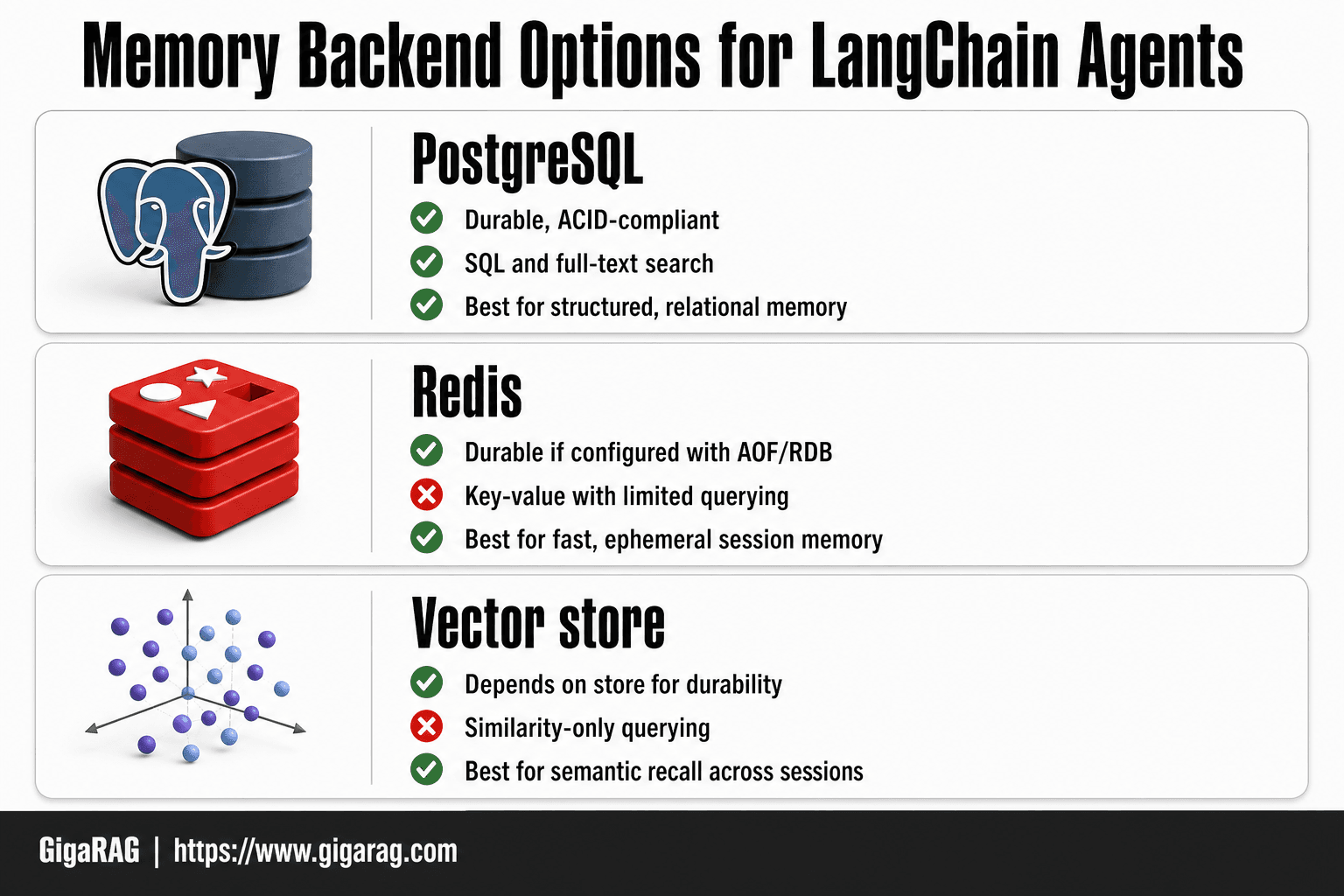
PostgreSQL vs Redis vs Vector Store for Persistent Memory
| Factor | PostgreSQL | Redis |
|---|---|---|
| Persistence | Durable, ACID-compliant | Durable if configured (AOF/RDB) |
| Query flexibility | SQL, full-text search, JSON | Key-value, limited querying |
| Setup complexity | Moderate (schema, migrations) | Low (in-memory, simple) |
| Best for | Structured, relational memory | Fast, ephemeral session memory |
| Scalability | Vertical and read replicas | High throughput, in-memory |
When Persistent Memory Is Worth the Complexity
Persistence adds a backend, serialization logic, and failure modes. That cost only pays off when the agent actually needs to remember across runs. Here's the honest framework.
Use cases that benefit from persistence
Multi-turn agents are the clearest case. A support bot that picks up a conversation from yesterday needs the full thread, not a blank slate. Long-running RAG pipelines benefit too: if a user refines a query over five turns, each turn narrows the retrieval, and losing that context forces them to restate everything.
User-specific context is another. An agent that remembers a customer's account tier, preferred output format, or past corrections avoids re-asking the same questions every session. Checkpointing also helps when you're running expensive agent loops: if the process crashes at step 40 of 50, a checkpoint means you resume at step 40 instead of restarting.
Scenarios where you should skip it
Single-shot queries don't need persistence. If the agent answers one question and exits, an in-memory buffer is faster and simpler. Stateless tools, like a one-off summarizer or a classifier, gain nothing from a database round-trip.
Skip it when the context is sensitive and short-lived. Persisting user data means you now own retention, deletion, and compliance. If the conversation is ephemeral by design, keeping it in RAM is the safer default.
The main catch: persistence doesn't improve reasoning. It only preserves state. If your agent's answers are bad on turn one, they'll still be bad on turn ten, just with more context attached.
[!tip] For RAG builders, start with a simple vector store for memory if your agent already uses one for retrieval—it reduces infrastructure overhead and leverages existing embedding pipelines. Only add a separate database when you need structured queries or high-speed session caching.
How To Add Persistent Memory To LangChain Agents: A Step-by-Step Guide
- Choose a backend based on your needs: PostgreSQL for structured data, Redis for speed, or a vector store for semantic recall.
- Install the necessary LangChain integration package (e.g., langchain-postgres, langchain-redis, or langchain-community for vector stores).
- Set up the backend service and create the required schema or index (e.g., run migrations for PostgreSQL, start Redis, or initialize a vector collection).
- Instantiate the memory component in your LangChain code, passing the connection details and configuration.
- Integrate the memory into your agent by passing it to the agent executor or using it in your chain.
- Test persistence by running the agent in one session, stopping it, and starting a new session to verify memory recall.
- Monitor and maintain the backend (e.g., backups, index optimization) as part of your deployment.
Prerequisites for Adding Persistent Memory
You need Python 3.9 or newer, a working LangChain install, and one backend you already know how to run. That last part matters more than the LangChain version. The memory code is thin; the database is where most setup time goes.
Required Python packages
Install LangChain and the backend connector you picked. For PostgreSQL, that's langchain-postgres plus psycopg. For Redis, langchain-redis and redis. For a vector store, langchain-chroma or langchain-pinecone depending on your choice.
You'll also want langgraph if you're using checkpointing, which is the cleaner path for agent state. Don't install everything at once. Pick one backend, install its two packages, and move on.
Environment setup
Start a local instance of your backend before writing any code. Docker is the fastest route: one command for Postgres, one for Redis. Make sure you can connect from a plain Python script first. If the connection string doesn't work outside LangChain, it won't work inside it either.
Set your connection string as an environment variable, not hardcoded in the script. You'll thank yourself when the code moves from your laptop to a server.
Step 1: Choose a Memory Backend
The backend you pick determines what your agent can remember and how fast it can recall it. Don't start with the code. Start with your existing stack. If you already run PostgreSQL, use it. If you already run Redis, use it. Adding a new database for memory alone is rarely worth the operational overhead.
PostgreSQL for structured memory
PostgreSQL is the default choice when you need durable, queryable memory. It stores conversation history, user preferences, and agent state as rows you can inspect, back up, and join against other tables. LangChain's PostgresSaver checkpointer writes agent state as JSON blobs with a thread ID, so you can resume any session by ID.
The main catch is latency. A round trip to Postgres takes milliseconds, not microseconds. For agents that make many small memory reads per turn, that adds up. It's fine for most RAG pipelines. It's not fine for high-frequency tool loops.
Redis for speed
Redis keeps memory in RAM, so reads are sub-millisecond. That makes it the right pick when your agent checks memory on every step, like a multi-step reasoning loop that consults prior turns constantly. LangChain's RedisSaver works the same way as the Postgres one: thread ID in, state out.
The trade-off is durability. Redis can persist to disk, but it's not a relational database. You can't run SQL against your memory. If you need to audit what an agent remembered and why, Redis makes that harder.
Vector stores for semantic memory
Vector stores answer a different question: not "what did this session say" but "what past memory is similar to this query." You embed memories, store the vectors, and retrieve by similarity. That's useful for long-term semantic recall across many sessions, like remembering a user's preferences from weeks ago without exact keyword matches.
The honest answer is that vector stores are the most complex option. You need an embedding model, a vector index, and a separate store for raw text. For most agents, this is overkill. Start with Postgres or Redis. Add a vector store only when semantic recall becomes a real requirement.
Comparison table
| Backend | Durability | Query flexibility | Setup complexity | Cost |
|---|---|---|---|---|
| PostgreSQL | High | High (SQL) | Low if already running | Low to moderate |
| Redis | Moderate | Low (key-value) | Low if already running | Low to moderate |
| Vector store | Depends on store | Low (similarity only) | High (embeddings + index) | Moderate to high |
Pick based on what you already run. The code changes are small. The operational cost is the real decision.
Step 2: Implement Persistent Memory in LangChain
The code below uses PostgreSQL as the backend. If you picked Redis in Step 1, swap PostgresSaver for RedisSaver and change the connection string. The wiring is identical.
Setting up the memory store
Start by installing the packages you need. LangGraph's checkpointers live in langgraph-checkpoint-postgres for Postgres and langgraph-checkpoint-redis for Redis.
pip install langgraph langgraph-checkpoint-postgres psycopg
Now create the checkpointer. This object is what writes agent state to Postgres and reads it back when a session resumes.
from langgraph.checkpoint.postgres import PostgresSaver

DB_URI = "postgresql://user:password@localhost:5432/agent_memory"

checkpointer = PostgresSaver.from_conn_string(DB_URI)
checkpointer.setup()
setup() creates the tables LangGraph needs. Run it once. After that, every agent run with this checkpointer will write its state to Postgres automatically.
Wiring memory into the agent
The checkpointer does nothing until you pass it to your graph. Here's a minimal agent with a tool and a model, wired for persistence.
from langgraph.graph import StateGraph, MessagesState, START
from langgraph.prebuilt import ToolNode
from langchain_openai import ChatOpenAI

model = ChatOpenAI(model="gpt-4o-mini")

def call_model(state: MessagesState):
    response = model.invoke(state["messages"])
    return {"messages": response}

graph = StateGraph(MessagesState)
graph.add_node("model", call_model)
graph.add_edge(START, "model")

app = graph.compile(checkpointer=checkpointer)
The key line is graph.compile(checkpointer=checkpointer). Without it, the agent runs stateless. With it, every turn is saved.
To run the agent, pass a thread_id in the config. That ID is the session key. Same ID, same memory. Different ID, fresh start.
config = {"configurable": {"thread_id": "user-42"}}

app.invoke(
    {"messages": [{"role": "user", "content": "My name is Ada."}]},
    config=config
)
Testing persistence across sessions
Now run a second call with the same thread_id and a new message. The agent should remember the name from the first call.
app.invoke(
    {"messages": [{"role": "user", "content": "What's my name?"}]},
    config=config
)
The response should reference Ada. If it doesn't, check that the checkpointer was passed to compile() and that the thread_id matches.
To verify persistence at the database level, query the checkpoint table directly.
SELECT thread_id, checkpoint FROM checkpoints WHERE thread_id = 'user-42';
You'll see the serialized state as JSON. That's your proof the memory survived the process boundary. Kill the Python process, restart it, run the same thread_id, and the agent still knows Ada.
One thing this setup won't do: it won't summarize or compress memory. Long conversations will hit the model's context window eventually. Step 3 covers that.
Step 3: Handle Common Pitfalls and Limitations
Persistent memory solves forgetting. It creates three new problems you'll hit within a week of running in production.
Token limits and context overflow
Every message you persist gets loaded back into the prompt on the next turn. A conversation that runs 200 turns will blow past the model's context window, and the agent will silently drop the oldest messages. You won't get an error. You'll get worse answers.
The fix is trimming or summarizing. Before each run, cap the message history to the last N turns, or run a summarization step that compresses older turns into a short paragraph. LangGraph doesn't do this for you. You write that node yourself.
Stale or conflicting memory
Memory is a snapshot, not a live fact. If a user changes their name, their role, or their preferences, the old value sits in the checkpoint until something overwrites it. Worse, two sessions with different thread_id values can store contradictory facts about the same user, and nothing reconciles them.
Mitigation: store a last_updated timestamp on user-level facts, and treat memory as a retrieval source, not a source of truth. When the agent needs a fact, it should fetch and verify, not assume the checkpoint is current.
Security and privacy concerns
Checkpoints store raw conversation text. That includes anything the user typed: API keys, personal data, internal project names. If your Postgres or Redis instance is compromised, all of it leaks at once.
Don't persist what you don't need. Redact sensitive fields before they hit the checkpointer, or store only embeddings and summaries, not full transcripts. For regulated data, keep memory in a database you already audit, not a new one you stood up for this feature.
Best Practices for Persistent Memory in RAG Pipelines
RAG changes what memory is for. In a plain chat agent, memory is conversation history. In a RAG pipeline, memory competes with retrieval. You have two sources of context: what you stored and what you fetched. The question is what belongs in each.
Memory and retrieval: what to store
Store raw text in memory only when you need it verbatim. That means user preferences, session state, and short facts the agent must quote exactly. Everything else belongs in your vector store, not your checkpointer.
Here's why. Embeddings are lossy. You can't reconstruct the original sentence from a vector, and you shouldn't try. If the agent needs to recall that the user's deployment target is us-west-2, store the string. If the agent needs to find documents similar to a past question, store the embedding and let retrieval do its job.
The honest answer is that most RAG builders over-persist. They dump every retrieved chunk into memory, then wonder why the context window fills up. Don't. Retrieval is repeatable. Memory is not.
Avoiding memory bloat in production
Long-running pipelines accumulate state. Every turn adds messages, and every message adds tokens. Without a cap, your checkpointer becomes the bottleneck.
Set a hard limit on stored turns. Ten to twenty is enough for most RAG agents. Beyond that, summarize. Keep a rolling summary of older turns and store only the last few messages verbatim.
Also, separate user-level memory from session-level memory. User preferences change slowly and should persist across sessions. Session state is ephemeral and should expire. Mixing the two is how you get bloat and stale facts at the same time.
The main catch: none of this is automatic. LangChain gives you the checkpointer. You write the trimming, the summarization, and the expiry logic. Budget for that before you ship.
FAQ: How to Add Persistent Memory to LangChain Agents
How do I add persistent memory in Python?
Use a checkpointer. LangChain's BaseChatMessageHistory handles in-memory storage, but persistence requires a backend like PostgresSaver or RedisSaver. Wire it into your agent's checkpointer argument, then pass a thread_id per session. That's the whole mechanism.
What's the best backend?
It depends on what you already run. PostgreSQL if you need durability and SQL queries. Redis if you need sub-millisecond reads. A vector store only if you're doing semantic recall, not conversation history.
Can I use Redis?
Yes. It's fast and simple. The catch: Redis is in-memory by default. You need AOF or RDB persistence enabled, or a restart wipes your memory.
How do I persist across sessions in LangGraph?
LangGraph checkpoints state automatically when you provide a checkpointer. Use MemorySaver for testing, PostgresSaver or RedisSaver for production. Same thread_id resumes the same conversation.
Do RAG pipelines need persistent memory?
Not always. Single-shot retrieval doesn't. Multi-turn RAG with follow-up questions does. Store user preferences and session state. Let retrieval handle documents.
Final Thoughts on Persistent Memory for LangChain Agents
Persistent memory is a tool, not a default. You add it when sessions must survive a restart, when follow-up questions depend on earlier turns, or when user context changes how retrieval should work. You skip it when queries are single-shot and stateless.
The implementation is straightforward: pick a backend that matches your stack, wire in a checkpointer, pass a thread_id. The hard part isn't the code. It's deciding what to store, how long to keep it, and when stale memory hurts more than it helps.
If you're building RAG pipelines and want agent memory without stitching together checkpointer logic, GigaRAG handles persistence and retrieval in one place. It's not the only option. But it removes the backend plumbing most teams don't want to own.
Start with PostgreSQL or Redis. Test with MemorySaver. Add persistence only when a real session crosses a restart. That's how to add persistent memory to LangChain agents without overbuilding.
Frequently Asked Questions
How to add persistent memory to LangChain agents using Python?
You can use LangChain's memory classes with a persistent backend like PostgreSQL or Redis. Install the integration package, configure the connection, and pass the memory object to your agent. For example, with PostgreSQL, use the PostgresChatMessageHistory class to store messages durably.
What is the best database for persistent memory in LangChain?
There's no single best database; it depends on your needs. PostgreSQL is great for structured, relational memory and complex queries. Redis excels for high-speed, ephemeral session memory. Vector stores are ideal for semantic recall of past interactions. Evaluate based on your query patterns and scalability requirements.
Can I use a vector store for persistent memory in LangChain?
Yes, vector stores can be used for persistent memory, especially for semantic search over past conversations. LangChain provides VectorStoreRetrieverMemory, which stores memories as embeddings and retrieves them based on similarity. This is useful for agents that need to recall relevant past interactions.
How to persist LangChain agent memory across sessions?
To persist memory across sessions, you need to use a backend that stores data outside the agent's runtime. LangChain's memory components can be configured with databases like PostgreSQL or Redis. When the agent restarts, it loads the memory from the backend, allowing continuity.
What are the limitations of persistent memory in LangChain?
Persistent memory adds complexity, latency, and potential privacy risks. Not all agents need it—stateless tasks or those handling sensitive data may be better without. Also, LangChain's memory tools are still evolving, and some older classes are deprecated. Always consider if the benefits outweigh the overhead.
How to add persistent memory to LangChain agents reddit?
Reddit discussions often recommend starting with a simple solution like SQLite for local development, then scaling to PostgreSQL or Redis for production. Many developers share code snippets using LangChain's SQLChatMessageHistory or RedisChatMessageHistory. Check r/LangChain for community insights.
About GigaRAG
GigaRAG is for agent memory and RAG pipeline builders. get this right. Whether you are working through How to Add Persistent Memory to LangChain Agents or something adjacent, we publish what we have actually tested, including where it falls short.


