Production-Grade RAG: What Pipeline Builders Actually Need to Know
Production-grade RAG is where pipeline builders stop trusting the demo. A prototype that answers five questions in a notebook will not survive five hundred concurrent users, a shifting knowledge base, or an agent that needs to remember yesterday's conversation. The good news is that the gap is mostly known ground: chunking choices, hybrid search, reranking, memory management, and evaluation that runs continuously instead of once. The main catch is that most tutorials stop before any of this matters. They show you retrieval working, then hand you a system that breaks in ways the demo never revealed: stale context, silent hallucination, latency spikes, token bills that surprise you at month end. GigaRAG is built for this exact problem, but this guide is not a pitch. It's a practical, honest walkthrough of what works, what breaks, and what you should not expect from production-grade RAG.
| At a glance | Details |
|---|---|
| Core idea | RAG that survives real traffic, data drift, and users |
| Biggest gap | Agent memory: short-term vs long-term, refresh, injection |
| Key trade-off | Latency vs accuracy vs cost — pick two per query |
| Must-have | Evaluation harness with retrieval and generation metrics |
| Common failure | Silent retrieval misses and stale memory |
| Maturity signal | Graceful degradation and observability, not peak demo scores |
In This Guide
- What Is Production-Grade RAG?
- Prototype RAG vs Production-Grade RAG
- Common Issues When Moving RAG to Production
- Production-grade Rag: A Step-by-Step Guide
- Architecture Overview for Production RAG Pipelines
- Chunking Strategies That Survive Production
- Hybrid Search and Reranking for Reliable Retrieval
- Agent Memory in Production RAG
- Evaluation Metrics for Production RAG
- What Production-Grade RAG Cannot Do
- A Practical Production RAG Walkthrough
- Common Mistakes When Building Production-Grade RAG
- Final Thoughts on Production-Grade RAG
What Is Production-Grade RAG?
Most RAG tutorials stop at the demo. You load a few PDFs, wire up a vector database, and get a plausible answer in an afternoon. That's prototype RAG. Production-grade RAG is a different system: one that meets reliability, latency, cost, and accuracy thresholds under real load, with real users, day after day.
The distinction matters because the failure modes are different. A prototype fails loudly: wrong answer, obvious hallucination, a crash you can see. A production system fails quietly: retrieval drifts, latency creeps up, costs balloon, and answers get subtly worse over weeks. You don't notice until a user complains or a bill arrives.
Prototype RAG vs. production RAG
A prototype answers one question correctly in a demo. Production RAG answers thousands of questions per hour, from a knowledge base that changes, with latency budgets measured in milliseconds and cost budgets measured in dollars per day. The difference isn't scale alone. Production systems need monitoring, evaluation, and a plan for when retrieval fails. Prototypes need none of those.
What "production-grade" actually means for latency, cost, and reliability
Production-grade means you can state your thresholds and hit them. Latency: retrieval plus generation under 2 seconds for most queries, with p95 tracked, not just averages. Cost: a per-query budget you can predict, not a surprise at month-end. Reliability: uptime targets, retry logic, and graceful degradation when a component fails. If you can't measure these, you don't have production RAG. You have a prototype with extra steps.
The four levels of RAG
The four levels of RAG describe how much orchestration sits around the basic retrieve-then-generate pattern:
- Naive RAG: retrieve chunks, stuff them into a prompt, generate. No reranking, no filtering, no memory.
- Advanced RAG: adds query rewriting, hybrid search, reranking, and better chunking. Retrieval quality improves, but the system is still stateless.
- Modular RAG: breaks the pipeline into swappable components: separate retrievers, rerankers, memory modules, and routers. You can replace one part without rebuilding the rest.
- Agentic RAG: the system decides what to retrieve, when to retrieve, and whether to use memory, tools, or multiple retrieval passes. Agent memory becomes a first-class component, not an afterthought.
Most teams stall at level 2. The jump to levels 3 and 4 is where production-grade actually starts.
[!note] Production-grade RAG is not a single architecture — it is an operating discipline: versioned data, measured retrieval, managed memory, and planned degradation. Treating any one of these as optional is what turns a working demo into an unreliable system.
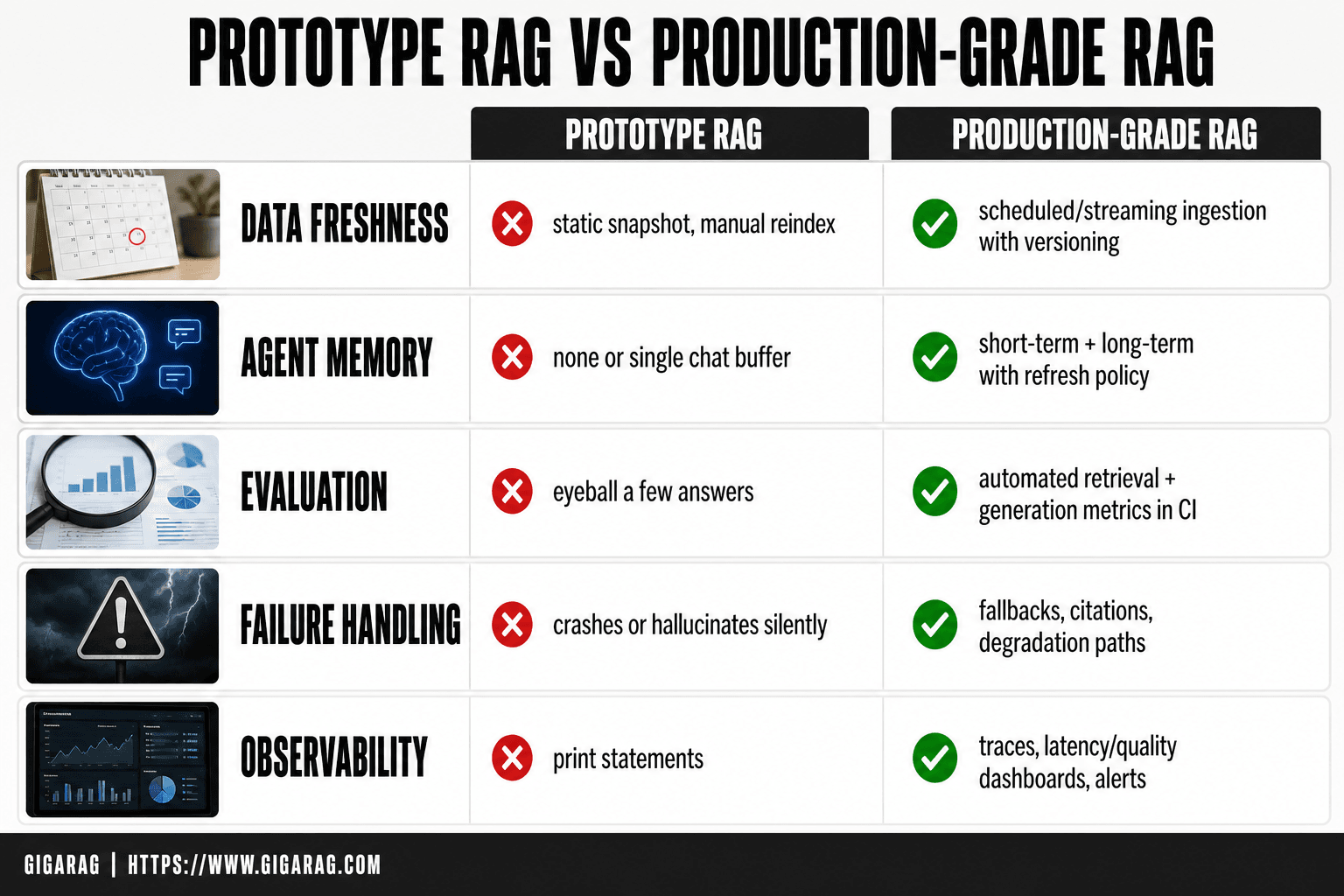
Prototype RAG vs Production-Grade RAG
| Factor | Prototype RAG | Production-Grade RAG |
|---|---|---|
| Data freshness | Static snapshot, manual reindex | Scheduled/streaming ingestion with versioning |
| Agent memory | None or single chat buffer | Short-term + long-term memory with refresh policy |
| Evaluation | Eyeball a few answers | Automated retrieval + generation metrics in CI |
| Failure handling | Crashes or hallucinates silently | Fallbacks, citations, and degradation paths |
| Observability | Print statements | Traces, latency/quality dashboards, alerts |
Common Issues When Moving RAG to Production
The demo works. Then you point it at real data, real users, real traffic, and it breaks in ways the demo never hinted at. Here's what actually goes wrong.
Retrieval quality degradation at scale
Small datasets hide bad retrieval. A few hundred chunks, and even sloppy embeddings return something relevant. At a million chunks, the same pipeline returns noise. Vector search drifts toward popular clusters, not the right answer. Queries that worked in testing fail in production because the embedding model sees phrasing it never saw before. The fix isn't one thing. It's hybrid search, reranking, and continuous evaluation, all covered later.
Latency and throughput bottlenecks
A single query feels fast. A hundred concurrent queries expose the queue. Vector search, reranking, and LLM generation each add latency, and they compound. You can't optimize one without measuring all three. The p95 latency, not the average, is what users feel.
Cost management and token explosion
Naive RAG stuffs every retrieved chunk into the prompt. Ten chunks of 500 tokens each is 5,000 tokens per query. At scale, that's real money. Reranking adds compute. Longer contexts add cost. Without a per-query budget, production RAG quietly becomes the most expensive component in your stack.
Stale or inconsistent knowledge bases
Your knowledge base changes. Documents get updated, deprecated, deleted. If your indexing pipeline doesn't track those changes, your RAG system answers from yesterday's data. Users notice when the answer contradicts the current docs. Staleness isn't a bug you fix once. It's a process you run continuously.
Context window overflow and information loss
Retrieval returns more than fits. You truncate, and the answer loses the one chunk that mattered. Or you stuff everything in, and the model attends to the middle poorly. Context overflow isn't just a capacity problem. It's a quality problem that shows up as plausible-sounding answers built on the wrong evidence.
[!tip] For agent memory specifically, log every memory write with a timestamp and source, and expire or re-verify long-term memories on a schedule. Stale memory is one of the most common causes of confidently wrong answers in production RAG systems.
Production-grade Rag: A Step-by-Step Guide
- Define quality and latency SLOs before choosing models or vector stores.
- Build a versioned ingestion pipeline with chunking, metadata, and refresh cadence.
- Separate short-term (session) and long-term (persistent) agent memory with explicit write/read rules.
- Implement hybrid retrieval (dense + keyword) and reranking; log every retrieved chunk.
- Add a context injection layer that assembles prompt from memory, retrieved docs, and user state.
- Stand up an evaluation harness covering retrieval recall, answer faithfulness, and latency.
- Instrument traces, alerts, and fallback paths; run load tests and failure drills.
Architecture Overview for Production RAG Pipelines
A production RAG pipeline is not one model call. It's a chain of components, each with its own failure mode, and the architecture you choose determines which failures you'll spend your nights debugging.
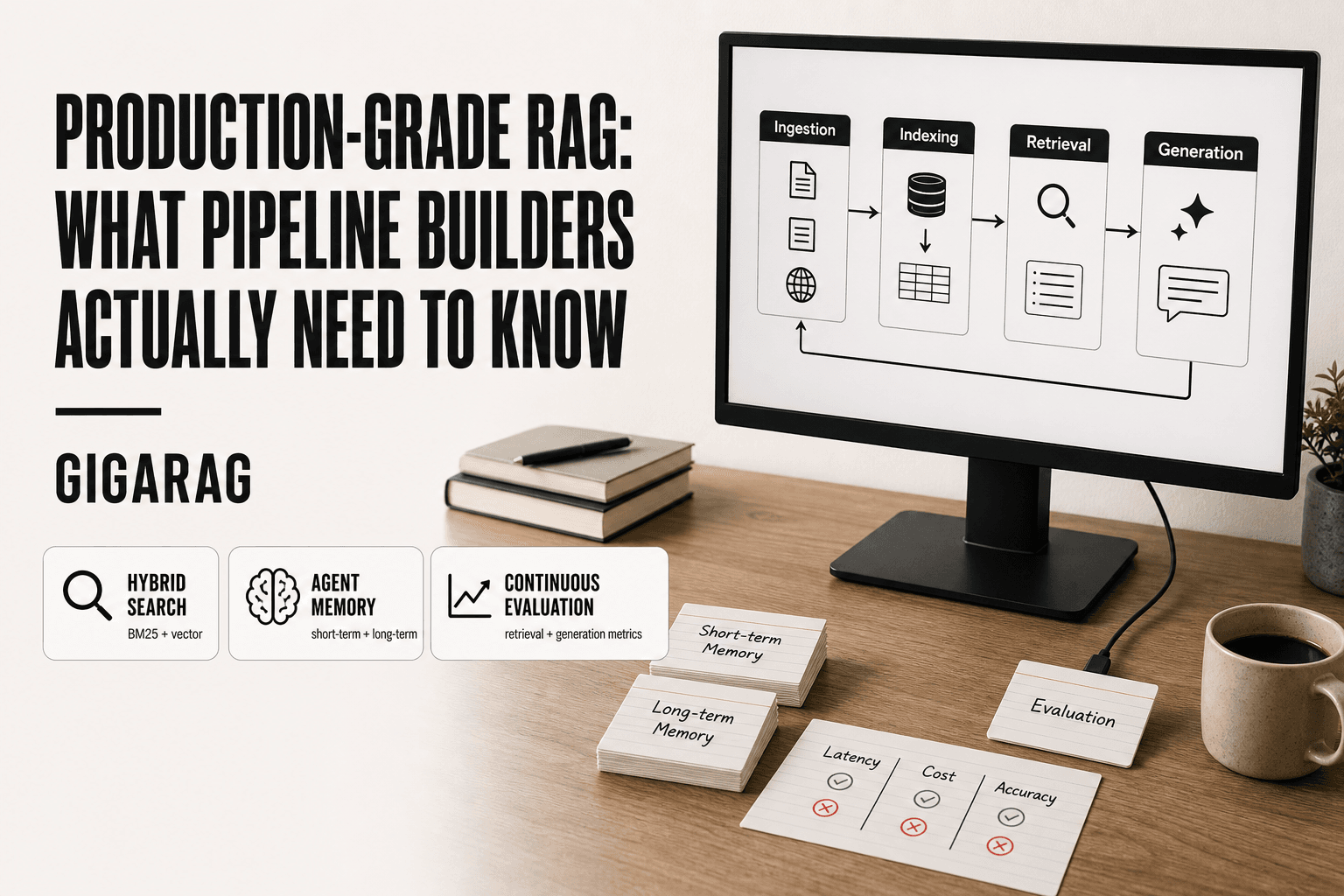
Core components: ingestion, indexing, retrieval, generation
Four stages, always in this order. Ingestion pulls raw documents from wherever they live: S3 buckets, databases, APIs, file systems. It cleans them, strips formatting, extracts text. Indexing turns that text into something searchable: chunks, embeddings, metadata, all written to a vector store. Retrieval takes a query, finds relevant chunks, and ranks them. Generation feeds those chunks to an LLM and produces an answer.
The feedback loop is the fifth component nobody draws in the diagram. Every user interaction, every thumbs-down, every corrected answer, feeds back into the pipeline. Without it, your system degrades silently. With it, you can measure what's actually breaking.
Where agent memory plugs into the pipeline
Agent memory sits between retrieval and generation. It's not a separate database. It's a context layer that decides what the agent remembers from past interactions and injects that memory into the prompt alongside retrieved chunks.
Short-term memory holds the current conversation: what the user asked three turns ago, what the agent already said. Long-term memory holds facts the agent has learned or been told: user preferences, past decisions, domain knowledge that isn't in the knowledge base. Both get injected at generation time. The retrieval step stays unchanged. Memory is additive, not a replacement for retrieval.
Layered vs. monolithic architecture trade-offs
A monolithic RAG pipeline is one service: ingest, index, retrieve, generate, all in a single codebase. It's fast to build and easy to debug when something breaks. It also scales poorly. A spike in ingestion traffic slows down retrieval. A bug in the generation prompt takes down the whole system.
A layered architecture splits these into separate services with queues between them. Ingestion writes to a queue. Indexing consumes from that queue. Retrieval is its own service. Generation is another. Each layer scales independently, and a failure in one layer doesn't cascade. The cost is operational complexity: more services to monitor, more queues to manage, more places for latency to hide.
The honest answer is it depends on your scale. Under a few thousand queries a day, monolithic is fine. Past that, you'll want layers.
Stateless vs. stateful RAG for agent workflows
Stateless RAG treats every query as new. No memory, no conversation history, no user context. It's simpler, cheaper, and easier to test. It also gives terrible answers for anything that requires follow-up or context.
Stateful RAG keeps conversation state and agent memory between turns. The agent knows what you asked before, what it answered, and what you corrected. That state has to live somewhere: in a session store, in the agent's memory layer, or in the prompt itself. Stateful RAG costs more and adds a new failure mode: stale state. If the agent remembers something wrong, it keeps being wrong until something corrects it.
Agent workflows need stateful RAG. Batch processing and one-shot Q&A can stay stateless. The architecture decision is really a decision about whether your users expect a conversation or a lookup.
Chunking Strategies That Survive Production
Chunking is where retrieval quality is won or lost. Get it wrong and your embeddings are garbage no matter how good your model is. Get it right and a mediocre retriever still finds the right context.
Fixed-size vs. semantic vs. recursive chunking
Fixed-size chunking splits text every N characters or tokens, usually 256 to 512. It's fast, predictable, and dumb. Sentences get cut in half. A chunk might start mid-thought and end mid-thought. For most production data, that's a real problem.
Semantic chunking splits on meaning. It uses sentence boundaries, paragraph breaks, or an embedding model to detect where one idea ends and the next begins. Chunks are uneven in size but coherent. The cost is complexity: you need a model or heuristic to find the boundaries, and chunk sizes vary enough to complicate your vector store.
Recursive chunking is the middle path. You start with a large chunk, say 1,000 tokens, and split it recursively on separators: paragraphs first, then sentences, then words. You get smaller chunks that still respect structure. It's the default in most production pipelines because it's simple and works well enough.
Choosing chunk size and overlap for your data
Chunk size depends on what you're retrieving. For FAQ-style Q&A, 128 to 256 tokens per chunk works. For technical documentation, 512 to 1,024 tokens gives the model enough context to answer a question without pulling in five chunks. For legal or medical text, you may need 1,500 tokens or more because a single clause rarely stands alone.
Overlap is the buffer between chunks. Ten to fifteen percent of chunk size is a common starting point. It prevents a sentence from being split across two chunks and lost entirely. Too much overlap wastes tokens and duplicates content across chunks. Too little and you lose context at the boundaries.
The honest answer is you test it. Run your evaluation set against different chunk sizes and measure retrieval quality. The right number for your data will surprise you.
Metadata enrichment for better filtering
Metadata is what turns a vector search into a filtered search. Attach source, date, author, document type, and any domain-specific tags to every chunk at indexing time. Then filter on metadata before or after vector search.
A support knowledge base needs product, version, and category tags. A legal corpus needs jurisdiction, court, and date. Without metadata, your retriever returns the most semantically similar chunk even when it's from the wrong product or the wrong year. With metadata, you can exclude it before the LLM ever sees it.
Chunking for agent memory: what changes
Agent memory changes the chunking calculus. Short-term memory, the current conversation, doesn't need chunking at all. It's injected directly into the prompt. Long-term memory, the facts the agent has learned, does need chunking, but the chunks are smaller and more atomic.
A memory chunk should hold one fact or one decision. Not a paragraph. Not a document. One thing the agent needs to recall. That makes memory retrieval closer to a lookup than a search. The agent asks "what does this user prefer?" and gets back a single chunk with the answer, not three paragraphs of context.
Hybrid Search and Reranking for Reliable Retrieval
Vector search alone fails in production. It's good at semantic similarity, bad at exact matches. Ask for "error code 503" and a pure vector search might return chunks about server errors generally, missing the one chunk that contains the literal string. That's the gap hybrid search closes.
Why vector search alone isn't enough
Embeddings capture meaning, not keywords. For queries with specific identifiers, product names, or rare terms, semantic similarity drifts. A vector search for "ACME-42 firmware update" may return chunks about firmware updates for other products because they're semantically close. The exact match is lost.
The second failure mode is out-of-domain queries. If a user asks about something your embeddings never saw during training, vector search returns whatever is closest, which may be irrelevant. Keyword search doesn't have this problem. It either finds the term or it doesn't.
Combining BM25 and vector search
BM25 is the standard keyword ranking algorithm. It scores chunks by term frequency and inverse document frequency, same idea as classic search engines. Run BM25 and vector search in parallel, then merge results.
The common merge is reciprocal rank fusion. Take the rank of each chunk in both result lists, combine them with a weighted formula, and re-sort. A chunk that ranks third in vector search and first in BM25 beats a chunk that ranks first in vector search but doesn't appear in BM25 at all.
Weights matter. For documentation with lots of code and identifiers, weight BM25 higher. For natural language Q&A, weight vector search higher. Test both on your evaluation set.
Reranking models: when they help and when they hurt
Reranking adds a second scoring pass. You retrieve 50 to 100 candidates with hybrid search, then a reranker model scores each candidate against the query directly. The top 5 to 10 go to the LLM.
Rerankers help when your initial retrieval is noisy. They're trained specifically to judge relevance, so they catch false positives that embedding similarity misses. Cross-encoder rerankers like Cohere's or BGE's are the common choice.
The catch is latency and cost. Every candidate chunk gets a full model pass. Reranking 100 chunks adds hundreds of milliseconds and real token costs per query. For high-throughput pipelines, that's significant.
Skip reranking when your retrieval is already precise. If hybrid search returns the right chunk in the top 5 consistently, a reranker adds cost without adding quality. Measure before you add it.
Latency and cost trade-offs of hybrid search
Hybrid search doubles your retrieval compute. You're running two search passes instead of one, plus a merge step. For a single query, that's 20 to 50 milliseconds extra. At 100 queries per second, that's real infrastructure.
The trade is recall. Hybrid search consistently improves retrieval quality on mixed query types, and the cost is predictable. Reranking is the expensive part, not the hybrid merge. Start with hybrid search, measure retrieval quality, and add reranking only where the numbers justify it.
Agent Memory in Production RAG
A static knowledge base answers the same question the same way every time. An agent doesn't. It carries context from earlier turns, remembers what the user said three messages ago, and uses that to shape the next retrieval. That's the difference between a search engine with an LLM bolted on and a system that behaves like it's paying attention.
Short-term vs. long-term agent memory
Short-term memory is the conversation itself. The current session's messages, the last few retrieval results, the agent's recent actions. It lives in the context window and disappears when the session ends. You don't build infrastructure for it. You manage it by deciding what to keep and what to drop as the window fills.
Long-term memory is what survives across sessions. User preferences, facts learned in previous conversations, decisions the agent made and why. This needs storage: a vector database, a key-value store, or a dedicated memory table. The retrieval step for long-term memory is itself a RAG call. You embed the current query, search memory, and inject what's relevant.
The main catch is that long-term memory is just another retrieval source. It can return stale or wrong information, same as your knowledge base. Treat it with the same skepticism.
Memory refresh and staleness management
Memory goes stale. A user changes their project name, their team, their preferences. If the agent keeps pulling old facts from long-term memory, it contradicts the user and loses trust fast.
The fix is a refresh step. When the user states something that conflicts with stored memory, update the memory record. When the agent retrieves a memory and uses it, check whether the user's current message contradicts it. If it does, overwrite.
Add timestamps to every memory record. A preference from six months ago is worth less than one from last week. You can weight memory retrieval by recency, or filter out records older than a threshold. Some systems store a confidence score alongside each memory and drop records that fall below it.
Don't over-engineer this. A simple "last updated" timestamp and an overwrite rule handle most staleness problems. The rest is edge cases.
Injecting memory into the generation context
Memory doesn't help if it never reaches the LLM. You need an explicit injection step between retrieval and generation.
The pattern is straightforward. Retrieve from your knowledge base as usual. Retrieve from long-term memory separately. Combine both into the prompt with clear labels: "Relevant knowledge base chunks" and "Relevant user context from previous sessions." The labels matter. They tell the model which information is factual reference and which is user-specific.
Short-term memory is already in the context window. You don't inject it. You manage it by truncating or summarizing older turns when the window fills.
Keep injected memory small. Three to five relevant memory records is usually enough. More than that and you crowd out the knowledge base chunks and the user's actual question.
Memory + retrieval: when to use which
It depends on what the query needs. If the user asks a factual question about your product, knowledge base retrieval is the primary source. Memory adds preferences: which version they're on, what they've tried before.
If the user asks "what should I do next," memory is the primary source. The knowledge base provides options, but memory tells the agent which options the user has already rejected.
The honest answer is that most queries need both. Run both retrievals in parallel, merge the results, and let the generation step sort out what's relevant. The cost is one extra retrieval call per query. That's cheap compared to the alternative: an agent that forgets everything you told it.
Evaluation Metrics for Production RAG
You can't fix what you don't measure. Production RAG fails quietly: answers that look plausible but cite nothing, retrieval that returns the wrong chunk with high confidence, latency that creeps up as your index grows. Evaluation is how you catch these before users do.
Faithfulness and hallucination detection
Faithfulness measures whether the generated answer is supported by the retrieved context. It's the single most important metric, because it catches hallucinations directly.
The practical approach is an LLM-as-judge. Feed the model the retrieved chunks and the generated answer, then ask: "Is every claim in this answer supported by the context?" Score it yes, no, or partially. Run this on a sample of production queries, not just a test set.
The main catch is that LLM judges are imperfect. They miss subtle fabrications and occasionally flag correct answers. Use them as a tripwire, not a verdict. When faithfulness scores drop below your threshold, investigate manually.
Answer relevance and context relevance
Answer relevance asks whether the response actually addresses the user's question. A faithful answer can still be useless if it answers the wrong question.
Context relevance asks whether the retrieved chunks are actually relevant to the query. This catches retrieval failures before they reach generation. If your context relevance is low, no amount of prompt engineering will fix the output.
Both are scored the same way: an LLM judge compares the query, the retrieved context, and the answer, then rates relevance on a simple scale. Track them separately. A drop in answer relevance with stable context relevance points to a generation problem. The reverse points to retrieval.
Latency, throughput, and cost as first-class metrics
Quality metrics get the attention. Latency, throughput, and cost are what kill production systems.
Track p50 and p95 latency for the full pipeline: retrieval, reranking, and generation separately. A p95 of 4 seconds means 5% of your users are waiting that long. That's a churn problem.
Throughput matters when you're serving concurrent requests. Measure requests per second at your expected peak load, not your average.
Cost is the metric most teams ignore until the bill arrives. Track tokens per query, including retrieval overhead and any reranking calls. A reranker that improves relevance by 3% but doubles your cost per query might not be worth it.
Continuous evaluation vs. one-time testing
A one-time evaluation before launch tells you almost nothing. Your data changes, your users change, your models change.
Run evaluation continuously. Sample a percentage of production queries, score them automatically, and alert when metrics drift. Keep a fixed golden set of queries with known-good answers as a regression check. Run it on every pipeline change.
The honest answer is that continuous evaluation is more work than a one-time gate. It's also the difference between a system that degrades silently and one you can actually maintain.
What Production-Grade RAG Cannot Do
RAG reduces hallucinations but does not eliminate them. It cannot guarantee factual accuracy, replace fine-tuning, or handle real-time data without extra infrastructure. If a retrieved chunk contains an error, the model will often repeat it confidently. Plan for that.
RAG does not eliminate hallucinations
RAG grounds the model in retrieved context. That's the mechanism. But grounding is only as good as the retrieval itself.
If retrieval returns the wrong chunk, the model generates from the wrong chunk. If the chunk contains outdated or incorrect information, the model repeats it. If the query is ambiguous, retrieval may pull context that looks relevant but isn't.
The failure is predictable: a confident answer, fully supported by the retrieved context, that is still wrong. Faithfulness metrics catch this when the context is checked against the answer. They don't catch it when the context itself is bad. You need context relevance checks and human review on high-stakes queries.
RAG is not a replacement for fine-tuning
RAG and fine-tuning solve different problems. RAG gives the model access to external knowledge at inference time. Fine-tuning changes how the model behaves: its tone, its format, its reasoning patterns.
You can't fine-tune your way out of a retrieval problem. And you can't RAG your way out of a model that doesn't follow your output format or doesn't understand your domain's conventions.
Most production systems need both. RAG for knowledge. Fine-tuning for behavior. Treating them as interchangeable is a common and costly mistake.
Real-time data requires additional infrastructure
A standard RAG pipeline indexes data on a schedule: nightly, hourly, or on push. That's fine for documentation and knowledge bases that change slowly.
It is not fine for data that changes in seconds or minutes. Stock prices, inventory counts, live event feeds. If your index is stale, your answers are stale, and the model will present them with full confidence.
Real-time RAG means streaming ingestion, incremental indexing, and cache invalidation. That's a different architecture, not a configuration flag. Budget for it before you promise real-time answers.
Failure modes to plan for
Here's what breaks in predictable ways:
- Retrieval misses: the right chunk exists but isn't returned. The model answers from nothing or from the wrong chunk.
- Context overflow: too many chunks, too much noise. The model ignores the relevant one.
- Stale index: the answer was right last week. It isn't now.
- Confident fabrication: the model fills gaps with plausible-sounding text that has no source.
None of these are bugs you fix once. They're failure modes you monitor for continuously. The system degrades. Your job is to notice before users do.
A Practical Production RAG Walkthrough
Here's a tool-agnostic walkthrough. You can swap in any vector database, embedding model, or LLM. The decisions matter more than the brands.
Step 1: Data ingestion and cleaning
Start with the source, not the model. Pull documents from wherever they live: S3 buckets, Notion, Confluence, a Postgres database. Then clean.
Strip HTML, headers, footers, navigation. Remove duplicate paragraphs. Normalize whitespace. If a document has tables, decide now whether to keep them as markdown or drop them. Tables often break naive chunking.
The rule: garbage in, garbage retrieved. A dirty source produces chunks that look relevant but aren't. You'll pay for that at generation time.
Step 2: Chunking and indexing
Chunk size depends on your content. For dense technical docs, 300 to 500 tokens works. For narrative text, 800 to 1,000. Overlap of 10 to 15 percent preserves context across boundaries.
Add metadata to every chunk: source document, section heading, last updated timestamp, any tags you'll filter on later. Metadata is what makes retrieval precise. Skip it and you're searching a pile of text with no way to narrow.
Index chunks into your vector database. Use a consistent embedding model. Changing models later means re-embedding everything.
Step 3: Retrieval setup (hybrid + reranking)
Vector search alone misses exact terms: product codes, error messages, proper nouns. Add BM25 keyword search alongside it. Combine results with reciprocal rank fusion. That's hybrid search.
Then rerank. Take the top 20 to 50 candidates from hybrid search and run them through a reranking model. Keep the top 5 to 10. Reranking adds latency, so measure it. For most production systems, the quality gain is worth the cost.
Step 4: Generation and prompt design
Pass the reranked chunks to the LLM with a prompt that does three things: states the task, includes the retrieved context clearly delimited, and instructs the model to say when it doesn't know.
Don't stuff the prompt with everything. Five to ten good chunks beat twenty noisy ones. The model attends to what's relevant, not to what's present.
Step 5: Adding agent memory
Static retrieval answers questions. Agent memory answers follow-ups.
Short-term memory is the conversation history: what the user asked, what the agent said, what was retrieved. Keep it in the session state and inject the last few turns into the prompt.
Long-term memory is what the agent should remember across sessions: user preferences, past decisions, facts learned. Store it as structured records, not raw text. Refresh it when new information contradicts old. Inject only what's relevant to the current query.
Memory and retrieval serve different purposes. Retrieval pulls from the knowledge base. Memory pulls from the user's history. Use both.
Step 6: Deployment, monitoring, and iteration
Deploy behind an API. Log every query, every retrieved chunk, every generated answer. Store them for evaluation.
Monitor latency, cost per query, and retrieval quality. Run evaluation on a sample of production traffic, not just a test set. When quality drops, check retrieval first. It's usually the problem.
Iterate on chunking, metadata, or reranking. Don't touch the model until you've ruled out retrieval.
Common Mistakes When Building Production-Grade RAG
Most production RAG failures aren't exotic. They're the same four mistakes, repeated across teams and codebases. Here's what they look like and how to avoid them.
Over-chunking and losing context
Smaller chunks feel safer. They fit neatly into embeddings and give you more granular retrieval. But cut too small and you destroy the context that makes a chunk useful.
A 100-token chunk of a technical spec might contain a function name but not its parameters. A 150-token chunk of a legal clause might state an obligation but not its exceptions. The embedding looks fine. The retrieval works. The answer is wrong because the model never saw the surrounding text.
The fix: match chunk size to the unit of meaning in your content. For API docs, that's a full endpoint definition. For contracts, that's a full clause. Test retrieval quality at different sizes before committing.
Ignoring metadata and filtering
Vector search finds semantic similarity. It doesn't know that a chunk is from a deprecated version, a different customer's data, or a draft that never shipped.
Without metadata filters, you'll retrieve stale or irrelevant chunks and hand them to the model. The model can't tell the difference. It generates confidently from whatever you give it.
Add metadata at indexing time: source, version, date, tenant, status. Filter on it at query time. This is not optional in multi-tenant systems. One customer's data leaking into another's answer is a production incident, not a quality issue.
Skipping evaluation until it's too late
The most common mistake is building the pipeline, shipping it, and never measuring retrieval quality. Then a user reports a wrong answer and you have no idea whether retrieval failed, reranking failed, or the model hallucinated.
Evaluation is not a one-time gate. It's a continuous process. Log production queries and answers. Sample them. Score faithfulness and relevance. Track the numbers over time.
Without this, you're flying blind. Every change to chunking, embeddings, or prompts is a guess.
Treating RAG as a static system
Knowledge bases change. Embedding models improve. User behavior shifts. A pipeline tuned once will degrade.
The fix is a feedback loop: monitor, evaluate, adjust. Re-embed when you change models. Re-chunk when content structure changes. Refresh agent memory when facts go stale.
Static RAG works in demos. Production RAG needs maintenance. Budget for it.
Final Thoughts on Production-Grade RAG
Production-grade RAG is not a feature you add. It's a system you operate.
The difference between a demo and a production pipeline comes down to three things: trade-offs you accept, evaluation you run continuously, and expectations you set honestly. Every decision in this guide is a trade-off. Hybrid search costs latency but buys recall. Reranking costs money but buys precision. Agent memory costs complexity but buys continuity. There is no configuration that optimizes all of them at once.
The honest answer is that production RAG will fail in predictable ways. Chunks will go stale. Retrieval will miss. The model will hallucinate from context you gave it. The question is whether you catch those failures before your users do. That's what evaluation is for. Log queries, sample answers, score faithfulness, track the numbers. If you're not measuring, you're guessing.
Agent memory is where most teams get stuck. A static knowledge base answers questions. An agent needs to remember what happened earlier in a conversation, what the user prefers, and what changed since the last interaction. That's a different problem than retrieval. It needs refresh cycles, staleness checks, and careful context injection. Skip it and your agent feels amnesic. Build it wrong and your agent confidently repeats outdated facts.
GigaRAG was built for exactly these challenges. It handles the pipeline, the memory layer, and the evaluation loop in one place, so you're not stitching together five tools and hoping they agree on a schema. It won't make production RAG easy. Nothing does. But it removes the plumbing work so you can spend your time on the trade-offs that actually matter.
Production-grade RAG rewards builders who plan for degradation, measure everything, and treat the system as living infrastructure. Build it that way and it holds up under real traffic. Build it any other way and you'll find out where it breaks at the worst possible time.
Frequently Asked Questions
What are the four levels of RAG?
A common framing describes four levels: (1) naive RAG — retrieve and stuff context; (2) advanced RAG — better chunking, hybrid search, reranking; (3) modular RAG — swappable components and routing; and (4) agentic RAG — agents that plan, use tools, and manage memory. The levels are cumulative, and most production systems blend elements of all four.
How to build a production-grade RAG?
Start with SLOs, then build a versioned ingestion pipeline, hybrid retrieval with reranking, and a context assembly layer that includes agent memory. Add an evaluation harness for retrieval and generation quality, plus tracing and fallbacks. Iterate on measured failures rather than swapping models blindly.
Is ChatGPT a RAG model?
- ChatGPT is a generative model (and product) that can be used as the generation component in a RAG pipeline, but it is not itself a retrieval-augmented system. RAG is an architecture pattern that combines retrieval with generation; you can implement it with ChatGPT or with other models.
What does RAG mean in design?
In design contexts, RAG usually refers to retrieval-augmented generation applied to design knowledge — pulling from style guides, component libraries, or research docs to ground generated UI copy, specs, or assets. It is the same retrieve-then-generate pattern, just with design-domain data.
What is the difference between short-term and long-term agent memory in RAG?
Short-term memory holds the current session's context — recent turns and working state — and is typically discarded or summarized at session end. Long-term memory persists across sessions (user preferences, facts, past outcomes) and must be written, refreshed, and expired deliberately. Production systems need both, with clear rules for what gets promoted from short-term to long-term.
What can production RAG not do?
RAG cannot fix missing or contradictory source data, cannot guarantee factual correctness if the generator ignores context, and cannot eliminate latency from retrieval and reranking. It also struggles with tasks requiring deep multi-step reasoning over unstructured data without additional tooling. Plan for degradation rather than assuming perfect answers.
How do you evaluate a production RAG system?
Evaluate retrieval and generation separately. For retrieval, track recall@k and ranking quality against a labeled set. For generation, measure faithfulness to retrieved context, answer relevance, and citation accuracy. Add latency, cost, and failure-rate dashboards, and run these checks in CI so regressions are caught before deploy.
About GigaRAG
GigaRAG is for agent memory and RAG pipeline builders. get this right. Whether you are working through production-grade rag or something adjacent, we publish what we have actually tested, including where it falls short.


