
Project Knowledge Exceeds Maximum? Here's How to Fix It and Scale Past Claude's Limit
Project knowledge exceeds maximum. Remove files to continue. If you're a developer or agent builder who just hit that wall in Claude, you know the feeling: you've spent hours curating a project knowledge base, and now the tool refuses to move. The honest answer is that this isn't a bug. It's a hard context-window ceiling, and every file you upload consumes tokens against it.
The good news is the fix has two parts. First, you can clear the error in about five minutes by removing the right files. Second, you can architect around the limit so it never blocks you again. That's where token budgeting, chunking, and external vector storage come in, and where GigaRAG fits into an agent memory stack that lives outside Claude's project limits. Here's what the error actually means, how to remove files step by step, and how to prevent the problem permanently.
| At a glance | Details |
|---|---|
| Error meaning | Project knowledge exceeds Claude's context window |
| Immediate fix | Remove files from project knowledge |
| Hard limit | Cannot be bypassed or increased |
| Pro plan | Same project knowledge limits apply |
| Long-term fix | Use external RAG with retrieval |
| Token budgeting | Estimate tokens before uploading |
In This Guide
- What Does 'Project Knowledge Exceeds Maximum' Actually Mean?
- Claude Project Knowledge vs External RAG Pipeline
- How to Remove Files from a Claude Project (Step-by-Step)
- Project Knowledge Exceeds Maximum: A Step-by-Step Guide
- Claude Project Knowledge Limits by Plan
- Immediate Fixes When You're Already Stuck
- Prevention: Token Budgeting for Claude Projects
- What You Cannot Do Within Claude's Project Knowledge Limits
- Scaling Past Claude's Limit: RAG and Agent Memory Architecture
- Common Mistakes When Fixing Project Knowledge Exceeds Maximum
What Does 'Project Knowledge Exceeds Maximum' Actually Mean?
Claude's project knowledge has a hard token ceiling, and every file you upload consumes tokens against that ceiling. When your files collectively exceed the limit, Claude refuses to continue until you remove enough content to get back under budget.
The error isn't a bug. It's Claude telling you the project's knowledge base has grown past what the model can hold in its working memory for that project. Think of it like a backpack with a fixed volume: you can rearrange what's inside, but you can't stuff in more than the bag physically holds.
How Claude counts project knowledge tokens
Every file you add to a project gets converted into tokens before Claude can use it. A token is roughly three-quarters of a word in English, so a 1,000-word document costs around 1,300 tokens. Code files, JSON, and structured data often cost more per character because punctuation and syntax each consume tokens.
Claude counts the combined tokens of every file in the project's knowledge panel. It doesn't matter whether a file is referenced in the current conversation or not. If it's sitting in project knowledge, it's consuming budget.
Project knowledge vs. conversation context: what's the difference?
Project knowledge is the set of files you've uploaded to a project. Conversation context is what's active in the current chat: your messages, Claude's replies, and any project files pulled into the exchange.
The two are related but not identical. Project knowledge sits in a separate pool from the conversation context window. When you ask a question, Claude can retrieve from project knowledge, but the retrieved content then enters the conversation context and consumes space there too. So a large project knowledge base creates pressure in two places: the project's own ceiling and the per-conversation context window.
Why the limit is a hard ceiling, not a suggestion
Anthropic sets the project knowledge limit based on what the model can reliably handle. There's no prompt trick, no setting, and no plan tier that removes it. When Claude says "remove files to continue," it means exactly that: the total token count of your project files must drop below the threshold before the project will work again.
The fix is mechanical. Identify the largest files, remove or replace them, and the error clears. The harder question is what to do when the files you removed are ones you actually need. That's where architecture comes in.
[!note] Claude's project knowledge limit is a hard cap on the total tokens of all uploaded files; no setting or workaround can increase it or restore context that was removed.
Claude Project Knowledge vs External RAG Pipeline
| Factor | Claude Project Knowledge | External RAG Pipeline |
|---|---|---|
| Storage limit | Hard cap on total tokens | Scales with your vector database |
| Retrieval | All files loaded into context | Only relevant chunks retrieved per query |
| Setup effort | Upload files directly | Requires chunking, embedding, and a vector store |
| Cost | Included in Claude subscription | Depends on embedding and vector DB usage |
| Best for | Small, static knowledge bases | Large or growing knowledge bases |
How to Remove Files from a Claude Project (Step-by-Step)
The fix is mechanical, but the UI isn't obvious if you've never done it. Here's the exact path, from opening the project to confirming the error clears.
Step 1: Open your project and locate the knowledge panel
Go to claude.ai and open the project that's throwing the error. The knowledge panel sits on the right side of the project view, below the project name and description. It lists every file you've uploaded, each with a small file-type icon and the filename.
If you don't see the panel, click the project name in the top-left to return to the project overview. The knowledge panel only appears there, not inside an active chat.
Step 2: Identify the largest files by token count
Claude doesn't show token counts per file in the knowledge panel. You'll need to estimate. Long documents, full codebases, and dense PDFs cost the most. A 50-page PDF can consume 30,000 to 50,000 tokens on its own, which is often the entire budget for a Claude Pro project.
Sort your files by size mentally: anything over 10 pages or 5,000 words is a prime candidate for removal. If you have multiple large files, start with the ones you reference least often. The goal is to drop below the ceiling, not to rebuild your whole project.
Step 3: Remove or replace files and confirm the error clears
Hover over a file in the knowledge panel and click the trash icon that appears. Claude asks for confirmation. Confirm it. The file is removed from project knowledge immediately.
After removing files, start a new chat within the project. The error should be gone. If you removed enough, Claude will respond normally. If the error persists, you're still over budget and need to remove more.
A better move than deleting outright: replace a large file with a condensed version. If you have a 40-page spec, cut it to a 5-page summary and upload that instead. You keep the context that matters and free up most of the tokens.
What to do if the error persists after removal
Remove more files. The ceiling doesn't reset between chats, and it doesn't care which files you removed. It only cares about the current total.
If you've removed everything you're willing to lose and the error still appears, the project is fundamentally over budget for your plan tier. Your options are to split the project into two focused projects, move large files to artifacts instead of project knowledge, or move to an external retrieval setup. The next sections cover those paths.
[!tip] For developers building RAG pipelines, treat Claude's project knowledge as a small cache, not a database: keep only the most frequently used documents there and route everything else through an external retrieval layer that fetches only the top-k relevant chunks per query.
Project Knowledge Exceeds Maximum: A Step-by-Step Guide
- Open the Claude project that shows the 'project knowledge exceeds maximum' error.
- Locate the project knowledge section in the project settings or sidebar.
- Review the list of uploaded files and identify the largest or least essential ones.
- Remove files one by one, starting with the largest, until the total token count falls below the limit.
- If the error persists, remove additional files or split the project into smaller focused projects.
- Confirm the error is gone by sending a test message in the project chat.
- Archive removed files externally so you can retrieve them later if needed.
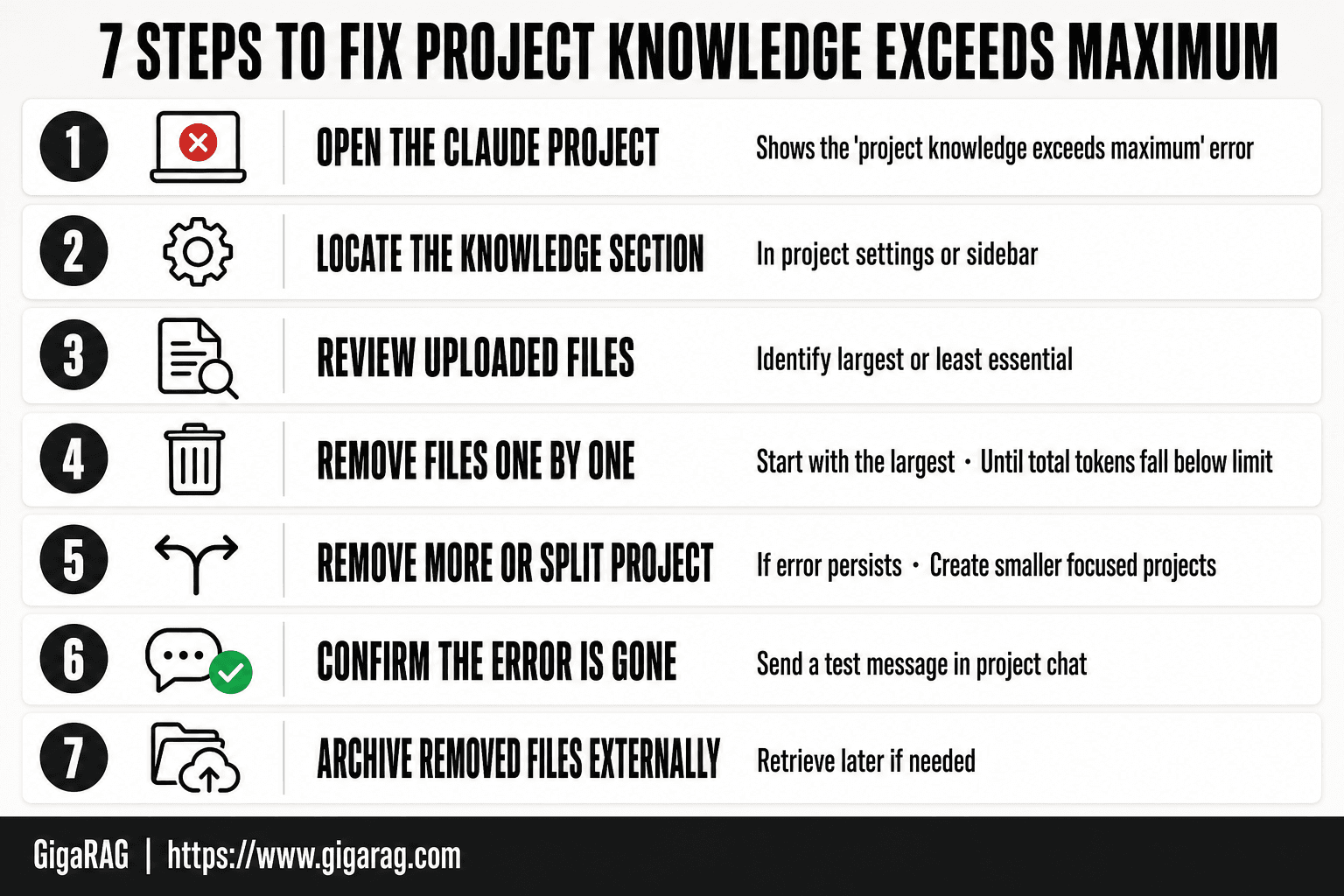
Claude Project Knowledge Limits by Plan
Anthropic doesn't publish exact token ceilings per plan. The honest answer is that the limit varies by plan tier, and the company has changed these numbers without announcing it. What's consistent: Free gets the least, Pro gets more, and Max gets the most. The error appears when your uploaded files cross whatever ceiling your plan carries.
Claude Free vs. Pro vs. Max project knowledge ceilings
Free plans hold roughly a few small documents before the error appears. Pro expands that to a working set of moderate files, but a single dense PDF can still blow the budget. Max offers the largest project knowledge allowance, yet it's still finite. None of these tiers remove the ceiling. They just move it.
How to check your current usage
Claude doesn't show a usage meter for project knowledge. You can't see how close you are to the limit until the error fires. The only signal is the error itself. If you want a rough estimate, add up the token cost of your largest files using a tokenizer, then compare against your plan's published context window. That's an approximation, not a guarantee.
The main catch: plan limits are a moving target. What worked last month may not work this month.
Immediate Fixes When You're Already Stuck
The error is on screen and you need to keep working. These four workarounds get you moving again without waiting for a plan upgrade or rebuilding your whole project. Each one costs you something. That's the deal.
Start a new chat and re-upload only what you need
Open a fresh conversation and attach just the two or three files the current task actually touches. Not the whole project. The tradeoff: you lose the shared project context, so Claude won't know about files you didn't attach. For a focused debugging session or a single document review, that's usually fine.
Summarize and hand off context between chats
Ask Claude to write a dense summary of the conversation so far, including decisions made, constraints, and what's left to do. Paste that summary into a new chat as the first message. The tradeoff: summaries lose detail. Fine-grained code snippets, exact error traces, and edge-case reasoning get flattened. This works for planning and high-level work, not for line-by-line code review.
Move large files to artifacts instead of project knowledge
If a file is reference material rather than active context, paste its contents into an artifact within the chat. Artifacts live in the conversation, not the project knowledge base, so they don't count against the project ceiling the same way. The tradeoff: artifacts don't persist across chats. You'll re-paste or re-create them each session.
Split one project into multiple focused projects
Create separate Claude projects for separate workstreams: one for the API integration, one for the data pipeline, one for the frontend. Each project stays under its own ceiling. The tradeoff: context doesn't flow between projects. If you need cross-project reasoning, you'll have to copy the relevant context manually each time.
None of these fixes the underlying ceiling. They buy you a working session. The next section covers how to stop hitting the wall in the first place.
Prevention: Token Budgeting for Claude Projects
Every file you upload is a token expense. A project is a budget. Once you start thinking that way, the error stops being a surprise and becomes a number you can plan around.
How to estimate token cost per file
A rough rule: 1,000 words of English text is about 1,300 tokens. Code runs higher, often 1.5 to 2 times that, because syntax and symbols don't compress as well. So a 10,000-word document costs roughly 13,000 tokens. A 500-line Python file might cost 8,000 to 10,000.
You don't need precision. You need a ceiling estimate before you upload. Take the word count, multiply by 1.3 for prose or 2 for code, and round up. If the total across all files exceeds your plan's project knowledge limit, you already know the upload will fail.
Chunking: break large documents into retrievable pieces
Claude retrieves from project knowledge at the file level. A 50,000-word file is one retrieval unit. When Claude pulls it, the whole thing lands in context, whether the answer needs three paragraphs or all fifty thousand words.
Chunking fixes this. Split large documents into sections of 2,000 to 5,000 words, each with a descriptive filename. "API-reference-auth.md" retrieves better than "docs.md" and costs a fraction of the context when pulled. The tradeoff: more files to manage, and you lose cross-section coherence unless your filenames and headers carry the structure.
Prioritize files by retrieval frequency, not size
The biggest file isn't always the most important. A 40,000-word archive of old meeting notes might get retrieved once a month. A 2,000-word schema definition might get pulled every single query.
Sort your files by how often Claude actually needs them. High-frequency files earn their token cost. Low-frequency files belong in external storage, pasted into chat only when the task demands them. Delete the archive before you delete the schema.
A simple token budget template for Claude projects
Start with your plan's ceiling. Subtract 20% for conversation overhead and system prompts. What's left is your file budget.
Then allocate by priority:
- Core context (retrieved every session): 40% of budget
- Reference material (retrieved occasionally): 30%
- Edge cases and examples (retrieved rarely): 20%
- Buffer (for new files you haven't anticipated): 10%
Check the budget before every upload. If a new file pushes you over, something else has to go. That's the whole discipline. It's not complicated. It's just arithmetic you do before Claude does it for you.
What You Cannot Do Within Claude's Project Knowledge Limits
Some limits are soft. This one isn't. Claude's project knowledge ceiling is a hard constraint built into the architecture, and no amount of clever prompting changes it. Here's what that means in practice.
No workaround restores removed project knowledge
When you delete a file from a project, it's gone. Not hidden, not archived, not recoverable from a trash folder. Claude doesn't keep a shadow copy of removed files, and there's no undo button in the knowledge panel.
If you remove a file and later realize you needed it, your only option is to re-upload it from your local copy. That's fine if you have the original. It's a problem if the file lived only inside Claude's project. Before you delete anything, make sure a copy exists somewhere outside the project.
No prompt trick expands the hard token ceiling
You can't ask Claude to "ignore the project knowledge limit" or "compress the files in the background." The ceiling is enforced before your prompt reaches the model. Claude never sees the request to bypass it.
The same goes for tricks like telling Claude to summarize its own project knowledge to free up space. Summarization happens inside the conversation context, not inside the project knowledge store. It doesn't reduce the token count of the files sitting in your project. The meter doesn't move.
No plan tier removes the limit entirely
Claude Pro and Max raise the ceiling. They don't remove it. Every plan has a finite project knowledge budget, and once you hit it, you hit it.
The honest answer is that Anthropic's project knowledge feature was never designed to hold everything. It's a curated context layer, not a database. If your project needs more than the ceiling allows, the fix isn't a better plan. It's a different architecture: external storage, retrieval at query time, and a memory layer that lives outside Claude entirely. That's the next section.
Scaling Past Claude's Limit: RAG and Agent Memory Architecture
The previous section ended on the honest answer: no plan tier removes the ceiling. If your project needs more context than Claude's project knowledge allows, the fix is architectural. Move the knowledge out of Claude and retrieve it at query time.
Why RAG pipelines outgrow Claude's project knowledge
Project knowledge is a static upload. Everything sits in the context window whether the current prompt needs it or not. A RAG pipeline does the opposite: it stores documents in an external vector database, embeds them, and retrieves only the chunks relevant to the current query.
The difference is scale. Claude's project knowledge holds a finite token budget. A vector store holds millions of chunks and grows with your data, not your plan tier. For agent builders, this is the difference between a demo and a system that handles real document volumes.
External vector stores: retrieve instead of upload
The pattern is straightforward. You chunk your documents, embed each chunk, and store the embeddings in a vector database like Pinecone, Weaviate, or pgvector. At query time, you embed the user's question, run a similarity search, and pass only the top-k matching chunks into Claude's context.
You're no longer uploading files to a project. You're retrieving context on demand. The token cost per query drops because Claude sees five relevant chunks instead of fifty files. The knowledge base can grow without touching any project limit.
MCP servers as a bridge to external context
MCP, the Model Context Protocol, gives Claude a standard way to call external tools and data sources. Instead of uploading a codebase to project knowledge, you run an MCP server that exposes search functions over your repository. Claude calls the server when it needs context, and the server returns only what's relevant.
This works for more than code. An MCP server can wrap a vector database, a wiki, a CRM, or an internal API. The context lives where it already lives. Claude reaches out to it instead of holding a copy.
How GigaRAG fits into an agent memory stack
GigaRAG is one example of a tool built for exactly this pattern. It sits between your documents and your agent, handling chunking, embedding, and retrieval so you don't wire those pieces together yourself. The agent queries GigaRAG the same way it would query any retrieval layer, and GigaRAG returns the relevant chunks.
It's not the only option. You can build the same stack with open-source components and an MCP server. The point isn't the specific tool. It's the architecture: external storage, retrieval at query time, and a memory layer that lives outside Claude's project knowledge entirely.
Common Mistakes When Fixing Project Knowledge Exceeds Maximum
You're frustrated, the error is blocking you, and the instinct is to start deleting. That instinct is usually wrong. Here are the three mistakes I see most often, and what to do instead.
Deleting files without checking token impact
You remove the file you use least, not the file that costs most. Token count, not file count, is what matters. One 50,000-token PDF hurts more than twenty small notes. Check the size of each file before you delete anything.
Re-uploading the same content in smaller pieces
Splitting a large document into ten smaller files doesn't reduce total tokens. It adds overhead. Claude still counts every token across all files in the project. You've made the problem harder to manage, not smaller.
Assuming the limit resets between chats
Project knowledge is persistent. It doesn't clear when you start a new conversation. The files stay attached to the project until you remove them. A new chat gives you a fresh context window, but the project knowledge ceiling is unchanged.
The fix is always the same: remove the largest token consumers first, then verify the error clears before touching anything else. If you're still hitting the wall after that, the problem isn't your files. It's your architecture. Move the knowledge out of Claude and retrieve it at query time, and project knowledge exceeds maximum stops being a blocker and becomes a design decision you already made.
Frequently Asked Questions
What happens when Claude project knowledge exceeds the maximum amount?
Claude will display an error and prevent you from adding more files or sending messages until you remove enough content to fall under the limit. The project becomes unusable for new input until the total token count is reduced.
What to do when Claude reached the limit?
You must remove files from the project knowledge to continue. Start with the largest or least critical files, and consider moving them to an external storage or RAG system if you need them later.
What is the project limit for Claude Pro?
Claude Pro has the same project knowledge limits as other plans; the exact token cap is not publicly documented and may change. The limit applies to the total size of all files in a single project.
Why does Claude say my prompt is too long?
This error occurs when your message plus the project knowledge exceeds the model's context window. Even if your prompt is short, a large project knowledge base can push the total over the limit.
Can I increase Claude's project knowledge limit?
No, the limit is fixed by Claude's architecture and cannot be increased through settings or workarounds. To handle larger knowledge bases, you need an external RAG pipeline that retrieves only relevant chunks.
How do I prevent hitting the project knowledge limit again?
Implement token budgeting: estimate the token count of files before uploading, and keep only essential documents in the project. For growing knowledge bases, use an external vector database and retrieval to fetch only what's needed per query.
Does removing files from project knowledge delete them permanently?
Removing files from a Claude project deletes them from that project's knowledge base, but the original files on your device or cloud storage remain intact. Always keep backups of important documents.
About GigaRAG
GigaRAG is for agent memory and RAG pipeline builders. get this right. Whether you are working through project knowledge exceeds maximum. remove files to continue. or something adjacent, we publish what we have actually tested, including where it falls short.


