Prompt Is Too Long: A Practical Guide for RAG Pipeline Builders and Agent Memory Developers
Prompt is too long. You've seen it mid-task, usually in an agent workflow where context has been building invisibly for the past twenty minutes. The system prompt, the conversation history, the tool outputs, the retrieved chunks. They all added up while you weren't looking. Most advice online is reactive: use /compact, start a new chat, truncate the history. That helps you recover, but it doesn't help you build. For RAG pipeline builders and agent memory developers, this error is a design problem, not a user error. The honest answer is that no amount of prompt compression will fit 500K tokens into a 200K window, and no tool can bypass hard model limits. What you can do is architect systems that never get close to the limit. Tools like GigaRAG exist specifically to manage agent memory and RAG context so this error stops happening. This guide covers the why, the token math, and the architectural patterns that prevent "prompt is too long" from ever appearing in your logs.
| At a glance | Details |
|---|---|
| What it means | Input tokens exceed the model's context window |
| Who hits it | RAG pipelines and long-running agent memory systems |
| Root cause | Context window mismanagement, not a user error |
| Hard limit | No compression fits more tokens than the window holds |
| Best fix | Design retrieval and memory to bound context by construction |
| Reactive fallback | Trim, summarize, or compact history and retry |
In This Guide
- What "Prompt Is Too Long" Actually Means
- Reactive Fixes vs Architectural Prevention for 'Prompt Is Too Long'
- What Fills the Context Window? A Token Budget Breakdown
- Prompt Is Too Long: A Step-by-Step Guide
- Context Window Sizes Across Models: Claude, GPT, and Others
- How to Recover Now: Immediate Fixes When You Hit the Limit
- Architectural Fixes: Designing RAG Pipelines That Don't Hit 'Prompt Is Too Long'
- Agent Memory: The Missing Piece in Context Window Management
- Prompt Compression and Truncation: What Works, What Doesn't
- Common Mistakes When Fixing 'Prompt Is Too Long' Errors
- Prevention Checklist for RAG and Agent Memory Systems
- Final Thoughts: Building Systems That Don't Break
What "Prompt Is Too Long" Actually Means
"Prompt is too long" means the combined input you sent exceeds the model's context window, a hard token limit that the API enforces by rejecting the request outright. It's not a warning. It's a refusal.
The context window is a hard limit, not a suggestion
Every model has a fixed context window: Claude runs 200K or 1M tokens depending on the tier, GPT-4 Turbo runs 128K. When your total input crosses that line, the request fails. No prompt engineering gets around it. You either reduce the input or you don't get a response.
What counts toward the limit: system prompt, history, tools, retrieved chunks
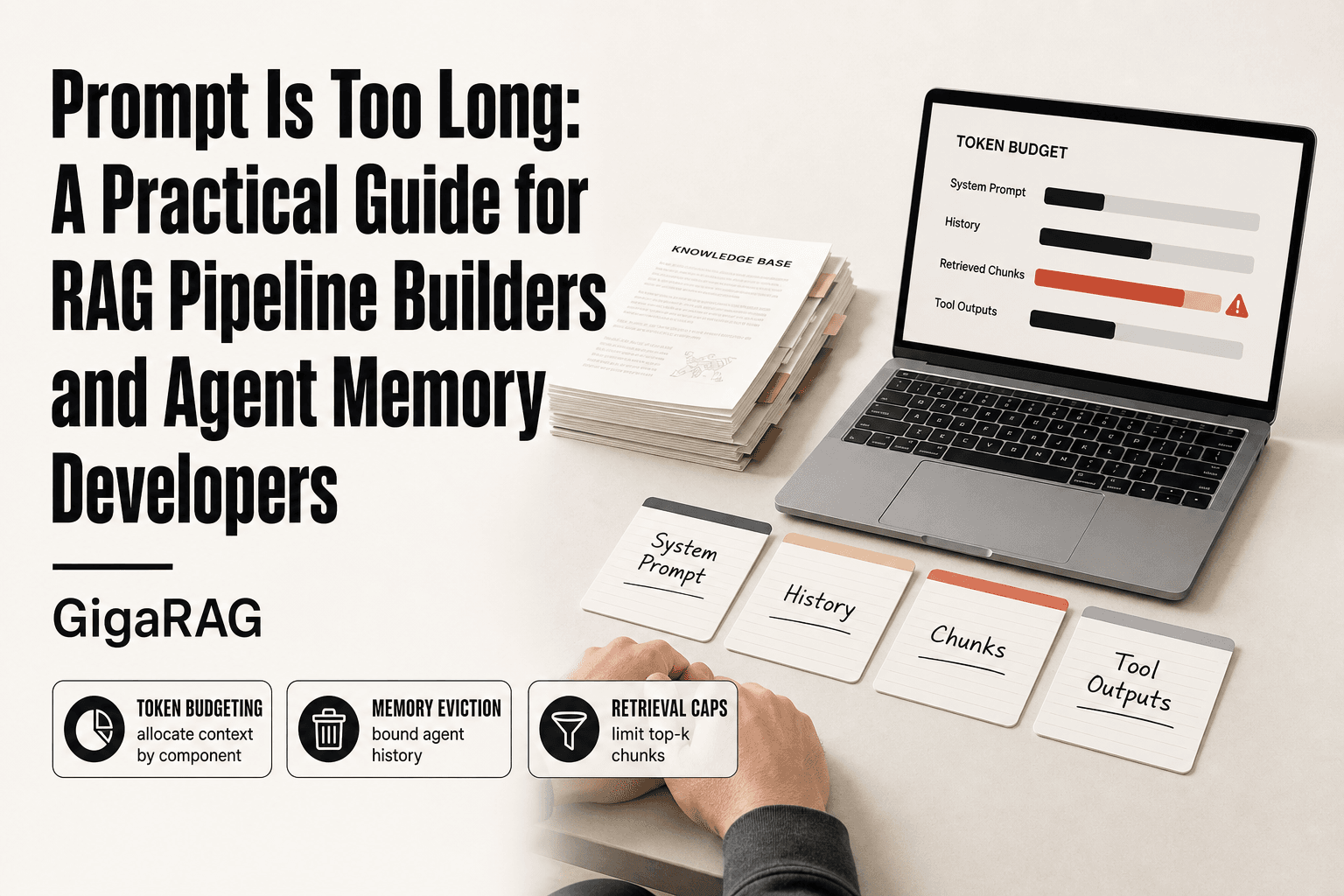
The context window holds everything: your system prompt, the full conversation history, any tool outputs, and in a RAG pipeline, every retrieved chunk you inject. A 10K-token system prompt plus 50K tokens of history plus 20 chunks at 500 tokens each adds up fast. The error doesn't care which component pushed you over.
Why the error appears mid-conversation, not at the start
Your first message is small, so it fits. But conversation history grows linearly with every turn. Tool outputs pile on. Retrieved chunks get added each query. You cross the limit silently, then the next request fails. The error looks sudden. It isn't.
[!note] The 'prompt is too long' error is a hard model limit: no amount of prompt compression can fit more tokens into a context window than it physically holds, and no tool can bypass that ceiling.
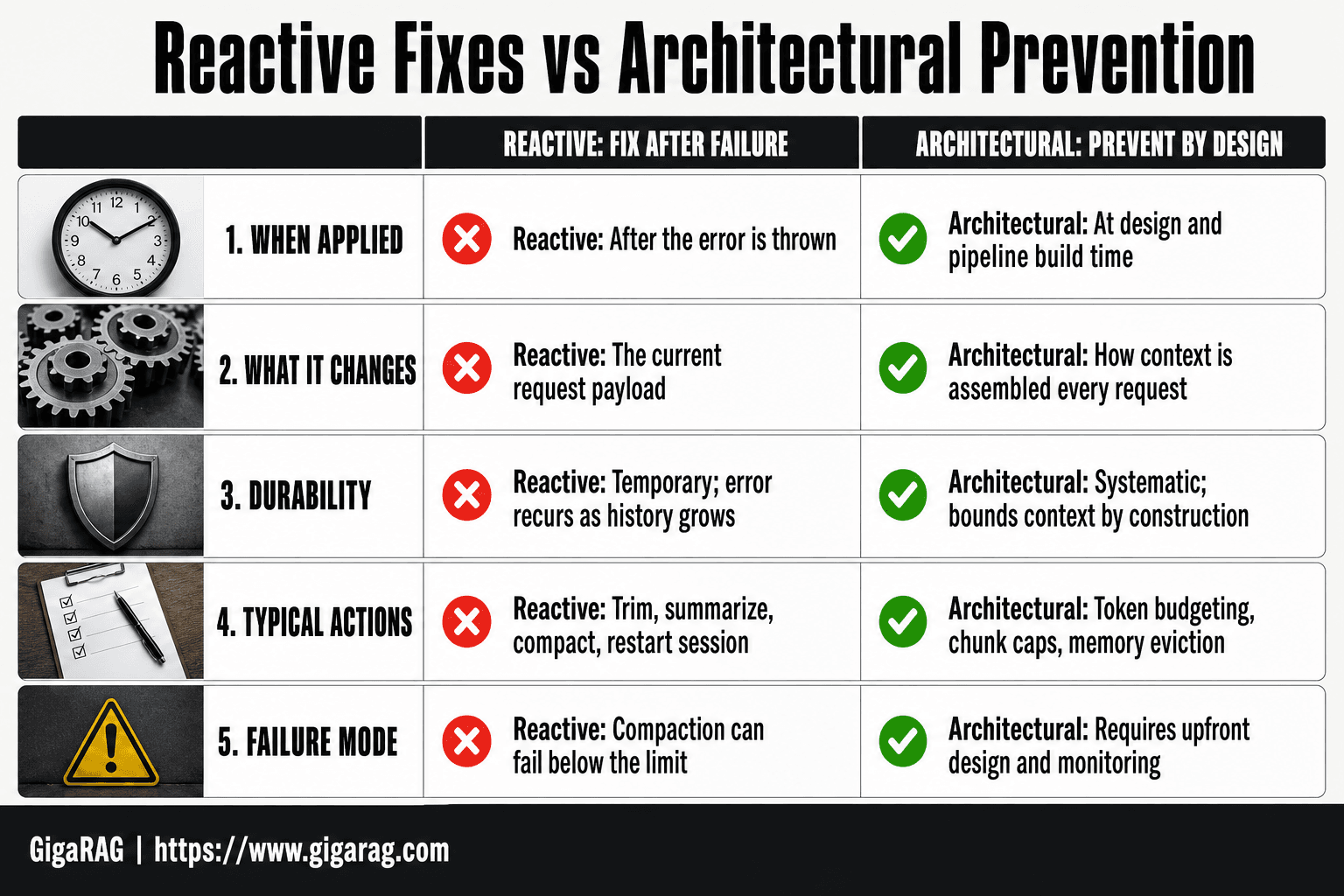
Reactive Fixes vs Architectural Prevention for 'Prompt Is Too Long'
| Factor | Reactive Fixes | Architectural Prevention |
|---|---|---|
| When applied | After the error is thrown | At design and pipeline build time |
| What it changes | The current request payload | How context is assembled every request |
| Durability | Temporary; error recurs as history grows | Systematic; bounds context by construction |
| Typical actions | Trim, summarize, compact, restart session | Token budgeting, chunk caps, memory eviction |
| Failure mode | Compaction can fail below the limit | Requires upfront design and monitoring |
What Fills the Context Window? A Token Budget Breakdown
Every token in your request competes for the same fixed budget. Knowing what consumes the most helps you cut the right thing first.
System prompts and instructions: the silent consumer
Your system prompt loads on every single request. A 2,000-token system prompt across 50 turns costs 100,000 tokens of context, even if the instructions never change. Most systems I've audited carry 3-5K tokens of instructions that could be 800.
Conversation history: linear growth that compounds
Each turn adds your input plus the model's output. A 500-token exchange repeated 40 times is 20,000 tokens before any retrieval happens. History never shrinks on its own. It only grows.
Retrieved chunks in RAG: how much context is too much?
Ten chunks at 400 tokens each is 4,000 tokens per query. Twenty chunks doubles it. The honest answer: most RAG pipelines retrieve 2-3x more context than the answer actually needs. Top-k is a budget decision, not a relevance setting.
Tool outputs and function call results
Tool results are raw text dumped into context. A database query returning 50 rows of JSON can be 8,000 tokens. Truncate tool outputs before they enter the window, or they'll eat your budget silently.
[!tip] For RAG and agent memory builders, treat the context window as a fixed budget you allocate, not a bucket you fill. Reserve headroom for tool outputs and the model's own response, because those are the components most likely to push a request over the edge in production.
Prompt Is Too Long: A Step-by-Step Guide
- Measure the real token cost of each context component: system prompt, conversation history, retrieved chunks, and tool outputs.
- Set an explicit token budget per component so their sum stays under the model's context window with headroom.
- Cap retrieved chunks by count and token size, and rank them so the most relevant context survives trimming.
- Implement memory eviction or summarization for agent history so old turns roll off before the window fills.
- Truncate or summarize tool outputs at the boundary rather than appending them raw to the prompt.
- Add monitoring that logs token usage per request and alerts before you approach the limit.
- Test with worst-case inputs, such as long documents and many tool calls, to confirm the budget holds.
Context Window Sizes Across Models: Claude, GPT, and Others
The numbers matter less than what they buy you. A 200K window sounds huge until a single agent session burns through it in 40 turns.
Claude: 200K and 1M token windows
Claude 3 and 3.5 models ship with a 200K context window. Claude 4 offers 1M tokens for select enterprise customers. That's roughly 750,000 words. In practice, the 200K window holds a full codebase or a long conversation, but retrieval quality degrades past 100K tokens on most benchmarks.
GPT-4 and GPT-4 Turbo: 128K
GPT-4 Turbo and GPT-4o run a 128K token window. GPT-4 base is 8K or 32K depending on the endpoint. The 128K window fits about 300 pages of text, but attention quality drops noticeably after 64K tokens.
Why a bigger window isn't a solution, it's a bandage
Bigger windows delay the error. They don't prevent it. A 1M window costs more per query, runs slower, and still fills up if your agent accumulates raw history. The fix is architecture, not capacity.
How to Recover Now: Immediate Fixes When You Hit the Limit
You hit the error mid-task. The agent has been running for 40 turns, the context is full, and the API just rejected your request. Here's what actually works right now, and what each fix costs you.
Use /compact or /summarize to condense history
Claude's /compact command replaces the conversation history with a model-generated summary. It frees up most of the window instantly. The catch: the summary is lossy. Nuances from earlier turns, exact code snippets, and specific error messages get flattened into prose. Your agent loses the verbatim record it was working from.
Start a new session and re-establish critical context
Sometimes the cleanest move is a fresh session. Copy the essential state: the current task, key decisions, variable names, file paths. Paste that into a new conversation as a system prompt or opening message. You lose everything else. For a long debugging session, that's often acceptable. For a multi-step agent workflow, it's disruptive.
Reduce the number of retrieved chunks
If you're running a RAG pipeline and the error appears, cut top_k in half. From 10 chunks to 5. From 20 to 8. The model gets less context, but it gets some context instead of an error. Response quality drops, but the request completes.
What you lose with each quick fix
/compact loses verbatim history. A new session loses continuity. Fewer chunks lose retrieval coverage. None of these are free. They're triage, not solutions. The architectural fixes in the next section are what stop the error from recurring.
Architectural Fixes: Designing RAG Pipelines That Don't Hit 'Prompt Is Too Long'
Quick fixes recover you from the error. Architecture prevents it. If you're building a RAG pipeline or agent memory system, the design choices below determine whether "prompt is too long" shows up in production at all.
Chunking strategies: size matters more than you think
Chunk size sets the floor for how much context any single retrieval injects. Chunks of 1,000 tokens mean every retrieved chunk costs you 1,000 tokens, even if only one sentence inside it is relevant. Smaller chunks, 200 to 300 tokens, give you finer retrieval granularity. The tradeoff: too small, and you lose the surrounding context that makes a chunk meaningful. Start at 300 tokens and test against your retrieval quality.
Top-k retrieval: why retrieving 20 chunks is usually wrong
Retrieving 20 chunks of 500 tokens each injects 10,000 tokens before your model sees a single word of the actual query. Most queries need 3 to 5 relevant chunks. Set top_k to 5 as a default. If retrieval quality drops, fix your embeddings or reranking, don't just retrieve more. More chunks is the lazy fix that guarantees you hit the limit sooner.
Summarize retrieved context before injecting it
Instead of injecting raw chunks, run a lightweight summarization pass over retrieved content first. A 500-token chunk becomes a 100-token summary. You lose some fidelity, but you gain room for more chunks or longer conversation history. This works best when chunks are noisy: web scrapes, forum threads, documentation pages with navigation boilerplate.
Dynamic context budgeting: allocate tokens by priority
Set explicit budgets per component before you build. System prompt gets 2,000 tokens. Conversation history gets 4,000. Retrieved context gets 6,000. Tool outputs get 2,000. When any component exceeds its budget, truncate or summarize that component, not the whole prompt. This is the difference between a system that degrades gracefully and one that crashes with an error.
Agent Memory: The Missing Piece in Context Window Management
RAG pipelines retrieve on demand. Agents are different: they run across many turns, many tool calls, and sometimes many sessions. Without a memory architecture, an agent accumulates raw history until the window fills and the request fails.
Working memory vs. long-term memory in agents
Working memory is the active context window: the current task, recent turns, tool outputs still in play. Long-term memory is everything else, stored outside the window and retrieved only when relevant. Most agent frameworks give you working memory for free. Long-term memory you have to build.
How agent memory reduces active context window usage
The principle is simple: keep the window small by moving anything not immediately needed out of it. A 200K window is not a license to hold 200K tokens. It's headroom for spikes. Agents that treat the window as storage hit the limit exactly when a complex task needs the most room.
Storing conversation summaries instead of raw history
Raw history grows linearly. Summaries don't. After each task or session, compress the exchange into a structured summary: what was asked, what was decided, what remains open. Store that. The next session starts with a 500-token summary instead of a 15,000-token transcript.
Retrieving relevant past interactions on demand
Keep summaries and key facts in a vector store. When a new task references something from a past session, retrieve just that slice. The agent gets the context it needs without carrying every prior conversation in the window. This is the same retrieval pattern as RAG, applied to the agent's own history.
Prompt Compression and Truncation: What Works, What Doesn't
Compression is the last resort, not the first fix. You compress when retrieval and memory architecture still leave too much in the window. Every technique trades fidelity for space. None of them are free.
Summarization: the simplest compression, and its limits
You ask an LLM to condense retrieved chunks or history into a shorter form. A 2,000-token passage becomes 300 tokens. The catch: summarization drops specifics. Numbers, names, edge cases, exact quotes. If the downstream task needs those details, the summary is useless. Use it for background context, never for source material you'll cite or reason over.
Embedding-based retrieval: fetch only what's relevant
This is compression by omission. Instead of stuffing everything in, you embed the query, search a vector store, and pull only the top-k matches. You're not compressing content. You're selecting it. The risk is missing a chunk that matters because its wording doesn't match the query. Semantic search helps, but it's not perfect.
Token pruning: removing low-value tokens
Pruning strips stop words, repeated phrases, or low-attention tokens before the prompt hits the model. It saves space but can break grammar and meaning. Most pruning tools are aggressive and dumb. They don't understand what matters in your specific context.
What compression cannot do
No technique fits arbitrary content into a fixed window without loss. If you need 500K tokens of detail, no compressor gets you to 200K intact. Compression buys headroom, not capacity. The honest answer: design your system so compression is a safety valve, not the load-bearing wall.
Common Mistakes When Fixing 'Prompt Is Too Long' Errors
Most fixes fail because they attack the symptom, not the cause. You trim a few chunks, restart the session, and the error returns two turns later. Here's what actually makes it worse.
Over-chunking: too many small chunks flood the window
Smaller chunks aren't always better. A 100-token chunk retrieves fast but carries little context. You end up pulling 30 chunks to cover what 5 larger ones would. The retrieval overhead and padding tokens eat the savings. Chunk size should match the reasoning unit of your content, not an arbitrary number.
Ignoring system prompt bloat
Your system prompt grows over time. New instructions, tool definitions, few-shot examples. Nobody audits it. A 4,000-token system prompt leaves 196K for everything else on a 200K model. Cut it first. It's the easiest win and the most overlooked.
Retrieving everything 'just in case'
Top-k=50 feels safe. It isn't. Most of those chunks are noise that dilutes the model's attention. Retrieve what the query needs, not what might be useful. If you can't justify a chunk's inclusion, it doesn't belong.
Prevention Checklist for RAG and Agent Memory Systems
You can't fix what you don't measure. This checklist turns the previous sections into a repeatable audit.
Audit your token consumption
Log token counts per component: system prompt, history, retrieved chunks, tool outputs. You'll find the real culprit fast.
Set explicit context budgets per component
Allocate percentages, not vibes. Example: 10% system prompt, 40% history, 30% retrieved context, 20% headroom. Enforce it in code.
Implement chunking and retrieval limits
Cap top-k at 5 to 10. Size chunks to the reasoning unit. Test retrieval quality, not just recall.
Monitor for context overflow in production
Alert when usage crosses 80% of the window. A warning beats a hard failure mid-task.
Final Thoughts: Building Systems That Don't Break
The "prompt is too long" error is a symptom. The disease is treating context as infinite. Systems that budget tokens from day one don't hit the wall at 3 a.m. in production.
RAG pipeline builders and agent memory developers who design for limits up front get cheaper, faster, more reliable systems. The alternative is a recurring fire drill.
Tools like GigaRAG exist to handle agent memory and RAG context management so the "prompt is too long" error stops being a recurring problem. Design for the limit, and the limit stops mattering.
Frequently Asked Questions
Why does Claude keep saying "prompt is too long"?
Claude returns this error when the total input tokens, including system prompt, conversation history, retrieved context, and tool outputs, exceed the model's context window. It is a hard limit, not a transient glitch. Reducing the payload or shortening history is the only way to resolve it.
How long can a ChatGPT prompt be?
ChatGPT prompts are bounded by the underlying model's context window, which varies by model and plan. The practical limit is the combined token count of your instructions, conversation history, and any attached context. Check the current model documentation for the exact figure, as it changes between releases.
How to bypass Claude chat length limit?
You cannot bypass a hard context window limit, but you can work within it. Start a new conversation, summarize or trim earlier turns, and avoid pasting large documents directly into the prompt. For pipelines, retrieve only the most relevant chunks instead of sending everything.
How long should a prompt be?
A prompt should be as short as it can be while still carrying the instructions and context the model needs. For RAG and agent systems, the goal is not a fixed length but a bounded one: allocate a token budget per component and keep the total under the window with headroom.
What does "compaction failed conversation could not be reduced below the context limit" mean?
It means the system tried to summarize or compact the conversation to fit the context window, but even after compaction the payload still exceeded the limit. This usually happens when a single message, tool output, or retrieved chunk is itself larger than the available budget. The fix is to truncate or split that oversized component before retrying.
Why does this happen more in RAG pipelines and agent memory systems?
These systems assemble context from multiple sources: retrieved chunks, conversation history, tool outputs, and system instructions. Each source can grow independently, so the combined payload can exceed the window even when no single component looks large. Bounding each source with a token budget prevents the overflow.
Can prompt compression solve the 'prompt is too long' error?
Prompt compression can reduce token count and delay the error, but it cannot overcome a hard context window limit. If your payload is fundamentally larger than the window, compression only buys time. The durable fix is architectural: retrieve less, evict memory, and cap tool outputs.
About GigaRAG
GigaRAG is for agent memory and RAG pipeline builders. get this right. Whether you are working through prompt is too long or something adjacent, we publish what we have actually tested, including where it falls short.


