RAG Cost Breakdown: Embedding Through Inference
A rag cost breakdown gets ugly fast when you scale it. Build a RAG pipeline for a thousand documents and the bill is coffee money. Push the same pipeline to ten thousand documents, add reranking, and let an agent hit memory retrieval a few dozen times per conversation, and the cost per query stops being a rounding error. It becomes a budget line item you have to defend. Agent memory makes this worse, not because memory is expensive, but because it multiplies every downstream cost: more retrieval, more context, more inference. Builders designing agent memory and RAG pipelines need a clear, honest view of where the money actually goes, from embedding through inference, without vendor spin. GigaRAG is built for exactly that workload, so I tested and priced each stage. This guide covers the real cost drivers, a stage-by-stage pricing breakdown, what you cannot optimize away, and a simple cost model you can apply to your own pipeline.
| At a glance | Details |
|---|---|
| Cost stages | Embedding, storage, retrieval, reranking, inference |
| Cheapest stage | Embedding one-time; storage is recurring |
| Biggest cost driver | Inference tokens and agent memory growth |
| Agent memory impact | Multiplies retrieval and inference calls |
| Main lever | Chunking, caching, and retrieval limits |
| Hard limit | Quality floor caps how much you can cut |
In This Guide
- What Drives RAG Costs?
- Standard RAG vs Agent Memory RAG: Cost Profile
- Embedding Costs: The Hidden Multiplier
- Rag Cost Breakdown: A Step-by-Step Guide
- Storage and Retrieval: The Quiet Costs
- Inference Costs: Where the Bill Lands
- Agent Memory: A Different Cost Beast
- Caching Strategies That Actually Work
- What You Cannot Do: Honest Limitations
- Building Your RAG Cost Model
- Final Thoughts on RAG Cost Breakdown
What Drives RAG Costs?
Four stages account for nearly every dollar in a RAG pipeline. Each scales differently, and each fails differently when you push it.
Embedding generation
Every chunk of text gets converted to a vector at indexing time. Every query gets converted again at search time. You pay per token for both. The indexing cost is one-time per document. The query cost repeats forever.
Vector storage
Vectors sit in a database, and that database charges by dimension count, volume, or both. Higher embedding dimensions mean more storage per chunk. More chunks mean more rows. It's quiet until it isn't.
Retrieval and reranking
Retrieval itself is cheap: a similarity search over an index. Reranking is not. A reranker reads the full text of every candidate passage, which means token costs on top of the search.
LLM inference
The model reads your prompt plus retrieved context, then generates an answer. Prompt tokens scale with context size. Completion tokens scale with answer length. This is where the bill lands.
[!note] Embedding costs are typically a one-time or infrequent expense, while storage, retrieval, and inference are recurring — so a pipeline that looks cheap at small scale can become dominated by inference and memory costs as usage grows.
Standard RAG vs Agent Memory RAG: Cost Profile
| Factor | Standard RAG | Agent Memory RAG |
|---|---|---|
| Retrieval frequency | Once per user query | Multiple times per agent step |
| Memory writes | None or batch | Continuous, per interaction |
| Inference calls | One generation per query | Chained generations per task |
| Storage growth | Mostly static corpus | Growing memory store |
| Cost predictability | Easier to forecast | Harder; scales with agent activity |
Embedding Costs: The Hidden Multiplier
Embedding costs hit twice: once at indexing time for every chunk you store, and again at query time for every search you run. The indexing cost is one-time. The query cost repeats forever. Your embedding model choice determines both.
Indexing embeddings: one-time cost per chunk
Every document gets split into chunks, and every chunk gets embedded. A 10,000-document corpus at 500 tokens per chunk means 5 million tokens through the embedding model. That's a one-time bill, but it's not small. The wrong model choice here locks in storage costs too: higher dimensions mean more vector storage per chunk, forever.
Query embeddings: recurring cost per search
Every search embeds the query before it hits the vector index. One query is trivial. A thousand queries per day is not. At 20 tokens per query, 1,000 daily searches means 20,000 tokens through the embedding model every day. That's 600,000 tokens per month just for query embedding, before retrieval or inference happens.
Embedding model pricing comparison
The main catch is that cheap models cost more downstream. A 384-dimension model stores less but retrieves worse. A 1,536-dimension model retrieves better but triples storage and slows similarity search. In practice, most builders pick a mid-size model and never revisit it. That's the cost lever you're ignoring.
[!tip] For agent memory workloads, cap the number of memory items retrieved per step and cache frequent retrievals; this usually reduces both retrieval and inference token spend more than switching embedding models.
Rag Cost Breakdown: A Step-by-Step Guide
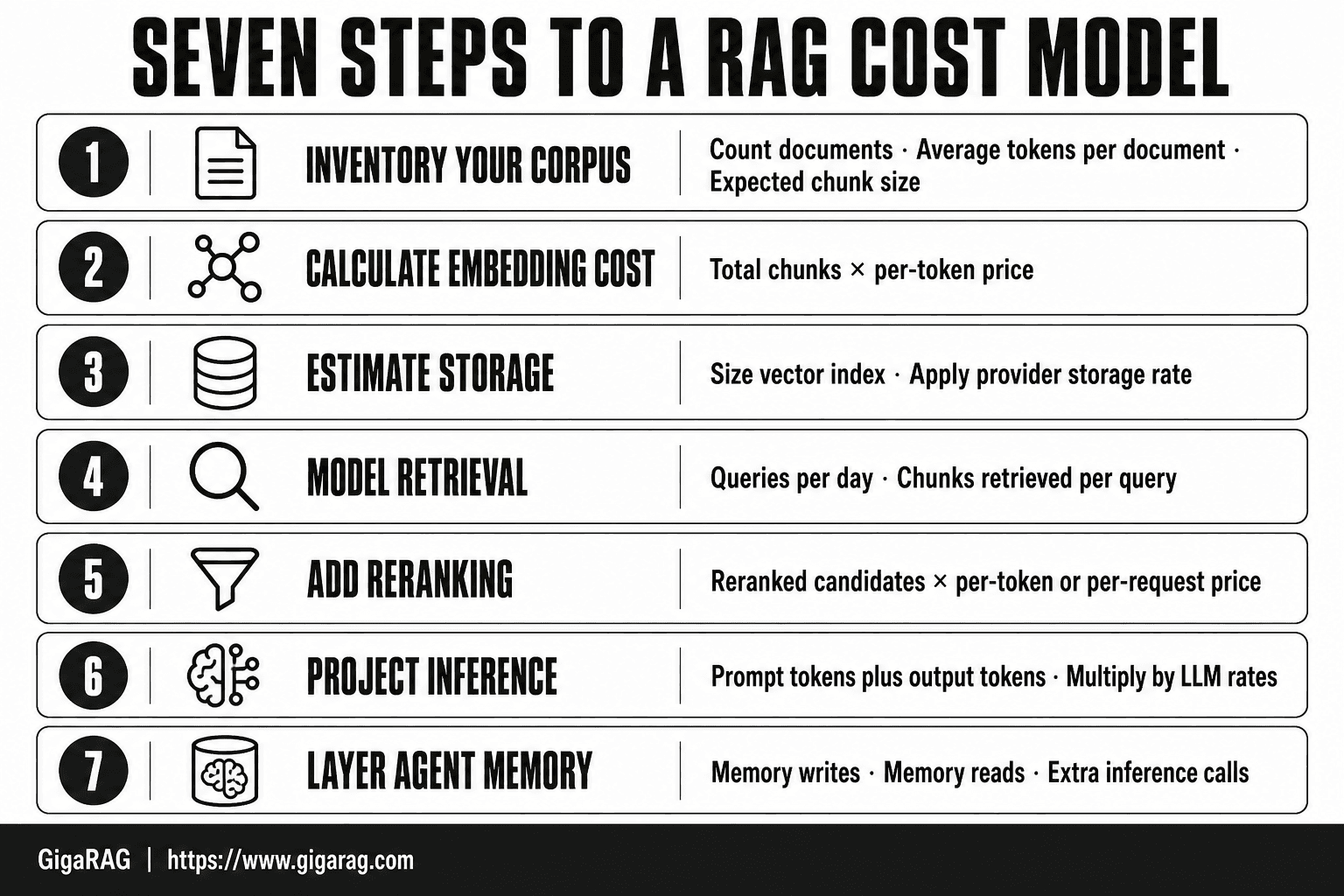
- Inventory your corpus: count documents, average tokens per document, and expected chunk size.
- Calculate embedding cost: multiply total chunks by your embedding model's per-token price.
- Estimate storage: size your vector index and any memory store, then apply your provider's storage rate.
- Model retrieval: estimate queries per day and the number of chunks retrieved per query.
- Add reranking: if used, multiply reranked candidates by the reranker's per-token or per-request price.
- Project inference: multiply average prompt tokens (context + query) plus output tokens by your LLM's rates.
- Layer agent memory: add memory writes, memory reads, and the extra inference calls they trigger.
Storage and Retrieval: The Quiet Costs
Embedding is only the first bill. Between embedding and inference sits a layer most cost breakdowns skip entirely: storage, retrieval, and reranking. These are quiet because they're small per operation. They're not small at scale.
Vector database pricing models
Most managed vector databases charge per stored vector, per query, or both. Pinecone charges by pod size and replica count. Qdrant Cloud charges per node. Weaviate and Milvus offer self-hosted options where you pay for compute instead. The honest answer is that storage is usually the cheapest line item. Retrieval compute is where the money hides.
Retrieval compute per query
Every query runs a similarity search across your vectors. At 10,000 vectors, that's trivial. At 10 million, it's not. Higher dimensions mean more compute per comparison. A 1,536-dimension index costs roughly four times the CPU of a 384-dimension one for the same query volume. You pay for that difference on every search, forever.
Reranking: optional but expensive
Reranking improves retrieval quality by scoring the top candidates with a cross-encoder. It also adds a second model call per query. A reranker processes maybe 50 to 100 candidate chunks per search, each at 200 to 500 tokens. That's real compute. Skip it and you save money but retrieve worse. Keep it and your retrieval cost per query can double or triple.
Inference Costs: Where the Bill Lands
Inference is the stage where RAG costs stop being quiet. Every query sends retrieved context plus your prompt to an LLM, and the model charges you for every token in and every token out. This is usually the largest line item in a production RAG pipeline.
Prompt tokens: context window inflation
Retrieved chunks are not free at inference time. They become prompt tokens. If your retriever returns five chunks of 300 tokens each, that's 1,500 tokens added to every query before the model generates a single word. Add system prompts, conversation history, and agent memory context, and a single query can easily carry 3,000 to 5,000 prompt tokens. The retrieval stage you optimized for quality quietly inflates your inference bill.
Completion tokens: generation length
Completion tokens are what the model outputs. A short answer runs 100 to 200 tokens. A detailed response with citations runs 500 to 1,000. Agent workflows that chain multiple LLM calls per task multiply this further. Completion tokens typically cost more per token than prompt tokens, so generation length matters more than most builders assume.
Cost per query formula
Here's the formula:
Cost per query = (prompt tokens × prompt price) + (completion tokens × completion price)
Using GPT-4o pricing as a reference point: $2.50 per 1M prompt tokens and $10 per 1M completion tokens (verify at publish). A query with 3,000 prompt tokens and 500 completion tokens costs roughly $0.0125. That sounds small. At 100,000 queries per month, it's $1,250. At 1 million, it's $12,500. Inference is where the bill lands.
Agent Memory: A Different Cost Beast
Agent memory breaks the standard RAG cost model. A normal RAG query runs once: embed, retrieve, generate, done. An agent with memory runs that loop repeatedly across a single task, holding context between turns. The same pipeline that costs $0.0125 per query now runs ten, twenty, or fifty times per task.
Memory retrieval frequency
Agents retrieve from memory constantly. Every turn, every tool call, every decision point can trigger a search against the memory store. A single user request that takes five agent steps means five retrieval passes, five embedding calls, five inference rounds. Standard RAG assumes one retrieval per query. Agent memory assumes retrieval is a background process.
Persistent context costs
Persistent context is not free storage. Memory entries that survive across sessions get re-embedded, re-indexed, and re-retrieved. A memory store with 50,000 entries costs more to maintain than a document index with 50,000 chunks, because entries update, expire, and get rewritten. You pay for the churn, not just the storage.
Multi-turn inference compounding
Multi-turn inference is where agent memory gets expensive. Each turn carries the full conversation history plus retrieved memory context into the prompt. By turn five, your prompt tokens have tripled. A 10-turn agent task can cost 20 to 50 times a single RAG query. The cost compounds per turn, not per task.
Caching Strategies That Actually Work
Caching is the cheapest cost lever you have. It trades a little storage for a lot of repeated compute. The catch is that caching done wrong silently degrades retrieval quality, and you won't notice until a user complains.
Embedding cache invalidation
Cache embeddings by content hash, not by document ID. When a chunk changes, the hash changes, and the cache misses. That's the whole trick. Store the hash alongside the embedding so you can check before recomputing. For query embeddings, cache only when you expect repeated queries, which is rare outside agent loops.
Prompt caching for repeated context
Most inference providers cache prompt prefixes automatically. If your system prompt plus retrieved context stays stable across turns, you pay full price on the first call and a fraction on subsequent calls. Structure your prompts so the stable part comes first. Don't interleave dynamic content into the cached prefix.
When caching fails
Caching fails when your data changes faster than your cache invalidates. It also fails when cache lookups cost more than recomputation, which happens with tiny embedding models on cheap hardware. Don't cache embeddings for one-off document uploads. You'll spend more managing the cache than you save.
What You Cannot Do: Honest Limitations
Cost reduction has hard stops. You can optimize around them, but you can't wish them away. Three limits matter most.
Embedding costs are unavoidable
Every chunk you index needs an embedding. Every query you run needs one too. You can choose a cheaper model or cache aggressively, but the compute has to happen somewhere. There's no free tier of reality.
Scaling is not linear
Doubling your documents doesn't double your cost. It usually costs more than double, because retrieval gets slower, reranking gets more expensive, and context windows fill faster. Plan for the curve, not the line.
Agent memory has a floor
Memory means repeated retrieval and persistent context. You can compress it, summarize it, or prune it, but an agent that remembers nothing is useless. The floor is the cost of keeping enough context to be useful. Below that, you don't have a product.
Building Your RAG Cost Model
You don't need a spreadsheet with fifty tabs. Four numbers get you within 20% of your real cost. Here's the method.
Step 1: Estimate document volume and chunk count
Count your documents, then divide by your chunk size. A 500-word chunk is a safe default. Ten thousand documents at 500 words each gives you roughly 10,000 chunks, assuming one chunk per document. Longer documents split into more.
Step 2: Calculate embedding cost
Multiply chunk count by your embedding model's per-token price. Most models charge per 1M tokens. A 500-word chunk is about 700 tokens. Ten thousand chunks is 7M tokens. At $0.02 per 1M tokens, indexing costs $0.14. Query embeddings add the same math per search.
Step 3: Estimate query volume and inference cost
Multiply daily queries by tokens per query. Retrieved context plus your prompt is prompt tokens. The model's answer is completion tokens. Add both, multiply by the per-token price, then by 30 for monthly cost.
Step 4: Add storage and reranking
Vector storage runs $0.10 to $0.50 per GB per month. Reranking adds $0.01 to $0.05 per query if you use it. Add both to your embedding and inference totals.
The model is simple: chunks times embedding price, plus queries times inference price, plus storage and reranking. Run it before you build.
Final Thoughts on RAG Cost Breakdown
The levers are simple once you see them. Embedding model choice sets your indexing floor. Query volume multiplies everything above it. Inference tokens are where the bill lands, and agent memory compounds all three.
A full rag cost breakdown comes down to four numbers: chunks, queries, tokens per query, and per-token prices. You can't optimize what you haven't measured, and you can't measure without running the model from the previous section.
If you're building agent memory or a RAG pipeline and want the cost model handled without hand-rolling every cache and reranker, GigaRAG is a practical option. It won't make embedding free. Nothing does. But it removes the plumbing work so you can focus on the numbers that matter.
Frequently Asked Questions
What are the main cost components of a RAG pipeline?
The main components are embedding, vector storage, retrieval, reranking, and inference. Embedding is usually a one-time cost, while storage, retrieval, and inference recur with usage. Agent memory adds continuous memory writes and reads that increase both retrieval and inference calls.
How much does embedding cost compared to inference?
Embedding is typically a small fraction of total cost because it runs once per document or chunk. Inference usually dominates because it runs on every query and scales with context length and output tokens. Exact ratios depend on your models and volume.
Why does agent memory make RAG more expensive?
Agent memory causes the system to retrieve and write memory repeatedly during a task, not just once per user query. Each memory operation can trigger additional retrieval and inference calls, multiplying token usage. This makes cost scale with agent activity rather than just user queries.
How can I reduce RAG inference costs?
Reduce the number of retrieved chunks per query, shorten prompts, and cache frequent responses. Use smaller models for simple steps and reserve larger models for complex generation. Also limit agent memory reads and writes to what is necessary.
What is the cheapest part of a RAG pipeline?
Embedding is often the cheapest stage because it is a one-time or infrequent batch operation. Storage can also be inexpensive at small scale, but it grows with your corpus and memory store. Retrieval and inference are typically the recurring cost drivers.
Where does cost reduction stop being possible in RAG?
You cannot reduce costs below the quality floor required for your use case. Cutting retrieval too far or using overly small models can degrade answer quality. At some point, further cuts harm accuracy more than they save money.
About GigaRAG
GigaRAG is for agent memory and RAG pipeline builders. get this right. Whether you are working through rag cost breakdown, embedding through inference or something adjacent, we publish what we have actually tested, including where it falls short.


