RAG with FastAPI and Postgres: A Practical Guide for Agent Memory and Pipeline Builders
RAG with FastAPI and Postgres is a stack most backend developers can stand up in an afternoon, and that's exactly the problem. Most tutorials stop at the setup: clone the repo, enable pgvector, run Alembic, call it done. You're left with a working endpoint and no idea how to make it function as actual agent memory, or what breaks when you try. This guide treats agent memory as the primary use case, not an afterthought, and it's plain about what this stack cannot do: no built-in memory management, no multi-agent coordination, no automatic context pruning. GigaRAG is built for agent memory and RAG pipeline builders, and the patterns here are the same ones that underpin a production system. By the end, you'll have a working FastAPI and Postgres RAG backend, a schema designed for persistent memory, and a clear list of the limitations you'll need to engineer around.
| At a glance | Details |
|---|---|
| Primary use case | Persistent agent memory via RAG |
| Core stack | FastAPI + Postgres + pgvector |
| Key limitation | No built-in memory management |
| Scaling approach | Read replicas and connection pooling |
| Retrieval pattern | Hybrid vector and keyword search |
| Production readiness | Requires custom orchestration |
In This Guide
- What Is RAG with FastAPI and Postgres?
- pgvector vs External Vector Database for Agent Memory
- Prerequisites and Tech Stack Overview
- Rag With Fastapi And Postgres: A Step-by-Step Guide
- Setting Up FastAPI and Postgres with pgvector
- Generating Embeddings for Agent Memory
- Building the RAG API Endpoints
- Designing Agent Memory with RAG and Postgres
- Limitations: What RAG with FastAPI and Postgres Cannot Do
- Production Considerations for RAG Pipelines
- Final Thoughts on RAG with FastAPI and Postgres
What Is RAG with FastAPI and Postgres?
RAG with FastAPI and Postgres is a retrieval backend that stores embeddings in PostgreSQL using pgvector and serves them through a FastAPI REST API. You store text, convert it to vectors, and query by similarity before feeding results to an LLM.
Why FastAPI for RAG backends
FastAPI gives you async request handling, automatic OpenAPI docs, and Pydantic validation out of the box. For a RAG backend, that means you can define ingestion and query endpoints in a few lines, and the async support keeps embedding calls from blocking the event loop. It's not magic. It's a thin, typed layer over Python that plays well with the libraries you'll use for embeddings and database access.
Why Postgres with pgvector for vector storage
Postgres with pgvector stores vectors in a regular table column. You get SQL joins between embeddings and their metadata, transactional writes, and one database to operate instead of two. The tradeoff is speed: pgvector's HNSW index is slower than dedicated vector databases at very large scale, but for most agent memory workloads, it's fast enough and far simpler to run.
How this stack serves agent memory
Agent memory needs persistence, metadata filtering, and retrieval that respects conversation context. Postgres handles the persistence and filtering. FastAPI exposes retrieval as an endpoint your agent can call mid-turn. What it won't do is manage memory for you: no automatic pruning, no recency weighting, no multi-agent coordination. You build those patterns yourself, and later sections show how.
[!note] Postgres with pgvector does not provide built-in memory management for agents; you must implement your own logic for memory eviction, summarization, and multi-agent coordination.
pgvector vs External Vector Database for Agent Memory
| Factor | pgvector (Postgres) | External Vector DB |
|---|---|---|
| Setup complexity | Low if Postgres already used | Additional service to deploy |
| Transaction support | Full ACID with relational data | Limited or eventual consistency |
| Scaling ceiling | Vertical + read replicas | Horizontal sharding built-in |
| Operational overhead | One system to manage | Separate monitoring and backups |
| Cost model | Included in Postgres hosting | Often usage-based pricing |
Prerequisites and Tech Stack Overview
You'll need three things before you start: Python 3.10 or newer, a running Postgres instance with the pgvector extension, and an embedding provider. That's the whole stack. Everything else is a library you'll install along the way.
Python and environment setup
Use Poetry or a plain venv. Poetry handles dependency pinning cleanly, which matters when you're juggling FastAPI, SQLAlchemy, pgvector, and an embedding client. If you've built a FastAPI app before, you're ready. If not, you should know how async functions work and how Pydantic models validate request bodies. That's the baseline. The rest is mechanical.
PostgreSQL with pgvector extension
You need Postgres 14 or newer, though Postgres 18 is what some local agent setups target now. Install the pgvector extension, then run CREATE EXTENSION vector; in your database. That gives you a vector column type and distance operators for similarity search. If you're on a managed provider like Supabase or Neon, pgvector is usually one toggle away.
Embedding provider (OpenAI or local)
You need something that turns text into vectors. OpenAI's text-embedding-3-small is the default choice: cheap, fast, and consistent. If you want to run fully local, a model like bge-small-en-v1.5 through sentence-transformers works without an API key. The tradeoff is quality and speed. Pick one before you write the ingestion code, because swapping later means re-embedding everything.
[!tip] For agent memory, store not just embeddings but also timestamps and access counts; use these to implement recency-weighted retrieval and periodic summarization to keep context relevant.
Rag With Fastapi And Postgres: A Step-by-Step Guide
- Set up Postgres with the pgvector extension enabled.
- Define a table schema for documents, embeddings, and metadata.
- Implement FastAPI endpoints for ingestion and retrieval.
- Generate embeddings using a model of your choice and store them.
- Build a retrieval function that combines vector similarity with filters.
- Integrate the retrieval into your agent's memory read/write cycle.
- Add connection pooling and async database access for production.
Setting Up FastAPI and Postgres with pgvector
The setup has three moving parts: the database extension, the migration tool, and the app itself. You'll wire them in that order. Get pgvector working first, because every other step depends on it.
Installing and enabling pgvector
On a self-managed Postgres box, install the extension from source or your package manager. On Debian or Ubuntu, that's apt install postgresql-16-pgvector (swap the version number to match your Postgres). On macOS with Homebrew, brew install pgvector. Managed providers are simpler: Supabase, Neon, and RDS all ship pgvector as a toggle.
Once installed, connect to your target database and run:
CREATE EXTENSION IF NOT EXISTS vector;
Verify it worked with SELECT * FROM pg_extension WHERE extname = 'vector';. If that returns a row, you're set. The extension gives you a vector(n) column type where n is the embedding dimension. For text-embedding-3-small, that's 1536. For bge-small-en-v1.5, it's 384. You'll need that number when you write the migration.
Database migrations with Alembic
Alembic tracks schema changes so you don't hand-edit tables in production. Start by initializing it in your project:
alembic init alembic
Then edit alembic/env.py to point at your database URL and import your SQLAlchemy models. The key migration is the one that creates your documents table with a vector column:
def upgrade():
    op.create_table(
        'documents',
        sa.Column('id', sa.Integer, primary_key=True),
        sa.Column('content', sa.Text, nullable=False),
        sa.Column('embedding', Vector(1536), nullable=False),
        sa.Column('metadata', sa.JSON, nullable=True),
    )
Run alembic upgrade head to apply it. If the vector type isn't recognized, you forgot to import the pgvector SQLAlchemy integration. Add from pgvector.sqlalchemy import Vector to your migration file.
Scaffolding the FastAPI application
Create a standard FastAPI app with async endpoints. The structure is small: a main.py for the app, a models.py for SQLAlchemy tables, a schemas.py for Pydantic request bodies, and a db.py for the engine and session.
from fastapi import FastAPI
from sqlalchemy.ext.asyncio import create_async_engine, async_sessionmaker

app = FastAPI()

engine = create_async_engine("postgresql+asyncpg://user:pass@localhost/dbname")
SessionLocal = async_sessionmaker(engine, expire_on_commit=False)
Use asyncpg as the driver. It's the only async Postgres driver that plays well with FastAPI's event loop. The sync psycopg2 driver will block your endpoints under load.
Don't skip the session dependency. Every endpoint that touches the database should get its session from a dependency that opens and closes it per request. That keeps connections from leaking when a request fails mid-query.
Generating Embeddings for Agent Memory
Embedding quality sets the ceiling on retrieval quality. If your vectors are bad, no amount of index tuning fixes the recall. The model you pick, how you chunk the text, and how you store the vectors all matter.
Choosing an embedding model
Start with text-embedding-3-small from OpenAI. It's cheap, returns 1536 dimensions, and handles most agent memory workloads. If you need to run locally, bge-small-en-v1.5 gives you 384 dimensions and runs on a single CPU. The tradeoff: local models are free but weaker on domain-specific language. Test both against your actual retrieval queries before committing.
Chunking strategies for agent context
Chunk size is the main lever. Too large, and the embedding averages out the specific detail your agent needs. Too small, and you lose the surrounding context that makes a chunk meaningful. For agent memory, 500 to 1000 characters per chunk with 10% overlap works well. Split on paragraph boundaries when you can. Don't split mid-sentence.
Storing embeddings in pgvector
Store the embedding as a vector(n) column alongside the original text and metadata. The metadata column is where agent memory gets interesting: store the agent ID, conversation ID, timestamp, and any tags. That lets you filter by agent or session before you even run a similarity search. Without metadata, you're searching a pile of unrelated vectors.
Building the RAG API Endpoints
Two endpoints carry the whole backend: one to ingest documents, one to query them. Everything else is plumbing.
POST /documents for ingestion
The ingestion endpoint accepts text, generates an embedding server-side, and stores the vector with its metadata. Don't trust the client to send embeddings. Generate them in the endpoint so every document uses the same model and dimensions. The request body carries the text, an optional document ID, and whatever metadata your agent needs later: agent ID, conversation ID, timestamp, tags.
The handler runs the text through your embedding function, then inserts a row into the documents table. Return the document ID and the chunk count. If the text exceeds your chunk size, split it before embedding and insert one row per chunk. That keeps retrieval granular.
POST /query for retrieval
The query endpoint takes a question string, embeds it with the same model, and runs a cosine similarity search against pgvector. Filter by agent ID or session ID first, then rank by distance. Return the top K chunks with their metadata and similarity scores.
K matters more than you think. For agent memory, 5 to 10 chunks usually beats 3. Too few, and the agent misses context. Too many, and you dilute the answer with noise. Let the caller pass K as a parameter with a sane default.
Handling metadata for agent memory
Metadata is what turns a generic RAG endpoint into agent memory. Store agent ID, conversation ID, and timestamp on every chunk. Then your query endpoint can filter by agent before similarity search runs. That means one agent's memories never leak into another's retrieval.
The timestamp also enables recency filtering. Agents often need recent context more than old context. You can boost or filter by timestamp in the query. Without metadata, you're searching a pile of unrelated vectors.
Designing Agent Memory with RAG and Postgres
Generic RAG retrieves documents. Agent memory retrieves context that changes how the agent behaves next turn. The difference is persistence and filtering.
Memory types: episodic vs semantic
Episodic memory stores what happened: a user asked about invoice 1042, the agent answered with a refund policy, the user confirmed. Each turn is a row with a timestamp and a conversation ID.
Semantic memory stores what the agent knows: product facts, API docs, company policies. These chunks don't belong to any single conversation. They're shared across sessions.
Most agent memory systems need both. Episodic rows give the agent continuity within a conversation. Semantic rows give it grounding across conversations. Mixing them in one table works, but you'll filter by type on every query.
Schema design for agent memory
Start with one table. Don't over-normalize.
CREATE TABLE agent_memories (
    id BIGSERIAL PRIMARY KEY,
    agent_id TEXT NOT NULL,
    conversation_id TEXT,
    memory_type TEXT NOT NULL CHECK (memory_type IN ('episodic', 'semantic')),
    content TEXT NOT NULL,
    embedding vector(1536),
    created_at TIMESTAMPTZ DEFAULT now()
);
The conversation_id is null for semantic memories. That's the whole trick. Episodic rows belong to one conversation. Semantic rows belong to everyone.
Add an index on (agent_id, memory_type) for filtering before similarity search. Add an HNSW index on the embedding column for fast nearest-neighbour lookup.
Retrieval patterns for multi-turn agents
A multi-turn agent needs three retrieval passes, not one.
First, pull recent episodic memories for the current conversation. Filter by conversation_id, order by created_at DESC, limit 10. This gives the agent its working context.
Second, pull semantic memories filtered by agent_id and memory_type = 'semantic'. Run similarity search against the user's latest message. This grounds the agent in shared knowledge.
Third, merge the two result sets before sending them to the LLM. Episodic first, then semantic. The agent sees what just happened, then what it knows.
The main catch: none of this happens automatically. You write the retrieval logic. Postgres stores the rows. Your FastAPI endpoints decide what to fetch and in what order. That's the part most tutorials skip.
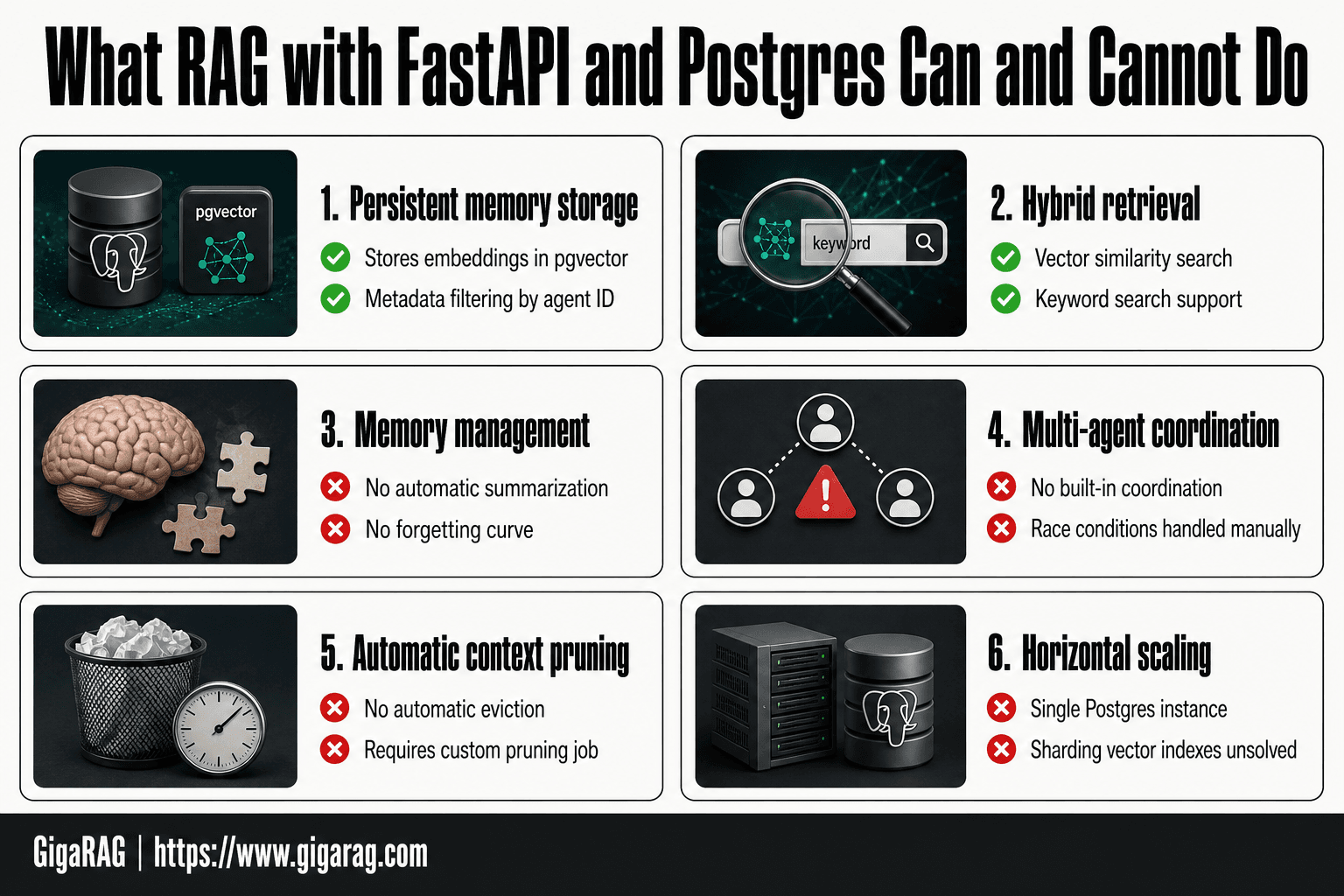
Limitations: What RAG with FastAPI and Postgres Cannot Do
You've built the retrieval logic. Now be clear about what you didn't build.
No built-in memory management
Postgres stores rows. It doesn't decide which memories matter. No automatic summarization of old turns. No consolidation of repeated facts. No forgetting curve. If an agent runs 400 turns, you get 400 episodic rows unless you write a pruning job yourself. That job is on you: a cron task, a background worker, or a manual endpoint.
No multi-agent coordination
One agent, one Postgres instance. That's the ceiling. Two agents sharing memory need a locking protocol, a merge strategy, or a message bus you build yourself. Postgres gives you transactions, not coordination. If Agent A writes a memory while Agent B reads the same conversation, you handle the race condition. The database won't.
Scaling challenges you will face
pgvector works fine at 100k rows. At 10 million, similarity search slows unless you tune HNSW parameters carefully. Connection pooling with async FastAPI helps, but a single Postgres instance is still one machine. Vertical scaling gets you far. Horizontal scaling means sharding, and sharding vector indexes is not a solved problem you can install.
The honest answer: this stack handles one agent's memory well. It does not handle a fleet of agents out of the box.
Production Considerations for RAG Pipelines
The limitations section named the ceiling. This section covers what you can do before you hit it.
Indexing strategies for pgvector
Start with HNSW, not IVFFlat. HNSW gives faster recall at the cost of slower builds and more memory. Set m to 16 and ef_construction to 64 for most workloads. Raise ef_search at query time when recall drops. Reindex after bulk inserts; incremental inserts fragment the graph.
Connection pooling and async FastAPI
Async FastAPI does not remove the need for a pool. Postgres handles one query per connection. Use PgBouncer in transaction mode, not session mode. Set pool size to roughly twice your CPU cores. Never open a new connection per request; you'll exhaust Postgres before you exhaust your app.
When to move beyond a single Postgres instance
It depends on row count and query latency. At 5 million vectors, HNSW on one machine still works if you have enough RAM. At 50 million, you need partitioning or a dedicated vector database. The honest answer: most agent memory workloads never leave a single instance. Move when p95 latency crosses 200ms and tuning stops helping.
Final Thoughts on RAG with FastAPI and Postgres
You've built a working RAG backend. FastAPI serves the endpoints, Postgres with pgvector stores the vectors, and the retrieval loop returns context your agent can use. That's the whole stack, and it runs on one machine.
The honest answer is that this stack gets you far. Most agent memory workloads never outgrow a single Postgres instance. But you now know the ceiling: no built-in memory management, no multi-agent coordination, no automatic context pruning. You write those yourself or you don't get them.
If you're building agent memory as a product rather than a side project, GigaRAG handles the parts this guide left as exercises. It's purpose-built for agent memory and RAG pipeline builders, so the memory management and retrieval patterns you'd otherwise hand-roll come ready to use. You don't need it to start. You'll know when you do.
Frequently Asked Questions
How do I implement RAG with FastAPI and Postgres?
Start by enabling the pgvector extension in Postgres, create a table with a vector column, and build FastAPI endpoints that generate embeddings and perform similarity searches. Use async database drivers for efficiency.
Can Postgres handle vector search for RAG?
Yes, with the pgvector extension, Postgres can perform efficient vector similarity searches. It supports indexes like IVFFlat and HNSW for approximate nearest neighbor search, making it suitable for many RAG applications.
What are the limitations of using Postgres for RAG?
Postgres with pgvector lacks built-in memory management for agents, such as automatic summarization or eviction. It also may not scale as easily as dedicated vector databases for very large datasets or high-throughput scenarios.
How do I scale RAG with FastAPI and Postgres?
Use connection pooling, read replicas for read-heavy workloads, and consider partitioning your vector table. For very large scale, you might need to shard or offload vector search to a specialized service.
Is pgvector suitable for production RAG?
Yes, pgvector is used in production by many teams, especially when they already rely on Postgres. It provides ACID compliance and integrates well with existing data, but you must plan for scaling and maintenance.
How do I handle agent memory with FastAPI and Postgres?
Design a schema that stores conversation history, embeddings, and metadata. Implement retrieval that considers recency and relevance, and periodically summarize or prune old memories to manage context window limits.
About GigaRAG
GigaRAG is for agent memory and RAG pipeline builders. get this right. Whether you are working through rag with fastapi and postgres or something adjacent, we publish what we have actually tested, including where it falls short.


