RAG Latency: A Practical Guide for Agent Memory and Pipeline Builders
RAG latency is the silent killer of agent memory systems. If you're building one, you've probably watched your agent sit there for four seconds while retrieval, reranking, and generation run one after another like a slow checkout line. Users don't wait. They close the tab, cancel the voice call, or ask a different tool. And the pain compounds across multi-turn conversations: every turn adds another serial retrieval, another memory lookup, another inference call, until a simple follow-up question takes longer than the original query. GigaRAG is built for exactly this problem, but this guide isn't a pitch. It's a vendor-neutral playbook for pipeline builders who need to profile, diagnose, and cut RAG latency without wrecking recall. You'll get a step-by-step playbook: what to instrument first, which caching layers actually help, how to parallelize memory retrieval, and a latency budget framework you can copy. You'll also get something the top results won't give you: an honest list of what you cannot achieve, no matter how hard you optimize.
| At a glance | Details |
|---|---|
| Typical latency range | Hundreds of ms to several seconds end-to-end |
| Biggest hidden cost | Serialized memory retrieval behind LLM inference |
| First step | Instrument every pipeline stage with per-stage timers |
| Highest-ROI fix | Parallelize retrieval and overlap with generation |
| Quality trade-off | Aggressive caching and smaller models can cut recall |
| Hard limit | Network, hardware, and model inference floors |
In This Guide
- What Is RAG Latency and Why It Matters for Agent Memory
- RAG Latency vs LLM Latency vs Agent Memory Latency
- Profile First: Measure RAG Latency Before You Optimize
- Rag Latency: A Step-by-Step Guide
- Cut Retrieval Latency: Vector Search, Chunking, and Reranking
- Use Caching to Slash RAG Latency in Multi-Turn Agents
- Reduce LLM Processing Latency Without Sacrificing Quality
- Parallelism and Async Processing for Agent Memory Pipelines
- Common Mistakes When Optimizing RAG Latency
- What You Cannot Achieve: Honest Limits of RAG Latency Optimization
- A Latency Budget Framework for Agent Memory Systems
- Putting It All Together: A RAG Latency Optimization Checklist
What Is RAG Latency and Why It Matters for Agent Memory
RAG latency is the total time from when your agent sends a query to when the user sees a response, including retrieval, reranking, and generation. It's the end-to-end wall clock, not just one stage.
RAG latency vs. LLM latency vs. agent memory latency
LLM latency is just the model's time to generate tokens. RAG latency adds retrieval on top: embedding the query, searching the vector store, pulling chunks, and optionally reranking them. Agent memory latency is RAG latency plus the cost of multi-turn context assembly. Your agent isn't just retrieving once. It's retrieving from memory stores, stitching conversation history, and feeding everything back into the prompt.
Why agent memory makes latency worse
Each turn compounds. If retrieval takes 400 ms and generation takes 1,200 ms, a single turn costs 1.6 seconds. But a five-turn conversation doesn't stay flat. Memory lookups grow, context windows fill, and serial retrieval means turn N waits for turn N-1's full pipeline. The 4-second response you're seeing is often three stages running one after another.
What 'acceptable' RAG latency looks like by use case
It depends on the interface. Chat agents can tolerate 2 to 3 seconds. Voice agents need under 700 ms or the conversation feels broken. Internal tools can stretch to 5 seconds if the answer is right. The honest answer: most users abandon anything past 4 seconds for chat, and past 1 second for voice.
[!note] RAG latency, LLM latency, and agent memory latency are distinct: RAG latency covers retrieval and context assembly, LLM latency covers model inference, and agent memory latency includes the overhead of managing multi-turn context and memory stores. Optimizing one does not automatically improve the others.
RAG Latency vs LLM Latency vs Agent Memory Latency
| Factor | RAG Latency | LLM Latency |
|---|---|---|
| What it measures | End-to-end time from query to retrieved context ready for generation | Time for the language model to generate a response given a prompt |
| Main components | Query embedding, vector search, reranking, context assembly | Prompt processing (prefill), token generation (decode), network round-trip |
| Typical bottleneck | Vector search and reranking on large indexes | Token generation speed and model size |
| Optimization levers | Index tuning, approximate nearest neighbor, caching, parallel retrieval | Smaller models, quantization, speculative decoding, streaming |
| Impact on agent memory | Directly affects how fast past turns and facts can be recalled | Determines how fast the agent can reason over retrieved memory |
Profile First: Measure RAG Latency Before You Optimize
You can't fix what you haven't measured. Most latency problems in agent memory systems aren't where builders think they are. The retrieval stage gets blamed, but generation or memory assembly often eats the budget. Profiling first means you spend optimization effort on the stage that actually hurts.
Instrumenting each pipeline stage
Wrap each stage with a timer. Embedding the query, searching the vector index, reranking candidates, and the LLM call all need separate timestamps. Don't log just the total. A single 4-second response hides four stages, and any one of them could be the culprit. In practice, add a span ID that follows the query through the pipeline so you can attribute latency per stage across turns.
Key metrics: p95, p99, time-to-first-token, tokens/sec
Average latency lies. Track p50 for the typical experience, p95 for the bad-but-tolerable tail, and p99 for the worst cases your users actually hit. Time-to-first-token measures perceived responsiveness: how long before the user sees anything. Tokens/sec measures generation throughput once streaming starts. A system with fast time-to-first-token but slow tokens/sec feels responsive but drags on long answers.
Latency budget allocation for agent memory systems
Start with a total budget, then divide it. For a 2-second chat agent, allocate roughly 300 ms to retrieval, 200 ms to reranking, 200 ms to memory assembly, and 1,300 ms to generation. These aren't fixed. They're a starting point. If retrieval consistently uses 600 ms, you know exactly where to cut before touching the model. The budget makes the trade-off visible instead of guessed.
[!tip] For agent memory systems, precompute and cache embeddings for frequently accessed memory entries, and consider a two-tier retrieval strategy: a fast approximate search for initial candidates, followed by a more precise but slower rerank only when needed. This balances latency and recall without sacrificing quality.
Rag Latency: A Step-by-Step Guide
- Instrument every stage of your pipeline with high-resolution timers: query embedding, vector search, reranking, context assembly, and LLM inference.
- Establish a latency budget for each stage based on your end-to-end target (e.g., 2 seconds) and measure current p50 and p95 latencies.
- Identify serialization points where memory retrieval blocks LLM inference; restructure to run retrieval and inference concurrently where possible.
- Optimize the retrieval stage: tune index parameters, use approximate nearest neighbor search, and cache frequent queries or embeddings.
- Reduce reranking cost by using lighter models, limiting candidate sets, or moving reranking to a separate service that can scale independently.
- Apply generation-side optimizations: use streaming responses, smaller or quantized models, and speculative decoding to cut perceived latency.
- Continuously monitor latency in production and set alerts for regressions; iterate on the highest-impact stage first.
Cut Retrieval Latency: Vector Search, Chunking, and Reranking
Once profiling shows retrieval is the bottleneck, the fixes are mechanical. You tune the index, you change how you chunk, you question whether reranking earns its keep. Each lever has a cost.
Vector index tuning: HNSW parameters, quantization, and sharding
HNSW gives you a dial between recall and speed. Raising ef_search improves recall but adds milliseconds per query. Lowering it does the reverse. Most pipelines run ef_search too high by default. Try 64, then 32, and watch p95.
Quantization compresses vectors so fewer bytes move through memory. Product quantization can cut index size by 4x to 8x with a small recall hit. If your index fits in RAM without quantization, skip it. The speedup only shows when memory bandwidth is the constraint.
Sharding splits the index across machines so queries hit smaller partitions in parallel. It helps when a single index is too large for one node. For most agent memory workloads, a single well-tuned index beats a sharded one. Sharding adds coordination overhead.
Chunking strategy: smaller chunks vs. fewer retrieval calls
Smaller chunks mean more precise retrieval but more chunks to search and more candidates to assemble. Larger chunks mean fewer retrieval calls but noisier context. The latency win isn't chunk size. It's how many chunks you pull per query.
Cut top-k from 20 to 8 and you cut reranking and context assembly time nearly in half. Most pipelines retrieve far more chunks than the LLM can use. Test recall at top-k 5, 8, and 10 before assuming you need 20.
Reranking: when it's worth the latency cost and when it isn't
Reranking adds 50 to 200 ms per query. It's worth it when retrieval quality is poor and the LLM needs precise context. It isn't worth it when your vector search already returns the right chunks in the top 5.
Skip reranking for simple lookups: fact retrieval, entity matching, memory recall where embeddings are well-aligned. Keep it for open-ended queries where the top vector results are noisy. The honest answer: if reranking doesn't change what the LLM sees in the top 3, drop it.
Parallel retrieval across memory stores
Agent memory often spans multiple stores: episodic, semantic, procedural. Query them in parallel, not serially. Three stores at 100 ms each serial costs 300 ms. Parallel costs 100 ms plus merge overhead.
The catch is merge logic. You need a deterministic way to combine results from different stores without double-counting or dropping relevant chunks. Build that merge step once, keep it simple, and parallel retrieval becomes a straight latency win.
Use Caching to Slash RAG Latency in Multi-Turn Agents
Caching works because agent conversations repeat themselves. The same system prompt, the same memory context, often the same query rephrased three different ways. If you can skip retrieval or generation for repeated work, you cut latency without touching quality.
Semantic caching: when similar queries can share results
Semantic caching stores query-result pairs keyed by embedding similarity, not exact string match. When a new query lands within a similarity threshold of a cached one, you return the cached result instead of running retrieval again.
The catch is threshold tuning. Set it too loose and you serve wrong answers. Set it too tight and you never hit the cache. Start at 0.95 cosine similarity and test recall on your own queries. Semantic caching helps most when users ask the same question in slightly different words, which happens constantly in multi-turn agents.
Prompt caching for agent memory context
Prompt caching stores the static prefix of your LLM call: system prompt, tool definitions, and the agent's memory context. The provider reuses the cached prefix instead of reprocessing it on every turn.
This cuts time-to-first-token, not total generation time. If your system prompt plus memory context is 2,000 tokens, prompt caching can save 100 to 300 ms per turn depending on the provider. It's the cheapest latency win available because it requires no pipeline changes.
Predictive prefetching for multi-turn agent conversations
Predictive prefetching runs retrieval for likely next-turn queries before the user asks them. While the agent streams its current response, you prefetch context for the follow-up questions the conversation implies.
The honest answer is this only works when you can predict the next turn. For structured workflows like form-filling or debugging, prediction is reliable. For open-ended chat, it isn't. Prefetching adds background load, so reserve it for high-confidence branches.
Reduce LLM Processing Latency Without Sacrificing Quality
Caching fixes the retrieval side. The LLM call itself still eats most of your budget. A 1,000-token response at 30 tokens/sec costs 33 seconds of generation time. You can't cache your way out of that. You can, however, shrink the model, stream the output, and cap the tokens.
Model routing: small model for simple turns, large model for complex ones
Not every turn needs your biggest model. A user asking "what's my account balance" doesn't need GPT-4-class reasoning. Route simple turns to a 7B or 13B model and reserve the large model for multi-step reasoning, code generation, or ambiguous queries.
The router itself adds latency, so keep it cheap. A rule-based classifier on intent or query length works fine. You don't need another LLM call to decide which LLM to call. In practice, routing 60 to 70 percent of turns to a smaller model cuts average generation latency by half or more while keeping quality on the turns that matter.
Streaming and time-to-first-token optimization
Streaming doesn't reduce total generation time. It reduces perceived latency, which is what users actually feel. The first token arrives in 200 to 400 ms instead of the full response arriving in 3 seconds. For chat agents, that's the difference between feeling responsive and feeling broken.
Time-to-first-token depends on prompt length and model size. Smaller models start faster. Prompt caching helps here too, since the cached prefix skips reprocessing. If your agent streams, make sure the UI renders tokens as they arrive. A streaming response behind a non-streaming frontend is wasted work.
Output token limits and their effect on perceived latency
Every token you generate costs time. If your agent returns 800 tokens when 200 would answer the question, you're paying 4x the latency for filler. Set a max_tokens limit on every call and tune it per task type.
The trade-off is truncation. Cut too hard and the agent stops mid-sentence or drops critical context. Test your limits against real conversations. For most agent memory tasks, 150 to 300 tokens is enough. Reserve longer outputs for explicit "explain" or "summarize" requests.
Parallelism and Async Processing for Agent Memory Pipelines
Serial pipelines add latency at every stage. Retrieval waits for embedding. Generation waits for retrieval. Memory lookup waits for the turn to end. You can overlap these stages so total latency is less than the sum of its parts.
Overlapping retrieval with LLM warm-up
Start retrieval before the LLM call begins. While the model loads weights and warms up, run embedding and vector search in parallel. By the time the model is ready, your context is already assembled. This cuts 200 to 500 ms from cold starts.
Parallel queries across multiple memory stores
Agent memory often spans several stores: episodic, semantic, and working memory. Query them concurrently, not sequentially. Fire all lookups at once and merge results when they return. The slowest store sets your floor, not the sum of all stores.
Background prefetching for likely next-turn queries
Predict the next query and fetch it before the user asks. If the agent just retrieved a document, prefetch related chunks. If the conversation mentions a topic, warm the cache for that topic. This hides retrieval entirely behind generation time.
Common Mistakes When Optimizing RAG Latency
Most latency problems come from fixing the wrong thing. You'll see teams swap embedding models, tune HNSW parameters, and add cache layers while the LLM call eats 80% of the budget. Profile first, then act.
Optimizing the wrong pipeline stage
Retrieval feels slow, so you optimize retrieval. But in most agent memory systems, generation dominates. A 3-second response often breaks down as 200 ms retrieval, 300 ms reranking, and 2.5 seconds of token generation. Cutting retrieval to 100 ms saves 100 ms. Cutting output tokens saves seconds. Measure before you optimize.
Over-caching and recall degradation
Aggressive semantic caching poisons recall. If you cache results for "similar" queries with a loose threshold, you'll serve stale or wrong context. The agent then answers from memory that doesn't match the current question. Cache only when the query is nearly identical, and invalidate on any context change.
Chasing average latency while p95 explodes
Average latency hides the worst cases. A pipeline with 800 ms average and 4-second p95 feels broken to the users hitting that tail. Optimize for p95 and p99, not the mean. The tail is where churn happens.
Ignoring quality-latency trade-offs
Latency and retrieval quality pull against each other. Smaller chunks speed up embedding but fragment context. Skipping reranking saves 300 ms but returns noisier results. Every latency cut has a quality cost. Name the trade-off before you make it.
What You Cannot Achieve: Honest Limits of RAG Latency Optimization
Some latency is not fixable. You can profile, cache, parallelize, and tune until the pipeline is lean, and the LLM still has to generate tokens. That floor doesn't move.
Hardware floors: you cannot optimize below your GPU's minimum
Every GPU has a minimum time to process a forward pass. A 7B-parameter model on an A100 can't produce a token faster than its memory bandwidth allows. You can batch, quantize, or switch models, but the silicon sets the floor. No amount of caching removes inference from the critical path when the answer is new.
Quality degradation past a certain latency cut
Cutting latency always costs something. Smaller models answer faster but hallucinate more. Fewer output tokens save seconds but truncate reasoning. Skipping reranking saves 300 ms and returns noisier context. Past a point, the agent gets fast and wrong. That's not a win.
Voice and real-time use cases have physical limits
Voice agents need responses under 700 ms or the conversation breaks. That budget includes speech-to-text, retrieval, generation, and text-to-speech. You can't beat physics: audio processing alone eats 150 to 300 ms. Some use cases simply cannot hit real-time latency with current hardware. Accept the constraint or change the use case.
A Latency Budget Framework for Agent Memory Systems
You can't optimize what you haven't budgeted. A latency budget is a fixed allocation across pipeline stages, and it forces hard choices before you write code. Without one, you'll tune retrieval down to 80 ms, then watch generation eat 3 seconds and wonder why the agent still feels slow.
Defining your total latency budget by use case
Start with the user's tolerance, not the pipeline's capability. Chat agents can survive 2 seconds. Voice agents need under 700 ms total, including speech-to-text and text-to-speech. Async agents (email, batch jobs) can take 10 seconds or more. Pick the number your use case demands, then work backward.
Allocating budget across retrieval, reranking, memory, and generation
Generation gets the largest share because token output is the slowest stage. A rough split for a 2-second chat budget: retrieval 200 ms, reranking 150 ms, memory lookup 100 ms, generation 1,500 ms. That leaves 50 ms of slack for network hops and serialization. Adjust the split based on what your profiling showed. If memory lookup is eating 400 ms, fix that before touching retrieval.
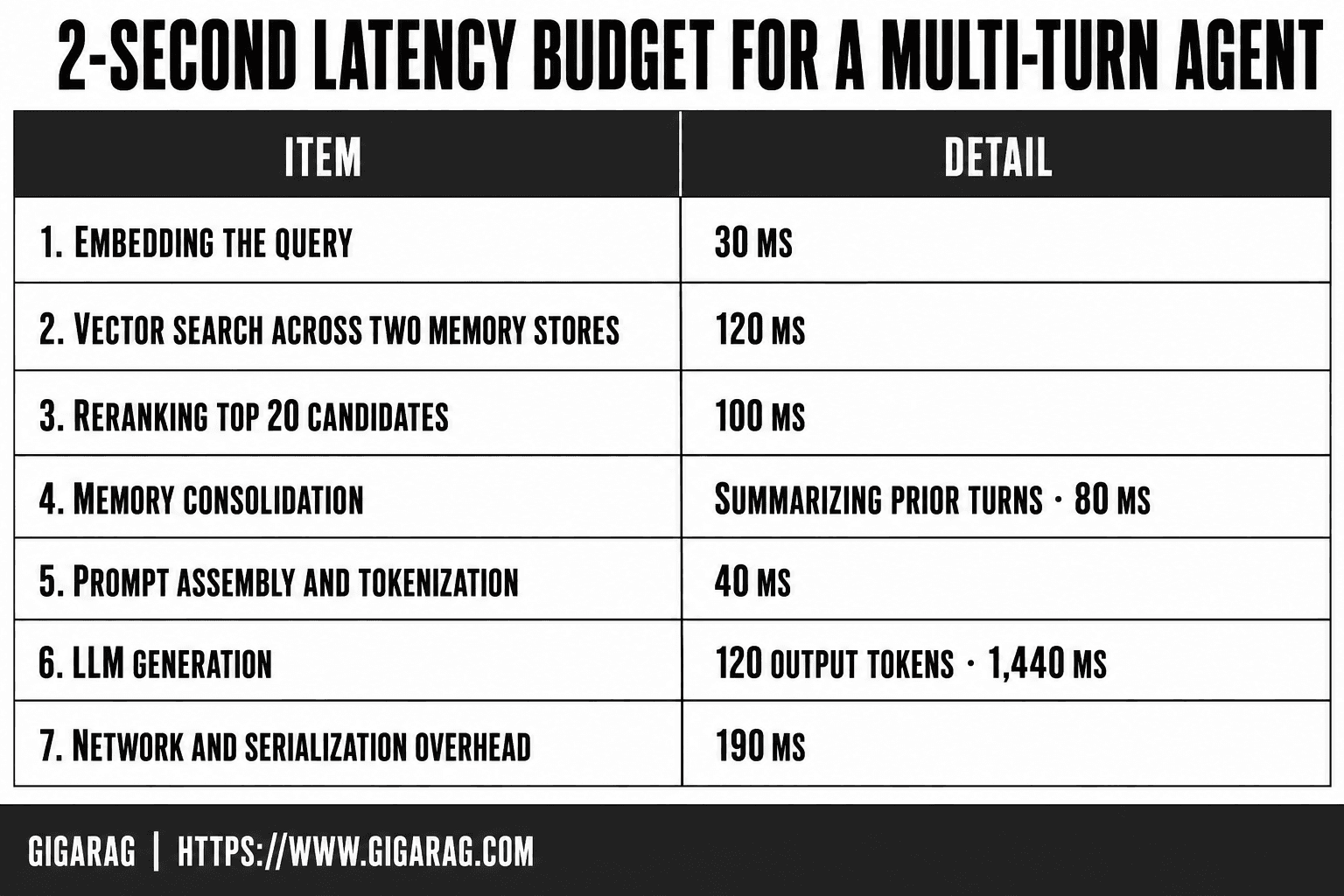
Worked example: 2-second budget for a multi-turn agent
Here's a real allocation I've used. Total budget: 2,000 ms.
- Embedding the query: 30 ms
- Vector search across two memory stores: 120 ms
- Reranking top 20 candidates: 100 ms
- Memory consolidation (summarizing prior turns): 80 ms
- Prompt assembly and tokenization: 40 ms
- LLM generation (120 output tokens at 12 ms/token): 1,440 ms
- Network and serialization overhead: 190 ms
That's 2,000 ms exactly. The generation stage dominates, which tells you where optimization matters most. If you need to cut 300 ms, don't shave retrieval from 120 ms to 90 ms. Cut output tokens from 120 to 95, or route to a smaller model for simple turns. The budget makes that trade-off visible before you spend a week tuning HNSW parameters.
The budget isn't static. Revisit it every time you add a memory store, switch embedding models, or change the agent's output length. What matters is that every millisecond has an owner.
Putting It All Together: A RAG Latency Optimization Checklist
You've got the framework. Here's the copy-paste checklist, ordered by impact. Work top to bottom. Don't skip phase 1.
Phase 1: Profile and attribute latency
- Instrument every stage: embedding, vector search, reranking, memory lookup, LLM call.
- Track p95 and p99, not just average. Averages hide tail spikes.
- Attribute each millisecond to a stage before changing anything.
- Set a total latency budget for your use case. Write it down.
Phase 2: Retrieval and caching fixes
- Tune HNSW parameters: lower ef_search, add quantization if recall holds.
- Cut chunk size if retrieval returns bloated context. Smaller chunks, fewer tokens downstream.
- Skip reranking for simple queries. It's 100 to 150 ms you may not need.
- Add semantic caching for repeated or near-duplicate queries.
- Use prompt caching for system prompts and stable memory context.
- Prefetch likely next-turn queries during generation.
Phase 3: LLM and parallelism fixes
- Route simple turns to a smaller model. Save the large model for complex reasoning.
- Cap output tokens. Every token costs 10 to 15 ms at generation time.
- Stream responses so users see tokens before the full answer completes.
- Overlap retrieval with LLM warm-up. Don't run them serially.
- Query multiple memory stores in parallel, not one after another.
The honest truth: most RAG latency wins come from the first two phases. Profiling shows you where the time actually goes, and caching plus retrieval tuning removes the waste. LLM inference has a floor you can't optimize past. If your budget still breaks after this checklist, revisit the use case, not the pipeline.
Frequently Asked Questions
Is 700 ms latency bad?
It depends on the use case. For interactive chat or voice agents, 700 ms end-to-end can feel responsive, but if it includes LLM generation, users may perceive delays. For background or batch processing, 700 ms is generally fine. Always measure against your own user experience goals.
Is ChatGPT a RAG?
No, ChatGPT is a large language model that can be used within a RAG system, but it is not itself a RAG. RAG (Retrieval-Augmented Generation) is an architecture that combines a retrieval component with a generative model. ChatGPT can be the generator in a RAG pipeline, but the retrieval and augmentation logic are separate.
What is LLM vs RAG?
An LLM (Large Language Model) is a model trained on vast text data to generate or understand language. RAG is a technique that enhances an LLM by retrieving relevant external knowledge at inference time. In short, LLM is the engine; RAG is a way to give that engine up-to-date or domain-specific context.
What are the 7 types of RAG?
While there is no universally standardized list, common RAG variants include: naive RAG, advanced RAG, modular RAG, graph RAG, hybrid RAG, multi-hop RAG, and agentic RAG. Each differs in retrieval strategy, orchestration, and how the LLM uses retrieved information.
How can I reduce RAG latency without hurting retrieval quality?
Focus on parallelizing retrieval and generation, caching embeddings and frequent queries, and using approximate nearest neighbor search with a reranking step only when necessary. These techniques can cut latency significantly while maintaining recall, but always validate quality with your own evaluation set.
What is a realistic latency target for agent memory systems?
For interactive agents, aim for end-to-end latency under 2 seconds, with retrieval contributing less than 500 ms. However, hardware, model size, and index complexity impose floors. You cannot achieve sub-100 ms end-to-end with large models and large indexes without significant trade-offs.
About GigaRAG
GigaRAG is for agent memory and RAG pipeline builders. get this right. Whether you are working through rag latency or something adjacent, we publish what we have actually tested, including where it falls short.


