RAG with Next.js and Vercel: A Practical Guide for Agent Memory Builders
RAG with Next.js and Vercel should be straightforward. Search for it and you'll find either a 238-word template landing page or a conceptual overview that never shows you a line of code. Neither helps if you're building agent memory and need persistent context across sessions. That gap is the whole reason this guide exists.
Most tutorials treat RAG as a demo: ingest a few documents, query them once, done. Agent memory is different. Your agent needs to store what it learned, retrieve it reliably, and combine short-term conversation state with long-term knowledge. That's the harder problem, and it's the one we'll actually solve here.
Tools like GigaRAG can handle parts of this for you, but you should understand the fundamentals first. This guide walks through a working RAG pipeline on Next.js and Vercel, with real code, honest limitations, and no template hand-waving. You'll build embeddings, wire up retrieval, implement agent memory, and deploy it. You'll also learn what RAG on serverless architecture cannot do, so you don't find out in production.
| At a glance | Details |
|---|---|
| Core stack | Next.js App Router + Vercel serverless functions |
| Vector store | External DB (Pinecone, Supabase pgvector, etc.) |
| Embeddings | OpenAI or open-source via API route |
| Agent memory | Persist in DB, not in serverless memory |
| Key limitation | No persistent filesystem or long-running processes |
| Best for | Stateless RAG with external state store |
In This Guide
- What Is RAG and Why It Matters for Agent Memory
- Vercel Serverless vs. Long-Running Server for RAG Agent Memory
- Setting Up Your Next.js and Vercel RAG Project
- Rag With Next.js And Vercel: A Step-by-Step Guide
- Building the RAG Pipeline: Embeddings, Storage, and Retrieval
- Implementing Agent Memory with RAG on Vercel
- Common RAG Workflow Optimizations for Next.js
- Honest Limitations of RAG with Next.js and Vercel
- Deploying Your RAG Application to Vercel
- Choosing the Right Tools for Your RAG Pipeline
- Final Thoughts on RAG with Next.js and Vercel
What Is RAG and Why It Matters for Agent Memory
RAG (retrieval augmented generation) lets an agent pull relevant information from a persistent store before answering, instead of relying only on its context window. You embed documents, store those embeddings in a vector database, and retrieve the closest matches at query time. The LLM then generates a response grounded in that retrieved context.
The core RAG workflow
RAG has four steps. You chunk your knowledge base into smaller pieces. You embed each chunk into a vector. You store those vectors in a database that supports similarity search. When a query comes in, you embed it, find the nearest chunks, and pass them to the LLM alongside the question. The model answers using that retrieved context.
Why agents need memory beyond context windows
Context windows are finite. Even large ones fill up fast when an agent carries conversation history, tool outputs, and system prompts. RAG gives you a way to store knowledge outside the window and pull it in only when needed. That's the difference between an agent that forgets and one that can reference past sessions.
How RAG differs from fine-tuning
Fine-tuning bakes knowledge into the model weights. It's expensive, slow to update, and you retrain for every change. RAG keeps knowledge in a separate store. You update the store, and the next retrieval picks up the change. For agent memory, that means you can add or remove facts without touching the model itself.
[!note] Vercel's serverless functions have execution time limits that vary by plan, so long-running agent loops or heavy document processing may need to be offloaded to a separate worker or queue.
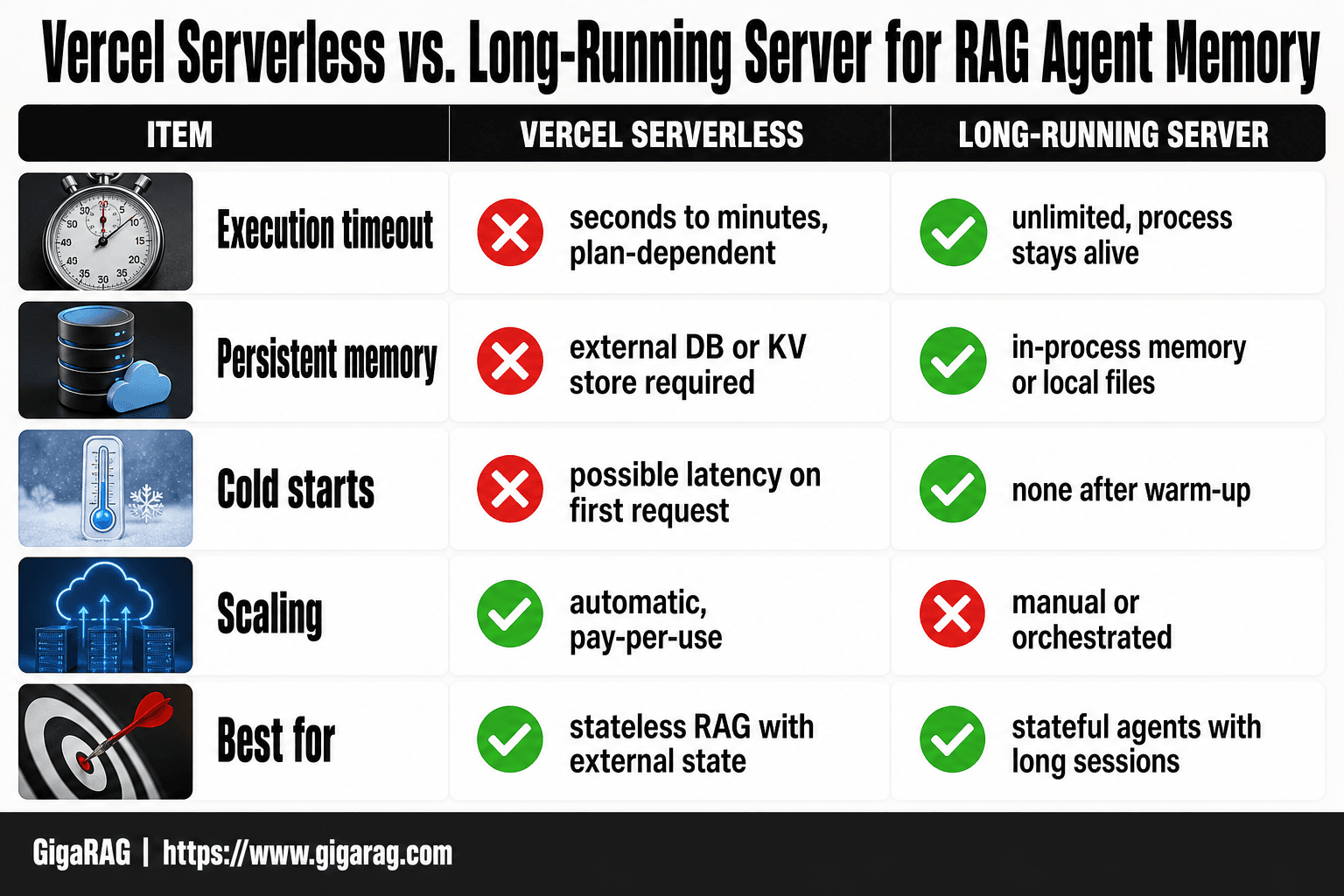
Vercel Serverless vs. Long-Running Server for RAG Agent Memory
| Factor | Vercel Serverless | Long-Running Server |
|---|---|---|
| Execution timeout | Seconds to minutes (plan-dependent) | Unlimited (process stays alive) |
| Persistent memory | Must use external DB or KV store | Can use in-process memory or local files |
| Cold starts | Possible latency on first request | None after warm-up |
| Scaling | Automatic, pay-per-use | Manual or orchestrated |
| Best for | Stateless RAG with external state | Stateful agents with long sessions |
Setting Up Your Next.js and Vercel RAG Project
You need a working Next.js app before you can build anything. Start there.
Project initialization with create-next-app
Run this in your terminal:
npx create-next-app@latest rag-agent-memory
The installer asks about TypeScript, ESLint, Tailwind, the src/ directory, and the App Router. Say yes to TypeScript and the App Router. The App Router matters because the Vercel AI SDK's streaming helpers are built for route handlers, not the old Pages API. Tailwind is optional. I use it for the chat UI, but plain CSS works fine.
After the install finishes, cd rag-agent-memory and run npm run dev. You should see the default Next.js page at localhost:3000. That's your base.
Installing the Vercel AI SDK
The AI SDK is what connects your Next.js app to an LLM provider. Install it with:
npm install ai @ai-sdk/openai
The ai package gives you streamText and the useChat hook. The @ai-sdk/openai package is the provider adapter. You can swap in Anthropic, Google, or any other supported provider later by changing one import.
If you plan to use a vector database like Pinecone or Supabase pgvector, install that client now too. For this guide I'll use Supabase because it keeps the database and auth in one place, but the retrieval code in the next section works with any provider.
Environment variables and API keys
Create a .env.local file in the project root. Add your keys:
OPENAI_API_KEY=sk-...
Never commit this file. Next.js loads .env.local automatically on the server, and any variable prefixed with NEXT_PUBLIC_ gets exposed to the browser. Keep your API keys without that prefix so they stay server-side only.
For Vercel deployment later, you'll add these same variables in the project dashboard under Settings > Environment Variables. The local file and the dashboard are separate. Don't assume one syncs to the other.
One thing to check before you write any RAG code: your OpenAI account needs credits. A fresh key with no billing attached returns a 429 on the first embedding call, and that's a confusing error to debug at 11pm.
[!tip] For agent memory, avoid storing state in module-level variables or the filesystem — use a dedicated external store like Redis or Postgres so memory survives cold starts and scales across regions.
Rag With Next.js And Vercel: A Step-by-Step Guide
- Set up a Next.js App Router project and install the Vercel AI SDK plus your vector DB client.
- Create an API route (e.g., /api/chat) that accepts user messages and retrieves relevant context from your vector store.
- Generate embeddings for your documents and upsert them into an external vector database (Pinecone, Supabase pgvector, etc.).
- In the API route, embed the user query, perform a similarity search, and inject the top matches into the prompt.
- Stream the LLM response back to the client using the AI SDK's streaming helpers.
- Persist conversation history and agent memory in an external store (e.g., Redis, Postgres) keyed by session ID.
- Deploy to Vercel, set environment variables for API keys, and test cold-start behavior and timeout limits.
Building the RAG Pipeline: Embeddings, Storage, and Retrieval
The pipeline has three moving parts: turn text into vectors, store those vectors somewhere queryable, and pull the closest matches when a user asks something. Each part is simple on its own. The work is in wiring them together so the retrieval actually returns useful chunks.
Generating embeddings with the AI SDK
The AI SDK ships an embed function that calls OpenAI's embedding model directly. You don't need a separate client.
import { embed } from 'ai';
import { openai } from '@ai-sdk/openai';

const { embedding } = await embed({
  model: openai.embedding('text-embedding-3-small'),
  value: 'Your chunk of text goes here',
});
embedding is an array of 1536 floats. That's the vector. Store it as-is; don't round or truncate it. The model text-embedding-3-small costs $0.02 per 1M tokens and returns 1536 dimensions. If you want fewer dimensions to save space, text-embedding-3-large supports a dimensions parameter, but for most agent memory workloads the small model is enough.
You'll call this once per chunk when you ingest documents, and once per user query at retrieval time. Batch the ingestion calls. Don't embed 500 chunks in a loop with individual awaits; that's 500 round trips. Use Promise.all with a concurrency limit of 10 or so.
Choosing and setting up a vector database
You have three realistic options on Vercel: Supabase with pgvector, Pinecone, or Vercel's own Postgres with pgvector. All three work with the same retrieval pattern.
Supabase is the path of least resistance if you already use it for auth. Enable the pgvector extension, then create a table:
create extension if not exists vector;

create table memory_chunks (
  id uuid primary key default gen_random_uuid(),
  content text not null,
  embedding vector(1536) not null,
  agent_id text not null,
  created_at timestamptz default now()
);
The agent_id column matters. Agent memory is per-agent, not one global pool. You'll filter on it in every query.
Pinecone is a dedicated vector database with no SQL layer. It's faster to set up for pure similarity search but adds a second service to manage. Vercel Postgres keeps everything inside your existing Vercel project, which simplifies deploys but locks you into their database.
The honest answer: for a single-agent prototype, any of these works. For multi-agent memory with per-agent isolation, Supabase or Vercel Postgres with a filter column is easier than Pinecone namespaces.
Implementing semantic search retrieval
Retrieval is one SQL query. Embed the user's message, then find the closest chunks:
const { embedding } = await embed({
  model: openai.embedding('text-embedding-3-small'),
  value: userMessage,
});

const { data } = await supabase.rpc('match_memory_chunks', {
  query_embedding: embedding,
  match_agent_id: agentId,
  match_count: 5,
});
The match_memory_chunks function does cosine similarity. You'll need to create it in Supabase:
create or replace function match_memory_chunks(
  query_embedding vector(1536),
  match_agent_id text,
  match_count int
) returns table (
  id uuid,
  content text,
  similarity float
) language plpgsql as $$
begin
  return query
  select
    memory_chunks.id,
    memory_chunks.content,
    1 - (memory_chunks.embedding <=> query_embedding) as similarity
  from memory_chunks
  where memory_chunks.agent_id = match_agent_id
  order by memory_chunks.embedding <=> query_embedding
  limit match_count;
end;
$$;
The <=> operator is pgvector's cosine distance. Subtract from 1 to get similarity, where 1 is identical and 0 is unrelated.
In practice, you'll want a similarity threshold. Chunks below 0.7 similarity are usually noise. Return fewer chunks rather than padding with irrelevant ones. The LLM handles a short context better than a long one full of near-misses.
The main catch: this retrieval is stateless. Every query re-embeds and re-searches from scratch. That's fine for a single turn, but agent memory needs more than one-shot retrieval. The next section builds on this pipeline to make memory persist across turns.
Implementing Agent Memory with RAG on Vercel
The pipeline from the last section retrieves chunks, but it forgets everything between turns. Agent memory means the system remembers what happened before, and can pull it back when relevant. That's the difference between a search bar and an agent.
Designing memory schemas for agents
A memory schema is just a table shape. You need three things stored: what happened, who it happened to, and when. The memory_chunks table from earlier has content, agent_id, and created_at. That's a start, but it's not enough.
Add a memory_type column. Short-term memory is the current conversation, long-term is distilled facts. You'll query them differently, so store them separately:
alter table memory_chunks
add column memory_type text default 'long_term';
Short-term memory lives in the same table but with memory_type = 'short_term'. You'll cap it and prune it. Long-term memory accumulates.
Storing and retrieving conversation history
Every turn gets embedded and stored. The user message and the assistant response both go in, tagged with the same agent_id and a session_id:
await supabase.from('memory_chunks').insert([
  {
    content: userMessage,
    agent_id: agentId,
    session_id: sessionId,
    memory_type: 'short_term',
    embedding: userEmbedding,
  },
  {
    content: assistantResponse,
    agent_id: agentId,
    session_id: sessionId,
    memory_type: 'short_term',
    embedding: responseEmbedding,
  },
]);
Retrieval for the next turn pulls from both short-term and long-term, but weights them differently. Recent short-term chunks get priority because they're the current context. Long-term chunks only surface when they're semantically close to the new query.
Combining short-term and long-term memory
The honest answer is that you don't need a fancy architecture. Run two queries: one against memory_type = 'short_term' filtered by session_id, one against memory_type = 'long_term' filtered by agent_id. Merge the results, dedupe, and pass the top five to the LLM.
Short-term memory gets a recency boost. Multiply its similarity by 1.2 before sorting. That keeps the current conversation in context without drowning out older facts.
The main catch: this is still retrieval, not reasoning. The agent can't decide what's important on its own. You'll need a separate step to promote short-term chunks to long-term memory, usually a periodic job that summarizes and re-embeds. That's the part most guides skip.
Common RAG Workflow Optimizations for Next.js
The pipeline works. It retrieves chunks and feeds them to the LLM. But "works" and "good" are different things. Retrieval quality is where most RAG systems quietly fail. You'll see it as answers that miss the point, or context that's close but not quite right.
Chunking strategies for better retrieval
Chunk size is the first lever. Too big, and the embedding averages out the meaning. Too small, and you lose the surrounding context that makes a chunk useful. For most agent memory workloads, 200 to 500 tokens per chunk is a reasonable starting range. Test it against your actual data.
Overlap matters more than size. A 10 to 15 percent overlap between adjacent chunks keeps sentences from getting cut in half. If you're chunking by paragraph, overlap isn't needed. If you're chunking by fixed token count, it is.
Don't chunk blindly. Split on natural boundaries: headings, paragraph breaks, list items. A chunk that starts mid-sentence retrieves poorly no matter how good your embedding model is.
Prompt engineering for RAG responses
The prompt is where retrieved context meets the model. If the model doesn't know what to do with the chunks, retrieval quality doesn't matter.
Give the model explicit instructions about the context. Tell it which chunks are short-term memory and which are long-term. Tell it to ignore chunks that aren't relevant. Tell it to say when it doesn't have enough information:
You are an agent with access to memory chunks.
Short-term memory: {short_term_chunks}
Long-term memory: {long_term_chunks}

Answer the user's question using only the chunks above.
If the chunks don't contain the answer, say so.
Do not invent information.
That last line prevents the most common RAG failure: the model confidently making things up when retrieval returns nothing useful.
Tuning retrieval parameters
The similarity threshold is your quality gate. Set it too low, and irrelevant chunks flood the prompt. Set it too high, and you get nothing back. Start at 0.7 for cosine similarity and adjust based on what you see in testing.
The number of chunks you return matters too. Five is a common default, but more chunks means more noise. For agent memory, three well-chosen chunks often beat eight mediocre ones.
Test with real queries. Log what gets retrieved, what the model said, and whether it was right. That's the only way to know if your tuning is helping.
Honest Limitations of RAG with Next.js and Vercel
Most guides skip this part. They show you the happy path and stop. Here's what actually breaks when you run RAG on Vercel's serverless architecture.
Serverless function constraints
Vercel functions have hard limits: 10 seconds on the Hobby plan, 60 seconds on Pro for the default runtime. Embedding generation and vector search usually fit. But if you're doing heavy preprocessing, re-ranking, or calling multiple models in sequence, you'll hit the wall. The fix is splitting work across multiple functions or moving to a background job. Neither is free.
Cold starts and latency
Serverless functions go idle when nobody calls them. The next request pays a cold start penalty: 200 to 500 milliseconds on Vercel, sometimes more if your function imports a large SDK. For a chatbot, that's noticeable. For an agent making multiple RAG calls per turn, it compounds. You can mitigate with edge runtime or keeping functions warm, but you can't eliminate it.
Embedding update challenges
Your knowledge base changes. New documents arrive, old ones become stale. On a traditional server, you'd re-embed on a schedule. On Vercel, there's no always-on process to do that. You need a cron job, an external trigger, or a manual re-embedding step. Every update means regenerating embeddings, re-uploading to your vector database, and dealing with version mismatches between old and new chunks.
What not to expect from RAG on Vercel
Don't expect real-time indexing. Don't expect large-scale batch processing inside a single function. Don't expect persistent in-memory state across requests. If your agent needs any of these, you'll need external services: a dedicated vector database, a queue, or a separate worker. Vercel is the front door, not the warehouse.
Deploying Your RAG Application to Vercel
You've built the pipeline. You've accepted the limitations. Now you need it live.
Preparing for production deployment
Before you push, check three things. First, your vector database is external. Vercel won't host one for you. Pinecone, Supabase with pgvector, or Weaviate all work, but the connection string must be reachable from Vercel's network. Second, your embedding calls happen inside route handlers, not client components. If you call the embedding API from the browser, you're shipping your API key. Don't. Third, your chunking and retrieval logic is deterministic. Same query, same chunks, same response. If it isn't, debug locally before you deploy.
Run vercel build locally to catch errors before they hit production. It won't catch everything, but it catches the obvious ones.
Configuring environment variables on Vercel
Go to your project settings, then Environment Variables. Add these:
OPENAI_API_KEYor your model provider's keyVECTOR_DB_URLandVECTOR_DB_API_KEYNEXT_PUBLIC_prefixed variables only for things safe to expose to the browser
Make sure you set variables for Production, Preview, and Development environments separately. Vercel defaults to all three, which is usually what you want. But if your preview deployments share a production vector database, you'll get test data mixed with real data. Create a separate index for preview.
Monitoring and debugging RAG in production
Vercel's built-in logs show function errors and response times. That's the floor, not the ceiling. For RAG specifically, you need to see what chunks were retrieved for each query. Add a debug flag that returns retrieved chunks alongside the response. Log it to your vector database or an external service. When a user says "the answer is wrong," you need to know whether retrieval failed or generation failed. Without chunk-level logging, you're guessing.
Watch your function duration. If retrieval plus generation approaches your plan's timeout, you'll see intermittent failures under load. The fix is usually caching embeddings or reducing chunk count per query, not upgrading your plan.
Choosing the Right Tools for Your RAG Pipeline
The honest answer is it depends on what you're building. A weekend project with 50 documents doesn't need the same stack as an agent that must remember conversations across months.
Managed vs. self-hosted vector databases
Self-hosted means you run Postgres with pgvector or Weaviate on your own infrastructure. You control costs, data, and upgrade timing. You also own backups, scaling, and security patches. Managed services like Pinecone handle those for you, but you pay per query and per gigabyte stored. For most Next.js projects, a managed database is the pragmatic choice: Vercel is already serverless, so pairing it with a serverless vector store keeps your architecture consistent.
When to use a managed RAG platform
Use one when retrieval quality matters more than your time. A managed platform handles chunking, embedding refreshes, and relevance tuning. You give it documents, it gives you answers. The tradeoff is lock-in and cost. If your agent memory needs are simple, building from scratch with the AI SDK is fine. If you're shipping a product where bad retrieval means lost users, pay for the platform.
Evaluating GigaRAG for agent memory
GigaRAG is a managed option worth checking if agent memory is your core problem. It handles persistent context across sessions, which is the part most RAG tutorials skip. You still need to understand the fundamentals in this guide, but GigaRAG removes the plumbing. Pricing and exact feature set: (verify at publish).
Final Thoughts on RAG with Next.js and Vercel
You now have a working RAG pipeline. Embeddings, storage, retrieval, agent memory, deployment. The pieces fit together.
The main catch is that serverless RAG is a tradeoff. You get zero infrastructure management, but you accept cold starts and embedding update friction. For most agent memory builders, that tradeoff is worth it. For high-frequency, low-latency retrieval, it isn't.
If you're building agent memory as a core feature, don't hand-roll the persistence layer forever. GigaRAG handles the parts this guide walked through manually: context persistence, memory schemas, and retrieval tuning. You'll still need the fundamentals. But the plumbing goes away.
Start with the code here. Ship something small. Then decide if a managed layer saves you time. RAG with Next.js and Vercel is a solid foundation, not a destination.
Frequently Asked Questions
Can I run RAG entirely on Vercel without an external vector database?
No, Vercel's serverless functions are stateless and have no persistent filesystem. You need an external vector store (e.g., Pinecone, Supabase pgvector, or Qdrant) to hold embeddings and retrieved context.
How do I handle agent memory with Vercel's serverless architecture?
Store conversation history and agent state in an external database or KV store (e.g., Redis, Postgres) keyed by session ID. Each serverless invocation reads and writes to that store, so memory persists across cold starts.
What are the timeout limits for RAG API routes on Vercel?
Timeout limits depend on your Vercel plan and are subject to change. Check Vercel's current documentation for the exact limits, and design your RAG pipeline to complete within those bounds or offload long tasks.
Is there a Vercel AI SDK RAG starter I can use?
Yes, Vercel provides AI SDK examples and starters that demonstrate streaming and tool use. You can adapt these to add retrieval by integrating a vector store and embedding step in your API route.
How do I deploy a RAG chatbot with Next.js on Vercel?
Build your RAG logic in Next.js API routes, connect to an external vector DB and LLM provider, set environment variables in Vercel, and deploy. Test for cold starts and timeout limits, and use streaming for a responsive chat UI.
What are the limitations of RAG on Vercel's serverless functions?
Key limitations include execution timeouts, no persistent local storage, potential cold-start latency, and statelessness. For long-running agents or heavy indexing, consider a separate worker or a different hosting model.
Can I use Vercel's Edge Functions for RAG?
Edge Functions have stricter limits and are better for lightweight tasks like authentication or simple routing. For RAG with embeddings and vector search, standard serverless functions or a dedicated backend are more suitable.
About GigaRAG
GigaRAG is for agent memory and RAG pipeline builders. get this right. Whether you are working through rag with next.js and vercel or something adjacent, we publish what we have actually tested, including where it falls short.


