A RAG On-Call Runbook for Agent Memory and Pipeline Builders
A RAG on-call runbook is what you reach for at 3 a.m. when your agent memory system or retrieval pipeline is returning garbage, stale answers, or nothing at all. You're paged, you're tired, and the temptation is to improvise. Don't. The honest answer is that most generic IT runbooks won't help you here. They assume a web app or a database, not a retrieval-augmented generation pipeline where the failure could live in embeddings, vector storage, re-ranking, or the context window itself.
This guide is built for RAG pipeline builders and agent memory maintainers. It covers the failure modes you'll actually get paged for, with concrete diagnostic steps and copy-pasteable commands. Platforms like GigaRAG can reduce how often these pages happen by giving you better observability into retrieval and agent memory, but the runbook itself is vendor-neutral.
Keep in mind: this runbook covers the most common RAG failure modes, not every novel incident. What you'll get is a triage path, freshness checks, retrieval validation, embedding drift detection, and a template you can copy.
| At a glance | Details |
|---|---|
| Scope | Retrieval, embeddings, vector store, generation |
| First action | Check vector index freshness |
| Key diagnostic | Retrieval quality test |
| Common root cause | Embedding drift or stale vectors |
| Runbook limit | Cannot fix novel failures or hallucinations |
| Best practice | Version-controlled runbook-as-code |
In This Guide
- What a RAG On-Call Runbook Is (and What It Is Not)
- RAG On-Call Runbook vs Generic AI/IT Runbook
- The RAG Failure Modes You Will Actually Get Paged For
- A Rag On-call Runbook: A Step-by-Step Guide
- Prerequisites: What You Need Before the Page
- Step 1: Confirm the Scope and Severity
- Step 2: Check Vector Index Freshness and Staleness
- Step 3: Test Retrieval Quality and Validate Context
- Step 4: Inspect Embedding Model Version and Drift
- Step 5: Mitigate, Communicate, and Escalate
- A RAG On-Call Runbook Template You Can Copy
- Keeping Your RAG Runbook Alive: Runbook as Code
- What a RAG Runbook Cannot Prevent
- Final Thoughts: Building a RAG On-Call Runbook That Lasts
What a RAG On-Call Runbook Is (and What It Is Not)
A RAG on-call runbook is a step-by-step diagnostic checklist for retrieval-augmented generation failures: stale vector indexes, embedding drift, bad context, and broken retrieval. It tells you what to check first when a pipeline returns garbage at 3 a.m. It is not a generic IT runbook.
Why generic IT runbooks fail for RAG
Generic runbooks assume the failure is a service down or a disk full. RAG failures are quieter. The API returns 200. The vector database responds. The output is just wrong. You need checks for similarity scores, index freshness, and embedding versions, not ping tests.
What this runbook covers
It covers the failures you will actually get paged for: empty retrieval, irrelevant context, stale documents, and embedding model changes. Each step gives a concrete diagnostic command or check.
What this runbook cannot prevent
It cannot prevent novel failures. It cannot fix bad retrieval context that passes validation. And it cannot replace observability. If you cannot see your pipeline's internals, no checklist saves you.
[!note] A runbook cannot prevent novel failure modes or hallucinations caused by fundamentally flawed retrieval; it is a diagnostic tool, not a fix-all.
RAG On-Call Runbook vs Generic AI/IT Runbook
| Factor | RAG On-Call Runbook | Generic AI/IT Runbook |
|---|---|---|
| Focus | Retrieval quality, embedding drift, vector staleness | Infrastructure, model serving, API errors |
| Diagnostic steps | Check index freshness, test retrieval, validate context | Check logs, restart services, verify API keys |
| Failure modes covered | Retrieval failures, embedding version mismatch, stale vectors | Service outages, high latency, authentication issues |
| Tooling | Vector DB queries, embedding version checks, retrieval eval | Monitoring dashboards, log aggregators, APM tools |
| Runbook-as-code | Version-controlled with automated retrieval checks and canaries | Often static documents or wiki pages |
The RAG Failure Modes You Will Actually Get Paged For
Most RAG incidents fall into four buckets. You'll see one of these before you see anything exotic.
Retrieval failures: empty or irrelevant results
The query returns nothing, or it returns documents that don't answer the question. Check the similarity threshold first. If it's set too high, valid matches get filtered out. If it's too low, noise floods the context. Empty results usually mean the index is missing documents or the query embedding is malformed.
Embedding drift: model version changes and data shift
Someone shipped a new embedding model, or the data distribution changed underneath you. Old vectors and new queries no longer live in the same space. Similarity scores drop across the board. You'll see it as a slow degradation, not a hard failure.
Vector database staleness: missing or outdated documents
The ingestion pipeline stopped running, or it's running behind. Documents that should be in the index aren't. Documents that were deleted still show up. The fix is re-indexing, but you need to confirm staleness before you trigger it.
Re-ranking and context assembly failures
Retrieval works, but the re-ranker promotes the wrong documents. Or the context window overflows and truncates the most relevant chunk. The model then answers from partial context. These failures look like hallucinations but the root cause is upstream.
[!tip] For backend/ML engineers: implement a runbook-as-code pattern by storing your runbook in version control alongside automated retrieval quality checks and canary deployments, so you can detect drift early and roll back safely.
A Rag On-call Runbook: A Step-by-Step Guide
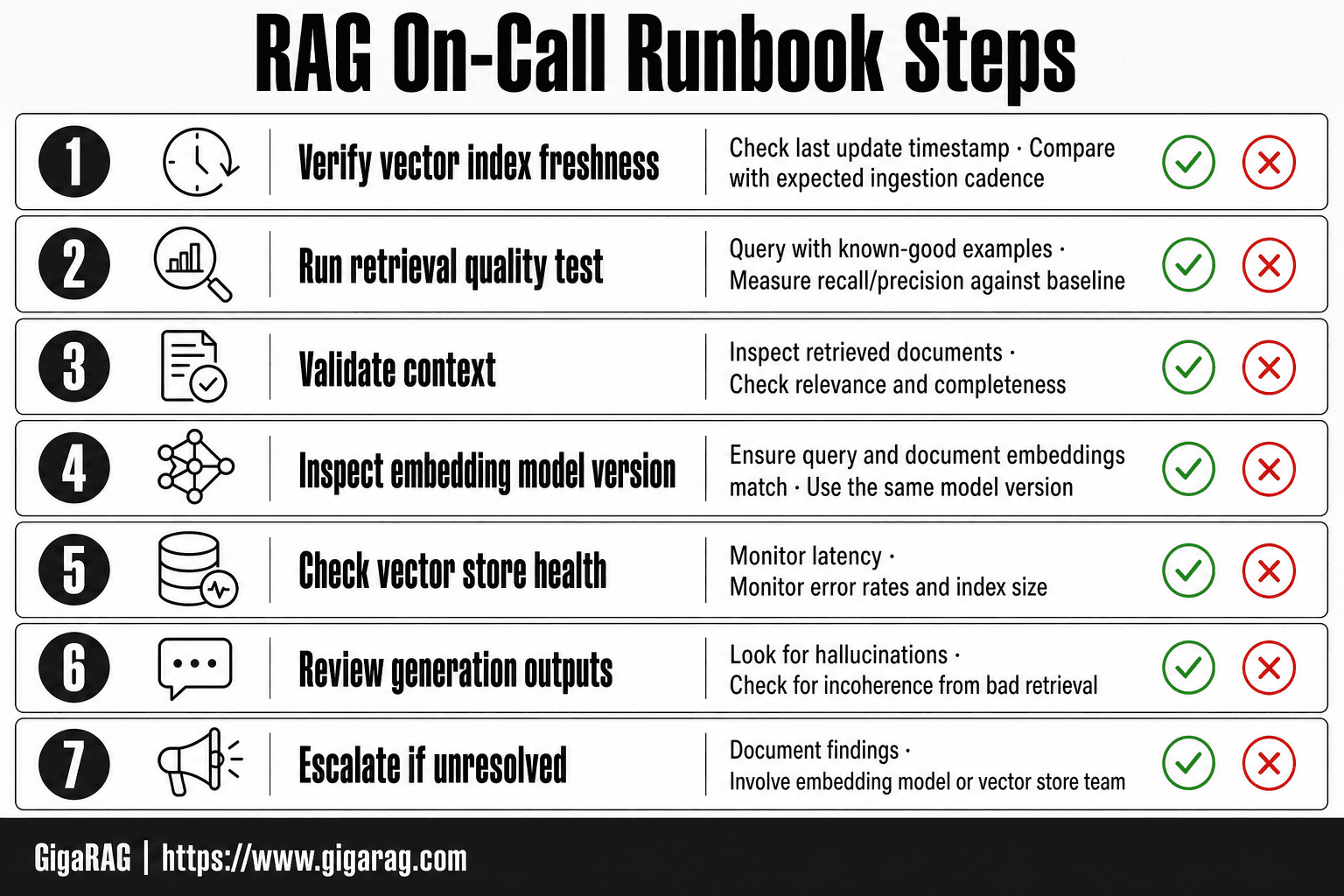
- Verify vector index freshness: check last update timestamp and compare with expected ingestion cadence.
- Run a retrieval quality test: query with known-good examples and measure recall/precision against baseline.
- Validate context: inspect retrieved documents for relevance and completeness before generation.
- Inspect embedding model version: ensure query and document embeddings use the same model version.
- Check vector store health: monitor latency, error rates, and index size for anomalies.
- Review generation outputs: look for hallucinations or incoherence that may stem from bad retrieval.
- Escalate if unresolved: document findings and involve the team responsible for the embedding model or vector store.
Prerequisites: What You Need Before the Page
You can't set these up at 3 a.m. They need to exist before the first page comes in.
Access and dashboards
You need read access to the vector database console, the embedding model registry, and the retrieval quality dashboard. Write down the URLs. Store them somewhere that doesn't require the very system that's down to look them up. A shared password manager entry works. A pinned Slack message works. A doc that lives behind the RAG app's own auth does not.
Observability and tracing
You need logs and traces for the retrieval path: query embedding, similarity scores, top-k results, re-ranked order, and final context assembly. If you can't see those, you're debugging blind. Set up tracing before the incident. It's the difference between a 20-minute diagnosis and a 3-hour guess.
The runbook itself
The runbook needs to be version-controlled, accessible without the RAG system, and short enough to read while half-asleep. Print it if you have to. Keep it under two pages.
Step 1: Confirm the Scope and Severity
Before you touch anything, figure out what's actually broken. Don't guess. Don't roll back a model because one user complained.
What is the user seeing?
Ask for the exact output. Empty response? Irrelevant context? Hallucinated facts? A screenshot beats a paraphrase. The symptom points at the layer: empty usually means retrieval, irrelevant means embedding or ranking, hallucination means context assembly or generation.
Which component is failing?
Check the retrieval path logs. Did the query embed? Did the vector search return results? Did re-ranking reorder them? One failed step narrows the search. All steps green means the problem sits downstream.
How severe is the impact?
One user or all users? One query type or every query? Severity sets your pace. A single bad response gets a ticket. A silent failure across production gets a rollback.
Step 2: Check Vector Index Freshness and Staleness
A stale index is the quietest failure mode. Retrieval still works. Results still come back. They're just wrong in ways that don't trip an alert. You'll only catch it by checking timestamps and counts directly.
Check last ingestion timestamp
Query your vector database for the most recent write. In Pinecone, that's a fetch on a known ID and a look at its metadata timestamp. In Weaviate or Qdrant, check the collection stats or the last indexed object. If the newest document is older than your ingestion interval, the pipeline stopped ingesting. Don't assume the pipeline is healthy because the API returns 200. Check the data.
Verify document counts and versions
Compare the number of vectors in the index against the number of documents in your source of truth. A mismatch means documents are missing, duplicates exist, or deletes aren't propagating. Also check document version fields. If the index holds v3 of a doc but your source has v5, every query touching that doc returns outdated context.
Test retrieval for known queries
Keep a set of canary queries with expected document IDs. Run one. If the right doc doesn't come back in the top 10, the index is stale or the embedding changed. This is the fastest staleness check you can run, and it works even when all the dashboards look green.
Step 3: Test Retrieval Quality and Validate Context
A fresh index doesn't mean good retrieval. You can have every document ingested on time and still return garbage if the embeddings are weak, the threshold is wrong, or the context gets truncated. Test the actual output.
Run known-good queries
Keep a set of 10 to 20 queries where you know the correct document. Run them against the pipeline. If fewer than 9 in 10 return the right doc in the top 5, retrieval quality is degraded. Don't eyeball it. Count it.
Check similarity scores and thresholds
Look at the scores on returned results. If everything comes back at 0.4 or below, your threshold is too low or the embeddings drifted. If nothing comes back at all, the threshold is too high. Compare against your baseline from when the pipeline was healthy.
Validate retrieved context for relevance and completeness
Pull the actual context passed to the generator. Is it the right doc? Is it complete, or did chunking cut it mid-thought? Check for contamination: unrelated chunks mixed in because they share a keyword. The generator can't fix bad context. It can only repeat it.
Step 4: Inspect Embedding Model Version and Drift
Retrieval quality can degrade even when the index is fresh and the queries are good. The embeddings themselves change. Check the model version first.
Check embedding model version
Log the embedding model name and version at ingestion time. Compare it against what's running now. A silent model swap is the most common cause of sudden retrieval quality drops. Query your model registry or check the config hash in your pipeline logs.
Detect drift in embeddings or chunking
Drift shows up as similarity scores trending down across all queries, not just one. If your baseline was 0.7 and you're now seeing 0.5 for the same query-doc pairs, the embeddings shifted. Changed chunking strategy produces the same symptom: different chunk boundaries mean different vectors, even with the same model.
Roll back to a known-good version
Pin your embedding model version in config. When drift is confirmed, roll back to the last known-good version and re-index. Don't re-embed on the fly. It's slow and you'll page yourself again.
Step 5: Mitigate, Communicate, and Escalate
You've found the fault. Now contain it.
Mitigation: rollback, re-index, or canary
Roll back the embedding model or chunking config first. Re-index if documents are stale. For risky fixes, deploy behind a canary: 5% of traffic, watch retrieval scores for 30 minutes, then widen.
Communication: who to notify and what to say
Notify the channel, not the world. Say what broke, what you did, and what's still open. One message now beats ten updates later.
Escalation: when to wake up the team
Escalate if rollback fails, if drift persists after re-indexing, or if you've hit 30 minutes without a root cause. Wake the pipeline owner. Don't solo a silent degradation.
A RAG On-Call Runbook Template You Can Copy
Copy this. Replace the bracketed placeholders with your stack.
The template
Service: [pipeline name] Owner: [team or person] Vector DB: [Pinecone / Weaviate / pgvector / other] Embedding model: [model name and version] Chunking: [strategy and params]
Triage (5 min):
- What is the user seeing? Empty, stale, or irrelevant answers?
- Which component changed last? Check deploy log.
- Severity: one user, one tenant, or all traffic?
Diagnostics (15 min):
- Last ingestion timestamp: [command]
- Document count vs expected: [command]
- Known-good query test: [query] returns [expected doc IDs]?
- Embedding model version: [command]
- Similarity score floor: [threshold]
Mitigation:
- Rollback: [command or runbook link]
- Re-index: [command]
- Canary: [command]
Escalate if: rollback fails, drift persists, or 30 min without root cause.
A worked example
Service: support-agent-memory
Vector DB: Pinecone, index docs-v3
Embedding model: text-embedding-3-small, version 2024-08
Chunking: 512 tokens, 10% overlap
A page comes in: answers cite a retired pricing page. Triage shows all traffic affected. Diagnostics: last ingestion was 6 hours ago, but the pricing doc was updated 2 hours ago. Document count is 1,204, expected 1,205. The known-good query "current enterprise pricing" returns the old doc ID. Root cause: ingestion pipeline stalled. Mitigation: restart the ingestion worker, re-index the pricing doc, confirm the query returns the new ID. Total time: 18 minutes.
Keeping Your RAG Runbook Alive: Runbook as Code
A runbook that lives in a wiki rots. Your pipeline changes weekly: new embedding model, new chunk size, new vector index. The runbook must change with it, or the 3 a.m. page sends you to instructions for a system that no longer exists.
Version control your runbook
Put the runbook in the same repo as the pipeline. A pull request that changes the embedding model must update the runbook in the same PR. Reviewers check both. If the runbook and the code drift, the runbook lies.
Automate retrieval checks
Don't wait for a page. Run known-good queries on a schedule and alert when similarity scores drop below your floor. The runbook then becomes the human path for what the automated check already flagged.
Canary deployments for runbook changes
Ship runbook changes to a canary first: one on-call shift uses the new version, others use the old. If the new steps miss a failure mode, you find out before it's the only copy.
This matters more for agent memory systems. Memory changes shape constantly. A stale runbook there isn't just wrong, it's actively dangerous.
What a RAG Runbook Cannot Prevent
A runbook is a checklist, not a guarantee. It tells you what to check when something breaks. It cannot stop the break from happening in the first place.
Hallucinations from bad retrieval
If retrieval returns plausible but wrong context, the model will answer confidently from it. Your validation steps catch some of this. They don't catch all of it. A similarity score above threshold doesn't mean the passage is true.
Novel failure modes
The first time a failure happens, there's no step for it. You'll improvise. That's the job. The runbook covers what has broken before, not what breaks next.
Systemic issues requiring architectural changes
A runbook won't fix a chunking strategy that splits every document wrong. It won't fix an embedding model that never matched your data. Those need redesign, not a checklist.
Final Thoughts: Building a RAG On-Call Runbook That Lasts
A runbook earns its keep the second time you use it. The first time, you're writing it while fixing the incident. The second time, you're moving faster because the steps are already there.
The honest answer is that a RAG on-call runbook is only as good as the maintenance behind it. Version it. Run the retrieval checks on a schedule. Update it after every postmortem. A stale runbook is worse than no runbook because it gives you false confidence.
Platforms like GigaRAG can reduce how often you get paged by giving you better observability into agent memory and retrieval pipelines. That's not a replacement for the runbook. It's a way to make the runbook shorter.
Build the runbook before you need it. Keep it alive after you do.
Frequently Asked Questions
What is a RAG on-call runbook?
A RAG on-call runbook is a structured checklist for diagnosing and mitigating failures in a Retrieval-Augmented Generation pipeline, covering retrieval, embeddings, vector storage, and generation. It helps on-call engineers quickly identify whether the issue lies in retrieval quality, embedding drift, or vector staleness.
How do I check if my vector index is stale?
Compare the last update timestamp of your vector index with your expected data ingestion frequency. If the index hasn't been updated within the expected window, it may be stale. You can also run a retrieval test with recently added documents to see if they are returned.
What are common causes of RAG pipeline failures?
Common causes include embedding model version mismatches between query and document encoders, stale or missing vectors due to ingestion failures, vector store connectivity issues, and retrieval parameters that return irrelevant context. These often manifest as degraded answer quality or hallucinations.
Can a runbook prevent hallucinations in RAG?
No, a runbook cannot prevent hallucinations, especially those caused by bad retrieval. It can help you diagnose when hallucinations are due to retrieval failures, but fixing the underlying data or model issues requires deeper investigation and possibly retraining or reindexing.
What tools do I need for a RAG on-call runbook?
You need access to your vector database for index freshness and query testing, embedding model version information, and logs from your RAG pipeline. Monitoring tools for latency and error rates are also helpful. No specific commercial tool is required; you can use your existing stack.
How often should I update my RAG runbook?
Update your runbook whenever your pipeline architecture changes, new failure modes are discovered, or after any incident. Treat it as living documentation and consider version-controlling it alongside your code.
What is runbook-as-code for RAG?
Runbook-as-code means storing your runbook in a version control system and automating diagnostic checks, such as retrieval quality tests and canary deployments. This allows you to track changes, run checks automatically, and ensure the runbook stays in sync with your pipeline.
About GigaRAG
GigaRAG is for agent memory and RAG pipeline builders. get this right. Whether you are working through a rag on-call runbook or something adjacent, we publish what we have actually tested, including where it falls short.


