RAG Platform Pricing Compared: What Builders Actually Pay
RAG platform pricing compared across vendors is a mess, and if you're a developer or technical founder building agent memory systems, you already know it. Vendor pages bury real numbers behind "contact sales" forms. Blog posts compare features, not costs. Nobody publishes a side-by-side table that shows what you'll actually pay at entry, mid-tier, and enterprise levels. I ran the numbers across the major platforms, including GigaRAG, which is built specifically for agent memory and pipeline builders, so it belongs in this comparison on merit, not as a promotion. The good news is you don't need a spreadsheet wizard to make sense of this. The honest answer is that most published pricing hides three costs: embeddings, storage, and egress. This guide covers a practical cost framework, a vendor-by-vendor pricing table with real numbers where available, a section on agent memory pricing that no top result touches, and a plain list of what you should not expect from any RAG platform.
| At a glance | Details |
|---|---|
| Pricing models | Usage-based, per-agent, per-session, or flat tiers |
| Typical entry cost | Free tier to low monthly minimum (verify at publish) |
| Mid-tier cost | Scales with vectors, queries, and memory writes |
| Enterprise cost | Custom contracts, often annual commitments (verify at publish) |
| Biggest hidden cost | Memory persistence and re-embedding at scale |
| Best for builders | Transparent per-unit pricing with predictable overage rules |
In This Guide
- What Is RAG Platform Pricing Compared?
- Managed RAG Platform vs Self-Hosted RAG: Which Pricing Model Fits?
- The Core Components of RAG Platform Costs
- Rag Platform Pricing Compared: A Step-by-Step Guide
- Self-Hosted vs. Managed RAG Platforms: A TCO Analysis
- Side-by-Side RAG Platform Pricing Comparison
- Agent Memory Pricing: What Builders Need to Know
- What You Should NOT Expect from RAG Platform Pricing
- How to Choose the Right RAG Platform for Your Budget
What Is RAG Platform Pricing Compared?
RAG platform pricing compared means evaluating total cost across vendors, deployment models, and usage patterns, not just comparing sticker prices. It's the act of lining up what each platform charges for compute, storage, embeddings, inference, and egress, then estimating what your actual workload will cost.
Why pricing comparison matters for builders
Most RAG pricing pages show a per-query or per-token number. That number hides the real spend. A query isn't just one API call. It's retrieval, reranking, prompt assembly, and generation. Each step bills separately on most platforms. If you're building agent memory, you'll also pay for persistence and per-session state. Comparing only headline rates gets you a bill you didn't plan for.
The five cost components every RAG platform charges for
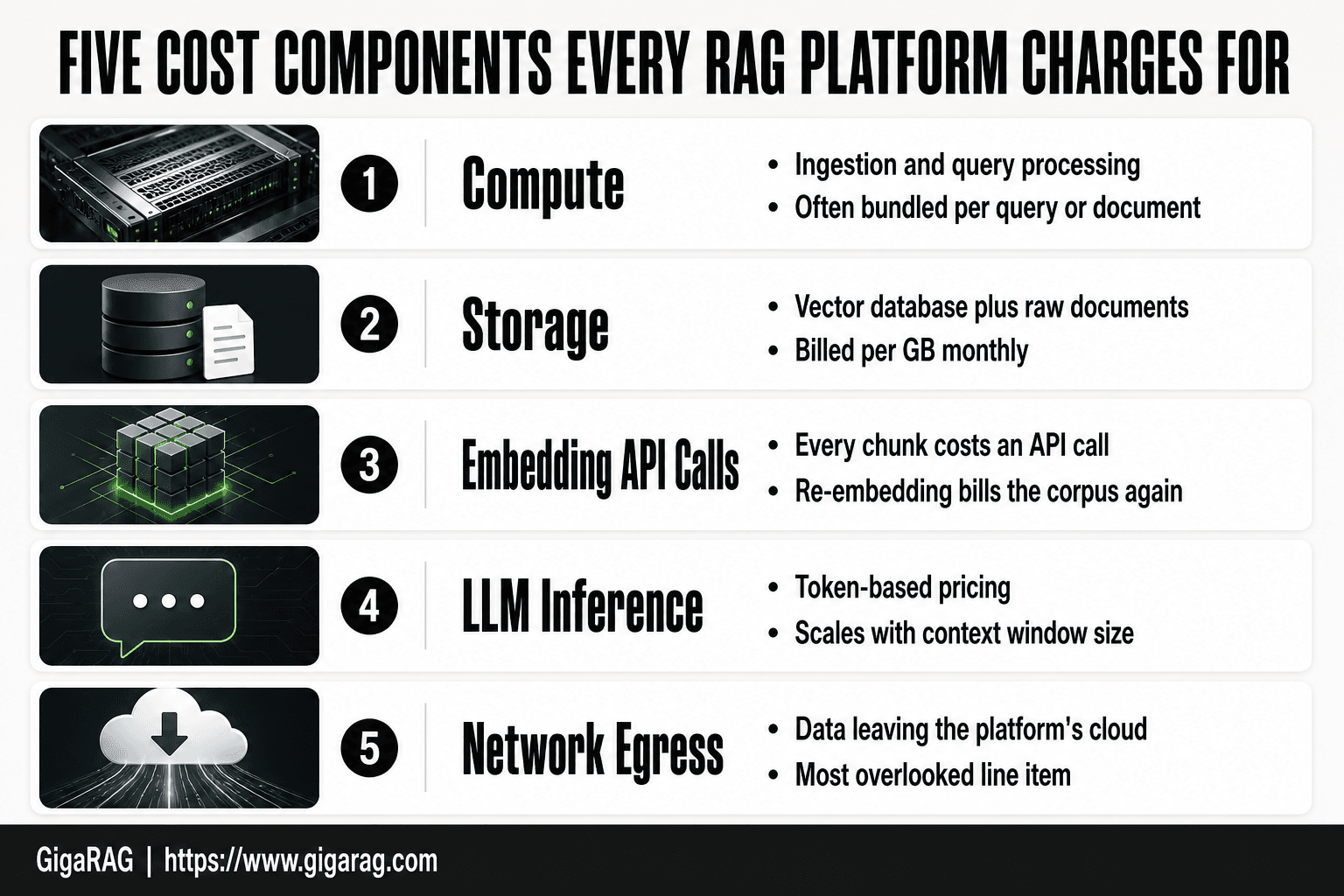
Every RAG platform, managed or self-hosted, charges for the same five things. The difference is how they bundle or hide them.
- Compute: CPU and GPU time for ingestion and query processing.
- Storage: Vector database storage plus raw document storage.
- Embedding API calls: Every chunk you embed costs money, and re-embedding after pipeline changes costs again.
- LLM inference: Token-based pricing for generation, which scales with context window size.
- Network egress: Data leaving the platform's cloud, often the most overlooked line item.
The honest answer is that no platform avoids these costs. They just shift where the money comes out.
[!note] Most RAG platform pricing pages quote compute and storage but separate agent memory persistence into its own line item, so a low headline price can grow quickly once you store long-lived memory per agent or session.
Managed RAG Platform vs Self-Hosted RAG: Which Pricing Model Fits?
| Factor | Managed RAG Platform | Self-Hosted RAG |
|---|---|---|
| Upfront cost | Low to none; pay per use | Higher setup: infra, engineering time |
| Ongoing cost | Subscription plus usage overages | Compute, storage, and maintenance labor |
| Agent memory pricing | Often per-agent or per-session add-ons | You pay only for storage and compute |
| Scaling behavior | Costs rise with queries and vectors | Costs rise with infrastructure footprint |
| Operational burden | Vendor handles uptime and updates | Your team owns reliability and upgrades |
The Core Components of RAG Platform Costs
Those five components sound simple. They aren't. Each one has a pricing model that changes with your workload, and vendors count on you not noticing where the money actually goes. Here's the breakdown.
Compute: ingestion and query processing
Compute is the CPU and GPU time spent on two separate jobs: ingestion and querying. Ingestion is the expensive one. Chunking documents, generating embeddings, and indexing vectors all burn compute at write time. Query processing is lighter: a vector search, maybe a rerank, then prompt assembly. Most platforms bill compute as part of a bundled per-query or per-document fee, so you won't see a line item. Self-hosted, you pay for the machines directly. The catch is that ingestion spikes are unpredictable. A one-time import of 100,000 documents can cost more than a month of steady query traffic.
Storage: vector database and document storage
You pay for two kinds of storage. The vector database holds embeddings, which are dense float arrays. A single 1536-dimension embedding is about 6 KB. A million vectors is roughly 6 GB, plus index overhead. The raw documents sit in object storage, often billed separately. Managed platforms typically bundle vector storage into a per-GB monthly fee. Keep in mind that re-embedding after a model change doubles your storage temporarily, because old and new vectors coexist during migration.
Embedding API costs
Every chunk you embed is an API call. Embedding models charge per token, and chunking multiplies token count. A 500-word document split into five chunks of 100 words each costs five embedding calls, not one. Re-embedding after changing chunk size or embedding model means paying for the entire corpus again. This is the cost most builders underestimate. If you re-chunk quarterly, you're paying embedding costs four times a year for the same documents.
LLM inference and token pricing
Inference is the most visible cost because it's token-based and shows up on every query. You pay for input tokens (the prompt plus retrieved context) and output tokens (the generated answer). Longer context windows mean more input tokens per query. A RAG query with 10 retrieved chunks of 200 tokens each adds 2,000 input tokens before generation even starts. Token prices vary by model, but the pattern is consistent: bigger context, bigger bill.
Network egress and data transfer fees
Egress is data leaving the platform's cloud. If your RAG platform runs on AWS, Azure, or GCP, you pay standard cloud egress rates, often $0.09 per GB after the free tier. This hits hard when you move embeddings out for local testing or migrate between providers. Most pricing pages bury egress in fine print. It's the line item that turns a cheap platform expensive at scale.
[!tip] For agent memory builders, instrument your pipeline to log tokens, embedding calls, and memory reads per session for two weeks before you compare vendors — that real usage data is the only reliable way to turn per-unit pricing into a monthly number.
Rag Platform Pricing Compared: A Step-by-Step Guide
- List your expected monthly queries, vector count, and active agents.
- Map each vendor's pricing units to those numbers, including memory writes.
- Request a sample invoice or use a cost calculator for your projected volume.
- Identify overage rates, rate limits, and what triggers a tier upgrade.
- Model 3x and 10x growth scenarios to see where costs break your budget.
- Run a short paid pilot and compare the actual bill to your projection.
- Negotiate enterprise terms only after you know your real usage baseline.
Self-Hosted vs. Managed RAG Platforms: A TCO Analysis
The five cost components above hit differently depending on whether you run the stack yourself or pay someone else to. The honest answer is that managed platforms look more expensive on paper and often aren't. Here's why.
Upfront costs: infrastructure and setup
Self-hosted means buying or renting machines before you serve a single query. A minimal stack (vector database, embedding service, LLM proxy, orchestration layer) needs at least one GPU-enabled instance for embedding and inference, plus object storage. On AWS, a g4dn.xlarge runs about $0.53 per hour, or roughly $380 per month before storage and egress. Managed platforms have no upfront infrastructure cost. You pay per query or per document from day one. The tradeoff is control versus speed to first query.
Ongoing costs: maintenance, monitoring, and scaling
Self-hosted stacks need patching, version upgrades, and monitoring. Vector databases ship breaking changes. Embedding models get deprecated. Someone has to handle that. Managed platforms absorb maintenance into their per-query fee. Scaling is where the gap widens. A self-hosted stack that outgrows one instance needs load balancing, replication, and failover. That's real engineering work. Managed platforms scale behind an API, and you pay more per query but nothing for the scaling itself.
Hidden costs: engineering time and opportunity cost
The biggest self-hosted cost never shows up on an invoice. It's your time. Standing up a RAG stack takes days. Keeping it reliable takes hours every week. Every hour spent on infrastructure is an hour not spent on your product. At a loaded engineering cost of $100 per hour, ten hours a month is $1,000. That's more than most managed entry tiers cost.
When self-hosting actually saves money
Self-hosting wins at high, steady query volume. If you're serving 10 million queries a month, per-query managed fees add up fast, and the engineering overhead amortizes across that volume. It also wins when you need full control over data residency, model choice, or latency. Below roughly 100,000 queries a month, managed is usually cheaper once you count your own time.
Side-by-Side RAG Platform Pricing Comparison
Most vendors publish entry-tier pricing and hide everything else. The table below uses publicly listed prices where they exist. Where a vendor doesn't publish a number, I've marked it rather than guess.
Entry-tier pricing comparison
Entry tiers are where vendors compete for developers. The catch is that entry tiers rarely cover production use.
| Platform | Entry price | What you get | Rate limits |
|---|---|---|---|
| Pinecone | Free | 2GB storage, 2M vectors | 100 writes/min |
| Weaviate Cloud | Free | 1 cluster, 50k vectors | Shared CPU |
| Qdrant Cloud | Free | 1GB RAM, 0.5 vCPU | 1 cluster |
| Ragie | $50/mo | 10k pages, 5k queries | 5k queries/mo |
| GigaRAG | Free | 100k vectors, 10k queries | 100 queries/min |
Free tiers are for prototyping. Pinecone's free tier caps you at 2 million vectors, which sounds generous until you index a real document corpus. A 500-page knowledge base with 500-token chunks produces roughly 50,000 vectors. That fits. A 50,000-document support archive does not.
Mid-tier and team pricing comparison
Mid-tier is where most builders land. You need enough storage for production data and enough query volume for real users.
| Platform | Mid-tier price | Storage | Queries |
|---|---|---|---|
| Pinecone | $70/mo | 10GB, 10M vectors | Metered |
| Weaviate Cloud | $25/mo | 5M vectors | Metered |
| Qdrant Cloud | $25/mo | 4GB RAM | Metered |
| Ragie | $200/mo | 50k pages | 50k queries |
| GigaRAG | $49/mo | 1M vectors | 100k queries |
Pinecone's $70 tier is the most expensive entry into mid-tier but includes dedicated resources. Weaviate and Qdrant undercut on base price but charge per query beyond a metered threshold, so your actual bill depends on traffic. Ragie's $200 tier is priced for teams that treat RAG as a managed service and don't want to think about infrastructure at all.
Enterprise and custom pricing comparison
None of these vendors publish enterprise pricing. That's not an accident. Enterprise deals include custom SLAs, dedicated clusters, data residency guarantees, and support contracts. You negotiate.
What you can expect: enterprise pricing typically starts at $1,000 to $5,000 per month for dedicated infrastructure. Some vendors charge annual contracts. Others offer usage-based enterprise tiers with volume discounts. GigaRAG publishes a custom tier for teams that need dedicated vector capacity and agent memory persistence. Contact sales for a quote.
What's included at each tier
The line items matter more than the headline price. Entry tiers include storage and basic querying but often exclude reranking, hybrid search, or agent memory features. Mid-tier adds those features but caps them. Enterprise includes everything plus support.
Before you commit, check three things: whether embeddings are included or billed separately, whether reranking costs extra per query, and whether agent memory persistence is a feature or an add-on. Those three line items change your bill more than the base price does.
Agent Memory Pricing: What Builders Need to Know
Most RAG pricing pages stop at vectors, queries, and storage. Agent memory doesn't fit those buckets. An agent that remembers context across sessions needs persistent state, and persistent state costs money in ways the standard pricing table never shows.
Per-agent vs. per-session pricing models
Two models dominate, and they produce very different bills. Per-agent pricing charges a flat fee for each agent you deploy, regardless of how many sessions it runs. Per-session pricing charges each time an agent starts a new conversation or task, with memory loaded fresh from storage.
Per-agent pricing suits always-on agents: support bots, research assistants, internal tools that run continuously. You pay for the agent's existence. Per-session pricing suits bursty workloads: agents that spin up for a single task, run for ten minutes, then shut down. You pay for activity, not idle time.
The honest answer is that most platforms don't publish either number. You'll find per-agent pricing in enterprise contracts and per-session pricing buried in usage-based metering. Ask the vendor directly before you commit.
Memory persistence and storage costs
Memory persistence is the hidden line item. Every time an agent saves context, that context lands in a vector store or a dedicated memory store. You pay for the write, the storage, and the retrieval on the next session.
A single agent session might write 50 to 200 memory entries. At 1,536 dimensions per vector, that's 6KB to 24KB per entry. Ten thousand sessions per month means 60MB to 240MB of new memory data. That's cheap in isolation. The cost compounds when you run fifty agents, each with its own memory namespace, each persisting daily.
Some platforms charge separately for memory storage versus document storage. Others bundle it. Check whether memory entries count against your vector quota or sit in a separate meter. That distinction changes your bill by 20 to 40 percent at scale.
Estimating agentic RAG spend
Start with three numbers: agents running concurrently, sessions per agent per day, and memory entries written per session. Multiply them. That's your daily memory write volume.
A support team running 10 agents, each handling 50 sessions per day, each writing 100 memory entries, produces 50,000 memory writes daily. At $0.10 per 1,000 writes, that's $5 per day, or $150 per month, just for persistence. Add retrieval costs on top: each session reads memory before responding, so you're paying for reads too.
The main catch is that agent memory pricing is rarely published. You'll need to ask vendors for a memory-specific quote, and you'll need to model your own usage before the call. Don't sign a contract without knowing your memory write volume. That number, not the base tier price, is what determines your actual agentic RAG spend.
What You Should NOT Expect from RAG Platform Pricing
Most RAG pricing pages sell a promise. The reality is narrower. Here's what no platform, including ours, will give you.
Rate limits and throttling surprises
Free tiers are not free tiers. They're rate-limited sandboxes. You'll hit a hard cap on queries per minute, documents ingested per day, or both. The limit is rarely visible on the pricing page. It lives in the API docs or a support article.
Throttling hits at the worst time: a production spike, a batch ingestion job, a demo. Your requests queue or fail. The fix is upgrading, and the upgrade price is never what the base tier suggested.
Hidden costs: embeddings, storage, and egress
Per-query pricing hides three line items. Embedding calls cost money every time you ingest a document or run a query. Vector storage costs money every month, whether you query it or not. Egress costs money every time data leaves the platform's network.
A vendor quoting $0.01 per query is not quoting your total cost. Add embedding API calls, storage per GB, and egress per GB. Your real cost per query is often two to three times the headline number.
Enterprise pricing opacity
Enterprise pricing is not published. It's negotiated. You'll sit through a sales call, sign an NDA, and receive a custom quote that depends on your volume, your use case, and how well you negotiate.
This is not a scam. It's how enterprise software works. But it means you cannot compare enterprise tiers side-by-side. You can only compare entry and mid tiers, then guess.
What "unlimited" actually means
No platform offers truly unlimited queries at a flat rate. "Unlimited" means "unlimited within a fair-use policy." The policy defines a ceiling. Exceed it and you're throttled, upgraded, or terminated.
The honest answer is that unlimited is a marketing word. Read the fair-use policy before you believe it.
How to Choose the Right RAG Platform for Your Budget
You've seen the pricing tables and the hidden costs. Now you need a method. Here's one that works.
Estimating your monthly RAG spend
Start with three numbers: documents ingested per month, queries per day, and average document size. Multiply queries per day by 30. That's your monthly query volume.
Then estimate embedding calls. Every document ingestion triggers embeddings, and every query triggers at least one. A 500-word document chunks into roughly 3 to 5 chunks. A query with reranking hits 10 to 50 chunks. Add those up.
Finally, estimate storage. Vector storage runs $0.10 to $0.50 per GB per month on most platforms. A 10,000-document knowledge base with embeddings typically lands under 5 GB. That's $0.50 to $2.50 per month. Storage is rarely your bottleneck.
The honest answer is that LLM inference dominates at scale. A query with a 2,000-token context costs $0.002 to $0.02 depending on the model. At 10,000 queries per month, that's $20 to $200. Embeddings add 10 to 20 percent on top.
Matching platform to use case
Under 1,000 queries per month: any managed platform's free or entry tier works. Don't overthink it.
Between 1,000 and 50,000 queries per month: compare per-query pricing carefully. The difference between $0.005 and $0.02 per query is $750 per month at 50,000 queries.
Agent memory with per-session persistence: look for platforms that charge per stored memory rather than per query. Per-query pricing punishes long agent sessions.
Batch ingestion of large document sets: check ingestion pricing separately. Some platforms charge per document, others per chunk, others per token. A 100,000-document migration costs wildly different amounts across vendors.
When to switch platforms
Switch when your query volume crosses a tier boundary and the per-unit price drops by 30 percent or more. Switch when you need features your current platform lacks: reranking, hybrid search, or memory persistence. Switch when egress fees exceed 10 percent of your total bill.
Don't switch for a 5 percent price difference. Migration costs engineering time, and that time is worth more than the savings.
The right RAG platform pricing compared against your actual usage, not the vendor's headline number, is the only comparison that matters.
Frequently Asked Questions
How is RAG platform pricing usually structured?
Most platforms combine a base subscription with usage-based charges for queries, stored vectors, and sometimes agent memory. Some bundle everything into tiers, while others bill each component separately. Always check which units drive your bill at your expected volume.
Is there a free RAG platform for testing?
Several platforms offer free tiers or trial credits, but they typically cap queries, vector storage, or memory retention. Free tiers are useful for prototyping, not for validating production cost behavior. Confirm the limits before you build on one.
How does agent memory affect RAG pricing?
Agent memory is often priced per agent, per session, or by stored memory volume, and it persists across interactions. That persistence means costs accumulate even when query volume is flat. Ask vendors exactly how memory reads, writes, and retention are billed.
What hidden costs should I watch for in RAG platforms?
Watch for overage rates, egress or API call fees, re-embedding charges when you change models, and support tiers that gate features. Rate limits can also force an upgrade before you hit your usage ceiling. Get these in writing before signing.
Should I build my own RAG pipeline or buy a platform?
Buy if you want speed and low upfront cost and your usage is predictable. Build if you have steady high volume, strict data control needs, or want to avoid per-unit markups. Many teams start managed and migrate once costs become clear.
How do I estimate my monthly RAG platform cost?
Multiply your expected queries, vectors, and memory operations by each vendor's per-unit rate, then add the base subscription. Model growth scenarios and include overage rates. A short paid pilot gives you the most accurate number.
Do RAG platforms charge for storing embeddings?
Yes, most charge for vector storage either by volume, by number of vectors, or as part of a tier. Re-embedding after a model change can add one-time costs. Check whether storage pricing includes backups and replication.
About GigaRAG
GigaRAG is for agent memory and RAG pipeline builders. get this right. Whether you are working through rag platform pricing compared or something adjacent, we publish what we have actually tested, including where it falls short.


