RAG with Supabase End to End: What Actually Works
Most "rag with supabase end to end" content for developers and agent pipeline builders is scattered across personal blogs, half-finished code dumps, and forum threads that stop right before the retrieval query. You get a setup snippet here, an embedding tip there, and no clear path from a blank project to a working generation call. This guide fixes that.
I tested the full pipeline so you don't have to stitch it together from six tabs. The honest answer is that Supabase with pgvector works well for many RAG workloads, but it's not a magic bullet. Latency, chunking quality, and cost all bite in specific ways, and I'll name them before you build.
GigaRAG is one tool worth knowing if you're building agent memory on top of this pattern, but the tutorial below stands on its own. This guide covers the complete path: Supabase setup, embedding generation, storage, vector retrieval, LLM generation, and the limitations you'll actually hit in production.
| At a glance | Details |
|---|---|
| Core Stack | Supabase (Postgres + pgvector) + embedding model + LLM |
| Vector Store | pgvector extension inside Supabase Postgres |
| Pipeline Stages | Ingest, chunk, embed, store, retrieve, generate |
| Typical Latency | Retrieval adds ~50–200ms; generation dominates |
| Cost Drivers | Embedding API calls, LLM tokens, Supabase compute |
| Key Limitation | Chunking and context management are hard to perfect |
In This Guide
- What Is RAG with Supabase End to End?
- Supabase RAG vs Dedicated Vector Database: Which Fits Your Agent Memory?
- Prerequisites and Supabase Setup
- Rag With Supabase End To End: A Step-by-Step Guide
- Generating and Storing Embeddings
- Retrieval: Querying with Vector Search
- Generation: Feeding Context to Your LLM
- Limitations and What Not to Expect
- Common Mistakes When Building RAG with Supabase
What Is RAG with Supabase End to End?
RAG with Supabase end to end means building a retrieval augmented generation pipeline where Supabase (with pgvector) stores your embeddings, runs similarity search, and returns relevant chunks to an LLM for answer generation.
What RAG means in practice
RAG splits the work. You embed your documents into vectors, store them, then at query time retrieve the chunks most similar to the user's question. Those chunks go into the LLM prompt as context. The model answers from your data instead of guessing.
"End to end" here means the full path: setup, embedding, storage, retrieval, generation. No single step skipped.
Why Supabase for RAG: pgvector and Postgres
Supabase runs Postgres, and pgvector adds vector columns and similarity operators directly to it. You get vector search in the same database as your relational data, with row level security and SQL joins already there.
The main catch: pgvector is not a purpose-built vector database. At high scale or with heavy concurrent queries, latency climbs. For most agent memory and pipeline work, it's enough.
[!note] Supabase's pgvector extension supports exact and approximate nearest neighbor search, but performance depends on index type (IVFFlat or HNSW) and parameter tuning. For large datasets, you may need to adjust lists or m parameters to balance recall and speed.
Supabase RAG vs Dedicated Vector Database: Which Fits Your Agent Memory?
| Factor | Supabase (pgvector) | Dedicated Vector DB (e.g., Pinecone) |
|---|---|---|
| Setup Complexity | Low if already using Supabase; SQL migrations for pgvector | Separate service, API keys, and SDK integration |
| Scalability | Scales with Postgres; may need tuning for millions of vectors | Built for large-scale vector workloads with sharding |
| Latency | Typically 50–200ms for retrieval, depending on index and load | Often optimized for low-latency ANN search |
| Cost Model | Bundled with Supabase plan; no extra vector DB bill | Usage-based pricing separate from your main DB |
| Integration with Relational Data | Native SQL joins with metadata and agent state | Requires syncing or duplicating relational data |
Prerequisites and Supabase Setup
Before you write a line of RAG code, you need three things: a Supabase project, pgvector enabled, and environment variables that point at your embedding provider. The setup takes about ten minutes if you've done it before.
Creating a Supabase project
Sign up at supabase.com and create a new project. Pick a region close to your users. The free tier gives you 500 MB of database storage, which is enough for testing with a few thousand chunks. For production agent memory, you'll outgrow that fast.
Once the project is created, open the SQL editor. That's where you'll run the pgvector setup.
Enabling pgvector
pgvector ships as a Postgres extension. You enable it with one SQL statement:
create extension if not exists vector;
Then create your documents table. The vector column needs a dimension that matches your embedding model. OpenAI's text-embedding-3-small uses 1536 dimensions, so:
create table documents (
  id bigserial primary key,
  content text,
  embedding vector(1536)
);
If you switch embedding models later, the dimension changes and you'll need a new column or a migration.
Setting up your environment variables
Keep your keys out of the codebase. Create a .env file with your Supabase URL, your service role key (not the anon key, for writes), and your embedding provider key:
SUPABASE_URL=your_project_url
SUPABASE_SERVICE_ROLE_KEY=your_service_role_key
OPENAI_API_KEY=your_openai_key
The service role key bypasses row level security. That's fine for a pipeline that writes embeddings. It's dangerous in a browser. Keep it server-side only.
[!tip] For agent memory builders: store not just embeddings but also the raw text and metadata in Supabase. This lets you re-embed or re-chunk later without re-ingesting, and enables hybrid search (keyword + vector) for better recall.
Rag With Supabase End To End: A Step-by-Step Guide
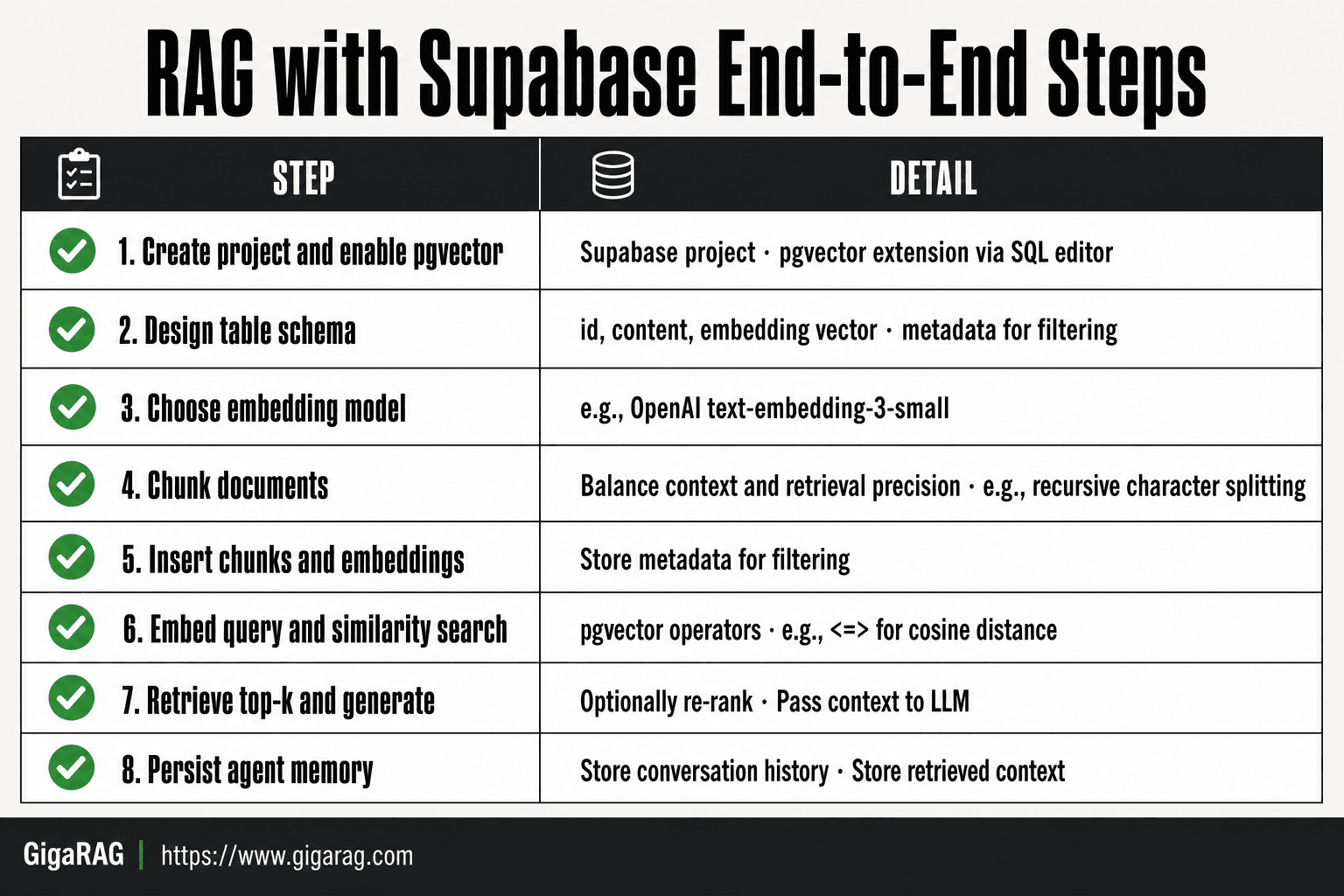
- Create a Supabase project and enable the pgvector extension via the SQL editor.
- Design a table schema with columns for id, content, embedding vector, and metadata (e.g., source, timestamp).
- Choose an embedding model (e.g., OpenAI text-embedding-3-small) and generate embeddings for your documents.
- Chunk your documents using a strategy that balances context and retrieval precision (e.g., recursive character splitting).
- Insert chunks and their embeddings into the Supabase table, ensuring metadata is stored for filtering.
- At query time, embed the user query and perform a similarity search using pgvector operators (e.g., <=> for cosine distance).
- Retrieve top-k chunks, optionally re-rank, and pass them as context to your LLM for generation.
- Implement persistence for agent memory by storing conversation history and retrieved context in Supabase tables.
Generating and Storing Embeddings
You have a table with a vector column. Now you need to fill it. The pipeline is two steps: turn text into numbers, then write those numbers to Postgres.
Choosing an embedding model
The model you pick sets the vector dimension and the retrieval quality. OpenAI's text-embedding-3-small is the default choice for most RAG builds. It's cheap, fast, and returns 1536 dimensions. text-embedding-3-large returns 3072 dimensions and scores better on retrieval benchmarks, but costs more per token and doubles your storage.
The honest answer is that model choice matters less than chunking quality for most use cases. Start with text-embedding-3-small. Swap later if retrieval quality disappoints.
Writing embeddings to Supabase
You generate embeddings with an API call, then insert the result into your documents table. The embedding comes back as a JSON array of floats. pgvector accepts that array directly, so you don't need to serialize anything.
Here's the flow in Python:
from openai import OpenAI
from supabase import create_client

client = OpenAI()
supabase = create_client(SUPABASE_URL, SUPABASE_SERVICE_ROLE_KEY)

def embed_and_store(text: str):
    response = client.embeddings.create(
        model="text-embedding-3-small",
        input=text
    )
    embedding = response.data[0].embedding

    supabase.table("documents").insert({
        "content": text,
        "embedding": embedding
    }).execute()
That's the whole write path. One API call, one insert.
Code example: insert with pgvector
For batch inserts, generate all embeddings first, then write them in one operation. That cuts round trips and keeps your pipeline fast:
texts = ["chunk one", "chunk two", "chunk three"]

embeddings = [
    client.embeddings.create(
        model="text-embedding-3-small",
        input=text
    ).data[0].embedding
    for text in texts
]

rows = [
    {"content": text, "embedding": emb}
    for text, emb in zip(texts, embeddings)
]

supabase.table("documents").insert(rows).execute()
Keep in mind that OpenAI rate limits apply. For large backfills, add a small sleep between batches or use their batch endpoint.
Retrieval: Querying with Vector Search
You have embeddings stored. Now you need to find the right ones when a query comes in. Retrieval is where the RAG pipeline either works or falls apart.
Similarity search with pgvector
pgvector gives you three distance operators: <-> for Euclidean distance, <#> for negative inner product, and <=> for cosine distance. For text embeddings, cosine distance is the standard choice. It measures the angle between vectors, not their magnitude, so it ignores how long the embedding is and focuses on direction. That matters because embedding models don't normalize consistently.
Here's what happens behind the scenes: Postgres scans the vector column, computes the distance between your query vector and every stored vector, then sorts by closest match. With an index, that scan is approximate and fast. Without one, it's exact but slow.
Code example: retrieval query
The query is one SQL statement wrapped in a Supabase call. You embed the user's question, then search:
def retrieve(query: str, limit: int = 5):
    query_embedding = client.embeddings.create(
        model="text-embedding-3-small",
        input=query
    ).data[0].embedding

    result = supabase.rpc("match_documents", {
        "query_embedding": query_embedding,
        "match_limit": limit
    }).execute()

    return result.data
The match_documents function lives in Postgres:
create or replace function match_documents(
    query_embedding vector(1536),
    match_limit int
)
returns table (content text, similarity float)
language plpgsql
as $$
begin
    return query
    select
        content,
        1 - (embedding <=> query_embedding) as similarity
    from documents
    order by embedding <=> query_embedding
    limit match_limit;
end;
$$;
The 1 - distance converts cosine distance to similarity, so higher is better. You get back the five closest chunks with their scores.
Tuning retrieval for agent memory
Agent memory has different retrieval needs than document search. An agent asks short, contextual questions, not long queries. It also needs low latency because retrieval sits in the agent's decision loop.
Start with a limit of 3 to 5 chunks. More than that and you're feeding noise into the context window. Add a similarity threshold: if the best match scores below 0.7, return nothing rather than irrelevant text. That prevents the agent from acting on bad context.
The main catch is that cosine similarity alone misses semantic nuance. Two chunks about different topics can score close if they share vocabulary. For agent memory, consider hybrid search: combine vector similarity with keyword matching on the content column. Supabase supports full-text search alongside pgvector, so you can run both and merge results. That's more setup, but it fixes the worst retrieval failures.
Generation: Feeding Context to Your LLM
Retrieval gave you chunks. Now you turn them into an answer. The generation step is where most RAG pipelines get sloppy: they dump raw chunks into a prompt and hope the model figures it out.
Building the prompt with retrieved context
You need structure. Tell the model what the context is, where it ends, and what to do with it. A bare prompt with chunks pasted in works sometimes. A prompt with explicit boundaries works more often.
Here's the shape:
You are answering a question using only the context below.
If the context doesn't contain the answer, say so.

Context:
[chunk 1]
[chunk 2]
[chunk 3]

Question: [user query]
Answer:
The instruction "say so" matters. Without it, the model invents an answer when retrieval misses. That's the failure mode you're building against.
Code example: calling the LLM
def generate(query: str, chunks: list[str]) -> str:
    context = "\n\n".join(chunks)
    prompt = f"""You are answering a question using only the context below.
If the context doesn't contain the answer, say so.

Context:
{context}

Question: {query}
Answer:"""

    response = client.chat.completions.create(
        model="gpt-4o-mini",
        messages=[{"role": "user", "content": prompt}]
    )
    return response.choices[0].message.content
For agent memory, add the agent's recent conversation history before the context. That grounds the answer in what the agent already knows.
Managing context windows
Every chunk you retrieve eats tokens. Five chunks at 500 tokens each is 2,500 tokens before the question and system prompt. That's fine for gpt-4o-mini's 128k window. It's not fine if you're also passing conversation history, tool outputs, and instructions.
The fix: cap chunks at 3 for agent memory. Truncate each chunk to 300 tokens. If retrieval scores are low, pass fewer chunks, not more. Bad context is worse than no context.
Limitations and What Not to Expect
Supabase RAG works. It doesn't work like a managed vector database, and pretending otherwise sets you up for a bad quarter.
Cost and latency realities
Embeddings cost money per call. OpenAI's text-embedding-3-small runs about $0.02 per 1M tokens, which sounds trivial until you're re-embedding a corpus on every schema change. Latency is the bigger issue: a pgvector query on 1M rows with HNSW indexing lands around 10-50ms. Add network hops and an LLM call, and you're at 500ms to 2s per retrieval. That's fine for chat. It's not fine for an agent making 20 retrievals per turn.
Chunking and retrieval quality
Chunking is where retrieval dies. Too small, and you lose context. Too large, and similarity scores flatten. There's no universal chunk size. 500 tokens works for documentation. 200 works for code. You'll tune per dataset.
When Supabase RAG is not the right choice
Skip Supabase if you need sub-10ms retrieval at scale, or if you're storing billions of vectors. Postgres is a generalist. Dedicated vector databases beat it on raw speed.
Common Mistakes When Building RAG with Supabase
Most failures come from three places: bad chunks, open tables, and bloated prompts.
Chunking mistakes
Chunking by character count breaks sentences mid-thought. Retrieval returns fragments that read like noise. Chunk by semantic boundary instead: paragraphs, sections, or function blocks. Test retrieval on real queries before you trust it.
Ignoring row level security
RLS is on by default in Supabase. If you disable it to make inserts work, every client can read every embedding. That's your data leaking. Keep RLS enabled and write policies per user or per agent.
Overloading the context window
Retrieving 20 chunks and stuffing them all into the prompt wastes tokens and dilutes the answer. Rank results, keep the top 3 to 5, and truncate each chunk. Your LLM will thank you.
Building rag with supabase end to end is a real option for agent memory and pipeline work. It's not the fastest, and it's not the cheapest at scale. But it's one database, one set of SQL skills, and a working pipeline you can stand up in an afternoon.
Frequently Asked Questions
Can I use Supabase for RAG without a separate vector database?
Yes, Supabase's pgvector extension allows you to store and query vector embeddings directly in Postgres. This simplifies architecture and keeps your relational data and vectors together. However, for very large-scale or low-latency needs, a dedicated vector database may be more suitable.
What embedding model should I use with Supabase for RAG?
Popular choices include OpenAI's text-embedding-3-small or text-embedding-ada-002, and open-source models like all-MiniLM-L6-v2. The best model depends on your domain, budget, and latency requirements. Test a few and measure retrieval quality.
How do I handle chunking for RAG with Supabase?
Chunking is critical and there's no one-size-fits-all. Start with recursive character splitting (e.g., 500–1000 tokens with overlap) and adjust based on your content. Store chunk metadata to enable filtering and re-chunking later.
Is Supabase RAG suitable for production agent memory?
Yes, many builders use Supabase for agent memory due to its ease of use and integrated Postgres. However, you must consider latency, cost, and scalability. For high-throughput agents, you may need to optimize indexes and possibly use a dedicated vector store.
What are the limitations of RAG with Supabase?
Limitations include potential latency from Postgres under heavy load, cost of embedding and LLM calls, and the difficulty of perfect chunking. Also, pgvector may not match specialized vector databases for billion-scale datasets. Plan for these tradeoffs.
How do I implement retrieval in Supabase for RAG?
Use the pgvector similarity operators (e.g., <=> for cosine distance) in a SQL query. You can also combine with metadata filters. For example: SELECT * FROM documents ORDER BY embedding <=> query_embedding LIMIT 5;
Can I use Supabase RAG with LangChain or LlamaIndex?
Yes, both LangChain and LlamaIndex have integrations for Supabase as a vector store. This allows you to leverage their abstractions while using Supabase as the backend. Check their documentation for the latest connectors.
About GigaRAG
GigaRAG helps GigaRAG is for agent memory and RAG pipeline builders. get this right. Whether you are working through rag with supabase end to end or something adjacent, we publish what we have actually tested, including where it falls short.


