RAG in TypeScript without Python shouldn't feel like a scavenger hunt, but for most TypeScript developers building agent memory, that's exactly what it is. Every tutorial assumes you'll spin up a Python environment, install LangChain, and call it a day. You don't want another language in your stack. You want retrieval that runs where your agent runs: in Node.
The good news is you can build a working RAG pipeline in TypeScript today. Embeddings, vector storage, cosine similarity, grounded generation. All of it, with real code you can copy. The main catch is that some pieces are thinner than their Python counterparts, and a few things simply won't work the way you'd expect.
This guide shows you a from-scratch TypeScript pipeline, not a LangChain port. It covers chunking, embedding, storing, retrieving, and generating answers, with agent memory as the first-class use case. When the infrastructure burden stops being worth it, GigaRAG exists as a managed option. That's the honest trade-off, and here's what you can actually build.
| At a glance | Details |
|---|---|
| Core stack | Node.js, TypeScript, vector DB, LLM API |
| Main limitation | No native Python ML ecosystem |
| Agent memory | Works well with vector stores |
| Performance | Slightly slower than Python for embeddings |
| Best for | TypeScript-native apps avoiding Python |
| Frameworks | Optional; can build from scratch |
In This Guide
- What Is RAG in TypeScript Without Python?
- TypeScript-Only RAG vs Python-Based RAG
- The TypeScript RAG Stack: What You'll Need
- Rag In Typescript Without Python: A Step-by-Step Guide
- Step 1: Chunking and Embedding Documents in TypeScript
- Step 2: Storing and Querying Vectors Without Python
- Step 3: Generating Answers with an LLM
- RAG for Agent Memory: What Changes
- What You Cannot Do (and Should Not Expect)
- Common Mistakes When Building RAG in TypeScript
What Is RAG in TypeScript Without Python?
RAG (Retrieval Augmented Generation) is a pattern where you embed documents into vectors, store those vectors, retrieve the most relevant chunks for a query, and feed them to an LLM as context. In TypeScript, you build this loop with Node.js libraries and HTTP APIs instead of Python packages.
The core RAG loop: embed, store, retrieve, generate
Embedding turns text into numbers. Storage keeps those numbers queryable. Retrieval finds the closest vectors to your query. Generation sends the retrieved text plus your question to an LLM. Four steps, no Python required.
Why TypeScript developers want to avoid Python
You already ship TypeScript. Adding Python means a second runtime, a second deploy pipeline, and context-switching between languages. For agent memory, that overhead hurts.
What "without Python" actually means in practice
It means calling embedding and LLM APIs over HTTP from Node.js. You still depend on external services. You just don't write or deploy Python to use them.
[!note] While TypeScript can handle RAG pipelines, tasks like fine-tuning models or running local embeddings often require Python due to library support. For production, consider managed services to offload complexity.
TypeScript-Only RAG vs Python-Based RAG
| Factor | TypeScript-Only | Python-Based |
|---|---|---|
| Ecosystem | Limited ML libraries; relies on APIs | Rich ML ecosystem (PyTorch, Hugging Face) |
| Performance | Good for I/O; slower for local embeddings | Optimized for heavy computation |
| Development speed | Fast if already in TypeScript | Fast if already in Python |
| Agent memory integration | Seamless with TypeScript agents | Requires interop or separate service |
| Deployment | Single language stack | Often multi-language or containerized |
The TypeScript RAG Stack: What You'll Need
You need three pieces: an embedding model, a vector store, and an LLM client. All three work from TypeScript over HTTP or native drivers. The honest answer is that support is uneven across the three.
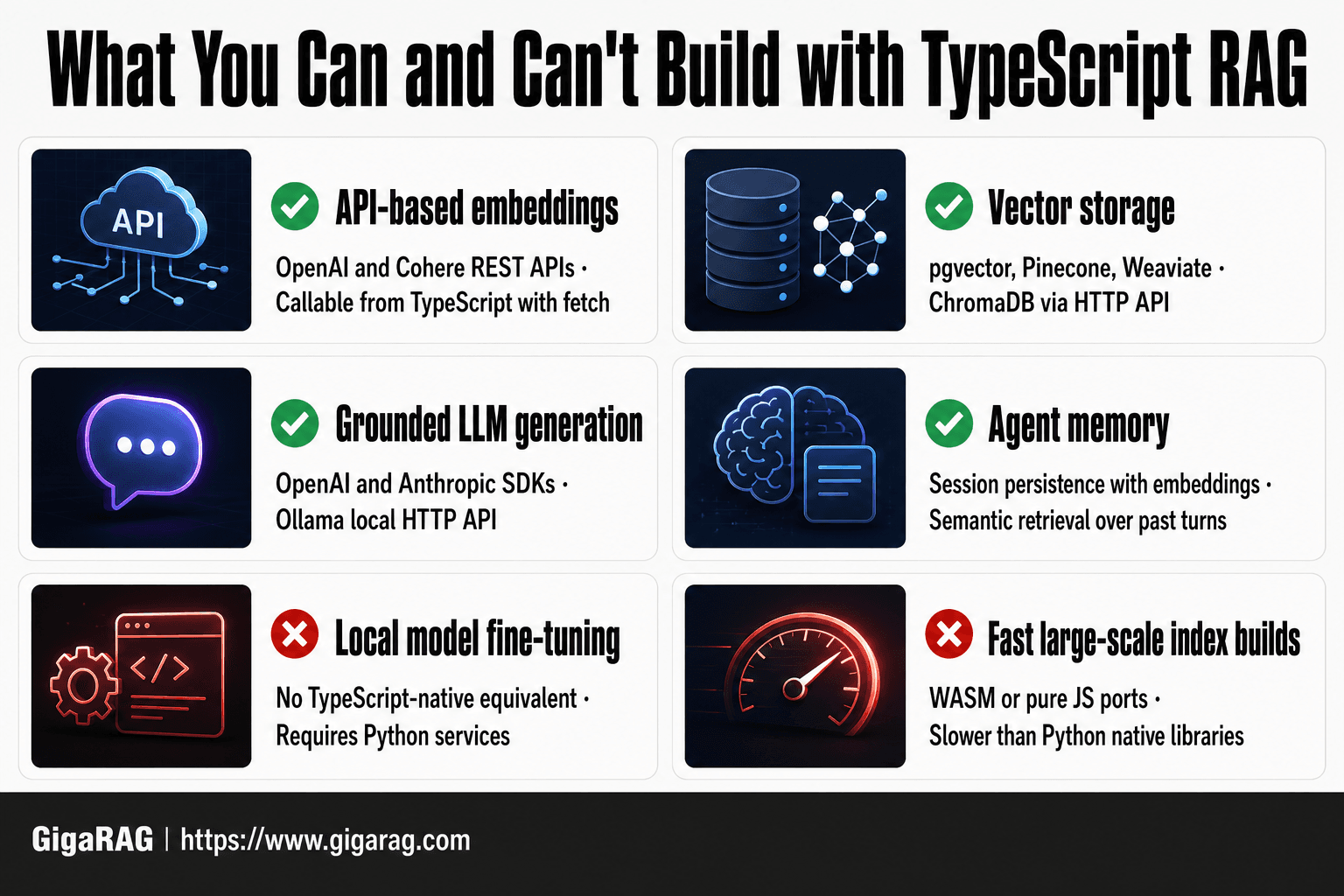
Embedding options: OpenAI, Cohere, transformers.js
OpenAI's text-embedding-3-small and Cohere's embed-english-v3.0 both expose REST APIs you can call with fetch. No SDK needed. transformers.js runs models locally in Node, but it's slower and memory-hungry. For most projects, start with OpenAI or Cohere.
Vector storage: pgvector, Pinecone, Weaviate, ChromaDB via HTTP
pgvector is a Postgres extension with a mature TypeScript driver (pg). Pinecone and Weaviate ship official TypeScript SDKs. ChromaDB has no first-class TypeScript client; you call its HTTP API directly. That works, but you lose typed queries and connection pooling.
LLM access: OpenAI SDK, Anthropic SDK, Ollama HTTP API
OpenAI and Anthropic both publish TypeScript SDKs that are well-maintained. Ollama exposes a local HTTP API you can hit with fetch to run models like Llama 3 without any cloud dependency. The main catch: Ollama's API is JSON over HTTP, so you write your own retry and timeout logic.
[!tip] For agent memory, use a vector store that supports metadata filtering and upserts, and implement a sliding window of recent interactions combined with semantic retrieval to balance recency and relevance.
Rag In Typescript Without Python: A Step-by-Step Guide
- Set up a Node.js project with TypeScript and install necessary packages (e.g., axios, dotenv).
- Choose an embedding API (e.g., OpenAI, Cohere) and generate embeddings for your documents.
- Store embeddings in a vector database (e.g., Pinecone, Qdrant, or a local solution like HNSW).
- Implement a retrieval function that queries the vector DB for relevant context.
- Integrate an LLM API (e.g., OpenAI, Anthropic) to generate answers using retrieved context.
- Add memory management for agents: store conversation history as embeddings and retrieve relevant past interactions.
- Test and iterate on retrieval quality and prompt engineering.
Step 1: Chunking and Embedding Documents in TypeScript
Chunking is where most RAG pipelines go wrong before they start. Split too small and you lose context. Split too large and retrieval returns noise. The fix is deliberate chunk size and overlap, not defaults.
Choosing a chunk size and overlap strategy
Aim for 300 to 500 tokens per chunk with 10 to 15 percent overlap. That overlap keeps sentences from being cut mid-thought at chunk boundaries. If your documents are code, chunk by function or class instead of by token count. If they're prose, split on paragraph breaks first, then fall back to token windows.
Calling an embedding API from TypeScript
OpenAI's text-embedding-3-small costs $0.02 per 1M tokens and returns 1536-dimension vectors. You call it with fetch and an API key. No SDK required. The request body takes an array of strings, so you can batch chunks in one call rather than embedding them one at a time.
Complete code: chunk and embed a document
const CHUNK_SIZE = 400;
const OVERLAP = 50;

function chunkText(text: string): string[] {
  const words = text.split(" ");
  const chunks: string[] = [];
  let start = 0;
  while (start < words.length) {
    const end = Math.min(start + CHUNK_SIZE, words.length);
    chunks.push(words.slice(start, end).join(" "));
    start += CHUNK_SIZE - OVERLAP;
  }
  return chunks;
}

async function embedChunks(chunks: string[], apiKey: string): Promise<number[][]> {
  const res = await fetch("https://api.openai.com/v1/embeddings", {
    method: "POST",
    headers: {
      "Content-Type": "application/json",
      "Authorization": `Bearer ${apiKey}`,
    },
    body: JSON.stringify({
      model: "text-embedding-3-small",
      input: chunks,
    }),
  });
  const data = await res.json();
  return data.data.map((d: any) => d.embedding);
}

const text = await Bun.file("./docs/readme.md").text();
const chunks = chunkText(text);
const embeddings = await embedChunks(chunks, process.env.OPENAI_API_KEY!);
console.log(`${chunks.length} chunks, ${embeddings.length} embeddings`);
The main catch: this code assumes your document fits in memory. For large files, stream and chunk incrementally.
Step 2: Storing and Querying Vectors Without Python
You have embeddings. Now they need to live somewhere you can query them. The Python world defaults to FAISS or ChromaDB via pip. TypeScript has options too, but they split into two camps: run a database yourself, or pay a hosted service. I'll show pgvector because it's free, local, and works with any Postgres you already have.
Setting up a vector store with TypeScript
pgvector adds a vector column type to Postgres. Install it with CREATE EXTENSION vector; once, then create a table with a vector column sized to your embedding dimensions. For text-embedding-3-small, that's 1536. You talk to it through the pg npm package, same as any Postgres query. No Python anywhere.
Running a cosine similarity query
pgvector ships a cosine distance operator: <=>. Lower distance means more similar. To find chunks closest to a query, embed the query with the same model, then order by embedding <=> $1 and limit the results. That's the whole retrieval step. One SQL query.
Complete code: store and retrieve vectors
import { Client } from "pg";

const client = new Client({ connectionString: process.env.DATABASE_URL });
await client.connect();

await client.query(`
  CREATE EXTENSION IF NOT EXISTS vector;
  CREATE TABLE IF NOT EXISTS chunks (
    id SERIAL PRIMARY KEY,
    text TEXT NOT NULL,
    embedding vector(1536)
  );
`);

async function storeChunks(chunks: string[], embeddings: number[][]) {
  for (let i = 0; i < chunks.length; i++) {
    await client.query(
      "INSERT INTO chunks (text, embedding) VALUES ($1, $2)",
      [chunks[i], JSON.stringify(embeddings[i])]
    );
  }
}

async function retrieve(queryEmbedding: number[], limit = 5) {
  const res = await client.query(
    `SELECT text, 1 - (embedding <=> $1) AS similarity
     FROM chunks
     ORDER BY embedding <=> $1
     LIMIT $2`,
    [JSON.stringify(queryEmbedding), limit]
  );
  return res.rows;
}
The main catch: pgvector's cosine operator returns distance, not similarity, so you subtract from 1 to get a score you can read. And for anything beyond a few thousand chunks, you'll want an index. CREATE INDEX ON chunks USING ivfflat (embedding vector_cosine_ops); gets you approximate search that's fast enough for most agent memory workloads.
Step 3: Generating Answers with an LLM
Retrieval gives you chunks. Generation turns them into an answer. The prompt is where most RAG pipelines succeed or fail, so start there.
Building the prompt with retrieved context
You have five chunks from pgvector. Don't dump them into the model raw. Order them by similarity score, highest first, and cap total context at roughly 3,000 tokens. That leaves room for the system prompt, the user's question, and the model's response without hitting the context window.
The prompt needs three parts: a system message telling the model to answer only from provided context, the retrieved chunks clearly delimited, and the user's question. If the context doesn't contain the answer, instruct the model to say so. That single instruction cuts hallucination more than any other change.
Calling an LLM from TypeScript
The OpenAI SDK has first-class TypeScript support. Install it with npm install openai, set your API key, and call chat.completions.create. Anthropic's SDK works the same way. For local models, Ollama exposes an HTTP API you can hit with fetch. No Python, no LangChain wrappers.
Complete code: generate a grounded answer
import OpenAI from "openai";

const openai = new OpenAI({ apiKey: process.env.OPENAI_API_KEY });

async function generateAnswer(
  question: string,
  retrievedChunks: { text: string; similarity: number }[]
) {
  const context = retrievedChunks
    .map((c, i) => `[${i + 1}] ${c.text}`)
    .join("\n\n");

  const response = await openai.chat.completions.create({
    model: "gpt-4o-mini",
    messages: [
      {
        role: "system",
        content:
          "Answer using only the provided context. If the context does not contain the answer, say 'I don't have enough information.'",
      },
      {
        role: "user",
        content: `Context:\n${context}\n\nQuestion: ${question}`,
      },
    ],
    temperature: 0.2,
  });

  return response.choices[0].message.content;
}
Keep temperature low. RAG answers need fidelity to retrieved text, not creativity. A temperature of 0.2 is a reasonable default. The model still paraphrases, but it won't wander far from the chunks you fed it.
RAG for Agent Memory: What Changes
Agents don't hold state between turns. Each call to the LLM starts fresh. RAG is the workaround: store past interactions and relevant context as vectors, retrieve them before each generation step, and the agent appears to remember.
Why agents need RAG as memory
A context window is finite. Once a conversation outgrows it, the model forgets the beginning. RAG lets you retrieve only what matters for the current turn. You get memory without paying for the full history on every call.
Session persistence and memory consolidation
Sessions need a stable ID. Store every exchange with that ID in your vector store, embedding both user messages and agent responses. Consolidation means summarizing old turns into shorter chunks so retrieval stays fast and relevant. Without it, your store fills with noise.
Latency considerations for agent loops
Agents loop: retrieve, generate, act, repeat. Each retrieval adds latency. Keep embeddings local or use a low-latency store. A 200ms retrieval per turn compounds fast across a ten-step loop.
What You Cannot Do (and Should Not Expect)
TypeScript RAG works for most pipelines. It is not a drop-in replacement for the Python ecosystem. Some things are slower, some are missing entirely, and a few will force you to reach for a managed service.
Ecosystem gaps: what's missing in TypeScript
The biggest gap is model tooling. Hugging Face's transformers.js runs a subset of models in the browser and Node, but it lags the Python library by months. Fine-tuning, quantization pipelines, and most reranking models have no TypeScript-native equivalent. You'll call Python services over HTTP or skip those features.
Performance trade-offs vs Python-native libraries
Python's FAISS and hnswlib are C++ under the hood. TypeScript equivalents are typically WASM ports or pure JS. Expect 2-5x slower index builds and higher memory use on large datasets. For under 100k vectors, you won't notice. Past a million, you will.
When you should consider a managed solution
If you need reranking, hybrid search, or sub-100ms retrieval at scale, building it yourself stops being worth the time. A managed RAG service handles the infrastructure and the missing pieces. That's the honest trade-off: you give up control to get back your week.
Common Mistakes When Building RAG in TypeScript
Most RAG failures aren't the stack. They're the defaults. Three mistakes show up repeatedly.
Naive chunking that destroys context
Splitting by character count with no overlap breaks sentences mid-thought. A chunk that ends at "the bank" loses whether it means a river or a lender. Use semantic boundaries: paragraphs, headings, or a 10-15% overlap.
Ignoring embedding model token limits
Every embedding model has a max input. OpenAI's text-embedding-3-small caps at 8,191 tokens. Feed a chunk longer than that and the API either truncates or rejects it. Truncation silently drops the tail of your document.
Overstuffing the context window
Retrieving 20 chunks and stuffing them all into the prompt wastes tokens and dilutes the answer. The LLM attends to everything, so noise buries the relevant passage. Retrieve 3-5 chunks, rank them, and send only the top ones.
These mistakes are the difference between a RAG pipeline in TypeScript that works and one that returns plausible nonsense.
Frequently Asked Questions
Can I build RAG entirely in TypeScript without Python?
Yes, you can build a functional RAG pipeline in TypeScript by using API-based embeddings and LLMs, and a vector database with a JavaScript client. However, you'll miss out on Python's rich ML ecosystem for local model execution and fine-tuning.
What are the limitations of RAG in TypeScript?
Limitations include fewer libraries for local embedding generation, slower performance for compute-intensive tasks, and less community support for advanced RAG techniques. You'll often rely on external APIs for embeddings and LLMs.
How do I handle embeddings in TypeScript?
You can use API services like OpenAI or Cohere to generate embeddings via HTTP requests. Alternatively, you can use ONNX Runtime with JavaScript bindings to run some models locally, but this is less common and may have performance trade-offs.
Is TypeScript suitable for agent memory?
Yes, TypeScript is suitable for agent memory when combined with a vector database. You can store and retrieve memories as embeddings, enabling semantic search over past interactions. This integrates well with TypeScript-based agent frameworks.
What vector databases work with TypeScript?
Many vector databases offer JavaScript/TypeScript clients, including Pinecone, Qdrant, Weaviate, and Chroma. Some also support local deployment, but cloud-based options are often easier to integrate.
When should I use a managed RAG solution like GigaRAG?
Consider a managed solution when you want to avoid infrastructure management, need scalability, or require advanced features like automatic embedding updates and hybrid search. It can save development time and reduce operational overhead.
About GigaRAG
GigaRAG is for agent memory and RAG pipeline builders. get this right. Whether you are working through rag in typescript without python or something adjacent, we publish what we have actually tested, including where it falls short.