
How to Configure Read-Only MCP Memory Access
Read-only MCP memory access is the safety rail you need when your RAG pipeline or agent should pull context from existing memory but never touch it. You've built the memory store. You've tested the retrieval. The last thing you want is a misconfigured client silently overwriting embeddings or appending junk to a production vector database. GigaRAG gives you controlled memory for exactly this scenario, and the configuration isn't hard once you know where the read-only switch lives.
The honest answer is that most MCP memory tutorials skip permission scoping entirely. They show you a working read-write setup and stop there. That leaves you guessing which fields to flip and what breaks when you do.
This guide covers the full read-only configuration: where the permission lives in your client config, how to scope it to specific memory stores, what read-only mode actually prevents, and the data leakage risks it can't stop.
| At a glance | Details |
|---|---|
| What it is | MCP memory access restricted to read operations only |
| Primary benefit | Prevents accidental writes and data corruption |
| Typical setup | Configure permissions in MCP server or client config |
| Key limitation | Does not prevent all data leakage if misconfigured |
| Best for | RAG pipelines and agents needing safe memory reads |
| GigaRAG support | Provides controlled memory for read-only use cases |
In This Guide
- What Is Read-Only MCP Memory Access?
- Read-Only vs Read-Write MCP Memory Access
- Prerequisites for Configuring Read-Only MCP Memory Access
- Read-only MCP Memory Access: A Step-by-Step Guide
- Step-by-Step: How to Configure Read-Only MCP Memory Access
- Security and Permission Scoping for Read-Only MCP Memory
- Read-Only vs Read-Write MCP Memory: When to Use Each
- Troubleshooting Read-Only MCP Memory Access
- What Read-Only MCP Memory Cannot Do
- Final Thoughts on Read-Only MCP Memory Access
What Is Read-Only MCP Memory Access?
Read-only MCP memory access lets an agent or RAG pipeline retrieve stored context from a memory server without permission to add, change, or delete any of it. The client can query and read. It cannot write.
Read-only vs read-write memory
Read-write mode lets the agent store new memories during a session. Read-only mode blocks every write operation. The agent sees what's already there, nothing more.
The honest answer is that read-only isn't a separate server type. It's a permission scope applied to the same memory server. You configure the client to deny write calls.
Why read-only matters for RAG pipelines
A RAG pipeline pulls from a curated memory store. You don't want a retrieval step silently modifying that store. Read-only mode makes accidental writes impossible at the protocol level.
The main catch: read-only doesn't stop an agent from leaking what it reads. It only stops writes.
[!note] Read-only MCP memory access prevents write operations but does not encrypt data or prevent unauthorized reads if access controls are weak. Always combine with authentication and network security.
Read-Only vs Read-Write MCP Memory Access
| Factor | Read-Only | Read-Write |
|---|---|---|
| Write capability | None; only read operations allowed | Full create, update, delete operations |
| Risk of data corruption | Low; no accidental modifications | Higher; miswrites can corrupt memory |
| Use case | Safe reads for RAG, analytics, monitoring | Agents that need to learn or update memory |
| Security exposure | Reduced attack surface for writes | Broader; requires strict access controls |
| Configuration complexity | Simpler; just restrict permissions | More complex; need write validation and auditing |
Prerequisites for Configuring Read-Only MCP Memory Access
Before you touch a config file, you need three things in place. Skip one and the read-only scope won't hold.
Installing an MCP memory server
You need a running memory server that speaks MCP. Any MCP-compatible memory server works: the official reference server, a community build, or a managed one. Install it locally or point to a remote endpoint. Make sure the server is up and responding before you configure the client. A client pointed at a dead server fails silently in most setups.
MCP client setup
Your client needs MCP support enabled. Claude Desktop, Cursor, and custom Python or Node clients all handle this differently. Check that your client version supports the MCP spec your server uses. Older clients may not recognize read-only permission scopes at all.
Required permissions and API keys
If your memory server sits behind a cloud provider, you'll need an API key or service account with read access only. Don't reuse a write-enabled key. Create a dedicated read-only credential. Store it in an environment variable, not in the config file.
[!tip] For RAG pipeline builders: use read-only MCP memory access for retrieval components while keeping a separate write-enabled service for ingestion, so your retrieval layer cannot accidentally modify memory.
Read-only MCP Memory Access: A Step-by-Step Guide
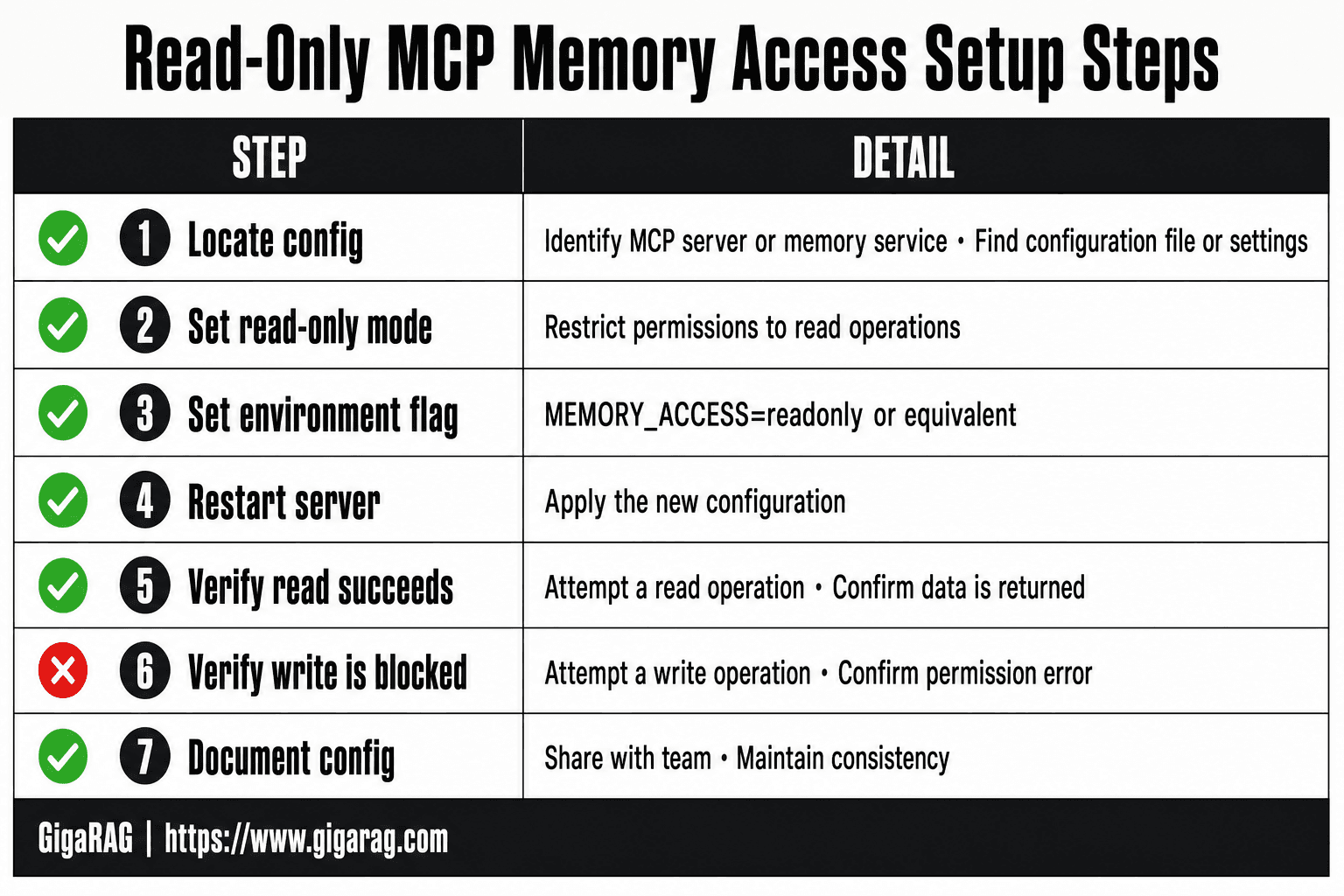
- Identify the MCP server or memory service you are using and locate its configuration file or settings.
- In the configuration, set the memory access mode to 'read-only' or restrict permissions to read operations only.
- If using environment variables, set a flag such as MEMORY_ACCESS=readonly or equivalent.
- Restart the MCP server or client to apply the new configuration.
- Verify read-only access by attempting a read operation and confirming it succeeds.
- Attempt a write operation to ensure it is blocked or returns a permission error.
- Document the configuration and share with your team to maintain consistency.
Step-by-Step: How to Configure Read-Only MCP Memory Access
You have a running server and a client that speaks MCP. Now you wire them together with read-only scope. The steps below assume a JSON config file, which is what Claude Desktop and most custom clients use.
Step 1: Locate your MCP client configuration file
Claude Desktop stores its config at claude_desktop_config.json inside the app's data directory. On macOS that's ~/Library/Application Support/Claude/. On Windows it's %APPDATA%\Claude\. Cursor and custom clients use their own paths, so check your client's docs. If the file doesn't exist, create it. A missing config file is the most common reason a server never loads.
Step 2: Define the memory server endpoint
Add a mcpServers block if one isn't there. Point it at your memory server's URL or local process. Here's the shape:
{
  "mcpServers": {
    "memory": {
      "command": "npx",
      "args": ["-y", "@modelcontextprotocol/server-memory"],
      "env": {
        "MEMORY_ACCESS_MODE": "read-only"
      }
    }
  }
}
For a remote server, swap command and args for a url field. The key is the server name your client will reference.
Step 3: Set read-only permissions and scopes
The read-only flag lives in two places. First, set the environment variable or server-side config to read-only. Second, scope the credential: if your memory store is a vector database, create a role with SELECT only. No INSERT, no UPDATE, no DELETE. If your MCP server doesn't expose a read-only mode, you can't fake it at the client level. You need a server that enforces it.
Step 4: Test the read-only configuration
Restart your client. Ask the agent to read a memory item. It should return data. Then ask it to write one. It should refuse. If the write succeeds, your scope isn't set. Check the server logs to confirm which mode loaded. Don't ship until the write fails.
Security and Permission Scoping for Read-Only MCP Memory
Read-only mode stops writes. It doesn't stop leaks. A read-only credential can still read everything the store contains, so scope matters as much as the mode flag.
Avoiding hardcoded secrets
Never put API keys or database passwords in your config file. A JSON file committed to a repo leaks the moment it's pushed. Use environment variables instead, and reference them in the config. If your client doesn't support env var expansion, use a secrets manager or a wrapper script that injects values at runtime.
Scoping permissions to specific memory stores
Create a dedicated role for the MCP server. Grant SELECT on only the tables, collections, or namespaces your agent actually needs. Not the whole database. If your store supports row-level or collection-level policies, apply them. A read-only role with broad scope is still a broad exposure.
Environment variables for secure configuration
Set MEMORY_ACCESS_MODE=read-only in the server's environment, not in the client config. Keep secrets in a .env file that's gitignored, or in your platform's secret store. Rotate keys on a schedule. Read-only access still needs a valid credential, and a stolen one reads just as well as a legitimate one.
Read-Only vs Read-Write MCP Memory: When to Use Each
Read-only and read-write modes serve different jobs. Read-only is for retrieval. Read-write is for learning. Pick based on whether the agent should change the store or just query it.
Use cases for read-only memory
Use read-only when the memory store is a source of truth you don't want touched. RAG pipelines pulling from a curated knowledge base fit here. So do agents that answer from existing session history, compliance logs, or a vector index built by a separate process. Read-only also works for shared memory across multiple agents, where one bad write corrupts everyone.
Use cases for read-write memory
Use read-write when the agent needs to persist new information. Session memory that accumulates context as a conversation progresses needs writes. So does an agent that learns from corrections, stores user preferences, or builds an index incrementally. If the memory is the agent's own scratchpad, read-only cripples it.
Trade-offs and risks
Read-only is safer but static. The agent can't add what it learns, so anything new is lost between runs unless another process writes it. Read-write is flexible but risky: a bad write, a hallucinated fact, or a prompt injection can poison the store for every future query. The honest answer is that most production systems need both: read-only access to the curated store, read-write access to a separate session store. Keep them in different namespaces so a write bug can't touch the source of truth.
Troubleshooting Read-Only MCP Memory Access
Most read-only failures come from three places: permissions, config loading, or client support. Here's how to fix each.
Permission denied errors
The server says read-only but the client still gets write errors. Check the scope first. Read-only scopes often cover the memory store but not the metadata layer, so the client tries to write an index entry and gets denied. Fix the scope, not the client. Also confirm the API key has read permissions at the provider level. A key with write access will attempt writes even when the MCP config says read-only.
Configuration file not loading
Your config changes don't take effect. Most MCP clients cache the config at startup. Restart the client fully, not just the conversation. Then check the file path. Claude Desktop looks in one location, Cursor in another. A config in the wrong directory loads silently with defaults, which means read-write.
Client compatibility issues
Not every MCP client honors read-only scopes. Some ignore the permission flag and send writes anyway. Test with a deliberate write attempt. If it succeeds, your client doesn't support read-only enforcement. Switch clients or put the store behind a proxy that blocks writes at the network layer.
What Read-Only MCP Memory Cannot Do
Read-only mode stops writes. It does not stop reads, and it does not stop leaks.
Data leakage risks
A read-only scope still lets the agent pull data out. If the agent can read a memory store, it can repeat that data into a prompt, a log, or a response to another user. Read-only is not a data loss prevention layer. You need output filtering or redaction on top.
Immutability limitations
Read-only is a permission, not a guarantee. The underlying store can still change through another client, a backup restore, or a direct database write. If you need an audit trail or tamper evidence, use versioned storage or append-only logs.
When read-only is not enough
If your agent must update memory during a session, read-only blocks it. If you need per-user scoping, most MCP servers don't support it natively. You'll need a proxy or custom middleware.
Final Thoughts on Read-Only MCP Memory Access
Read-only MCP memory access solves one problem well: it stops accidental writes. It won't stop data leakage, and it won't make your memory store immutable. Treat it as a permission layer, not a security boundary.
The configuration itself is straightforward. Scope the permission, test the connection, move on. The hard part is deciding what the agent actually needs to read, and what happens to that data after it's read.
If you're building a RAG pipeline that needs controlled memory without the risk of corrupted context, GigaRAG provides read-only memory access designed for exactly that use case. You get scoped reads without giving the agent write access to your knowledge base.
Read-only MCP memory access is a tool for control, not a substitute for filtering, auditing, or access governance. Configure it first, then layer the rest on top.
Frequently Asked Questions
How do I configure read-only MCP memory access?
Configuration depends on your MCP server or memory service. Typically, you set a permission flag or access mode in the server's configuration file or environment variables. For example, some servers accept a 'readonly' mode setting. Always consult your specific MCP implementation's documentation.
What are the limitations of read-only MCP memory access?
Read-only access prevents write operations but does not guarantee data confidentiality. If an attacker gains read access, they can still exfiltrate data. It also does not prevent denial-of-service or resource exhaustion attacks. Always implement additional security layers.
Can I use read-only MCP memory access with GigaRAG?
Yes, GigaRAG supports controlled memory access, including read-only configurations. You can configure your MCP client to interact with GigaRAG in read-only mode to safely retrieve memory for RAG pipelines without risking modifications.
How does read-only MCP memory access improve security?
By restricting to read operations, you eliminate the risk of accidental or malicious writes that could corrupt data or inject false information. This reduces the attack surface and helps maintain data integrity in production systems.
What happens if I try to write with read-only access?
The MCP server should reject the write operation and return an error, such as a permission denied message. The exact behavior depends on the implementation, but the write should not succeed.
Is read-only MCP memory access suitable for production RAG pipelines?
Yes, it is often ideal for retrieval components that only need to read from memory. However, you may need a separate write-enabled path for updating memory, such as during ingestion or learning phases.
About GigaRAG
GigaRAG is for agent memory and RAG pipeline builders. get this right. Whether you are working through How to Configure Read-Only MCP Memory Access or something adjacent, we publish what we have actually tested, including where it falls short.


