How to Share Memory Between Claude Code and Cursor
Sharing memory between Claude Code and Cursor sounds like a small ask, but if you build agent memory or RAG pipelines, you already know the mess: each tool reads different files, keeps its own session state, and forgets what the other one learned. You fix a bug in Claude Code, then Cursor repeats it. You write a schema decision in one place, then the other agent invents a new one. Most advice stops at "use AGENTS.md" and skips the hard parts: where the file goes, what goes in it, and what happens when it grows into a retrieval problem. You'll get the file trick done right, a migration path for existing Claude Code memory, a decision matrix for AGENTS.md versus MCP versus custom scripts, and a memory schema you can index for vector search. GigaRAG is one option for scaling this into a retrieval-ready knowledge base, but the workflow here is tool-agnostic first. This guide covers the setup, the honest limits, and the mistakes that break shared memory before it starts.
| At a glance | Details |
|---|---|
| Core method | Shared AGENTS.md file plus retrieval layer |
| Works with | Claude Code, Cursor, and any AGENTS.md-aware tool |
| Best for | Agent memory and RAG pipeline builders |
| Key limitation | No automatic sync; stale context risk |
| Security note | Never commit secrets to shared memory files |
| Scaling path | Add vector store for retrieval-ready memory |
In This Guide
- Why Claude Code and Cursor End Up with Two Different Memories
- AGENTS.md vs MCP vs Custom Scripts for Shared Memory
- What People Try First to Share Memory Between Claude Code and Cursor
- Share Memory Between Claude Code And Cursor: A Step-by-Step Guide
- The Fix: One Shared Memory File with AGENTS.md
- Project
- Decisions
- Conventions
- Gotchas
- Active Work
- How to Find Claude Code Memory and Migrate It to Cursor
- Scaling Shared Memory with MCP for Agent Memory and RAG Pipelines
- Shared Memory Schemas and Indexing Strategies for RAG Builders
- [TYPE] Short title
- What You Should Not Expect from Shared Memory
- Common Mistakes When You Share Memory Between Claude Code and Cursor
Why Claude Code and Cursor End Up with Two Different Memories
You run Claude Code in the terminal. You run Cursor in the editor. Both feel like they know your project. Then you ask one about a decision you made in the other, and it has no idea what you're talking about.
That's not a bug. It's two tools reading different files and keeping separate session state.
How Claude Code stores memory
Claude Code reads CLAUDE.md at your repo root, plus any nested CLAUDE.md files in subdirectories. It loads those at session start. Everything you tell it during a session lives in the conversation context, which disappears when the session ends. Nothing persists unless you write it to a file yourself.
How Cursor stores memory
Cursor reads .cursorrules and, increasingly, AGENTS.md. It also keeps its own index of your codebase for retrieval. But its rules files are separate from Claude Code's CLAUDE.md. Same repo, two different memory systems.
The cost of fragmented context
You repeat yourself. You fix the same bug twice. You explain your architecture to each tool separately. Worse, neither tool can retrieve what the other learned, so your shared knowledge base never forms. The fix starts with one file both tools agree to read.
[!note] File-based sharing like AGENTS.md is a snapshot, not a live sync. If both tools edit memory independently, you can end up with conflicting or stale context that silently degrades agent output.
AGENTS.md vs MCP vs Custom Scripts for Shared Memory
| Factor | AGENTS.md | MCP / Custom Scripts |
|---|---|---|
| Setup effort | Low: create one file | Medium to high: server or script |
| Cross-tool support | Native in Claude Code and Cursor | Depends on tool MCP support |
| Dynamic updates | Manual edits only | Can sync and update automatically |
| Retrieval-ready | No, static text only | Yes, can connect to vector stores |
| Security risk | Low if secrets excluded | Higher: network and auth surface |
What People Try First to Share Memory Between Claude Code and Cursor
Most people start with the fastest thing they can think of. It usually fails in a specific way.
Copy-pasting context manually
You copy a chunk of conversation from Claude Code and paste it into Cursor. It works for one session. Then the context drifts. You forget what you pasted where. You paste stale decisions into a fresh session and the tool acts on outdated information. Manual copy-paste doesn't scale past a single handoff.
Using a single CLAUDE.md for both tools
The obvious move: put everything in CLAUDE.md and hope Cursor reads it. Cursor does read some files, but CLAUDE.md is not one it treats as a rules file by default. You end up maintaining two files that say almost the same thing, and they drift apart. You think you have one memory. You have two that look alike.
Relying on session memory alone
Session memory is convenient. It's also gone when the session ends. If you rely on it, every new session starts from zero. You re-explain your project structure, your naming conventions, your past decisions. The tools feel smart in the moment and forget everything the next day.
None of these approaches survive contact with a real project. The fix is a file both tools actually read.
[!tip] For RAG builders: keep AGENTS.md as the human-readable source of truth, then generate embeddings from it into your vector store on every commit. This gives you one memory layer that both tools and your retrieval pipeline can consume.
Share Memory Between Claude Code And Cursor: A Step-by-Step Guide
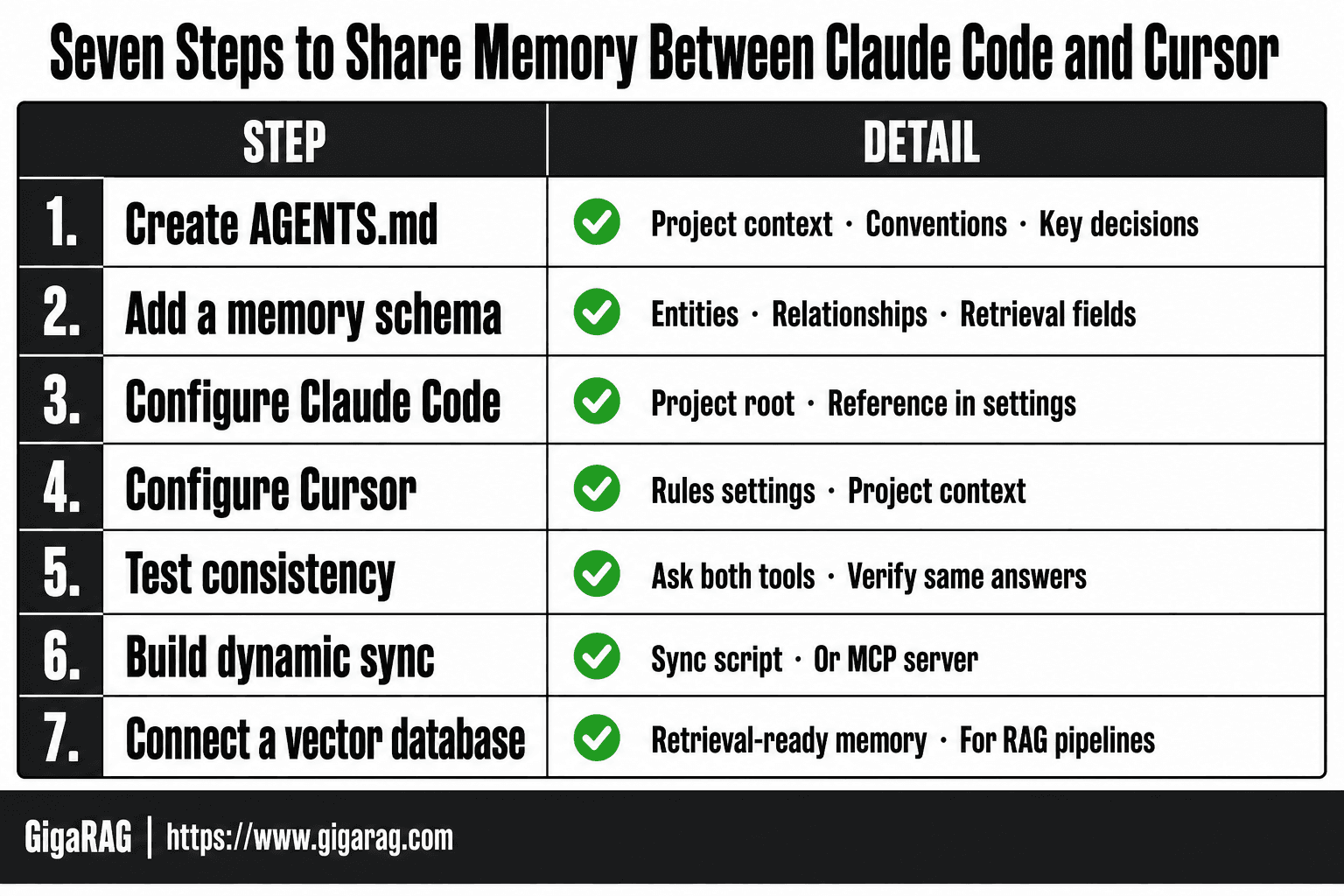
- Create an AGENTS.md file at your project root with project context, conventions, and key decisions.
- Add a memory schema section defining entities, relationships, and retrieval fields for RAG use.
- Configure Claude Code to read AGENTS.md by placing it in the project root or referencing it in settings.
- Configure Cursor to read the same AGENTS.md file via its rules or project context settings.
- Test by asking both tools a project-specific question and verifying consistent answers.
- For dynamic memory, build a small sync script or MCP server that reads and writes to a shared store.
- Connect the shared store to a vector database to make memory retrieval-ready for RAG pipelines.
The Fix: One Shared Memory File with AGENTS.md
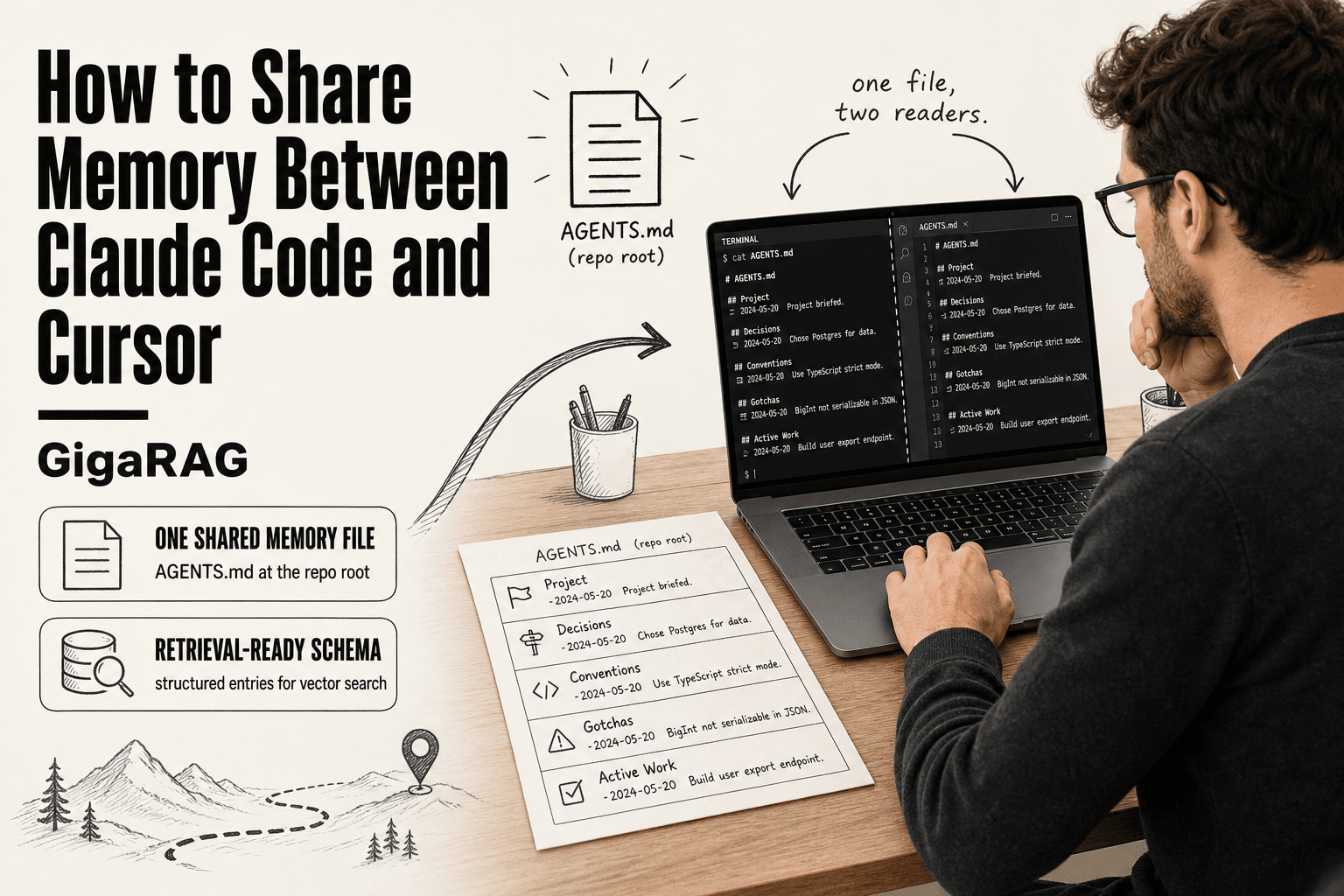
AGENTS.md is a single Markdown file at your repository root that both Claude Code and Cursor read as project instructions. It gives both tools one shared memory layer instead of two drifting copies.
Where to place AGENTS.md
Put it at the repo root, next to your README. That's the only location both tools check by default. If your project lives in a monorepo, place one AGENTS.md at the top level and, if needed, smaller ones in subdirectories for package-specific rules.
Don't bury it in a docs folder. Don't rename it. The filename is the contract: AGENTS.md, uppercase, at the root. Claude Code reads it automatically on session start. Cursor reads it when you enable the right settings, which we'll get to in the migration section.
A starter AGENTS.md template for agent memory
Here's a template you can copy. It's deliberately short. A bloated memory file is worse than no memory file because it buries the useful entries in noise.
# AGENTS.md

## Project
- Name: [project name]
- Stack: [languages, frameworks, versions]
- Repo layout: [one line per top-level directory]

## Decisions
- [YYYY-MM-DD] [Decision made, in one sentence]
- [YYYY-MM-DD] [Why this decision, in one sentence]

## Conventions
- [Naming convention]
- [Testing command]
- [Lint command]

## Gotchas
- [One-line warning about a known trap]
- [One-line warning about a second trap]

## Active Work
- [Current task, updated when it changes]
The "Decisions" section is the part that actually behaves like memory. Each entry has a date, a decision, and a reason. That structure is what makes retrieval possible later.
How to structure memory entries for retrieval
Write each memory entry as a single self-contained line. No paragraphs. No context that depends on another entry. If an entry says "see above," it's useless for retrieval because a search tool can't follow the pointer.
Use this pattern: date, decision, reason. For example:
- 2025-01-14 Switched from SQLite to Postgres because we need concurrent writes from background jobs.
That one line tells a future agent what changed and why. It doesn't require reading three other entries to make sense. When you later index this file for a RAG pipeline, each line becomes a clean chunk.
What AGENTS.md cannot do
AGENTS.md is a static file. It doesn't update itself. If you make a decision in a session and forget to write it down, the memory is gone. It also doesn't sync across machines unless your repo does. And it has no access control: anyone who can read the repo can read every memory entry, including secrets if you're careless enough to put them there.
It's a shared notebook, not a database. For anything that needs to update automatically or be queried at scale, you'll need MCP or a proper memory server.
How to Find Claude Code Memory and Migrate It to Cursor
Claude Code stores memory in a few places, and none of them are obvious. The main file is CLAUDE.md at your project root. Session-specific memory lives in the ~/.claude directory on your machine. If you've been using Claude Code's memory features, that's where your accumulated context sits.
Locating Claude Code memory files
Check your project root for CLAUDE.md first. That's the file Claude Code reads on startup. Then look in ~/.claude for project-specific subdirectories and session logs. On macOS, the path is /Users/yourname/.claude. On Linux, it's /home/yourname/.claude. Windows users will find it under C:\Users\yourname.claude.
The session files are JSON, not Markdown. They contain conversation history, not clean memory entries. You can't just copy them into Cursor and expect them to work.
Extracting useful memory entries
Open CLAUDE.md and pull out the lines that describe decisions, conventions, and gotchas. Skip the conversational noise. You want the durable stuff: why you chose a library, what naming pattern the team follows, which tests are flaky.
Session logs are harder to mine. They're verbose. If you need something from a session, search for your own summary messages or the word "decision" in the transcript. Most of what's in there isn't worth migrating.
Migrating memory into AGENTS.md for Cursor
Copy the useful entries into the AGENTS.md template from the previous section. Put decisions under "Decisions," conventions under "Conventions," gotchas under "Gotchas." Keep each entry to one line with a date where it matters.
Cursor reads AGENTS.md automatically once you enable it in settings. You don't need to convert formats. You just need to move the content from Claude Code's files into the shared file, then delete or archive the old CLAUDE.md so you don't end up with two sources of truth.
The honest catch: this is manual work. There's no export button. You read, you filter, you paste. It takes 20 minutes on a small project and an afternoon on a large one.
Scaling Shared Memory with MCP for Agent Memory and RAG Pipelines
AGENTS.md works until it doesn't. The file gets read into context on every session, which is fine at 200 lines and painful at 2,000. MCP changes the model: instead of loading memory, you query it.
What MCP changes about shared memory
MCP, the Model Context Protocol, lets Claude Code and Cursor talk to external servers through a standard interface. A memory server holds your notes, decisions, and gotchas outside the repo. The agent asks for what it needs, gets back only the relevant entries, and never loads the whole file into context.
That's the difference. AGENTS.md is a static file read in full. An MCP memory server is a queryable store. You can add entries from either tool, and both read from the same source. No sync step, no copy-paste, no drift between two files.
Setting up an MCP memory server for Claude Code and Cursor
You'll need a memory server. Options include the official MCP memory server, MemoryLake, or a custom server built on SQLite. Each exposes tools like add_memory, search_memory, and list_memories.
Claude Code connects through claude mcp add with a command and arguments. Cursor connects through its MCP settings panel under Features. Point both at the same server URL or local process. Once connected, both tools see the same memory store.
The catch: you're running a server now. It needs to be up when you work. Local servers are fine on one machine. Remote servers add deployment overhead but let a team share one memory store.
Connecting MCP memory to a RAG pipeline
The memory server becomes your source of truth. For RAG, you export entries from the server, embed them, and store the vectors in a vector database. New memory entries get embedded on write. Your retrieval pipeline queries the vector store, not the raw memory file.
This is where shared memory stops being a convenience and starts being infrastructure. The agent writes memory through MCP. Your RAG pipeline reads from the same store. One write path, one read path, no format conversion in between.
The honest limit: MCP doesn't give you embeddings or vector search out of the box. You build that layer yourself, or use a platform that does.
Shared Memory Schemas and Indexing Strategies for RAG Builders
A flat AGENTS.md file is not retrieval-ready. It's a text file read top to bottom. For RAG, you need structure: entries that can be split, embedded, and ranked independently.
A memory schema for retrieval
Start with a schema that makes each memory entry self-contained. Don't write prose paragraphs. Write discrete entries with a type, a trigger, and a body.
Here's a schema that works:
## [TYPE] Short title
- When: [condition that triggers this memory]
- What: [the fact, decision, or warning]
- Why: [the reason it matters]
- Tags: [comma-separated keywords]
Types might be DECISION, GOTCHA, PATTERN, or CONTEXT. The When field is the retrieval key. It tells the embedding model what query should surface this entry. The Tags field gives you a fallback for keyword search when vector search misses.
Keep each entry under 80 words. Long entries embed poorly because the signal gets diluted across too many tokens. If a memory needs more space, split it into two entries with different triggers.
Indexing AGENTS.md entries for vector search
You can't embed the whole file as one chunk and expect good retrieval. A query about "database migration" will match a 2,000-word file that mentions migration once, buried in unrelated context.
Split on the ## markers. Each entry becomes one chunk. Embed each chunk separately. Store the chunk text, the embedding, and the entry type as metadata.
The metadata matters more than most builders expect. Filter by type before you rank. If the agent is asking "why did we choose Postgres," you want DECISION entries first, not GOTCHA entries. A metadata filter cuts the candidate pool before similarity scoring runs.
Re-embed on every change. A stale index is worse than no index because it returns confident wrong answers.
Code snippet: querying shared memory from a RAG pipeline
Here's a minimal Python query path using a vector store:
import sqlite3
import numpy as np

def query_memory(query, embed_fn, top_k=5, entry_type=None):
    q_vec = embed_fn(query)
    conn = sqlite3.connect("memory.db")
    rows = conn.execute(
        "SELECT text, type, embedding FROM memory_entries"
    ).fetchall()

    scored = []
    for text, etype, emb_blob in rows:
        if entry_type and etype != entry_type:
            continue
        emb = np.frombuffer(emb_blob, dtype=np.float32)
        score = np.dot(q_vec, emb) / (
            np.linalg.norm(q_vec) * np.linalg.norm(emb)
        )
        scored.append((score, text, etype))

    scored.sort(reverse=True, key=lambda x: x[0])
    return scored[:top_k]
This is cosine similarity over a SQLite table. It works for a few thousand entries. Past that, move to a real vector database like pgvector, Qdrant, or Pinecone. The query shape stays the same: embed, filter by metadata, rank by similarity, return top-k.
The pipeline reads from the same store the agents write to. No export step, no format conversion. That's the point of the schema: it's the contract between the agent memory layer and the retrieval layer.
What You Should Not Expect from Shared Memory
A shared memory file is not a second brain. It's a text file that two tools read. That gap between expectation and reality is where most projects go wrong.
Stale context and memory drift
Memory goes stale the moment the project changes. You decide to move from Postgres to SQLite, update the code, forget the AGENTS.md entry. Now both Claude Code and Cursor read a confident lie about your database. The honest answer is that no file-based memory updates itself. You need a process: update the memory entry in the same commit as the code change, or accept that drift will happen.
Security and prompt injection risks
Shared memory files are a prompt injection surface. Any text in AGENTS.md becomes instructions to both tools. If a dependency, a dataset, or a colleague's commit adds a line that says "ignore previous instructions," your agents will read it. Keep secrets out of shared memory. Never store API keys, tokens, or internal URLs in a file that gets embedded and indexed. Treat every memory entry as public to anyone who can read the repo.
Performance overhead of large memory files
Large memory files slow down every session. Claude Code and Cursor both read the file into context, and context is a finite budget. A 5,000-word AGENTS.md eats tokens that could go to your actual code. Past roughly 2,000 words, retrieval quality drops and latency climbs. That's the ceiling for file-based sharing. If you need more memory than that, you need a retrieval layer, not a bigger file.
Common Mistakes When You Share Memory Between Claude Code and Cursor
Most shared memory failures aren't tool problems. They're process problems. Here are the three that show up most.
Overloading AGENTS.md with irrelevant context
Every line in AGENTS.md costs tokens on every session. A file stuffed with old decisions, abandoned approaches, and half-remembered notes forces both tools to read noise before they reach signal. Keep entries to what an agent actually needs: current stack, active conventions, known gotchas. If an entry hasn't helped in two weeks, cut it.
Forgetting to update memory after project changes
The file drifts. You rename a service, switch a library, change a schema. The code moves forward, AGENTS.md stays behind. Now both Claude Code and Cursor confidently apply outdated rules. The fix is mechanical: update the memory entry in the same commit as the change. No commit message reminder, no separate pass. Same commit.
Assuming MCP solves everything
MCP gives you a memory server, not memory discipline. You still decide what gets stored, when it gets updated, and how it gets retrieved. An MCP server with stale entries is just a stale file with extra steps. The retrieval layer helps at scale. It doesn't replace the habit of writing down what changed.
Sharing memory between Claude Code and Cursor works when you treat it as a process, not a file. The file is the starting point. The discipline is what keeps it useful.
Frequently Asked Questions
Can you combine Claude Code and Cursor?
Yes, you can use both tools on the same project. They do not share memory automatically, but you can point both at a shared AGENTS.md file or a custom memory store to keep context consistent.
How to give Claude Code more memory?
Claude Code reads project context from files like AGENTS.md. To extend memory, add a structured memory file or connect an MCP server that serves retrieval-augmented context from a vector store.
How to migrate from Claude Code to Cursor?
Migration is mostly about context, not code. Copy your AGENTS.md and any memory files into the Cursor project, then configure Cursor rules to read them. Test with project-specific questions to confirm parity.
How to find Claude Code memory?
Claude Code memory typically lives in project files like AGENTS.md or in tool-specific settings. Check your project root and Claude Code configuration for memory or context files.
Does AGENTS.md work in both Claude Code and Cursor?
AGENTS.md is designed as a cross-tool convention. Both Claude Code and Cursor can read it when placed in the project root, though exact behavior depends on version and settings.
What are the risks of sharing memory between AI coding tools?
The main risks are stale context, conflicting edits, and accidental exposure of secrets. Never put API keys or credentials in shared memory files, and treat the shared file as read-only for agents unless you have a sync strategy.
Can shared memory scale into a RAG pipeline?
Yes, but file-based memory alone is not retrieval-ready. You need to embed the memory content into a vector store and serve it via a retrieval layer, such as an MCP server, so both tools can query it dynamically.
About GigaRAG
GigaRAG is for agent memory and RAG pipeline builders. get this right. Whether you are working through How to Share Memory Between Claude Code and Cursor or something adjacent, we publish what we have actually tested, including where it falls short.